
Field Service & Operations Software
These are the specialized categories within Field Service & Operations Software. Looking for something broader? Return to Home.
Elite EXTRA Multi-Stop Route Planner
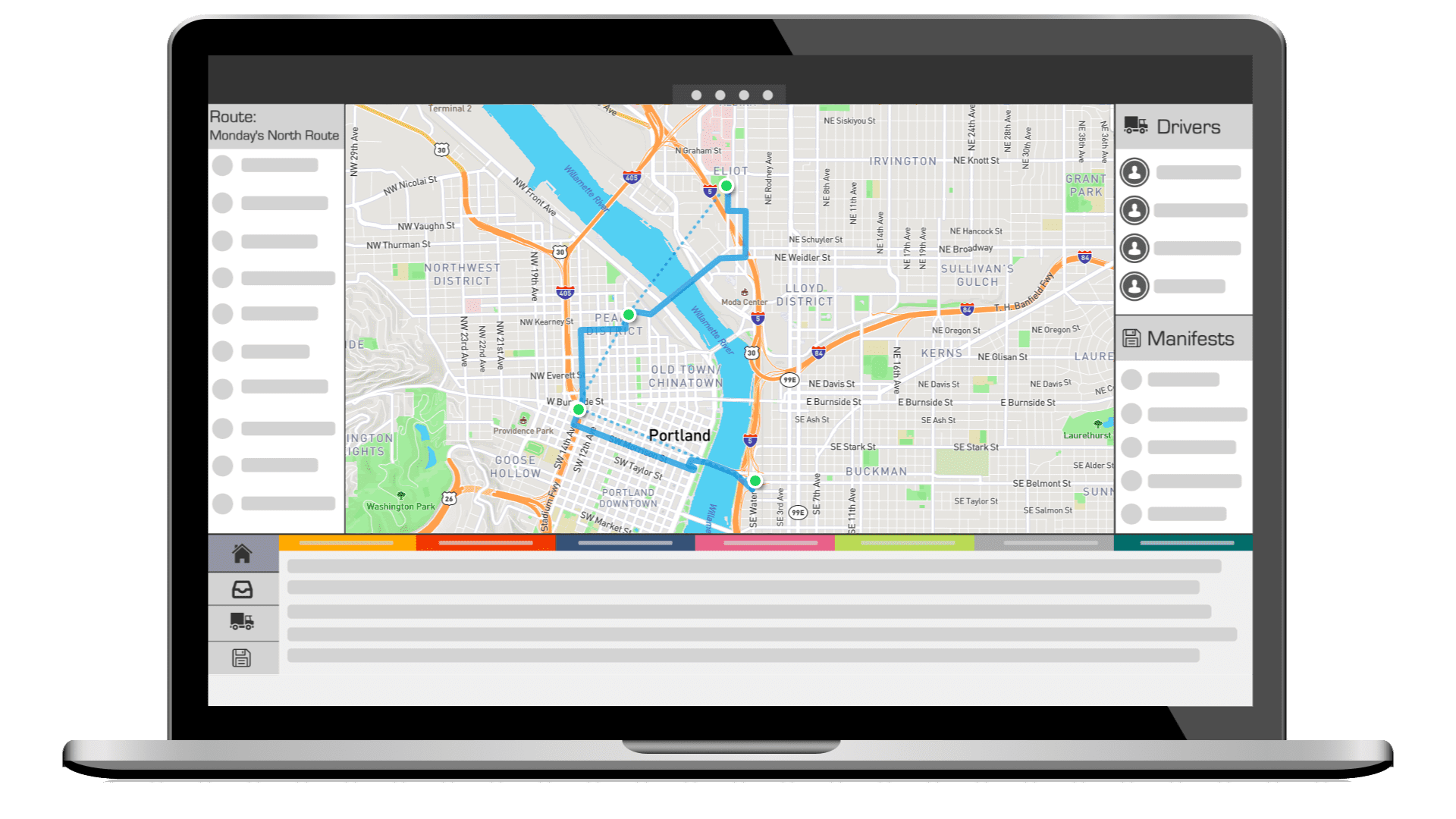
Elite EXTRA provides an effective solution for businesses needing multi-route planning. With its core feature of building multiple stop routes for multiple drivers, it directly caters to the needs of companies handling many deliveries. It optimizes for the fastest, most efficient route, saving time and fuel costs, and includes dispatching, tracking, and optimization features.
Best for Multi-Stop Route Planning Tools for Drivers
Expert Take
Elite EXTRA excels in multi-stop route planning by offering robust optimization features, real-time tracking, and dispatching capabilities. Its integration with major couriers and cloud-based architecture enhances its value for businesses with complex delivery needs, positioning it as a top-tier solution in its category.
Pros
- Access to third-party fleets (DoorDash/Uber)
- Automated returns policy enforcement
- Deep integration with Epicor & CDK
- Real-time driver tracking & visibility
- Responsive US-based customer support
Cons
- Driver app causes high battery drain
- Implementation fees start at $1,000
- Desktop interface creates tab clutter
- Steep learning curve for new users
- Custom pricing required for enterprise
Best for teams that are
- Automotive, lumber, or wholesale industries needing ERP integration
- Companies using a mix of internal fleets and third-party couriers (e.g., DoorDash)
- Enterprises requiring automated returns management workflows
Skip if
- Small businesses or solo drivers seeking a low-cost, instant-setup tool
- Users wanting transparent pricing without requesting a custom quote
- Simple operations that do not need complex integrations
Best for teams that are
- Automotive, lumber, or wholesale industries needing ERP integration
- Companies using a mix of internal fleets and third-party couriers (e.g., DoorDash)
- Enterprises requiring automated returns management workflows
Skip if
- Small businesses or solo drivers seeking a low-cost, instant-setup tool
- Users wanting transparent pricing without requesting a custom quote
- Simple operations that do not need complex integrations
Pros
- Access to third-party fleets (DoorDash/Uber)
- Automated returns policy enforcement
- Deep integration with Epicor & CDK
- Real-time driver tracking & visibility
- Responsive US-based customer support
Cons
- Driver app causes high battery drain
- Implementation fees start at $1,000
- Desktop interface creates tab clutter
- Steep learning curve for new users
- Custom pricing required for enterprise
Expert Take
Elite EXTRA excels in multi-stop route planning by offering robust optimization features, real-time tracking, and dispatching capabilities. Its integration with major couriers and cloud-based architecture enhances its value for businesses with complex delivery needs, positioning it as a top-tier solution in its category.
Fiix Work Order Management Software

Fiix CMMS is a leading AI-powered work order management software designed to streamline the submission and response to maintenance and operational requests, especially for multi-site operations. It centralizes records and uses intelligent analysis to improve efficiency, making it perfect for this industry that often deals with complex, extensive work order processes across numerous locations.
Best for Work Order Automation for Multi-Site Operations
Expert Take
Fiix Work Order Management Software excels in providing AI-powered solutions for multi-site operations, enhancing efficiency through centralized data management and intelligent analysis. Its strong market credibility and usability make it a top choice in its category, despite some limitations in pricing transparency.
Pros
- AI-driven predictive maintenance tools
- Backed by Rockwell Automation
- Transparent pricing with Free tier
- SOC 2 Type 2 & ISO 27001 certified
- Strong ERP integration ecosystem
Cons
- Mobile sync issues offline
- Slow performance with large datasets
- Complex custom reporting setup
- Advanced features locked in Enterprise
- Clunky navigation for custom fields
Best for teams that are
- Multi-site manufacturing teams needing ERP integration
- Users of Rockwell Automation hardware or PLCs
- Operations requiring AI-driven maintenance insights
Skip if
- Small businesses with simple maintenance workflows
- Teams needing native video RCA tools
Best for teams that are
- Multi-site manufacturing teams needing ERP integration
- Users of Rockwell Automation hardware or PLCs
- Operations requiring AI-driven maintenance insights
Skip if
- Small businesses with simple maintenance workflows
- Teams needing native video RCA tools
Pros
- AI-driven predictive maintenance tools
- Backed by Rockwell Automation
- Transparent pricing with Free tier
- SOC 2 Type 2 & ISO 27001 certified
- Strong ERP integration ecosystem
Cons
- Mobile sync issues offline
- Slow performance with large datasets
- Complex custom reporting setup
- Advanced features locked in Enterprise
- Clunky navigation for custom fields
Expert Take
Fiix Work Order Management Software excels in providing AI-powered solutions for multi-site operations, enhancing efficiency through centralized data management and intelligent analysis. Its strong market credibility and usability make it a top choice in its category, despite some limitations in pricing transparency.
ServiceTrade Field Service Software
ServiceTrade is a robust field service management software specifically designed for commercial maintenance. It streamlines operations, optimizes field performance, and enhances client retention by leveraging digital tools and providing real-time, data-driven insights. This software is built to address the industry’s need for efficient workflow management, and customer service improvement.
Best for Field Service Platforms for Commercial Maintenance
Expert Take
ServiceTrade excels as a specialized field service management platform for commercial maintenance, offering robust capabilities and industry-specific features. Its strong market credibility and usability are supported by real-time data insights and streamlined operations. While pricing may be a consideration for smaller businesses, its value proposition remains strong for its target market.
Pros
- Office users are free of charge
- Service Link provides rich media reports
- Strong accounting integrations (Sage, QuickBooks)
- Smart Scan AI for asset capture
- Specialized for fire and mechanical trades
Cons
- Mobile app sync issues reported
- No public pricing listed
- Reporting customization can be limited
- Not ideal for residential/small service
Best for teams that are
- Commercial HVAC, fire protection, and mechanical contractors
- Companies prioritizing asset service history and customer engagement
Skip if
- Residential-only service providers like home plumbing or cleaning
- Small businesses seeking low-cost or free software solutions
Best for teams that are
- Commercial HVAC, fire protection, and mechanical contractors
- Companies prioritizing asset service history and customer engagement
Skip if
- Residential-only service providers like home plumbing or cleaning
- Small businesses seeking low-cost or free software solutions
Pros
- Office users are free of charge
- Service Link provides rich media reports
- Strong accounting integrations (Sage, QuickBooks)
- Smart Scan AI for asset capture
- Specialized for fire and mechanical trades
Cons
- Mobile app sync issues reported
- No public pricing listed
- Reporting customization can be limited
- Not ideal for residential/small service
Expert Take
ServiceTrade excels as a specialized field service management platform for commercial maintenance, offering robust capabilities and industry-specific features. Its strong market credibility and usability are supported by real-time data insights and streamlined operations. While pricing may be a consideration for smaller businesses, its value proposition remains strong for its target market.
UpKeep Maintenance Management

This SaaS solution is designed specifically for the maintenance requirements of schools and higher education institutions. With features that enable scheduling of routine work orders for equipment like boilers or chillers, UpKeep helps ensure your campus's machinery runs smoothly and efficiently.
Best for Work Order Platforms for Schools and Campuses
Expert Take
UpKeep Maintenance Management excels as a work order platform specifically tailored for educational institutions, offering robust preventative maintenance scheduling and mobile accessibility. Its market credibility is supported by third-party recognition, and its usability is enhanced by features like inventory management and 24/7 support. While pricing may be a consideration for smaller institutions, the platform's targeted capabilities make it a top choice for schools and campuses.
Pros
- Mobile-first design optimized for field technicians
- Intuitive interface requires minimal training
- SOC 2 Type 2 security compliance
- Offline mode for connectivity-challenged areas
- GPS-based automation for work orders
Cons
- Offline mode locked behind higher tiers
- Reporting customization can be complex
- Per-user pricing expensive at scale
- Notification reliability issues reported
- Limited features in entry-level plan
Best for teams that are
- Maintenance teams prioritizing a mobile-first experience for technicians in the field
- Schools needing a user-friendly interface that requires minimal training to adopt
Skip if
- Large institutions requiring complex, enterprise-grade custom reporting on a budget
- Organizations sensitive to per-user pricing models that scale up costs quickly
Best for teams that are
- Maintenance teams prioritizing a mobile-first experience for technicians in the field
- Schools needing a user-friendly interface that requires minimal training to adopt
Skip if
- Large institutions requiring complex, enterprise-grade custom reporting on a budget
- Organizations sensitive to per-user pricing models that scale up costs quickly
Pros
- Mobile-first design optimized for field technicians
- Intuitive interface requires minimal training
- SOC 2 Type 2 security compliance
- Offline mode for connectivity-challenged areas
- GPS-based automation for work orders
Cons
- Offline mode locked behind higher tiers
- Reporting customization can be complex
- Per-user pricing expensive at scale
- Notification reliability issues reported
- Limited features in entry-level plan
Expert Take
UpKeep Maintenance Management excels as a work order platform specifically tailored for educational institutions, offering robust preventative maintenance scheduling and mobile accessibility. Its market credibility is supported by third-party recognition, and its usability is enhanced by features like inventory management and 24/7 support. While pricing may be a consideration for smaller institutions, the platform's targeted capabilities make it a top choice for schools and campuses.

UpKeep’s preventive maintenance software is a smart solution tailored for SMBs in the field service and operations industry. It leverages advanced technology to prevent asset breakdowns, ensuring smooth operations, reducing downtime, and increasing productivity.
Best for Preventive Maintenance Tools for SMBs
Expert Take
UpKeep Preventive Maintenance is a top-tier solution for SMBs in the field service sector due to its user-friendly interface and comprehensive feature set. It excels in usability and customer experience, offering mobile accessibility and real-time tracking. While its premium pricing may be higher, the value provided justifies the cost for businesses seeking to minimize downtime and enhance operational efficiency.
Pros
- Mobile-first design for deskless workers
- Native IoT sensor integration (Edge)
- Transparent per-user pricing tiers
- SOC 2 Type 2 security compliance
- SAP and Oracle ERP integrations
Cons
- Costs scale quickly with team size
- Bulk export limitations for work orders
- Occasional performance slowdowns reported
- Advanced features require higher tiers
- Initial setup can be complex
Best for teams that are
- Asset-intensive companies needing IoT sensor integration
- Teams prioritizing a mobile-first experience for technicians
- Multi-site organizations needing centralized asset operations
Skip if
- Small businesses with very tight budgets due to higher costs
- Users with poor internet connectivity facing performance issues
- Teams wanting a one-time purchase rather than SaaS subscription
Best for teams that are
- Asset-intensive companies needing IoT sensor integration
- Teams prioritizing a mobile-first experience for technicians
- Multi-site organizations needing centralized asset operations
Skip if
- Small businesses with very tight budgets due to higher costs
- Users with poor internet connectivity facing performance issues
- Teams wanting a one-time purchase rather than SaaS subscription
Pros
- Mobile-first design for deskless workers
- Native IoT sensor integration (Edge)
- Transparent per-user pricing tiers
- SOC 2 Type 2 security compliance
- SAP and Oracle ERP integrations
Cons
- Costs scale quickly with team size
- Bulk export limitations for work orders
- Occasional performance slowdowns reported
- Advanced features require higher tiers
- Initial setup can be complex
Expert Take
UpKeep Preventive Maintenance is a top-tier solution for SMBs in the field service sector due to its user-friendly interface and comprehensive feature set. It excels in usability and customer experience, offering mobile accessibility and real-time tracking. While its premium pricing may be higher, the value provided justifies the cost for businesses seeking to minimize downtime and enhance operational efficiency.

Accruent is a robust CMMS solution designed for multi-location businesses across various industries. It specializes in reducing downtime, predicting maintenance needs, and managing assets and equipment inventory, thus catering to the unique needs of businesses that require meticulous field service and operations management.
Best for Cloud CMMS Tools for Multi-Location Businesses
Expert Take
Accruent excels as a CMMS solution for multi-location businesses, offering advanced predictive maintenance and comprehensive asset management. Its industry-specific features and 24/7 support enhance its usability, though the complexity of setup and potential cost for smaller businesses are considerations. Overall, it is a top-tier choice for businesses needing robust field service management.
Pros
- Comprehensive suite for entire asset lifecycle
- Strong compliance with SOC 2 & FDA
- Transparent pricing for enterprise software
- Robust ERP and IoT integrations
- Trusted by 10,000+ global customers
Cons
- Support response times can be slow
- Complex customization for reporting
- Implementation delays for on-premise versions
- Steep learning curve for advanced features
- On-premise updates may lag cloud
Best for teams that are
- Large enterprises needing scalable, complex asset management
- Healthcare or industries requiring deep compliance and audit trails
- Organizations needing robust document management and scalability
Skip if
- Small businesses with limited budget and implementation time
- Teams needing a lightweight tool with zero training requirements
- Users seeking a simple, pay-as-you-go monthly tool
Best for teams that are
- Large enterprises needing scalable, complex asset management
- Healthcare or industries requiring deep compliance and audit trails
- Organizations needing robust document management and scalability
Skip if
- Small businesses with limited budget and implementation time
- Teams needing a lightweight tool with zero training requirements
- Users seeking a simple, pay-as-you-go monthly tool
Pros
- Comprehensive suite for entire asset lifecycle
- Strong compliance with SOC 2 & FDA
- Transparent pricing for enterprise software
- Robust ERP and IoT integrations
- Trusted by 10,000+ global customers
Cons
- Support response times can be slow
- Complex customization for reporting
- Implementation delays for on-premise versions
- Steep learning curve for advanced features
- On-premise updates may lag cloud
Expert Take
Accruent excels as a CMMS solution for multi-location businesses, offering advanced predictive maintenance and comprehensive asset management. Its industry-specific features and 24/7 support enhance its usability, though the complexity of setup and potential cost for smaller businesses are considerations. Overall, it is a top-tier choice for businesses needing robust field service management.
Building Engines Work Order Management

Building Engines Work Order Management Software for Commercial Real Estate (CRE) is a robust, fully-integrated solution designed to streamline and prioritize work order requests. It is specifically tailored to meet the needs of property managers, providing them with the tools needed to increase tenant satisfaction and efficiently manage property-related tasks.
Best for Work Order Systems for Property Managers
Expert Take
Building Engines Work Order Management excels as a tailored solution for property managers in the CRE industry. Its integration capabilities, tenant satisfaction focus, and robust reporting make it a standout choice. While enterprise pricing and potential training needs are considerations, its specialized features justify its premium positioning.
Pros
- Backed by JLL's $300M acquisition
- SOC 2 Type 2 certified security
- Specialized refrigerant & billables tracking
- Offline mobile functionality for engineers
- Manages over 4 billion sq ft
Cons
- Mobile app syncing & crash issues
- No public pricing or free trial
- Complex navigation for some actions
- Labor entry editing limitations
- Implementation can be resource intensive
Best for teams that are
- Commercial real estate managers (office, retail) needing billable work orders
- Teams managing complex vendor certificates of insurance (COI) and compliance
Skip if
- Residential property managers or single-family rental portfolios
- Small businesses wanting a simple, low-cost maintenance ticketing system
Best for teams that are
- Commercial real estate managers (office, retail) needing billable work orders
- Teams managing complex vendor certificates of insurance (COI) and compliance
Skip if
- Residential property managers or single-family rental portfolios
- Small businesses wanting a simple, low-cost maintenance ticketing system
Pros
- Backed by JLL's $300M acquisition
- SOC 2 Type 2 certified security
- Specialized refrigerant & billables tracking
- Offline mobile functionality for engineers
- Manages over 4 billion sq ft
Cons
- Mobile app syncing & crash issues
- No public pricing or free trial
- Complex navigation for some actions
- Labor entry editing limitations
- Implementation can be resource intensive
Expert Take
Building Engines Work Order Management excels as a tailored solution for property managers in the CRE industry. Its integration capabilities, tenant satisfaction focus, and robust reporting make it a standout choice. While enterprise pricing and potential training needs are considerations, its specialized features justify its premium positioning.

FieldPulse is a comprehensive field service management solution, tailored for appliance repair businesses. Its robust features, including scheduling, dispatching, invoicing, and customer communications, streamline operations by fostering seamless collaboration between office and field teams.
Best for FSM Platforms for Appliance Repair Businesses
Expert Take
FieldPulse FSM Software excels in providing a comprehensive solution tailored for appliance repair businesses. Its robust feature set, including scheduling, dispatching, and invoicing, supports seamless operations. While it requires an internet connection, its industry-specific capabilities and integration options make it a top choice in its category.
Pros
- Advanced multi-hub inventory management
- Serialized inventory tracking supported
- Exceptional customer support ratings (9.6/10)
- Comprehensive all-in-one FSM platform
- User-friendly interface for office staff
Cons
- Offline mode reported as unreliable
- Pricing is not publicly transparent
- Reporting lacks deep customization
- Mobile interface can feel cramped
- QuickBooks Desktop sync issues reported
Best for teams that are
- Growing service teams needing highly customizable workflows and status tags
- Businesses requiring native inventory tracking across multiple locations
- Mixed residential and commercial shops needing flexible pricing structures
Skip if
- Large enterprises requiring complex ERP integrations or SAP connections
- Technicians working primarily in areas with poor cellular coverage (offline limits)
- Solo users on a tight budget who don't need advanced customization
Best for teams that are
- Growing service teams needing highly customizable workflows and status tags
- Businesses requiring native inventory tracking across multiple locations
- Mixed residential and commercial shops needing flexible pricing structures
Skip if
- Large enterprises requiring complex ERP integrations or SAP connections
- Technicians working primarily in areas with poor cellular coverage (offline limits)
- Solo users on a tight budget who don't need advanced customization
Pros
- Advanced multi-hub inventory management
- Serialized inventory tracking supported
- Exceptional customer support ratings (9.6/10)
- Comprehensive all-in-one FSM platform
- User-friendly interface for office staff
Cons
- Offline mode reported as unreliable
- Pricing is not publicly transparent
- Reporting lacks deep customization
- Mobile interface can feel cramped
- QuickBooks Desktop sync issues reported
Expert Take
FieldPulse FSM Software excels in providing a comprehensive solution tailored for appliance repair businesses. Its robust feature set, including scheduling, dispatching, and invoicing, supports seamless operations. While it requires an internet connection, its industry-specific capabilities and integration options make it a top choice in its category.
Geotab Fleet Dispatch Software
Geotab's fleet dispatch software offers optimal route planning specifically designed for delivery fleets. With in-depth route planning and the ability to create efficient sequences of stops and waypoints, it addresses the industry's need for time and fuel efficiency, improved customer service, and reduced operational costs.
Best for Route Optimization Tools for Delivery Fleets
Expert Take
Geotab Fleet Dispatch Software excels in providing optimal route planning and real-time tracking for delivery fleets. Its capabilities are well-documented and supported by industry recognition, making it a top choice for businesses seeking efficiency and reliability in fleet management.
Pros
- FedRAMP Authorized & FIPS 140-3 validated
- Marketplace with 250+ integrations
- Economic-based route optimization
- Scalable to 5M+ vehicles
- Granular open API access
Cons
- Pricing hidden behind resellers
- Mobile app has low ratings
- Steep learning curve for UI
- Support quality varies by reseller
- Advanced routing is an add-on
Best for teams that are
- Fleets already using Geotab telematics devices for vehicle tracking and health
- Dispatchers needing to assign ad-hoc jobs to drivers in real-time
- Fleets wanting to combine routing data with engine health and safety metrics
Skip if
- Companies needing complex multi-stop optimization without third-party add-ons
- Businesses not using Geotab hardware or telematics devices
- Planners needing strategic, fixed-route modeling capabilities out of the box
Best for teams that are
- Fleets already using Geotab telematics devices for vehicle tracking and health
- Dispatchers needing to assign ad-hoc jobs to drivers in real-time
- Fleets wanting to combine routing data with engine health and safety metrics
Skip if
- Companies needing complex multi-stop optimization without third-party add-ons
- Businesses not using Geotab hardware or telematics devices
- Planners needing strategic, fixed-route modeling capabilities out of the box
Pros
- FedRAMP Authorized & FIPS 140-3 validated
- Marketplace with 250+ integrations
- Economic-based route optimization
- Scalable to 5M+ vehicles
- Granular open API access
Cons
- Pricing hidden behind resellers
- Mobile app has low ratings
- Steep learning curve for UI
- Support quality varies by reseller
- Advanced routing is an add-on
Expert Take
Geotab Fleet Dispatch Software excels in providing optimal route planning and real-time tracking for delivery fleets. Its capabilities are well-documented and supported by industry recognition, making it a top choice for businesses seeking efficiency and reliability in fleet management.

NextGen FSM - Field Service Management software product is an AI-powered solution designed to streamline field execution, scheduling, and routing for multi-technician field teams. It enables technicians to collaborate using Augmented Reality, significantly boosting efficiency and accuracy in field service operations.
Best for FSM Platforms for Multi-Technician Field Teams
Expert Take
NextGen FSM Software excels in providing advanced features like AI-powered optimization and AR collaboration, making it a standout in the field service management category. Its capabilities are well-documented, and it has received recognition for its innovative approach, although its pricing model may limit transparency.
Pros
- Deep GIS & linear asset integration
- Hands-free AR remote collaboration
- Offline-capable mobile app
- Proven high ROI for utilities
- Gartner Visionary status
Cons
- Complex configuration and setup
- Steep learning curve for admins
- No public pricing transparency
- Implementation can be resource-intensive
- Limited ecosystem vs global giants
Best for teams that are
- Utilities and energy companies managing linear assets
- Teams needing GIS integration and Augmented Reality
- Mission-critical field operations
Skip if
- Residential contractors or small service businesses
- Companies without complex infrastructure maintenance needs
- Teams looking for a low-cost, basic scheduling tool
Best for teams that are
- Utilities and energy companies managing linear assets
- Teams needing GIS integration and Augmented Reality
- Mission-critical field operations
Skip if
- Residential contractors or small service businesses
- Companies without complex infrastructure maintenance needs
- Teams looking for a low-cost, basic scheduling tool
Pros
- Deep GIS & linear asset integration
- Hands-free AR remote collaboration
- Offline-capable mobile app
- Proven high ROI for utilities
- Gartner Visionary status
Cons
- Complex configuration and setup
- Steep learning curve for admins
- No public pricing transparency
- Implementation can be resource-intensive
- Limited ecosystem vs global giants
Expert Take
NextGen FSM Software excels in providing advanced features like AI-powered optimization and AR collaboration, making it a standout in the field service management category. Its capabilities are well-documented, and it has received recognition for its innovative approach, although its pricing model may limit transparency.
Explore Categories
- Affiliate & Referral Management Platforms
- Equipment & Asset Maintenance Software
- Field Service Management (FSM) Platforms
- Influencer Marketing Platforms
- Job Scheduling & Dispatching Software
- Mobile Workforce & Field Team Management Tools
- Route Planning & Optimization Software
- Sales Training & Coaching Platforms
- Work Order & Ticketing Management Platforms