
Design, Creative & Media Production Software
These are the specialized categories within Design, Creative & Media Production Software. Looking for something broader? Return to Home.

ActiveCollab is an intuitive productivity and collaboration tool designed specifically for service businesses and creative agencies. Its comprehensive features for task, project, team, client, and billing management make it ideal for streamlining operations and facilitating communication in these fast-paced, project-driven environments.
Best for Creative Project Management Tools for Agencies
Expert Take
ActiveCollab excels in providing a comprehensive suite of tools tailored for creative agencies, with strong capabilities in project management, client interaction, and financial oversight. Its market credibility is supported by industry recognition, and it offers a user-friendly experience with customizable workflows.
Pros
- Self-hosted option for total data control
- Built-in invoicing and expense tracking
- Unlimited clients on all pricing plans
- Flat-rate pricing for small teams
- Integrated profitability and budget analysis
Cons
- Single assignee limit per task
- Mobile app lacks desktop feature parity
- Advanced reporting limited to higher tiers
- No free plan for teams >3 users
- Search functionality historically cited as weak
Best for teams that are
- Small to mid-sized agencies needing affordable management
- Teams wanting built-in time tracking and invoicing
- Users seeking a balance between simplicity and power
Skip if
- Large enterprises requiring advanced reporting and permissions
- Teams needing complex resource planning tools
- Users needing extensive third-party integrations
Best for teams that are
- Small to mid-sized agencies needing affordable management
- Teams wanting built-in time tracking and invoicing
- Users seeking a balance between simplicity and power
Skip if
- Large enterprises requiring advanced reporting and permissions
- Teams needing complex resource planning tools
- Users needing extensive third-party integrations
Pros
- Self-hosted option for total data control
- Built-in invoicing and expense tracking
- Unlimited clients on all pricing plans
- Flat-rate pricing for small teams
- Integrated profitability and budget analysis
Cons
- Single assignee limit per task
- Mobile app lacks desktop feature parity
- Advanced reporting limited to higher tiers
- No free plan for teams >3 users
- Search functionality historically cited as weak
Expert Take
ActiveCollab excels in providing a comprehensive suite of tools tailored for creative agencies, with strong capabilities in project management, client interaction, and financial oversight. Its market credibility is supported by industry recognition, and it offers a user-friendly experience with customizable workflows.
Filecamp Digital Asset Management
Best for Stock Media & Asset Libraries for Digital Marketing Agencies

Filecamp is a robust Digital Asset Management (DAM) solution tailored for digital marketing agencies. It provides an easy-to-use, centralized platform for managing, accessing, and sharing marketing assets, while also offering online proofing and media library functionalities. Its intuitive controls make it ideal for users who are not tech-savvy, addressing the industry's need for efficient and simplified asset management.
Best for Stock Media & Asset Libraries for Digital Marketing Agencies
Expert Take
Filecamp excels as a Digital Asset Management solution for digital marketing agencies, offering a user-friendly interface and cost-effective pricing with unlimited users. While it lacks extensive integration options, its core functionalities like online proofing and branding customization make it a strong choice for agencies.
Pros
- Unlimited users included in all pricing plans
- Full white-labeling capabilities for brand customization
- Transparent and affordable fixed monthly pricing
- Built-in online proofing and annotation tools
- No training required due to intuitive interface
Cons
- No public API for custom integrations
- Limited native integrations with other software
- Performance may lag with very large libraries
- Mobile experience has reported limitations
- Lacks advanced workflow automation features
Best for teams that are
- SMBs and agencies requiring unlimited users at a fixed price
- Teams needing custom-branded portals for client sharing
- Organizations wanting a user-friendly, low-training solution
Skip if
- Enterprises requiring complex API integrations or automation
- Teams needing on-premise hosting solutions
- Users looking for advanced AI auto-tagging features
Best for teams that are
- SMBs and agencies requiring unlimited users at a fixed price
- Teams needing custom-branded portals for client sharing
- Organizations wanting a user-friendly, low-training solution
Skip if
- Enterprises requiring complex API integrations or automation
- Teams needing on-premise hosting solutions
- Users looking for advanced AI auto-tagging features
Pros
- Unlimited users included in all pricing plans
- Full white-labeling capabilities for brand customization
- Transparent and affordable fixed monthly pricing
- Built-in online proofing and annotation tools
- No training required due to intuitive interface
Cons
- No public API for custom integrations
- Limited native integrations with other software
- Performance may lag with very large libraries
- Mobile experience has reported limitations
- Lacks advanced workflow automation features
Expert Take
Filecamp excels as a Digital Asset Management solution for digital marketing agencies, offering a user-friendly interface and cost-effective pricing with unlimited users. While it lacks extensive integration options, its core functionalities like online proofing and branding customization make it a strong choice for agencies.
PageProof: Online Proofing Software
PageProof is a SaaS solution designed specifically to streamline the creative review and approval process. It provides industry professionals with a seamless and efficient tool for managing creative projects, enabling them to quickly and effortlessly review, proof, and approve designs. With a focus on simplicity and user-friendly features, PageProof fills industry needs for a fast, intuitive, and collaborative proofing process.
Best for Creative Review & Proofing Tools for Designers
Expert Take
PageProof excels in providing a streamlined and user-friendly platform for creative review and approval, supported by cross-platform compatibility and collaborative features. Its market credibility is bolstered by industry recognition, and it offers a transparent pricing model. The product is well-suited for creative professionals seeking efficient project management tools.
Pros
- Flat-rate pricing with unlimited users
- Patented triple-layer encryption security
- Supports 1,200+ file types
- No login required for reviewers
- Smart Compare for pixel-perfect checks
Cons
- Interface described as clunky by some
- Occasional slow uploads for large files
- Lacks direct SOC 2 certification
- Limited reporting in lower tiers
- Markup icons can be hard to distinguish
Best for teams that are
- Marketing teams needing unlimited users and reviewers
- Security-conscious enterprises requiring ISO 27001
- Teams heavily reliant on Adobe Creative Cloud
Skip if
- Small teams with low volume (flat rate pricing is high)
- Teams seeking a full project management suite replacement
- Users needing a per-seat pricing model
Best for teams that are
- Marketing teams needing unlimited users and reviewers
- Security-conscious enterprises requiring ISO 27001
- Teams heavily reliant on Adobe Creative Cloud
Skip if
- Small teams with low volume (flat rate pricing is high)
- Teams seeking a full project management suite replacement
- Users needing a per-seat pricing model
Pros
- Flat-rate pricing with unlimited users
- Patented triple-layer encryption security
- Supports 1,200+ file types
- No login required for reviewers
- Smart Compare for pixel-perfect checks
Cons
- Interface described as clunky by some
- Occasional slow uploads for large files
- Lacks direct SOC 2 certification
- Limited reporting in lower tiers
- Markup icons can be hard to distinguish
Expert Take
PageProof excels in providing a streamlined and user-friendly platform for creative review and approval, supported by cross-platform compatibility and collaborative features. Its market credibility is bolstered by industry recognition, and it offers a transparent pricing model. The product is well-suited for creative professionals seeking efficient project management tools.
Pitch: Team-Oriented Presentation Software
Best for Presentation & Slide Design Software for Private Equity Firms

Pitch is a presentation software designed for fast-paced teams like those in private equity firms. The AI-powered platform enables professionals to collaborate on, create, and deliver high-quality slide decks while maintaining brand consistency. Its advanced features cater to the dynamic nature of private equity transactions by providing easy-to-use design tools, interactive presentation components, and seamless team collaboration.
Best for Presentation & Slide Design Software for Private Equity Firms
Expert Take
Pitch excels as a presentation software tailored for private equity firms, offering robust collaboration tools and AI-powered features. Its focus on brand consistency and team-oriented design makes it a top choice in its niche, despite some limitations in offline capabilities and pricing for larger teams.
Pros
- Real-time 'multiplayer' collaboration features
- Generous free plan for 5 users
- High-quality, modern template library
- Deep integrations with Notion and Slack
- Intuitive interface for non-designers
Cons
- No custom slide sizes or portrait mode
- Significant recent staff layoffs (Jan 2024)
- Extra seats on paid plans are costly
- Limited font options without upload
- Export branding on free plan
Best for teams that are
- Teams requiring real-time collaboration and slide analytics
- Startups wanting sleek, modern presentations without a professional designer
- Remote teams needing integrated video and workflow features
Skip if
- Power users needing complex diagrams or extensive shape options
- Users requiring robust offline reliability or traditional PowerPoint features
- Enterprises needing strict legacy file compatibility
Best for teams that are
- Teams requiring real-time collaboration and slide analytics
- Startups wanting sleek, modern presentations without a professional designer
- Remote teams needing integrated video and workflow features
Skip if
- Power users needing complex diagrams or extensive shape options
- Users requiring robust offline reliability or traditional PowerPoint features
- Enterprises needing strict legacy file compatibility
Pros
- Real-time 'multiplayer' collaboration features
- Generous free plan for 5 users
- High-quality, modern template library
- Deep integrations with Notion and Slack
- Intuitive interface for non-designers
Cons
- No custom slide sizes or portrait mode
- Significant recent staff layoffs (Jan 2024)
- Extra seats on paid plans are costly
- Limited font options without upload
- Export branding on free plan
Expert Take
Pitch excels as a presentation software tailored for private equity firms, offering robust collaboration tools and AI-powered features. Its focus on brand consistency and team-oriented design makes it a top choice in its niche, despite some limitations in offline capabilities and pricing for larger teams.
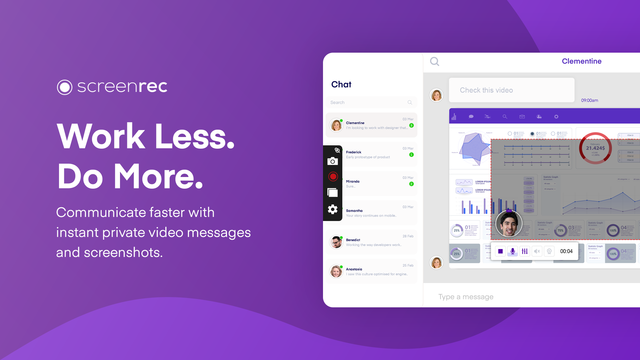
ScreenRec is a versatile screen recording tool, particularly suited for customer support teams. Its key features such as instant video messaging and annotated screenshot sharing expedite the communication process, making it easier for support teams to provide detailed, visual instructions or demonstrations to clients, thereby enhancing support quality and efficiency.
Best for Screen Recording Tools for Customer Support
Expert Take
ScreenRec excels in providing customer support teams with tools for effective communication through visual aids. Its features like instant video messaging and annotated screenshot sharing enhance the support experience. While it lacks advanced editing tools and a mobile app, its cost-effectiveness and ease of use make it a strong contender in its category.
Pros
- Instant video messaging
- Annotated screenshot sharing
- Easy-to-use interface
- No watermarks
- Unlimited recording time
Cons
- Limited editing tools
- Dependent on internet connection for sharing files
- No mobile app
Best for teams that are
- Budget-conscious users needing unlimited free recording time without watermarks
- Teams requiring secure, encrypted video sharing for internal communication
- Users who need a lightweight tool for quick bug reporting
Skip if
- Creators needing video editing features like trimming or zooming
- Users who require high frame-rate recording for gaming
- Professionals needing polished, branded video presentations
Best for teams that are
- Budget-conscious users needing unlimited free recording time without watermarks
- Teams requiring secure, encrypted video sharing for internal communication
- Users who need a lightweight tool for quick bug reporting
Skip if
- Creators needing video editing features like trimming or zooming
- Users who require high frame-rate recording for gaming
- Professionals needing polished, branded video presentations
Pros
- Instant video messaging
- Annotated screenshot sharing
- Easy-to-use interface
- No watermarks
- Unlimited recording time
Cons
- Limited editing tools
- Dependent on internet connection for sharing files
- No mobile app
Expert Take
ScreenRec excels in providing customer support teams with tools for effective communication through visual aids. Its features like instant video messaging and annotated screenshot sharing enhance the support experience. While it lacks advanced editing tools and a mobile app, its cost-effectiveness and ease of use make it a strong contender in its category.

Animaker, an AI-powered animation generator and video maker, specifically caters to the needs of marketing content teams by providing accessible, studio-quality animated videos. Its suite of tools and functionalities streamline the creation process, making it an ideal solution for marketing professionals looking to enhance their content with engaging, high-quality animations.
Best for Animation Tools for Marketing Content Teams
Expert Take
Animaker stands out as a leading tool for marketing content teams due to its AI-powered capabilities, extensive asset library, and user-friendly interface. It offers a balance of affordability and high-quality output, making it accessible for teams with varying budgets and expertise levels. The product's recognition in the industry further solidifies its position as a top choice for animation tools.
Pros
- Massive library of 100M+ stock assets
- ISO 27001 certified enterprise security
- Deep character customization with billions of options
- Intuitive drag-and-drop interface for beginners
- AI-powered tools like auto lip-sync
Cons
- Slow rendering times reported by users
- Interface can be laggy on complex projects
- Free plan exports are watermarked
- Premium assets limited by monthly credits
- 4K export locked to Enterprise plan
Best for teams that are
- HR and L&D teams creating internal training and onboarding videos
- Non-designers needing quick 2D explainer videos with pre-made assets
- Marketers wanting to create animated characters with auto lip-sync
Skip if
- Professional animators requiring frame-by-frame control
- Users needing to work offline without an internet connection
- Creators looking for complex 3D motion graphics capabilities
Best for teams that are
- HR and L&D teams creating internal training and onboarding videos
- Non-designers needing quick 2D explainer videos with pre-made assets
- Marketers wanting to create animated characters with auto lip-sync
Skip if
- Professional animators requiring frame-by-frame control
- Users needing to work offline without an internet connection
- Creators looking for complex 3D motion graphics capabilities
Pros
- Massive library of 100M+ stock assets
- ISO 27001 certified enterprise security
- Deep character customization with billions of options
- Intuitive drag-and-drop interface for beginners
- AI-powered tools like auto lip-sync
Cons
- Slow rendering times reported by users
- Interface can be laggy on complex projects
- Free plan exports are watermarked
- Premium assets limited by monthly credits
- 4K export locked to Enterprise plan
Expert Take
Animaker stands out as a leading tool for marketing content teams due to its AI-powered capabilities, extensive asset library, and user-friendly interface. It offers a balance of affordability and high-quality output, making it accessible for teams with varying budgets and expertise levels. The product's recognition in the industry further solidifies its position as a top choice for animation tools.
BeFunky Graphic Designer
Best for Graphic Design & Illustration Tools for Photography Studios

BeFunky's Graphic Designer is a highly intuitive and easy-to-use design tool that's perfect for photography studios. With a wealth of templates and features tailored for creating stunning visuals for brochures, flyers, and social media, it addresses the industry's need for visually compelling content.
Best for Graphic Design & Illustration Tools for Photography Studios
Expert Take
BeFunky Graphic Designer excels in providing intuitive design tools tailored for photography studios, with a strong focus on usability and a wide range of templates. Its market credibility is supported by its extensive feature set and pricing transparency, making it a top choice in its category.
Pros
- All-in-one editor, collage maker, and designer
- Powerful AI tools like Sky Replacer
- Batch processing for multiple images
- Over 1 million free stock photos
- Affordable annual plan at $6.99/month
Cons
- No RAW image format support
- Cancellation process reported as difficult
- Free version has intrusive ads
- Requires constant internet connection
- Less granular control than Photoshop
Best for teams that are
- Hobbyists wanting fun photo effects and simple collages
- Users needing quick batch processing for social media
- Beginners looking for an intuitive drag-and-drop interface
Skip if
- Professional designers needing vector tools or CMYK support
- Users requiring offline access or advanced retouching
- Creators needing high-resolution print outputs
Best for teams that are
- Hobbyists wanting fun photo effects and simple collages
- Users needing quick batch processing for social media
- Beginners looking for an intuitive drag-and-drop interface
Skip if
- Professional designers needing vector tools or CMYK support
- Users requiring offline access or advanced retouching
- Creators needing high-resolution print outputs
Pros
- All-in-one editor, collage maker, and designer
- Powerful AI tools like Sky Replacer
- Batch processing for multiple images
- Over 1 million free stock photos
- Affordable annual plan at $6.99/month
Cons
- No RAW image format support
- Cancellation process reported as difficult
- Free version has intrusive ads
- Requires constant internet connection
- Less granular control than Photoshop
Expert Take
BeFunky Graphic Designer excels in providing intuitive design tools tailored for photography studios, with a strong focus on usability and a wide range of templates. Its market credibility is supported by its extensive feature set and pricing transparency, making it a top choice in its category.

Canto's DAM and PIM solution is a unified system specifically designed for Product & Ecommerce Teams. It fulfills the industry's need for a centralized, organized and seamless workflow, facilitating better product experience management. The software provides a single source of truth for all digital assets, making it easier to manage, repurpose, and distribute them efficiently.
Best for DAM Tools for Product & Ecommerce Teams
Expert Take
Canto's DAM & PIM System excels in providing a unified platform for managing digital assets and product information, crucial for ecommerce teams. The product demonstrates strong capabilities and market credibility, supported by external validations and a comprehensive feature set, making it a top choice in its category.
Pros
- Unified DAM and PIM capabilities
- AI Visual Search (no tagging needed)
- SOC 2, ISO 27001, HIPAA compliant
- Facial recognition for auto-tagging
- Portals for secure external sharing
Cons
- No public pricing available
- Expensive for smaller teams
- Interface described as outdated by some
- Occasional large file upload issues
- Extra costs for advanced features
Best for teams that are
- Mid-market marketing teams needing visual, intuitive asset management
- Retailers requiring integrated PIM features for ecommerce syndication
- Teams needing to sync product data and assets for Shopify or Amazon
Skip if
- Large enterprises with highly complex custom metadata needs
- Developers seeking open-source or headless-first architecture
- Teams on a tight budget wanting to avoid per-user licensing costs
Best for teams that are
- Mid-market marketing teams needing visual, intuitive asset management
- Retailers requiring integrated PIM features for ecommerce syndication
- Teams needing to sync product data and assets for Shopify or Amazon
Skip if
- Large enterprises with highly complex custom metadata needs
- Developers seeking open-source or headless-first architecture
- Teams on a tight budget wanting to avoid per-user licensing costs
Pros
- Unified DAM and PIM capabilities
- AI Visual Search (no tagging needed)
- SOC 2, ISO 27001, HIPAA compliant
- Facial recognition for auto-tagging
- Portals for secure external sharing
Cons
- No public pricing available
- Expensive for smaller teams
- Interface described as outdated by some
- Occasional large file upload issues
- Extra costs for advanced features
Expert Take
Canto's DAM & PIM System excels in providing a unified platform for managing digital assets and product information, crucial for ecommerce teams. The product demonstrates strong capabilities and market credibility, supported by external validations and a comprehensive feature set, making it a top choice in its category.
Captions AI Creative Studio

Captions is an AI-powered creative studio that caters specifically to the needs of social media professionals. It allows users to create studio-grade videos with minimal effort, thus addressing the industry's need for efficient, high-quality content creation. The software's AI capabilities simplify the process of captioning and copywriting, making it ideal for social media content creation.
Best for Caption and Copywriting Tools for Social Media
Expert Take
Captions AI Creative Studio excels in providing AI-driven tools for efficient social media content creation, with strong usability and value propositions. Its market credibility is supported by its innovative approach, though customization limitations are noted. Overall, it is a premium tool for social media professionals.
Pros
- AI Lipdub visually syncs lips to translations
- AI Eye Contact corrects gaze automatically
- Supports captions in over 100 languages
- Backed by top investors like Sequoia
- Entry-level Pro plan is affordable ($9.99/mo)
Cons
- Desktop version reported as buggy/slow
- Generative features limited by monthly credits
- Export errors and audio sync issues reported
- Free plan includes watermarks and limitations
- Android version lags behind iOS features
Best for teams that are
- Video creators focusing on TikTok, Reels, and Shorts
- Influencers needing AI dubbing and eye contact correction
Skip if
- Copywriters looking for text-only blog or article generation
- Users needing static graphic design or image editing tools
Best for teams that are
- Video creators focusing on TikTok, Reels, and Shorts
- Influencers needing AI dubbing and eye contact correction
Skip if
- Copywriters looking for text-only blog or article generation
- Users needing static graphic design or image editing tools
Pros
- AI Lipdub visually syncs lips to translations
- AI Eye Contact corrects gaze automatically
- Supports captions in over 100 languages
- Backed by top investors like Sequoia
- Entry-level Pro plan is affordable ($9.99/mo)
Cons
- Desktop version reported as buggy/slow
- Generative features limited by monthly credits
- Export errors and audio sync issues reported
- Free plan includes watermarks and limitations
- Android version lags behind iOS features
Expert Take
Captions AI Creative Studio excels in providing AI-driven tools for efficient social media content creation, with strong usability and value propositions. Its market credibility is supported by its innovative approach, though customization limitations are noted. Overall, it is a premium tool for social media professionals.

Descript is a unique SaaS solution designed to simplify the video and audio editing process for social media professionals. It allows recording, transcription, editing, and publishing in one seamless tool, making it ideal for content creators who need to quickly produce and edit video and podcast content for various platforms.
Best for Social Media Video Editing Tools
Expert Take
Descript AI Video & Podcast Editor stands out as a 'best-of-the-best' product due to its innovative approach to multimedia editing, integrating AI-driven tools for seamless content creation. Its market credibility is bolstered by positive third-party recognition and a strong user base. While there are minor limitations in advanced editing tools, the product excels in usability and value.
Pros
- Edit video and audio by editing text
- Studio Sound AI removes background noise
- Overdub creates realistic AI voice clones
- SOC 2 Type II security compliance
- Direct export to YouTube and podcast hosts
Cons
- Performance lags on large or long projects
- Transcription requires manual proofreading
- Steep learning curve for traditional editors
- Free plan exports have watermarks
- Complex credit-based limits on AI features
Best for teams that are
- Podcasters and creators editing "talking head" videos via text
- Users needing fast AI transcription and filler word removal
- Teams collaborating on script-based video content
Skip if
- Editors focusing on visual storytelling or complex B-roll sequences
- Users needing precise manual control over every frame and transition
- Projects requiring advanced color grading or visual effects
Best for teams that are
- Podcasters and creators editing "talking head" videos via text
- Users needing fast AI transcription and filler word removal
- Teams collaborating on script-based video content
Skip if
- Editors focusing on visual storytelling or complex B-roll sequences
- Users needing precise manual control over every frame and transition
- Projects requiring advanced color grading or visual effects
Pros
- Edit video and audio by editing text
- Studio Sound AI removes background noise
- Overdub creates realistic AI voice clones
- SOC 2 Type II security compliance
- Direct export to YouTube and podcast hosts
Cons
- Performance lags on large or long projects
- Transcription requires manual proofreading
- Steep learning curve for traditional editors
- Free plan exports have watermarks
- Complex credit-based limits on AI features
Expert Take
Descript AI Video & Podcast Editor stands out as a 'best-of-the-best' product due to its innovative approach to multimedia editing, integrating AI-driven tools for seamless content creation. Its market credibility is bolstered by positive third-party recognition and a strong user base. While there are minor limitations in advanced editing tools, the product excels in usability and value.
Explore Categories
- Animation & Motion Graphics Software
- Brand Asset & Digital Asset Management Platforms
- Brand Asset & Style Guide Platforms
- Creative Collaboration & Review Tools
- Creative Project Management & Proofing Tools
- Graphic Design & Digital Illustration Tools
- Layout & Publishing Design Software
- Podcasting & Audio Editing Tools
- Presentation & Slide Design Software
- Prototyping & Wireframing Tools
- Screen Recording & Tutorial Creation Tools
- Social Media Content Creation Tools
- Stock Media & Asset Libraries
- Video Editing & Production Software