What Is Creative Project Management & Proofing Tools?
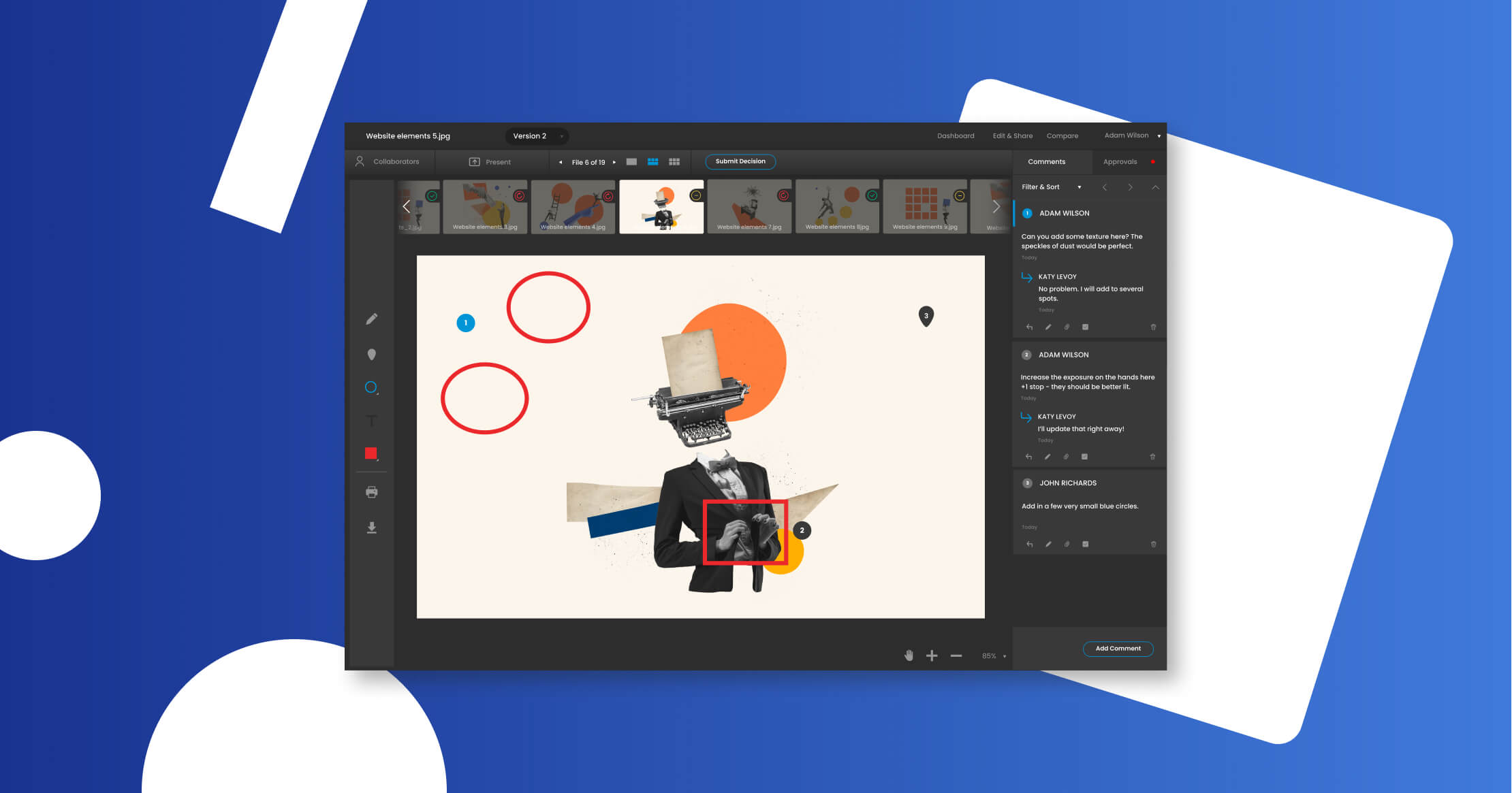
It sits between Digital Asset Management (DAM), which focuses on the storage and downstream distribution of finished assets, and General Project Management (GPM), which lacks the specialized rendering, annotation, and version control capabilities required for rich media. While GPM tools track tasks, Creative Project Management & Proofing Tools track the evolution of the asset itself. The category includes both general-purpose platforms capable of handling diverse media types (PDF, video, web) and vertical-specific tools built for high-end video production, packaging design, or editorial workflows.
For buyers, the distinction is critical: standard project management tools treat a creative asset as a static attachment. True creative management platforms treat the asset as a dynamic object subject to complex, multi-stage governance. This software is essential for marketing teams, agencies, and production studios that must balance creative velocity with rigorous brand and compliance standards.
History
The evolution of Creative Project Management & Proofing Tools is a history of closing the gap between administrative oversight and the actual creative work. In the 1990s and early 2000s, creative production was largely managed through disparate systems: schedules lived in Excel or early desktop scheduling software, while proofs were physical printouts or email attachments. This bifurcation created a "black box" for management; they knew a deadline was approaching but had no visibility into the asset's status until it was delivered.
The mid-2000s saw the rise of general SaaS project management, but these tools failed to address the specific needs of creative files. Reviewers still had to download files, annotate them offline, and upload disparate feedback, leading to the infamous "version control hell." The true emergence of this category occurred in the 2010s with the advent of HTML5-based browser proofing. For the first time, stakeholders could annotate video, code, and high-resolution imagery directly in a browser without proprietary software. This technological shift allowed for the decoupling of "viewing" from "creating," democratizing the review process for non-technical stakeholders.
Between 2015 and 2020, a wave of market consolidation reshaped the landscape. Large work management platforms began acquiring specialized proofing tools to integrate asset review directly into the task workflow. This transition marked a shift in buyer expectations from "give me a database of feedback" to "give me actionable intelligence." Modern buyers no longer just want to track comments; they demand analytics on review cycle times, automated compliance checks, and integration with the creative software itself. Today, the market is pivoting again, this time toward "creative operations" where the software does not just manage the project but actively participates in it via automation and AI-driven governance.
What To Look For
Evaluating this software requires looking beyond the user interface to the underlying architecture of how assets and feedback are handled. The most critical criterion is fidelity. A tool that compresses a video file for smooth playback but hides compression artifacts is useless for a colorist or VFX supervisor. Buyers must verify that the viewing experience matches the technical specifications of the final deliverable, whether that is print-ready CMYK PDFs or 4K HDR video.
Another pivotal factor is the granularity of permissions. Creative assets are sensitive intellectual property. A robust platform must distinguish between internal comments (creative team only) and external comments (client facing). Red flags include systems that rely on "security by obscurity" (unlisted links) rather than robust rights management (IRM) or single sign-on (SSO) for external reviewers. If a vendor cannot demonstrate how they prevent a leaked product launch from being accessed via a forwarded email link, they are not enterprise-ready.
Buyers should also interrogate the versioning logic. How does the system handle "stacked" versions? Does it retain the comment history of previous versions in a way that is easily comparable? A warning sign is a tool that treats a new version as a separate file, severing the audit trail. Key questions to ask vendors include: "Does your comparison tool highlight changes pixel-by-pixel or just side-by-side?", "How does the system handle conflicting feedback from two stakeholders with equal approval authority?", and "Can we automate the locking of a file once approval is granted to prevent subsequent unauthorized edits?"
Industry-Specific Use Cases
Retail & E-commerce
For retail and e-commerce, the primary driver is volume and velocity. These teams often produce thousands of assets per season across web, mobile, and social channels. The critical evaluation priority here is scalability of variant management. Tools must be able to handle "parent-child" relationships between assets, where one master creative is adapted into dozens of sizes and formats. Unlike other industries, retail demands deep integration with Product Information Management (PIM) systems; a proofer that cannot display the SKU metadata alongside the image forces reviewers to switch tabs, introducing risk.
Unique considerations include dynamic creative optimization (DCO) workflows. Retailers need tools that can proof HTML5 banners and personalized content where the "image" is actually code. Warning signs for this sector include per-storage pricing models, which penalize the high volume of high-res photography required for e-commerce catalogs. Success depends on "speed to shelf", reducing the time from photoshoot to product page live date.
Healthcare
In healthcare and life sciences, the software serves a fundamentally different purpose: risk mitigation. The priority is the Medical, Legal, and Regulatory (MLR) review process. Unlike creative agencies where "good enough" might suffice, healthcare demands absolute precision. The tool must support "clean" text extraction for spell-checking against approved claims lists and verify font sizes for regulatory disclosures. Version control is a safety-critical feature; an accidentally reverted version could lead to FDA warning letters or massive fines.
Evaluation must focus on the audit trail. The system must record not just what was said, but exactly who said it, when, and on which specific version. Electronic signature capabilities (compliant with 21 CFR Part 11 in the US) are often mandatory. A general-purpose tool that allows a user to delete a comment after the fact is a non-starter in this regulated environment.
Financial Services
Financial services buyers operate under similar regulatory pressure to healthcare but with a higher emphasis on data security and residency. Creative assets often contain non-public market-moving information or sensitive customer data. Financial institutions require on-premise or private cloud options and rigorous encryption key management. The workflow often involves compliance officers who are not creative professionals; therefore, the interface must be exceedingly simple for non-technical users while retaining complex backend governance.
A unique need in finance is the expiration and renewal tracking. Assets often have licensing rights or regulatory validity periods (e.g., an interest rate offer valid for 30 days). The software must trigger automated takedown notices or archive workflows when an asset expires. Red flags include weak integration with archival systems, as FINRA and SEC regulations require retrieving marketing communications years after the fact.
Manufacturing
Manufacturing and CPG (Consumer Packaged Goods) focus heavily on packaging and 3D visualization. A standard 2D viewer is insufficient for reviewing blister packs, bottles, or complex folding cartons. These teams need tools that support CAD files or 3D models, allowing reviewers to rotate the asset and check for distortion on curved surfaces. Color accuracy (managing spot colors and Pantone matching) is paramount, as a shade variance can cause a shelf recall.
The workflow here extends beyond the creative team to supply chain partners. The software must allow external printers and converters to access files without seeing the company's entire asset library. "Compare" features must be sophisticated enough to detect subtle shifts in barcode placement or ingredients lists, which are common sources of costly reprint errors.
Professional Services
For law firms, consultancies, and architecture firms, the currency is client experience and billable efficiency. The tool serves as a client portal. It must carry the firm's branding, not the vendor's. The evaluation priority is the "frictionless" nature of the external review, if a high-net-worth client has to create an account to view a brochure, the tool has failed. Security remains high, but usability is the differentiator.
These firms often require deep integration with document management systems (like iManage or SharePoint) rather than purely creative DAMs. The ability to proof 100-page text-heavy documents with the same ease as a visual layout is essential. A common pitfall is buying tools designed purely for video or images when the bulk of the firm's output is complex PDF reports and presentations.
Emerging Trends and Contrarian Take
Emerging Trends 2025-2026
The dominant trend is the rise of Agentic AI. As identified by Gartner, by 2028, 15% of day-to-day work decisions will be made autonomously by AI agents. In creative operations, this looks like software that doesn't just notify a human that a task is due, but autonomously checks the asset against brand guidelines, resizes it for three social channels, and routes it to the correct legal approver without human intervention. We are also seeing a convergence of categories, where the lines between DAM, PIM (Product Information Management), and Creative Project Management are blurring into unified "Content Supply Chain" platforms.
Contrarian Take
The "Single Source of Truth" is a dangerous distraction.
For decade, vendors have sold the dream of a "Single Source of Truth" (SSOT), one platform to rule them all. But as martech stacks balloon, achieving a literal SSOT is mathematically impossible and operationally paralyzing. Attempting to centralize every conversation, file, and financial record into one creative tool creates a "monolith" that is mediocre at everything. The contrarian reality is that federated data, where best-of-breed tools talk to each other via API but retain their own sovereignty, is the only viable model. The most efficient teams in 2026 will be those who stop trying to force their finance team into their project management tool and instead focus on invisible, seamless data handoffs. The goal is not one tool; it is one workflow.
Common Mistakes
Buying for the Manager, Not the Maker
The most fatal error is selecting a tool based on its reporting dashboards rather than its user experience for the creatives. If it takes a designer 10 clicks to upload a proof, they will find a workaround. Adoption dies in the friction of the upload button.
Ignoring the "External" User Experience
Many organizations test the tool internally but fail to test the experience for a client or external freelancer. If your external stakeholders need to install a plugin or create a complex login to view a file, your review cycle times will double. The external experience must be zero-friction.
Underestimating "Rework" Costs
Buyers often focus on the software subscription cost but ignore the cost of creative rework. Construction industry data suggests rework can cost 20% of the total project value; the same logic applies to creative projects. A cheap tool that lacks precise version control can cause a $50,000 campaign to be reprinted. Investing in superior proofing fidelity is an insurance policy against rework.
Questions To Ask in a Demo
- "Show me the exact steps a freelancer takes to upload a file. Count the clicks."
- "How does your system handle a conflict when two approvers give contradictory feedback on the same video frame?"
- "Can I see your API documentation? specifically, how do you handle webhooks for status changes?"
- "What is your policy on storage overages? Do you archive 'cold' assets to a cheaper tier automatically?"
- "Demonstrate how your tool handles color profiles (CMYK vs RGB) in the browser viewer."
- "If we leave your platform, in what format can we export our comment history and version data?"
Before Signing the Contract
Final Decision Checklist
Verify your exit strategy. Ensure that you own the metadata and that the vendor provides a structured export (JSON/XML) of all approval history. Check the SLA (Service Level Agreement) for uptime; if this tool goes down, your studio stops working. Negotiate "true-up" periods for users; creative teams fluctuate in size, and you shouldn't be locked into paying for peak headcount during a slow quarter.
Deal-Breakers
Walk away if the vendor charges for "guest" reviewers. In a creative ecosystem, the number of reviewers is unpredictable and high; paying for them is a punishment for collaboration. Also, reject any tool that cannot demonstrate SOC 2 Type II compliance if you are handling any form of proprietary or pre-release data.
Closing
Mastering the creative workflow is not about controlling creativity; it is about removing the administrative friction that slows it down. The right tool acts as an invisible scaffold, supporting the weight of the process so the team can build something extraordinary. If you have questions about navigating this complex landscape or need an unbiased second opinion on your shortlist, I invite you to reach out.
Email: albert@whatarethebest.com

 M
M