1. Home
  2. HR & People Management
  3. Workforce Scheduling & Shift Management Tools
  4. Shift Scheduling & Workforce Management for SaaS Companies

Ranking · Workforce Scheduling & Shift Management Tools

Best Shift Scheduling & Workforce Management for SaaS Companies

10 products scored on six criteria. Workday leads at 9.1 and the field is tight, with 0.4 points between first and last, so read the catches before you pick. Every product opens to the evidence behind its number.

10 products scored6 criteria118 sources citedUpdated Aug 9, 2026
1 Workdayworkday.com

Fair Workweek compliance built in, setup runs 6-14 months

Read the reviewVisit ↗
2 Humanitytcpsoftware.com

Humanity holds TxRAMP Level 2, a rare scheduling certification

Read the reviewVisit ↗
3 Legionlegion.co

Legion's AI forecasts hit 98% accuracy, no public pricing

Read the reviewVisit ↗
10Products
8.7 to 9.1Score spread
4Free plan or tier
01

The ranking

Order follows the score. Six little boxes show each product's criterion scores: green or red is above or below the category average, grey means too few products share that criterion to compare. The full review sits right under each one.

Nothing matches that filter here. Tap All to see every product.

1

Workday

workday.com · Workday Workforce Scheduling · scored Dec 2025

Fair Workweek compliance built in, setup runs 6-14 months

Best forLarge enterprises already using Workday for HCM and Finance

From $34 per user/mo SOC 2enterpriseAI features
Top score

AI-driven workforce scheduling unifying demand forecasting with Workday HCM and Finance data.

Standout factHistorical pricing estimated at $34-$42 per employee per monthoutsail.co
Biggest catchImplementation typically takes 6 to 14 months.virtelligence.com
$34-$42 PEPMHistorical price rangeoutsail.co
6-14 monthsImplementation timevirtelligence.com
10,500+Organizations using Workdayprnewswire.com

Starting price

$34-$42/employee/mohistorical estimate, custom quote required

In their words

“Navigating on your phone is a challenge but it works great on the computer.”

g2.com

Upside

  • AI-driven schedule generation
  • Native Fair Workweek compliance
  • Deep Workday HCM integration

Catch

  • Opaque, historically expensive pricing
  • 6 to 14 month implementation
  • Mobile navigation can be clunky
Pick it ifLarge enterprises already using Workday for HCM and Finance
Skip it ifSmall to mid-sized businesses with limited budgets and IT resources
PricingCustom quote, historically $34-$42 per employee monthly

Editor's takeWorkday Workforce Scheduling ranks first among 10 shift scheduling tools for SaaS companies with a 9.1 overall score. It natively calculates Fair Workweek penalties and forecasts demand using Workday Illuminate AI. Historical pricing runs $34 to $42 per employee monthly, and implementation can stretch 6 to 14 months.

How long does Workday Workforce Scheduling take to implement?

Typically 6 to 14 months, according to an implementation consultancy's published estimate.

Does it handle Fair Workweek compliance automatically?

Yes. It calculates penalties for late schedule changes and enforces meal, break, and predictive scheduling laws natively, per Workday's own documentation.

The evidence: 6 criteria, 3 penalties (−0.18 points)
9.5
Product Capability & DepthLooked for: We evaluate the breadth of scheduling features, including automation, mobile self-service, and integration with broader HCM systems.Workday delivers a comprehensive scheduling suite with AI-driven automated schedule generation, demand forecasting using external data, and deep unification with Time Tracking and HCM.workday.comworkday.comworkday.com
9.9
Market Credibility & Trust SignalsLooked for: We assess market presence, analyst recognition, and the size of the customer base to determine reliability.Workday is a dominant market leader, recognized as a Leader in the Gartner Magic Quadrant for Cloud HCM for nine consecutive years and serving over 10,500 global organizations.prnewswire.comprnewswire.com
8.7
Usability & Customer ExperienceLooked for: We examine user interface design, mobile app usability, and customer feedback regarding ease of use.While Workday promotes a 'worker-first' mobile experience, user feedback is mixed, with some praising the unified access and others criticizing the interface as 'clunky' or difficult to navigate on mobile.workday.comg2.comtrustpilot.com
8.2
Value, Pricing & TransparencyLooked for: We analyze pricing transparency, cost structure relative to competitors, and implementation value.Workday does not publicly disclose pricing, requires custom quotes, and is historically one of the most expensive options ($34-$42 PEPM) with significant implementation costs.workday.comthecfoclub.comoutsail.co
9.6
Compliance & Labor Law AdherenceLooked for: We evaluate the software's ability to handle complex labor regulations, union rules, and predictive scheduling laws.Workday excels in compliance, offering built-in tools for 'Fair Workweek' laws, union rule enforcement, and automatic calculation of penalties for schedule changes.workday.comhr-path.comhr-path.com
9.3
AI & Intelligent AutomationLooked for: We assess the integration of artificial intelligence for demand forecasting, automated scheduling, and labor optimization.Workday Illuminate and ML-based forecasting leverage external data to optimize schedules, automatically recommend worker replacements, and predict labor demand.workday.comworkday.comjoshbersin.com

Score adjustments−0.18 points in total

−0.05High implementation costs (often ~100% of annual fees) and opaque pricing models create significant barriers to entry and value assessment.outsail.co · severity 70/100
−0.08Implementation timelines are lengthy, typically ranging from 6 to 14 months, requiring significant resource investment.virtelligence.com · severity 60/100
−0.05Users report the mobile interface can be difficult to navigate and 'clunky', which impacts the effectiveness of self-service features.g2.com · severity 50/100
2

Humanity

tcpsoftware.com · Humanity Schedule · scored Dec 2025

Humanity holds TxRAMP Level 2, a rare scheduling certification

Best forMid-market to large organizations needing complex labor law compliance.

From $3 per user/mo SOC 2TxRAMPADP integration
−0.2 vs #1

AI-driven shift scheduling platform with demand forecasting and automated labor law compliance.

Standout factHolds TxRAMP Level 2 certification, alongside SOC 2 Type II compliance.tcpsoftware.com
Biggest catchA recent interface update reportedly added clicks to tasks that used to take one click.g2.com
175,000+Business locations servedtcpsoftware.com
1.3M+Users worldwidesaas-capital.com
4.8-4.9/5Mobile app ratingconnecteam.com

Standout number

175,000+business locations served

Source: tcpsoftware.com

Compliance

✓ SOC 2 Type II✓ TxRAMP Level 2

Source: tcpsoftware.com

Upside

  • AI-powered demand forecasting
  • TxRAMP Level 2 certified
  • Native ADP and Workday sync

Catch

  • No permanent free plan
  • New interface reported as slower
  • Advanced features cost extra
Pick it ifMid-market to large organizations needing complex labor law compliance.
Skip it ifSmall businesses wanting a free plan or zero learning curve.
PricingFrom about $2.75/user/mo; no permanent free plan.

Editor's takeHumanity's Demand Scheduler uses AI to forecast staffing needs from historical data, and a custom rules engine flags labor law violations automatically. It holds TxRAMP Level 2 certification, a standard not many scheduling tools carry, plus SOC 2 Type II compliance. The mobile app rates 4.8 to 4.9 on app stores, but the newer desktop interface draws complaints. Reviewers say routine tasks now take more clicks than before.

Does Humanity have a free plan?

No permanent free plan is offered, only a free trial. Paid plans start around $2.75 to $3.75 per user per month, according to third-party pricing data.

What is TxRAMP Level 2?

A Texas state security authorization for cloud products. Humanity holds this certification along with SOC 2 Type II compliance.

The evidence: 6 criteria, 2 penalties (−0.08 points)
9.1
Product Capability & DepthLooked for: We look for advanced scheduling automation, demand forecasting, and granular control over shift management.Humanity offers robust AI-driven demand forecasting, automated scheduling based on custom rules, and comprehensive compliance management for complex labor laws.tcpsoftware.comtcpsoftware.comconnecteam.com
9.3
Market Credibility & Trust SignalsLooked for: We look for established market presence, reputable ownership, and widespread adoption across industries.Acquired by TCP Software in 2020, Humanity serves over 175,000 business locations and 1.3 million users, backed by significant industry tenure.tcpsoftware.comsaas-capital.com
8.7
Usability & Customer ExperienceLooked for: We look for intuitive interfaces, high-rated mobile apps, and responsive support systems.Users generally praise the intuitive interface and mobile app, though recent updates have drawn criticism for slowness and increased clicks for simple tasks.tcpsoftware.comconnecteam.comg2.com
8.6
Value, Pricing & TransparencyLooked for: We look for clear pricing tiers, free trial availability, and transparent inclusion of key features.Pricing is competitive starting around $3/user, but there is no permanent free plan and advanced features like auto-scheduling often cost extra.tcpsoftware.comsaasworthy.comconnecteam.com
8.9
Security, Compliance & Data ProtectionLooked for: We look for native connections to major payroll, HR, and POS systems to streamline data flow.The platform offers robust integrations with major HCM providers like ADP, Workday, and BambooHR, plus an open API for custom connections.tcpsoftware.comtcpsoftware.comtcpsoftware.com
9.0
Support, Training & Onboarding Resourcestcpsoftware.com

Score adjustments−0.08 points in total

−0.05Users have reported that the new interface update resulted in slower performance and increased clicks for routine tasks.g2.com · severity 50/100
−0.03Unlike some competitors, the product does not offer a permanent free plan, and advanced AI scheduling features may require higher tiers or add-ons.connecteam.com · severity 45/100
3

Legion

legion.co · Legion WFM · scored Dec 2025

Legion's AI forecasts hit 98% accuracy, no public pricing

Best forLarge retail and service chains with unpredictable labor demand

Quote only SOC 2enterpriseAI features
−0.2 vs #1

An AI-native workforce management platform that forecasts demand and auto-generates compliant schedules.

Standout factA Forrester study found organizations using Legion could see a 1,345% (13x) ROI over three years.legion.co
Biggest catchPricing is not public, and implementation can require significant time for data migration and configuration.sprad.io
1,345% (13x)3-year ROIlegion.co
98%Forecast accuracyslashdot.org
4.9 starsMobile app ratinglegion.co

By the numbers

98%AI forecast accuracy
1,345%3-year ROI (Forrester)
<10sto generate a schedule

Source: legion.co

What reviewers say

App store
4.9/5

Source: legion.co

Upside

  • 98% accurate AI demand forecasting
  • Schedules generated in under 10 seconds
  • Mobile app rated 4.9 stars

Catch

  • No public pricing
  • Complex initial setup
  • Limited reporting customization
Pick it ifLarge retail and service chains with unpredictable labor demand
Skip it ifSmall businesses with predictable, static schedules
PricingCustom quote; documented 13x ROI over three years

Editor's takeLegion's forecasting engine claims 98% accuracy and can build a compliant schedule in under 10 seconds, backed by a Forrester-measured 13x ROI over three years. Its mobile app holds a 4.9-star rating, and Legion is an SAP Endorsed App with a pre-built Workday integration. Pricing stays behind a quote request, and implementation reportedly takes real time to configure, so budget for setup before rollout.

What ROI does Legion WFM document?

A Forrester Total Economic Impact study found organizations using Legion Workforce Management could see a 1,345% ROI, or roughly 13 times the investment, over three years.

How accurate is Legion's demand forecasting?

Legion states its automated labor forecasts reach 98% accuracy, according to third-party comparison data cited by the vendor.

The evidence: 6 criteria, 3 penalties (−0.17 points)
9.4
Product Capability & DepthLooked for: We evaluate the depth of AI automation, forecasting accuracy, and the breadth of workforce management features like scheduling and time tracking.Legion offers an AI-native platform claiming 98% forecast accuracy and the ability to generate compliant schedules in under 10 seconds.legion.coslashdot.orglegion.co
9.2
Market Credibility & Trust SignalsLooked for: We look for third-party validation, major industry awards, analyst recognition, and adoption by enterprise-scale customers.Legion is backed by Workday Ventures, holds multiple 'AI Breakthrough' awards, and has a Forrester TEI study validating its ROI.businesswire.comlegion.colegion.co
8.9
Usability & Customer ExperienceLooked for: We assess user interface design, mobile app ratings, and customer feedback regarding ease of use for both managers and frontline employees.The mobile app is highly rated (4.9 stars) and G2 reviews frequently cite 'ease of use' as a primary benefit, though some specific workflows have friction.legion.cog2.com
8.2
Value, Pricing & TransparencyLooked for: We evaluate public pricing availability, contract terms, and documented return on investment data.While pricing is not publicly transparent, the product has a documented 1345% ROI over three years according to Forrester research.legion.cog2.comlegion.co
8.8
Integrations & Ecosystem StrengthLooked for: We look for pre-built connectors with major HRIS/payroll systems and the breadth of the partner ecosystem.Legion is an SAP Endorsed App and Workday Ventures partner, offering pre-built integrations with major enterprise systems.legion.colegion.comarketplace.workday.com
9.6
Security, Compliance & Data ProtectionLooked for: We examine certifications, data sovereignty, and suitability for regulated industries like government or healthcare.Legion holds exceptional security credentials for a WFM tool, including DoD IL2-6 approval, SOC 2 Type 2, and HIPAA compliance.legionintel.comlegion.co

Score adjustments−0.17 points in total

−0.06Implementation and setup can be complex, with data migration and configuration requiring significant time and resources.sprad.io · severity 55/100
−0.05Users report specific friction with holiday management, particularly regarding clocking in and out on holidays.g2.com · severity 50/100
−0.06Reviewers note limited reporting customization options, suggesting advanced data analysis may lack flexibility.selecthub.com · severity 45/100
4

When I Work

wheniwork.com · scored Dec 2025

When I Work's free plan covers up to 75 users

Best forSmall to mid-sized retail and hospitality teams needing simple mobile scheduling

Free tier From $2 per user/mo free planmobile appZapier
−0.2 vs #1

Employee scheduling and time-tracking app with a free plan and mobile-first design for shift-based teams.

Standout factFree plan covers up to 75 users, with paid plans starting at $2/user/monthwheniwork.com
Biggest catchIntegration options are more limited than larger workforce management platforms.wheniwork.com
75Free plan user limitwheniwork.com
$2/user/moStarting paid pricewheniwork.com
14 daysFree trialwheniwork.com

Free vs paid

Free plan

$0
  • Up to 75 users

Paid from

$2/user/mo
  • Advanced scheduling
  • Time tracking

Source: wheniwork.com

Before you sign up

  • Retail or hospitality shift team
  • Want simple mobile-first scheduling
  • Need deep integrations or phone support

Upside

  • Free plan for up to 75 users
  • Simple interface for remote teams
  • Mobile app included

Catch

  • Limited integration options
  • Less customization available
  • No offline mode
Pick it ifSmall to mid-sized retail and hospitality teams needing simple mobile scheduling
Skip it ifLarge enterprises with complex compliance or union scheduling rules
PricingFree plan for up to 75 users, paid plans from $2/user/month

Editor's takeWhen I Work covers scheduling and time tracking with a free plan for up to 75 users, a higher seat limit than most competitors offer for free. Paid plans start at $2 per user a month with a 14-day trial. Integration options stay limited next to larger workforce platforms, connecting mainly through Slack, QuickBooks and Gusto.

Does When I Work have a free plan?

Yes. The free plan covers up to 75 users. Paid plans start at $2 per user a month.

Does When I Work integrate with other tools?

It connects with Slack, QuickBooks and Gusto, though integration options are more limited than some competitors.

The evidence: 6 criteria
9.0
Product Capability & Depthwheniwork.com
8.8
Market Credibility & Trust Signalspcmag.com
9.2
Usability & Customer Experiencecio.com
8.9
Value, Pricing & Transparencywheniwork.com
8.5
Integrations & Ecosystem Strengthwheniwork.com
9.0
Security, Compliance & Data Protectionwheniwork.com
5

Microsoft Teams Shifts

microsoft.com · Microsoft Teams Shift Management · scored Dec 2025

Teams Shifts comes free, drops UKG connectors in 2025

Best forOrganizations already invested in Microsoft 365

Free plan Free with M365Time clockNo AI scheduling
−0.3 vs #1

Mobile-first shift scheduling built into Microsoft Teams with a time clock and audit logging.

Standout factIncluded at no extra cost with Microsoft 365 F1 plans starting around $2.25/user/month.microsoft.com
Biggest catchMicrosoft is retiring its managed UKG and Blue Yonder connectors on December 7, 2025, forcing a migration.mc.merill.net
~$2.25/user/monthMicrosoft 365 F1 pricemicrosoft.com
Dec 7, 2025UKG/Blue Yonder connector retirementmc.merill.net

Starting price

$0extraIncluded with Microsoft 365 F1/F3 licenses

In their words

“if a change is made to the schedule it does not sync to the Android devices using the Teams app. We have to clear the Shifts cache... to see the changes”

learn.microsoft.com

Upside

  • Free with Microsoft 365 licenses
  • Built-in time clock with geofencing
  • Audit logging via Microsoft Purview

Catch

  • No guest user scheduling
  • Mobile sync issues reported
  • No AI auto-scheduling
Pick it ifOrganizations already invested in Microsoft 365
Skip it ifBusinesses needing AI auto-scheduling or guest scheduling
PricingIncluded free with Microsoft 365 F1/F3 licenses

Editor's takeShifts rides inside Microsoft Teams, so any organization already paying for Microsoft 365 F1 or F3 gets a full scheduling tool, time clock and swap system at no added cost. It backs that with Microsoft Purview audit logging that tracks every shift change, a compliance depth standalone scheduling apps rarely match. The gaps are real: Shifts cannot add guest or contractor users to a schedule, users report Android sync delays that require clearing the app cache, and Microsoft is retiring its managed UKG and Blue Yonder connectors in December 2025.

Does Microsoft Teams Shifts cost extra?

No. It is included with standard Microsoft 365 licenses, including F1 plans starting around $2.25 per user monthly, with no additional Shifts-specific fee.

Can external contractors be added to a Shifts schedule?

No. Shifts does not support guest user access, so external contractors or temporary staff cannot be scheduled the same way as full employees.

The evidence: 6 criteria, 3 penalties (−0.21 points)
8.8
Product Capability & DepthLooked for: We evaluate the breadth of scheduling features, including shift creation, swapping, time tracking, and mobile accessibility for frontline workers.Shifts offers core scheduling features like open shifts, swapping, and a built-in time clock with geofencing, though it lacks advanced auto-scheduling automation found in specialized competitors.microsoft.comyoutube.comyoutube.com
9.4
Market Credibility & Trust SignalsLooked for: We assess the product's adoption rate, backing by established technology providers, and reliability track record in the enterprise market.As a core component of the Microsoft 365 ecosystem, Shifts benefits from immense market penetration and the enterprise-grade reliability associated with Microsoft's infrastructure.microsoft.comlearn.microsoft.comlearn.microsoft.com
8.5
Usability & Customer ExperienceLooked for: We analyze the ease of use for mobile-first workers, interface intuitiveness, and the reliability of data synchronization across devices.While the mobile-first design is intuitive for workers, persistent reports of synchronization delays between desktop and mobile apps negatively impact the user experience.microsoft.comlearn.microsoft.comlearn.microsoft.com
9.6
Value, Pricing & TransparencyLooked for: We evaluate the cost-benefit ratio, specifically looking for hidden fees versus included features in standard licensing packages.Shifts offers exceptional value as it is included at no additional cost with standard Microsoft 365 F1 and F3 frontline worker licenses.microsoft.comsyskit.com
8.7
Integrations & Ecosystem StrengthLooked for: We assess the ability to integrate with third-party workforce management systems and the availability of APIs for custom connections.While powerful Graph APIs exist, Microsoft is retiring first-party managed connectors for major WFM systems like UKG and Blue Yonder, forcing a transition to partner apps.mc.merill.netlearn.microsoft.com
9.3
Security, Compliance & Data ProtectionLooked for: We examine audit logging capabilities, data residency compliance, and adherence to enterprise security standards.The product leverages the robust Microsoft Purview compliance portal, offering detailed audit logs for shift creation, deletion, and modifications.learn.microsoft.comlearn.microsoft.com

Score adjustments−0.21 points in total

−0.10Shifts does not support guest access, meaning external contractors or temporary staff cannot be added to schedules.learn.microsoft.com · severity 75/100
−0.06Users frequently report that schedule updates made on desktop do not sync to the mobile app without clearing the app cache.learn.microsoft.com · severity 60/100
−0.05Microsoft is retiring its first-party managed connectors for UKG and Blue Yonder, forcing customers to migrate to alternative integration methods.mc.merill.net · severity 50/100
6

Sage HR

sage.com · Sage HR Shift Management · scored Dec 2025

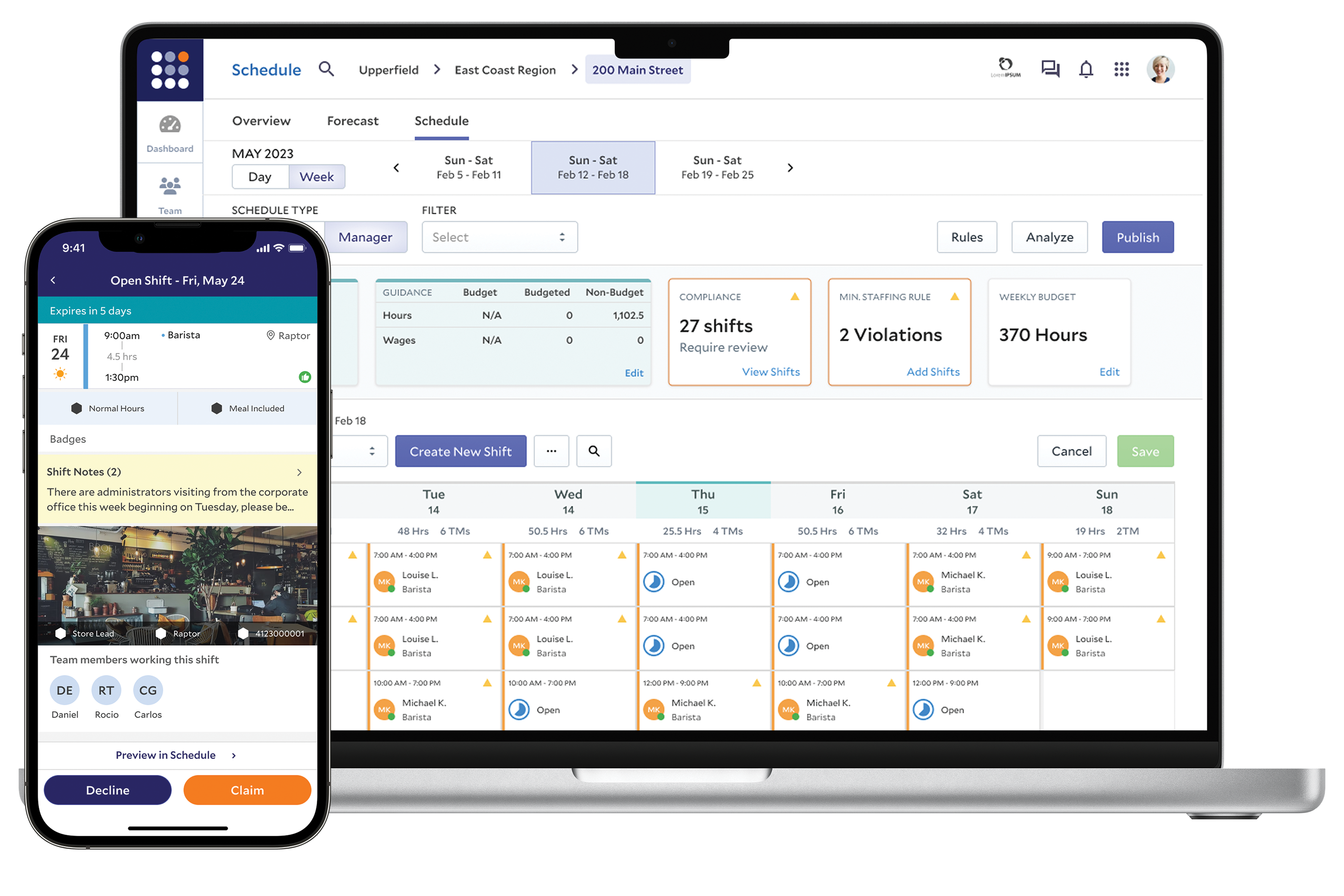
Scheduling module from $4/employee, but mobile can't edit shifts.

Best forSmall to mid-sized Sage customers wanting to pay only for scheduling.

From $4 per user/mo modular pricingISO 27001Sage Payroll sync
−0.3 vs #1

Modular shift scheduling with drag-and-drop rosters, ISO 27001 security, and native Sage Payroll sync.

Standout factThe Shift Scheduling module costs $4 per employee per month as an add-on.peoplemanagingpeople.com
Biggest catchManagers cannot create or adjust shift schedules from the mobile app, only the web interface.youtube.com
$4/employee/moShift Scheduling add-onpeoplemanagingpeople.com
2M+Customers worldwidesage.com
4.4/5G2 ratingg2.com

True monthly cost

Monthly cost per employee

Core HR + Leave$7
Shift Scheduling add-on$4
Total$11/employee

Modular pricing, pay only for modules used

The thing people get wrong

Managers can build schedules from the Sage HR mobile app

Shift creation and edits are web-only, not available on mobile

Source: youtube.com

Upside

  • Modular pricing, pay for what you use
  • ISO 27001 certified security
  • Native Sage Payroll sync

Catch

  • Mobile app can't edit shifts
  • Payroll sync varies by region
  • Reporting customization is limited
Pick it ifSmall to mid-sized Sage customers wanting to pay only for scheduling.
Skip it ifLarge enterprises needing complex, AI-driven labor demand forecasting tools.
PricingModular: Core HR $7/employee/mo, Shift Scheduling $4/employee/mo add-on.

Editor's takeSage HR sells scheduling as a standalone module, so businesses pay $4 per employee a month for Shift Scheduling without buying a full HRIS suite. It carries ISO 27001 certification and AES-256 encryption over AWS, backed by Sage Group's status as a FTSE 100 company. Managers cannot create or edit shifts from the mobile app, that administrative work stays on the web interface.

How much does Sage HR's scheduling module cost?

Shift Scheduling is a modular add-on priced at $4 per employee per month. Core HR and Leave Management runs $7 per employee per month separately.

Can managers build shift schedules from the Sage HR mobile app?

No. Schedule creation and edits are restricted to the web interface, while the mobile app is built for employee self-service like viewing shifts and requesting time off.

The evidence: 6 criteria, 3 penalties (−0.18 points)
8.9
Product Capability & DepthLooked for: We evaluate the flexibility of roster creation, support for complex shift patterns, and automation features for SMEs.Sage HR offers a robust drag-and-drop scheduler with support for shift templates, group-based planning, and employee self-service availability, though it relies on manual allocation rather than AI-driven auto-scheduling.sage.comsage.comsage.com
9.4
Market Credibility & Trust SignalsLooked for: We assess the vendor's financial stability, user base size, and reputation within the HR software market.Backed by the Sage Group, a FTSE 100 company, the product benefits from immense market stability and is trusted by over 2 million customers worldwide.sage.comsage.comg2.com
8.7
Usability & Customer ExperienceLooked for: We look for an intuitive user interface, mobile accessibility for frontline workers, and responsive support channels.Users consistently praise the clean, user-friendly dashboard and mobile app for employees, though some managers report an inability to adjust schedules directly via the mobile application.sage.comg2.comemployeehandbooktemplateuk.co.uk
9.0
Value, Pricing & TransparencyLooked for: We evaluate pricing transparency, modularity, and cost-effectiveness for small to medium-sized businesses.Sage HR employs a highly transparent modular pricing model, allowing businesses to pay only for the specific features they need (e.g., Core HR + Shift Scheduling) without bundling unnecessary tools.sage.compeoplemanagingpeople.comsage.com
8.5
Integrations & Ecosystem StrengthLooked for: We examine the depth of integration with payroll systems and the broader third-party software ecosystem.The product offers seamless integration with Sage Payroll products (Sage 50/Business Cloud), which is a major advantage for existing Sage customers, though third-party integrations outside the Sage ecosystem are less extensive.sage.comgb-kb.sage.comdsdinc.com
9.5
Security, Compliance & Data ProtectionLooked for: We check for industry-standard certifications like ISO 27001, SOC 2, and GDPR compliance measures.Sage HR is ISO 27001 certified and adheres to strict GDPR guidelines, leveraging AWS infrastructure to ensure high-level data protection and compliance.support.sage.hrsupport.sage.hr

Score adjustments−0.18 points in total
−0.06Deep payroll integration features, such as pay stub access, are often limited to specific regions (e.g., UK) or specific Sage software versions (Sage 50c).youtube.com · severity 60/100
−0.06Managers cannot create or adjust shift schedules via the mobile app; these administrative tasks are restricted to the web interface.youtube.com · severity 55/100
−0.06Reporting capabilities are described by some users as rigid, with limited options for customization or adjustments.jibble.io · severity 45/100
7

Shiftbase

shiftbase.com · Shiftbase Workforce Management · scored Dec 2025

Shiftbase stays free forever for up to 10 employees.

Best forEuropean SMEs with flexible or part-time workforces needing GDPR compliance.

Free tier From $3 per user/mo free planISO 27001GDPR
−0.3 vs #1

An ISO 27001-certified scheduling platform with drag-and-drop shifts and a genuinely free small-team tier.

Standout factThe Free Plan covers up to 10 employees and is described as free forever.shiftbase.com
Biggest catchThe mobile app cannot handle admin tasks like editing shifts, forcing a desktop switch.unrubble.com
10 employeesFree plan limitshiftbase.com
€3/employee/moPaid plan starting priceshiftbase.com

Free vs paid

Free forever

$0
  • Up to 10 employees
  • Drag-and-drop scheduling
  • Time tracking

Basic, from €3/employee/mo

  • Unlimited employees
  • Availability rules
  • Payroll integrations

Source: shiftbase.com

Compliance

✓ ISO 27001:2022✓ GDPR? SOC 2

Source: trust.shiftbase.com

Upside

  • Free plan for up to 10 employees
  • ISO 27001 certified
  • Drag-and-drop scheduling

Catch

  • Mobile app lacks admin features
  • Forecasting locked to Premium plan
  • Some payroll syncs are one-way
Pick it ifEuropean SMEs with flexible or part-time workforces needing GDPR compliance.
Skip it ifLarge enterprises needing deep, complex HRIS integrations.
PricingFree for up to 10 employees, paid plans from €3/employee/mo

Editor's takeShiftbase pairs a genuinely free tier for small teams with ISO 27001:2022 certification, unusual at this price point. Its public Trust Center lays out GDPR and security practices in detail. Mobile admin functionality lags the desktop app, and budget forecasting tools stay locked to the Premium plan.

Is Shiftbase free for small teams?

Yes. The Free Plan covers up to 10 employees and is free forever, per Shiftbase's pricing page.

Is Shiftbase ISO certified?

Yes. Shiftbase holds ISO/IEC 27001:2022 certification for information security.

The evidence: 6 criteria, 3 penalties (−0.16 points)
8.8
Product Capability & DepthLooked for: We evaluate the breadth of workforce management features, including scheduling flexibility, time tracking precision, and reporting granularity.Shiftbase offers a comprehensive suite including drag-and-drop scheduling, kiosk-based time tracking, and automated absence management, though advanced forecasting is reserved for higher tiers.shiftbase.comshiftbase.comgetapp.com
9.3
Market Credibility & Trust SignalsLooked for: We assess the vendor's reputation, security certifications, and transparency regarding data protection and compliance.Shiftbase demonstrates exceptional credibility through a dedicated Trust Center, ISO 27001:2022 certification, and full GDPR compliance transparency.techround.co.ukshiftbase.comtrust.shiftbase.com
8.7
Usability & Customer ExperienceLooked for: We analyze user feedback regarding ease of use, onboarding speed, and the quality of the mobile experience.Users praise the intuitive drag-and-drop interface and responsive support, but consistently cite a learning curve during setup and limitations in the mobile app's administrative functions.shiftbase.comunrubble.comgetapp.com
9.1
Value, Pricing & TransparencyLooked for: We examine the pricing structure, the generosity of free tiers, and the clarity of cost information.Shiftbase offers a transparent pricing model with a 'free forever' plan for small teams and competitive per-user rates for larger organizations.shiftbase.comshiftbase.comshiftbase.com
8.8
Security, Compliance & Data ProtectionLooked for: We investigate the availability of APIs and pre-built connectors for payroll, POS, and HR systems.Shiftbase provides a public API and a marketplace of integrations for major payroll and POS systems, though some integrations have documented data synchronization limitations.shiftbase.comtrust.shiftbase.comtrust.shiftbase.com
9.2
Support, Training & Onboarding Resourcesshiftbase.com

Score adjustments−0.16 points in total

−0.06The mobile app has documented limitations regarding administrative tasks, such as editing shifts, which forces users to switch to the desktop version.unrubble.com · severity 60/100
−0.05Certain payroll integrations (e.g., Exact Online, Employes) do not sync leave balances back from the payroll system to Shiftbase, requiring manual management.help.shiftbase.com · severity 50/100
−0.05Users report a steep learning curve during the initial setup and configuration of the software.getapp.com · severity 45/100
8

Shiftboard

shiftboard.com · Shiftboard: Employee Scheduling · scored Dec 2025

No drag-and-drop scheduling, despite the price

Best forMid-to-large enterprises with complex 24/7 shift operations.

Quote only SOC 2union complianceUKG integration
−0.3 vs #1

Enterprise scheduling platform for shift work with union rules, fatigue management, and UKG integration.

Standout factShiftboard requires a minimum of 100 employees, per its sales team.connecteam.com
Biggest catchThe web interface lacks drag-and-drop scheduling entirely.connecteam.com
100+Minimum employees reportedconnecteam.com
$45-$276/moHistorical price rangetrustradius.com

In their words

“Shiftboard doesn't support drag-and-drop shift scheduling... A Shiftboard sales rep told me Shiftboard tested drag-and-drop functionality but determined it's 'not as error-proof'.”

connecteam.com

Before choosing Shiftboard

  • Team of 100+ employees
  • Need union or fatigue rule compliance
  • Want drag-and-drop web scheduling

Upside

  • Compliance guarantee for scheduling rules
  • Deep UKG and HRIS integration
  • Handles union and fatigue rules

Catch

  • No drag-and-drop web scheduling
  • Web interface called outdated
  • Sales requires 100+ employees
Pick it ifMid-to-large enterprises with complex 24/7 shift operations.
Skip it ifSmall businesses with simple, straightforward scheduling needs.
PricingCustom quote. Historical plans ranged $45 to $276/mo.

Editor's takeShiftboard targets mission-critical scheduling where union rules and fatigue policies matter most. Its compliance guarantee offers a money-back promise on rule enforcement, rare in this category. Reviewers note the web app skips drag-and-drop entirely, a deliberate choice the vendor calls more error-proof.

Does Shiftboard support drag-and-drop scheduling?

No. Shiftboard's team says they tested drag-and-drop but found it less error-proof, so the web interface omits it.

What size company does Shiftboard serve?

Mostly larger teams. One reviewer reported sales requiring a minimum of 100 employees for a quote. Historical listings show plans from $45 to $276 per month.

The evidence: 6 criteria, 3 penalties (−0.14 points)
9.0
Product Capability & DepthLooked for: We evaluate the software's ability to handle complex scheduling scenarios, automation rules, and workforce management features specific to hourly and shift-based operations.Shiftboard offers two distinct products, ScheduleFlex and SchedulePro, featuring advanced algorithms for coverage optimization, fatigue management, and automated compliance with union rules.softwarefinder.comslashdot.org
9.3
Market Credibility & Trust SignalsLooked for: We assess industry recognition, awards, partnerships, and the vendor's reputation among enterprise-level clients in regulated sectors.Shiftboard holds significant market credibility, evidenced by a Gold Brandon Hall Group award, a strategic partnership with UKG, and a client base including Fortune 500 companies.shiftboard.combusinesswire.com
8.4
Usability & Customer ExperienceLooked for: We analyze user feedback regarding the interface design, ease of use, mobile accessibility, and specific workflow features like drag-and-drop scheduling.While the mobile app is well-regarded, the web interface is frequently criticized for being outdated and lacking modern drag-and-drop functionality found in competitor products.shiftboard.comconnecteam.comjoinvars.com
8.5
Value, Pricing & TransparencyLooked for: We examine public pricing availability, contract terms, minimum user requirements, and the overall value proposition for the target market.Pricing is not publicly transparent and requires a quote; research indicates potential minimum user requirements (e.g., 100 employees) that may exclude smaller businesses.shiftboard.comconnecteam.comtrustradius.com
8.9
Integrations & Ecosystem StrengthLooked for: We evaluate the depth and quality of integrations with major HRIS, payroll, and workforce management systems essential for enterprise environments.Shiftboard offers robust integrations with major enterprise systems like UKG, Workday, and ADP, utilizing API, flat-file, and pre-built connectors.shiftboard.commarketplace.ukg.comshiftboard.com
9.4
Security, Compliance & Data ProtectionLooked for: We assess the product's adherence to security standards (SOC 2, HIPAA) and its ability to manage regulatory compliance within the scheduling process.Shiftboard is SOC 2 Type II compliant and emphasizes a 'compliance guarantee' for scheduling rules, positioning itself as a secure solution for mission-critical industries.shiftboard.comshiftboard.com

Score adjustments−0.14 points in total

−0.06The web interface lacks drag-and-drop scheduling functionality, a standard feature in many competitor products, which users report makes schedule adjustments more cumbersome.connecteam.com · severity 60/100
−0.05Multiple independent reviews describe the web-based user interface as 'outdated' and 'clunky' compared to the mobile app and modern competitors.joinvars.com · severity 50/100
−0.03Sales inquiries for smaller teams (e.g., under 100 employees) may be declined or deprioritized, indicating a high minimum user requirement that is not explicitly stated on the main pricing page.connecteam.com · severity 45/100
9

Sling

getsling.com · Sling: Employee Scheduling Solution · scored Dec 2025

Sling's free plan now caps at 30 users, Android app still glitchy

Best forSmall to mid-sized businesses in retail and hospitality

Free tier From $2 per user/mo free plangeofenced time clockToast integration
−0.4 vs #1

Mobile-first shift scheduling with labor cost optimization, geofenced time tracking, and Toast and Gusto integrations.

Standout factPaid plans start at $1.70 per user per month when billed annually.forbes.com
Biggest catchThe previously unlimited free plan is now capped at 30 users, effective March 1, 2025.support.getsling.com
$1.70/user/moStarting paid priceforbes.com
30 usersFree plan capsupport.getsling.com
4.6/5Capterra ratingconnecteam.com

Free vs paid

Free plan

$0
  • Up to 30 users
  • Shift scheduling
  • Time-off requests

Paid from $1.70/user/mo

  • Labor cost optimization
  • Advanced reporting
  • Task management

Source: support.getsling.com

What reviewers say

Capterra
4.6/5 · verified
G2
4.4/5 · verified

Source: connecteam.com

Upside

  • Free plan for small teams
  • Labor cost optimization built in
  • Toast, Square, Gusto integrations

Catch

  • Android app stability issues
  • Free plan now capped at 30 users
  • Advanced reporting locked to top tier
Pick it ifSmall to mid-sized businesses in retail and hospitality
Skip it ifLarge enterprises requiring complex compliance automation
PricingFree plan (30 users), paid from $1.70/user/mo

Editor's takeSling bundles scheduling, messaging, time tracking, and labor cost forecasting into one platform aimed at retail and hospitality, with GPS geofencing on its time clock to prevent early clock-ins. It integrates directly with Toast, Square, and Gusto for POS and payroll sync, and paid plans start at just $1.70 per user monthly. The free plan, previously unlimited, was capped at 30 users in March 2025, and the Android app carries documented reports of bugs and crashes.

Is Sling's free plan still unlimited?

No. As of March 1, 2025, free accounts are limited to 30 users unless associated with Toast POS.

Does Sling integrate with POS and payroll systems?

Yes, including Toast, Square, Shopify, and Gusto, syncing employee hours directly for payroll.

The evidence: 6 criteria, 3 penalties (−0.13 points)
8.9
Product Capability & DepthLooked for: We evaluate the breadth of scheduling tools, time tracking precision, and workforce management features essential for shift-based industries.Sling offers a comprehensive suite including drag-and-drop scheduling, time clocks with geofencing, labor cost optimization, and task management.getsling.comgetsling.comgetsling.com
9.2
Market Credibility & Trust SignalsLooked for: We assess user ratings across major review platforms, client roster quality, and company longevity.Sling maintains high ratings (4.4-4.6/5) across major platforms and serves major clients like Amazon and AMC Theatres.connecteam.comgetsling.com
8.7
Usability & Customer ExperienceLooked for: We analyze interface intuitiveness, mobile app performance, and the quality of customer support interactions.Users praise the desktop interface for its ease of use, though the mobile app has received mixed feedback regarding stability on Android devices.g2.comsoon.works
9.1
Value, Pricing & TransparencyLooked for: We examine the generosity of free plans, affordability of paid tiers, and transparency of cost structures.Sling offers a highly competitive free plan (capped at 30 users as of 2025) and very affordable paid tiers starting at $1.70/user.getsling.comsupport.getsling.comforbes.com
8.8
Integrations & Ecosystem StrengthLooked for: We evaluate the ability to sync with Point of Sale (POS), Payroll, and HR systems critical for retail and hospitality.Strong integrations with industry-standard tools like Toast, Square, Gusto, and Shopify allow for seamless data flow.getsling.comgetsling.comgusto.com
8.6
Mobile Workforce ManagementLooked for: We assess features specifically designed for deskless workers, such as mobile clock-in, shift swapping, and geofencing.Sling provides robust mobile tools for employees to manage shifts and clock in, though Android performance issues are a notable drawback.getsling.comgetsling.comapps.apple.com

Score adjustments−0.13 points in total

−0.06Users report stability issues, bugs, and crashes specifically with the Android mobile application.play.google.com · severity 60/100
−0.03The free plan, previously unlimited, is restricted to 30 users effective March 1, 2025.support.getsling.com · severity 45/100
−0.04Advanced reporting and analytics features are limited or locked behind the highest pricing tier.thecxlead.com · severity 30/100
10

Workforce.com

workforce.com · scored Dec 2025

Workforce.com bundles payroll, hides its price

Best forMid-to-large companies with hourly or shift-based staff needing forecasting and compliance.

Quote only native payrollAI forecastingSOC 2
−0.4 vs #1

Workforce management platform with AI shift scheduling, time tracking and built-in payroll for hourly staff.

Standout factAn independent Forrester study found customers saw 455% ROI using Workforce.com.workforce.com
Biggest catchUsers report the mobile app is slow, clunky and prone to freezing.apps.apple.com
455%ROI, Forrester studyworkforce.com
4.4/5G2 ratingg2.com
25-30Labor hours saved weekly (Domino's NL)workforce.com

By the numbers

455%ROI per Forrester study
4.4/5G2 rating
25-30 hrsweekly labor hours saved (Domino's NL)

Source: workforce.com

Company size fit

SoloSmallMidEnterprise

Built for hourly, shift-based staff, not solo users

Upside

  • Native payroll built in
  • AI labor demand forecasting
  • Automated overtime compliance alerts

Catch

  • Mobile app freezes and lags
  • Pricing kept off the website
  • Reporting customization is limited
Pick it ifMid-to-large companies with hourly or shift-based staff needing forecasting and compliance.
Skip it ifVery small teams wanting a free, basic scheduling app.
PricingQuote-based, third parties estimate $2.50-$4.50/user/month

Editor's takeWorkforce.com folds payroll directly into scheduling, a combination most rivals split across two tools. Its AI forecasting pulls sales and foot traffic data to set staffing levels. Mobile stability is the recurring complaint, with app store reviewers citing freezes during shift changes.

How much does Workforce.com cost?

The vendor does not publish pricing and requires a sales call. Third-party sources estimate rates around $2.50 to $4.50 per user per month.

What is the biggest complaint about Workforce.com?

App store reviews describe the mobile app as slow and prone to freezing, which frustrates frontline staff checking schedules.

The evidence: 6 criteria, 3 penalties (−0.15 points)
9.1
Product Capability & DepthLooked for: We look for comprehensive workforce management features including scheduling, time tracking, and payroll integration tailored for shift-based industries.Workforce.com offers a unified platform combining AI-driven scheduling, time and attendance, and a native payroll engine that handles complex wage calculations automatically.workforce.comworkforce.comworkforce.com
9.2
Market Credibility & Trust SignalsLooked for: We look for third-party validation, high user review ratings, and documented return on investment for enterprise clients.The platform maintains high ratings across major review sites and cites an independent Forrester study demonstrating significant ROI for customers.workforce.comg2.comworkforce.com
8.6
Usability & Customer ExperienceLooked for: We look for intuitive design, ease of adoption for frontline workers, and reliable mobile performance.While the desktop interface is praised for ease of use, the mobile app suffers from documented stability issues including freezing and slow performance.workforce.comapps.apple.comg2.com
8.4
Value, Pricing & TransparencyLooked for: We look for clear, publicly available pricing structures and flexible plans that scale with business size.Pricing is primarily quote-based with no transparent costs listed on the main site, though third-party sources suggest competitive per-user rates.workforce.comworkforce.comfitsmallbusiness.com
8.9
Compliance & Labor Law AutomationLooked for: We look for a wide range of native integrations with POS, payroll, and HR systems, along with a robust API.The platform offers strong native integrations with major POS systems like Lightspeed and payroll providers like ADP, supported by an open API.workforce.comselecthub.comworkforce.com
9.1
Security, Compliance & Data Protectionworkforce.com

Score adjustments−0.15 points in total

−0.07Multiple users report the mobile app is prone to freezing, crashing, and slow performance, impacting the experience for frontline staff.apps.apple.com · severity 65/100
−0.03The vendor does not publicly list pricing tiers on their main website, requiring a sales contact for all cost information.workforce.com · severity 45/100
−0.05Some users cite limitations in reporting customization and administrative settings for mid-sized organizational structures.trustradius.com · severity 40/100
02

Side by side

10 features across 10 products. Green is yes, red is no, grey is not published.

FeatureWorkdayHumanityLegionWhen I WorkMicrosoft Teams ShiftsSage HRShiftbaseShiftboardSlingWorkforce.com
Has Mobile App
Has Free Plan
Has Free Trial Contact for trial Contact for trial Contact for trial Contact for trial Contact for trial
Integrates With Zapier
Has Public API Enterprise API only
Live Chat Support Email/Ticket only Email/Ticket only Email/Ticket only
SOC 2 or ISO Certified
Popular Integrations Salesforce, Microsoft 365, Slack Slack, Google Calendar, ADP ADP, Workday, SAP Slack, QuickBooks, Gusto Microsoft 365, SharePoint, OneDrive Microsoft 365, Slack, Xero Microsoft Teams, Google Calendar, Slack Salesforce, ADP, Kronos Google Calendar, Slack, Trello Xero, QuickBooks, ADP
Supports SSO
Starting Price $34 per user/mo $3 per user/mo Contact for pricing $2 per user/mo Free $4 per user/mo $3 per user/mo Contact for pricing $2 per user/mo Contact for pricing
03

How we chose

Four fixed criteria for every product, plus two chosen for Shift Scheduling & Workforce Management for SaaS Companies, weighted and reduced by documented penalties.

Full methodology
Criteria set for this categoryProduct Capability & Depth, Market Credibility & Trust Signals, Usability & Customer Experience, Value, Pricing & Transparency, Security, Compliance & Data Protection, Integrations & Ecosystem Strength
Evidence, then a scoreDocumentation, pricing pages, security pages and third-party reviews. Each criterion records what was found and links its sources.
Penalties, then a rankDocumented problems pull the score down with their evidence attached. Rank follows the score. Sponsored rows, where present, are labelled.
iVendors cannot buy a position. Every score rests on published evidence, documented problems pull it down, and a 9.1 here is not a 9.1 in another category.
Albert Richer
Albert RicherFounder · Memphis, TN

Sets the criteria and reviews the evidence before a ranking publishes. Email him if something here looks wrong.

04

Questions people ask

How long does Workday Workforce Scheduling take to implement?

Typically 6 to 14 months, according to an implementation consultancy's published estimate.

Does it handle Fair Workweek compliance automatically?

Yes. It calculates penalties for late schedule changes and enforces meal, break, and predictive scheduling laws natively, per Workday's own documentation.

Does Humanity have a free plan?

No permanent free plan is offered, only a free trial. Paid plans start around $2.75 to $3.75 per user per month, according to third-party pricing data.

What is TxRAMP Level 2?

A Texas state security authorization for cloud products. Humanity holds this certification along with SOC 2 Type II compliance.

What ROI does Legion WFM document?

A Forrester Total Economic Impact study found organizations using Legion Workforce Management could see a 1,345% ROI, or roughly 13 times the investment, over three years.

How accurate is Legion's demand forecasting?

Legion states its automated labor forecasts reach 98% accuracy, according to third-party comparison data cited by the vendor.

Does When I Work have a free plan?

Yes. The free plan covers up to 75 users. Paid plans start at $2 per user a month.

Does When I Work integrate with other tools?

It connects with Slack, QuickBooks and Gusto, though integration options are more limited than some competitors.

How is the best Shift Scheduling & Workforce Management for SaaS Companies decided?

Every product is scored on six criteria for this category, with cited evidence and documented penalties. Rank follows the overall score. Vendors cannot pay for a position.

How often is this ranking updated?

Products are re-scored when pricing, features or evidence change. This ranking was last updated August 9, 2026.

05

More in Workforce Scheduling & Shift Management Tools

11 related rankings.

All of Workforce Scheduling & Shift Management
Research

78% of AI power users actively seek outside employment opportunities

May 23, 2026

80% of global organizations will deploy digital adoption platforms by 2027 to fight skills shortages

May 1, 2026

Supervisor engagement plummeted 51% more responsibilities than they can manage

Apr 19, 2026