
HR & People Management Software
These are the specialized categories within HR & People Management Software. Looking for something broader? Return to Home.
Apploi Healthcare Onboarding
Best for Onboarding Platforms for Healthcare and Hospital Staff

Apploi's Healthcare Onboarding Software specifically caters to the unique needs of the healthcare industry. It streamlines the hiring process, covers background checks, facilitates the distribution of onboarding packets, and manages the essential task of credentialing. This creates a seamless onboarding experience for new hires in a field where efficiency and accuracy are paramount.
Best for Onboarding Platforms for Healthcare and Hospital Staff
Expert Take
Apploi Healthcare Onboarding is a specialized platform designed to meet the unique needs of the healthcare industry. It excels in streamlining the onboarding process with features like automated background checks and credential management, which are critical in healthcare settings. The product's focus on compliance and efficiency makes it a top choice for healthcare organizations.
Pros
- Automated license verification & alerts
- Exclusive PointClickCare & UKG integrations
- Mobile-friendly digital onboarding packets
- Six consecutive years on Inc. 5000
- Documented reduction in agency spend
Cons
- System performance lags with high volume
- Limited candidate filtering capabilities
- Pricing is not publicly available
- Occasional in-app messaging glitches
- Support response times vary occasionally
Best for teams that are
- Skilled nursing facilities and home health agencies with high turnover rates
- Organizations needing an all-in-one solution for recruiting, credentialing, and onboarding
- Healthcare providers requiring automated license verification and background checks
Skip if
- Non-healthcare companies, as the platform is specifically designed for healthcare workflows
- Organizations seeking a standalone onboarding tool without applicant tracking features
- Small practices that do not require high-volume hiring tools
Best for teams that are
- Skilled nursing facilities and home health agencies with high turnover rates
- Organizations needing an all-in-one solution for recruiting, credentialing, and onboarding
- Healthcare providers requiring automated license verification and background checks
Skip if
- Non-healthcare companies, as the platform is specifically designed for healthcare workflows
- Organizations seeking a standalone onboarding tool without applicant tracking features
- Small practices that do not require high-volume hiring tools
Pros
- Automated license verification & alerts
- Exclusive PointClickCare & UKG integrations
- Mobile-friendly digital onboarding packets
- Six consecutive years on Inc. 5000
- Documented reduction in agency spend
Cons
- System performance lags with high volume
- Limited candidate filtering capabilities
- Pricing is not publicly available
- Occasional in-app messaging glitches
- Support response times vary occasionally
Expert Take
Apploi Healthcare Onboarding is a specialized platform designed to meet the unique needs of the healthcare industry. It excels in streamlining the onboarding process with features like automated background checks and credential management, which are critical in healthcare settings. The product's focus on compliance and efficiency makes it a top choice for healthcare organizations.
CareConnect Home Health Care Hire
Best for Applicant Tracking Systems (ATS) for Home Care Agencies
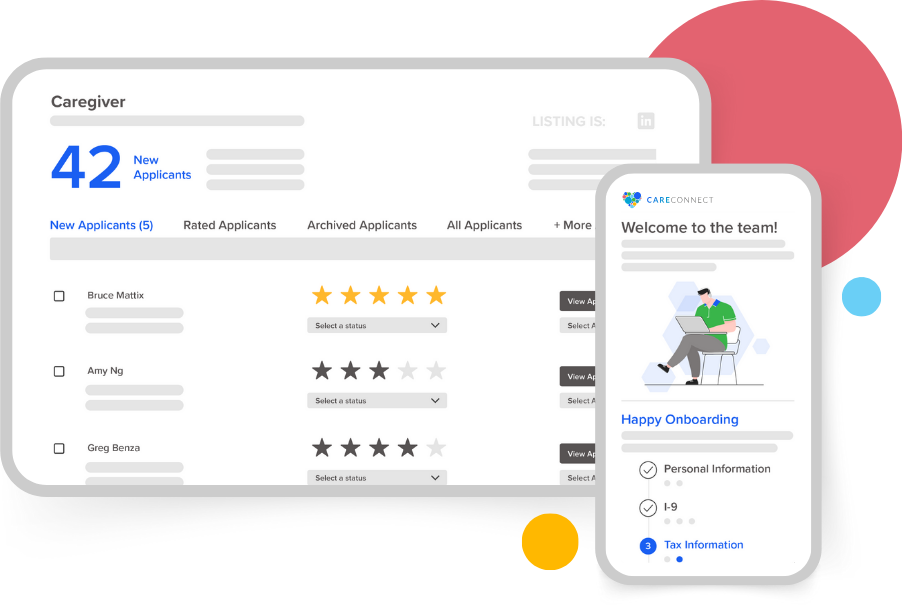
CareConnect's Home Health Care Hire is a unique Applicant Tracking System (ATS) aimed specifically at home-based care providers. This software streamlines the hiring process, reducing onboarding times and ensuring quality care providers are quickly and efficiently integrated into your team.
Best for Applicant Tracking Systems (ATS) for Home Care Agencies
Expert Take
CareConnect Home Health Care Hire excels in providing a specialized applicant tracking system tailored for home care agencies. Its industry-specific features, efficient onboarding process, and strong support infrastructure make it a standout choice for agencies. However, the need for training and lack of transparent pricing slightly impact its overall usability and value perception.
Pros
- Free 'Silver' ATS tier available
- AI-driven predictive shift matching
- Integrated occupational health scheduling
- Seamless HHAeXchange & AlayaCare sync
- Specialized for home care workflows
Cons
- Mobile app reported as buggy
- Training modules may freeze
- Support difficult to reach for caregivers
- Advanced analytics require paid upgrade
- App UI criticized in reviews
Best for teams that are
- Home care agencies needing AI-driven shift matching and scheduling
- Agencies requiring integrated occupational health and compliance screening
- Providers wanting a mobile-first caregiver onboarding experience
Skip if
- General corporate recruiters outside the home care industry
- Large hospital systems requiring a full-suite enterprise HRIS
- Agencies not needing shift-based scheduling or mobile workforce tools
Best for teams that are
- Home care agencies needing AI-driven shift matching and scheduling
- Agencies requiring integrated occupational health and compliance screening
- Providers wanting a mobile-first caregiver onboarding experience
Skip if
- General corporate recruiters outside the home care industry
- Large hospital systems requiring a full-suite enterprise HRIS
- Agencies not needing shift-based scheduling or mobile workforce tools
Pros
- Free 'Silver' ATS tier available
- AI-driven predictive shift matching
- Integrated occupational health scheduling
- Seamless HHAeXchange & AlayaCare sync
- Specialized for home care workflows
Cons
- Mobile app reported as buggy
- Training modules may freeze
- Support difficult to reach for caregivers
- Advanced analytics require paid upgrade
- App UI criticized in reviews
Expert Take
CareConnect Home Health Care Hire excels in providing a specialized applicant tracking system tailored for home care agencies. Its industry-specific features, efficient onboarding process, and strong support infrastructure make it a standout choice for agencies. However, the need for training and lack of transparent pricing slightly impact its overall usability and value perception.
iTacit Manufacturing Onboarding
Best for Onboarding Platforms for Manufacturing and Warehouse Staff
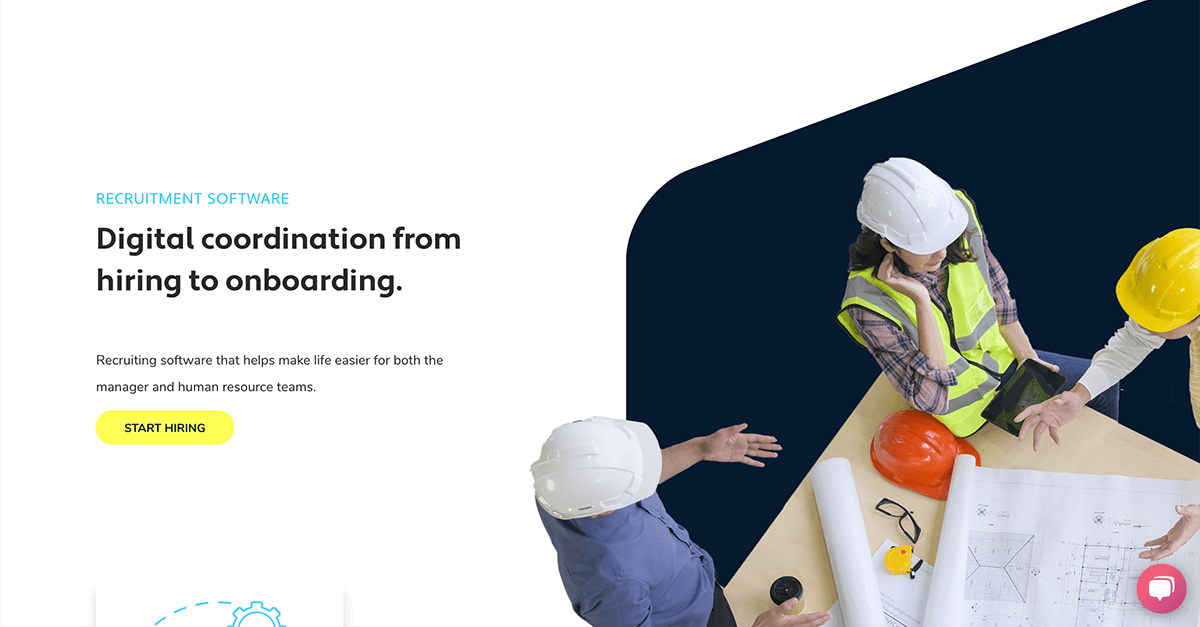
iTacit’s onboarding software is specifically designed for the manufacturing industry, offering robust tracking and insights throughout the hiring process. The software streamlines the onboarding process and helps make more informed hiring decisions, catering to the unique requirements of manufacturing and warehouse staff.
Best for Onboarding Platforms for Manufacturing and Warehouse Staff
Expert Take
iTacit Manufacturing Onboarding is tailored for the manufacturing sector, offering specialized features that streamline the onboarding process. Its robust tracking and insightful analytics are well-suited for industry-specific needs, while customizable workflows enhance adaptability. Despite limited pricing transparency, the product's capabilities and industry focus position it as a leading solution.
Pros
- Mobile-first design for deskless workers
- Offline functionality for remote access
- No corporate email required for employees
- SOC 2 Type II certified security
- Integrated LMS and onboarding workflows
Cons
- Reporting features can be slow/limited
- Steep learning curve for administrators
- Backend interface described as clunky
- Search function struggles with accents
- Pricing is not publicly transparent
Best for teams that are
- Large frontline workforces requiring strict safety and compliance training
- Organizations prioritizing a mobile app for deskless employee engagement
- Companies needing to bridge the gap between non-desk workers and digital HR
Skip if
- Companies seeking a full HRIS with native payroll and benefits administration
- Small, office-based teams that do not require safety compliance tracking
- Organizations looking for a dedicated applicant tracking system (ATS)
Best for teams that are
- Large frontline workforces requiring strict safety and compliance training
- Organizations prioritizing a mobile app for deskless employee engagement
- Companies needing to bridge the gap between non-desk workers and digital HR
Skip if
- Companies seeking a full HRIS with native payroll and benefits administration
- Small, office-based teams that do not require safety compliance tracking
- Organizations looking for a dedicated applicant tracking system (ATS)
Pros
- Mobile-first design for deskless workers
- Offline functionality for remote access
- No corporate email required for employees
- SOC 2 Type II certified security
- Integrated LMS and onboarding workflows
Cons
- Reporting features can be slow/limited
- Steep learning curve for administrators
- Backend interface described as clunky
- Search function struggles with accents
- Pricing is not publicly transparent
Expert Take
iTacit Manufacturing Onboarding is tailored for the manufacturing sector, offering specialized features that streamline the onboarding process. Its robust tracking and insightful analytics are well-suited for industry-specific needs, while customizable workflows enhance adaptability. Despite limited pricing transparency, the product's capabilities and industry focus position it as a leading solution.

Leena AI is a powerful onboarding solution specifically designed for startups. It optimizes the onboarding process by automating routine tasks, ensuring a smooth and exciting first day for new hires. It addresses the need for efficient time management in startups and ensures seamless integration of new employees into their roles.
Best for Employee Onboarding Software for Startups
Expert Take
Leena AI Onboarding Solution excels in automating the onboarding process for startups, offering a user-friendly experience and robust HR integrations. While it provides significant value, its pricing transparency and customization options could be improved. Overall, it is a strong choice for startups seeking efficient onboarding solutions.
Pros
- Guaranteed 70% self-service resolution ratio
- Proprietary WorkLM trained on enterprise data
- 1000+ integrations including Workday and SAP
- FedRAMP Moderate and SOC 2 certified
- Seamless Slack and Microsoft Teams integration
Cons
- No public pricing available
- Setup can be complex for non-technical users
- Requires training for advanced workflow configuration
- Employee-based licensing may not suit all
- Occasional AI limitations reported by users
Best for teams that are
- Large enterprises wanting AI-driven 24/7 employee support
- Organizations looking to automate HR helpdesk and routine queries
Skip if
- Small businesses with limited budgets or simple needs
- Companies with unstructured or poor quality internal data
Best for teams that are
- Large enterprises wanting AI-driven 24/7 employee support
- Organizations looking to automate HR helpdesk and routine queries
Skip if
- Small businesses with limited budgets or simple needs
- Companies with unstructured or poor quality internal data
Pros
- Guaranteed 70% self-service resolution ratio
- Proprietary WorkLM trained on enterprise data
- 1000+ integrations including Workday and SAP
- FedRAMP Moderate and SOC 2 certified
- Seamless Slack and Microsoft Teams integration
Cons
- No public pricing available
- Setup can be complex for non-technical users
- Requires training for advanced workflow configuration
- Employee-based licensing may not suit all
- Occasional AI limitations reported by users
Expert Take
Leena AI Onboarding Solution excels in automating the onboarding process for startups, offering a user-friendly experience and robust HR integrations. While it provides significant value, its pricing transparency and customization options could be improved. Overall, it is a strong choice for startups seeking efficient onboarding solutions.
Redstone LMS for Government Contractors
The Redstone Learning Management System is a specialized solution crafted for government contractors. It helps to ensure that all employee training and compliance responsibilities are met efficiently and effectively, which is vital for this industry. Its turnkey nature simplifies and streamlines the process of educating employees on recurring compliance topics.
Best for Learning Management Systems (LMS) for Contractors
Expert Take
Redstone LMS excels in providing a specialized learning management solution tailored for government contractors, ensuring compliance and continuous learning. Its industry-specific focus and turnkey nature make it a valuable tool, though pricing transparency is limited due to enterprise pricing models.
Pros
- Created by former DCAA auditors
- Covers specific FAR/DFARS clauses
- Turnkey subscription model
- Specialized CPSR and HR tracks
- Mitigates non-compliance risk
Cons
- No public pricing listed
- No CPE for LMS packages
- Limited technical feature disclosure
- Niche focus limits general use
- Requires separate consultation for setup
Best for teams that are
- Government contractors specifically needing DCAA, FAR, and CAS compliance training
- Companies wanting a turnkey subscription solution for federal compliance awareness
- Organizations needing training content developed by government audit experts
Skip if
- General construction companies that do not handle federal government contracts
- Organizations looking for a general LMS to build and host their own custom safety courses
- Teams needing a broad library of general construction skills training beyond compliance
Best for teams that are
- Government contractors specifically needing DCAA, FAR, and CAS compliance training
- Companies wanting a turnkey subscription solution for federal compliance awareness
- Organizations needing training content developed by government audit experts
Skip if
- General construction companies that do not handle federal government contracts
- Organizations looking for a general LMS to build and host their own custom safety courses
- Teams needing a broad library of general construction skills training beyond compliance
Pros
- Created by former DCAA auditors
- Covers specific FAR/DFARS clauses
- Turnkey subscription model
- Specialized CPSR and HR tracks
- Mitigates non-compliance risk
Cons
- No public pricing listed
- No CPE for LMS packages
- Limited technical feature disclosure
- Niche focus limits general use
- Requires separate consultation for setup
Expert Take
Redstone LMS excels in providing a specialized learning management solution tailored for government contractors, ensuring compliance and continuous learning. Its industry-specific focus and turnkey nature make it a valuable tool, though pricing transparency is limited due to enterprise pricing models.
Global Payroll by Remote
Best for Payroll and Benefits Platforms for Global and Multi-Country Teams

Global Payroll by Remote simplifies multi-country payroll for global teams. It consolidates complex processes, ensuring tax, payments, and compliance are handled efficiently and accurately. This solution is specifically designed for industries with international operations and remote teams, addressing their unique needs for comprehensive, automated payroll services.
Best for Payroll and Benefits Platforms for Global and Multi-Country Teams
Expert Take
Global Payroll by Remote excels in simplifying multi-country payroll processes with a focus on compliance, automation, and multi-currency support. Its strong market credibility is supported by third-party recognitions and certifications, making it a top choice for global teams. While pricing complexity is a consideration, the product's comprehensive capabilities justify its premium positioning.
Pros
- Owned-entity model ensures compliance control
- Transparent flat-fee pricing ($50/mo payroll)
- Strong IP protection with IP Guard
- Modern, intuitive self-service interface
- SOC 2 Type 2 & ISO 27001 certified
Cons
- Support response times can be slow
- Exchange rates not updated daily
- EOR pricing ($599) higher than peers
- Coverage limited to ~100 countries
- Integrations list smaller than legacy players
Best for teams that are
- Startups and SMEs seeking flat-rate pricing and IP protection
- Companies prioritizing owned-entity infrastructure for compliance
- Teams wanting a self-service platform for global hiring
Skip if
- Enterprises requiring coverage in countries where Remote lacks entities
- Companies needing extensive HRIS features beyond payroll and EOR
Best for teams that are
- Startups and SMEs seeking flat-rate pricing and IP protection
- Companies prioritizing owned-entity infrastructure for compliance
- Teams wanting a self-service platform for global hiring
Skip if
- Enterprises requiring coverage in countries where Remote lacks entities
- Companies needing extensive HRIS features beyond payroll and EOR
Pros
- Owned-entity model ensures compliance control
- Transparent flat-fee pricing ($50/mo payroll)
- Strong IP protection with IP Guard
- Modern, intuitive self-service interface
- SOC 2 Type 2 & ISO 27001 certified
Cons
- Support response times can be slow
- Exchange rates not updated daily
- EOR pricing ($599) higher than peers
- Coverage limited to ~100 countries
- Integrations list smaller than legacy players
Expert Take
Global Payroll by Remote excels in simplifying multi-country payroll processes with a focus on compliance, automation, and multi-currency support. Its strong market credibility is supported by third-party recognitions and certifications, making it a top choice for global teams. While pricing complexity is a consideration, the product's comprehensive capabilities justify its premium positioning.
Shifton Hotel Staff Scheduling
Best for Workforce Scheduling Tools for Hospitality & Hotels
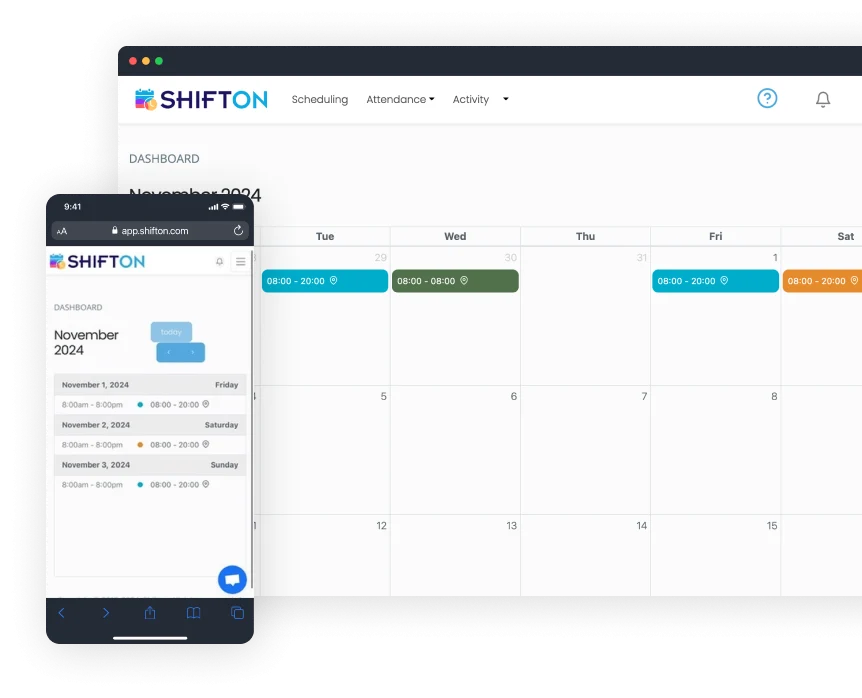
Shifton's software provides a specifically tailored solution for the hospitality industry, aiming to streamline hotel staff scheduling. It helps in creating balanced schedules, minimizing errors, and maximizing efficiency. Its features such as payroll integration and attendance tracking are designed to cater to the complex workforce management needs in a hotel setting.
Best for Workforce Scheduling Tools for Hospitality & Hotels
Expert Take
Shifton Hotel Staff Scheduling excels in providing industry-specific solutions for the hospitality sector, with robust features like payroll integration and attendance tracking. Its focus on optimizing scheduling for hotels makes it a valuable tool, though some limitations in customization and payroll system support exist.
Pros
- Free plan for up to 100 employees
- Modular pricing (pay-per-feature)
- Automated AI-driven shift scheduling
- Task management for housekeeping/maintenance
- Real-time GPS location tracking
Cons
- Mobile app limited to employee views
- Admins must use web interface
- Potential battery drain from location services
- Low volume of third-party reviews
- Location control add-on is expensive
Best for teams that are
- Service businesses seeking automated shift generation and easy swapping
- Teams needing a flexible tool that handles various shift patterns
- Managers looking for AI-driven scheduling suggestions
Skip if
- Large food service operations needing specialized menu management features
- Enterprises requiring a widely adopted, industry-standard legacy system
- Users needing extensive third-party integrations out of the box
Best for teams that are
- Service businesses seeking automated shift generation and easy swapping
- Teams needing a flexible tool that handles various shift patterns
- Managers looking for AI-driven scheduling suggestions
Skip if
- Large food service operations needing specialized menu management features
- Enterprises requiring a widely adopted, industry-standard legacy system
- Users needing extensive third-party integrations out of the box
Pros
- Free plan for up to 100 employees
- Modular pricing (pay-per-feature)
- Automated AI-driven shift scheduling
- Task management for housekeeping/maintenance
- Real-time GPS location tracking
Cons
- Mobile app limited to employee views
- Admins must use web interface
- Potential battery drain from location services
- Low volume of third-party reviews
- Location control add-on is expensive
Expert Take
Shifton Hotel Staff Scheduling excels in providing industry-specific solutions for the hospitality sector, with robust features like payroll integration and attendance tracking. Its focus on optimizing scheduling for hotels makes it a valuable tool, though some limitations in customization and payroll system support exist.
WorkBright HR Onboarding Software is specifically designed for the construction industry, ensuring a seamless and efficient onboarding process for new hires. Its automated reminders and step-by-step guides are perfect for this highly-regulated industry that requires stringent compliance to labor laws, safety regulations, and worker certifications.
Best for Employee Onboarding Software for Contractors
Expert Take
WorkBright HR Onboarding excels in providing industry-specific solutions for the construction sector, with features that ensure compliance and streamline onboarding processes. Its mobile-friendly interface and automated reminders enhance usability, while its market credibility is supported by industry-specific recognition.
Pros
- Mobile-first design for field workers
- Zero client audit fines track record
- Integrated E-Verify with instant resolution
- Remote I-9 verification support
- Fast onboarding (<10 min completion)
Cons
- Reporting features lack depth
- Limited customization for complex workflows
- Higher price point than some peers
- Setup time for specialized processes
- E-Verify interface can be confusing
Best for teams that are
- High-volume or seasonal employers in retail, hospitality, and healthcare
- Companies needing fast remote I-9 verification and mobile-first paperwork
- HR teams prioritizing speed and ease of use for mass hiring
Skip if
- Enterprises requiring complex, long-term talent management suites
- Businesses looking for deep project management or payment processing
- Organizations needing extensive customization beyond standard forms
Best for teams that are
- High-volume or seasonal employers in retail, hospitality, and healthcare
- Companies needing fast remote I-9 verification and mobile-first paperwork
- HR teams prioritizing speed and ease of use for mass hiring
Skip if
- Enterprises requiring complex, long-term talent management suites
- Businesses looking for deep project management or payment processing
- Organizations needing extensive customization beyond standard forms
Pros
- Mobile-first design for field workers
- Zero client audit fines track record
- Integrated E-Verify with instant resolution
- Remote I-9 verification support
- Fast onboarding (<10 min completion)
Cons
- Reporting features lack depth
- Limited customization for complex workflows
- Higher price point than some peers
- Setup time for specialized processes
- E-Verify interface can be confusing
Expert Take
WorkBright HR Onboarding excels in providing industry-specific solutions for the construction sector, with features that ensure compliance and streamline onboarding processes. Its mobile-friendly interface and automated reminders enhance usability, while its market credibility is supported by industry-specific recognition.
Workstaff Staff Management
Best for Shift Scheduling & Workforce Management for Staffing Agencies

Workstaff is a SaaS solution designed specifically for staffing agencies to manage shift scheduling and workforce management. It simplifies staff scheduling, time tracking, and overall workforce management with its intuitive software and mobile app, addressing the industry's need for an efficient, time-saving solution.
Best for Shift Scheduling & Workforce Management for Staffing Agencies
Expert Take
Workstaff excels in providing a tailored solution for staffing agencies, focusing on shift scheduling and workforce management. Its mobile app enhances usability, while its industry-specific design ensures relevance. However, the lack of upfront pricing details and potential limitations for larger agencies are notable tradeoffs.
Pros
- Pricing based on managers, not staff count
- Dedicated mobile apps for staff and managers
- Automated contractor invoicing and payroll prep
- White-labeled client portal for agencies
- Real-time geolocation and presence tracking
Cons
- Key features (Payroll, Portal) are paid add-ons
- Low volume of third-party reviews
- Limited native integrations (relies on exports)
- Chat functionality lacks granular group options
- Base plans exclude advanced compensation rules
Best for teams that are
- Staffing and experiential agencies managing on-demand/contingent rosters
- Businesses needing built-in contractor invoicing and client portals
- Event caterers requiring real-time staff booking and confirmation
Skip if
- Traditional businesses with fixed, full-time employee schedules
- Companies needing deep integration with traditional payroll for permanent staff
- Organizations that do not manage a gig or temporary workforce
Best for teams that are
- Staffing and experiential agencies managing on-demand/contingent rosters
- Businesses needing built-in contractor invoicing and client portals
- Event caterers requiring real-time staff booking and confirmation
Skip if
- Traditional businesses with fixed, full-time employee schedules
- Companies needing deep integration with traditional payroll for permanent staff
- Organizations that do not manage a gig or temporary workforce
Pros
- Pricing based on managers, not staff count
- Dedicated mobile apps for staff and managers
- Automated contractor invoicing and payroll prep
- White-labeled client portal for agencies
- Real-time geolocation and presence tracking
Cons
- Key features (Payroll, Portal) are paid add-ons
- Low volume of third-party reviews
- Limited native integrations (relies on exports)
- Chat functionality lacks granular group options
- Base plans exclude advanced compensation rules
Expert Take
Workstaff excels in providing a tailored solution for staffing agencies, focusing on shift scheduling and workforce management. Its mobile app enhances usability, while its industry-specific design ensures relevance. However, the lack of upfront pricing details and potential limitations for larger agencies are notable tradeoffs.
BenefitHub Employee Rewards
Best for Employee Recognition Platforms for Healthcare & Hospital Staff

BenefitHub provides a comprehensive rewards platform tailored to healthcare and hospital staff. With a focus on exclusive discounts on health, financial, and shopping benefits, it enhances employee well-being and retention, addressing the industry's high turnover rate and the need for a healthier workforce.
Best for Employee Recognition Platforms for Healthcare & Hospital Staff
Expert Take
BenefitHub Employee Rewards is tailored for healthcare staff, offering exclusive discounts and benefits that enhance employee well-being and retention. Its focus on industry-specific challenges and comprehensive benefits marketplace positions it as a leading solution in the employee recognition platform category.
Pros
- Free for many employers
- 1,000+ national brand partners
- 200,000+ local deal offers
- 2% to 20% cashback available
- Used by 36% of Fortune 500
Cons
- Mobile app stability issues
- Cashback delays up to 90 days
- Some deals match public pricing
- Support response times vary
- Complex redemption for some offers
Best for teams that are
- HR leaders wanting to offer extensive employee discounts and perks
- Organizations looking to stretch compensation with lifestyle benefits
- Companies wanting a low-cost add-on for basic recognition
Skip if
- Organizations seeking a robust, feature-rich social recognition platform
- Teams wanting deep peer-to-peer culture building tools
- Companies where discounts are not a valued benefit for staff
Best for teams that are
- HR leaders wanting to offer extensive employee discounts and perks
- Organizations looking to stretch compensation with lifestyle benefits
- Companies wanting a low-cost add-on for basic recognition
Skip if
- Organizations seeking a robust, feature-rich social recognition platform
- Teams wanting deep peer-to-peer culture building tools
- Companies where discounts are not a valued benefit for staff
Pros
- Free for many employers
- 1,000+ national brand partners
- 200,000+ local deal offers
- 2% to 20% cashback available
- Used by 36% of Fortune 500
Cons
- Mobile app stability issues
- Cashback delays up to 90 days
- Some deals match public pricing
- Support response times vary
- Complex redemption for some offers
Expert Take
BenefitHub Employee Rewards is tailored for healthcare staff, offering exclusive discounts and benefits that enhance employee well-being and retention. Its focus on industry-specific challenges and comprehensive benefits marketplace positions it as a leading solution in the employee recognition platform category.
Explore Categories
- Applicant Tracking Systems (ATS)
- Employee Engagement & Pulse Survey Platforms
- Employee Onboarding Software
- Employee Recognition & Rewards Platforms
- HR Compliance & Policy Management Tools
- HR Management & HCM Software
- HRIS (Human Resources Information Systems)
- LMS & Employee Training Platforms
- Onboarding & Employee Orientation Platforms
- Payroll & Benefits Administration Software
- Performance Management Software
- Talent Acquisition & Recruiting Platforms
- Time & Attendance Tracking Software
- Workforce Scheduling & Shift Management Tools