What Is Onboarding & Employee Orientation Platforms?
At its core, this software solves the "productivity gap"—the costly period between an offer acceptance and the moment an employee generates value. For Human Resources, it automates the administrative burden of tax forms (I-9, W-4) and policy acknowledgments. For hiring managers, it structures the crucial first 90 days, ensuring that equipment provisioning, goal setting, and team introductions happen systematically rather than haphazardly. The users are distinct but interconnected: HR administrators configure workflows to ensure compliance; hiring managers track progress and assign role-specific tasks; and new hires access a self-service portal to navigate their entry into the organization.
The strategic importance of this category has shifted from simple digitization of paper forms to retention engineering. With research indicating that a significant percentage of new hires decide whether to stay or leave within their first month [1], these platforms serve as the primary mechanism for cementing organizational culture and reducing early-stage attrition.
History of the Category
The evolution of Onboarding & Employee Orientation Platforms mirrors the broader shift in enterprise software from "systems of record" to "systems of engagement." In the 1990s and early 2000s, onboarding did not exist as a distinct software category. It was a fragmented manual process: IT managed provisioning via helpdesk tickets, HR managed paperwork via filing cabinets or basic ERP modules, and training happened in physical classrooms. The "software" involved was often little more than a payroll database where a new record was created after the manual work was done.
The first major shift occurred with the rise of cloud computing and the digitization of recruitment in the mid-2000s. As Applicant Tracking Systems (ATS) moved to the cloud, a functional gap emerged: the ATS handled the candidate until the offer letter, and the Core HR system picked up at the first paycheck. The chaotic interim period—"pre-boarding"—became the birthing ground for specialized onboarding solutions. Early vendors focused heavily on compliance and forms automation, selling the promise of "paperless HR." This era was defined by the transition from on-premise servers to SaaS, allowing new hires to complete paperwork from home before their first day [2].
By the 2010s, the market began to consolidate and mature. Large Human Capital Management (HCM) providers began acquiring niche onboarding startups to close the loop between recruiting and talent management. However, a second wave of innovation was driven by the "War for Talent." Buyer expectations evolved from "give me a database to store I-9s" to "give me a tool to stop new hires from quitting." This shifted the focus toward "experience-driven" onboarding—platforms that emphasized social connection, mentorship matching, and culture content over pure administration. Today, the market is characterized by a split between massive, all-in-one HCM suites that treat onboarding as a feature, and specialized "best-of-breed" platforms that offer deep, vertical-specific functionality for complex industries [3].
What to Look For
Evaluating onboarding platforms requires a distinct mindset shift from evaluating other HR tools. Unlike payroll (which must be accurate) or time-tracking (which must be precise), onboarding software must be engaging while remaining compliant. If the user experience is poor, adoption drops, and the "ghosting" rate—where hires accept offers but never show up—increases.
Critical Evaluation Criteria
First, assess the depth of pre-boarding capabilities. The most critical risk period is the window between offer acceptance and the start date. Superior platforms provide a secure portal where new hires can sign documents, order equipment, and view welcome videos before Day 1. Look for systems that allow "drip-feeding" content to avoid overwhelming the user. If a vendor requires an active corporate email address to access the portal, this is a failure point for pre-boarding, as many new hires won't have credentials yet.
Second, evaluate cross-departmental workflow orchestration. Onboarding is rarely an HR-only activity; it requires IT to ship laptops, facilities to issue badges, and managers to schedule 1:1s. A robust platform acts as a traffic controller, triggering tasks in other systems (e.g., creating a ticket in IT service management software) when a new hire is added. If the tool relies solely on email notifications to other departments without API triggers or integration, it will not scale.
Red Flags and Warning Signs
Be wary of vendors that describe their product primarily as a "document repository." While document management is essential, a modern onboarding platform must be a process engine. Another red flag is the lack of mobile-responsive design. For industries like retail or manufacturing, where candidates may not own desktops, a mobile-hostile interface is a dealbreaker. Additionally, watch out for "hard-coded" workflows. If changing a task from "Day 1" to "Day 3" requires a support ticket to the vendor rather than a drag-and-drop admin change, the system is likely too rigid for modern agility.
Key Questions to Ask Vendors
- "How does your system handle 're-boarding' for internal promotions or cross-border transfers, not just new hires?"
- "Can we trigger different workflows based on metadata like location, department, or employment type (e.g., contractor vs. full-time) without manual intervention?"
- "Show us the exact view a new hire sees on a mobile device when completing an I-9 form."
- "What is your specific mechanism for handling counter-signatories on documents (e.g., a manager must sign after the employee)?"
Industry-Specific Use Cases
Retail & E-commerce
In retail, the onboarding challenge is defined by high volume, high turnover, and seasonality. The primary goal is speed to productivity. Retailers often hire hundreds of temporary staff for holiday seasons, meaning the onboarding software must handle bulk processing and rapid identity verification without crashing. Unlike corporate environments, retail associates rarely have corporate email addresses prior to starting and may never sit at a desk. Therefore, the software must be "mobile-first," allowing new hires to complete training and forms on personal smartphones via SMS links rather than email logins [4].
Evaluation priorities for retail include automated scheduling integration. The onboarding tool must speak directly to workforce management systems to ensure that a new hire cannot be scheduled for a shift until their safety training and compliance paperwork are 100% complete. This "compliance gate" prevents costly labor law violations. Additionally, content delivery must be "micro-learning" focused—short, 3-minute videos on loss prevention or POS usage that can be consumed on the floor, rather than hour-long e-learning courses [5].
Healthcare
Healthcare onboarding is dominated by credentialing and privileges. The stakes are legal and patient safety-related, not just administrative. A hospital cannot allow a nurse or doctor to touch a patient until their licenses, malpractice insurance, and board certifications are verified. Consequently, generic onboarding platforms often fail here because they lack "primary source verification" integration. Healthcare-specific platforms connect directly to databases (like state nursing boards) to automatically validate license status [6].
Unique considerations include complex role-based variance. The onboarding workflow for a radiologist is vastly different from that of a cafeteria worker or a visiting physician. The software must support highly granular logic to serve different packets of forms and training modules (e.g., HIPAA, bloodborne pathogens) based on the specific clinical role. Furthermore, "privileging" workflows—where a committee reviews a doctor's qualifications—must be digital and auditable within the system [7].
Financial Services
For financial services, the overriding driver is regulatory compliance (SEC, FINRA, etc.). Onboarding software in this sector must handle specific forms like the U4 (Uniform Application for Securities Industry Registration) and track "outside business activities" to prevent conflicts of interest. The system must create an immutable audit trail of exactly when a policy was presented and when it was acknowledged, often requiring "WORM" (Write Once, Read Many) compliant storage integration [8].
A key evaluation priority is the pre-clearance of personal trading accounts. Onboarding tools for wealth management or investment banking often need to integrate with compliance engines that monitor employee trading. Additionally, the software must manage "garden leave" and non-compete periods for senior hires, ensuring they do not access sensitive data or contact clients before legally permitted. The speed of "time to seat" is also critical; every day a broker is not registered is lost revenue, so automated submission of data to regulators like FINRA is a major differentiator [9].
Manufacturing
Manufacturing onboarding focuses on safety and physical site access. Similar to retail, the workforce is often deskless, but the training requirements are far more rigorous due to OSHA regulations. Onboarding platforms here must manage "blended learning"—tracking online safety modules alongside in-person practical assessments (e.g., proving capability to operate a forklift). A generic tool that only tracks digital course completion is insufficient; the system must allow a supervisor to check off a physical skills assessment on a tablet on the factory floor [10].
Unique considerations include site-specific logic. A manufacturer with 20 plants might have 20 different safety protocols or union requirements. The software must be able to deploy a "global" standard while allowing local plant HR managers to append site-specific requirements. Furthermore, integration with physical access control systems (badge readers) is common; a worker's badge should not open the door to the chemical storage area until their HazMat training is recorded as complete in the onboarding system [11].
Professional Services
In law firms, consultancies, and agencies, the product is the people. Therefore, onboarding is focused on knowledge network integration and billable utilization. The software needs to accelerate "time to competency" by connecting new hires with mentors and subject matter experts immediately. Unlike other industries where standardization is key, professional services onboarding is often highly personalized, involving bios, practice area introductions, and client-specific conflict checks [12].
A specific workflow this niche handles well is client-ready profile generation. Data collected during onboarding (skills, certifications, past project experience) often flows directly into "pitch deck" systems or resource management tools used to assign staff to client projects. If the onboarding tool doesn't capture this granular skills data, the firm loses money because they cannot effectively bill the new hire. Additionally, the system must handle rigorous "independence checks" to ensure a new partner's past financial interests don't conflict with current firm audit clients [13].
Subcategory Overview
Onboarding Platforms for Franchise and Multi-Location Businesses
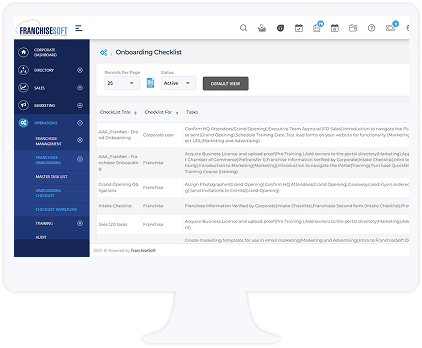
This niche caters to organizations where the "employer" entity might vary by location, such as fast-food chains or automotive service franchises. What makes Onboarding Platforms for Franchise and Multi-Location Businesses genuinely different is their ability to handle multi-tenant architecture with brand consistency. A parent brand (Franchisor) needs to enforce global brand standards (e.g., "Welcome to Burger King" videos) while the local owner (Franchisee) needs control over local tax forms, wage rates, and scheduling. Generic tools struggle to allow this "parent-child" permission structure where data is siloed between franchisees but aggregated for the franchisor.
One workflow only this specialized tool handles well is the mass update of brand content across disparate legal entities. If the corporate headquarters updates the "Food Safety Manual," they can push this content to 5,000 independently owned locations instantly, tracking acknowledgment centrally without accessing the local owners' payroll data. The specific pain point driving buyers here is joint-employer liability. Franchisors want to provide training tools without stepping over the legal line of managing the franchisee's employees directly; these platforms are architected to maintain that legal separation [14].
Onboarding Platforms for Call Centers and Support Teams
This subcategory focuses intensely on rapid proficiency and system simulations. Call centers often have turnover rates exceeding 40%, meaning onboarding is a constant, high-volume machine. Onboarding Platforms for Call Centers and Support Teams differ from generic tools by integrating directly with Quality Assurance (QA) and Learning Management Systems (LMS) to track "speed to competency." It is not enough to mark a form as "signed"; the system tracks how quickly an agent can navigate the CRM during a mock call.
A unique workflow is the "nesting" phase management. After classroom training, agents move to a transition phase where they take live calls with supervision. Specialized platforms track performance metrics during this specific phase to gate the employee from moving to full production status. Buyers choose this niche to solve the pain point of training ramp time. Generic tools track paperwork; these tools track how fast an agent stops costing the company money and starts resolving tickets [15].
Onboarding Platforms for Manufacturing and Warehouse Staff
As noted in the industry section, this niche is defined by safety compliance and physical verification. Onboarding Platforms for Manufacturing and Warehouse Staff distinguish themselves with kiosk mode and QR code access. Because warehouse workers do not have laptops, these platforms are designed to run on shared tablets in a breakroom or via personal mobile devices without complex login hurdles (often using employee ID badges or QR codes).
One workflow unique to this niche is equipment certification tracking tied to access control. The system manages the lifecycle of a forklift license—alerting the floor manager 30 days before expiration and automatically scheduling the recertification practical exam. The pain point driving buyers here is regulatory fines and liability. A generic onboarding tool might store a PDF of a license, but it won't actively prevent an unqualified worker from clocking into a hazardous role, whereas specialized tools often integrate with shift scheduling to prevent exactly that [16].
Onboarding Platforms for Healthcare and Hospital Staff
This category deals with the most complex compliance matrix of any industry. Onboarding Platforms for Healthcare and Hospital Staff are different because they include automated primary source verification (PSV). They do not just ask a doctor to upload their license; the software bots out to the state medical board's database to verify the license is active and free of sanctions.
A specialized workflow is the management of "privileging" packets. Hospitals must grant specific clinical privileges (e.g., "allowed to perform cardiac surgery") based on evidence. This software assembles the evidence packet for the credentialing committee review, a workflow completely foreign to corporate onboarding tools. The driving pain point is revenue cycle leakage. If a provider is not properly credentialed and onboarded, the hospital cannot bill insurance for their services. Delays in onboarding directly equal lost revenue, pushing buyers toward specialized tools that accelerate this specific process [6].
Onboarding Platforms for Retail and Store Associates
Speed and volume define this niche. Onboarding Platforms for Retail and Store Associates are optimized for zero-training user interfaces. The UX is designed to be as intuitive as a social media app because store managers—who are often teenagers themselves—do not have time to train new hires on how to use the HR software.
A critical workflow is the automated distribution of uniform and inventory requests relative to store location. When a new hire is added to "Store 402," the system checks inventory for that specific location's uniform sizes and triggers a replenishment order if needed, ensuring the employee has a shirt on Day 1. The primary pain point is manager administrative burden. Retail store managers are measured on sales, not HR admin. They buy these tools to automate the "paper chase" so they can get back to the sales floor [4].
Integration & API Ecosystem
The effectiveness of an onboarding platform is often determined by its "connective tissue"—how well it pushes and pulls data from the rest of the tech stack. In a modern enterprise, onboarding sits at the nexus of the Applicant Tracking System (ATS), Core HR/Payroll, Identity and Access Management (IAM), and Learning Management Systems (LMS). A failure in integration leads to "swivel chair" data entry, where HR staff manually retype data from the onboarding tool into payroll, introducing error rates that can affect employee pay.
According to Gartner, organizations that successfully integrate onboarding with other HR applications can improve employee performance by up to 20% due to reduced administrative friction [17]. However, integration is also a primary failure point. McKinsey research on digital transformations highlights that data mapping inconsistencies (e.g., "Contractor" in one system vs. "Contingent Worker" in another) are a leading cause of project delays [18].
Real-World Scenario: Consider a 50-person professional services firm. They buy a modern onboarding platform to impress new consultants. They intend to connect it to their Project Management tool (e.g., Asana) and their Billing system (e.g., QuickBooks). The goal: when a new consultant signs their offer, they are automatically set up as a "billable resource" in the project tool. The Break: The integration was "one-way" only. When the start date changed in the onboarding tool due to a delay, the API did not push the update to the Project Management tool. The resource was assigned to a client project starting Monday, but they didn't actually start until Wednesday. The project manager burned budget on a "ghost" resource, and the invoice to the client had to be manually corrected, damaging client trust. A robust bi-directional API with error handling would have caught the date mismatch and flagged it.
Security & Compliance
Security in onboarding platforms is non-negotiable because these systems house the "Crown Jewels" of identity data: Social Security Numbers, bank account details, home addresses, and passport scans. Compliance is bifurcated into data privacy (how the data is stored/processed) and employment law (what forms are presented). The landscape is complicated by conflicting regional regulations, such as GDPR in Europe versus state-level laws like CCPA in California.
Experts at Forrester warn that "security by obscurity" is no longer viable; platforms must adhere to rigorous standards. A key distinction often missed by buyers is the difference between SOC 2 Type II and GDPR compliance. As noted by compliance experts, SOC 2 is a voluntary standard focusing on security controls (common in US SaaS), while GDPR is a legal framework for privacy rights (mandatory for EU data) [19]. A platform can be SOC 2 compliant but still fail GDPR requirements if it doesn't allow for the "Right to be Forgotten."
Real-World Scenario: A US-based tech company hires a remote developer in Germany. They use a standard US onboarding platform. The platform collects the new hire's data and stores it on servers in Ohio. The Risk: This transfer of data from the EU to the US without specific safeguards (like Standard Contractual Clauses or the Data Privacy Framework) is a violation of GDPR. Six months later, the developer leaves and requests their data be deleted. The US platform, designed for SEC record-keeping rules (which require retaining data for years), refuses to delete the record. The company is now liable for a GDPR fine because their vendor selection failed to account for the conflict between US retention laws and EU privacy rights.
Pricing Models & TCO
Pricing in this category has shifted from perpetual licenses to SaaS models, but the unit of measure varies significantly. The two dominant models are Per-Employee-Per-Month (PEPM) (based on total company headcount) and Per-Onboard (based on the number of new hires processed). A PEPM model is predictable but can be expensive for low-turnover companies. A Per-Onboard model is cost-effective for stable companies but punitive for high-turnover industries like retail.
Research from Bain & Company indicates that hybrid pricing models are gaining traction, where a base fee covers the platform and usage fees apply to premium features like AI-driven insights [20]. However, the "hidden" costs of Total Cost of Ownership (TCO) often shock buyers. A study by Deel suggests that hidden costs—such as integration maintenance and manual data reconciliation—can outweigh the software license fees [21].
TCO Scenario: A retail chain with 500 employees and 50% turnover (250 new hires/year).
Vendor A (PEPM): Charges $5 per active employee/month.
Calculation: 500 employees * $5 * 12 months = $30,000/year.
Vendor B (Per-Onboard): Charges $50 per new hire packet.
Calculation: 250 hires * $50 = $12,500/year.
The Trap: On the surface, Vendor B is cheaper. However, Vendor B charges $5,000 for "implementation" and $2,000 for "SSO integration." Vendor A includes these. Furthermore, Vendor B charges for "offboarding" as a separate transaction ($20/exit). With 250 exits/year, that adds $5,000.
Adjusted Vendor B Cost: $12,500 (hires) + $5,000 (setup) + $2,000 (integration) + $5,000 (exits) = $24,500 year 1. The gap narrows. If turnover spikes to 70%, Vendor B suddenly becomes more expensive than Vendor A. Buyers must model their turnover variability, not just current headcount.
Implementation & Change Management
Implementation is where the promise of software meets the reality of organizational inertia. It is not just installing code; it is re-engineering how people work. The failure rate of digital transformations is notoriously high; McKinsey research consistently cites that 70% of transformation programs fail to achieve their goals [22]. In onboarding, failure looks like "shadow processes"—HR managers bypassing the new software to use their old spreadsheets because the new tool is "too hard."
Gartner analysts note that successful implementations prioritize "change adoption" over "feature deployment." This means identifying internal champions and planning for the "dip" in productivity that occurs when users learn a new system. A common pitfall is the "Big Bang" launch, where the system is rolled out to all departments simultaneously without piloting.
Real-World Scenario: A manufacturing firm implements a new mobile-first onboarding app. The HQ team loves it. They roll it out to the factory floor on Monday. The Failure: They didn't account for the fact that the factory Wi-Fi is spotty in the breakroom where onboarding happens. The app times out repeatedly. Supervisors, frustrated by the delay, revert to paper forms to get workers on the line. The data never makes it into the system. By Friday, the implementation is effectively dead. A proper change management process would have involved a "site readiness assessment" (testing Wi-Fi) and a pilot with one shift before the full rollout.
Vendor Evaluation Criteria
When selecting a vendor, buyers must look beyond the demo sizzle. The most critical, yet overlooked, criterion is the vendor's product roadmap and financial stability. In a consolidating market, smaller vendors are often acquired. If a vendor is acquired by a legacy ERP giant, innovation often stalls. Evaluation should focus on the "Partnership Profile"—does the vendor have a Customer Success Manager (CSM) ratio that supports your size?
Forrester suggests evaluating vendors based on their "ecosystem gravity"—how many pre-built integrations they have with your specific tech stack (e.g., "Do you have a certified connector for Netsuite 2024.1?"). A "Yes, we have an open API" is not the same as "We have a managed connector."
Scenario: A buyer evaluates Vendor X and Vendor Y. Vendor X has a sleek interface but is a Series B startup. Vendor Y is an established player but looks dated. The buyer chooses Vendor X. Six months later, Vendor X runs out of cash and is acquired by a competitor who sunsets the product. The buyer is forced to migrate again in under a year. The evaluation missed the "financial health" criterion. A stronger evaluation would have asked for audited financials or backing details.
Emerging Trends and Contrarian Take
Emerging Trends 2025-2026