
Time & Attendance Tracking Software
These are the specialized categories within Time & Attendance Tracking Software. Looking for something broader? See all HR & People Management Software categories.

How big is your team?
What's your budget situation?
What's your team's technical comfort level?
What's the ONE thing this tool must do well?
Replicon: Time Tracking Software
Best for Time & Attendance Software for Compliance-Heavy Industries

Replicon is a comprehensive time tracking solution, designed to handle the specific needs of compliance-heavy industries. From tracking time data to transforming it into valuable metrics such as costs, utilization, billing, and pay, this platform is particularly beneficial for industries where stringent compliance and accurate time reporting are crucial.
Best for Time & Attendance Software for Compliance-Heavy Industries
Expert Take
Replicon excels in providing compliance-focused time tracking solutions for industries with stringent regulatory requirements. Its comprehensive capabilities in transforming time data into actionable metrics, combined with strong integration options, position it as a leader in its category.
Pros
- FedRAMP Moderate Authorized security
- AI-powered ZeroTime auto-tracking
- Global labor law compliance (145+ jurisdictions)
- Modular pricing structure
- Deep DCAA compliance support
Cons
- Steep learning curve for new users
- Complex reporting configuration
- Mobile app sync inconsistencies
- No free plan available
- Can be expensive for small teams
Best for teams that are
- Project-based businesses like consulting, IT, and professional services
- Enterprises needing to track billable hours and client costs accurately
- Global organizations with complex multi-jurisdiction compliance needs
Skip if
- Small businesses or startups (often too complex and costly)
- Simple retail or restaurant operations just needing clock-in/out
- Teams not requiring detailed project or grant tracking
Best for teams that are
- Project-based businesses like consulting, IT, and professional services
- Enterprises needing to track billable hours and client costs accurately
- Global organizations with complex multi-jurisdiction compliance needs
Skip if
- Small businesses or startups (often too complex and costly)
- Simple retail or restaurant operations just needing clock-in/out
- Teams not requiring detailed project or grant tracking
Pros
- FedRAMP Moderate Authorized security
- AI-powered ZeroTime auto-tracking
- Global labor law compliance (145+ jurisdictions)
- Modular pricing structure
- Deep DCAA compliance support
Cons
- Steep learning curve for new users
- Complex reporting configuration
- Mobile app sync inconsistencies
- No free plan available
- Can be expensive for small teams
Expert Take
Replicon excels in providing compliance-focused time tracking solutions for industries with stringent regulatory requirements. Its comprehensive capabilities in transforming time data into actionable metrics, combined with strong integration options, position it as a leader in its category.
TimeTrak Manufacturing Time Tracking
Best for Time & Attendance Software for Manufacturing & Production Lines
TimeTrak offers a comprehensive suite of time tracking tools for manufacturing and production lines. It provides industry-specific features like RFID badge, fingerprint, and advanced facial recognition, enabling accurate tracking of employee hours and productivity. Its robust set of features is designed to streamline workflow and improve operational efficiency in manufacturing environments.
Best for Time & Attendance Software for Manufacturing & Production Lines
Expert Take
TimeTrak Manufacturing Time Tracking excels in providing industry-specific features like RFID and facial recognition, crucial for manufacturing environments. It integrates seamlessly with HR systems and offers comprehensive support. However, the lack of explicit pricing details and potential high implementation costs are noted tradeoffs.
Pros
- Rugged hardware built for harsh environments
- Deep bi-directional Infor & Epicor integration
- Granular job costing and labor tracking
- 40+ years of manufacturing industry experience
- US-based customer support team
Cons
- Mobile app connectivity issues reported
- Enterprise pricing is not transparent
- Interface described as outdated by some
- Manual time entry can be cumbersome
- Advanced HR features require partners
Best for teams that are
- Factories needing rugged, dust-resistant physical time clocks
- Manufacturing plants requiring biometric fingerprint security
- Large organizations (>100 employees) needing complex rules engines
Skip if
- Small businesses wanting a simple, cloud-only solution
- Remote-only teams without a need for physical shop floor hardware
Best for teams that are
- Factories needing rugged, dust-resistant physical time clocks
- Manufacturing plants requiring biometric fingerprint security
- Large organizations (>100 employees) needing complex rules engines
Skip if
- Small businesses wanting a simple, cloud-only solution
- Remote-only teams without a need for physical shop floor hardware
Pros
- Rugged hardware built for harsh environments
- Deep bi-directional Infor & Epicor integration
- Granular job costing and labor tracking
- 40+ years of manufacturing industry experience
- US-based customer support team
Cons
- Mobile app connectivity issues reported
- Enterprise pricing is not transparent
- Interface described as outdated by some
- Manual time entry can be cumbersome
- Advanced HR features require partners
Expert Take
TimeTrak Manufacturing Time Tracking excels in providing industry-specific features like RFID and facial recognition, crucial for manufacturing environments. It integrates seamlessly with HR systems and offers comprehensive support. However, the lack of explicit pricing details and potential high implementation costs are noted tradeoffs.

BusyBusy is a GPS time tracking app specially designed for field service teams. It streamlines time and attendance management, enabling field workers to clock in and out with ease. Its GPS capabilities ensure accuracy and transparency in tracking work hours and locations, a crucial need in the field service industry.
Best for Time & Attendance Software for Field Service Teams
Expert Take
BusyBusy excels in providing GPS-based time tracking tailored for field service teams, offering transparency and ease of use. Its mobile-friendly interface and real-time insights contribute to its strong positioning in the market. While it has limitations in offline functionality and advanced features are gated behind a Pro plan, it remains a top choice for its intended audience.
Pros
- Free forever plan (unlimited users)
- Robust equipment tracking & job costing
- Offline mode for field reliability
- Seamless QuickBooks & Procore integrations
- GPS breadcrumbing & geofencing
Cons
- Mandatory $40/mo admin fee (paid plans)
- No native 'paid break' tracking
- Reports of high battery drain
- GPS breadcrumbing locked to paid tiers
Best for teams that are
- Construction and field crews needing robust equipment and job costing tracking.
- Teams working in remote areas that require offline time tracking capabilities.
Skip if
- Desk-based workers or freelancers who don't need heavy equipment tracking.
- Companies wanting a built-in payroll system without paying extra.
Best for teams that are
- Construction and field crews needing robust equipment and job costing tracking.
- Teams working in remote areas that require offline time tracking capabilities.
Skip if
- Desk-based workers or freelancers who don't need heavy equipment tracking.
- Companies wanting a built-in payroll system without paying extra.
Pros
- Free forever plan (unlimited users)
- Robust equipment tracking & job costing
- Offline mode for field reliability
- Seamless QuickBooks & Procore integrations
- GPS breadcrumbing & geofencing
Cons
- Mandatory $40/mo admin fee (paid plans)
- No native 'paid break' tracking
- Reports of high battery drain
- GPS breadcrumbing locked to paid tiers
Expert Take
BusyBusy excels in providing GPS-based time tracking tailored for field service teams, offering transparency and ease of use. Its mobile-friendly interface and real-time insights contribute to its strong positioning in the market. While it has limitations in offline functionality and advanced features are gated behind a Pro plan, it remains a top choice for its intended audience.
TimeClock 365: Healthcare Time Tracking
Best for Time & Attendance Software for Healthcare & Clinics

TimeClock 365 is a time and attendance tracking software designed for healthcare and medical staff. It addresses the unique needs of the healthcare industry by managing shifts, preventing staff burnout, and ensuring compliance. This allows healthcare teams to focus more on patient care rather than administrative tasks.
Best for Time & Attendance Software for Healthcare & Clinics
Expert Take
TimeClock 365 excels in providing healthcare-specific time tracking solutions, addressing critical industry needs like shift management and compliance. Despite some setup complexity, its targeted features and integration capabilities make it a top choice for healthcare providers.
Pros
- Seamless Microsoft Teams integration
- ISO 27001 & GDPR certified
- Biometric & door access control
- Automated coverage gap alerts
- Real-time GPS location tracking
Cons
- Not HIPAA compliant (per MS cert)
- Mobile app stability issues
- Privacy policy security disclaimer
- Limited audit data retention
- Support response times vary
Best for teams that are
- Home health agencies requiring GPS tracking for remote or field-based staff
- Small to medium clinics needing an affordable, user-friendly time tracking solution
Skip if
- Large enterprises with complex union payroll rules or intricate clinical scheduling
- Organizations requiring deep integration with hospital-grade EHR systems
Best for teams that are
- Home health agencies requiring GPS tracking for remote or field-based staff
- Small to medium clinics needing an affordable, user-friendly time tracking solution
Skip if
- Large enterprises with complex union payroll rules or intricate clinical scheduling
- Organizations requiring deep integration with hospital-grade EHR systems
Pros
- Seamless Microsoft Teams integration
- ISO 27001 & GDPR certified
- Biometric & door access control
- Automated coverage gap alerts
- Real-time GPS location tracking
Cons
- Not HIPAA compliant (per MS cert)
- Mobile app stability issues
- Privacy policy security disclaimer
- Limited audit data retention
- Support response times vary
Expert Take
TimeClock 365 excels in providing healthcare-specific time tracking solutions, addressing critical industry needs like shift management and compliance. Despite some setup complexity, its targeted features and integration capabilities make it a top choice for healthcare providers.

Inovalon's healthcare time & attendance software is designed to simplify payroll operations specifically in the healthcare sector. It provides accurate time tracking, real-time alerts, and helps enforce compliance every shift, making it a perfect fit for clinics and hospitals who want to streamline their workforce management.
Best for Time & Attendance Software for Healthcare & Clinics
Expert Take
Inovalon's Healthcare Time & Attendance software is tailored for the healthcare sector, offering specialized features like real-time alerts and compliance enforcement. It is recognized for its capability to streamline payroll operations in clinics and hospitals, making it a leading choice in its niche.
Pros
- Direct QIES connectivity for PBJ
- Geo-location iBeacon punch verification
- Seamless scheduling & agency integration
- Automated overtime & pay coding
- Real-time compliance alerts
Cons
- Mobile app performance issues
- Difficult contract cancellation process
- Strict auto-renewal policies
- Support responsiveness varies
- Laggy interface reported by some
Best for teams that are
- Healthcare facilities aiming to reduce reliance on expensive external agency staff
- Organizations needing integrated scheduling, credentialing, and time tracking
Skip if
- Small, single-location practices with no agency staff or complex scheduling needs
- Non-healthcare businesses, as the platform is highly specialized for clinical workflows
Best for teams that are
- Healthcare facilities aiming to reduce reliance on expensive external agency staff
- Organizations needing integrated scheduling, credentialing, and time tracking
Skip if
- Small, single-location practices with no agency staff or complex scheduling needs
- Non-healthcare businesses, as the platform is highly specialized for clinical workflows
Pros
- Direct QIES connectivity for PBJ
- Geo-location iBeacon punch verification
- Seamless scheduling & agency integration
- Automated overtime & pay coding
- Real-time compliance alerts
Cons
- Mobile app performance issues
- Difficult contract cancellation process
- Strict auto-renewal policies
- Support responsiveness varies
- Laggy interface reported by some
Expert Take
Inovalon's Healthcare Time & Attendance software is tailored for the healthcare sector, offering specialized features like real-time alerts and compliance enforcement. It is recognized for its capability to streamline payroll operations in clinics and hospitals, making it a leading choice in its niche.

ExakTime allows industry professionals to maintain oversight of mobile crews with its GPS-based time and attendance app. It's designed for managing remote teams or specific job sites, eliminating the need for physical presence and ensuring accurate, on-the-spot timekeeping.
Best for GPS-Based Time & Attendance Apps for Mobile Crews
Expert Take
ExakTime GPS Time Tracking is a specialized solution for managing mobile crews, offering real-time GPS tracking and mobile compatibility. It excels in providing accurate timekeeping and productivity tracking, making it a valuable tool for industries with remote teams. Despite some limitations, it maintains a strong position in its niche market.
Pros
- Deep Sage & Foundation integrations
- Rugged JobClock hardware available
- FaceFront photo verification
- Offline data storage capability
- Detailed job costing features
Cons
- Mobile app sync glitches
- Hidden monthly base fees
- No native mileage tracking
- Steep cost for small teams
- Low iOS app rating (2.1)
Best for teams that are
- Construction firms and contractors requiring rugged tracking solutions.
- Teams needing biometric photo ID verification to eliminate buddy punching.
Skip if
- Smaller businesses prioritizing budget-friendly software.
- Primarily office-based organizations or non-field workforces.
Best for teams that are
- Construction firms and contractors requiring rugged tracking solutions.
- Teams needing biometric photo ID verification to eliminate buddy punching.
Skip if
- Smaller businesses prioritizing budget-friendly software.
- Primarily office-based organizations or non-field workforces.
Pros
- Deep Sage & Foundation integrations
- Rugged JobClock hardware available
- FaceFront photo verification
- Offline data storage capability
- Detailed job costing features
Cons
- Mobile app sync glitches
- Hidden monthly base fees
- No native mileage tracking
- Steep cost for small teams
- Low iOS app rating (2.1)
Expert Take
ExakTime GPS Time Tracking is a specialized solution for managing mobile crews, offering real-time GPS tracking and mobile compatibility. It excels in providing accurate timekeeping and productivity tracking, making it a valuable tool for industries with remote teams. Despite some limitations, it maintains a strong position in its niche market.

Time & Attendance for Microsoft Dynamics 365 is a leading solution specifically designed for managing field service team's working hours and attendance. It seamlessly integrates with Microsoft Dynamics 365, allowing employees to record their time, thus addressing the industry's need for accurate and efficient time-tracking.
Best for Time & Attendance Software for Field Service Teams
Expert Take
Time & Attendance for Dynamics 365 stands out as a premier solution in the field service time-tracking category due to its seamless integration with Microsoft Dynamics 365, robust time-tracking capabilities, and strong market presence. Despite limited customization and pricing transparency, its alignment with Dynamics 365 and industry recognition affirm its best-of-the-best status.
Pros
- Native integration with Microsoft Teams and Outlook
- Modular pricing model (pay per user)
- Data stored in own Microsoft tenant
- Supports physical and virtual time clocks
- Built-in GDPR compliance tools
Cons
- Support quality complaints in user reviews
- Documentation described as weak by some users
- Advanced features can be overwhelming
- Integration with non-Microsoft apps can be complex
Best for teams that are
- Enterprises already using Microsoft Dynamics 365 or Microsoft 365.
- Teams wanting time tracking integrated directly inside MS Teams and Outlook.
Skip if
- Businesses that do not use the Microsoft Dynamics 365 ecosystem.
- Small companies looking for a standalone, simple mobile app.
Best for teams that are
- Enterprises already using Microsoft Dynamics 365 or Microsoft 365.
- Teams wanting time tracking integrated directly inside MS Teams and Outlook.
Skip if
- Businesses that do not use the Microsoft Dynamics 365 ecosystem.
- Small companies looking for a standalone, simple mobile app.
Pros
- Native integration with Microsoft Teams and Outlook
- Modular pricing model (pay per user)
- Data stored in own Microsoft tenant
- Supports physical and virtual time clocks
- Built-in GDPR compliance tools
Cons
- Support quality complaints in user reviews
- Documentation described as weak by some users
- Advanced features can be overwhelming
- Integration with non-Microsoft apps can be complex
Expert Take
Time & Attendance for Dynamics 365 stands out as a premier solution in the field service time-tracking category due to its seamless integration with Microsoft Dynamics 365, robust time-tracking capabilities, and strong market presence. Despite limited customization and pricing transparency, its alignment with Dynamics 365 and industry recognition affirm its best-of-the-best status.

Homebase Time Clock is ideal for small businesses managing hourly workforces, offering seamless integration with POS systems and payroll tools. It prevents time theft, automates labor compliance, and enhances team communication, all while being easy to use.
Best for GPS-Based Time & Attendance Apps for Mobile Crews
Expert Take
Homebase genuinely understands the operational headaches of managing an hourly workforce. It bridges the gap between basic time-tracking and full-scale workforce management by seamlessly syncing with the POS systems and payroll tools small businesses already use. By combining an accessible free tier with powerful tools that prevent time theft, automate labor compliance, and streamline team communication, Homebase empowers small business owners to spend less time on administrative paperwork and m
Pros
- Truly free basic plan for up to 20 employees
- Excellent native integrations with major POS systems
- Highly intuitive mobile app for staff members
- Photo clock-in prevents buddy punching
- Automated labor law compliance alerts
Cons
- Per-location pricing scales poorly
- Payroll processing costs an additional monthly fee
- Difficult subscription cancellation process
- No custom geofencing boundary options
Best for teams that are
- Small businesses like restaurants, retail shops, and service providers.
- Managers needing integrated shift scheduling, hiring, and payroll features.
Skip if
- Construction firms needing heavy job costing, mileage, and equipment tracking.
- Large enterprises with complex HR and custom ERP integration requirements.
Best for teams that are
- Small businesses like restaurants, retail shops, and service providers.
- Managers needing integrated shift scheduling, hiring, and payroll features.
Skip if
- Construction firms needing heavy job costing, mileage, and equipment tracking.
- Large enterprises with complex HR and custom ERP integration requirements.
Pros
- Truly free basic plan for up to 20 employees
- Excellent native integrations with major POS systems
- Highly intuitive mobile app for staff members
- Photo clock-in prevents buddy punching
- Automated labor law compliance alerts
Cons
- Per-location pricing scales poorly
- Payroll processing costs an additional monthly fee
- Difficult subscription cancellation process
- No custom geofencing boundary options
Expert Take
Homebase genuinely understands the operational headaches of managing an hourly workforce. It bridges the gap between basic time-tracking and full-scale workforce management by seamlessly syncing with the POS systems and payroll tools small businesses already use. By combining an accessible free tier with powerful tools that prevent time theft, automate labor compliance, and streamline team communication, Homebase empowers small business owners to spend less time on administrative paperwork and m
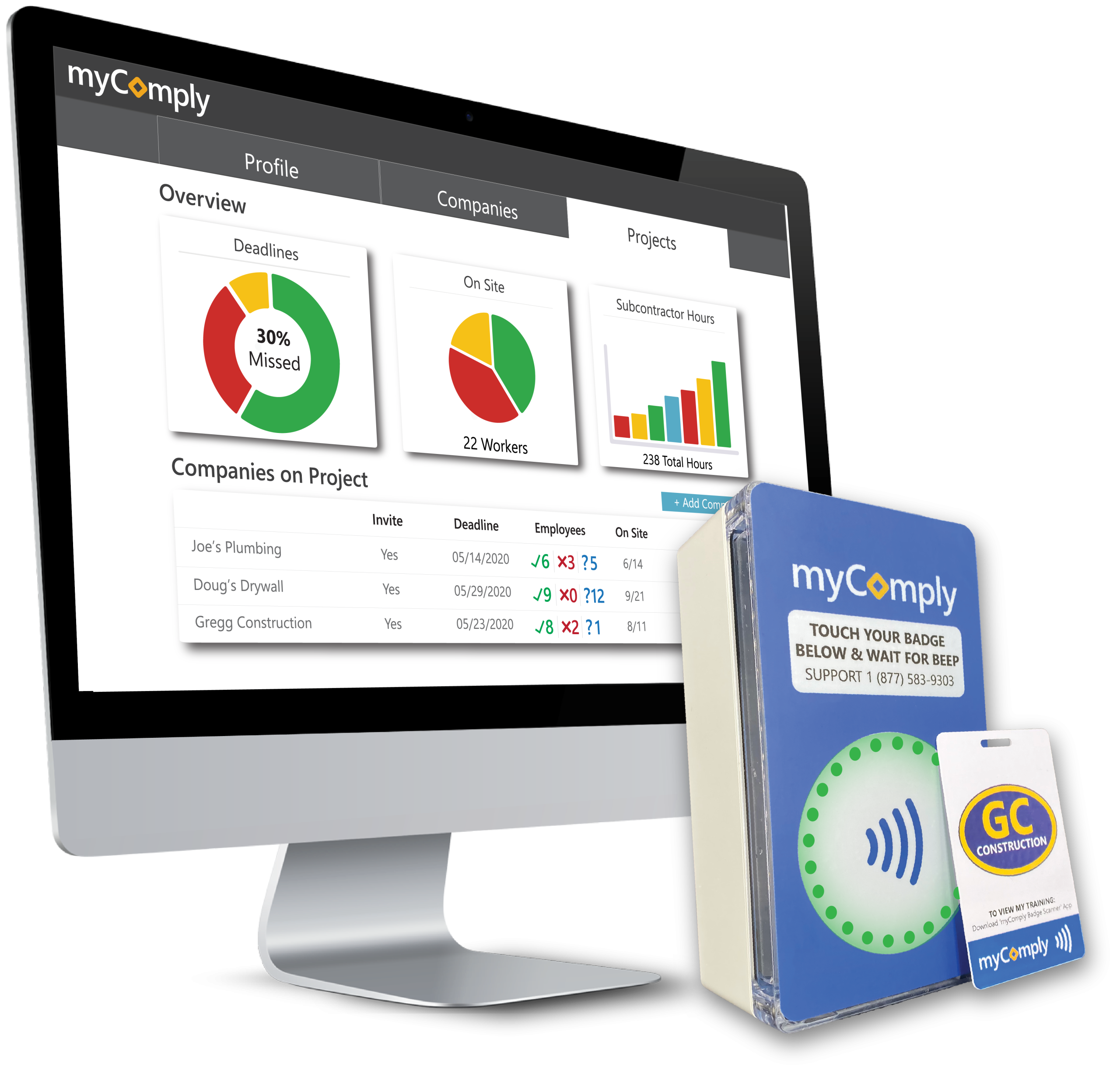
myComply's Time & Attendance system is specifically designed for the unique demands of construction sites. Its adaptability allows it to meet varied project requirements, providing real-time, reliable data on workers' time and attendance. This ensures project timelines are adhered to and labor costs are accurately tracked.
Best for Time & Attendance Software for Construction & Job Sites
Expert Take
myComply Time & Attendance excels in providing a specialized solution for construction site management, offering real-time tracking and adaptability to dynamic project requirements. Its industry-specific focus and reliable data tracking make it a valuable tool, though pricing transparency and customization options could be improved.
Pros
- NYC DOB official partner
- Integrated Smart Brick hardware
- SOC 2 compliant security
- Automated LL 196 reporting
- Real-time certification verification
Cons
- Interface described as rudimentary
- Setup may require professional help
- Custom pricing for Projects Pro
- Mobile app has limited reviews
- Hardware installation required
Best for teams that are
- Contractors navigating strict safety ordinances like NYC LL196.
- Sites needing NFC/Bluetooth badge and Smart Brick access control.
- General contractors wanting automated certification verification.
Skip if
- Small residential contractors with simple time tracking needs.
- Industries outside of construction, mining, or energy.
Best for teams that are
- Contractors navigating strict safety ordinances like NYC LL196.
- Sites needing NFC/Bluetooth badge and Smart Brick access control.
- General contractors wanting automated certification verification.
Skip if
- Small residential contractors with simple time tracking needs.
- Industries outside of construction, mining, or energy.
Pros
- NYC DOB official partner
- Integrated Smart Brick hardware
- SOC 2 compliant security
- Automated LL 196 reporting
- Real-time certification verification
Cons
- Interface described as rudimentary
- Setup may require professional help
- Custom pricing for Projects Pro
- Mobile app has limited reviews
- Hardware installation required
Expert Take
myComply Time & Attendance excels in providing a specialized solution for construction site management, offering real-time tracking and adaptability to dynamic project requirements. Its industry-specific focus and reliable data tracking make it a valuable tool, though pricing transparency and customization options could be improved.
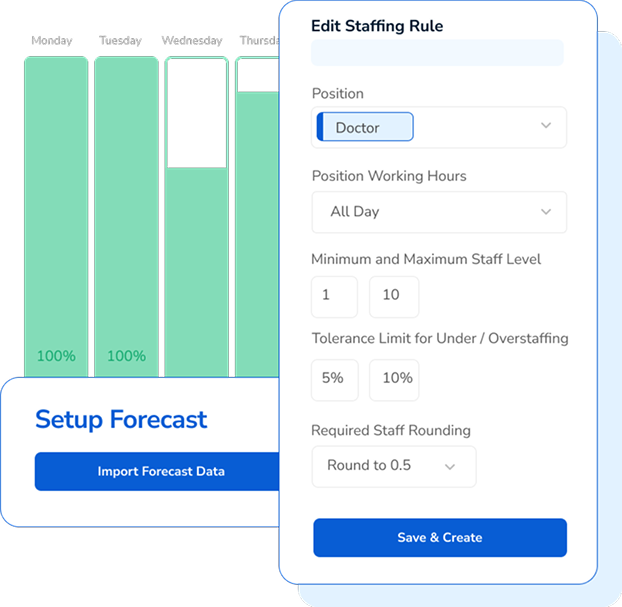
TCP's Manufacturing Scheduling and Time Tracking Software is designed explicitly for compliance-heavy industries. Its core functionality aims to streamline labor scheduling, reduce paperwork, and control costs making it an efficient solution for manufacturing companies dealing with complex regulatory environments.
Best for Time & Attendance Software for Compliance-Heavy Industries
Expert Take
TCP Manufacturing Time Tracking excels in providing compliance-focused features tailored for industries with complex regulatory requirements. Its capabilities in labor scheduling and cost control are well-documented, making it a strong choice for manufacturing companies. The product's market credibility is supported by its focus on compliance-heavy industries, though some implementation time may be required.
Pros
- Robust handling of complex union and overtime rules
- Durable hardware with biometric and thermal options
- Offline mode ensures data capture during outages
- Real-time job costing and labor allocation
- Scalable for enterprise-level manufacturing needs
Cons
- Mobile app rated poorly (1.8/5 stars)
- Steep learning curve for administrators
- Pricing is not transparent (quote-based)
- Interface described as clunky and dated
- Contract cancellation can be difficult
Best for teams that are
- Manufacturing and industrial environments
- Workplaces requiring durable, physical time clocks
- Companies managing complex shift differentials and union rules
Skip if
- White-collar office environments tracking project time
- Small retail shops or cafes
- Businesses looking for a software-only or mobile-first solution
Best for teams that are
- Manufacturing and industrial environments
- Workplaces requiring durable, physical time clocks
- Companies managing complex shift differentials and union rules
Skip if
- White-collar office environments tracking project time
- Small retail shops or cafes
- Businesses looking for a software-only or mobile-first solution
Pros
- Robust handling of complex union and overtime rules
- Durable hardware with biometric and thermal options
- Offline mode ensures data capture during outages
- Real-time job costing and labor allocation
- Scalable for enterprise-level manufacturing needs
Cons
- Mobile app rated poorly (1.8/5 stars)
- Steep learning curve for administrators
- Pricing is not transparent (quote-based)
- Interface described as clunky and dated
- Contract cancellation can be difficult
Expert Take
TCP Manufacturing Time Tracking excels in providing compliance-focused features tailored for industries with complex regulatory requirements. Its capabilities in labor scheduling and cost control are well-documented, making it a strong choice for manufacturing companies. The product's market credibility is supported by its focus on compliance-heavy industries, though some implementation time may be required.
Explore Categories
-
 Enterprise Time & Attendance Platforms for Global Workforces
-
 GPS-Based Time & Attendance Apps for Mobile Crews
-
 Time & Attendance Software for Compliance-Heavy Industries
-
 Time & Attendance Software for Construction & Job Sites
-
 Time & Attendance Software for Field Service Teams
-
 Time & Attendance Software for Healthcare & Clinics
-
 Time & Attendance Software for Manufacturing & Production Lines
-
 Time & Attendance Software with PTO & Leave Management
Loading comparison data…
Enterprise Time & Attendance Platforms for Global Workforces
GPS-Based Time & Attendance Apps for Mobile Crews
Time & Attendance Software for Compliance-Heavy Industries
Time & Attendance Software for Construction & Job Sites
Time & Attendance Software for Field Service Teams
Time & Attendance Software for Healthcare & Clinics
Time & Attendance Software for Manufacturing & Production Lines
Time & Attendance Software with PTO & Leave Management