Time & Attendance Tracking Software

These are the specialized categories within Time & Attendance Tracking Software. Looking for something broader? See all HR & People Management Software categories.

1

Replicon: Time Tracking Software

Best for Time & Attendance Software for Compliance-Heavy Industries

Score
9.9 / 10
Replicon: Time Tracking Software

Replicon is a comprehensive time tracking solution, designed to handle the specific needs of compliance-heavy industries. From tracking time data to transforming it into valuable metrics such as costs, utilization, billing, and pay, this platform is particularly beneficial for industries where stringent compliance and accurate time reporting are crucial.

Best for Time & Attendance Software for Compliance-Heavy Industries

Expert Take

Replicon excels in providing compliance-focused time tracking solutions for industries with stringent regulatory requirements. Its comprehensive capabilities in transforming time data into actionable metrics, combined with strong integration options, position it as a leader in its category.

Pros

  • FedRAMP Moderate Authorized security
  • AI-powered ZeroTime auto-tracking
  • Global labor law compliance (145+ jurisdictions)
  • Modular pricing structure
  • Deep DCAA compliance support

Cons

  • Steep learning curve for new users
  • Complex reporting configuration
  • Mobile app sync inconsistencies
  • No free plan available
  • Can be expensive for small teams

Best for teams that are

  • Project-based businesses like consulting, IT, and professional services
  • Enterprises needing to track billable hours and client costs accurately
  • Global organizations with complex multi-jurisdiction compliance needs

Skip if

  • Small businesses or startups (often too complex and costly)
  • Simple retail or restaurant operations just needing clock-in/out
  • Teams not requiring detailed project or grant tracking

Best for teams that are

  • Project-based businesses like consulting, IT, and professional services
  • Enterprises needing to track billable hours and client costs accurately
  • Global organizations with complex multi-jurisdiction compliance needs

Skip if

  • Small businesses or startups (often too complex and costly)
  • Simple retail or restaurant operations just needing clock-in/out
  • Teams not requiring detailed project or grant tracking

Pros

  • FedRAMP Moderate Authorized security
  • AI-powered ZeroTime auto-tracking
  • Global labor law compliance (145+ jurisdictions)
  • Modular pricing structure
  • Deep DCAA compliance support

Cons

  • Steep learning curve for new users
  • Complex reporting configuration
  • Mobile app sync inconsistencies
  • No free plan available
  • Can be expensive for small teams

Expert Take

Replicon excels in providing compliance-focused time tracking solutions for industries with stringent regulatory requirements. Its comprehensive capabilities in transforming time data into actionable metrics, combined with strong integration options, position it as a leader in its category.

2

TimeTrak Manufacturing Time Tracking

Best for Time & Attendance Software for Manufacturing & Production Lines
Score
9.9 / 10
TimeTrak Manufacturing Time Tracking

TimeTrak offers a comprehensive suite of time tracking tools for manufacturing and production lines. It provides industry-specific features like RFID badge, fingerprint, and advanced facial recognition, enabling accurate tracking of employee hours and productivity. Its robust set of features is designed to streamline workflow and improve operational efficiency in manufacturing environments.

Best for Time & Attendance Software for Manufacturing & Production Lines

Expert Take

TimeTrak Manufacturing Time Tracking excels in providing industry-specific features like RFID and facial recognition, crucial for manufacturing environments. It integrates seamlessly with HR systems and offers comprehensive support. However, the lack of explicit pricing details and potential high implementation costs are noted tradeoffs.

Pros

  • Rugged hardware built for harsh environments
  • Deep bi-directional Infor & Epicor integration
  • Granular job costing and labor tracking
  • 40+ years of manufacturing industry experience
  • US-based customer support team

Cons

  • Mobile app connectivity issues reported
  • Enterprise pricing is not transparent
  • Interface described as outdated by some
  • Manual time entry can be cumbersome
  • Advanced HR features require partners

Best for teams that are

  • Factories needing rugged, dust-resistant physical time clocks
  • Manufacturing plants requiring biometric fingerprint security
  • Large organizations (>100 employees) needing complex rules engines

Skip if

  • Small businesses wanting a simple, cloud-only solution
  • Remote-only teams without a need for physical shop floor hardware

Best for teams that are

  • Factories needing rugged, dust-resistant physical time clocks
  • Manufacturing plants requiring biometric fingerprint security
  • Large organizations (>100 employees) needing complex rules engines

Skip if

  • Small businesses wanting a simple, cloud-only solution
  • Remote-only teams without a need for physical shop floor hardware

Pros

  • Rugged hardware built for harsh environments
  • Deep bi-directional Infor & Epicor integration
  • Granular job costing and labor tracking
  • 40+ years of manufacturing industry experience
  • US-based customer support team

Cons

  • Mobile app connectivity issues reported
  • Enterprise pricing is not transparent
  • Interface described as outdated by some
  • Manual time entry can be cumbersome
  • Advanced HR features require partners

Expert Take

TimeTrak Manufacturing Time Tracking excels in providing industry-specific features like RFID and facial recognition, crucial for manufacturing environments. It integrates seamlessly with HR systems and offers comprehensive support. However, the lack of explicit pricing details and potential high implementation costs are noted tradeoffs.

3

MSite Construction Time & Attendance

Best for Time & Attendance Software for Construction & Job Sites

Score
9.8 / 10
MSite Construction Time & Attendance

MSite offers an advanced SaaS solution specifically designed for the construction industry to monitor and track workers' time and attendance using facial biometric technology. This tool not only improves accuracy in payroll but also enhances safety measures as it provides real-time data on who is on the job site.

Best for Time & Attendance Software for Construction & Job Sites

Expert Take

MSite excels in providing a specialized time and attendance solution tailored for the construction industry, leveraging advanced facial biometric technology. Its focus on real-time tracking and safety measures makes it a standout choice in its niche. While it requires internet connectivity and initial setup, these are common trade-offs for the high level of accuracy and security it offers.

Pros

  • Guaranteed 5 million turnstile rotations
  • Deep Procore & Power BI integration
  • Biometric facial & fingerprint verification
  • Automatic CSCS & Right-to-Work checks
  • 40% of UK workforce already enrolled

Cons

  • Mobile app reliability issues reported
  • Requires heavy physical installation (plinths)
  • No transparent public pricing
  • Hardware lead times and logistics
  • Tablets not supported for app

Best for teams that are

  • Large construction projects requiring biometric access control and turnstiles
  • General contractors managing many subcontractors and site security
  • Developers needing end-to-end workforce management and compliance

Skip if

  • Small businesses needing a simple, software-only mobile app
  • Teams without physical site access control or hardware needs
  • Freelancers or small crews looking for a free solution

Best for teams that are

  • Large construction projects requiring biometric access control and turnstiles
  • General contractors managing many subcontractors and site security
  • Developers needing end-to-end workforce management and compliance

Skip if

  • Small businesses needing a simple, software-only mobile app
  • Teams without physical site access control or hardware needs
  • Freelancers or small crews looking for a free solution

Pros

  • Guaranteed 5 million turnstile rotations
  • Deep Procore & Power BI integration
  • Biometric facial & fingerprint verification
  • Automatic CSCS & Right-to-Work checks
  • 40% of UK workforce already enrolled

Cons

  • Mobile app reliability issues reported
  • Requires heavy physical installation (plinths)
  • No transparent public pricing
  • Hardware lead times and logistics
  • Tablets not supported for app

Expert Take

MSite excels in providing a specialized time and attendance solution tailored for the construction industry, leveraging advanced facial biometric technology. Its focus on real-time tracking and safety measures makes it a standout choice in its niche. While it requires internet connectivity and initial setup, these are common trade-offs for the high level of accuracy and security it offers.

4

TimeClock 365: Healthcare Time Tracking

Best for Time & Attendance Software for Healthcare & Clinics

Score
9.8 / 10
TimeClock 365: Healthcare Time Tracking

TimeClock 365 is a time and attendance tracking software designed for healthcare and medical staff. It addresses the unique needs of the healthcare industry by managing shifts, preventing staff burnout, and ensuring compliance. This allows healthcare teams to focus more on patient care rather than administrative tasks.

Best for Time & Attendance Software for Healthcare & Clinics

Expert Take

TimeClock 365 excels in providing healthcare-specific time tracking solutions, addressing critical industry needs like shift management and compliance. Despite some setup complexity, its targeted features and integration capabilities make it a top choice for healthcare providers.

Pros

  • Seamless Microsoft Teams integration
  • ISO 27001 & GDPR certified
  • Biometric & door access control
  • Automated coverage gap alerts
  • Real-time GPS location tracking

Cons

  • Not HIPAA compliant (per MS cert)
  • Mobile app stability issues
  • Privacy policy security disclaimer
  • Limited audit data retention
  • Support response times vary

Best for teams that are

  • Home health agencies requiring GPS tracking for remote or field-based staff
  • Small to medium clinics needing an affordable, user-friendly time tracking solution

Skip if

  • Large enterprises with complex union payroll rules or intricate clinical scheduling
  • Organizations requiring deep integration with hospital-grade EHR systems

Best for teams that are

  • Home health agencies requiring GPS tracking for remote or field-based staff
  • Small to medium clinics needing an affordable, user-friendly time tracking solution

Skip if

  • Large enterprises with complex union payroll rules or intricate clinical scheduling
  • Organizations requiring deep integration with hospital-grade EHR systems

Pros

  • Seamless Microsoft Teams integration
  • ISO 27001 & GDPR certified
  • Biometric & door access control
  • Automated coverage gap alerts
  • Real-time GPS location tracking

Cons

  • Not HIPAA compliant (per MS cert)
  • Mobile app stability issues
  • Privacy policy security disclaimer
  • Limited audit data retention
  • Support response times vary

Expert Take

TimeClock 365 excels in providing healthcare-specific time tracking solutions, addressing critical industry needs like shift management and compliance. Despite some setup complexity, its targeted features and integration capabilities make it a top choice for healthcare providers.

5

Inovalon Healthcare Time & Attendance

Best for Time & Attendance Software for Healthcare & Clinics

Score
9.8 / 10
Inovalon Healthcare Time & Attendance

Inovalon's healthcare time & attendance software is designed to simplify payroll operations specifically in the healthcare sector. It provides accurate time tracking, real-time alerts, and helps enforce compliance every shift, making it a perfect fit for clinics and hospitals who want to streamline their workforce management.

Best for Time & Attendance Software for Healthcare & Clinics

Expert Take

Inovalon's Healthcare Time & Attendance software is tailored for the healthcare sector, offering specialized features like real-time alerts and compliance enforcement. It is recognized for its capability to streamline payroll operations in clinics and hospitals, making it a leading choice in its niche.

Pros

  • Direct QIES connectivity for PBJ
  • Geo-location iBeacon punch verification
  • Seamless scheduling & agency integration
  • Automated overtime & pay coding
  • Real-time compliance alerts

Cons

  • Mobile app performance issues
  • Difficult contract cancellation process
  • Strict auto-renewal policies
  • Support responsiveness varies
  • Laggy interface reported by some

Best for teams that are

  • Healthcare facilities aiming to reduce reliance on expensive external agency staff
  • Organizations needing integrated scheduling, credentialing, and time tracking

Skip if

  • Small, single-location practices with no agency staff or complex scheduling needs
  • Non-healthcare businesses, as the platform is highly specialized for clinical workflows

Best for teams that are

  • Healthcare facilities aiming to reduce reliance on expensive external agency staff
  • Organizations needing integrated scheduling, credentialing, and time tracking

Skip if

  • Small, single-location practices with no agency staff or complex scheduling needs
  • Non-healthcare businesses, as the platform is highly specialized for clinical workflows

Pros

  • Direct QIES connectivity for PBJ
  • Geo-location iBeacon punch verification
  • Seamless scheduling & agency integration
  • Automated overtime & pay coding
  • Real-time compliance alerts

Cons

  • Mobile app performance issues
  • Difficult contract cancellation process
  • Strict auto-renewal policies
  • Support responsiveness varies
  • Laggy interface reported by some

Expert Take

Inovalon's Healthcare Time & Attendance software is tailored for the healthcare sector, offering specialized features like real-time alerts and compliance enforcement. It is recognized for its capability to streamline payroll operations in clinics and hospitals, making it a leading choice in its niche.

6

BusyBusy GPS Time Tracker

Best for GPS-Based Time & Attendance Apps for Mobile Crews

Score
9.7 / 10
BusyBusy GPS Time Tracker

BusyBusy is a GPS-based time tracking app designed specifically for field employees and contractors. It simplifies timesheet management by allowing real-time clocking in and out, and offers location tracking to ensure productivity. It's an essential tool for HR and project managers in construction and similar industries, greatly improving time and attendance monitoring.

Best for GPS-Based Time & Attendance Apps for Mobile Crews

Expert Take

BusyBusy excels in providing a GPS-based time tracking solution tailored for field employees, particularly in the construction industry. Its features like real-time GPS tracking and automated timesheets are well-documented and praised, making it a top choice for mobile crews. While it has some limitations, such as dependency on internet availability, its overall capabilities and market credibility position it as a leader in its category.

Pros

  • Reliable offline mode for remote sites
  • Specialized equipment tracking and location
  • Deep integration with Procore & QuickBooks
  • Strong job costing with cost codes
  • High user ratings for ease of use

Cons

  • Mandatory $40/mo base fee on paid plans
  • Free plan lacks GPS enforcement
  • Battery drain complaints from some users
  • Paid breaks tracking was historically limited

Best for teams that are

  • Construction and field service companies needing job costing and equipment tracking
  • Supervisors who need to clock in an entire crew at once from the field
  • Businesses that need to track heavy equipment location alongside employee time

Skip if

  • Office-based teams or those needing screen monitoring features
  • Businesses looking for a permanently free plan with advanced features
  • Companies needing complex project management beyond time and cost tracking

Best for teams that are

  • Construction and field service companies needing job costing and equipment tracking
  • Supervisors who need to clock in an entire crew at once from the field
  • Businesses that need to track heavy equipment location alongside employee time

Skip if

  • Office-based teams or those needing screen monitoring features
  • Businesses looking for a permanently free plan with advanced features
  • Companies needing complex project management beyond time and cost tracking

Pros

  • Reliable offline mode for remote sites
  • Specialized equipment tracking and location
  • Deep integration with Procore & QuickBooks
  • Strong job costing with cost codes
  • High user ratings for ease of use

Cons

  • Mandatory $40/mo base fee on paid plans
  • Free plan lacks GPS enforcement
  • Battery drain complaints from some users
  • Paid breaks tracking was historically limited

Expert Take

BusyBusy excels in providing a GPS-based time tracking solution tailored for field employees, particularly in the construction industry. Its features like real-time GPS tracking and automated timesheets are well-documented and praised, making it a top choice for mobile crews. While it has some limitations, such as dependency on internet availability, its overall capabilities and market credibility position it as a leader in its category.

7

myComply Time & Attendance

Best for Time & Attendance Software for Construction & Job Sites
Score
9.7 / 10
myComply Time & Attendance

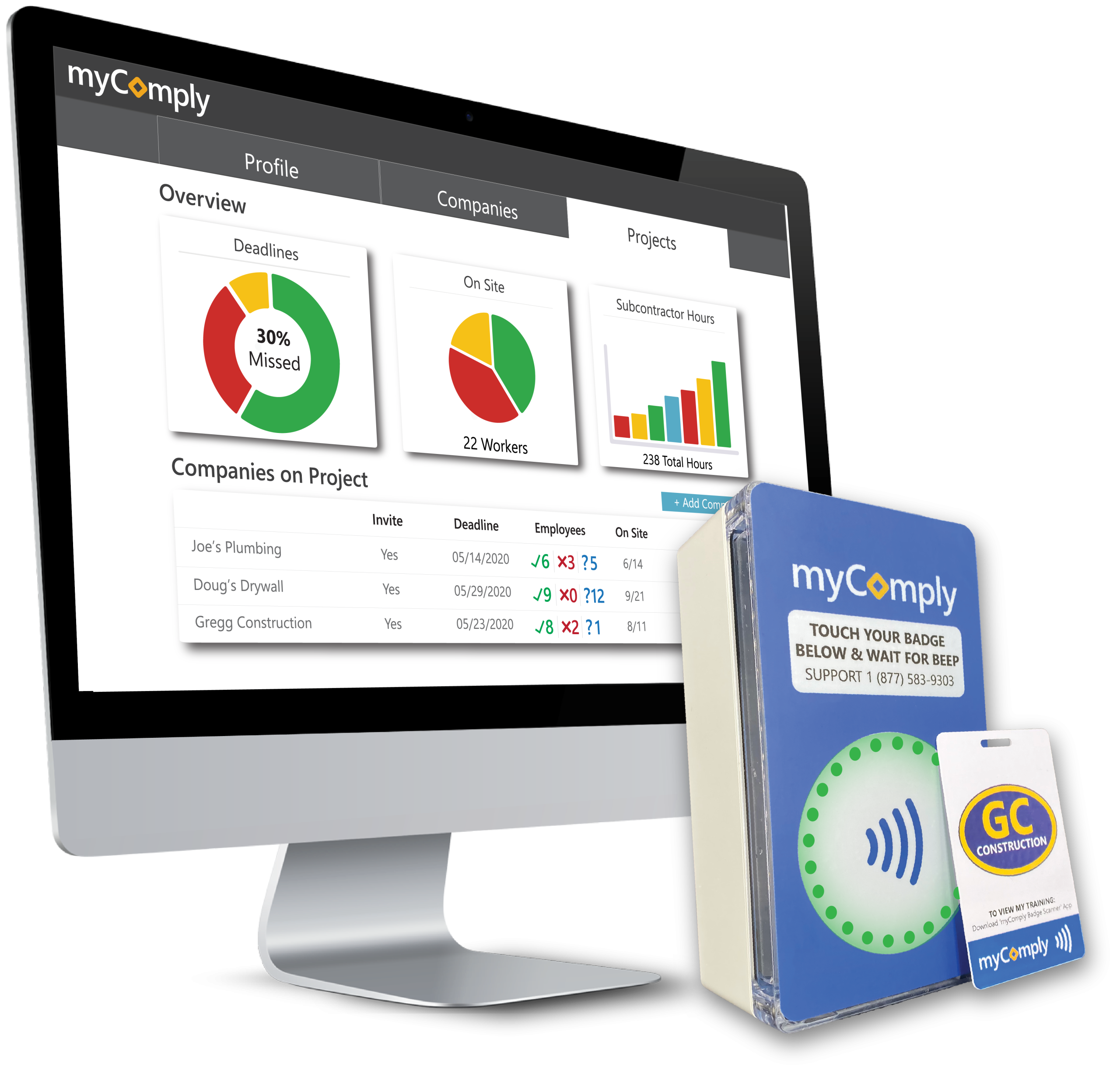
myComply's Time & Attendance system is specifically designed for the unique demands of construction sites. Its adaptability allows it to meet varied project requirements, providing real-time, reliable data on workers' time and attendance. This ensures project timelines are adhered to and labor costs are accurately tracked.

Best for Time & Attendance Software for Construction & Job Sites

Expert Take

myComply Time & Attendance excels in providing a specialized solution for construction site management, offering real-time tracking and adaptability to dynamic project requirements. Its industry-specific focus and reliable data tracking make it a valuable tool, though pricing transparency and customization options could be improved.

Pros

  • NYC DOB official partner
  • Integrated Smart Brick hardware
  • SOC 2 compliant security
  • Automated LL 196 reporting
  • Real-time certification verification

Cons

  • Interface described as rudimentary
  • Setup may require professional help
  • Custom pricing for Projects Pro
  • Mobile app has limited reviews
  • Hardware installation required

Best for teams that are

  • General Contractors managing subcontractor certifications and compliance
  • Asset owners requiring detailed workforce reporting for stakeholders
  • Projects needing strict site access control based on training

Skip if

  • Small subcontractors just needing simple payroll tracking
  • Teams wanting a quick setup without hardware or compliance workflows
  • Users with simple needs who don't manage subcontractor certifications

Best for teams that are

  • General Contractors managing subcontractor certifications and compliance
  • Asset owners requiring detailed workforce reporting for stakeholders
  • Projects needing strict site access control based on training

Skip if

  • Small subcontractors just needing simple payroll tracking
  • Teams wanting a quick setup without hardware or compliance workflows
  • Users with simple needs who don't manage subcontractor certifications

Pros

  • NYC DOB official partner
  • Integrated Smart Brick hardware
  • SOC 2 compliant security
  • Automated LL 196 reporting
  • Real-time certification verification

Cons

  • Interface described as rudimentary
  • Setup may require professional help
  • Custom pricing for Projects Pro
  • Mobile app has limited reviews
  • Hardware installation required

Expert Take

myComply Time & Attendance excels in providing a specialized solution for construction site management, offering real-time tracking and adaptability to dynamic project requirements. Its industry-specific focus and reliable data tracking make it a valuable tool, though pricing transparency and customization options could be improved.

8

TCP Manufacturing Time Tracking

Best for Time & Attendance Software for Compliance-Heavy Industries
Score
9.7 / 10
TCP Manufacturing Time Tracking

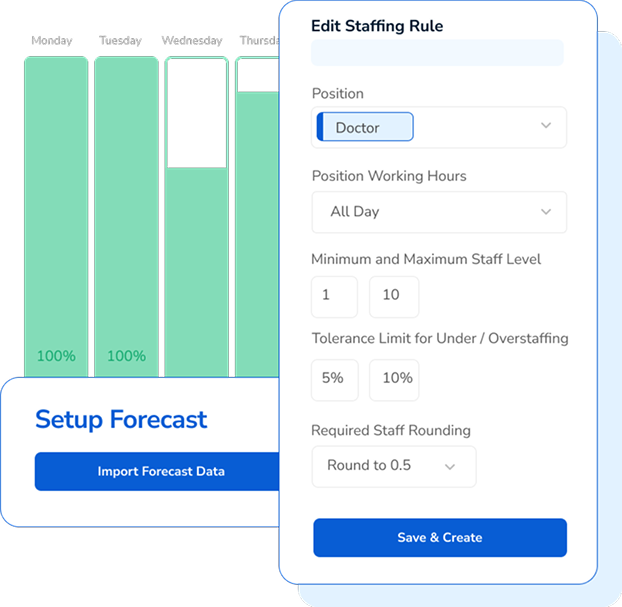
TCP's Manufacturing Scheduling and Time Tracking Software is designed explicitly for compliance-heavy industries. Its core functionality aims to streamline labor scheduling, reduce paperwork, and control costs making it an efficient solution for manufacturing companies dealing with complex regulatory environments.

Best for Time & Attendance Software for Compliance-Heavy Industries

Expert Take

TCP Manufacturing Time Tracking excels in providing compliance-focused features tailored for industries with complex regulatory requirements. Its capabilities in labor scheduling and cost control are well-documented, making it a strong choice for manufacturing companies. The product's market credibility is supported by its focus on compliance-heavy industries, though some implementation time may be required.

Pros

  • Robust handling of complex union and overtime rules
  • Durable hardware with biometric and thermal options
  • Offline mode ensures data capture during outages
  • Real-time job costing and labor allocation
  • Scalable for enterprise-level manufacturing needs

Cons

  • Mobile app rated poorly (1.8/5 stars)
  • Steep learning curve for administrators
  • Pricing is not transparent (quote-based)
  • Interface described as clunky and dated
  • Contract cancellation can be difficult

Best for teams that are

  • Manufacturing and industrial environments
  • Workplaces requiring durable, physical time clocks
  • Companies managing complex shift differentials and union rules

Skip if

  • White-collar office environments tracking project time
  • Small retail shops or cafes
  • Businesses looking for a software-only or mobile-first solution

Best for teams that are

  • Manufacturing and industrial environments
  • Workplaces requiring durable, physical time clocks
  • Companies managing complex shift differentials and union rules

Skip if

  • White-collar office environments tracking project time
  • Small retail shops or cafes
  • Businesses looking for a software-only or mobile-first solution

Pros

  • Robust handling of complex union and overtime rules
  • Durable hardware with biometric and thermal options
  • Offline mode ensures data capture during outages
  • Real-time job costing and labor allocation
  • Scalable for enterprise-level manufacturing needs

Cons

  • Mobile app rated poorly (1.8/5 stars)
  • Steep learning curve for administrators
  • Pricing is not transparent (quote-based)
  • Interface described as clunky and dated
  • Contract cancellation can be difficult

Expert Take

TCP Manufacturing Time Tracking excels in providing compliance-focused features tailored for industries with complex regulatory requirements. Its capabilities in labor scheduling and cost control are well-documented, making it a strong choice for manufacturing companies. The product's market credibility is supported by its focus on compliance-heavy industries, though some implementation time may be required.

9

Timeclock 365 PTO Management

Best for Time & Attendance Software with PTO & Leave Management
Score
9.7 / 10
Timeclock 365 PTO Management

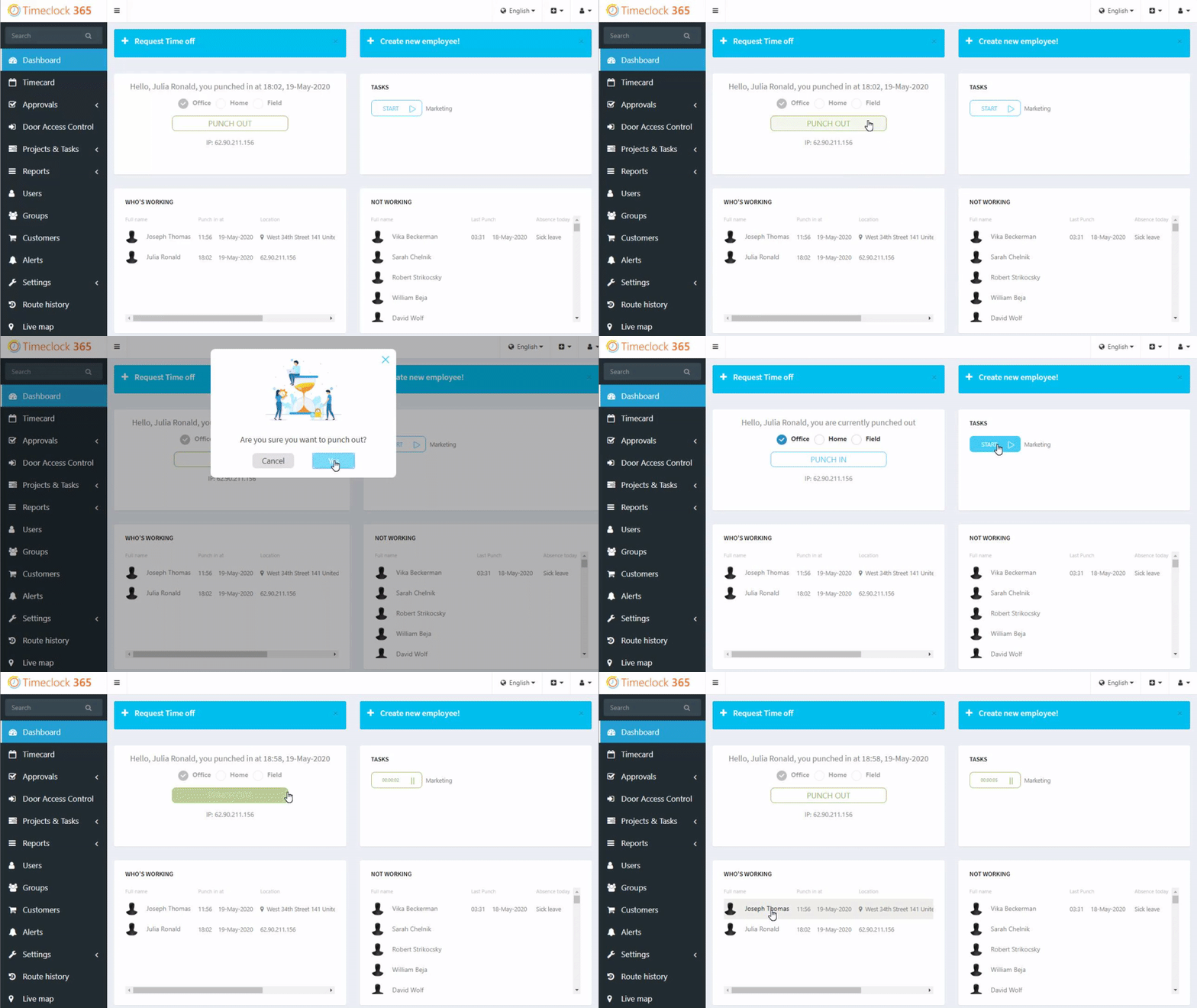
Timeclock 365's PTO Leave Management is a robust tool specifically designed to streamline leave management processes in businesses. It eliminates the traditional back-and-forth communication, allowing employees to log or request time off through the web portal. This feature addresses the need for efficient time management and reduces administrative overload in HR departments.

Best for Time & Attendance Software with PTO & Leave Management

Expert Take

Timeclock 365 PTO Management excels in streamlining leave management processes with its intuitive web portal and real-time tracking capabilities. It is recognized for reducing administrative workload and enhancing efficiency, making it a top choice in its category.

Pros

  • ISO 27001 & GDPR compliant security
  • Certified Microsoft Teams integration
  • Biometric data stored locally on devices
  • Real-time GPS tracking and geofencing
  • Affordable modular pricing model

Cons

  • Mobile app crashes and GPS bugs
  • Manual export needed for some payrolls
  • Advanced features require paid add-ons
  • Reporting can be complex to configure
  • Limited native integrations outside Microsoft

Best for teams that are

  • Companies using Microsoft Teams for daily operations
  • Facilities needing biometric or door access control integration
  • Businesses with field employees requiring GPS tracking

Skip if

  • Organizations needing deep, customizable reporting features
  • Teams requiring highly flexible, non-standard workflows
  • Businesses looking for a dedicated HRIS rather than just time

Best for teams that are

  • Companies using Microsoft Teams for daily operations
  • Facilities needing biometric or door access control integration
  • Businesses with field employees requiring GPS tracking

Skip if

  • Organizations needing deep, customizable reporting features
  • Teams requiring highly flexible, non-standard workflows
  • Businesses looking for a dedicated HRIS rather than just time

Pros

  • ISO 27001 & GDPR compliant security
  • Certified Microsoft Teams integration
  • Biometric data stored locally on devices
  • Real-time GPS tracking and geofencing
  • Affordable modular pricing model

Cons

  • Mobile app crashes and GPS bugs
  • Manual export needed for some payrolls
  • Advanced features require paid add-ons
  • Reporting can be complex to configure
  • Limited native integrations outside Microsoft

Expert Take

Timeclock 365 PTO Management excels in streamlining leave management processes with its intuitive web portal and real-time tracking capabilities. It is recognized for reducing administrative workload and enhancing efficiency, making it a top choice in its category.

10

DATABASICS Leave Management

Best for Time & Attendance Software with PTO & Leave Management

Score
9.7 / 10
DATABASICS Leave Management

DATABASICS Leave Management is a top-notch SaaS solution for HR professionals needing to automate PTO tracking and streamline leave approvals. Its accuracy and ease of use make it a perfect match for the industry, syncing calendars and ensuring seamless time and attendance tracking.

Best for Time & Attendance Software with PTO & Leave Management

Expert Take

DATABASICS Leave Management excels in automating PTO tracking and streamlining leave approvals, making it a top choice for HR professionals. Its integration capabilities and calendar synchronization enhance usability, though pricing transparency is limited. The product's industry relevance and functionality justify its high scoring as a premium solution.

Pros

  • Automated FMLA and DCAA compliance
  • Deep bi-directional ERP integrations
  • Highly responsive customer support
  • Flexible complex accrual engine
  • Unified time and leave platform

Cons

  • Mobile app stability issues
  • Reporting interface can be complex
  • No free trial available
  • Pricing is not transparent
  • Steep learning curve for admins

Best for teams that are

  • Mid-market to enterprise organizations with complex policies
  • Government contractors requiring DCAA compliance
  • Companies needing deep integration with ERPs like NetSuite

Skip if

  • Small businesses or freelancers with simple needs
  • Teams needing a free or low-cost standalone tool
  • Organizations without complex compliance or audit requirements

Best for teams that are

  • Mid-market to enterprise organizations with complex policies
  • Government contractors requiring DCAA compliance
  • Companies needing deep integration with ERPs like NetSuite

Skip if

  • Small businesses or freelancers with simple needs
  • Teams needing a free or low-cost standalone tool
  • Organizations without complex compliance or audit requirements

Pros

  • Automated FMLA and DCAA compliance
  • Deep bi-directional ERP integrations
  • Highly responsive customer support
  • Flexible complex accrual engine
  • Unified time and leave platform

Cons

  • Mobile app stability issues
  • Reporting interface can be complex
  • No free trial available
  • Pricing is not transparent
  • Steep learning curve for admins

Expert Take

DATABASICS Leave Management excels in automating PTO tracking and streamlining leave approvals, making it a top choice for HR professionals. Its integration capabilities and calendar synchronization enhance usability, though pricing transparency is limited. The product's industry relevance and functionality justify its high scoring as a premium solution.

How We Rank Products

Our Evaluation Process

Time & Attendance Tracking Software is evaluated based on features like integration capabilities with existing systems and compliance with labor regulations. Pricing transparency is considered to assess cost-effectiveness for different business sizes. Compatibility with mobile devices and biometric systems is also reviewed. Third-party customer feedback provides insights into real-world usability and satisfaction.

Verification

  • Products evaluated through comprehensive research and analysis of time tracking features and user experiences.
  • Rankings based on analysis of specifications, customer feedback, and expert reviews in the time and attendance tracking category.
  • Selection criteria focus on key factors such as integration capabilities, user interface, and reporting functionalities.

Score Breakdown

0.0 / 10

About Time & Attendance Tracking Software

WHAT IS TIME & ATTENDANCE TRACKING SOFTWARE?

This category covers software used to capture, validate, and process employee working hours and leave data for the purpose of accurate payroll calculation and labor law compliance. Unlike simple "time clocks" of the past, modern Time & Attendance Tracking Software manages the complex rules engine that sits between raw punch data and a paycheck: calculating overtime, applying shift differentials, enforcing break compliance, managing accruals, and distinguishing between billable and non-billable time. It sits between HRIS (which holds core employee demographic data) and Payroll (which executes the final funds transfer), acting as the operational translation layer that converts "presence" into "pay."

The category is narrower than broader Workforce Management (WFM) suites—which also include forecasting, advanced scheduling, and task management—but significantly deeper than basic timekeeping features found in project management tools. It includes both general-purpose cloud platforms designed for office environments and highly specialized, vertical-specific tools built for complex regulatory environments like unionized manufacturing, healthcare, and field construction. These systems serve as the single source of truth for labor activity, protecting organizations from wage theft litigation while ensuring employees are paid accurately for every minute worked.

The core problem this software solves is the "translation error" between human activity and financial compensation. Without it, organizations rely on manual estimation or disconnected spreadsheets, leading to "time theft," payroll leakage, and significant regulatory liability. It is used primarily by HR and Operations leaders to enforce labor policy automatically, removing the burden of manual calculation from frontline managers.

HISTORY: FROM PUNCH CARDS TO ALGORITHMIC COMPLIANCE

While mechanical time clocks date back to the late 19th century, the modern software category of Time & Attendance began to take shape in the 1990s as a response to the rigid limitations of mainframe ERP systems. In the early 90s, "time and attendance" was often a module bolted onto a massive on-premise ERP or a physical hardware system that printed data onto proprietary cards. These systems were essentially digital databases for clock punches—they could record when someone arrived, but they lacked the intelligence to interpret what that arrival meant for payroll without manual intervention.

The late 1990s and early 2000s saw the rise of "best-of-breed" solutions. As labor laws (such as the FMLA and various state-level overtime mandates) became more complex, generalist ERPs could not keep up with the nuanced calculations required for unionized or shift-based workforces. This created a gap that specialized software vendors filled, focusing entirely on the "rules engine"—the software's ability to automatically apply complex logic like California meal break penalties or union-mandated double-time.

The most significant shift occurred with the transition from on-premise servers to the cloud (SaaS) around 2010. This moved the point of data capture from a wall-mounted clock to the employee's pocket. Mobile connectivity allowed Time & Attendance software to expand into field services and logistics, tracking not just time but location via GPS. This era also saw massive market consolidation, where large payroll providers acquired standalone time tracking vendors to control the data flow from punch to paycheck, attempting to create "unified" human capital management suites.

Today, buyer expectations have evolved from "give me a digital timesheet" to "give me actionable intelligence." Modern systems are expected to predict overtime before it happens, flag "flight risk" employees based on attendance patterns, and automate compliance with shifting labor regulations. The focus has moved from simple data collection to risk mitigation and operational optimization.

WHAT TO LOOK FOR

Evaluating Time & Attendance Tracking Software requires moving beyond basic feature checklists ("does it have a mobile app?") to assessing the robustness of the rules engine. The critical differentiator is rarely how the time is collected, but rather how the system handles exceptions. A robust system must be able to configure "if/then" logic without custom coding. For example, can the system automatically trigger a different pay code if an employee works a split shift across two different cost centers on a Sunday? If the vendor answers "we can build that for you," that is a red flag. True enterprise-grade software handles this via configuration, not customization.

Buyers should scrutinize the system's "auditability." In the event of a wage-and-hour lawsuit, you need more than just the final timesheet; you need the metadata of every modification. Who changed the punch? When? Was the employee notified? Warning signs include systems that allow managers to edit timesheets without generating a permanent, unalterable log entry, or systems that overwrite original punch data rather than storing it alongside the corrected entry.

Another critical area is "offline resilience." Cloud-based systems are excellent until the internet goes down. Ask vendors specifically: "How does the hardware or mobile app behave during a prolonged outage?" Inferior systems will simply stop accepting punches, causing chaos at shift change. Superior systems store data locally with high-grade encryption and sync intelligently once connectivity is restored, flagging any anomalies that occurred during the blackout.

Finally, verify the "biometric data policy." With the rise of biometric privacy laws (like BIPA in Illinois), the software must support biometric template hashing—converting a fingerprint or face scan into a mathematical string that cannot be reverse-engineered into an image—and provide automated tools for consent management and data destruction. If a vendor treats biometric data simply as "images stored in the cloud," they are exposing you to massive legal liability.

INDUSTRY-SPECIFIC USE CASES

Retail & E-commerce

In retail environments, the primary challenge is not just tracking time, but managing high-velocity volatility. Retailers face high turnover and frequent schedule changes that trigger "predictive scheduling" or "fair workweek" laws in many jurisdictions. These laws penalize employers for last-minute schedule changes. Therefore, Time & Attendance software for retail must have tight integration with scheduling modules to alert managers before they make a change that incurs a penalty. It also needs to support seamless "shift swapping" where the time tracking logic automatically transfers the hours—and the associated overtime calculations—to the covering employee without manager intervention.

Healthcare

Healthcare systems operate under the most complex pay rules of any industry. Nurses often work across different departments (cost centers) in a single week, or even a single shift, triggering different pay rates ("shift differentials"). A nurse might earn a base rate, plus a weekend differential, plus a "charge nurse" premium, plus a hazard pay bonus—all simultaneously. Generic software fails here. Healthcare-specific Time & Attendance tools must handle "stacked pay codes" and integrate with clinical credentialing systems to ensure that the person clocking in is actually licensed to perform the scheduled role, blocking the punch if a certification has expired.

Financial Services

For financial institutions, the priority is security and audit trails rather than complex shift patterns. These organizations often require "zero-trust" time tracking where the software must verify identity with extreme rigor to prevent unauthorized access to sensitive trading floors or banking systems. Time & Attendance in this sector often acts as a gatekeeper; the "clock in" triggers access to physical doors or cybersecurity login credentials. The software must produce immutable audit logs that satisfy Sarbanes-Oxley (SOX) and other regulatory frameworks, proving exactly who was in the building and when.

Manufacturing

Manufacturing buyers need software that bridges the gap between "attendance" (being at work) and "job costing" (what work was done). In this sector, employees often clock into specific production orders or machines. The software must track "piece rate" calculations or complex union rules regarding breaks and overtime distribution. A critical unique need is the "gapping" analysis—identifying the difference between the time an employee is paid for (gate-to-gate) vs. the time they are productive on the line. Specialized tools here often integrate directly with IoT sensors on shop floor machinery to validate human input against machine runtime.

Professional Services

In law firms, consultancies, and agencies, time tracking is the revenue engine. The focus shifts from "compliance" to "billability." Unlike other sectors where minimizing overtime is the goal, here the goal is capturing every billable minute. The software must differentiate clearly between "utilized" time (billable to a client) and "administrative" time. Evaluation priorities include deep integration with project management and invoicing billing systems. A unique consideration is the user interface friction; highly paid professionals will not use a clunky "punch clock" interface. They require "passive" tracking tools that run in the background of their workstations, suggesting time entries based on calendar appointments and document activity.

SUBCATEGORY OVERVIEW

Time & Attendance Software for Construction & Job Sites

This niche is fundamentally defined by the "distributed and disconnected" nature of the workforce. Unlike an office or factory, the "workplace" in construction moves constantly and often lacks reliable internet infrastructure. What makes this category genuinely different is the requirement for robust "offline mode" capabilities and geofencing validation that works without battery drain. General tools fail here because they assume a constant connection; specialized construction tools cache data locally on ruggedized devices and sync only when a signal is verified.

A workflow that only Time & Attendance Software for Construction & Job Sites handles well is the "crew punch." In this scenario, a foreman clocks in an entire team of 20 workers at once from a single tablet, assigning them to a specific cost code (e.g., "Framing - Building B") and then transferring them collectively to a different code ("Drywall - Building B") mid-shift. Generic tools force individual clock-ins, which wastes massive amounts of productive time. The specific pain point driving buyers here is "ghost employees"—workers being clocked in by buddies when they aren't actually on the remote site—which specialized tools solve via facial verification at the point of the crew punch.

Enterprise Time & Attendance Platforms for Global Workforces

The defining characteristic of this subcategory is the ability to handle "multi-jurisdictional compliance" simultaneously. A general tool might handle US overtime rules perfectly but fail when asked to calculate French "RTT" days or Brazilian electronic timekeeping mandates (Portaria 671). Enterprise platforms are architected with a global rules library that localizes compliance automatically based on the employee's assigned region.

A workflow unique to Enterprise Time & Attendance Platforms for Global Workforces is the "global labor view" rollout. This involves standardizing pay rules across 30+ countries while maintaining local legal adherence, allowing a HQ in London to view real-time labor costs in Tokyo, New York, and Berlin on a single dashboard, normalized to a single currency. Buyers are driven to this niche by the pain of "fragmented data"—having to collate spreadsheets from 15 different local payroll vendors to get a simple headcount report.

Time & Attendance Software for Manufacturing & Production Lines

This software distinguishes itself by treating time as a production input rather than just a payroll output. It is integrated deeply with ERP and Manufacturing Execution Systems (MES). The nuance here is "shop floor data collection." Generic tools simply record that John was at work for 8 hours. Specialized manufacturing tools record that John spent 2 hours on Machine A, 4 hours on Machine B, and 2 hours on maintenance, reconciling his labor cost against the profitability of the specific widgets produced.

One workflow that Time & Attendance Software for Manufacturing & Production Lines excels at is "piece-rate calculation with minimum wage floor." If a worker is paid per unit produced but their production falls below the legal minimum hourly wage, the software must instantly calculate the "make-up pay" to ensure compliance. General tools cannot handle this dual-logic calculation. The driving pain point is "job costing inaccuracy"—manufacturers realizing they are losing money on products because they cannot accurately attribute labor costs to specific production runs.

Time & Attendance Software for Compliance-Heavy Industries

This subcategory serves industries where the cost of non-compliance is existential, such as unionized transportation, healthcare, or government contracting. The differentiator is the "rules engine configurability" and the depth of the audit trail. These tools are built to codify Collective Bargaining Agreements (CBAs) that may have existed for 50 years and contain bizarre, compounded pay rules that defy standard logic.

A workflow specific to Time & Attendance Software for Compliance-Heavy Industries is "grievance avoidance." The software proactively alerts managers if assigning a specific overtime shift to Employee A would violate a seniority clause in the union contract, thereby preventing a costly grievance filing. Buyers flock here due to the pain of "litigation risk"—the fear of class-action lawsuits arising from systematic miscalculation of complex overtime or break rules.

Time & Attendance Software for Field Service Teams

The focus here is on "route-based" time tracking. Unlike construction (which is site-based), field service involves technicians moving between 5-10 locations a day. This software blends time tracking with logistics, using GPS breadcrumbing not just for verification, but to calculate "drive time" vs. "wrench time."

A specific workflow handled by Time & Attendance Software for Field Service Teams is the automatic deduction of commute time. If a technician drives the company van home, the software must differentiate between the "commute" (unpaid) and the travel to the first job site (paid), often based on dynamic distance thresholds. General tools struggle to automate this "first trip of the day" logic. The driving pain point is "leakage in billable hours"—service companies losing revenue because technicians under-report travel time or over-report breaks between jobs.

Integration & API Ecosystem

The single most critical failure point in Time & Attendance deployments is not the time clock itself, but the bridge to payroll. In a modern stack, T&A software is the "operational lung" that breathes in schedule data and breathes out payroll files. Gartner notes that "consolidated integrations" are a primary driver for efficiency, as a global system requires less effort to maintain than fragmented local connections [1]. The ecosystem has matured from flat-file exports (CSV) to real-time, bi-directional APIs. However, "real-time" is often a marketing term; buyers must verify if the API supports validation logic, not just data transfer.

Consider a scenario involving a mid-sized professional services firm of 50 people. They use a CRM for client management and a separate payroll provider. They implement a new Time & Attendance tool to track billable hours. A poorly designed integration might sync employee names from the HR system but fail to sync "Project Codes" from the CRM in real-time. The result? Consultants cannot log time to new projects until an admin manually updates the T&A system—a delay that causes billable hours to be lost or miscategorized to "General Admin."

When integrations break, the cost is high. Research indicates that organizations with disconnected systems suffer from higher error rates. Specifically, Ernst & Young found that the average cost of a single payroll error is approximately $291 [2]. If your integration fails to capture overtime correctly for just 10 employees in a pay period, the administrative cleanup cost alone—not including the wage liability—can exceed $3,000 instantly. A robust API ecosystem prevents this by validating data before it hits the payroll run.

Security & Compliance

Security in Time & Attendance has moved beyond password protection to become a matter of biometric privacy and sovereign data residency. The rise of laws like the Illinois Biometric Information Privacy Act (BIPA) has turned simple fingerprint clocks into liability landmines. BIPA allows for "liquidated damages" of $1,000 per negligent violation and $5,000 per reckless violation. This is not theoretical; in recent years, companies have faced massive settlements, such as the $3.3 million settlement by UKG regarding biometric data handling [3].

Compliance also extends to data minimization principles found in GDPR. A "compliant" system must not only encrypt data but also enforce retention policies automatically—deleting biometric templates immediately when an employee is terminated. Forrester emphasizes that organizations are now prioritizing data privacy and security as critical drivers in enterprise software selection [4].

In practice, consider a multi-state logistics company operating in Illinois, Texas, and New York. They use facial recognition time clocks. If their software stores raw photos of faces rather than encrypted, hashed templates, and fails to obtain written consent from a new driver in Chicago before they clock in, the company has committed a BIPA violation the moment that driver punches in. A secure system would physically block the clock-in attempt until the digital consent form is signed and verified, protecting the company from a class-action lawsuit that accumulates penalty dollars with every single shift.

Pricing Models & TCO

Pricing in this category is shifting. The traditional model is Per Employee Per Month (PEPM), which typically ranges from $3 to $10 for core timekeeping, with add-ons for scheduling or advanced analytics. However, a newer trend is usage-based pricing, which is gaining traction in enterprise software. While PEPM offers predictability, it can be inefficient for businesses with high seasonality. Usage-based models charge based on active users or "punches," aligning cost with actual utility.

According to recent market analysis, 46% of SaaS businesses had adopted some form of usage-based pricing by 2022, a trend expected to grow as companies seek better alignment between price and value [5]. Buyers must be wary of Total Cost of Ownership (TCO) traps, particularly regarding hardware. A vendor might offer a low software fee but mandate proprietary time clocks that cost $2,000 each and require a separate maintenance contract.

Let’s calculate the TCO for a hypothetical 25-person construction team. Option A (PEPM): $8/user/month = $200/month. Annual software cost: $2,400. Option B (Usage): $0.50 per clocked shift. If employees work 20 days/month = $10/user/month = $250/month. At first glance, PEPM looks cheaper. However, if the construction team is seasonal and only works 6 months of the year, Option A costs $2,400 (you pay for the seats regardless of activity) while Option B drops to $1,500. A savvy buyer must model these scenarios based on their workforce's actual volatility, not just the sticker price.

Implementation & Change Management

Implementation failure in Time & Attendance is rarely technical; it is cultural. The introduction of new tracking software is often perceived by employees as "surveillance" rather than "support." Gartner highlights that organizations are increasingly leveraging WFM applications to improve employee experience (EX), not just efficiency, through features like flexible scheduling and sentiment capture [6]. Ignoring this EX component is a recipe for rejection.

The cost of poor implementation is quantifiable. The American Payroll Association (APA) notes that payroll errors—often caused by poor data entry or adoption of time systems—can affect employee retention. In fact, just two payroll errors can cause 49% of employees to start looking for a new job [7]. If the new system is confusing or buggy, employees will revert to manual workarounds, destroying data integrity.

Consider a scenario where a manufacturing plant replaces paper cards with a mobile app. The management assumes this is an "upgrade." However, they fail to account for the fact that the factory floor has poor Wi-Fi and workers are prohibited from having phones on the line for safety reasons. The result is a bottleneck at the breakroom door where 50 workers try to clock out on a single shared tablet. This friction causes workers to miss punches or clock out late, triggering overtime payments that shouldn't exist. A successful implementation would have identified this physical constraint during the "change management" phase and installed wired, ruggedized kiosks instead.

Vendor Evaluation Criteria

When evaluating vendors, "stability" and "support" often outweigh "features." The market is crowded, and consolidation is rampant. You want a vendor that owns their rules engine, not one that is white-labeling a third-party calculator. Forrester’s research indicates that late adopters in enterprise software are finally moving to SaaS, shrinking the on-premise market share to just 25% of new purchases [4]. This means you should prioritize vendors with a mature, "cloud-native" architecture rather than "lift-and-shift" legacy providers.

A critical metric to ask for is the "first-call resolution rate" for support tickets during payroll critical days (usually Mondays or Tuesdays). If a vendor cannot guarantee rapid support when you are trying to close payroll, they are useless. The "shiny object" syndrome is a risk here.

Imagine a buyer evaluating two vendors: Vendor A has a beautiful, modern interface but outsources their support to a generalist call center. Vendor B looks slightly dated but has a dedicated "payroll compliance" support team. In a real-world scenario, when a new union contract rule is implemented incorrectly on a Tuesday before payday, Vendor A's chat bot cannot help you. Vendor B's support engineer understands the concept of "retroactive overtime adjustment" and walks you through the fix. Vendor B is the superior choice for mission-critical operations, despite the aesthetic lag.

EMERGING TRENDS AND CONTRARIAN TAKE

Looking toward 2025-2026, the dominant trend is the "Invisible Time Clock." We are moving away from the active "punch" toward passive data collection using the digital exhaust of work. AI-enabled skills management and automated scheduling are becoming core capabilities, with Gartner predicting that by 2030, AI-driven skills matching will be a daily tool for deploying hourly workers [1]. This means the software will infer attendance from badge swipes, computer log-ins, and GPS location without the employee ever needing to "clock in."

Contrarian Take: The obsession with "precision" in time tracking is often a financial error. Many businesses spend thousands of dollars implementing draconian rounding rules and biometric controls to save pennies, while completely missing the massive ROI of fatigue management. A reader who has evaluated 10 vendors might realize: The real ROI isn't in catching the employee who steals 5 minutes; it's in stopping the exhausted employee from working the 5 minutes that leads to a safety accident or a quality defect. Most T&A systems are designed as "policing" tools, but their highest value is actually as "risk mitigation" tools. If you are buying software solely to verify attendance, you are overpaying for a commodity. The only justifiable premium is for software that uses time data to prevent future operational failure.

COMMON MISTAKES

Overbuying for the "Happy Path": Buyers often fall in love with sleek dashboards that show perfect data. They fail to test the "unhappy path." What happens when an employee forgets to clock out on Friday and tries to clock in on Monday? Does the system block them? Does it create a 60-hour shift? Failing to test exception handling is the number one buying mistake. If the system makes fixing an error harder than making the error, your data quality will collapse.

Ignoring the Hardware Ecosystem: Many buyers treat the software and hardware as separate decisions. They buy a top-tier cloud platform and pair it with cheap, generic tablets. In high-traffic environments, consumer-grade tablets fail. They have battery swelling issues, Wi-Fi antennas that can't penetrate concrete walls, and touchscreens that don't work with gloved hands. The hardware is the user interface for your frontline staff; if it fails, the software is irrelevant.

Underestimating Change Management: As noted by analyst research, resistance to new technology is a primary failure mode. Companies frequently roll out a new system with a simple email announcement. Without training, employees view the new "GPS-enabled" app as a spying tool. This leads to morale issues and even sabotage. A successful rollout requires "selling" the benefit to the employee—for example, faster expense reimbursement or visibility into accrued PTO—rather than just the benefit to the company.

QUESTIONS TO ASK IN A DEMO

  • "Show me exactly how a manager corrects a missed punch from last week. Count the clicks." (If it takes more than 3 clicks, your managers will hate it.)
  • "What happens to the mobile app when the phone loses signal? Please demonstrate the offline mode right now by turning off the wifi." (Verify if the data caches locally.)
  • "How does your system handle a mid-pay-period retroactive pay rate change?" (This is a torture test for the rules engine; many systems require manual recalculation.)
  • "Can you show me the audit log for a timesheet change? Does it show who made the change and the original value?" (Essential for legal compliance.)
  • "How do you handle 'split shifts' that cross over midnight into a new pay period or holiday?" (Critical for 24/7 operations.)

BEFORE SIGNING THE CONTRACT

Before committing, execute a final "decision checklist." First, validate the implementation timeline. Vendors often promise 6 weeks; reality is often 12. Tie payment milestones to "go-live," not "contract signature." Second, scrutinize the data export fees. Some vendors charge exorbitant fees to give you your own historical data back if you decide to leave. Ensure the contract creates a clear, free path for data portability.

Negotiation Point: Focus on "User Definitions." Are you paying for "active" users or "eligible" users? If you have seasonal staff who are in the system but not working for 3 months, you should not be paying PEPM fees for them. Negotiate a "dormant user" rate or a pricing model based on active timesheets only.

Deal-Breaker: Lack of compliance indemnification. If the software's rules engine miscalculates overtime despite being configured correctly, who pays the fine? If the vendor refuses to offer any indemnification for their own calculation errors, walk away. You are paying them to be the expert calculator; they must stand behind their math.

CLOSING

Selecting the right Time & Attendance Tracking Software is not just an administrative task; it is an operational strategy that safeguards your business against liability and inefficiency. If you have questions about specific vendors or need help modeling your TCO, feel free to reach out.

Email: albert@whatarethebest.com