
Digital Whiteboard & Visual Collaboration Tools
These are the specialized categories within Digital Whiteboard & Visual Collaboration Tools. Looking for something broader? See all Project Management & Productivity Tools categories.

Conceptboard is a GDPR-compliant digital whiteboard designed to enhance visual collaboration. Specifically tailored for professionals seeking a centralized solution for brainstorming, decision making, and client collaboration, it provides an interactive, real-time platform that caters to the needs of remote and in-house teams alike.
Best for Digital Whiteboard Tools for Client Collaboration
Expert Take
Conceptboard stands out as a leading digital whiteboard tool due to its strong focus on security and compliance, particularly with GDPR. It offers robust collaboration features that cater to both remote and in-house teams, making it an ideal choice for professionals seeking a secure and interactive platform for client collaboration.
Pros
- Unmatched data sovereignty with German hosting
- Trusted by U.S. Air Force & Siemens
- ISO 27001, 27017, 27018 certified
- On-premises self-hosting option available
- Infinite canvas with no installation required
Cons
- Free plan limited to 100 objects
- Fewer integrations than market leaders
- No native data charting/graphing tools
- Screen sharing unsupported on Safari
- Occasional lag on very large boards
Best for teams that are
- Privacy-conscious EU enterprises (GDPR compliant)
- Teams reviewing large visual assets on an infinite canvas
- Government or highly regulated industries
Skip if
- Users expecting a modern, fast-paced interface
- Teams wanting simple, quick brainstorming without setup
- Users who find complex toolbars and menus overwhelming
Best for teams that are
- Privacy-conscious EU enterprises (GDPR compliant)
- Teams reviewing large visual assets on an infinite canvas
- Government or highly regulated industries
Skip if
- Users expecting a modern, fast-paced interface
- Teams wanting simple, quick brainstorming without setup
- Users who find complex toolbars and menus overwhelming
Pros
- Unmatched data sovereignty with German hosting
- Trusted by U.S. Air Force & Siemens
- ISO 27001, 27017, 27018 certified
- On-premises self-hosting option available
- Infinite canvas with no installation required
Cons
- Free plan limited to 100 objects
- Fewer integrations than market leaders
- No native data charting/graphing tools
- Screen sharing unsupported on Safari
- Occasional lag on very large boards
Expert Take
Conceptboard stands out as a leading digital whiteboard tool due to its strong focus on security and compliance, particularly with GDPR. It offers robust collaboration features that cater to both remote and in-house teams, making it an ideal choice for professionals seeking a secure and interactive platform for client collaboration.

MyMap.AI is a cutting-edge AI-powered brainstorming tool designed specifically for professionals who require a visual and comprehensive approach to ideation. It empowers users to generate creative and detailed mind maps from simple prompts, streamlining the brainstorming process while enhancing the quality and depth of generated ideas.
Best for Brainstorming Tools with AI Idea Generation
Expert Take
MyMap.AI is a premium AI-powered brainstorming tool that excels in generating creative and detailed mind maps. It is recognized for its ease of use and innovative AI capabilities, making it a top choice for professionals seeking enhanced ideation processes. While it has some limitations in customization, its overall performance and market credibility position it as a best-of-the-best product.
Pros
- AI-native chat-to-diagram interface
- Real-time web search integration
- Generates StoryMaps and ConceptMaps
- Parses PDF/Doc uploads into maps
- Real-time team collaboration
Cons
- Free plan has low-res exports
- Reported billing cancellation friction
- Limited manual customization depth
- Requires internet for functionality
- UI can feel cluttered with pop-ups
Best for teams that are
- Students and researchers converting notes into visual summaries
- Visual thinkers who want to generate diagrams via simple chat prompts
- Users needing to quickly visualize concepts without design skills
Skip if
- Power users requiring deep manual customization of diagrams
- Teams needing robust real-time collaboration features
- Users expecting high-variety outputs beyond standard templates
Best for teams that are
- Students and researchers converting notes into visual summaries
- Visual thinkers who want to generate diagrams via simple chat prompts
- Users needing to quickly visualize concepts without design skills
Skip if
- Power users requiring deep manual customization of diagrams
- Teams needing robust real-time collaboration features
- Users expecting high-variety outputs beyond standard templates
Pros
- AI-native chat-to-diagram interface
- Real-time web search integration
- Generates StoryMaps and ConceptMaps
- Parses PDF/Doc uploads into maps
- Real-time team collaboration
Cons
- Free plan has low-res exports
- Reported billing cancellation friction
- Limited manual customization depth
- Requires internet for functionality
- UI can feel cluttered with pop-ups
Expert Take
MyMap.AI is a premium AI-powered brainstorming tool that excels in generating creative and detailed mind maps. It is recognized for its ease of use and innovative AI capabilities, making it a top choice for professionals seeking enhanced ideation processes. While it has some limitations in customization, its overall performance and market credibility position it as a best-of-the-best product.
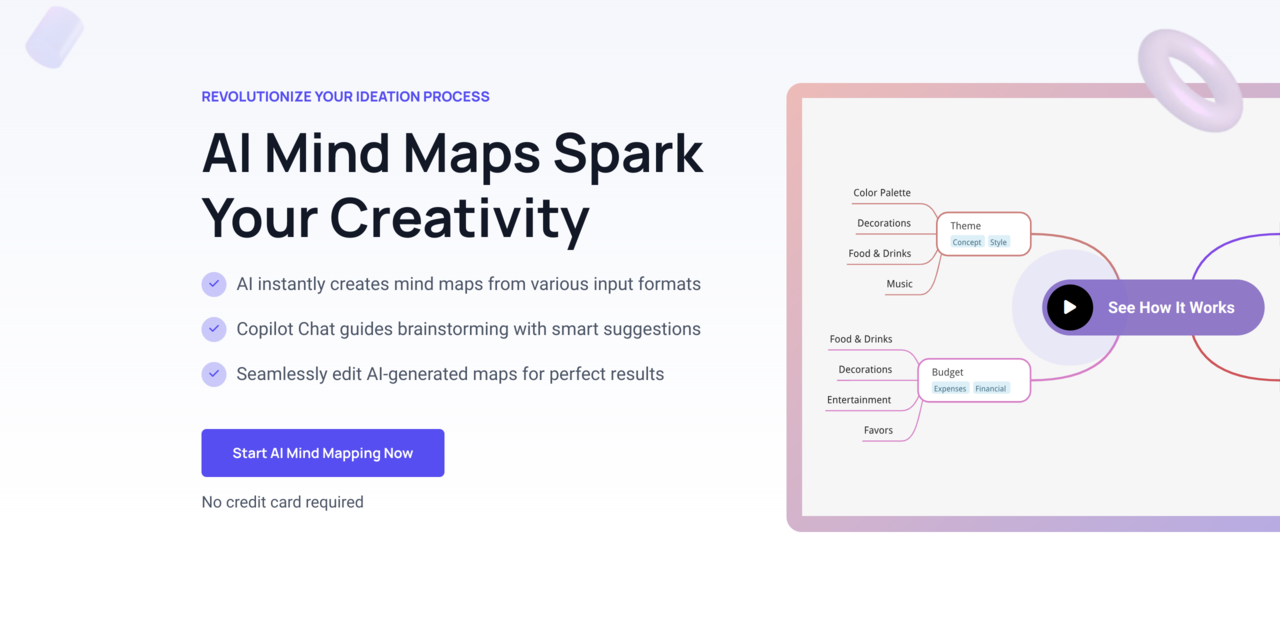
MindMap AI is a unique AI-powered mind mapping tool that streamlines brainstorming processes for professionals in various industries. It features a Copilot Chat for real-time collaboration, multi-format data input for diverse idea generation, and easy sharing capabilities to enhance team coherence and productivity.
Best for Brainstorming Tools with AI Idea Generation
Expert Take
MindMap AI stands out as a leading tool in the AI-driven brainstorming category due to its innovative features like AI-powered idea generation and real-time collaboration. It offers a comprehensive suite of capabilities that enhance productivity and team coherence, making it a top choice for professionals seeking advanced brainstorming solutions.
Pros
- Multi-format input (PDF, Audio, Video)
- Intuitive, distraction-free interface
- Lifetime pricing options available
- AI Copilot for interactive brainstorming
- Versatile export formats (SVG, Markdown, JSON)
Cons
- No real-time collaboration features
- Complex credit-based usage limits
- 4,000-word limit per generation
- Lacks deep third-party integrations
- AI output can occasionally be generic
Best for teams that are
- Students and professionals wanting a hybrid of AI generation and manual editing
- Users who need to export maps to various formats like PDF or Markdown
- Thinkers looking for structured idea expansion and second-order connections
Skip if
- Teams needing an infinite whiteboard for freeform drawing
- Users looking for a purely text-based writing assistant
- Those requiring a desktop application (web-based focus)
Best for teams that are
- Students and professionals wanting a hybrid of AI generation and manual editing
- Users who need to export maps to various formats like PDF or Markdown
- Thinkers looking for structured idea expansion and second-order connections
Skip if
- Teams needing an infinite whiteboard for freeform drawing
- Users looking for a purely text-based writing assistant
- Those requiring a desktop application (web-based focus)
Pros
- Multi-format input (PDF, Audio, Video)
- Intuitive, distraction-free interface
- Lifetime pricing options available
- AI Copilot for interactive brainstorming
- Versatile export formats (SVG, Markdown, JSON)
Cons
- No real-time collaboration features
- Complex credit-based usage limits
- 4,000-word limit per generation
- Lacks deep third-party integrations
- AI output can occasionally be generic
Expert Take
MindMap AI stands out as a leading tool in the AI-driven brainstorming category due to its innovative features like AI-powered idea generation and real-time collaboration. It offers a comprehensive suite of capabilities that enhance productivity and team coherence, making it a top choice for professionals seeking advanced brainstorming solutions.
Frameable Collaborative Whiteboard
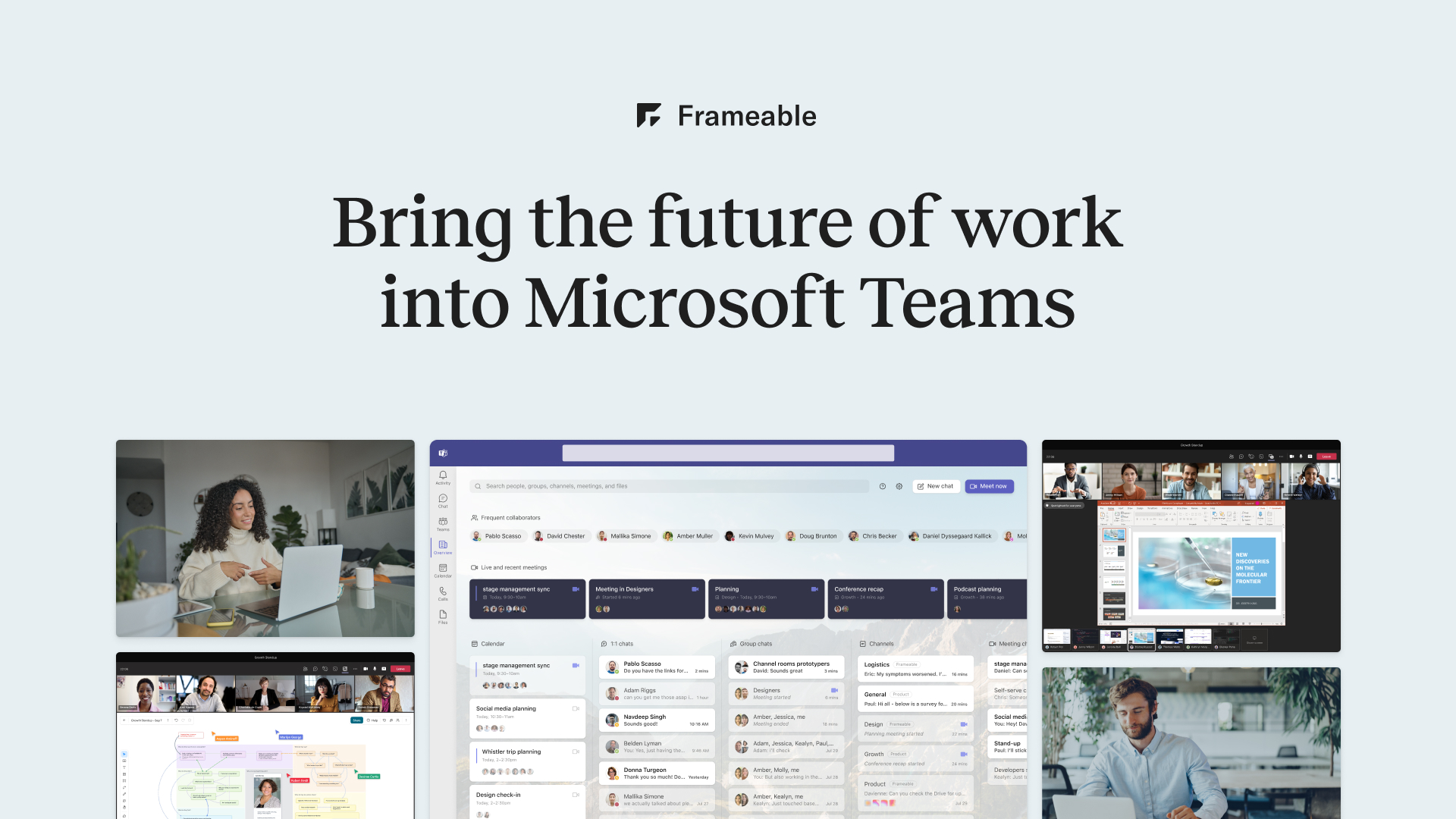
Frameable Collaborative Whiteboard is a SaaS solution ideal for professionals looking for a seamless brainstorming and execution tool. It facilitates real-time collaboration, making it easy for remote teams or individuals to discuss, ideate, and turn concepts into reality. It's designed to cater to the unique needs of industries that require creative and strategic planning.
Best for Whiteboard Tools with Templates & Frameworks
Expert Take
Frameable Collaborative Whiteboard excels in providing a versatile and user-friendly platform for remote collaboration and brainstorming. Its wide range of templates and frameworks, combined with real-time collaboration capabilities, make it a top choice for industries focused on creative and strategic planning. While the free version has limited features, the product's overall capability and market credibility position it as a leader in its category.
Pros
- Unique nested cards for hierarchical organization
- Deep native integration with Microsoft Teams
- Highly affordable at $4/user/month
- Semantic zoom for navigating complex boards
- Zero learning curve intuitive interface
Cons
- Lacks SOC 2 security compliance
- No support for Conditional Access policies
- No dedicated native mobile application
- Smaller template library than Miro/Mural
- Limited integrations outside Microsoft ecosystem
Best for teams that are
- Microsoft Teams users needing enhanced in-call tools
- Structured meetings using cards and regions
Skip if
- Teams not using Microsoft Teams for communication
- Users needing a fully featured standalone web app
Best for teams that are
- Microsoft Teams users needing enhanced in-call tools
- Structured meetings using cards and regions
Skip if
- Teams not using Microsoft Teams for communication
- Users needing a fully featured standalone web app
Pros
- Unique nested cards for hierarchical organization
- Deep native integration with Microsoft Teams
- Highly affordable at $4/user/month
- Semantic zoom for navigating complex boards
- Zero learning curve intuitive interface
Cons
- Lacks SOC 2 security compliance
- No support for Conditional Access policies
- No dedicated native mobile application
- Smaller template library than Miro/Mural
- Limited integrations outside Microsoft ecosystem
Expert Take
Frameable Collaborative Whiteboard excels in providing a versatile and user-friendly platform for remote collaboration and brainstorming. Its wide range of templates and frameworks, combined with real-time collaboration capabilities, make it a top choice for industries focused on creative and strategic planning. While the free version has limited features, the product's overall capability and market credibility position it as a leader in its category.

Mural is an intuitive digital whiteboard tool specifically designed for seamless client collaboration. Its real-time collaboration features, coupled with its innovative shared visual spaces, makes it an ideal tool for industry professionals who need to brainstorm, discuss, and execute ideas in a unified platform.
Best for Digital Whiteboard Tools for Client Collaboration
Expert Take
Mural Online Whiteboard excels in providing a seamless client collaboration experience through its real-time features and shared visual spaces. It is recognized for its intuitive interface and strong integration capabilities, making it a top choice for professionals needing effective brainstorming tools. While the free plan has limited features, its enterprise options offer comprehensive solutions.
Pros
- Trusted by 95% of Fortune 100
- FedRAMP In Process security status
- Powerful two-way Jira & Azure sync
- Advanced facilitation tools (voting, timers)
- Deep Microsoft 365 & Copilot integration
Cons
- Performance lag on large boards
- Mobile app lacks desktop features
- Limited static export options
- Steep learning curve for some
- No private rooms in free plan
Best for teams that are
- Facilitators running structured workshops and meetings
- Enterprise teams using design thinking methodologies
- Large organizations needing consulting-grade templates
Skip if
- Engineering teams needing deep technical diagramming
- Solo users wanting a quick, simple sketchpad
- Teams on a tight budget looking for a lightweight tool
Best for teams that are
- Facilitators running structured workshops and meetings
- Enterprise teams using design thinking methodologies
- Large organizations needing consulting-grade templates
Skip if
- Engineering teams needing deep technical diagramming
- Solo users wanting a quick, simple sketchpad
- Teams on a tight budget looking for a lightweight tool
Pros
- Trusted by 95% of Fortune 100
- FedRAMP In Process security status
- Powerful two-way Jira & Azure sync
- Advanced facilitation tools (voting, timers)
- Deep Microsoft 365 & Copilot integration
Cons
- Performance lag on large boards
- Mobile app lacks desktop features
- Limited static export options
- Steep learning curve for some
- No private rooms in free plan
Expert Take
Mural Online Whiteboard excels in providing a seamless client collaboration experience through its real-time features and shared visual spaces. It is recognized for its intuitive interface and strong integration capabilities, making it a top choice for professionals needing effective brainstorming tools. While the free plan has limited features, its enterprise options offer comprehensive solutions.
Collaboard Online Whiteboard

Collaboard is a powerful digital whiteboard tool optimized for product workshops. It offers secure collaboration with high data protection, advanced drawing tools, mindmaps, and moderation features. These functionalities address the industry's need for brainstorming, planning, creativity, and documentation in a safe, virtual environment.
Best for Digital Whiteboard Tools for Product Workshops
Expert Take
Collaboard excels in providing a secure and feature-rich environment for digital whiteboarding, particularly suited for product workshops. Its advanced collaboration tools and strong data protection measures make it a standout choice. While the free version is limited, the premium offerings justify its positioning as a best-of-the-best tool.
Pros
- 100% GDPR compliant with Swiss/EU hosting
- On-premises and air-gapped deployment options
- Competitive pricing starting at $6/month
- Immune to US CLOUD Act data access
- Infinite canvas with voting and timer tools
Cons
- Interface design feels dated compared to Miro
- Fewer third-party integrations than market leaders
- Limited customization options for board elements
- Occasional navigation challenges reported by users
- Less 'slick' user experience than top competitors
Best for teams that are
- Organizations with high-security or self-hosting requirements
- European public sector and education needing data sovereignty
Skip if
- Teams wanting a vast ecosystem of third-party integrations
- Users prioritizing a highly modern, polished user interface
Best for teams that are
- Organizations with high-security or self-hosting requirements
- European public sector and education needing data sovereignty
Skip if
- Teams wanting a vast ecosystem of third-party integrations
- Users prioritizing a highly modern, polished user interface
Pros
- 100% GDPR compliant with Swiss/EU hosting
- On-premises and air-gapped deployment options
- Competitive pricing starting at $6/month
- Immune to US CLOUD Act data access
- Infinite canvas with voting and timer tools
Cons
- Interface design feels dated compared to Miro
- Fewer third-party integrations than market leaders
- Limited customization options for board elements
- Occasional navigation challenges reported by users
- Less 'slick' user experience than top competitors
Expert Take
Collaboard excels in providing a secure and feature-rich environment for digital whiteboarding, particularly suited for product workshops. Its advanced collaboration tools and strong data protection measures make it a standout choice. While the free version is limited, the premium offerings justify its positioning as a best-of-the-best tool.
Excalidraw Online Whiteboard
Excalidraw is a highly intuitive, free-to-use virtual whiteboard that caters to the increasing demand for digital collaboration in the client-focused industries. It provides a simplistic interface for creating hand-drawn diagrams, flowcharts, and illustrations, effectively addressing the need for visual and interactive communication with clients, irrespective of geographical barriers.
Best for Digital Whiteboard Tools for Client Collaboration
Expert Take
Excalidraw excels as a digital whiteboard tool for client collaboration by offering a free, intuitive platform that facilitates real-time visual communication. Its simplicity and accessibility make it a strong choice for professionals needing a straightforward solution, despite lacking advanced features and integrations.
Pros
- 100% free and open-source core editor
- Unique hand-drawn aesthetic reduces intimidation
- End-to-end encryption for free users
- Massive integration ecosystem (Obsidian, VS Code)
- Zero learning curve with intuitive shortcuts
Cons
- Performance lag on large (5000+ element) diagrams
- Handwriting input can be laggy on tablets
- Lacks advanced enterprise diagramming templates
- Library management can be limited
- No one-time purchase for Plus features
Best for teams that are
- Developers sketching low-fidelity architecture diagrams
- Users wanting a unique, hand-drawn aesthetic
- Teams prioritizing speed and simplicity over polish
Skip if
- Teams needing polished, corporate-style presentations
- Project managers requiring complex task tracking
- Users who dislike the informal, sketchy visual style
Best for teams that are
- Developers sketching low-fidelity architecture diagrams
- Users wanting a unique, hand-drawn aesthetic
- Teams prioritizing speed and simplicity over polish
Skip if
- Teams needing polished, corporate-style presentations
- Project managers requiring complex task tracking
- Users who dislike the informal, sketchy visual style
Pros
- 100% free and open-source core editor
- Unique hand-drawn aesthetic reduces intimidation
- End-to-end encryption for free users
- Massive integration ecosystem (Obsidian, VS Code)
- Zero learning curve with intuitive shortcuts
Cons
- Performance lag on large (5000+ element) diagrams
- Handwriting input can be laggy on tablets
- Lacks advanced enterprise diagramming templates
- Library management can be limited
- No one-time purchase for Plus features
Expert Take
Excalidraw excels as a digital whiteboard tool for client collaboration by offering a free, intuitive platform that facilitates real-time visual communication. Its simplicity and accessibility make it a strong choice for professionals needing a straightforward solution, despite lacking advanced features and integrations.
myViewBoard - Digital Whiteboarding

myViewBoard is a powerful digital whiteboarding platform that addresses the unique needs of educators by facilitating engaging, interactive lessons. The software caters to both in-person and remote teaching, making it ideal for various educational scenarios.
Best for Digital Whiteboard Tools for Product Workshops
Expert Take
myViewBoard excels as a digital whiteboarding tool tailored for educators, offering robust capabilities for both remote and in-person teaching. Its integration with popular educational platforms and comprehensive resources make it a standout choice in its category.
Pros
- Ease of use
- Supports remote and in-person teaching
- Multiple collaboration tools
- Wide range of educational resources
- Integrates with popular education platforms
Cons
- Requires internet connection
- Learning curve for advanced features
- Limited features on free plan
Best for teams that are
- K-12 educators using interactive classroom displays
- Hybrid learning environments combining hardware and software
Skip if
- Corporate product teams needing Agile project management tools
- Purely remote business teams without interactive hardware
Best for teams that are
- K-12 educators using interactive classroom displays
- Hybrid learning environments combining hardware and software
Skip if
- Corporate product teams needing Agile project management tools
- Purely remote business teams without interactive hardware
Pros
- Ease of use
- Supports remote and in-person teaching
- Multiple collaboration tools
- Wide range of educational resources
- Integrates with popular education platforms
Cons
- Requires internet connection
- Learning curve for advanced features
- Limited features on free plan
Expert Take
myViewBoard excels as a digital whiteboarding tool tailored for educators, offering robust capabilities for both remote and in-person teaching. Its integration with popular educational platforms and comprehensive resources make it a standout choice in its category.

Miro is a cloud-based collaborative whiteboard platform that enables teams in product workshops to ideate, visualize and share complex information. The platform offers a range of templates catering specifically to product development workflows, such as Flowchart, Customer Touchpoint Map, and Product Roadmap, ensuring a tailored experience for professionals in this industry.
Best for Digital Whiteboard Tools for Product Workshops
Expert Take
Miro excels as a digital whiteboard tool, offering extensive collaboration features and integration capabilities. Its tailored templates for product development workflows enhance its utility for product workshops. While the platform may present a learning curve for new users, its overall value and market credibility position it as a leading choice in its category.
Pros
- Infinite canvas with 2,500+ pre-built templates
- Trusted by 99% of Fortune 100 companies
- ISO 42001 certified for AI safety
- Deep integrations with Jira and Microsoft 365
- Robust free plan for small teams
Cons
- Performance lag on large, complex boards
- No true offline editing mode available
- Mobile app stability issues on iOS
- Enterprise pricing requires sales contact
- Steep learning curve for advanced features
Best for teams that are
- Enterprise teams running complex Agile workshops and sprints
- Power users requiring deep integrations with Jira and Slack
Skip if
- Small teams wanting a simple, low-learning-curve tool
- Users strictly committed to the Microsoft ecosystem
Best for teams that are
- Enterprise teams running complex Agile workshops and sprints
- Power users requiring deep integrations with Jira and Slack
Skip if
- Small teams wanting a simple, low-learning-curve tool
- Users strictly committed to the Microsoft ecosystem
Pros
- Infinite canvas with 2,500+ pre-built templates
- Trusted by 99% of Fortune 100 companies
- ISO 42001 certified for AI safety
- Deep integrations with Jira and Microsoft 365
- Robust free plan for small teams
Cons
- Performance lag on large, complex boards
- No true offline editing mode available
- Mobile app stability issues on iOS
- Enterprise pricing requires sales contact
- Steep learning curve for advanced features
Expert Take
Miro excels as a digital whiteboard tool, offering extensive collaboration features and integration capabilities. Its tailored templates for product development workflows enhance its utility for product workshops. While the platform may present a learning curve for new users, its overall value and market credibility position it as a leading choice in its category.
HyperWrite Brainstorming Tool
HyperWrite's Brainstorming Tool is an Artificial Intelligence (AI) driven solution specifically designed for industries that need to generate creative ideas and solutions for various problems. The AI offers a unique approach to brainstorming, making it highly effective for professionals in creative fields, marketing, product development, and strategic planning.
Best for Brainstorming Tools with AI Idea Generation
Expert Take
HyperWrite Brainstorming Tool excels in AI-driven idea generation, making it a top choice for creative industries. Its collaborative features and efficient brainstorming capabilities are well-documented, though customization options are limited. The product's market credibility is supported by its innovative approach and industry relevance.
Pros
- Powered by GPT-4 for high-quality ideation
- Seamless Chrome extension works on any website
- TypeAhead feature predicts sentences as you type
- Personal Assistant agent automates browser tasks
- Competitive entry pricing at $19.99/month
Cons
- Premium plan capped at 250 AI messages
- Inconsistent coherence in long-form content
- Personal Assistant feature is still basic/beta
- Requires constant internet connection
- Free plan has very limited generations
Best for teams that are
- Writers and marketers struggling with blank page syndrome
- Professionals needing AI writing help directly in Google Docs or Gmail
- Users looking for text-based creative writing and email assistance
Skip if
- Teams requiring a visual whiteboard or mind mapping canvas
- Users needing to generate flowcharts, diagrams, or visual project plans
- Groups looking for real-time collaborative visual workshops
Best for teams that are
- Writers and marketers struggling with blank page syndrome
- Professionals needing AI writing help directly in Google Docs or Gmail
- Users looking for text-based creative writing and email assistance
Skip if
- Teams requiring a visual whiteboard or mind mapping canvas
- Users needing to generate flowcharts, diagrams, or visual project plans
- Groups looking for real-time collaborative visual workshops
Pros
- Powered by GPT-4 for high-quality ideation
- Seamless Chrome extension works on any website
- TypeAhead feature predicts sentences as you type
- Personal Assistant agent automates browser tasks
- Competitive entry pricing at $19.99/month
Cons
- Premium plan capped at 250 AI messages
- Inconsistent coherence in long-form content
- Personal Assistant feature is still basic/beta
- Requires constant internet connection
- Free plan has very limited generations
Expert Take
HyperWrite Brainstorming Tool excels in AI-driven idea generation, making it a top choice for creative industries. Its collaborative features and efficient brainstorming capabilities are well-documented, though customization options are limited. The product's market credibility is supported by its innovative approach and industry relevance.