
Virtual Collaboration & Team Workspaces
These are the specialized categories within Virtual Collaboration & Team Workspaces. Looking for something broader? See all Project Management & Productivity Tools categories.

Coda is an all-in-one workspace designed to make team collaboration smooth and effective. Its unique blend of doc-like familiarity and app-like engagement addresses the industry's need for integrated toolsets, streamlined communication, and seamless project management. Its integrations with a variety of tools makes it a versatile choice for professionals in this industry.
Best for Collaboration Workspaces with Integrations
Expert Take
Coda excels as a collaborative workspace by integrating document-like familiarity with app-like functionality. It offers extensive integrations and customizable workflows, making it a versatile tool for team collaboration. While it may present a learning curve due to its feature-rich environment, it remains a top choice for professionals seeking a unified platform.
Pros
- Maker Billing model allows unlimited free editors
- Combines docs, spreadsheets, and apps in one
- Powerful two-way integrations via Packs
- Deep formula and automation capabilities
- Strong enterprise security and compliance (HIPAA, SOC2)
Cons
- Mobile app performance is often criticized
- Steeper learning curve than simple note apps
- Performance lags with very large datasets
- HIPAA compliance limited to Enterprise plan
- No native desktop app (web-wrapper only)
Best for teams that are
- Tech startups and product teams wanting to build custom internal tools
- Teams looking to consolidate docs, spreadsheets, and apps into one platform
- Makers who want to create interactive documents with embedded data
Skip if
- Users seeking a simple, ready-to-use note-taking app without a learning curve
- Non-technical teams who may find the building aspect overwhelming
- Teams requiring robust offline access to their documents
Best for teams that are
- Tech startups and product teams wanting to build custom internal tools
- Teams looking to consolidate docs, spreadsheets, and apps into one platform
- Makers who want to create interactive documents with embedded data
Skip if
- Users seeking a simple, ready-to-use note-taking app without a learning curve
- Non-technical teams who may find the building aspect overwhelming
- Teams requiring robust offline access to their documents
Pros
- Maker Billing model allows unlimited free editors
- Combines docs, spreadsheets, and apps in one
- Powerful two-way integrations via Packs
- Deep formula and automation capabilities
- Strong enterprise security and compliance (HIPAA, SOC2)
Cons
- Mobile app performance is often criticized
- Steeper learning curve than simple note apps
- Performance lags with very large datasets
- HIPAA compliance limited to Enterprise plan
- No native desktop app (web-wrapper only)
Expert Take
Coda excels as a collaborative workspace by integrating document-like familiarity with app-like functionality. It offers extensive integrations and customizable workflows, making it a versatile tool for team collaboration. While it may present a learning curve due to its feature-rich environment, it remains a top choice for professionals seeking a unified platform.
Mural: AI-Powered Collaborative Workspace

Mural is an intelligent SaaS solution that facilitates real-time collaboration for teams. It's specifically designed to streamline workflows, offer templates, and use AI to accelerate insights and decision-making. The software is ideal for the collaboration and productivity industry as it easily integrates with existing systems and enhances team dynamics.
Best for Collaboration Workspaces with Integrations
Expert Take
Mural excels as a collaborative workspace due to its AI-powered features that enhance team productivity and decision-making. Its extensive integration capabilities and user-friendly interface make it a top choice for teams seeking seamless collaboration. While the basic plan has limited features, the overall value and functionality justify its premium positioning.
Pros
- FedRAMP In Process and ISO 27001 certified
- Deep integration with Microsoft 365 and Copilot
- Advanced facilitation tools like Private Mode
- LUMA Institute methodology for guided collaboration
- Unlimited visitors on Free and Team plans
Cons
- Performance lag on very large boards
- Mobile app has limited editing features
- No native video chat functionality
- Export options limited to static formats
- Steeper learning curve for some users
Best for teams that are
- Facilitators and consultants running structured design thinking workshops
- Creative and design teams needing a dedicated digital whiteboard for ideation
- Enterprise teams requiring guided templates for strategy sessions
Skip if
- Solo workers or those who prefer traditional text-based documentation
- Teams needing robust task management or project tracking features
- Users with poor internet connectivity due to heavy resource usage
Best for teams that are
- Facilitators and consultants running structured design thinking workshops
- Creative and design teams needing a dedicated digital whiteboard for ideation
- Enterprise teams requiring guided templates for strategy sessions
Skip if
- Solo workers or those who prefer traditional text-based documentation
- Teams needing robust task management or project tracking features
- Users with poor internet connectivity due to heavy resource usage
Pros
- FedRAMP In Process and ISO 27001 certified
- Deep integration with Microsoft 365 and Copilot
- Advanced facilitation tools like Private Mode
- LUMA Institute methodology for guided collaboration
- Unlimited visitors on Free and Team plans
Cons
- Performance lag on very large boards
- Mobile app has limited editing features
- No native video chat functionality
- Export options limited to static formats
- Steeper learning curve for some users
Expert Take
Mural excels as a collaborative workspace due to its AI-powered features that enhance team productivity and decision-making. Its extensive integration capabilities and user-friendly interface make it a top choice for teams seeking seamless collaboration. While the basic plan has limited features, the overall value and functionality justify its premium positioning.
Zenhub Collaboration for Software Teams

Zenhub is a collaboration hub specifically designed for software development teams. It caters to the unique needs of product owners, developers, and managers, providing them a platform to cross-collaborate and gain visibility into software projects. Its features are designed to streamline project management, boost productivity and facilitate communication.
Best for Collaboration Hubs for Product & Engineering Teams
Expert Take
Zenhub is tailored for software development teams, offering deep integration with GitHub and robust project management features. It excels in usability for its target audience, though it has limited integrations outside GitHub. Its market credibility is supported by its specialized focus and user-centric design.
Pros
- Native GitHub integration eliminates context switching
- Automated sprint planning and AI features
- Multi-repository support for complex projects
- SOC 2 Type II and On-premise options
- Generous free plan for small teams
Cons
- Performance lag on very large boards
- Search limitations regarding closed issues
- Heavy dependency on GitHub ecosystem
- Occasional UI glitches and load failures
- Limited functionality for non-GitHub users
Best for teams that are
- Agile software teams who want to manage projects directly within GitHub
- Developers seeking to minimize context switching between code and project tasks
- Teams needing automated sprint planning based on GitHub Issues
Skip if
- Non-technical departments (marketing, sales) that do not use GitHub
- Engineering teams using GitLab or Bitbucket as their primary repository
- Organizations looking for a general-purpose project management tool
Best for teams that are
- Agile software teams who want to manage projects directly within GitHub
- Developers seeking to minimize context switching between code and project tasks
- Teams needing automated sprint planning based on GitHub Issues
Skip if
- Non-technical departments (marketing, sales) that do not use GitHub
- Engineering teams using GitLab or Bitbucket as their primary repository
- Organizations looking for a general-purpose project management tool
Pros
- Native GitHub integration eliminates context switching
- Automated sprint planning and AI features
- Multi-repository support for complex projects
- SOC 2 Type II and On-premise options
- Generous free plan for small teams
Cons
- Performance lag on very large boards
- Search limitations regarding closed issues
- Heavy dependency on GitHub ecosystem
- Occasional UI glitches and load failures
- Limited functionality for non-GitHub users
Expert Take
Zenhub is tailored for software development teams, offering deep integration with GitHub and robust project management features. It excels in usability for its target audience, though it has limited integrations outside GitHub. Its market credibility is supported by its specialized focus and user-centric design.
CoLab Software Collaboration

CoLab Software offers a cutting-edge platform for engineering teams to enhance collaboration with all relevant suppliers on designs. The software solves the increasing complexity in products, companies, and supply chains, by providing modern tools that evolve with these complexities.
Best for Collaboration Hubs for Product & Engineering Teams
Expert Take
CoLab Software Collaboration is tailored for engineering teams, offering advanced collaboration tools that address modern complexities in product design and supply chains. Its focus on supplier collaboration and adaptability to evolving needs positions it as a top choice in its category.
Pros
- Browser-based 3D CAD viewing without installs
- SOC 2 Type 2 and ISO 27001 certified
- Deep integration with Windchill and Teamcenter PLM
- AI-powered AutoReview for automated design checks
- Centralized issue tracking linked to model geometry
Cons
- Pricing perceived as high for mid-sized teams
- Occasional performance lag reported by users
- Mobile functionality limited compared to desktop
- Learning curve for advanced features
- No public pricing transparency
Best for teams that are
- Mechanical engineering teams conducting collaborative 3D CAD design reviews
- Organizations needing to share CAD models securely with suppliers without licenses
- Hardware teams wanting to track design feedback directly on the model
Skip if
- Pure software development teams with no hardware or CAD design needs
- Teams seeking a general-purpose project management tool for non-technical tasks
- Users looking for a tool to create or edit CAD geometry (it is for review only)
Best for teams that are
- Mechanical engineering teams conducting collaborative 3D CAD design reviews
- Organizations needing to share CAD models securely with suppliers without licenses
- Hardware teams wanting to track design feedback directly on the model
Skip if
- Pure software development teams with no hardware or CAD design needs
- Teams seeking a general-purpose project management tool for non-technical tasks
- Users looking for a tool to create or edit CAD geometry (it is for review only)
Pros
- Browser-based 3D CAD viewing without installs
- SOC 2 Type 2 and ISO 27001 certified
- Deep integration with Windchill and Teamcenter PLM
- AI-powered AutoReview for automated design checks
- Centralized issue tracking linked to model geometry
Cons
- Pricing perceived as high for mid-sized teams
- Occasional performance lag reported by users
- Mobile functionality limited compared to desktop
- Learning curve for advanced features
- No public pricing transparency
Expert Take
CoLab Software Collaboration is tailored for engineering teams, offering advanced collaboration tools that address modern complexities in product design and supply chains. Its focus on supplier collaboration and adaptability to evolving needs positions it as a top choice in its category.
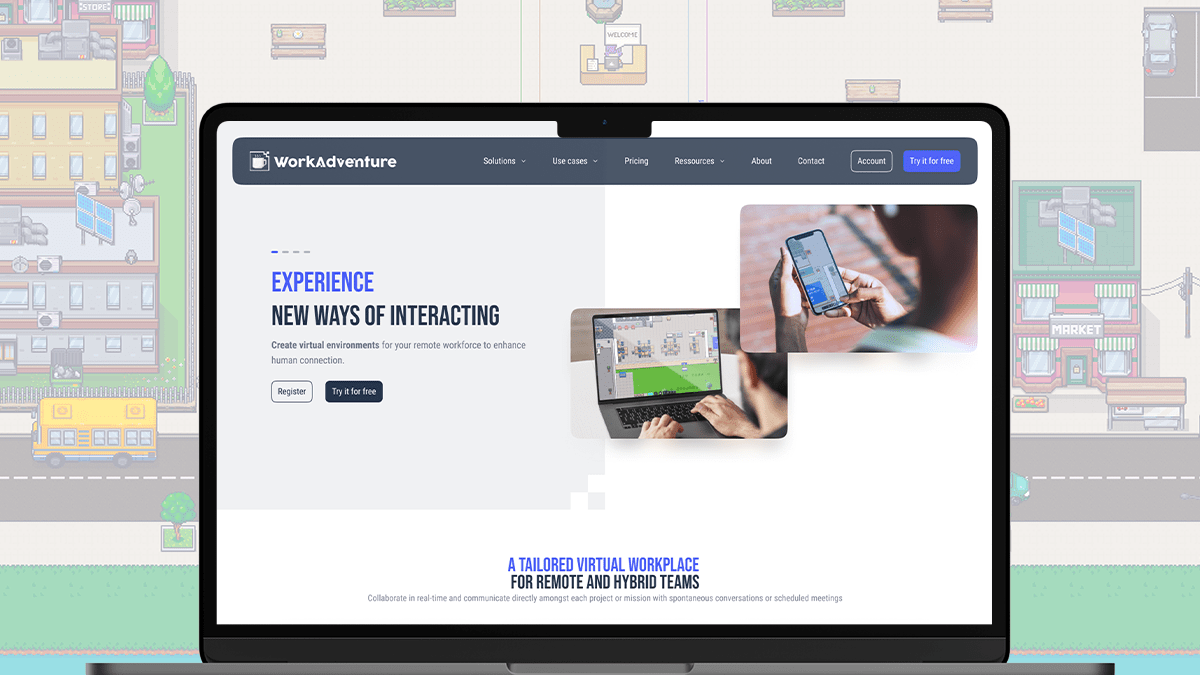
WorkAdventure is a virtual office application designed to meet the needs of remote and hybrid teams. It creates a collaborative workspace, fostering connectivity and engagement while also providing the platform for virtual events. This addresses the industry's need for a seamless, interactive platform that can keep dispersed teams connected and productive.
Best for Collaboration Workspaces for Remote Teams
Expert Take
WorkAdventure Virtual Office excels in creating an interactive and engaging environment for remote teams. Its ability to mimic a traditional office setup while integrating with popular tools makes it a standout product in the collaboration workspace category. Despite some limitations in the free plan and a learning curve, its premium features and adaptability for hybrid work setups justify its 'best-of-the-best' positioning.
Pros
- Fully GDPR compliant & EU hosted
- Open-source & self-hostable option
- Generous free plan for 15 users
- Deep customization via Scripting API
- Fun, gamified 2D virtual environment
Cons
- Steep learning curve for map building
- No GUI admin panel in free self-hosted
- Performance issues with large maps
- Requires technical skills for setup
- 2D pixel art style limits appeal
Best for teams that are
- Tech-savvy organizations requiring a self-hosted, GDPR-compliant virtual environment
- Developers looking to build custom map interactions and games via API
Skip if
- Non-technical teams needing a polished, plug-and-play solution without setup complexity
- Small groups wanting a fully managed SaaS experience with minimal configuration
Best for teams that are
- Tech-savvy organizations requiring a self-hosted, GDPR-compliant virtual environment
- Developers looking to build custom map interactions and games via API
Skip if
- Non-technical teams needing a polished, plug-and-play solution without setup complexity
- Small groups wanting a fully managed SaaS experience with minimal configuration
Pros
- Fully GDPR compliant & EU hosted
- Open-source & self-hostable option
- Generous free plan for 15 users
- Deep customization via Scripting API
- Fun, gamified 2D virtual environment
Cons
- Steep learning curve for map building
- No GUI admin panel in free self-hosted
- Performance issues with large maps
- Requires technical skills for setup
- 2D pixel art style limits appeal
Expert Take
WorkAdventure Virtual Office excels in creating an interactive and engaging environment for remote teams. Its ability to mimic a traditional office setup while integrating with popular tools makes it a standout product in the collaboration workspace category. Despite some limitations in the free plan and a learning curve, its premium features and adaptability for hybrid work setups justify its 'best-of-the-best' positioning.

Roam is a comprehensive solution designed to streamline remote collaboration for teams. It caters to the specific needs of remote workforces with features like drop-in meetings, AI-powered meeting summaries, and a virtual office. Its AI Screen Recorder enables easy documentation and sharing of critical information, making it a perfect fit for remote teams.
Best for Collaboration Workspaces for Remote Teams
Expert Take
Roam Virtual Workspace excels in providing a comprehensive solution for remote teams with its virtual office environment and AI-powered features. It is recognized for its innovative approach to team collaboration, making it a top choice in its category.
Pros
- Usage-based pricing (pay only for active users)
- Average meeting time reduced to ~8 minutes
- Built-in AI meeting summaries (Magic Minutes)
- SOC 2 Type II Certified
- Free guest access for external meetings
Cons
- Web version has significant functional limitations
- Steep learning curve for spatial interface
- Requires strong internet for optimal performance
- No hardware acceleration on web client
- Limited to desktop/mobile apps for full features
Best for teams that are
- Distributed teams wanting a professional, audio-first virtual headquarters
- Companies looking to replace Slack and Zoom with a single synchronous office map
Skip if
- Teams needing a permanently free tier, as pricing is based on active users
- Very large organizations (over 200 users) due to current capacity limits
Best for teams that are
- Distributed teams wanting a professional, audio-first virtual headquarters
- Companies looking to replace Slack and Zoom with a single synchronous office map
Skip if
- Teams needing a permanently free tier, as pricing is based on active users
- Very large organizations (over 200 users) due to current capacity limits
Pros
- Usage-based pricing (pay only for active users)
- Average meeting time reduced to ~8 minutes
- Built-in AI meeting summaries (Magic Minutes)
- SOC 2 Type II Certified
- Free guest access for external meetings
Cons
- Web version has significant functional limitations
- Steep learning curve for spatial interface
- Requires strong internet for optimal performance
- No hardware acceleration on web client
- Limited to desktop/mobile apps for full features
Expert Take
Roam Virtual Workspace excels in providing a comprehensive solution for remote teams with its virtual office environment and AI-powered features. It is recognized for its innovative approach to team collaboration, making it a top choice in its category.
HubStar Collaboration Suite

HubStar is a top-tier software designed to streamline the collaborative efforts of product & engineering teams. It places a strong emphasis on allowing teams to connect effortlessly, enhancing learning, fostering creativity, and boosting productivity. HubStar effectively addresses industry needs by providing a hybrid workplace environment that balances remote and on-site work seamlessly.
Best for Collaboration Hubs for Product & Engineering Teams
Expert Take
HubStar Collaboration Suite excels in providing a robust platform for product and engineering teams, specifically designed to enhance collaboration in hybrid work environments. Its strong market credibility, usability, and integration capabilities make it a top-tier choice in its category.
Pros
- Deep Microsoft Places & Teams integration
- Hardware-agnostic Wi-Fi utilization analytics
- Advanced portfolio optimization features
- ISO and WCAG 2.1AA compliant
- Acquired Relogix for sensor depth
Cons
- Mobile app stability issues reported
- Complex initial setup process
- No transparent public pricing
- Overwhelming features for small teams
- Support sometimes described as lacking
Best for teams that are
- Facilities managers optimizing physical office space and desk utilization
- Companies implementing hybrid work policies requiring desk and room booking
- HR leaders wanting data on office attendance and occupancy trends
Skip if
- Fully remote organizations with no physical office footprint to manage
- Teams looking for digital software project management or code collaboration
- Small offices with fixed seating that do not need dynamic booking systems
Best for teams that are
- Facilities managers optimizing physical office space and desk utilization
- Companies implementing hybrid work policies requiring desk and room booking
- HR leaders wanting data on office attendance and occupancy trends
Skip if
- Fully remote organizations with no physical office footprint to manage
- Teams looking for digital software project management or code collaboration
- Small offices with fixed seating that do not need dynamic booking systems
Pros
- Deep Microsoft Places & Teams integration
- Hardware-agnostic Wi-Fi utilization analytics
- Advanced portfolio optimization features
- ISO and WCAG 2.1AA compliant
- Acquired Relogix for sensor depth
Cons
- Mobile app stability issues reported
- Complex initial setup process
- No transparent public pricing
- Overwhelming features for small teams
- Support sometimes described as lacking
Expert Take
HubStar Collaboration Suite excels in providing a robust platform for product and engineering teams, specifically designed to enhance collaboration in hybrid work environments. Its strong market credibility, usability, and integration capabilities make it a top-tier choice in its category.

Gather is a versatile virtual workspace that offers an interactive, immersive environment for remote teams. With AI-powered search and instant collaboration, it is designed to bring together conversations, meetings, and content from other apps into one cohesive workspace. Its spatial video chat feature allows users to have natural, real-world type interactions, making it an excellent tool for remote teams looking to foster a more connected, collaborative workspace.
Best for Collaboration Workspaces for Remote Teams
Expert Take
Gather Virtual Workspace excels in providing an immersive and interactive environment for remote teams, enhancing collaboration through unique features like spatial video chat and AI-powered search. Its market credibility is supported by integrations and third-party mentions, though the complexity may be a barrier for some users.
Pros
- Spatial audio and video mimic real-life interactions
- Highly customizable 2D virtual office environments
- SOC 2 Type II certified for enterprise security
- Seamless integrations with Slack, Outlook, and Google Calendar
- Trusted by major enterprises like Coca-Cola and Amazon
Cons
- Mobile app does not support map navigation
- Free tier removed in recent pricing updates
- Performance issues reported on Linux and Firefox
- Resource intensive compared to standard video tools
- Steep learning curve for advanced map customization
Best for teams that are
- Remote teams seeking social connection through a gamified, 2D pixel-art environment
- Virtual event organizers needing customizable, interactive maps for engagement
- Teams wanting a casual culture builder that mimics a retro video game
Skip if
- Corporate environments requiring a strictly professional, non-gamified aesthetic
- Large teams with zero budget, as the free plan is limited to 10 users
Best for teams that are
- Remote teams seeking social connection through a gamified, 2D pixel-art environment
- Virtual event organizers needing customizable, interactive maps for engagement
- Teams wanting a casual culture builder that mimics a retro video game
Skip if
- Corporate environments requiring a strictly professional, non-gamified aesthetic
- Large teams with zero budget, as the free plan is limited to 10 users
Pros
- Spatial audio and video mimic real-life interactions
- Highly customizable 2D virtual office environments
- SOC 2 Type II certified for enterprise security
- Seamless integrations with Slack, Outlook, and Google Calendar
- Trusted by major enterprises like Coca-Cola and Amazon
Cons
- Mobile app does not support map navigation
- Free tier removed in recent pricing updates
- Performance issues reported on Linux and Firefox
- Resource intensive compared to standard video tools
- Steep learning curve for advanced map customization
Expert Take
Gather Virtual Workspace excels in providing an immersive and interactive environment for remote teams, enhancing collaboration through unique features like spatial video chat and AI-powered search. Its market credibility is supported by integrations and third-party mentions, though the complexity may be a barrier for some users.
Intapp Workspaces is a Microsoft Teams-based SaaS solution designed specifically for firms seeking efficient collaboration and information sharing. Its integration with chat, videoconferencing, and other Microsoft functionalities enables seamless collaboration and streamlines workflows, making it an ideal choice for businesses in industries where real-time communication and team collaboration are crucial.
Best for Collaboration Workspaces with Integrations
Expert Take
Intapp Workspaces for Teams excels in providing a seamless integration with Microsoft Teams, enhancing collaboration and productivity. Its strong market credibility and usability are supported by its robust feature set and alignment with the Microsoft ecosystem. However, its pricing transparency is limited, which slightly affects its overall score.
Pros
- Prevents Microsoft Teams sprawl automatically
- Enforces ethical walls in real-time
- Deep integration with iManage and NetDocuments
- Single pane of glass for matters
- Auto-archives inactive teams and matters
Cons
- High cost for smaller firms
- Minimum 100 user license requirement
- Complex implementation process
- Steep learning curve for administrators
- Performance issues under heavy load
Best for teams that are
- Legal, accounting, and financial firms requiring strict governance and compliance
- Professional services teams needing matter-centric workspaces in Microsoft 365
- IT teams needing to prevent Microsoft Teams sprawl with automated archiving
Skip if
- Small businesses or creative industries not operating in the Microsoft 365 ecosystem
- Organizations not requiring complex ethical walls or industry-specific compliance
- Teams looking for a standalone tool independent of Microsoft infrastructure
Best for teams that are
- Legal, accounting, and financial firms requiring strict governance and compliance
- Professional services teams needing matter-centric workspaces in Microsoft 365
- IT teams needing to prevent Microsoft Teams sprawl with automated archiving
Skip if
- Small businesses or creative industries not operating in the Microsoft 365 ecosystem
- Organizations not requiring complex ethical walls or industry-specific compliance
- Teams looking for a standalone tool independent of Microsoft infrastructure
Pros
- Prevents Microsoft Teams sprawl automatically
- Enforces ethical walls in real-time
- Deep integration with iManage and NetDocuments
- Single pane of glass for matters
- Auto-archives inactive teams and matters
Cons
- High cost for smaller firms
- Minimum 100 user license requirement
- Complex implementation process
- Steep learning curve for administrators
- Performance issues under heavy load
Expert Take
Intapp Workspaces for Teams excels in providing a seamless integration with Microsoft Teams, enhancing collaboration and productivity. Its strong market credibility and usability are supported by its robust feature set and alignment with the Microsoft ecosystem. However, its pricing transparency is limited, which slightly affects its overall score.
Miro Innovation Workspace

Miro is a collaborative workspace specifically designed for product and engineering teams. It facilitates the ideation, project management, and design process by offering a shared, visual platform where teams can work together in real-time. The software's ability to integrate with other productivity tools and its extensive template library make it perfectly suited for this industry.
Best for Collaboration Hubs for Product & Engineering Teams
Expert Take
Miro Innovation Workspace stands out as a leading collaboration hub for product and engineering teams due to its robust real-time collaboration features, extensive integration capabilities, and user-friendly interface. Its recognition in the industry and comprehensive template library further solidify its position as a top-tier solution.
Pros
- Infinite canvas for visual collaboration
- ISO 42001 AI security certification
- Integrates with 150+ enterprise apps
- Bridges ideation with structured docs
- Used by 99% of Fortune 100
Cons
- Lag on large, complex boards
- No offline editing mode
- Free plan limited to 3 boards
- Steep learning curve for some
- Mobile app has limited functionality
Best for teams that are
- Cross-functional teams needing a visual canvas for brainstorming and agile planning
- Product teams bridging the gap between unstructured ideation and structured delivery
- Organizations wanting to centralize diagrams, wireframes, and roadmaps in one space
Skip if
- Teams needing strict, granular task tracking and reporting (e.g., replacing Jira)
- Users who find infinite canvases overwhelming and prefer linear text documents
- Groups requiring complex resource loading or Gantt chart dependencies
Best for teams that are
- Cross-functional teams needing a visual canvas for brainstorming and agile planning
- Product teams bridging the gap between unstructured ideation and structured delivery
- Organizations wanting to centralize diagrams, wireframes, and roadmaps in one space
Skip if
- Teams needing strict, granular task tracking and reporting (e.g., replacing Jira)
- Users who find infinite canvases overwhelming and prefer linear text documents
- Groups requiring complex resource loading or Gantt chart dependencies
Pros
- Infinite canvas for visual collaboration
- ISO 42001 AI security certification
- Integrates with 150+ enterprise apps
- Bridges ideation with structured docs
- Used by 99% of Fortune 100
Cons
- Lag on large, complex boards
- No offline editing mode
- Free plan limited to 3 boards
- Steep learning curve for some
- Mobile app has limited functionality
Expert Take
Miro Innovation Workspace stands out as a leading collaboration hub for product and engineering teams due to its robust real-time collaboration features, extensive integration capabilities, and user-friendly interface. Its recognition in the industry and comprehensive template library further solidify its position as a top-tier solution.