We review products independently. We may earn a commission if you buy through our links, at no extra cost to you. Learn more


If you want the complete list, explore our Document Workflow & Contract Management Tools page. Other Software products for Contractors.

Other Software products for Contractors.

Document Collaboration & Workflow Tools for Contractors
Albert Richer

Construction contractors face unique document management challenges that extend far beyond basic file sharing: coordinating design revisions across multiple disciplines, maintaining audit trails for regulatory compliance, and enabling field teams to access critical drawings on mobile devices without compromising security. Bluebeam dominates this space with 99% adoption among top US contractors, providing industry-standard markup tools that facilitate seamless plan review and approval workflows between architects, engineers, and field personnel. If your projects involve complex BIM coordination across disciplines, Autodesk Design Collaboration and Revizto excel at managing 3D model conflicts and visualizing design changes over time, with Revizto earning recognition from major ENR firms like Jacobs and AECOM for its unified 2D/3D approach. However, Revizto's 2D interface remains less intuitive than its 3D environment, creating workflow friction for teams heavily dependent on traditional construction drawings. For contractors managing payment compliance and lien waiver documentation, Rabbet automates covenant checks and draw request workflows with SOC 2 certification, though its interface complexity can overwhelm new users during onboarding. STACK prioritizes user adoption with its notably simple interface and 9.5/10 support rating, making it ideal for teams requiring rapid deployment without extensive training overhead. Construction contractors face unique document management challenges that extend far beyond basic file sharing: coordinating design revisions across multiple disciplines, maintaining audit trails for regulatory compliance, and enabling field teams to access critical drawings on mobile devices without compromising security.

Similar Categories
1
Expert Score
9.8 / 10
493
88
USER-FRIENDLY DESIGN
MOBILE FRIENDLY

Bluebeam Construction Software

Bluebeam Construction Software
View Website
Bluebeam is a comprehensive SaaS solution specifically designed for the construction industry, empowering professionals with customizable markup, measurement, and document management tools. This software enhances review speed and accuracy, streamlining project management and ensuring efficient collaboration among teams.
USER-FRIENDLY DESIGN
MOBILE FRIENDLY

Best for teams that are

  • AEC professionals needing advanced PDF markup and quantity takeoffs
  • Teams requiring robust design review and document comparison tools
  • Estimators relying on custom tool sets for PDF-based calculations

Skip if

  • Mac-only offices, as the native Mac version is discontinued
  • Teams needing full project management (financials, schedule) beyond PDF
  • Field teams requiring a mobile-first interface (mobile app is limited)

Expert Take

Our analysis shows Bluebeam remains the undisputed standard for AEC document management, largely due to its patented 'Tool Chest' feature which allows teams to standardize custom markups across projects. Research indicates that while the transition to subscription pricing caused friction, the inclusion of 'Studio Sessions' for real-time collaboration continues to drive its 99% adoption rate among top contractors. Despite the lack of a native Mac app, its deep integration with Procore and Autodesk ensures it remains essential for complex construction workflows.

Pros

  • Industry-standard Tool Chest
  • Real-time Studio collaboration
  • Robust overlay & comparison
  • Native Procore & Autodesk plugins
  • SOC 2 Type 2 security

Cons

  • No native Mac desktop app
  • Lag with large files
  • Subscription-only pricing model
  • Steep learning curve
  • Limited web functionality vs desktop
2
Expert Score
9.7 / 10
473
132
SECURE CLOUD ACCESS
AUDIT TRAIL ENABLED

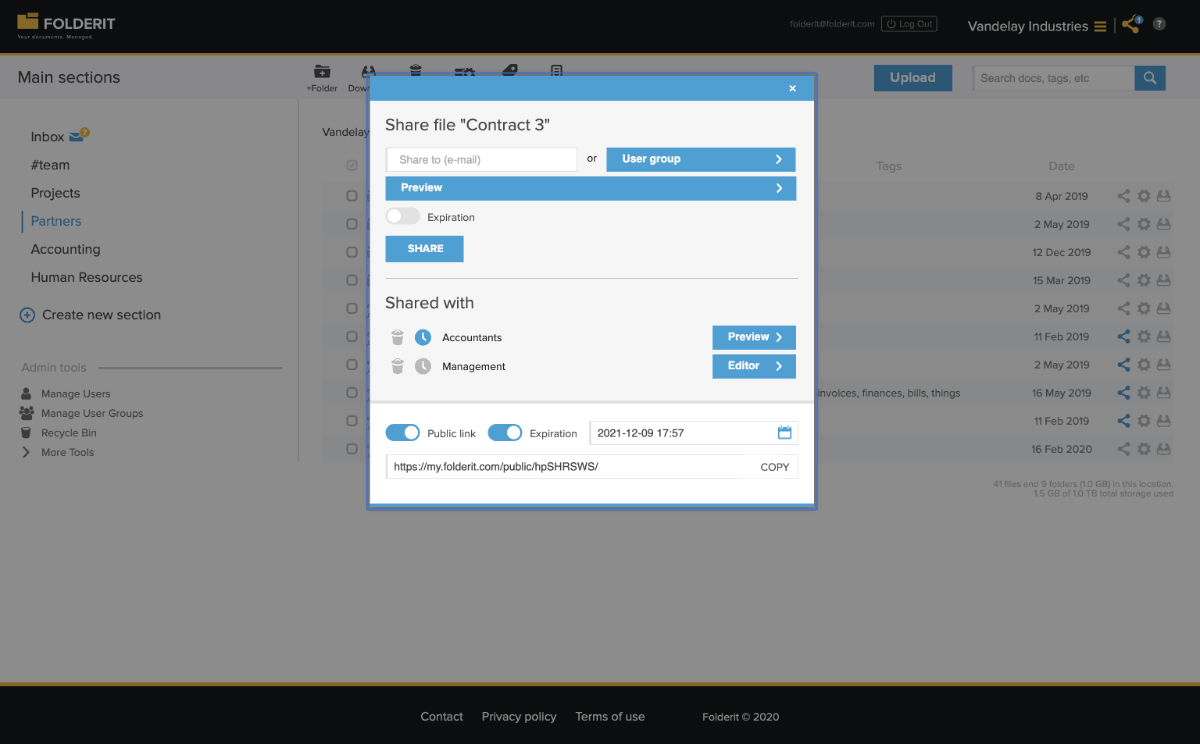
Folderit Document Collaboration

Folderit Document Collaboration
View Website
Folderit provides an ideal document management system for contractors, offering seamless document sharing and approval. Its cloud-based platform ensures security and accessibility, crucial for the fast-paced, mobile nature of the contracting industry.
SECURE CLOUD ACCESS
AUDIT TRAIL ENABLED

Best for teams that are

  • Small businesses seeking an affordable, user-friendly DMS
  • Teams needing simple cloud storage with OCR and approval workflows
  • Organizations requiring secure storage with granular access controls

Skip if

  • Large enterprises requiring advanced BIM or CAD file integration
  • Projects needing complex field management or RFI tracking
  • Users needing specialized construction estimating features

Expert Take

Our analysis shows Folderit disrupts the standard SaaS pricing model by charging per storage tier rather than per user, making it exceptionally cost-effective for growing teams. Research indicates it maintains enterprise-grade security with ISO 27001 certification and triple-redundant backups despite its SMB focus. Based on documented features, the inclusion of multilingual OCR and granular access controls provides high-end capability without the complexity of legacy enterprise systems.

Pros

  • Fixed pricing per team, not per user
  • ISO 27001, HIPAA, and GDPR compliant
  • Triple data backups in separate locations
  • Multilingual OCR search included
  • Native Office 365 and DocuSign integrations

Cons

  • No native mobile app (web-only)
  • API access restricted to higher plans
  • Occasional slow performance reported
  • Lacks advanced enterprise-scale features
  • Integration ecosystem smaller than competitors
3
Expert Score
9.5 / 10
466
38
REAL-TIME COLLABORATION
3D VISUALIZATION

Rabbet Construction Collaboration

Rabbet Construction Collaboration
View Website
Rabbet is specifically designed for the construction industry, simplifying the approval workflow and document collaboration process. Its centralized platform is a game-changer for contractors, enabling easy review and management of tasks, leading to efficient project execution.
REAL-TIME COLLABORATION
3D VISUALIZATION

Best for teams that are

  • Real estate developers and lenders managing construction finance
  • Teams automating lien waivers and payment application reviews
  • Users needing to streamline draw requests and budget tracking

Skip if

  • General contractors seeking field operations or safety software
  • Small residential builders with simple billing needs
  • Teams looking for design collaboration or plan markup tools

Expert Take

Our analysis shows Rabbet stands out by applying AI specifically to the 'draw request' chaos, automating the ingestion of hundreds of documents that typically bog down construction finance. Research indicates it effectively bridges the gap between lenders and developers with shared visibility, unlike generic project management tools. Based on documented features, its automated lien waiver tracking and covenant compliance checks provide a critical layer of risk management that manual spreadsheets cannot match.

Pros

  • AI-powered document parsing and routing
  • Automated lien waiver management
  • Transparent published pricing tiers
  • SOC 2 Type 2 compliance
  • Responsive customer support team

Cons

  • Integration challenges requiring double entry
  • Steep learning curve for new users
  • Lender-centric design friction for developers
  • Missing some project management features
  • Higher cost for smaller teams
4
Expert Score
9.5 / 10
439
48
QUICK SETUP

FlowForma Collaborative Workflow Management

FlowForma Collaborative Workflow Management
View Website
FlowForma's collaborative workflow management software is designed specifically for contractors. It enables cross-functional teams to coordinate and strategize on key initiatives, providing seamless document collaboration and workflow tools. The software addresses industry-specific needs such as job costing, document tracking, and resource allocation.
QUICK SETUP

Best for teams that are

  • Construction firms on Office 365 wanting to digitize paper forms
  • Process managers needing no-code workflow automation
  • Teams looking to automate HR, safety, and onboarding processes

Skip if

  • Organizations not using the Microsoft 365/SharePoint ecosystem
  • Teams needing specialized construction drawing or BIM tools
  • Users seeking a dedicated project management or scheduling tool

Expert Take

Our analysis shows FlowForma stands out by unifying forms, workflow, and document generation into a single no-code interface, significantly reducing complexity for business users. Research indicates its transparent, flat-rate pricing model is a major differentiator in an industry often plagued by hidden costs. Based on documented features, its deep integration with Microsoft 365 makes it an ideal choice for enterprises already invested in that ecosystem.

Pros

  • 3-in-1 tool: Forms, Workflow, Doc Gen
  • ISO 27001 Certified Security
  • Transparent pricing with no hidden fees
  • Deep Microsoft 365 / SharePoint integration
  • AI Copilot for rapid process building

Cons

  • WYSIWYG editor less flexible than competitors
  • High entry price (€2,067/mo) for SMBs
  • Heavy dependency on SharePoint ecosystem
  • Advanced customization has limits
  • Mobile app requires connectivity for some features
5
Expert Score
9.4 / 10
424
28
EFFICIENT DOCUMENT MANAGEMENT
INTEGRATION CAPABLE

Construction Document Management

Construction Document Management
View Website
This SaaS solution is specifically designed for construction professionals, centralizing project files in a secure, cloud-based system. It offers user-friendly construction document management, which is crucial in a sector where effective coordination of plans, contracts, and other documents is vital for successful project execution.
EFFICIENT DOCUMENT MANAGEMENT
INTEGRATION CAPABLE

Best for teams that are

  • UK-based construction firms needing integrated ERP and HR solutions
  • Mid-to-large companies wanting to unify finance and operations
  • Organizations prioritizing UK compliance and payroll integration

Skip if

  • Non-UK companies, as the software is tailored to UK compliance
  • Small contractors needing only basic file sharing or field tools
  • Teams looking for a standalone design or BIM collaboration tool

Expert Take

Our analysis shows that Access Fonn distinguishes itself with a rare 'unlimited users and projects' model, making it highly scalable for growing construction firms without spiraling costs. Research indicates it is particularly strong for UK markets due to dedicated Part L compliance features like geotagged photo evidence. Based on documented features, its offline mobile capability ensures site teams remain productive regardless of connectivity, addressing a major pain point in field construction.

Pros

  • Unlimited users and projects pricing model
  • Robust offline mobile capabilities for site work
  • Built-in BIM viewer for 3D models
  • Specific tools for UK Part L compliance
  • Intuitive interface with low learning curve

Cons

  • Reports of Android app stability issues
  • Fewer integrations than market leaders
  • Pricing requires custom quote (not public)
  • Occasional notification delays reported
  • RFI features noted as needing improvement
6
Expert Score
9.2 / 10
702
52
COST EFFICIENT

RIB Construction Collaboration Software

RIB Construction Collaboration Software
View Website
The RIB Construction Collaboration Software is a dedicated solution tailored for contractors, offering streamlined document management and collaboration tools. It addresses the specific needs of this industry by enabling efficient coordination from the initial stages to the end of a construction project, mitigating potential delays and miscommunications.
COST EFFICIENT

Best for teams that are

  • Large enterprises requiring end-to-end 5D BIM and cost management
  • Complex projects needing integrated estimating and lifecycle control
  • Firms wanting to connect office ERP data with field operations

Skip if

  • Small businesses with limited budgets due to high cost and complexity
  • Teams seeking a simple, plug-and-play document storage solution
  • Users without dedicated resources for implementation and training

Expert Take

Our analysis shows that RIB CX stands out for its 'Single Source of Truth' architecture, which centralizes not just documents but all project correspondence into a form-based system. Research indicates this approach offers superior auditability compared to standard file-based platforms. Furthermore, its backing by Schneider Electric and adherence to ISO 27001 standards provide the enterprise-grade security and longevity assurance that major infrastructure projects require.

Pros

  • Comprehensive module suite from tender to handover
  • Strong BIM integration with web-based viewer
  • ISO 27001 and SOC 2 security certified
  • Backed by Schneider Electric for stability
  • Configurable form-based workflow architecture

Cons

  • Reports of slow system loading times
  • Documented glitches during critical tender submissions
  • No transparent public pricing available
  • Steep learning curve for complex modules
  • Implementation requires significant configuration
7
Expert Score
9.1 / 10
353
140

Revizto Construction Collaboration

Revizto Construction Collaboration
View Website
Revizto is a powerful collaboration and project management tool designed specifically for the construction industry. It provides seamless communication between all workflows, whether they are 2D or 3D, enabling you to manage resources, track progress, and resolve issues in real-time.

Best for teams that are

  • BIM managers needing unified 2D/3D model coordination
  • Teams focusing on clash detection and issue tracking in models
  • Projects requiring real-time model accessibility for non-technical users

Skip if

  • Users seeking general document storage or financial management
  • Teams not utilizing 3D models or BIM workflows
  • Small projects where 2D drawings are the only deliverable

Expert Take

Our analysis shows Revizto stands out by utilizing the Unity gaming engine to handle massive 'giga-models' with fluid navigation, a capability often cited as superior to traditional CAD viewers. Research indicates its unique 2D-on-3D overlay feature bridges the gap between design teams and field staff, ensuring data accessibility. Based on documented security credentials like ISO 27001 and SOC 2 Type 2, it offers enterprise-grade protection that exceeds many competitors.

Pros

  • Unity gaming engine handles massive models
  • Unique 2D overlay on 3D models
  • Offline mobile app with AR tools
  • ISO 27001 and SOC 2 certified
  • Automated clash detection workflows

Cons

  • Pricing is opaque and expensive
  • Clash detection less granular than Navisworks
  • 2D interface less intuitive than 3D
  • Steep learning curve for advanced features
  • Large model uploads can be slow
8
Expert Score
9.0 / 10
430
97

STACK Construction Document Control

STACK Construction Document Control
View Website
STACK is a cloud-based document control software designed specifically for the construction industry. It streamlines document management by enabling quick storage, retrieval, and analysis of all project documents. Its plan comparison feature makes it easy to understand changes at a glance, addressing the industry’s need for efficient data management.

Best for teams that are

  • Contractors prioritizing cloud-based takeoff and estimating
  • Teams needing accessible plan management and markup tools
  • Preconstruction teams wanting integrated takeoff and document control

Skip if

  • Large enterprises requiring complex ERP or accounting integrations
  • Users needing advanced 3D/BIM modeling capabilities
  • Teams looking for extensive field management or daily log features

Expert Take

Our analysis shows that STACK excels at creating a 'single source of truth' for construction projects by seamlessly bridging the gap between office and field. Research indicates its robust offline mobile capabilities and automated version control significantly reduce the risk of building from outdated plans. While it may lack some of the complex customization of enterprise-level competitors, its intuitive design and strong support make it highly effective for teams prioritizing speed and usability.

Pros

  • Automated version control reduces rework
  • Robust offline mobile access
  • Unlimited plan sheets and storage
  • Intuitive, user-friendly interface
  • Real-time team collaboration and syncing

Cons

  • Limited advanced editing tools
  • Occasional lag with large files
  • No built-in cost databases
  • Less customization than enterprise tools
  • No free forever plan (paid only)
9
Expert Score
8.6 / 10
538
136
CONSTRUCTION READY

ShareFile Construction Document Workflow

ShareFile Construction Document Workflow
View Website
ShareFile's construction document workflow solution is designed specifically for the construction industry, simplifying project collaboration through file sharing and workflow streamlining. It enables contractors to stay synced across various devices, ensuring smooth completion of projects.
CONSTRUCTION READY

Best for teams that are

  • Construction teams needing secure, compliant file sharing with external clients
  • Companies requiring client portals and automated approval workflows
  • Users handling large file transfers that exceed email limits

Skip if

  • Teams needing deep BIM model interaction or CAD integration
  • Field crews requiring daily logs, punch lists, or site management tools
  • Users seeking a comprehensive construction project management suite

Expert Take

Our analysis shows ShareFile distinguishes itself in the construction sector through its 'unlimited client users' model, which significantly reduces costs when collaborating with numerous subcontractors and vendors. Research indicates its security infrastructure is superior to standard cloud storage, offering bank-level encryption and granular permissions essential for protecting sensitive project IP. While it lacks the native deep integrations of some vertical-specific competitors, its robust file handling and specialized templates for RFIs and bidding make it a secure, scalable backbone for document-heavy construction workflows.

Pros

  • Unlimited client users for subcontractors
  • Bank-level AES 256-bit encryption
  • Supports large files up to 100GB
  • Integrated legally binding e-signatures
  • Mobile app for field access

Cons

  • No native direct Procore sync
  • Slow sync speeds with large files
  • Extra cost for additional employees
  • Limited native CAD/BIM preview
  • Interface learning curve for some
10
Expert Score
8.5 / 10
428
168
IMPROVED WORKFLOW

Autodesk Design Collaboration

Autodesk Design Collaboration
View Website
Autodesk Design Collaboration is a SaaS solution specifically designed for contractors, architects, and project teams in the construction industry. It transforms design documentation into a robust, project-based record, capturing and managing design data between all project teams, ensuring streamlined workflow and reduced miscommunications.
IMPROVED WORKFLOW

Best for teams that are

  • Architects and engineers using Revit for real-time co-authoring
  • Teams deeply invested in the Autodesk ecosystem (AEC Collection)
  • Projects requiring strict version control of design models

Skip if

  • Contractors needing simple PDF management without BIM complexity
  • Small firms avoiding high-cost subscriptions for design tools
  • Teams that do not use Revit, Civil 3D, or Plant 3D

Expert Take

Our analysis shows that Autodesk Design Collaboration stands out for its specialized 'swimlane' timeline and 'package' system, which solves the critical industry problem of uncontrolled data exchange between disciplines. Research indicates that unlike simple file sharing, this structure allows architects and engineers to curate exactly what they share and when, preventing the accidental use of work-in-progress data. Based on documented features, its native integration with Revit and Civil 3D makes it the definitive choice for Autodesk-centric design teams.

Pros

  • Visual timeline tracks design deliverables
  • Native Revit & Civil 3D integration
  • Automated change visualization between versions
  • SOC 2 & ISO 27001 certified
  • Curated 'packages' control data exchange

Cons

  • Model processing can be slow
  • Steep learning curve for workflows
  • One-way sync for bridged projects
  • Higher cost than basic storage
  • Complex permission management

Product Comparison

Product Has Mobile App Has Free Plan Has Free Trial Integrates With Zapier Has Public API Live Chat Support SOC 2 or ISO Certified Popular Integrations Supports SSO Starting Price
1 Bluebeam Construction Software
Yes No Yes - 30 days No No No Not specified Revit, AutoCAD, Microsoft 365 Enterprise plans only Contact for pricing
2 Folderit Document Collaboration
Yes No Yes - 14 days No No Email/Ticket only Not specified Limited integrations No $19/month
3 Rabbet Construction Collaboration
Web-only No Contact for trial No No Email/Ticket only Not specified Limited integrations No Contact for pricing
4 FlowForma Collaborative Workflow Management
Web-only No Yes - 14 days Yes Yes Yes Not specified Microsoft 365, SharePoint, Salesforce Yes Contact for pricing
5 Construction Document Management
Web-only No Contact for trial No No No Not specified Limited integrations No Contact for pricing
6 RIB Construction Collaboration Software
Yes No Contact for trial No Enterprise API only Email/Ticket only Not specified Microsoft 365, SAP, Oracle Enterprise plans only Contact for pricing
7 Revizto Construction Collaboration
Yes No Yes - 30 days No No Yes Not specified Revit, AutoCAD, Navisworks Yes Contact for pricing
8 STACK Construction Document Control
Yes Yes Yes - 7 days No No Yes Not specified Limited integrations No $999/year
9 ShareFile Construction Document Workflow
Yes No Yes - 30 days Yes Yes Yes SOC 2 Microsoft 365, Google Workspace, Salesforce Yes Contact for pricing
10 Autodesk Design Collaboration
Yes No Yes - 30 days No Yes Yes ISO 27001 Revit, AutoCAD, BIM 360 Yes Contact for pricing
1

Bluebeam Construction Software

Has Mobile App
Yes
Has Free Plan
No
Has Free Trial
Yes - 30 days
Integrates With Zapier
No
Has Public API
No
Live Chat Support
No
SOC 2 or ISO Certified
Not specified
Popular Integrations
Revit, AutoCAD, Microsoft 365
Supports SSO
Enterprise plans only
Starting Price
Contact for pricing
2

Folderit Document Collaboration

Has Mobile App
Yes
Has Free Plan
No
Has Free Trial
Yes - 14 days
Integrates With Zapier
No
Has Public API
No
Live Chat Support
Email/Ticket only
SOC 2 or ISO Certified
Not specified
Popular Integrations
Limited integrations
Supports SSO
No
Starting Price
$19/month
3

Rabbet Construction Collaboration

Has Mobile App
Web-only
Has Free Plan
No
Has Free Trial
Contact for trial
Integrates With Zapier
No
Has Public API
No
Live Chat Support
Email/Ticket only
SOC 2 or ISO Certified
Not specified
Popular Integrations
Limited integrations
Supports SSO
No
Starting Price
Contact for pricing
4

FlowForma Collaborative Workflow Management

Has Mobile App
Web-only
Has Free Plan
No
Has Free Trial
Yes - 14 days
Integrates With Zapier
Yes
Has Public API
Yes
Live Chat Support
Yes
SOC 2 or ISO Certified
Not specified
Popular Integrations
Microsoft 365, SharePoint, Salesforce
Supports SSO
Yes
Starting Price
Contact for pricing
5

Construction Document Management

Has Mobile App
Web-only
Has Free Plan
No
Has Free Trial
Contact for trial
Integrates With Zapier
No
Has Public API
No
Live Chat Support
No
SOC 2 or ISO Certified
Not specified
Popular Integrations
Limited integrations
Supports SSO
No
Starting Price
Contact for pricing
6

RIB Construction Collaboration Software

Has Mobile App
Yes
Has Free Plan
No
Has Free Trial
Contact for trial
Integrates With Zapier
No
Has Public API
Enterprise API only
Live Chat Support
Email/Ticket only
SOC 2 or ISO Certified
Not specified
Popular Integrations
Microsoft 365, SAP, Oracle
Supports SSO
Enterprise plans only
Starting Price
Contact for pricing
7

Revizto Construction Collaboration

Has Mobile App
Yes
Has Free Plan
No
Has Free Trial
Yes - 30 days
Integrates With Zapier
No
Has Public API
No
Live Chat Support
Yes
SOC 2 or ISO Certified
Not specified
Popular Integrations
Revit, AutoCAD, Navisworks
Supports SSO
Yes
Starting Price
Contact for pricing
8

STACK Construction Document Control

Has Mobile App
Yes
Has Free Plan
Yes
Has Free Trial
Yes - 7 days
Integrates With Zapier
No
Has Public API
No
Live Chat Support
Yes
SOC 2 or ISO Certified
Not specified
Popular Integrations
Limited integrations
Supports SSO
No
Starting Price
$999/year
9

ShareFile Construction Document Workflow

Has Mobile App
Yes
Has Free Plan
No
Has Free Trial
Yes - 30 days
Integrates With Zapier
Yes
Has Public API
Yes
Live Chat Support
Yes
SOC 2 or ISO Certified
SOC 2
Popular Integrations
Microsoft 365, Google Workspace, Salesforce
Supports SSO
Yes
Starting Price
Contact for pricing
10

Autodesk Design Collaboration

Has Mobile App
Yes
Has Free Plan
No
Has Free Trial
Yes - 30 days
Integrates With Zapier
No
Has Public API
Yes
Live Chat Support
Yes
SOC 2 or ISO Certified
ISO 27001
Popular Integrations
Revit, AutoCAD, BIM 360
Supports SSO
Yes
Starting Price
Contact for pricing

Similar Categories

How We Rank Products

Our Evaluation Process

The methodology for selecting and ranking document collaboration and workflow tools for contractors focused on several key factors, including specifications, features, customer reviews, ratings, and overall value. Important considerations specific to this category included the ease of document sharing, integration capabilities with other software commonly used in construction, and compliance with industry standards. The research and analysis approach involved comparing product specifications, analyzing customer feedback from various platforms, reviewing ratings across multiple sources, and evaluating the price-to-value ratio to ensure a comprehensive understanding of each tool's strengths and weaknesses.

Overall scores reflect relative ranking within this category, accounting for which limitations materially affect real-world use cases. Small differences in category scores can result in larger ranking separation when those differences affect the most common or highest-impact workflows.

Verification

  • Products evaluated through comprehensive research and analysis of collaboration features and workflow efficiency.
  • Rankings based on in-depth examination of user reviews, expert insights, and product specifications.
  • Selection criteria focus on essential capabilities for document collaboration and project management specific to contractor needs.

Other Software products for Contractors

As an Amazon Associate, we earn from qualifying purchases. We may also earn commissions from other affiliate partners.

×

Score Breakdown

0.0 / 10

What This Award Means