Creative Workflow & Marketing Approval Tools

These are the specialized categories within Creative Workflow & Marketing Approval Tools. Looking for something broader? See all Marketing & Advertising Platforms categories.

1

PageProof Marketing Approval Software

Best for Approval Tools for Ad and Creative Teams

Score
9.9 / 10
PageProof Marketing Approval Software

PageProof is designed specifically to streamline and fast-track content review and approval processes for marketing teams. It addresses the industry's need for quick, effective communication and collaboration, ensuring that marketing materials are accurate, on-brand, and ready for distribution.

Best for Approval Tools for Ad and Creative Teams

Expert Take

PageProof excels in streamlining content review and approval processes for marketing teams, offering robust collaboration features and an intuitive interface. Its secure platform supports various file types, making it a valuable tool for marketing professionals. While it requires an internet connection, its overall capabilities position it as a leading solution in its category.

Pros

  • Unlimited users, storage, and proofs
  • Flat-rate pricing ($249/mo)
  • ISO 27001:2022 certified security
  • No login required for reviewers
  • Patented triple-layer encryption

Cons

  • Interface can feel clunky to some
  • Occasional upload glitches reported
  • Dashboard search can be difficult
  • High starting price for small teams
  • Limited flexibility in some workflows

Best for teams that are

  • Large teams or agencies benefiting from flat-rate pricing
  • Packaging designers needing color separation and smart compare
  • Security-conscious teams requiring ISO 27001 certification

Skip if

  • Solo freelancers or small teams with low proofing volume
  • Teams preferring per-seat pricing models over flat rates
  • Users looking for a free forever plan for basic use

Best for teams that are

  • Large teams or agencies benefiting from flat-rate pricing
  • Packaging designers needing color separation and smart compare
  • Security-conscious teams requiring ISO 27001 certification

Skip if

  • Solo freelancers or small teams with low proofing volume
  • Teams preferring per-seat pricing models over flat rates
  • Users looking for a free forever plan for basic use

Pros

  • Unlimited users, storage, and proofs
  • Flat-rate pricing ($249/mo)
  • ISO 27001:2022 certified security
  • No login required for reviewers
  • Patented triple-layer encryption

Cons

  • Interface can feel clunky to some
  • Occasional upload glitches reported
  • Dashboard search can be difficult
  • High starting price for small teams
  • Limited flexibility in some workflows

Expert Take

PageProof excels in streamlining content review and approval processes for marketing teams, offering robust collaboration features and an intuitive interface. Its secure platform supports various file types, making it a valuable tool for marketing professionals. While it requires an internet connection, its overall capabilities position it as a leading solution in its category.

2

Lytho: Creative Workflow Management

Best for Marketing Workflow Tools for Creative Teams

Score
9.8 / 10
Lytho: Creative Workflow Management

Lytho is an innovative SaaS solution designed to streamline the workflow of creative and marketing teams. Focusing on strategy over manual tasks, Lytho eliminates time-consuming content chasing and resizing, and helps in centralizing brand assets. Its comprehensive features are designed to address the unique needs of creative professionals, including digital asset management, brand management, and content creation.

Best for Marketing Workflow Tools for Creative Teams

Expert Take

Lytho excels as a creative workflow management tool by offering comprehensive features tailored for creative teams. Its capabilities in digital asset and brand management, coupled with an intuitive interface, make it a top choice in its category. While it requires initial training, its efficiency and productivity benefits are well-documented.

Pros

  • Unified DAM and workflow platform
  • Deep Adobe Creative Cloud integration
  • Intuitive and user-friendly interface
  • Excellent customer support responsiveness
  • Robust online proofing tools

Cons

  • Mobile app functionality issues
  • Search requires exact naming
  • Opaque custom pricing model
  • Limited workflow customization options
  • Steep learning curve for admins

Best for teams that are

  • Marketing teams specifically needing integrated Digital Asset Management (DAM)
  • Mid-to-large enterprises with high-volume creative production and approval needs
  • Teams prioritizing a user-friendly interface and strong support over financial tools

Skip if

  • Small businesses or startups with limited budgets due to high entry costs
  • Teams needing built-in agency financial, billing, or media buying modules
  • Users looking for a generic project management tool without creative focus

Best for teams that are

  • Marketing teams specifically needing integrated Digital Asset Management (DAM)
  • Mid-to-large enterprises with high-volume creative production and approval needs
  • Teams prioritizing a user-friendly interface and strong support over financial tools

Skip if

  • Small businesses or startups with limited budgets due to high entry costs
  • Teams needing built-in agency financial, billing, or media buying modules
  • Users looking for a generic project management tool without creative focus

Pros

  • Unified DAM and workflow platform
  • Deep Adobe Creative Cloud integration
  • Intuitive and user-friendly interface
  • Excellent customer support responsiveness
  • Robust online proofing tools

Cons

  • Mobile app functionality issues
  • Search requires exact naming
  • Opaque custom pricing model
  • Limited workflow customization options
  • Steep learning curve for admins

Expert Take

Lytho excels as a creative workflow management tool by offering comprehensive features tailored for creative teams. Its capabilities in digital asset and brand management, coupled with an intuitive interface, make it a top choice in its category. While it requires initial training, its efficiency and productivity benefits are well-documented.

3

Hive Marketing Workflow Tool

Best for Marketing Workflow Tools with Asset Review

Score
9.8 / 10
Hive Marketing Workflow Tool

Hive is a robust SaaS solution designed specifically to streamline marketing workflows. Its capabilities extend from task management to proofing, automation, and reporting, making it a perfect fit for the marketing industry that requires efficient coordination, asset review and feedback integration.

Best for Marketing Workflow Tools with Asset Review

Expert Take

Hive Marketing Workflow Tool stands out as a comprehensive solution for marketing professionals, offering a range of features from task management to automation. Its strengths in usability and market credibility are supported by industry recognition and robust documentation, making it a top choice in its category.

Pros

  • Native proofing for video and images
  • Flexible views (Gantt, Kanban, Table)
  • Democratically built roadmap based on voting
  • 1,000+ integrations including Salesforce & HubSpot
  • Built-in native chat and email

Cons

  • Mobile app is laggy and limited
  • Proofing and Timesheets are paid add-ons
  • Interface lag with large projects
  • Steep learning curve for advanced features
  • Notification overload reported by users

Best for teams that are

  • Marketing agencies needing visual project management and proofing in one intuitive platform
  • Teams valuing quick onboarding and a clean, user-friendly interface for campaign management
  • Organizations that want a democratically built roadmap where users vote on new features

Skip if

  • Budget-conscious teams needing advanced features like time-tracking (sold as extra add-ons)
  • Enterprises requiring highly complex, custom-coded workflow automations beyond standard templates

Best for teams that are

  • Marketing agencies needing visual project management and proofing in one intuitive platform
  • Teams valuing quick onboarding and a clean, user-friendly interface for campaign management
  • Organizations that want a democratically built roadmap where users vote on new features

Skip if

  • Budget-conscious teams needing advanced features like time-tracking (sold as extra add-ons)
  • Enterprises requiring highly complex, custom-coded workflow automations beyond standard templates

Pros

  • Native proofing for video and images
  • Flexible views (Gantt, Kanban, Table)
  • Democratically built roadmap based on voting
  • 1,000+ integrations including Salesforce & HubSpot
  • Built-in native chat and email

Cons

  • Mobile app is laggy and limited
  • Proofing and Timesheets are paid add-ons
  • Interface lag with large projects
  • Steep learning curve for advanced features
  • Notification overload reported by users

Expert Take

Hive Marketing Workflow Tool stands out as a comprehensive solution for marketing professionals, offering a range of features from task management to automation. Its strengths in usability and market credibility are supported by industry recognition and robust documentation, making it a top choice in its category.

4

Admation Marketing Approval Workflow

Best for Campaign Approval Tools for Marketing Teams

Score
9.8 / 10
Admation Marketing Approval Workflow

Admation's solution is designed specifically for marketing teams, providing tools that enhance project transparency, streamline revisions, and improve compliance. It makes the marketing approval workflow process more efficient by reducing bottlenecks, avoiding miscommunications, and ensuring that all marketing materials meet compliance standards.

Best for Campaign Approval Tools for Marketing Teams

Expert Take

Admation Marketing Approval Workflow excels in providing a specialized solution for marketing teams, enhancing transparency and compliance in the approval process. Its focus on reducing bottlenecks and improving workflow efficiency positions it as a premium tool in its category.

Pros

  • Centralized approval workflow hub
  • ISO 27001 & GDPR certified
  • Integrated online proofing tools
  • Automated compliance audit trails
  • Transparent starting price ($30/mo)

Cons

  • Interface reported as clunky
  • Steep learning curve for new users
  • Limited third-party integrations
  • Navigation can be time-consuming
  • Lower G2 rating (3.8/5)

Best for teams that are

  • Regulated industries like Finance and Pharma requiring strict legal compliance
  • Large enterprises needing integrated Resource Management, DAM, and Approvals
  • Teams managing complex campaigns with high volumes of assets and stakeholders

Skip if

  • Small creative teams or freelancers looking for a quick, low-cost proofing solution
  • Users wanting a simple tool solely for visual feedback without heavy project management
  • Teams with limited implementation budgets or timelines

Best for teams that are

  • Regulated industries like Finance and Pharma requiring strict legal compliance
  • Large enterprises needing integrated Resource Management, DAM, and Approvals
  • Teams managing complex campaigns with high volumes of assets and stakeholders

Skip if

  • Small creative teams or freelancers looking for a quick, low-cost proofing solution
  • Users wanting a simple tool solely for visual feedback without heavy project management
  • Teams with limited implementation budgets or timelines

Pros

  • Centralized approval workflow hub
  • ISO 27001 & GDPR certified
  • Integrated online proofing tools
  • Automated compliance audit trails
  • Transparent starting price ($30/mo)

Cons

  • Interface reported as clunky
  • Steep learning curve for new users
  • Limited third-party integrations
  • Navigation can be time-consuming
  • Lower G2 rating (3.8/5)

Expert Take

Admation Marketing Approval Workflow excels in providing a specialized solution for marketing teams, enhancing transparency and compliance in the approval process. Its focus on reducing bottlenecks and improving workflow efficiency positions it as a premium tool in its category.

5

ReviewStudio for Marketing Teams

Best for Marketing Workflow Tools with Asset Review

Score
9.7 / 10
ReviewStudio for Marketing Teams

ReviewStudio is a SaaS solution designed to streamline marketing workflows by offering centralized feedback, markup tools, and approval management. The software addresses the marketing industry's needs by offering faster approvals, making it an ideal tool for marketing teams looking to enhance their efficiency and productivity.

Best for Marketing Workflow Tools with Asset Review

Expert Take

ReviewStudio excels as a marketing workflow tool with its centralized feedback and approval management features, making it highly suitable for marketing teams. It is recognized for its usability and integration capabilities, although its pricing transparency could be improved. Overall, it stands out as a top solution in its category.
Pros

  • Unlimited guests on most plans
  • Supports 100+ file formats including HTML
  • ISO 27001 and SOC 2 compliant
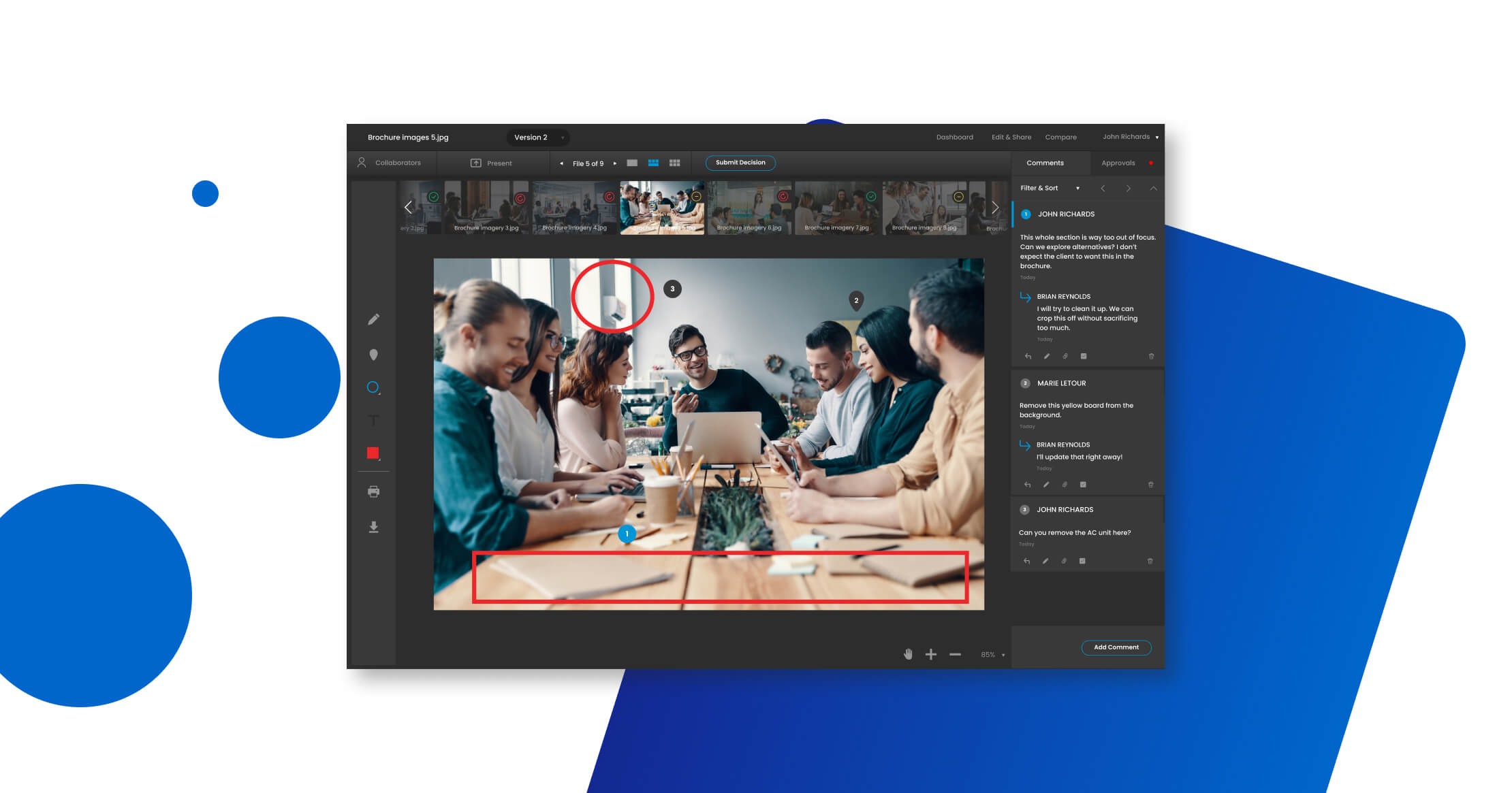
  • Side-by-side version compare mode
  • Live 'Present Mode' for synchronous reviews

Cons

  • No native mobile app available
  • Reporting limited on lower tiers
  • Video re-encoding may affect quality
  • Notifications can be overwhelming if untuned
  • Custom branding limited to paid plans

Best for teams that are

  • Creative studios and video production teams focused heavily on visual asset proofing
  • Freelancers and agencies needing a dedicated tool for client review cycles on rich media

Skip if

  • Teams needing full-scale project management beyond just review and approval functions
  • Users with non-technical clients who may resist adopting a new external platform for feedback

Best for teams that are

  • Creative studios and video production teams focused heavily on visual asset proofing
  • Freelancers and agencies needing a dedicated tool for client review cycles on rich media

Skip if

  • Teams needing full-scale project management beyond just review and approval functions
  • Users with non-technical clients who may resist adopting a new external platform for feedback

Pros

  • Unlimited guests on most plans
  • Supports 100+ file formats including HTML
  • ISO 27001 and SOC 2 compliant
  • Side-by-side version compare mode
  • Live 'Present Mode' for synchronous reviews

Cons

  • No native mobile app available
  • Reporting limited on lower tiers
  • Video re-encoding may affect quality
  • Notifications can be overwhelming if untuned
  • Custom branding limited to paid plans

Expert Take

ReviewStudio excels as a marketing workflow tool with its centralized feedback and approval management features, making it highly suitable for marketing teams. It is recognized for its usability and integration capabilities, although its pricing transparency could be improved. Overall, it stands out as a top solution in its category.

6

Orange Logic DAM Workflows

Best for Marketing Workflow Tools with Asset Review

Score
9.7 / 10
Orange Logic DAM Workflows

Orange Logic's Digital Asset Management (DAM) software is a must-have tool for industry professionals seeking to streamline, automate, and enhance their marketing workflows, ensuring compliance and efficiency. The AI-powered software uniquely addresses the industry's need for real-time collaboration across global teams, and the management and review of digital assets in a single, centralized system.

Best for Marketing Workflow Tools with Asset Review

Expert Take

Orange Logic DAM Workflows excels in providing AI-powered automation and centralized asset management, making it a top choice for marketing professionals. Its real-time collaboration features and focus on compliance further enhance its appeal, although the enterprise pricing model may limit its accessibility for smaller businesses.

Pros

  • 99.6% lifetime customer retention rate
  • Handles 40k+ API calls/minute
  • ISO 27001 & SOC 2 certified
  • Advanced AI facial/voice recognition
  • Unlimited users supported

Cons

  • Steep learning curve for beginners
  • High entry cost (~$200k/year)
  • Complex implementation process
  • UI less intuitive than competitors
  • Requires strong governance to manage

Best for teams that are

  • Large enterprises and media companies managing massive asset libraries and complex rights
  • Organizations needing highly scalable, custom-configured workflows for diverse departments

Skip if

  • Small businesses or startups due to enterprise-level pricing and complex implementation
  • Teams needing a quick "plug-and-play" solution without a lengthy setup process

Best for teams that are

  • Large enterprises and media companies managing massive asset libraries and complex rights
  • Organizations needing highly scalable, custom-configured workflows for diverse departments

Skip if

  • Small businesses or startups due to enterprise-level pricing and complex implementation
  • Teams needing a quick "plug-and-play" solution without a lengthy setup process

Pros

  • 99.6% lifetime customer retention rate
  • Handles 40k+ API calls/minute
  • ISO 27001 & SOC 2 certified
  • Advanced AI facial/voice recognition
  • Unlimited users supported

Cons

  • Steep learning curve for beginners
  • High entry cost (~$200k/year)
  • Complex implementation process
  • UI less intuitive than competitors
  • Requires strong governance to manage

Expert Take

Orange Logic DAM Workflows excels in providing AI-powered automation and centralized asset management, making it a top choice for marketing professionals. Its real-time collaboration features and focus on compliance further enhance its appeal, although the enterprise pricing model may limit its accessibility for smaller businesses.

7

Ashore Marketing Approval Software

Best for Campaign Approval Tools for Marketing Teams

Score
9.7 / 10
Ashore Marketing Approval Software

Ashore Marketing Approval Software is a solution specifically designed for creative agencies. It optimizes the proof review process, helping teams and clients streamline their approval workflows. Its robust features cater to the unique needs of marketing teams, helping them manage and speed up the campaign approval process.

Best for Campaign Approval Tools for Marketing Teams

Expert Take

Ashore Marketing Approval Software is tailored for creative agencies, offering a streamlined approval process with integrated feedback tools and customizable reminders. While it excels in usability and workflow optimization, its limited third-party integrations and absence of a mobile application slightly impact its overall versatility.

Pros

  • Extensive white-labeling capabilities
  • Supports video, web, and audio proofing
  • No account required for approvers
  • Generous 'Free Forever' plan
  • Automated audit trails and versioning

Cons

  • No native mobile application
  • Not a full project management tool
  • Full white-labeling requires Premium plan
  • Approvers must input name/email
  • Large price jump to Premium tier

Best for teams that are

  • Creative agencies and freelancers prioritizing a fully white-labeled client experience
  • Print shops and apparel companies managing high volumes of routine sign-offs
  • High-velocity creative teams needing automated approval reminders and workflows

Skip if

  • Enterprise teams needing complex financial forecasting or resource planning
  • Organizations requiring deep integration with heavy ERP or legacy systems
  • Teams needing advanced video proofing features beyond basic playback and comment

Best for teams that are

  • Creative agencies and freelancers prioritizing a fully white-labeled client experience
  • Print shops and apparel companies managing high volumes of routine sign-offs
  • High-velocity creative teams needing automated approval reminders and workflows

Skip if

  • Enterprise teams needing complex financial forecasting or resource planning
  • Organizations requiring deep integration with heavy ERP or legacy systems
  • Teams needing advanced video proofing features beyond basic playback and comment

Pros

  • Extensive white-labeling capabilities
  • Supports video, web, and audio proofing
  • No account required for approvers
  • Generous 'Free Forever' plan
  • Automated audit trails and versioning

Cons

  • No native mobile application
  • Not a full project management tool
  • Full white-labeling requires Premium plan
  • Approvers must input name/email
  • Large price jump to Premium tier

Expert Take

Ashore Marketing Approval Software is tailored for creative agencies, offering a streamlined approval process with integrated feedback tools and customizable reminders. While it excels in usability and workflow optimization, its limited third-party integrations and absence of a mobile application slightly impact its overall versatility.

8

Confluence for Creative Collaboration

Best for Marketing Workflow Tools for Creative Teams

Score
9.6 / 10
Confluence for Creative Collaboration

Confluence by Atlassian is a SaaS solution specifically designed to streamline the marketing workflow process for creative teams. Its robust AI-powered tools promote seamless cross-functional collaboration, enabling users to connect tools and automate workflows for efficient creative project management.

Best for Marketing Workflow Tools for Creative Teams

Expert Take

Confluence excels in facilitating creative collaboration through its AI-powered tools and seamless integration with other Atlassian products. Its strong market credibility is supported by Atlassian's reputation and industry recognition. While it offers significant value, some users may experience a learning curve.

Pros

  • Deep two-way integration with Jira
  • Live Figma file embedding
  • Whiteboards included in base price
  • Enterprise-grade security (SOC2, ISO)
  • AI-powered content summarization

Cons

  • Steep learning curve for creatives
  • Performance lags on large pages
  • Rigid formatting options
  • Complex permission management
  • Search can be difficult in cluttered spaces

Best for teams that are

  • Marketing teams within tech companies already using the Atlassian (Jira) ecosystem
  • Teams focused heavily on documentation, content strategy, and knowledge sharing
  • Groups needing collaborative whiteboards for brainstorming and planning

Skip if

  • Creative teams requiring native, robust video/image proofing and approval workflows
  • Agencies needing financial management, time tracking, or resource scheduling
  • Non-technical users who find wiki-based permissions and formatting complex

Best for teams that are

  • Marketing teams within tech companies already using the Atlassian (Jira) ecosystem
  • Teams focused heavily on documentation, content strategy, and knowledge sharing
  • Groups needing collaborative whiteboards for brainstorming and planning

Skip if

  • Creative teams requiring native, robust video/image proofing and approval workflows
  • Agencies needing financial management, time tracking, or resource scheduling
  • Non-technical users who find wiki-based permissions and formatting complex

Pros

  • Deep two-way integration with Jira
  • Live Figma file embedding
  • Whiteboards included in base price
  • Enterprise-grade security (SOC2, ISO)
  • AI-powered content summarization

Cons

  • Steep learning curve for creatives
  • Performance lags on large pages
  • Rigid formatting options
  • Complex permission management
  • Search can be difficult in cluttered spaces

Expert Take

Confluence excels in facilitating creative collaboration through its AI-powered tools and seamless integration with other Atlassian products. Its strong market credibility is supported by Atlassian's reputation and industry recognition. While it offers significant value, some users may experience a learning curve.

9

StreamWork Approval Workflow

Best for Approval Tools for Ad and Creative Teams

Score
9.6 / 10
StreamWork Approval Workflow

StreamWork's Approval Workflow Software is a boon for creative teams, streamlining the review and approval process for creative files. It allows professionals in the ad industry to effortlessly track and implement client feedback, irrespective of the version number of the creative files.

Best for Approval Tools for Ad and Creative Teams

Expert Take

StreamWork Approval Workflow is a premium tool designed for ad and creative teams, offering a streamlined process for managing feedback and approvals across multiple versions of creative files. It is recognized for its intuitive interface and ability to simplify complex workflows, making it a valuable asset for professionals in the advertising industry.

Pros

  • Simplifies approval process
  • Facilitates easy tracking of feedback
  • Caters to all versions of creative files
  • Intuitive interface
  • Helpful for ad and creative professionals

Cons

  • May require familiarization
  • Pricing may not be accessible for small businesses

Best for teams that are

  • Marketing teams heavily invested in Asana or Monday.com
  • Agencies requiring automated multi-stage approval workflows
  • Teams needing centralized audit trails for compliance

Skip if

  • Freelancers or small teams with low volume or budget
  • Users needing a standalone tool without PM software integration
  • Teams requiring deep Adobe Creative Cloud plugin support

Best for teams that are

  • Marketing teams heavily invested in Asana or Monday.com
  • Agencies requiring automated multi-stage approval workflows
  • Teams needing centralized audit trails for compliance

Skip if

  • Freelancers or small teams with low volume or budget
  • Users needing a standalone tool without PM software integration
  • Teams requiring deep Adobe Creative Cloud plugin support

Pros

  • Simplifies approval process
  • Facilitates easy tracking of feedback
  • Caters to all versions of creative files
  • Intuitive interface
  • Helpful for ad and creative professionals

Cons

  • May require familiarization
  • Pricing may not be accessible for small businesses

Expert Take

StreamWork Approval Workflow is a premium tool designed for ad and creative teams, offering a streamlined process for managing feedback and approvals across multiple versions of creative files. It is recognized for its intuitive interface and ability to simplify complex workflows, making it a valuable asset for professionals in the advertising industry.

10

Workamajig Creative Workflow

Best for Marketing Workflow Tools for Creative Teams

Score
9.6 / 10
Workamajig Creative Workflow

Workamajig is a specialized tool for creative and marketing teams, offering a comprehensive solution for managing creative workflows. Its robust set of features addresses the industry-specific needs of creative project management, resource allocation, and team collaboration, ensuring efficient and streamlined operations.

Best for Marketing Workflow Tools for Creative Teams

Expert Take

Workamajig Creative Workflow is a specialized tool designed for creative and marketing teams, offering a comprehensive suite of features for managing creative workflows. Its industry-specific capabilities, combined with strong market credibility and usability, position it as a leading solution in its category.

Pros

  • All-in-one agency management (PM + Accounting)
  • Includes free training and onboarding
  • Specialized media buying integrations (Strata)
  • SOC 2 Type 2 and GDPR compliant
  • Transparent pricing with no hidden fees

Cons

  • Steep learning curve for new users
  • Interface can feel complex and outdated
  • No native mobile app (web-only)
  • Implementation takes 2-3 months
  • Search and navigation can be tedious

Best for teams that are

  • Creative agencies needing an all-in-one solution for projects, finance, and CRM
  • Mid-to-large teams requiring robust resource management and profitability reporting
  • Teams with 5+ users who want to consolidate accounting and workflow tools

Skip if

  • Small teams (under 5 users) or freelancers due to minimum user requirements
  • Non-creative teams finding the agency-specific financial features unnecessary
  • Users seeking a simple, low-learning-curve task manager

Best for teams that are

  • Creative agencies needing an all-in-one solution for projects, finance, and CRM
  • Mid-to-large teams requiring robust resource management and profitability reporting
  • Teams with 5+ users who want to consolidate accounting and workflow tools

Skip if

  • Small teams (under 5 users) or freelancers due to minimum user requirements
  • Non-creative teams finding the agency-specific financial features unnecessary
  • Users seeking a simple, low-learning-curve task manager

Pros

  • All-in-one agency management (PM + Accounting)
  • Includes free training and onboarding
  • Specialized media buying integrations (Strata)
  • SOC 2 Type 2 and GDPR compliant
  • Transparent pricing with no hidden fees

Cons

  • Steep learning curve for new users
  • Interface can feel complex and outdated
  • No native mobile app (web-only)
  • Implementation takes 2-3 months
  • Search and navigation can be tedious

Expert Take

Workamajig Creative Workflow is a specialized tool designed for creative and marketing teams, offering a comprehensive suite of features for managing creative workflows. Its industry-specific capabilities, combined with strong market credibility and usability, position it as a leading solution in its category.

How We Rank Products

Our Evaluation Process

Products in the Marketing Workflow & Approval Tools category are evaluated based on documented features such as automation capabilities, workflow customization, and integration options. Pricing transparency is considered, ensuring buyers understand the cost structure. Compatibility with existing systems and third-party customer feedback are also key evaluation criteria, helping to gauge user satisfaction and the practical benefits of each tool.

Verification

  • Products evaluated through comprehensive research and analysis of user feedback and expert insights.
  • Rankings based on analysis of specifications, customer ratings, and industry reviews.
  • Selection criteria focus on key features specific to marketing workflow and approval tools.

Score Breakdown

0.0 / 10

About Creative Workflow & Marketing Approval Tools

Creative Workflow & Marketing Approval Tools: The Definitive Expert Guide

This category covers software designed to orchestrate the production, review, and approval of creative assets across their operational lifecycle: from initial briefing and resource allocation to iterative feedback, compliance checking, and final sign-off. It sits squarely between Project Management (which focuses on task completion and timelines) and Digital Asset Management (which focuses on storage and distribution). While adjacent to Marketing Resource Management (MRM), Creative Workflow & Marketing Approval Tools differ by prioritizing the quality assurance and collaboration mechanics of the creative process—annotation, version control, and proofing—over high-level budgeting or strategic planning. This category includes both general-purpose platforms suitable for agile marketing teams and vertical-specific tools built for highly regulated industries like life sciences and financial services.

What Are Creative Workflow & Marketing Approval Tools?

At its core, this software category solves the "feedback loop" problem. In the absence of specialized tools, creative teams rely on fragmented communication channels—email threads, Slack messages, and spreadsheet trackers—to manage complex approval chains. This fragmentation leads to version control errors, missed deadlines, and compliance risks. Creative Workflow & Marketing Approval Tools centralize these interactions into a single system of record.

These platforms are used primarily by marketing departments, creative agencies, and in-house design studios. However, their value extends to legal, compliance, and product teams who must verify that creative output meets regulatory standards and brand guidelines. Why does this matter? Because the cost of a delayed campaign or a non-compliant asset is measurable. In high-velocity environments like retail, a delay of two days can miss a seasonal window. In regulated sectors like pharma, an unapproved claim can result in significant fines. These tools transform the creative process from a chaotic series of hand-offs into a structured, auditable manufacturing line for content.

History of the Category

The lineage of Creative Workflow & Marketing Approval Tools begins in the 1990s with the desktop publishing revolution. As tools like Adobe Photoshop and Illustrator (launched in the late 80s and early 90s) moved creative production from physical paste-ups to digital files, a new gap emerged: how to manage the files themselves. Initially, this was the domain of early server-based storage and eventually Digital Asset Management (DAM) systems. However, DAMs were repositories, not workspaces. They could store the "final" version, but they were terrible at managing the messy, iterative process of getting there. See [1].

By the mid-2000s, the explosion of digital channels created a volume crisis. Marketing teams were no longer just producing one TV spot and three print ads; they were producing hundreds of banner ads, email headers, and web assets. General-purpose project management tools like Basecamp or Microsoft Project could track tasks, but they couldn't display a video file for frame-accurate commentary or handle the visual nuance of a print layout. This specific need—visual collaboration—birthed the first generation of online proofing tools. The market saw a shift from on-premise solutions, which were heavy and IT-dependent, to cloud-based SaaS models that allowed external agencies and freelancers to collaborate without firewall issues. See [2].

The 2010s marked a period of intense verticalization and consolidation. Gartner began tracking "Marketing Resource Management" (MRM) as a broader category, but quickly realized the specific needs of creative production required distinct capabilities. In 2017, Gartner retired its original MRM Magic Quadrant to redefine the space as "MRM 2.0," acknowledging that work management, asset management, and performance management had become specialized disciplines. This era also saw the rise of vertical SaaS: generic tools were insufficient for healthcare companies facing FDA regulations or financial firms dealing with FINRA rules. Specialized vendors emerged to handle these complex compliance workflows, offering features like electronic signatures and audit trails that generic tools lacked. Today, the market is defined by a demand for "actionable intelligence"—buyers no longer just want a database of approvals; they want analytics on bottleneck duration, revision rounds, and creative ROI. See [3].

What to Look For

When evaluating vendors in this space, buyers must look beyond the user interface and interrogate the underlying workflow engine. The most critical evaluation criterion is proof-centricity versus task-centricity. A task-centric tool (like general project management software) treats a creative asset as an attachment to a to-do list item. A proof-centric tool treats the asset as the center of the universe, with tasks, comments, and versions orbiting around it. For creative teams, proof-centricity is non-negotiable for adoption.

Critical Evaluation Criteria:

  • Visual Comparison Capabilities: Can the tool overlay two versions of a PDF or video and automatically highlight pixel-level differences? This "diffing" capability saves hours of manual review.
  • External Stakeholder Access: How much friction is involved for a client or legal reviewer to leave feedback? If they have to create an account and remember a password, adoption will fail. Look for "guest review" features that prioritize security without sacrificing usability.
  • Granular Permissions: Can you hide internal creative chatter from external clients? The ability to have "internal" vs. "public" comment layers is essential for agency workflows.

Red Flags and Warning Signs:

  • "All-in-One" Bloat: Be wary of platforms that claim to be a CRM, HR tool, and Creative Workflow tool simultaneously. These "Frankenstein" platforms often have shallow proofing capabilities that frustrate designers.
  • Lack of Version Stacking: If the tool lists "v1" and "v2" as separate files rather than stacking them into a single historical view, you will lose the thread of feedback.
  • Proprietary File Formats: Ensure the system supports standard industry formats (INDD, PSD, MP4, HTML5) natively. If the tool requires you to convert everything to a flat PDF before uploading, it adds unnecessary friction.

Key Questions to Ask Vendors:

  • "Does your system support 'blind' reviews where stakeholders cannot see each other's comments until a moderator releases them?" (Crucial for avoiding groupthink).
  • "How does your platform handle live website proofing? Do we have to take screenshots, or can we comment directly on a live staging URL?"
  • "Show me the exact workflow for a compliance officer who needs to reject a specific claim in a video at the 0:34 mark."

Industry-Specific Use Cases

Retail & E-commerce

For retail and e-commerce, the primary driver is velocity and volume. These teams are not managing a few high-value assets; they are managing thousands of SKUs, dynamic product ads (DPAs), and seasonal variations. The critical need here is "creative automation"—the ability to take a master asset and spin out hundreds of variations for different social platforms and audience segments. Evaluation priorities should focus on integration with Product Information Management (PIM) systems. If the workflow tool cannot pull live pricing and spec data to verify against the creative asset, it adds manual risk. A unique consideration is the handling of "expiration dates" for rights-managed imagery (e.g., influencer photos that can only be used for 6 months). The tool must flag assets that are about to expire to prevent unauthorized use. See [4].

Healthcare

In healthcare and life sciences, the workflow is dictated by the MLR (Medical, Legal, Regulatory) review process. Unlike other industries where "approval" means "I like it," here approval means "this will not get us sued or fined by the FDA." Specific needs include the ability to link every claim in a piece of copy to a reference document (called "anchoring" or "referencing"). Evaluation priorities must center on audit trails: the system must log exactly who looked at a file, for how long, and what they signed off on. A unique consideration is the requirement for "clean" vs. "annotated" exports; the system needs to generate a clean PDF for production and a marked-up PDF for regulatory submission seamlessly. Chaos in this workflow isn't just annoying; it's a compliance violation. See [5].

Financial Services

Financial services firms are governed by strict regulations like FINRA Rule 2210 in the US, which mandates that all communications with the public be fair, balanced, and not misleading. The workflow tool acts as a compliance engine. It must ensure that every piece of content is reviewed by a registered principal before release. Evaluation priorities include "lexicon checking"—automated scanning of text for risky words like "guarantee" or "promise." A unique consideration is the need for WORM (Write Once, Read Many) compliant storage integration to ensure that once an approval record is created, it cannot be altered or deleted, satisfying record-keeping regulations. See [6].

Manufacturing

For manufacturing and CPG (Consumer Packaged Goods), the focus is on packaging artwork approval. This is distinct from digital marketing because it involves physical constraints: die lines, color separation (CMYK/Pantone), and nutrition label compliance. A digital proof might look fine on a screen, but if the barcode isn't readable or the allergen warning is below the minimum font size, the product cannot ship. Evaluation priorities should focus on advanced viewing tools that can measure ink density, check font sizes, and simulate how packaging looks on a shelf. A unique consideration is "separation viewing," allowing approvers to toggle specific ink plates on and off to verify technical printability. See [7].

Professional Services

Agencies and consultancies operate on a billable client service model. Their workflow tools serve a dual purpose: quality control and client experience. The tool is often the primary interface between the agency and the client. Evaluation priorities include "white-labeling"—the ability to brand the portal with the agency's logo so the client feels they are in a proprietary environment. A unique consideration is the "approval audit" for billing disputes. If a client claims they didn't approve a costly print run, the agency needs to pull a timestamped log proving the client signed off on version 3 on a specific date. This protects revenue and relationships. See [8].

Subcategory Overview

Marketing Workflow Tools for Creative Teams

This subcategory is the engine room of creative production. Unlike generic project management tools, Marketing Workflow Tools for Creative Teams are designed to bridge the gap between the "left brain" logic of project managers and the "right brain" flow of creatives. What makes this niche genuinely different is its deep integration with creative software suites like Adobe Creative Cloud. A generic tool forces a designer to export a file, minimize their design software, log into a browser, and upload. These specialized tools often feature plugins that allow designers to receive tasks, view comments, and upload new versions without ever leaving Photoshop or InDesign. A workflow that only this tool handles well is the "brief-to-concept" transition, where structured data from a marketing brief is automatically converted into creative tasks with pre-assigned templates. The specific pain point driving buyers here is "context switching"—the productivity loss that occurs when creatives have to toggle between their design environment and administrative tools.

Campaign Approval Tools for Marketing Teams

While creative teams focus on the asset, marketing leadership focuses on the campaign hierarchy. Campaign Approval Tools for Marketing Teams are distinct because they manage approvals at the deliverable and strategic level rather than just the file level. They are built to visualize multi-channel campaigns where a single approval might trigger the release of a landing page, an email sequence, and a social ad set simultaneously. A workflow unique to this category is "parallel path routing," where a campaign brief is sent to legal for compliance review while simultaneously going to the media team for budget allocation, ensuring no bottleneck stops the entire train. Buyers move toward this niche when they suffer from "stakeholder fatigue"—where senior approvers are bombarded with individual asset links instead of a consolidated campaign view.

Approval Tools for Ad and Creative Teams

Speed is the currency of this subcategory. Approval Tools for Ad and Creative Teams are stripped-down, high-velocity engines designed specifically for the review phase. They differ from broader workflow tools by offering best-in-class annotation capabilities for complex media types like video (frame-by-frame sketching), HTML5 banners (interactive click-through testing), and audio (waveform commenting). A workflow that only this niche excels at is "guest review aggregation." In ad production, you might need feedback from a freelance director, a sound engineer, and a brand client, none of whom are in your internal system. These tools allow you to generate a secure, expirable link that collects feedback from all these disparate parties onto a single timeline. The pain point here is "feedback consolidation"—the nightmare of collating comments from three different email chains and a Slack thread into one actionable change list.

Marketing Workflow Tools with Asset Review

This category represents the convergence of workflow management and digital asset management (DAM). Marketing Workflow Tools with Asset Review ensure that the asset lifecycle doesn't end at approval. What differentiates this niche is the "post-approval" workflow. In standalone approval tools, a finished asset sits in the system until someone manually downloads it. In this integrated category, an "approved" status automatically triggers metadata tagging and ingestion into the long-term asset library, making it immediately searchable for the sales team. A workflow unique to this tool is "rights-managed approval," where the approval process includes a check against talent usage rights stored in the asset record. Buyers choose this when they face "asset abandonment"—where approved files get lost on local hard drives and never make it to the central repository for reuse.

Integration & API Ecosystem

In the modern marketing stack, a standalone tool is a dead end. Integration is the circulatory system that keeps data moving. According to the 2025 Gartner Marketing Technology Survey, marketing organizations are utilizing only 49% of their martech stack's capabilities, largely due to poor integration and data silos [9]. A robust Creative Workflow tool must sit centrally, pushing and pulling data from Project Management systems (like Asana or Jira), DAMs, and distribution platforms.

Expert Insight: As Scott Brinker (Chief Martec) often notes, the value of a martech tool is increasingly defined by its "composability"—its ability to act as a building block in a larger ecosystem rather than a walled garden. Buyers should prioritize tools with "low-code" integration builders (like Zapier or Workato connectors) over those requiring custom engineering.

Real-World Scenario: Consider a 50-person professional services firm. They use Salesforce for client records, Monday.com for project tracking, and QuickBooks for invoicing. They purchase a standalone Creative Approval tool. Without integration, when a project manager opens a job in the approval tool, they must manually re-type the client name and job code from Salesforce. If they make a typo, the final invoice generated in QuickBooks won't match the job record, leading to billing disputes. A well-integrated system would automatically pull the "Client ID" from Salesforce to create the project folder, and upon final "Approved" status, push a "Billable Milestone" trigger to QuickBooks, ensuring data integrity and faster payment.

Security & Compliance

Security in creative workflow is no longer just about password protection; it's about supply chain hardening. The Motion Picture Association's Trusted Partner Network (TPN) has set the gold standard here, establishing security benchmarks for vendors handling pre-release content [10]. For software buyers, the distinction between SOC 2 Type II and ISO 27001 is critical. SOC 2 is an attestation of controls relevant primarily to US markets, while ISO 27001 is a broader international standard for information security management systems.

Expert Insight: Security experts emphasize that "shadow IT" is the biggest threat in creative operations. When official tools are too hard to use, creatives resort to WeTransfer or personal Dropbox accounts to share sensitive files.

Real-World Scenario: A healthcare agency is preparing a launch for a new drug. The creative files contain unreleased clinical trial data. If they use a tool that is only SOC 2 compliant but lacks granular "view-only" permissions, a freelancer might download the file to a personal laptop. If that laptop is stolen, it constitutes a data breach. A properly secured tool would offer "watermarking" and "stream-only" viewing for video files, ensuring that even if a freelancer views the content, they cannot extract the source file, and any leak can be traced back to the specific user via the watermark.

Pricing Models & TCO

Pricing transparency is rare in this category. The market is split between per-user pricing and usage-based (storage/project) pricing. According to KeyBanc Capital Markets' 2024 SaaS Survey, per-user pricing remains the dominant model for collaboration software, but usage-based models are growing in prevalence for enterprise tiers [11]. Buyers must calculate the Total Cost of Ownership (TCO) not just on license fees, but on "guest" seats. Some vendors charge for every external reviewer; others allow unlimited free guests.

Expert Insight: Pricing analysts warn against "seat cliffs"—where moving from 10 to 11 users forces a jump to an "Enterprise" tier that doubles the cost per seat.

Real-World Scenario: A mid-sized agency with 25 employees (15 creatives, 10 account managers) is evaluating two vendors. Vendor A charges $30/user/month. Vendor B charges $500/month flat fee for unlimited users. On the surface, Vendor B looks cheaper ($500 vs $750). However, Vendor A includes 1TB of storage, while Vendor B charges overages for anything above 100GB. Since the agency works with 4K video, they burn through 100GB in a week. By year's end, the storage overages with Vendor B push the TCO to $12,000, whereas Vendor A remains steady at $9,000. The "cheaper" flat rate was a trap.

Implementation & Change Management

Software implementation is where ROI goes to die. McKinsey & Company research consistently shows that 70% of digital transformations fail to meet their objectives, often due to resistance to change rather than technical failures [12]. In creative teams, this resistance is often cultural; creatives view structured workflows as bureaucratic impediments to their art.

Expert Insight: Change management consultants recommend identifying "champions" within the creative team—not just managers—to pilot the tool. If the lead designer hates the proofing interface, the implementation will fail regardless of what the Operations Director says.

Real-World Scenario: A retail brand implements a new workflow tool to replace email. They define a rigid 15-step approval process in the software that mirrors their "ideal" state, not their actual working habits. When the team attempts to use it, the "Review" stage creates a bottleneck because the VP of Marketing, who is listed as a mandatory approver, is traveling. The system locks the file, preventing the designers from seeing the next set of edits. Work grinds to a halt. To survive, the team moves back to email to get the job done. A successful implementation would have started with a flexible "happy path" workflow and slowly introduced constraints only after adoption was stabilized.

Vendor Evaluation Criteria

The vendor landscape is crowded. To cut through the noise, buyers must interrogate the product roadmap and support structure. Gartner’s analysis of software buying cycles highlights that "vendor viability" is a key risk factor; small, niche vendors may be acquired or pivot, leaving customers stranded [9].

Expert Insight: Look for vendors who treat "Customer Success" as a consultancy, not just tech support. You want a vendor who will teach you how to structure a workflow, not just how to click the buttons.

Real-World Scenario: A global manufacturing firm requires a tool that can handle 3D CAD files for packaging review. Vendor X claims to support "all major file types." During the sales demo, the buyer asks to upload a specific proprietary 3D format used by their engineering team. Vendor X's tool displays it as a flat 2D image, rendering it useless for rotational review. A rigorous evaluation would have involved a "Proof of Concept" (POC) phase where the buyer tested their actual, messiest files—not the vendor's polished demo assets—to uncover these functional gaps before signing.

Emerging Trends and Contrarian Take

Emerging Trends 2025-2026:

  • Agentic AI Workflows: We are moving beyond "generative AI" (making images) to "agentic AI" (managing work). Expect to see AI agents that act as project managers—automatically chasing overdue approvals, summarizing feedback from 10 different stakeholders into a single consolidated punch list, and even auto-tagging assets for compliance risks before a human ever sees them. See [13].
  • Platform Convergence: The lines between Project Management, DAM, and Creative Workflow are blurring. We are seeing a consolidation trend where massive platforms (like Adobe or Canva) are acquiring niche workflow tools to offer an "end-to-end" creative operating system, potentially squeezing out standalone point solutions.

Contrarian Take:

Automation is often a mistake. The industry obsession with "automating creative workflows" is driving teams to pave cow paths. As highlighted by Gartner, 40% of agentic AI projects will fail by 2027 not because the tech is bad, but because organizations are automating broken processes [13]. If your current approval process is a tangled mess of 15 unnecessary stakeholders, automating it simply means you will produce bad decisions faster. The smartest move for many organizations is not to buy software that automates their workflow, but to eliminate the workflow steps entirely before applying technology. Software cannot fix a lack of trust between a Creative Director and a Marketing VP.

Common Mistakes

Over-Engineering the Workflow: A common impulse is to map every possible edge case into the software. Teams build complex "if/then" routing rules (e.g., "If budget > $5k, route to CFO"). The result is a brittle system that breaks the moment a project doesn't fit the mold. Fix: Start with a simple, linear workflow and manage exceptions manually until patterns emerge.

Ignoring the "Guest" Experience: Buyers often focus entirely on the experience for their internal team (the "paid seat" holders) and ignore the experience for the external client (the "guest"). If the guest interface is clunky, slow, or confusing, clients will refuse to use it, and your team will be forced back to email. Fix: Test the "client view" yourself during the demo.

Failing to Define "Done": Without clear software definitions, projects linger in "99% complete" limbo. Teams fail to configure the system to distinguish between "Approved with Changes" and "Approved." Fix: Configure the tool to require a binary "Go/No-Go" decision at critical gates to force accountability.

Questions to Ask in a Demo

  • "Can I route a proof to a non-user without them needing to create a login? Show me exactly what that email looks like."
  • "Does your version control allow us to compare two different file types (e.g., a Word doc brief vs. a PDF layout) side-by-side?"
  • "If our internet goes down, does your platform offer an offline mode or desktop app for reviewing heavy video files?"
  • "How do you handle 'conflicting feedback'? If two stakeholders leave contradictory comments on the same spot, how does the system flag this for resolution?"
  • "Show me the API documentation. Specifically, can we trigger a project creation via an external webhook?"

Before Signing the Contract

Final Decision Checklist:

  • Scalability Check: Have you stress-tested the system with your largest possible file size? (e.g., a 5GB 8K video file).
  • Adoption Pilot: Have you run a 2-week pilot with your least tech-savvy stakeholder? Their struggle is your future support burden.
  • Exit Strategy: Does the contract specify how you get your data back if you leave? Ensure there is a clause for "bulk export" of all assets and approval logs in a non-proprietary format.

Common Negotiation Points:

  • Storage tiers: Vendors often use storage as a hidden cost lever. Negotiate for a "soft cap" rather than hard overage fees.
  • Implementation support: Demand that implementation fees be tied to specific milestones (e.g., "Go-Live") rather than just paid upfront.
  • Sandbox environment: Ask for a free "sandbox" or testing environment included in your enterprise license so you can test workflow changes without disrupting active projects.

Deal-Breakers:

  • Lack of Single Sign-On (SSO) for enterprise teams (security risk).
  • No mobile app or mobile-responsive review interface (modern approvals happen on phones).
  • Inability to lock a file from further comments once a deadline has passed (process risk).

Closing

Choosing the right creative workflow tool is less about features and more about understanding the "physics" of your team's collaboration. If you have questions about specific vendors or need a sounding board for your evaluation strategy, feel free to reach out.

Email: albert@whatarethebest.com