
Video Conferencing Software
These are the specialized categories within Video Conferencing Software. Looking for something broader? See all Project Management & Productivity Tools categories.

How big is your team?
What's your budget situation?
What's your team's technical comfort level?
What's the ONE thing this tool must do well?

MegaMeeting is a secure, all-in-one video conferencing solution designed specifically for SaaS companies. It offers high-quality video and audio, webinar services, and advanced collaboration tools that cater to the needs of remote teams and client communication in the SaaS sector.
Best for Video Conferencing Software for SaaS Companies
Expert Take
MegaMeeting Video Conferencing excels in providing a secure and comprehensive solution tailored for SaaS companies. Its strong emphasis on security, combined with robust collaboration features and ease of access, positions it as a leading choice in the video conferencing space. While it has some limitations, such as the need for high bandwidth, its overall capabilities make it a top-tier product.
Pros
- 100% browser-based WebRTC (no downloads required)
- HIPAA compliant with Business Associate Agreements (BAA)
- Complete white-labeling including custom domains and branding
- All-in-one platform for video conferencing and webinars
- US-based 24/7 customer support
Cons
- Video meetings capped at 50 participants
- Webinars capped at 500 attendees
- No native AI virtual background feature
- Smaller integration ecosystem than Zoom or Teams
- Per-host pricing can be higher than basic Zoom plans
Best for teams that are
- Professional services and healthcare needing HIPAA compliance.
- Resellers and businesses needing white-label customization.
Skip if
- Users seeking a fully free, unlimited meeting solution.
- Teams wanting native desktop apps instead of browser-based.
Best for teams that are
- Professional services and healthcare needing HIPAA compliance.
- Resellers and businesses needing white-label customization.
Skip if
- Users seeking a fully free, unlimited meeting solution.
- Teams wanting native desktop apps instead of browser-based.
Pros
- 100% browser-based WebRTC (no downloads required)
- HIPAA compliant with Business Associate Agreements (BAA)
- Complete white-labeling including custom domains and branding
- All-in-one platform for video conferencing and webinars
- US-based 24/7 customer support
Cons
- Video meetings capped at 50 participants
- Webinars capped at 500 attendees
- No native AI virtual background feature
- Smaller integration ecosystem than Zoom or Teams
- Per-host pricing can be higher than basic Zoom plans
Expert Take
MegaMeeting Video Conferencing excels in providing a secure and comprehensive solution tailored for SaaS companies. Its strong emphasis on security, combined with robust collaboration features and ease of access, positions it as a leading choice in the video conferencing space. While it has some limitations, such as the need for high bandwidth, its overall capabilities make it a top-tier product.

Livestorm is an all-in-one video conferencing solution designed specifically for SaaS companies. It's an ideal tool for creating, promoting, and analyzing video communication. Livestorm helps SaaS businesses to scale with ease by providing a reliable platform for team collaboration, customer engagement, and product demonstrations.
Best for Video Conferencing Software for SaaS Companies
Expert Take
Livestorm Video Conferencing excels as a tailored solution for SaaS companies, providing strong integration capabilities and robust analytics. The product's usability and market credibility are supported by its high-quality video and audio features, although its premium pricing may limit accessibility for some users.
Pros
- 100% browser-based with no downloads required
- ISO 27001 certified and GDPR compliant
- Deep native integrations with HubSpot and Salesforce
- Automated email cadences and recurring event support
- Modern, intuitive user interface for hosts
Cons
- 15-second latency on non-Chrome browsers
- Limited design customization for event rooms
- Active Contact pricing can be expensive
- Mobile experience has fewer features than desktop
- Free plan limited to 20 minutes
Best for teams that are
- Tech and SaaS companies needing automated marketing webinars.
- Sales teams tracking advanced attendee engagement analytics.
Skip if
- Users wanting a basic, bare-bones tool without marketing features.
- Casual users looking for simple one-on-one personal video chats.
Best for teams that are
- Tech and SaaS companies needing automated marketing webinars.
- Sales teams tracking advanced attendee engagement analytics.
Skip if
- Users wanting a basic, bare-bones tool without marketing features.
- Casual users looking for simple one-on-one personal video chats.
Pros
- 100% browser-based with no downloads required
- ISO 27001 certified and GDPR compliant
- Deep native integrations with HubSpot and Salesforce
- Automated email cadences and recurring event support
- Modern, intuitive user interface for hosts
Cons
- 15-second latency on non-Chrome browsers
- Limited design customization for event rooms
- Active Contact pricing can be expensive
- Mobile experience has fewer features than desktop
- Free plan limited to 20 minutes
Expert Take
Livestorm Video Conferencing excels as a tailored solution for SaaS companies, providing strong integration capabilities and robust analytics. The product's usability and market credibility are supported by its high-quality video and audio features, although its premium pricing may limit accessibility for some users.

GoTo Meeting is designed for contractors seeking a reliable video conferencing solution that ensures security and compliance. With features like unlimited meeting durations and cloud recordings, it caters to industries requiring strict adherence to regulations.
Best for Video Conferencing Software for Contractors
Expert Take
GoTo Meeting stands out as a highly reliable, no-nonsense web conferencing solution that prioritizes security and stability over flashy features. We love its strict adherence to enterprise-grade compliance, including HIPAA and SOC 2 Type II certifications, making it a powerhouse for regulated industries like healthcare and finance. The inclusion of unlimited meeting durations and unlimited cloud recording on mid-tier plans offers exceptional value, while its 99.99% uptime guarantee ensures your
Pros
- Unlimited meeting durations with no time limits on video conferences.
- Highly secure with HIPAA, SOC 2 Type II, and AES-256 bit encryption.
- Includes unlimited cloud recording and meeting transcription on Business tiers.
- Reliable performance with an industry-leading 99.99% uptime guarantee.
Cons
- Lacks a permanently free tier, offering only a 14-day free trial.
- User interface feels outdated and cluttered compared to modern competitors.
- Lacks advanced AI features like gesture recognition and automated summaries.
Best for teams that are
- Small to mid-sized businesses needing reliability.
- Users seeking affordable cloud recording storage.
Skip if
- Users needing a robust and feature-rich free plan.
- Teams wanting the most modern user interface.
Best for teams that are
- Small to mid-sized businesses needing reliability.
- Users seeking affordable cloud recording storage.
Skip if
- Users needing a robust and feature-rich free plan.
- Teams wanting the most modern user interface.
Pros
- Unlimited meeting durations with no time limits on video conferences.
- Highly secure with HIPAA, SOC 2 Type II, and AES-256 bit encryption.
- Includes unlimited cloud recording and meeting transcription on Business tiers.
- Reliable performance with an industry-leading 99.99% uptime guarantee.
Cons
- Lacks a permanently free tier, offering only a 14-day free trial.
- User interface feels outdated and cluttered compared to modern competitors.
- Lacks advanced AI features like gesture recognition and automated summaries.
Expert Take
GoTo Meeting stands out as a highly reliable, no-nonsense web conferencing solution that prioritizes security and stability over flashy features. We love its strict adherence to enterprise-grade compliance, including HIPAA and SOC 2 Type II certifications, making it a powerhouse for regulated industries like healthcare and finance. The inclusion of unlimited meeting durations and unlimited cloud recording on mid-tier plans offers exceptional value, while its 99.99% uptime guarantee ensures your

GoTo Room provides recruitment agencies with a seamless video conferencing experience, simplifying complex setups with plug-and-play hardware from Poly and Logitech. It offers centralized management through a unified admin portal and supports third-party meeting platforms, making it ideal for IT-friendly remote collaboration.
Best for Video Conferencing Software for Recruitment Agencies
Expert Take
GoTo Room distinguishes itself by transforming complex conference room setups into a highly accessible, turnkey experience. By partnering with industry-leading hardware providers like Poly and Logitech, the platform bridges the gap between premium audio-visual fidelity and software simplicity. The unified GoTo Admin portal and seamless third-party meeting interoperability make it incredibly IT-friendly, allowing administrators to easily manage remote collaboration spaces without heavy technical
Pros
- Plug-and-play setup with top hardware brands like Poly and Logitech.
- Unified admin dashboard for centralized user and room management.
- Allows direct joining of third-party meetings like Zoom and Teams.
- Enterprise-grade security with 256-bit encryption and SSO integration.
Cons
- No longer actively selling new hardware kits or room licenses.
- Struggles with large group settings and multiple presenter documents.
- Users report occasional difficulties reaching responsive customer support.
- Pricing requires custom quotes and lacks upfront web transparency.
Best for teams that are
- SMBs needing cost-effective, physical conference room hardware solutions.
- Organizations already utilizing the broader GoTo communication ecosystem.
Skip if
- Recruitment agencies requiring built-in ATS or one-way interview tools.
- HR teams looking for AI-driven candidate screening or skill assessments.
Best for teams that are
- SMBs needing cost-effective, physical conference room hardware solutions.
- Organizations already utilizing the broader GoTo communication ecosystem.
Skip if
- Recruitment agencies requiring built-in ATS or one-way interview tools.
- HR teams looking for AI-driven candidate screening or skill assessments.
Pros
- Plug-and-play setup with top hardware brands like Poly and Logitech.
- Unified admin dashboard for centralized user and room management.
- Allows direct joining of third-party meetings like Zoom and Teams.
- Enterprise-grade security with 256-bit encryption and SSO integration.
Cons
- No longer actively selling new hardware kits or room licenses.
- Struggles with large group settings and multiple presenter documents.
- Users report occasional difficulties reaching responsive customer support.
- Pricing requires custom quotes and lacks upfront web transparency.
Expert Take
GoTo Room distinguishes itself by transforming complex conference room setups into a highly accessible, turnkey experience. By partnering with industry-leading hardware providers like Poly and Logitech, the platform bridges the gap between premium audio-visual fidelity and software simplicity. The unified GoTo Admin portal and seamless third-party meeting interoperability make it incredibly IT-friendly, allowing administrators to easily manage remote collaboration spaces without heavy technical
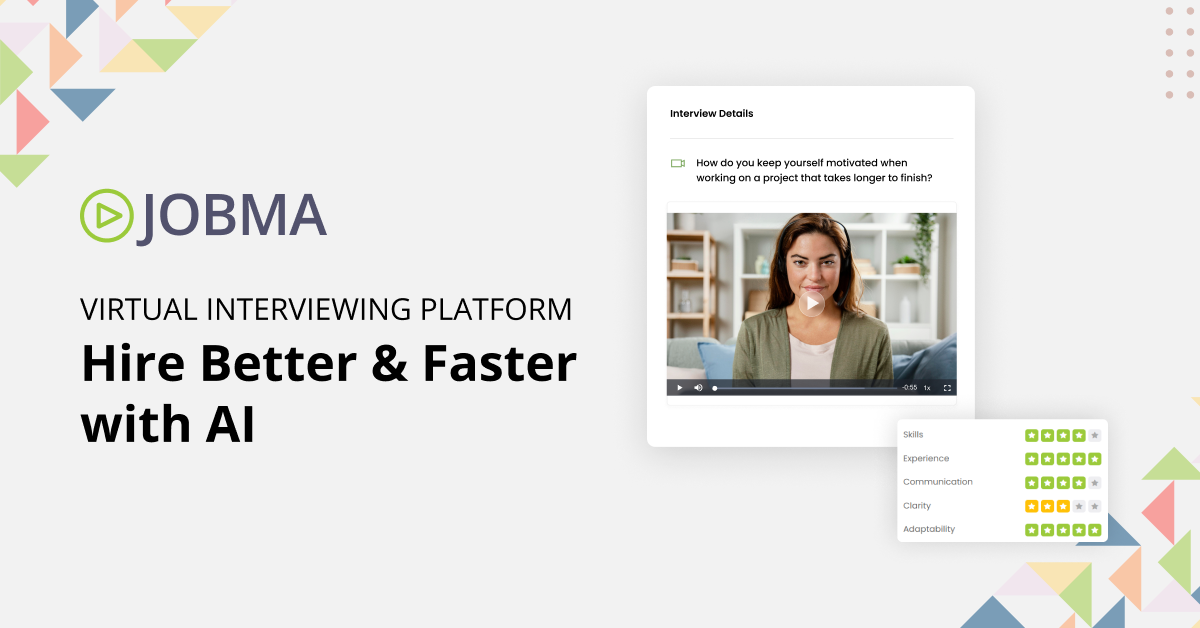
Jobma is an advanced AI video interviewing and skill validation platform designed specifically for recruitment agencies. It streamlines the hiring process by allowing recruiters to conduct virtual interviews, use AI-driven assessments, and enhance candidate experience, thereby addressing the unique needs of the recruitment industry.
Best for Video Conferencing Software for Recruitment Agencies
Expert Take
Jobma AI Hiring Software excels in providing a specialized video interviewing platform tailored for recruitment agencies. Its AI-driven capabilities and focus on candidate experience make it a standout choice. While it offers strong usability and support, some customization limitations exist.
Pros
- SOC 2 Type II & ISO 27001 Certified
- Native coding assessments for technical hiring
- Integrates with Workday, Oracle & iCIMS
- AI proctoring & anti-cheating features
- Multi-lingual transcription & AI scoring
Cons
- No public pricing; requires sales quote
- Mobile app friction for some candidates
- Steeper learning curve than simpler tools
- Setup can be complex for small teams
- Advanced features may require higher tiers
Best for teams that are
- Mid-market to enterprise HR teams handling high-volume recruitment.
- Organizations wanting asynchronous video interviews with AI-powered scoring.
Skip if
- Small companies with low hiring volumes that don't require automation.
- Teams looking for a complete, all-in-one ATS without needing integrations.
Best for teams that are
- Mid-market to enterprise HR teams handling high-volume recruitment.
- Organizations wanting asynchronous video interviews with AI-powered scoring.
Skip if
- Small companies with low hiring volumes that don't require automation.
- Teams looking for a complete, all-in-one ATS without needing integrations.
Pros
- SOC 2 Type II & ISO 27001 Certified
- Native coding assessments for technical hiring
- Integrates with Workday, Oracle & iCIMS
- AI proctoring & anti-cheating features
- Multi-lingual transcription & AI scoring
Cons
- No public pricing; requires sales quote
- Mobile app friction for some candidates
- Steeper learning curve than simpler tools
- Setup can be complex for small teams
- Advanced features may require higher tiers
Expert Take
Jobma AI Hiring Software excels in providing a specialized video interviewing platform tailored for recruitment agencies. Its AI-driven capabilities and focus on candidate experience make it a standout choice. While it offers strong usability and support, some customization limitations exist.

Webex is a comprehensive collaboration solution that addresses the unique needs of recruitment agencies. It offers robust video conferencing capabilities, along with messaging, webinars, events, polling, and whiteboarding, enabling recruiters to effectively communicate with candidates, conduct interviews, and collaborate with team members.
Best for Video Conferencing Software for Recruitment Agencies
Expert Take
Webex Collaboration Suite excels as a comprehensive solution for recruitment agencies, offering robust video conferencing and collaboration tools. Its integration capabilities and extensive feature set make it a top choice in its category. While some features are tiered, the overall offering remains strong.
Pros
- Trusted by 95% of Fortune 500 companies
- FedRAMP, HIPAA, and GDPR compliant security
- AI noise removal and real-time translation
- Integrated first-party hardware ecosystem
- Includes Slido polling and Vidcast messaging
Cons
- Interface can be cluttered and non-intuitive
- High system resource usage causes lag
- Mobile app lacks desktop feature parity
- International calling can be expensive
- Steeper learning curve for new users
Best for teams that are
- Enterprise IT teams needing secure, carrier-grade unified communication.
- Remote or hybrid workforces requiring robust omnichannel customer experience tools.
Skip if
- Small recruiting agencies needing a specialized applicant tracking system.
- Teams seeking a lightweight, standalone video tool without IT overhead.
Best for teams that are
- Enterprise IT teams needing secure, carrier-grade unified communication.
- Remote or hybrid workforces requiring robust omnichannel customer experience tools.
Skip if
- Small recruiting agencies needing a specialized applicant tracking system.
- Teams seeking a lightweight, standalone video tool without IT overhead.
Pros
- Trusted by 95% of Fortune 500 companies
- FedRAMP, HIPAA, and GDPR compliant security
- AI noise removal and real-time translation
- Integrated first-party hardware ecosystem
- Includes Slido polling and Vidcast messaging
Cons
- Interface can be cluttered and non-intuitive
- High system resource usage causes lag
- Mobile app lacks desktop feature parity
- International calling can be expensive
- Steeper learning curve for new users
Expert Take
Webex Collaboration Suite excels as a comprehensive solution for recruitment agencies, offering robust video conferencing and collaboration tools. Its integration capabilities and extensive feature set make it a top choice in its category. While some features are tiered, the overall offering remains strong.

Ideal for SaaS companies, eyeson streamlines video conferencing with Single Stream Technology, minimizing CPU and bandwidth use. Its browser-based platform ensures secure and accessible meetings, perfect for low-bandwidth environments.
Best for Video Conferencing Software for SaaS Companies
Expert Take
Eyeson stands out with its innovative Single Stream Technology, which merges all participant feeds into one audio/video stream in the cloud. This drastically reduces CPU and bandwidth requirements, ensuring stable connections even in low-bandwidth environments. Combined with its strictly browser-based approach and ephemeral 'just-in-time' servers, Eyeson offers a uniquely secure, accessible, and developer-friendly platform for video collaboration.
Pros
- Patented Single Stream Technology reduces bandwidth
- 100% browser-based with no downloads required
- Temporary just-in-time servers enhance data privacy
- Robust API for custom integrations and layouts
Cons
- Maximum of 9 visible video feeds
- Opaque enterprise pricing model requires sales contact
- Lacks advanced native whiteboarding features
Best for teams that are
- Defense and public safety teams needing tactical situational awareness.
- Developers merging UAV and bodycam video feeds via APIs.
Skip if
- Standard corporate marketing teams hosting basic webinars.
- Consumers seeking simple peer-to-peer personal video chatting.
Best for teams that are
- Defense and public safety teams needing tactical situational awareness.
- Developers merging UAV and bodycam video feeds via APIs.
Skip if
- Standard corporate marketing teams hosting basic webinars.
- Consumers seeking simple peer-to-peer personal video chatting.
Pros
- Patented Single Stream Technology reduces bandwidth
- 100% browser-based with no downloads required
- Temporary just-in-time servers enhance data privacy
- Robust API for custom integrations and layouts
Cons
- Maximum of 9 visible video feeds
- Opaque enterprise pricing model requires sales contact
- Lacks advanced native whiteboarding features
Expert Take
Eyeson stands out with its innovative Single Stream Technology, which merges all participant feeds into one audio/video stream in the cloud. This drastically reduces CPU and bandwidth requirements, ensuring stable connections even in low-bandwidth environments. Combined with its strictly browser-based approach and ephemeral 'just-in-time' servers, Eyeson offers a uniquely secure, accessible, and developer-friendly platform for video collaboration.

EMS Video Conferencing Software is designed for contractors, offering an integrated solution for scheduling and managing web conferences. The software specifically addresses the need for efficient resource management in the contracting industry, ensuring contractors can schedule, track and manage virtual meetings with ease.
Best for Video Conferencing Software for Contractors
Expert Take
Our analysis shows that Accruent EMS stands out for its ability to act as a 'single pane of glass' for complex facility management, bridging the gap between digital scheduling and physical building operations. Research indicates it is particularly strong for large enterprises requiring granular control, as it uniquely combines video conferencing automation with hardware integrations like HVAC and digital signage. Based on documented features, it offers a level of depth in resource management that simpler scheduling tools cannot match.
Pros
- Integrates with Teams, Zoom, and Webex
- Automates HVAC and lighting controls
- ISO 27001 and SOC 2 compliant
- Supports complex recurring meeting logic
- Centralized room and resource scheduling
Cons
- Steep learning curve for new users
- User interface is not intuitive
- Extra licensing fees for VC integrations
- Support response times can be slow
- Implementation process can be lengthy
Best for teams that are
- Admins managing campus or enterprise room booking.
- Organizations with complex hybrid scheduling needs.
Skip if
- Small teams lacking physical meeting rooms.
- Users seeking standalone video software.
Best for teams that are
- Admins managing campus or enterprise room booking.
- Organizations with complex hybrid scheduling needs.
Skip if
- Small teams lacking physical meeting rooms.
- Users seeking standalone video software.
Pros
- Integrates with Teams, Zoom, and Webex
- Automates HVAC and lighting controls
- ISO 27001 and SOC 2 compliant
- Supports complex recurring meeting logic
- Centralized room and resource scheduling
Cons
- Steep learning curve for new users
- User interface is not intuitive
- Extra licensing fees for VC integrations
- Support response times can be slow
- Implementation process can be lengthy
Expert Take
Our analysis shows that Accruent EMS stands out for its ability to act as a 'single pane of glass' for complex facility management, bridging the gap between digital scheduling and physical building operations. Research indicates it is particularly strong for large enterprises requiring granular control, as it uniquely combines video conferencing automation with hardware integrations like HVAC and digital signage. Based on documented features, it offers a level of depth in resource management that simpler scheduling tools cannot match.

TrueConf offers a secure and scalable video conferencing solution, perfect for staffing agencies. With its ability to host up to 2000 participants and advanced AI algorithms, it fosters realistic, engaging, and effective communication. Particularly beneficial in an industry where remote and real-time communication with a large number of candidates and clients is crucial.
Best for Video Conferencing Software for Staffing Agencies
Expert Take
TrueConf Video Conferencing stands out in the staffing agency sector due to its high participant capacity, secure communication features, and scalability. Its AI-enhanced realism and cross-platform compatibility further enhance its usability. The product's credibility is supported by its official documentation and third-party recognitions.
Pros
- Secure on-premise air-gapped operation
- Lifetime perpetual license option available
- 4K UltraHD video quality support
- Built-in SIP/H.323 gateway
- Works offline in LAN/VPN
Cons
- No HIPAA BAA signed
- Outdated user interface design
- Complex initial server configuration
- Limited native SaaS integrations
- Free tier limits SIP connections
Best for teams that are
- Agencies with strict data security needs requiring on-premise hosting
- Organizations operating in low-bandwidth environments or closed LAN networks
- Government or defense-related staffing firms needing total data sovereignty
Skip if
- Small agencies seeking a quick, cloud-based plug-and-play solution
- Teams primarily hosting external client meetings where ease of access is paramount
- Users who do not have IT resources to manage a self-hosted server
Best for teams that are
- Agencies with strict data security needs requiring on-premise hosting
- Organizations operating in low-bandwidth environments or closed LAN networks
- Government or defense-related staffing firms needing total data sovereignty
Skip if
- Small agencies seeking a quick, cloud-based plug-and-play solution
- Teams primarily hosting external client meetings where ease of access is paramount
- Users who do not have IT resources to manage a self-hosted server
Pros
- Secure on-premise air-gapped operation
- Lifetime perpetual license option available
- 4K UltraHD video quality support
- Built-in SIP/H.323 gateway
- Works offline in LAN/VPN
Cons
- No HIPAA BAA signed
- Outdated user interface design
- Complex initial server configuration
- Limited native SaaS integrations
- Free tier limits SIP connections
Expert Take
TrueConf Video Conferencing stands out in the staffing agency sector due to its high participant capacity, secure communication features, and scalability. Its AI-enhanced realism and cross-platform compatibility further enhance its usability. The product's credibility is supported by its official documentation and third-party recognitions.
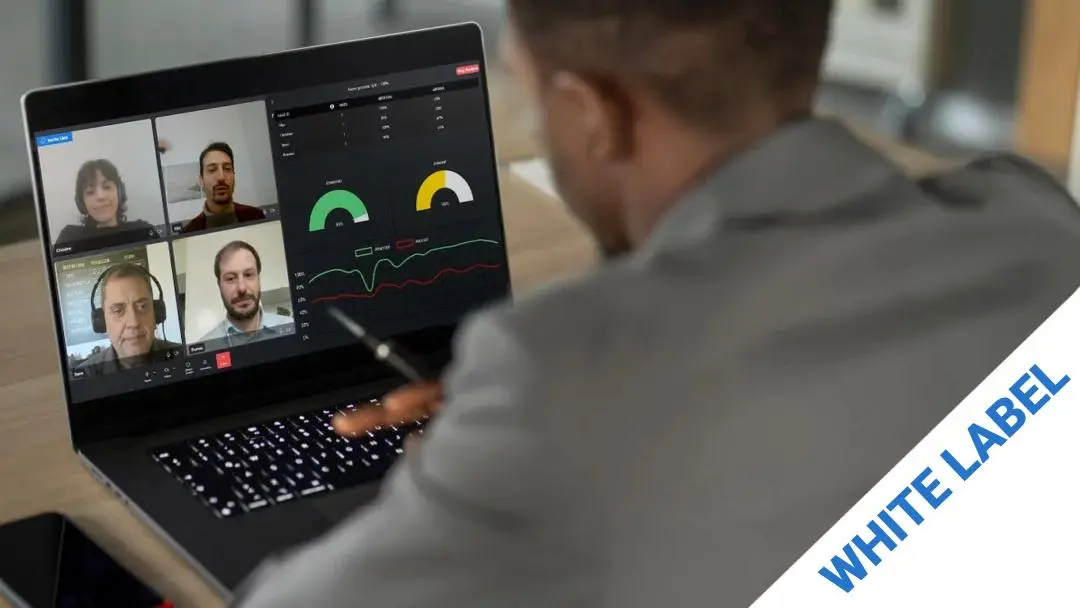
This product is designed to integrate seamlessly into your branded environment/platform, offering a unique edge in B2B SaaS industry. By leveraging AI technology, it not only facilitates high-quality video conferencing, but also provides emotion recognition, enabling businesses to measure user engagement and adapt their strategies in real time.
Best for Video Conferencing Software for SaaS Companies
Expert Take
MorphCast Emotion AI Video Conferencing stands out in the B2B SaaS sector with its unique emotion recognition feature, enhancing user engagement insights. It offers seamless integration and high-quality video conferencing, though it may present privacy concerns and require technical expertise for setup.
Pros
- Client-side processing ensures GDPR privacy
- Lightweight SDK (<1MB) loads instantly
- Transparent pay-as-you-go pricing model
- No end-user installation required (browser-based)
- White-label option for full branding control
Cons
- Accuracy depends on user lighting/camera
- No native Unity plugin available
- Lower accuracy than some server-side rivals
- Limited to basic Ekman emotion model
- Performance varies by user device power
Best for teams that are
- Therapists and educators tracking real-time emotional engagement.
- Hosts needing post-meeting analytics on audience mood triggers.
Skip if
- Users uncomfortable with facial tracking and emotion analysis.
- Casual meetings where advanced emotional tracking provides no value.
Best for teams that are
- Therapists and educators tracking real-time emotional engagement.
- Hosts needing post-meeting analytics on audience mood triggers.
Skip if
- Users uncomfortable with facial tracking and emotion analysis.
- Casual meetings where advanced emotional tracking provides no value.
Pros
- Client-side processing ensures GDPR privacy
- Lightweight SDK (<1MB) loads instantly
- Transparent pay-as-you-go pricing model
- No end-user installation required (browser-based)
- White-label option for full branding control
Cons
- Accuracy depends on user lighting/camera
- No native Unity plugin available
- Lower accuracy than some server-side rivals
- Limited to basic Ekman emotion model
- Performance varies by user device power
Expert Take
MorphCast Emotion AI Video Conferencing stands out in the B2B SaaS sector with its unique emotion recognition feature, enhancing user engagement insights. It offers seamless integration and high-quality video conferencing, though it may present privacy concerns and require technical expertise for setup.


Loading comparison data…