
Product Design Collaboration Platforms
These are the specialized categories within Product Design Collaboration Platforms. Looking for something broader? See all Project Management & Productivity Tools categories.

How big is your team?
What's your budget situation?
What's your team's technical comfort level?
What's the ONE thing this tool must do well?

BugHerd is an easy-to-use design feedback tool that streamlines the process of receiving, managing, and acting on user feedback for web designs. It is specifically beneficial for professionals in the design and development industry, as it reduces the complexity of back-and-forth communication and enhances collaboration.
Best for Design Collaboration Tools with Commenting and Reviews
Expert Take
BugHerd excels in providing a streamlined design feedback process, enhancing collaboration through its visual feedback system. Its integration with popular project management tools and ease of use make it a top choice for design professionals. However, the lack of a mobile app and limited third-party integrations are notable constraints.
Pros
- Unlimited guests and projects on all plans
- Deep two-way sync with Jira and Asana
- Automatic capture of browser and OS metadata
- No login required for client feedback
- Visual point-and-click annotation on live sites
Cons
- Limited bulk task management capabilities
- Browser extension can be occasionally unstable
- No native PDF export for reports
- SSO limited to Enterprise plan
- UI can become crowded with many tasks
Best for teams that are
- Web dev agencies needing to track bugs with technical metadata
- QA teams wanting a Kanban-style board for managing feedback tasks
- Developers needing browser/OS details auto-captured with feedback
Skip if
- Native mobile app feedback (focus is on web/responsive sites)
- Simple design reviews where installing a script is not possible
- Budget-conscious freelancers due to higher entry price points
Best for teams that are
- Web dev agencies needing to track bugs with technical metadata
- QA teams wanting a Kanban-style board for managing feedback tasks
- Developers needing browser/OS details auto-captured with feedback
Skip if
- Native mobile app feedback (focus is on web/responsive sites)
- Simple design reviews where installing a script is not possible
- Budget-conscious freelancers due to higher entry price points
Pros
- Unlimited guests and projects on all plans
- Deep two-way sync with Jira and Asana
- Automatic capture of browser and OS metadata
- No login required for client feedback
- Visual point-and-click annotation on live sites
Cons
- Limited bulk task management capabilities
- Browser extension can be occasionally unstable
- No native PDF export for reports
- SSO limited to Enterprise plan
- UI can become crowded with many tasks
Expert Take
BugHerd excels in providing a streamlined design feedback process, enhancing collaboration through its visual feedback system. Its integration with popular project management tools and ease of use make it a top choice for design professionals. However, the lack of a mobile app and limited third-party integrations are notable constraints.

Pastel is designed to meet the specific needs of web designers, developers, and agencies. It is a visual website feedback tool that simplifies the process of collecting feedback on website projects, thereby improving collaboration and speeding up revisions.
Best for Design Collaboration Tools with Commenting and Reviews
Expert Take
Pastel excels as a design collaboration tool by offering a streamlined feedback process tailored for web designers and developers. Its real-time collaboration features and ease of use make it a standout choice in its category. While it is limited to website projects, it provides significant value within its niche.
Pros
- No client installation or login required
- Comments directly on live websites
- Captures browser and OS metadata automatically
- Enterprise SSO and SOC 2 compliance
- Simple link-based sharing for canvases
Cons
- 72-hour comment limit on free plan
- No native mobile feedback submission
- Limited markup tools (no drawing/arrows)
- Integrations lack deep two-way sync
- Higher pricing tiers for small teams
Best for teams that are
- Agencies needing quick website feedback without installing code
- Non-technical clients who need a simple 'no-login' review experience
- Marketing teams reviewing live websites via proxy links
Skip if
- Developers requiring deep technical debugging data like console logs
- Complex web apps where proxy technology struggles with authentication
- Teams needing permanent documentation on the free plan (72h limit)
Best for teams that are
- Agencies needing quick website feedback without installing code
- Non-technical clients who need a simple 'no-login' review experience
- Marketing teams reviewing live websites via proxy links
Skip if
- Developers requiring deep technical debugging data like console logs
- Complex web apps where proxy technology struggles with authentication
- Teams needing permanent documentation on the free plan (72h limit)
Pros
- No client installation or login required
- Comments directly on live websites
- Captures browser and OS metadata automatically
- Enterprise SSO and SOC 2 compliance
- Simple link-based sharing for canvases
Cons
- 72-hour comment limit on free plan
- No native mobile feedback submission
- Limited markup tools (no drawing/arrows)
- Integrations lack deep two-way sync
- Higher pricing tiers for small teams
Expert Take
Pastel excels as a design collaboration tool by offering a streamlined feedback process tailored for web designers and developers. Its real-time collaboration features and ease of use make it a standout choice in its category. While it is limited to website projects, it provides significant value within its niche.
Mural: Collaborative Visual Workspace
Best for Design Collaboration Platforms for Product and UX Squads
Mural, an AI-driven visual workspace, is explicitly designed for product and UX squads. It streamlines the entire product development process, enabling teams to design smarter, iterate faster, and build with confidence. Its powerful collaborative features address industry-specific needs such as remote collaboration, idea visualization, and real-time feedback.
Best for Design Collaboration Platforms for Product and UX Squads
Expert Take
Mural excels as a design collaboration platform for product and UX squads, offering robust capabilities in visual collaboration and real-time feedback. Its market credibility is supported by third-party recognition, and it provides a comprehensive user experience with a focus on remote teamwork. While pricing transparency is limited due to enterprise models, the platform's value is evident in its feature set.
Pros
- Trusted by 95% of Fortune 100
- Deep Microsoft 365 & Copilot integration
- Advanced facilitation tools (voting, private mode)
- Enterprise-grade security (ISO 27001, BYOK)
- Two-way sync with Jira and Asana
Cons
- Performance lag on very large boards
- Export resolution limited to 14,000px
- Less specialized diagramming than Miro
- Steeper learning curve for navigation
- SSO only available on Business plan
Best for teams that are
- Facilitators and consultants running structured workshops and meetings
- Teams new to digital whiteboarding needing easy-to-use templates
- Enterprise organizations focusing on design thinking and agile ceremonies
Skip if
- Teams needing high-fidelity UI/UX design capabilities
- Users wanting a complex ecosystem with extensive third-party integrations
- Power users who prefer the feature density of Miro
Best for teams that are
- Facilitators and consultants running structured workshops and meetings
- Teams new to digital whiteboarding needing easy-to-use templates
- Enterprise organizations focusing on design thinking and agile ceremonies
Skip if
- Teams needing high-fidelity UI/UX design capabilities
- Users wanting a complex ecosystem with extensive third-party integrations
- Power users who prefer the feature density of Miro
Pros
- Trusted by 95% of Fortune 100
- Deep Microsoft 365 & Copilot integration
- Advanced facilitation tools (voting, private mode)
- Enterprise-grade security (ISO 27001, BYOK)
- Two-way sync with Jira and Asana
Cons
- Performance lag on very large boards
- Export resolution limited to 14,000px
- Less specialized diagramming than Miro
- Steeper learning curve for navigation
- SSO only available on Business plan
Expert Take
Mural excels as a design collaboration platform for product and UX squads, offering robust capabilities in visual collaboration and real-time feedback. Its market credibility is supported by third-party recognition, and it provides a comprehensive user experience with a focus on remote teamwork. While pricing transparency is limited due to enterprise models, the platform's value is evident in its feature set.

Supernova.io is a game-changer for product and UX squads. It leverages AI to streamline design collaboration, allowing teams to prototype, write, and align with stakeholders more efficiently. This platform is specifically beneficial to this industry as it enables real-time collaboration while minimizing design iterations and redundancies.
Best for Design Collaboration Platforms for Product and UX Squads
Expert Take
Supernova.io excels in design collaboration for product and UX squads, leveraging AI for efficient workflows. It offers real-time collaboration and automated code generation, enhancing productivity. Despite limited integrations in the free plan, its capabilities make it a top choice for design teams.
Pros
- Automated code delivery pipelines
- SOC 2 Type II & ISO 27001
- Deep Figma & Tokens Studio sync
- Multiplayer documentation editor
- Free plan for small teams
Cons
- Occasional platform slowness reported
- Versioning system can be unclear
- SSO setup complexity issues
- Token visualization limitations
- Advanced features require learning curve
Best for teams that are
- Design Ops teams managing complex, multi-brand design systems
- Engineers wanting to automate design tokens directly to code
- Organizations needing customizable, code-backed design system documentation
Skip if
- Small teams without a defined design system or coding knowledge
- Teams looking for a visual design tool rather than a documentation platform
- Non-technical users who find code-based workflows intimidating
Best for teams that are
- Design Ops teams managing complex, multi-brand design systems
- Engineers wanting to automate design tokens directly to code
- Organizations needing customizable, code-backed design system documentation
Skip if
- Small teams without a defined design system or coding knowledge
- Teams looking for a visual design tool rather than a documentation platform
- Non-technical users who find code-based workflows intimidating
Pros
- Automated code delivery pipelines
- SOC 2 Type II & ISO 27001
- Deep Figma & Tokens Studio sync
- Multiplayer documentation editor
- Free plan for small teams
Cons
- Occasional platform slowness reported
- Versioning system can be unclear
- SSO setup complexity issues
- Token visualization limitations
- Advanced features require learning curve
Expert Take
Supernova.io excels in design collaboration for product and UX squads, leveraging AI for efficient workflows. It offers real-time collaboration and automated code generation, enhancing productivity. Despite limited integrations in the free plan, its capabilities make it a top choice for design teams.

Rayon is a game-changer for design teams, allowing real-time collaboration, annotations, and markups directly on designs. It caters to the unique needs of this industry, enabling efficient and precise design reviews, which are crucial in the product development process.
Best for Design Collaboration Tools with Commenting and Reviews
Expert Take
Rayon excels in facilitating real-time design collaboration and review, offering a robust platform for design teams. Its affordability and cross-platform compatibility enhance its appeal, although the free plan's limitations and learning curve for non-designers are noted. The product's strong market credibility and usability make it a top choice in its category.
Pros
- Real-time multiplayer collaboration
- Browser-based with no installation
- Backed by Norman Foster
- Intuitive 'Figma-like' interface
- Seamless DWG and PDF import
Cons
- 2D only (no 3D modeling)
- Requires constant internet connection
- No mobile or tablet app
- Not for complex construction docs
- Limited to 'light' BIM features
Best for teams that are
- Architects and interior designers collaborating on 2D floor plans
- Teams needing browser-based CAD tools for space planning
- Professionals wanting real-time collaboration on technical drawings
Skip if
- Projects requiring 3D modeling or photorealistic rendering
- Complex engineering projects needing full BIM capabilities like Revit
- Users needing offline functionality as it is browser-based
Best for teams that are
- Architects and interior designers collaborating on 2D floor plans
- Teams needing browser-based CAD tools for space planning
- Professionals wanting real-time collaboration on technical drawings
Skip if
- Projects requiring 3D modeling or photorealistic rendering
- Complex engineering projects needing full BIM capabilities like Revit
- Users needing offline functionality as it is browser-based
Pros
- Real-time multiplayer collaboration
- Browser-based with no installation
- Backed by Norman Foster
- Intuitive 'Figma-like' interface
- Seamless DWG and PDF import
Cons
- 2D only (no 3D modeling)
- Requires constant internet connection
- No mobile or tablet app
- Not for complex construction docs
- Limited to 'light' BIM features
Expert Take
Rayon excels in facilitating real-time design collaboration and review, offering a robust platform for design teams. Its affordability and cross-platform compatibility enhance its appeal, although the free plan's limitations and learning curve for non-designers are noted. The product's strong market credibility and usability make it a top choice in its category.

Frame.io is a game-changer for professionals in the design industry. It offers advanced commenting capabilities, enabling enhanced reviews and collaborations in real time. Its precision controls and full-screen review option make it a top choice for design collaboration, particularly for those who require meaningful feedback on their work.
Best for Design Collaboration Tools with Commenting and Reviews
Expert Take
Frame.io excels in design collaboration with its advanced commenting and real-time review capabilities. It integrates seamlessly with popular design tools, enhancing workflow efficiency. While the basic plan has limited features, its premium offerings make it a top choice for professionals seeking detailed feedback mechanisms.
Pros
- Camera to Cloud instant upload technology
- Frame-accurate commenting and annotations
- TPN Gold Shield security compliance
- Native Adobe Premiere & Final Cut integration
- Flexible V4 metadata and collections
Cons
- High cost for additional storage
- Occasional web playback performance issues
- Support response times can be slow
- Free plan limited to 2GB storage
Best for teams that are
- Video editors using Adobe Premiere needing frame-accurate feedback
- Production teams managing high-volume video assets and versioning
- Professionals requiring fast, accelerated media uploads
Skip if
- Teams primarily reviewing static documents or PDFs (overkill)
- Users seeking a permanent video hosting or delivery platform
- Workflows requiring mixed asset types in a single version stack
Best for teams that are
- Video editors using Adobe Premiere needing frame-accurate feedback
- Production teams managing high-volume video assets and versioning
- Professionals requiring fast, accelerated media uploads
Skip if
- Teams primarily reviewing static documents or PDFs (overkill)
- Users seeking a permanent video hosting or delivery platform
- Workflows requiring mixed asset types in a single version stack
Pros
- Camera to Cloud instant upload technology
- Frame-accurate commenting and annotations
- TPN Gold Shield security compliance
- Native Adobe Premiere & Final Cut integration
- Flexible V4 metadata and collections
Cons
- High cost for additional storage
- Occasional web playback performance issues
- Support response times can be slow
- Free plan limited to 2GB storage
Expert Take
Frame.io excels in design collaboration with its advanced commenting and real-time review capabilities. It integrates seamlessly with popular design tools, enhancing workflow efficiency. While the basic plan has limited features, its premium offerings make it a top choice for professionals seeking detailed feedback mechanisms.

Marvel is a comprehensive design collaboration platform specifically tailored for product and UX squads. Its rich feature set, including wireframing, prototyping, user testing, and design inspection, addresses the unique needs of digital product development teams, fostering collaboration and simplifying the design process.
Best for Design Collaboration Platforms for Product and UX Squads
Expert Take
Marvel Design Platform excels as a comprehensive tool for product and UX squads, offering a robust suite of features that streamline design collaboration. Its user-friendly interface and integration capabilities enhance usability, while third-party recognition underscores its credibility in the design collaboration space.
Pros
- Rapid prototyping without coding
- Automated handoff (CSS, Swift, XML)
- Intuitive interface with low learning curve
- Real-time collaboration and syncing
- Integrates with Sketch and Jira
Cons
- Native user testing removed from free plan
- Lacks advanced AI design features
- No Android app for design creation
- Limited offline functionality
- Advanced animation control is basic
Best for teams that are
- Non-designers or stakeholders needing to create quick, simple prototypes
- Teams focusing on rapid user testing and validation
- Early-stage startups needing rapid, low-fidelity wireframing
Skip if
- Advanced designers needing high-fidelity vector editing or complex animations
- Teams requiring deep technical handoff features or code generation
- Large enterprises needing robust design system management
Best for teams that are
- Non-designers or stakeholders needing to create quick, simple prototypes
- Teams focusing on rapid user testing and validation
- Early-stage startups needing rapid, low-fidelity wireframing
Skip if
- Advanced designers needing high-fidelity vector editing or complex animations
- Teams requiring deep technical handoff features or code generation
- Large enterprises needing robust design system management
Pros
- Rapid prototyping without coding
- Automated handoff (CSS, Swift, XML)
- Intuitive interface with low learning curve
- Real-time collaboration and syncing
- Integrates with Sketch and Jira
Cons
- Native user testing removed from free plan
- Lacks advanced AI design features
- No Android app for design creation
- Limited offline functionality
- Advanced animation control is basic
Expert Take
Marvel Design Platform excels as a comprehensive tool for product and UX squads, offering a robust suite of features that streamline design collaboration. Its user-friendly interface and integration capabilities enhance usability, while third-party recognition underscores its credibility in the design collaboration space.

Lucid is a comprehensive SaaS solution chosen for its ability to streamline collaboration among product and UX teams. Its shared virtual space allows these professionals to communicate and collaborate seamlessly, significantly enhancing their productivity and the quality of their final outputs.
Best for Design Collaboration Platforms for Product and UX Squads
Expert Take
Lucid Design Collaboration excels in providing a comprehensive platform for product and UX teams, offering robust collaboration tools and a shared virtual workspace. Its market credibility is supported by industry recognition, and it offers a strong user experience despite requiring some initial training. The product's integration capabilities further enhance its value for teams.
Pros
- Universal Canvas unifies diagramming and whiteboarding
- FedRAMP Moderate Authorized security status
- Deep bi-directional data linking (Jira/Salesforce)
- Used by 99% of Fortune 500
- Intelligent automation for org charts
Cons
- Strict 60-object limit on free plan
- No offline editing on mobile apps
- Accessibility compliance gaps in education
- Advanced features require learning curve
- Enterprise Shield costs extra
Best for teams that are
- Engineers and architects creating complex technical diagrams and data visualizations
- Enterprises requiring strict security, governance, and process documentation
- Operations teams mapping complex workflows and organizational charts
Skip if
- Creative teams looking for freeform artistic drawing tools
- Users needing high-fidelity UI prototyping capabilities
- Small creative agencies preferring flexible, less structured canvases
Best for teams that are
- Engineers and architects creating complex technical diagrams and data visualizations
- Enterprises requiring strict security, governance, and process documentation
- Operations teams mapping complex workflows and organizational charts
Skip if
- Creative teams looking for freeform artistic drawing tools
- Users needing high-fidelity UI prototyping capabilities
- Small creative agencies preferring flexible, less structured canvases
Pros
- Universal Canvas unifies diagramming and whiteboarding
- FedRAMP Moderate Authorized security status
- Deep bi-directional data linking (Jira/Salesforce)
- Used by 99% of Fortune 500
- Intelligent automation for org charts
Cons
- Strict 60-object limit on free plan
- No offline editing on mobile apps
- Accessibility compliance gaps in education
- Advanced features require learning curve
- Enterprise Shield costs extra
Expert Take
Lucid Design Collaboration excels in providing a comprehensive platform for product and UX teams, offering robust collaboration tools and a shared virtual workspace. Its market credibility is supported by industry recognition, and it offers a strong user experience despite requiring some initial training. The product's integration capabilities further enhance its value for teams.

Figma is a powerful design platform specifically geared towards product and UX teams. It significantly enhances collaborative efforts, allowing teams to design, prototype, and build products more efficiently. It also supports real-time feedback, addressing the need for continuous improvement and iteration in the fast-paced tech industry.
Best for Design Collaboration Platforms for Product and UX Squads
Expert Take
Figma excels as a collaborative design platform, offering robust real-time collaboration and prototyping features. It is widely recognized in the industry and integrates well with other productivity tools, making it a top choice for product and UX teams.
Pros
- Industry-standard real-time collaboration
- Browser-based with no installation required
- Massive community plugin ecosystem
- Advanced design system features (Variables)
- Enterprise-grade security (SOC 2, FedRAMP)
Cons
- 2GB memory limit per file
- Limited offline functionality
- Dev Mode requires paid seat
- Performance lag on very large files
- Steep learning curve for Auto Layout
Best for teams that are
- UI/UX designers building high-fidelity interfaces and prototypes
- Teams requiring real-time, multiplayer design collaboration
- Developers needing to inspect designs and assets via Dev Mode
Skip if
- Non-designers who find professional vector tools complex or overwhelming
- Teams needing only simple whiteboarding or brainstorming capabilities
- Users requiring offline access as it is primarily browser-based
Best for teams that are
- UI/UX designers building high-fidelity interfaces and prototypes
- Teams requiring real-time, multiplayer design collaboration
- Developers needing to inspect designs and assets via Dev Mode
Skip if
- Non-designers who find professional vector tools complex or overwhelming
- Teams needing only simple whiteboarding or brainstorming capabilities
- Users requiring offline access as it is primarily browser-based
Pros
- Industry-standard real-time collaboration
- Browser-based with no installation required
- Massive community plugin ecosystem
- Advanced design system features (Variables)
- Enterprise-grade security (SOC 2, FedRAMP)
Cons
- 2GB memory limit per file
- Limited offline functionality
- Dev Mode requires paid seat
- Performance lag on very large files
- Steep learning curve for Auto Layout
Expert Take
Figma excels as a collaborative design platform, offering robust real-time collaboration and prototyping features. It is widely recognized in the industry and integrates well with other productivity tools, making it a top choice for product and UX teams.
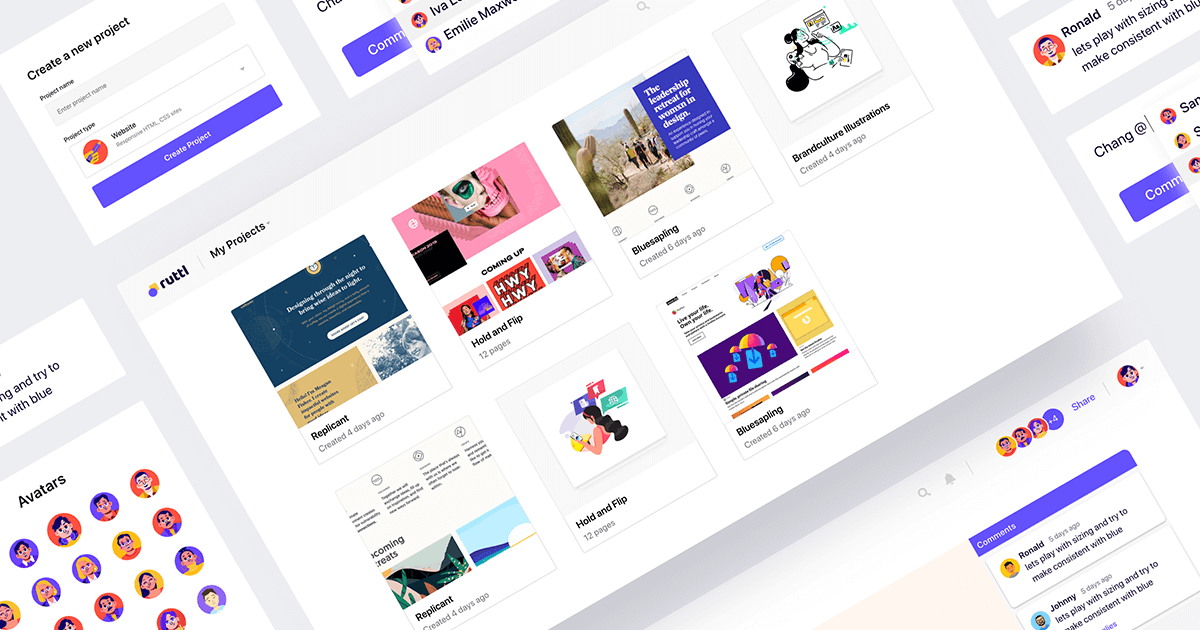
Ruttl is a visual and design feedback tool that is specifically designed for the needs of design professionals, developers, and product managers. It streamlines the process of reviewing, commenting, and bug reporting on designs and content in websites, applications, PDFs, and images, making collaboration and iteration more efficient and effective.
Best for Design Collaboration Tools with Commenting and Reviews
Expert Take
Ruttl is a premium design collaboration tool that excels in real-time feedback and in-browser editing, making it highly effective for design professionals. Its integration capabilities and support for various file formats enhance its usability, while its market credibility is supported by its innovative features.
Pros
- Real-time CSS and text editing
- Guest commenting without login
- Unlimited guests on paid plans
- Mobile app feedback support
- Integrates with Jira and Slack
Cons
- GDPR compliance listed as 'Coming Soon'
- Data processed in India (residency)
- Occasional stability/bug reports
- Inconsistent pricing info across pages
- CSS editing has technical limitations
Best for teams that are
- Web designers wanting to edit live CSS directly in the browser
- Agencies needing video comments and precise visual feedback on live sites
- Teams collaborating on web projects who need guest access for clients
Skip if
- Teams unable to install JavaScript snippets on client websites
- Large teams with tight budgets due to per-user pricing models
- Users needing deep project management integrations compared to BugHerd
Best for teams that are
- Web designers wanting to edit live CSS directly in the browser
- Agencies needing video comments and precise visual feedback on live sites
- Teams collaborating on web projects who need guest access for clients
Skip if
- Teams unable to install JavaScript snippets on client websites
- Large teams with tight budgets due to per-user pricing models
- Users needing deep project management integrations compared to BugHerd
Pros
- Real-time CSS and text editing
- Guest commenting without login
- Unlimited guests on paid plans
- Mobile app feedback support
- Integrates with Jira and Slack
Cons
- GDPR compliance listed as 'Coming Soon'
- Data processed in India (residency)
- Occasional stability/bug reports
- Inconsistent pricing info across pages
- CSS editing has technical limitations
Expert Take
Ruttl is a premium design collaboration tool that excels in real-time feedback and in-browser editing, making it highly effective for design professionals. Its integration capabilities and support for various file formats enhance its usability, while its market credibility is supported by its innovative features.

Loading comparison data…