
Document Scanning & OCR Software
These are the specialized categories within Document Scanning & OCR Software. Looking for something broader? See all Cloud Storage, Backup & File Management categories.

How big is your team?
What's your budget situation?
What's your team's technical comfort level?
What's the ONE thing this tool must do well?

LightPDF is designed for insurance agents seeking efficient document scanning and OCR capabilities. It leverages GPT-4 to transform static PDFs into dynamic resources, allowing users to extract insights, create mind maps, and translate content swiftly. The software offers cross-platform accessibility and an intuitive interface, providing a cost-effective solution compared to traditional options.
Best for Document Scanning & OCR Software for Insurance Agents
Expert Take
LightPDF successfully bridges the gap between traditional PDF management and modern AI workflows. By integrating GPT-4 directly into the document reader, it transforms static text into an interactive database where users can extract cited insights, generate mind maps, and translate content in seconds. Its cross-platform accessibility and intuitive layout make it a standout, affordable alternative to legacy software like Adobe Acrobat.
Pros
- Comprehensive suite of 25+ tools
- Clean, highly intuitive interface
- Works across Web, Desktop, Mobile
Cons
- Hidden 20MB file size limits
- Unused AI credits expire monthly
Best for teams that are
- Students and educators summarizing academic materials via AI chat.
- Users needing multi-language OCR and AI document analysis.
Skip if
- Enterprises requiring limitless AI usage without strict credit caps.
- Users who need to process AI document tasks entirely offline.
Best for teams that are
- Students and educators summarizing academic materials via AI chat.
- Users needing multi-language OCR and AI document analysis.
Skip if
- Enterprises requiring limitless AI usage without strict credit caps.
- Users who need to process AI document tasks entirely offline.
Pros
- Comprehensive suite of 25+ tools
- Advanced GPT-4 powered document chat
- Clean, highly intuitive interface
- Works across Web, Desktop, Mobile
Cons
- Hidden 20MB file size limits
- Unused AI credits expire monthly
- OCR struggles with complex layouts
Expert Take
LightPDF successfully bridges the gap between traditional PDF management and modern AI workflows. By integrating GPT-4 directly into the document reader, it transforms static text into an interactive database where users can extract cited insights, generate mind maps, and translate content in seconds. Its cross-platform accessibility and intuitive layout make it a standout, affordable alternative to legacy software like Adobe Acrobat.
Smart OCR by Parascript is specifically tailored for mortgage lenders, focusing on dramatically improving document automation and workflow efficiency. Its technological capabilities are proven to increase mortgage document automation by up to 50% and throughput by seven times compared to competitors, directly addressing the industry's needs for speed and accuracy.
Best for Document Scanning & OCR Software for Mortgage Brokers
Expert Take
Smart OCR by Parascript excels in automating and enhancing mortgage document processing, offering significant improvements in efficiency and accuracy. Its tailored capabilities for mortgage lenders, combined with industry recognition, position it as a leading solution in its niche.
Pros
- Recognizes unconstrained cursive handwriting
- Processes 100 billion documents annually
- Smart Learning reduces configuration time
- High accuracy signature verification
Cons
- Initial setup may require specialized knowledge
- Pricing not publicly listed (quote-based)
- Documentation can be technical for non-developers
Best for teams that are
- High-volume enterprises needing signature verification and fraud checks
- Lenders needing to automate complex handwriting recognition
Skip if
- Small teams with low document volume or limited technical resources
- Users needing a simple tool for manual data entry assistance
Best for teams that are
- High-volume enterprises needing signature verification and fraud checks
- Lenders needing to automate complex handwriting recognition
Skip if
- Small teams with low document volume or limited technical resources
- Users needing a simple tool for manual data entry assistance
Pros
- Recognizes unconstrained cursive handwriting
- Outcome-based pricing model
- Processes 100 billion documents annually
- Smart Learning reduces configuration time
- High accuracy signature verification
Cons
- Initial setup may require specialized knowledge
- Pricing not publicly listed (quote-based)
- Low volume of third-party user reviews
- Documentation can be technical for non-developers
Expert Take
Smart OCR by Parascript excels in automating and enhancing mortgage document processing, offering significant improvements in efficiency and accuracy. Its tailored capabilities for mortgage lenders, combined with industry recognition, position it as a leading solution in its niche.

PDFelement is designed for accountants and small businesses needing efficient document management. With its intuitive interface and powerful AI tools, it offers highly accurate OCR and flexible form creation, making it a cost-effective alternative to expensive enterprise editors.
Best for Document Scanning & OCR Software for Accountants
Expert Take
Wondershare PDFelement successfully bridges the gap between basic PDF viewers and expensive enterprise editors. By combining an intuitive, Office-style interface with powerful AI tools, highly accurate OCR, and flexible form creation, it empowers individuals and small businesses to manage documents efficiently without a steep learning curve.
Pros
- Intuitive Microsoft Office-style interface
- Highly accurate OCR for scanned documents
- Built-in AI summarization and translation
Cons
- Perpetual licenses exclude major version updates
- Lacks advanced enterprise-level compliance controls
Best for teams that are
- Professionals needing a robust desktop PDF editor
- Users wanting an affordable alternative to Adobe Acrobat
Skip if
- Firms needing automated batch processing of bank statements
- Users wanting dedicated AP invoice data extraction software
Best for teams that are
- Professionals needing a robust desktop PDF editor
- Users wanting an affordable alternative to Adobe Acrobat
Skip if
- Firms needing automated batch processing of bank statements
- Users wanting dedicated AP invoice data extraction software
Pros
- Cost-effective alternative to Adobe Acrobat
- Intuitive Microsoft Office-style interface
- Highly accurate OCR for scanned documents
- Built-in AI summarization and translation
Cons
- Perpetual licenses exclude major version updates
- Performance lags with extremely large files
- Lacks advanced enterprise-level compliance controls
Expert Take
Wondershare PDFelement successfully bridges the gap between basic PDF viewers and expensive enterprise editors. By combining an intuitive, Office-style interface with powerful AI tools, highly accurate OCR, and flexible form creation, it empowers individuals and small businesses to manage documents efficiently without a steep learning curve.

pdfFiller is a robust platform designed for accountants needing secure and compliant document management. It excels in PDF editing and eSignatures, with seamless integrations and an extensive form library to enhance workflow automation.
Best for Document Scanning & OCR Software for Accountants
Expert Take
pdfFiller stands out by successfully bridging the gap between basic PDF editors and enterprise-grade eSignature platforms. Its rigorous security compliance—including HIPAA, GDPR, and SOC 2 Type II—makes it exceptionally reliable for sensitive industries like healthcare and legal. Furthermore, its extensive integration capabilities and massive form library transform standard document management into a highly streamlined, automated workflow.
Pros
- Exceptional compliance standards (HIPAA, SOC 2)
- Extensive library of 35+ million forms
- Seamless Google Workspace and Zapier integrations
Cons
- No perpetual free plan available
- Advanced automation requires the Premium tier
- Complaints regarding strict subscription renewal terms
Best for teams that are
- Individuals and SMBs needing to edit and e-sign PDF forms
- Users seeking a cloud-based tool for manual document completion
Skip if
- Firms needing automated batch extraction of financial data
- Accountants looking for seamless QuickBooks or ERP integration
Best for teams that are
- Individuals and SMBs needing to edit and e-sign PDF forms
- Users seeking a cloud-based tool for manual document completion
Skip if
- Firms needing automated batch extraction of financial data
- Accountants looking for seamless QuickBooks or ERP integration
Pros
- Comprehensive PDF editing and eSignature platform
- Exceptional compliance standards (HIPAA, SOC 2)
- Extensive library of 35+ million forms
- Seamless Google Workspace and Zapier integrations
Cons
- No perpetual free plan available
- Occasional text formatting and font matching quirks
- Advanced automation requires the Premium tier
- Complaints regarding strict subscription renewal terms
Expert Take
pdfFiller stands out by successfully bridging the gap between basic PDF editors and enterprise-grade eSignature platforms. Its rigorous security compliance—including HIPAA, GDPR, and SOC 2 Type II—makes it exceptionally reliable for sensitive industries like healthcare and legal. Furthermore, its extensive integration capabilities and massive form library transform standard document management into a highly streamlined, automated workflow.
SecureScan is a highly reliable SaaS solution for accountants, tailored to convert physical accounting documents into searchable digital archives. The powerful OCR technology ensures accurate data capture and easy retrieval, making it essential for accounting firms dealing with large volumes of sensitive financial information.
Best for Document Scanning & OCR Software for Accountants
Expert Take
Our analysis shows SecureScan stands out for its rigorous adherence to security standards, boasting SOC 2 Type 2 and NAID AAA certifications that many local competitors lack. We appreciate the rare transparency of their public pricing calculator, which demystifies scanning costs. Based on documented client feedback, their 'white-glove' service model—handling all document preparation and indexing—removes the heaviest burden of digitization for their clients.
Pros
- Transparent pricing with online calculator
- NAID AAA Certified shredding included
- Handles prep work (staple removal)
- Trusted by government agencies
Cons
- On-site service limited to Northeast
- Flat-rate box pricing may vary
- Manual prep costs may apply
- No proprietary mobile app mentioned
Best for teams that are
- Firms needing outsourced HIPAA/SOC2 compliant scanning
- Practices drowning in physical paper needing bulk digitization
Skip if
- Accountants looking for a DIY SaaS OCR software application
- Solo bookkeepers with fully digital existing workflows
Best for teams that are
- Firms needing outsourced HIPAA/SOC2 compliant scanning
- Practices drowning in physical paper needing bulk digitization
Skip if
- Accountants looking for a DIY SaaS OCR software application
- Solo bookkeepers with fully digital existing workflows
Pros
- SOC 2 Type 2 & HIPAA compliant
- Transparent pricing with online calculator
- NAID AAA Certified shredding included
- Handles prep work (staple removal)
- Trusted by government agencies
Cons
- On-site service limited to Northeast
- Relies on 3rd-party cloud software
- Flat-rate box pricing may vary
- Manual prep costs may apply
- No proprietary mobile app mentioned
Expert Take
Our analysis shows SecureScan stands out for its rigorous adherence to security standards, boasting SOC 2 Type 2 and NAID AAA certifications that many local competitors lack. We appreciate the rare transparency of their public pricing calculator, which demystifies scanning costs. Based on documented client feedback, their 'white-glove' service model—handling all document preparation and indexing—removes the heaviest burden of digitization for their clients.
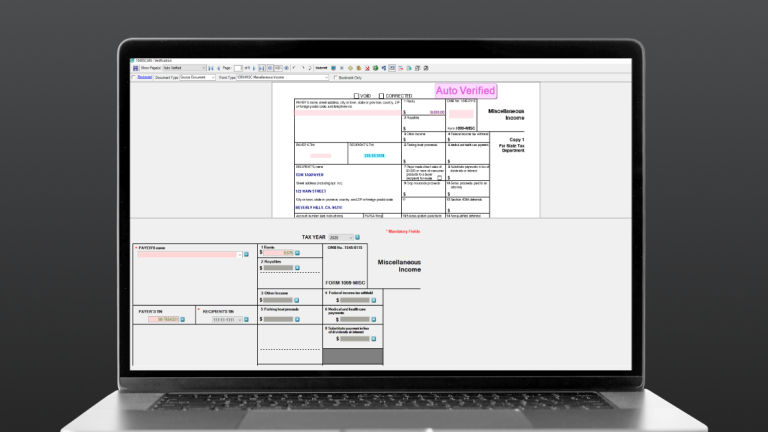
1040Scan is an OCR software specifically designed for accountants and tax professionals. It scans and digitizes documents, then automatically populates the data into tax software, thereby eliminating manual data entry and reducing the risk of errors. This streamlines the tax preparation process, saving time and resources.
Best for Document Scanning & OCR Software for Accountants
Expert Take
Our analysis shows 1040Scan leads the market in document coverage, recognizing 4-7x more forms than competitors. Research indicates its patented auto-verification technology handles 65% of standard documents without human intervention, significantly reducing data entry. Based on documented features, the integration with TaxCaddy and SPbinder creates a seamless end-to-end workflow for tax professionals.
Pros
- Auto-verifies 65% of standard documents
- Integrates with CCH, Lacerte, and UltraTax
- SOC 2 Type 2 certified security
- Includes SPbinder for workpaper management
Cons
- High minimum purchase requirement (~$2,500)
- Pricing is not publicly transparent
- OCR struggles with complex K-1s
- Implementation training can be expensive
Best for teams that are
- CPA firms preparing high volumes of 1040 tax returns
- Tax professionals using Thomson Reuters UltraTax or GoSystem
Skip if
- Corporate AP departments processing vendor invoices
- Freelancers seeking simple receipt management tools
Best for teams that are
- CPA firms preparing high volumes of 1040 tax returns
- Tax professionals using Thomson Reuters UltraTax or GoSystem
Skip if
- Corporate AP departments processing vendor invoices
- Freelancers seeking simple receipt management tools
Pros
- Recognizes 4-7x more documents than competitors
- Auto-verifies 65% of standard documents
- Integrates with CCH, Lacerte, and UltraTax
- SOC 2 Type 2 certified security
- Includes SPbinder for workpaper management
Cons
- High minimum purchase requirement (~$2,500)
- Interface reported as clunky and slow
- Pricing is not publicly transparent
- OCR struggles with complex K-1s
- Implementation training can be expensive
Expert Take
Our analysis shows 1040Scan leads the market in document coverage, recognizing 4-7x more forms than competitors. Research indicates its patented auto-verification technology handles 65% of standard documents without human intervention, significantly reducing data entry. Based on documented features, the integration with TaxCaddy and SPbinder creates a seamless end-to-end workflow for tax professionals.
Esker OCR Software is a robust solution for contractors that need to extract data from various documents. With its advanced optical character, optical mark, barcode, and handwriting recognition, it's designed to streamline data retrieval in document-heavy sectors like contracting.
Best for Document Scanning & OCR Software for Contractors
Expert Take
Esker OCR Software excels in document-heavy environments, particularly for contractors, with its advanced OCR capabilities including handwriting recognition. It is recognized for its efficiency in data extraction, though it requires custom pricing and some initial training.
Pros
- Certified SAP & Microsoft integrations
- Handles 130+ languages
- SOC 2 Type 2 & HIPAA compliant
- Hybrid structured/unstructured data handling
Cons
- Steep implementation learning curve
- Limited foreign invoice processing
- No native auto-escalation
- Opaque pricing structure
Best for teams that are
- Large enterprises using ERPs like SAP or Oracle needing deep integration
- Companies aiming to automate the entire source-to-pay cycle
Skip if
- Small businesses with low invoice volumes or no complex ERP system
- Teams needing a standalone OCR tool without workflow automation features
Best for teams that are
- Large enterprises using ERPs like SAP or Oracle needing deep integration
- Companies aiming to automate the entire source-to-pay cycle
Skip if
- Small businesses with low invoice volumes or no complex ERP system
- Teams needing a standalone OCR tool without workflow automation features
Pros
- AI-driven 'Synergy' neural networks
- Certified SAP & Microsoft integrations
- Handles 130+ languages
- SOC 2 Type 2 & HIPAA compliant
- Hybrid structured/unstructured data handling
Cons
- Steep implementation learning curve
- Complex setup requires consultants
- Limited foreign invoice processing
- No native auto-escalation
- Opaque pricing structure
Expert Take
Esker OCR Software excels in document-heavy environments, particularly for contractors, with its advanced OCR capabilities including handwriting recognition. It is recognized for its efficiency in data extraction, though it requires custom pricing and some initial training.

FWS Medical Document Scanning Services provides an efficient, accurate solution for digitizing medical records. It addresses the medical industry's need for secure, accurate data capture and storage, speeding up the process of scanning and uploading medical documents using advanced data capture technology.
Best for Document Scanning & OCR Software for Medical Offices
Expert Take
Our analysis shows Flatworld Solutions stands out for its exceptional pricing transparency, explicitly listing rates starting at $4 per reading and $1,300/month for FTEs—a rarity in the BPO sector. Research indicates they combine this with rigorous compliance, boasting ISO/IEC 27001:2022 certification and HIPAA adherence. Based on documented features, their use of AI-driven OCR technology allows them to claim accuracy rates of up to 99%, making them a robust choice for high-volume medical digitization.
Pros
- ISO 27001 & HIPAA certified
- 99% accuracy via AI/OCR
- 24/7 support availability
- Scalable FTE pricing model
Cons
- High internal employee turnover risks
- Potential technical tool limitations
- Time zone coordination delays
Best for teams that are
- High-volume operations needing manual data verification
- Companies looking for offshore data entry teams
Skip if
- Providers requiring strictly on-premise data handling
- Users uncomfortable with offshore data processing
Best for teams that are
- High-volume operations needing manual data verification
- Companies looking for offshore data entry teams
Skip if
- Providers requiring strictly on-premise data handling
- Users uncomfortable with offshore data processing
Pros
- Pricing starts at $4 per reading
- ISO 27001 & HIPAA certified
- 99% accuracy via AI/OCR
- 24/7 support availability
- Scalable FTE pricing model
Cons
- High internal employee turnover risks
- Mixed management reviews from staff
- Potential technical tool limitations
- Time zone coordination delays
Expert Take
Our analysis shows Flatworld Solutions stands out for its exceptional pricing transparency, explicitly listing rates starting at $4 per reading and $1,300/month for FTEs—a rarity in the BPO sector. Research indicates they combine this with rigorous compliance, boasting ISO/IEC 27001:2022 certification and HIPAA adherence. Based on documented features, their use of AI-driven OCR technology allows them to claim accuracy rates of up to 99%, making them a robust choice for high-volume medical digitization.

ARC's Medical Document Scanning Services is a specialized solution for healthcare providers, transforming paper records into secure, easily accessible digital formats. By digitizing records, it enhances efficiency, compliance and security within the healthcare industry, while safeguarding sensitive patient data.
Best for Document Scanning & OCR Software for Medical Offices
Expert Take
Our analysis shows ARC Medical Document Scanning stands out not just for its software, but for its massive physical infrastructure. With 140+ locations, they offer a 'local' chain of custody that purely digital competitors cannot match, significantly reducing shipping risks for sensitive patient records. Research indicates they are uniquely capable of handling complex medical assets like X-rays and large-format facility blueprints alongside standard charts, backed by rigorous SOC 2 and ISO 27001 certifications.
Pros
- ISO 27001 & SOC 2 certified
- Scans X-rays & large formats
- Secure chain-of-custody protocols
- Simple 'Scan by the Box' model
Cons
- Slow 10-20 day turnaround
- Additional cost for shredding
- Mixed employee satisfaction ratings
- Minimums for free pickup
Best for teams that are
- Facilities needing 'scan-by-the-box' services
- Companies requiring offsite document storage
Skip if
- Teams wanting to perform daily scanning in-house
- Practices needing immediate access to physical files
Best for teams that are
- Facilities needing 'scan-by-the-box' services
- Companies requiring offsite document storage
Skip if
- Teams wanting to perform daily scanning in-house
- Practices needing immediate access to physical files
Pros
- 140+ local service centers
- ISO 27001 & SOC 2 certified
- Scans X-rays & large formats
- Secure chain-of-custody protocols
- Simple 'Scan by the Box' model
Cons
- Slow 10-20 day turnaround
- Extra fees for HIPAA compliance
- Additional cost for shredding
- Mixed employee satisfaction ratings
- Minimums for free pickup
Expert Take
Our analysis shows ARC Medical Document Scanning stands out not just for its software, but for its massive physical infrastructure. With 140+ locations, they offer a 'local' chain of custody that purely digital competitors cannot match, significantly reducing shipping risks for sensitive patient records. Research indicates they are uniquely capable of handling complex medical assets like X-rays and large-format facility blueprints alongside standard charts, backed by rigorous SOC 2 and ISO 27001 certifications.
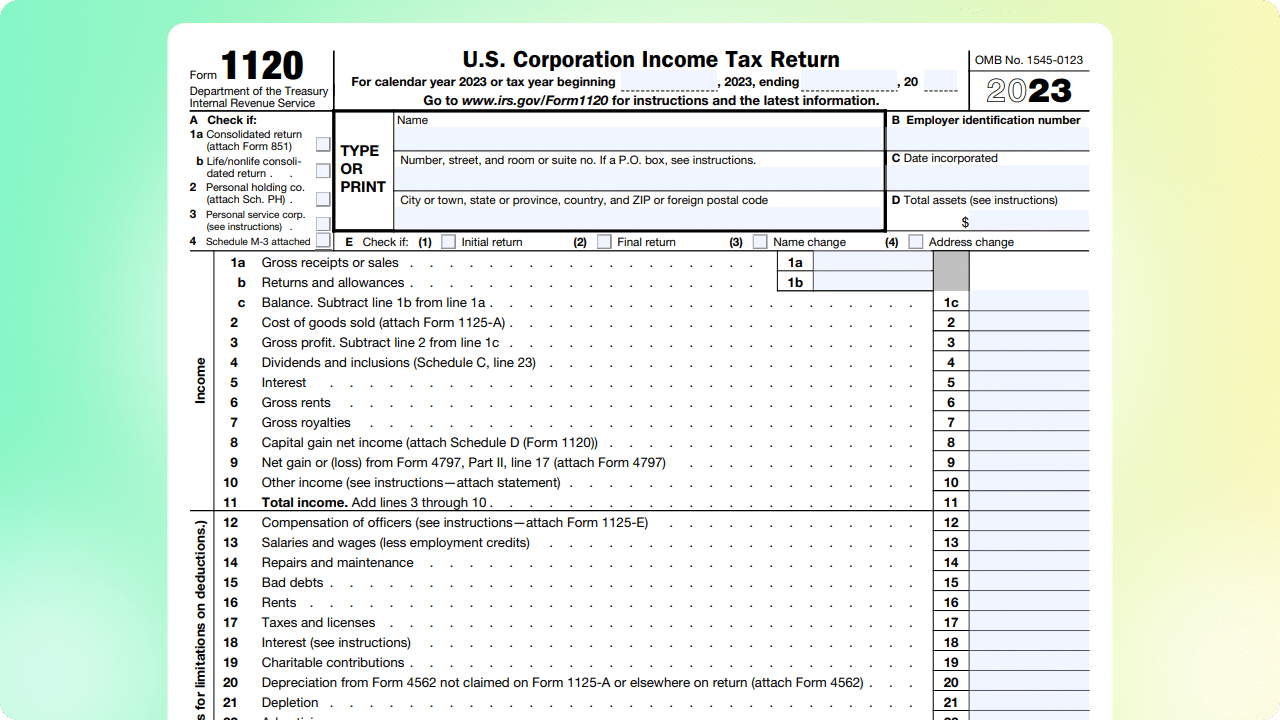
DocuClipper is specifically designed for mortgage brokers. It automates the analysis of financial documents, extracting critical data for underwriting and reducing processing time by a staggering 80%. Its AI and OCR capabilities allow smooth handling of bank statements and tax forms, addressing the industry's needs for speed, accuracy and efficiency.
Best for Document Scanning & OCR Software for Mortgage Brokers
Expert Take
DocuClipper for Lenders excels in automating document analysis for mortgage brokers, significantly reducing processing time and enhancing accuracy through AI and OCR technologies. Its specialized focus on financial documents positions it as a leader in its niche, supported by strong usability and market credibility.
Pros
- 99.6% OCR accuracy for statements
- Built-in fraud & tampering detection
- Automatic transaction reconciliation
- Direct QuickBooks & Xero integration
Cons
- Only supports English bank statements
- Free trial limits data export
- Occasional support response delays
- No mobile app for capture
Best for teams that are
- Underwriters needing to convert PDF bank statements to Excel or CSV
- Teams needing to analyze cash flow from bank statements quickly
Skip if
- Enterprise lenders needing full loan packet sorting and indexing
- Users needing to process non-financial documents (e.g., deeds)
Best for teams that are
- Underwriters needing to convert PDF bank statements to Excel or CSV
- Teams needing to analyze cash flow from bank statements quickly
Skip if
- Enterprise lenders needing full loan packet sorting and indexing
- Users needing to process non-financial documents (e.g., deeds)
Pros
- 99.6% OCR accuracy for statements
- SOC 2 Type II certified security
- Built-in fraud & tampering detection
- Automatic transaction reconciliation
- Direct QuickBooks & Xero integration
Cons
- Only supports English bank statements
- Free trial limits data export
- Expensive for low-volume users
- Occasional support response delays
- No mobile app for capture
Expert Take
DocuClipper for Lenders excels in automating document analysis for mortgage brokers, significantly reducing processing time and enhancing accuracy through AI and OCR technologies. Its specialized focus on financial documents positions it as a leader in its niche, supported by strong usability and market credibility.





Loading comparison data…