
Embedded Analytics Platforms
These are the specialized categories within Embedded Analytics Platforms. Looking for something broader? See all Business Intelligence & Analytics Software categories.

How big is your team?
What's your budget situation?
What's your team's technical comfort level?
What's the ONE thing this tool must do well?

Tableau is a powerful business intelligence and analytics software that helps professionals in the B2B industry understand and visualize their data, leading to smarter business decisions. The ability to connect to almost any database, create visualizations with a simple drag and drop, and share insights with a click makes it an indispensable tool for businesses looking to leverage their data.
Best for Embedded Reporting Tools for B2B Applications
Expert Take
Tableau is recognized as a leading tool in the business intelligence space due to its extensive data connectivity, intuitive interface, and strong visualization capabilities. It is well-regarded for enabling data-driven decision-making through its robust analytics features, despite a steeper learning curve for beginners.
Pros
- Industry-leading visualization capabilities
- Extensive native data connector library
- Robust enterprise security (PCI-DSS 4.0)
- AI-powered insights with Tableau Pulse
Cons
- Steep learning curve for beginners
- High licensing and add-on costs
- Complex server management for on-prem
- Premium features require extra fees
Best for teams that are
- Large enterprises with an existing Tableau data culture and budget
- Organizations capable of supporting high-cost licensing for external users
Skip if
- SaaS startups needing a low-cost, seamless white-label solution
- Teams wanting a lightweight, native embedding experience (uses iframes)
Best for teams that are
- Large enterprises with an existing Tableau data culture and budget
- Organizations capable of supporting high-cost licensing for external users
Skip if
- SaaS startups needing a low-cost, seamless white-label solution
- Teams wanting a lightweight, native embedding experience (uses iframes)
Pros
- Industry-leading visualization capabilities
- Deep Salesforce ecosystem integration
- Extensive native data connector library
- Robust enterprise security (PCI-DSS 4.0)
- AI-powered insights with Tableau Pulse
Cons
- Steep learning curve for beginners
- High licensing and add-on costs
- Performance lags with massive datasets
- Complex server management for on-prem
- Premium features require extra fees
Expert Take
Tableau is recognized as a leading tool in the business intelligence space due to its extensive data connectivity, intuitive interface, and strong visualization capabilities. It is well-regarded for enabling data-driven decision-making through its robust analytics features, despite a steeper learning curve for beginners.

Power BI Embedded Analytics is a comprehensive solution that caters to the needs of SaaS professionals looking to integrate robust, interactive reports into their applications without having to create data visualizations from scratch. It provides a seamless way for developers to incorporate analytical data in user-friendly formats to enhance decision-making capabilities.
Best for Embedded Analytics Platforms for SaaS Products
Expert Take
Power BI Embedded Analytics excels in providing robust integration capabilities and interactive reporting features for SaaS applications. It is highly regarded for its scalability and comprehensive data visualization options, making it a top choice for businesses seeking embedded analytics solutions.
Pros
- Full white-labeling capabilities
- Pay-as-you-go hourly billing (A-SKUs)
- Deep Azure ecosystem integration
- Rich interactive dashboards
Cons
- Steep developer learning curve
- Complex capacity-based pricing
- Requires DAX/M knowledge
- No built-in write-back features
Best for teams that are
- Organizations deeply invested in the Microsoft Azure and Office 365 stack.
- Teams needing enterprise-grade governance and security.
Skip if
- SaaS apps requiring a fully native UX (iframe limitations).
- Non-Microsoft stacks or those avoiding Azure dependencies.
Best for teams that are
- Organizations deeply invested in the Microsoft Azure and Office 365 stack.
- Teams needing enterprise-grade governance and security.
Skip if
- SaaS apps requiring a fully native UX (iframe limitations).
- Non-Microsoft stacks or those avoiding Azure dependencies.
Pros
- Full white-labeling capabilities
- Granular Row-Level Security (RLS)
- Pay-as-you-go hourly billing (A-SKUs)
- Deep Azure ecosystem integration
- Rich interactive dashboards
Cons
- Steep developer learning curve
- Complex capacity-based pricing
- Performance lag with large datasets
- Requires DAX/M knowledge
- No built-in write-back features
Expert Take
Power BI Embedded Analytics excels in providing robust integration capabilities and interactive reporting features for SaaS applications. It is highly regarded for its scalability and comprehensive data visualization options, making it a top choice for businesses seeking embedded analytics solutions.

Sigma Computing's Self-Service Embedded Analytics solution is specifically designed for end customers in industries seeking to derive more value from their data. It offers highly performant and customizable analytics, enabling businesses to launch new product SKUs and enhance customer experience.
Best for Self Service Embedded Analytics for End Customers
Expert Take
Sigma Self-Service Analytics stands out in the self-service embedded analytics space due to its high performance and customizability. It is recognized for empowering end-users with data-driven insights and seamlessly integrating with existing systems. While it requires technical proficiency and is priced at an enterprise level, its capabilities make it a top choice for data-driven businesses.
Pros
- Direct warehouse query without data extraction
- Unique write-back 'Input Tables' capability
- Unlimited viewer licenses on some plans
- SOC 2 Type II and HIPAA compliant
Cons
- Performance lags with massive datasets
- Pricing not publicly transparent
- Steep learning curve for advanced features
- Requires cloud data warehouse (no on-prem)
Best for teams that are
- Companies fully invested in cloud warehouses like Snowflake
- Teams needing real-time analysis on massive datasets
Skip if
- Teams needing on-premise deployment or non-cloud data sources
- Organizations needing strict, traditional static reporting
Best for teams that are
- Companies fully invested in cloud warehouses like Snowflake
- Teams needing real-time analysis on massive datasets
Skip if
- Teams needing on-premise deployment or non-cloud data sources
- Organizations needing strict, traditional static reporting
Pros
- Spreadsheet interface familiar to Excel users
- Direct warehouse query without data extraction
- Unique write-back 'Input Tables' capability
- Unlimited viewer licenses on some plans
- SOC 2 Type II and HIPAA compliant
Cons
- Performance lags with massive datasets
- Limited visualization customization options
- Pricing not publicly transparent
- Steep learning curve for advanced features
- Requires cloud data warehouse (no on-prem)
Expert Take
Sigma Self-Service Analytics stands out in the self-service embedded analytics space due to its high performance and customizability. It is recognized for empowering end-users with data-driven insights and seamlessly integrating with existing systems. While it requires technical proficiency and is priced at an enterprise level, its capabilities make it a top choice for data-driven businesses.

Databrain's Embedded Analytics software is a specialized SaaS solution that offers seamless data insights integration into SaaS product workflows. It significantly reduces development overhead, accelerating decision-making processes, meeting the unique needs of SaaS businesses seeking efficient, real-time data analysis.
Best for Embedded Analytics Platforms for SaaS Products
Expert Take
Databrain Embedded Analytics excels as a specialized solution for SaaS products, offering seamless integration and real-time data insights. Its capabilities are well-documented, and it has received recognition for its innovation in the embedded analytics space. While pricing transparency is limited, the product's depth and usability make it a top choice for SaaS businesses.
Pros
- Flat-rate pricing with unlimited external users
- AI-powered natural language querying
- SOC 2 Type II and HIPAA compliant
- Fast implementation (weeks vs months)
Cons
- Learning curve for advanced configurations
- Fewer pre-built templates than legacy BI
- Occasional 'bleeding edge' stability issues
- Smaller community ecosystem than Tableau
Best for teams that are
- SaaS engineering teams using modern data warehouses like Snowflake.
- Product teams wanting to avoid iframe-based embedding.
Skip if
- Non-technical teams looking for a purely no-code dashboard builder.
- Companies relying on legacy on-premise databases.
Best for teams that are
- SaaS engineering teams using modern data warehouses like Snowflake.
- Product teams wanting to avoid iframe-based embedding.
Skip if
- Non-technical teams looking for a purely no-code dashboard builder.
- Companies relying on legacy on-premise databases.
Pros
- Flat-rate pricing with unlimited external users
- Native React, Vue, and Angular SDKs
- AI-powered natural language querying
- SOC 2 Type II and HIPAA compliant
- Fast implementation (weeks vs months)
Cons
- Learning curve for advanced configurations
- Fewer pre-built templates than legacy BI
- Newer platform (founded ~2022)
- Occasional 'bleeding edge' stability issues
- Smaller community ecosystem than Tableau
Expert Take
Databrain Embedded Analytics excels as a specialized solution for SaaS products, offering seamless integration and real-time data insights. Its capabilities are well-documented, and it has received recognition for its innovation in the embedded analytics space. While pricing transparency is limited, the product's depth and usability make it a top choice for SaaS businesses.

Explo is designed for end-customers seeking a self-service embedded analytics solution. With an emphasis on customization, security, and user-friendly analytics, this software meets the specific needs of businesses looking for data-driven insights without requiring extensive technical knowledge.
Best for Self Service Embedded Analytics for End Customers
Expert Take
Explo Embedded Analytics stands out as a premium self-service embedded analytics solution due to its user-friendly interface, customizable dashboards, and robust security features. Despite some limitations in pricing transparency and language support, it excels in providing data-driven insights for non-technical users, making it a top choice in its category.
Pros
- AI-powered self-service report builder
- SOC 2 Type 2 & HIPAA compliant
- Modern Web Component embedding option
- Transparent pricing tiers
Cons
- UI customization limited to component model
- $695/mo starting price for embedded
- Iframe approach has inherent limitations
Best for teams that are
- Product teams wanting pre-built dashboards with minimal engineering
- External data sharing use cases (portals, emails)
Skip if
- Internal BI use cases requiring complex cross-department data
- Teams needing on-premise hosting or complex data modeling
Best for teams that are
- Product teams wanting pre-built dashboards with minimal engineering
- External data sharing use cases (portals, emails)
Skip if
- Internal BI use cases requiring complex cross-department data
- Teams needing on-premise hosting or complex data modeling
Pros
- Rapid setup in days not weeks
- AI-powered self-service report builder
- SOC 2 Type 2 & HIPAA compliant
- Modern Web Component embedding option
- Transparent pricing tiers
Cons
- UI customization limited to component model
- Occasional slow data loading reported
- $695/mo starting price for embedded
- Iframe approach has inherent limitations
Expert Take
Explo Embedded Analytics stands out as a premium self-service embedded analytics solution due to its user-friendly interface, customizable dashboards, and robust security features. Despite some limitations in pricing transparency and language support, it excels in providing data-driven insights for non-technical users, making it a top choice in its category.

Holistics Docs Embedded Analytics is a powerful SaaS solution that enables businesses to embed interactive, data-rich dashboards directly into their own applications or websites. This addresses the industry's demand for real-time data visualization and customer engagement, making this tool perfect for customer-facing portals.
Best for Embedded Dashboards for Customer Facing Portals
Expert Take
Holistics Docs Embedded Analytics excels in providing interactive, data-rich dashboards for customer-facing portals, with strong customization and integration capabilities. Its secure data handling and 24/7 support enhance its usability, although some complexity may arise for beginners. Overall, it stands out as a premium solution in the embedded analytics space.
Pros
- Git version control and CI/CD integration
- SOC 2 Type II and GDPR compliant
- Row-level security enforced via JWT
- Predictable worker-based pricing model
Cons
- Iframe embedding limits deep UI customization
- Steeper learning curve for AMQL modeling
- No native web component embedding option
Best for teams that are
- Internal tools or B2B portals where iframe embedding is acceptable
- SQL-centric teams wanting a reusable semantic modeling layer
Skip if
- Product teams needing fully native, non-iframe embedding options
- High-traffic public apps requiring unlimited scale without per-viewer costs
Best for teams that are
- Internal tools or B2B portals where iframe embedding is acceptable
- SQL-centric teams wanting a reusable semantic modeling layer
Skip if
- Product teams needing fully native, non-iframe embedding options
- High-traffic public apps requiring unlimited scale without per-viewer costs
Pros
- Unlimited dashboard viewers included in base price
- Git version control and CI/CD integration
- SOC 2 Type II and GDPR compliant
- Row-level security enforced via JWT
- Predictable worker-based pricing model
Cons
- Iframe embedding limits deep UI customization
- Requires HTTPS for localhost development
- Steeper learning curve for AMQL modeling
- No native web component embedding option
Expert Take
Holistics Docs Embedded Analytics excels in providing interactive, data-rich dashboards for customer-facing portals, with strong customization and integration capabilities. Its secure data handling and 24/7 support enhance its usability, although some complexity may arise for beginners. Overall, it stands out as a premium solution in the embedded analytics space.

m-Power Embedded BI is a powerful solution for businesses that seek to incorporate Business Intelligence (BI) into their existing software. It offers the ability to embed BI applications, dashboards, and reports, and also provides white-labeling capabilities to ensure seamless integration with your brand. This is particularly suited for B2B applications where detailed analytics are key to driving decision-making processes.
Best for Embedded Reporting Tools for B2B Applications
Expert Take
m-Power Embedded BI stands out as a premium solution in the embedded analytics space due to its seamless integration capabilities and white-labeling features. It offers robust analytics tools without user limits, making it ideal for B2B applications. However, the lack of readily available pricing information and potential learning curve are minor limitations.
Pros
- No user or distribution fees
- Generates standard Java code (no lock-in)
- Unlimited users and applications
- Full white-labeling capabilities
Cons
- Steeper learning curve than no-code tools
- Visuals less polished than Tableau
- Interface can be complex for beginners
- Smaller community than Power BI
Best for teams that are
- Organizations wanting unlimited users and apps without per-seat fees
- Businesses preferring perpetual licensing over subscription models
Skip if
- Teams looking for a free, open-source visualization tool
- Users wanting a purely visual BI tool without application-building features
Best for teams that are
- Organizations wanting unlimited users and apps without per-seat fees
- Businesses preferring perpetual licensing over subscription models
Skip if
- Teams looking for a free, open-source visualization tool
- Users wanting a purely visual BI tool without application-building features
Pros
- No user or distribution fees
- Perpetual licensing option available
- Generates standard Java code (no lock-in)
- Unlimited users and applications
- Full white-labeling capabilities
Cons
- Steeper learning curve than no-code tools
- Visuals less polished than Tableau
- Requires HTML knowledge for deep customization
- Interface can be complex for beginners
- Smaller community than Power BI
Expert Take
m-Power Embedded BI stands out as a premium solution in the embedded analytics space due to its seamless integration capabilities and white-labeling features. It offers robust analytics tools without user limits, making it ideal for B2B applications. However, the lack of readily available pricing information and potential learning curve are minor limitations.
Power BI Embedded Analytics is an excellent tool specifically designed for businesses that require dynamic, interactive, and customer-facing dashboards. It caters to the industry's need for an innovative way to visualize data and share insights, allowing users to embed items like reports, dashboards, and tiles directly into a web application or website.
Best for Embedded Dashboards for Customer Facing Portals
Expert Take
Power BI Embedded Analytics stands out for its robust capabilities in embedding interactive dashboards and reports into customer-facing portals. It benefits from Microsoft's extensive ecosystem, providing strong integration options and market credibility. While its pricing model may be complex, its feature set and reliability make it a top choice for businesses seeking advanced data visualization solutions.
Pros
- Robust Row-Level Security (RLS) for data isolation
- Service Principal Profiles for massive multi-tenancy
- Deep integration with Microsoft Azure ecosystem
- No end-user Power BI licenses required (App Owns Data)
Cons
- Performance lags with large datasets
- Complex capacity-based pricing structure
- Strict API rate limiting and throttling
- Limited UI customization for seamless white-labeling
Best for teams that are
- Organizations deeply integrated with Azure and Microsoft Office 365
- ISVs needing to scale to many users using capacity-based pricing
Skip if
- SaaS products requiring a fully white-labeled, native-feeling UI (iframe limits)
- Projects with large datasets on a limited budget due to capacity costs
Best for teams that are
- Organizations deeply integrated with Azure and Microsoft Office 365
- ISVs needing to scale to many users using capacity-based pricing
Skip if
- SaaS products requiring a fully white-labeled, native-feeling UI (iframe limits)
- Projects with large datasets on a limited budget due to capacity costs
Pros
- Hourly billing with pause capability (A SKUs)
- Robust Row-Level Security (RLS) for data isolation
- Service Principal Profiles for massive multi-tenancy
- Deep integration with Microsoft Azure ecosystem
- No end-user Power BI licenses required (App Owns Data)
Cons
- Performance lags with large datasets
- Steep learning curve for non-Microsoft developers
- Complex capacity-based pricing structure
- Strict API rate limiting and throttling
- Limited UI customization for seamless white-labeling
Expert Take
Power BI Embedded Analytics stands out for its robust capabilities in embedding interactive dashboards and reports into customer-facing portals. It benefits from Microsoft's extensive ecosystem, providing strong integration options and market credibility. While its pricing model may be complex, its feature set and reliability make it a top choice for businesses seeking advanced data visualization solutions.

Tableau Embedded Analytics is a prime choice for businesses aiming to integrate self-service analytics into their applications. It allows end users to interact, customize and explore their own data insights, making it perfect for industries where data-driven decision making is key.
Best for Self Service Embedded Analytics for End Customers
Expert Take
Tableau Embedded Analytics stands out as a leading solution in the self-service embedded analytics space due to its strong integration capabilities, intuitive user interface, and scalability. It is recognized for empowering end users with data-driven insights while maintaining flexibility and depth in its offerings.
Pros
- Modern Embedding API v3
- Enterprise-grade security (PCI-DSS)
- Massive user & developer community
- AI-powered insights via Tableau Pulse
Cons
- Expensive at scale
- Opaque pricing structure
- Performance lag with large data
- Complex integration for deep customization
Best for teams that are
- Use cases requiring highly complex, visually stunning data stories
- Enterprises needing robust, established community support
Skip if
- SaaS products needing a seamless, white-labeled native UX
- Teams wanting a lightweight, developer-first integration
Best for teams that are
- Use cases requiring highly complex, visually stunning data stories
- Enterprises needing robust, established community support
Skip if
- SaaS products needing a seamless, white-labeled native UX
- Teams wanting a lightweight, developer-first integration
Pros
- Industry-leading visualization capabilities
- Modern Embedding API v3
- Enterprise-grade security (PCI-DSS)
- Massive user & developer community
- AI-powered insights via Tableau Pulse
Cons
- Expensive at scale
- Steep learning curve
- Opaque pricing structure
- Performance lag with large data
- Complex integration for deep customization
Expert Take
Tableau Embedded Analytics stands out as a leading solution in the self-service embedded analytics space due to its strong integration capabilities, intuitive user interface, and scalability. It is recognized for empowering end users with data-driven insights while maintaining flexibility and depth in its offerings.
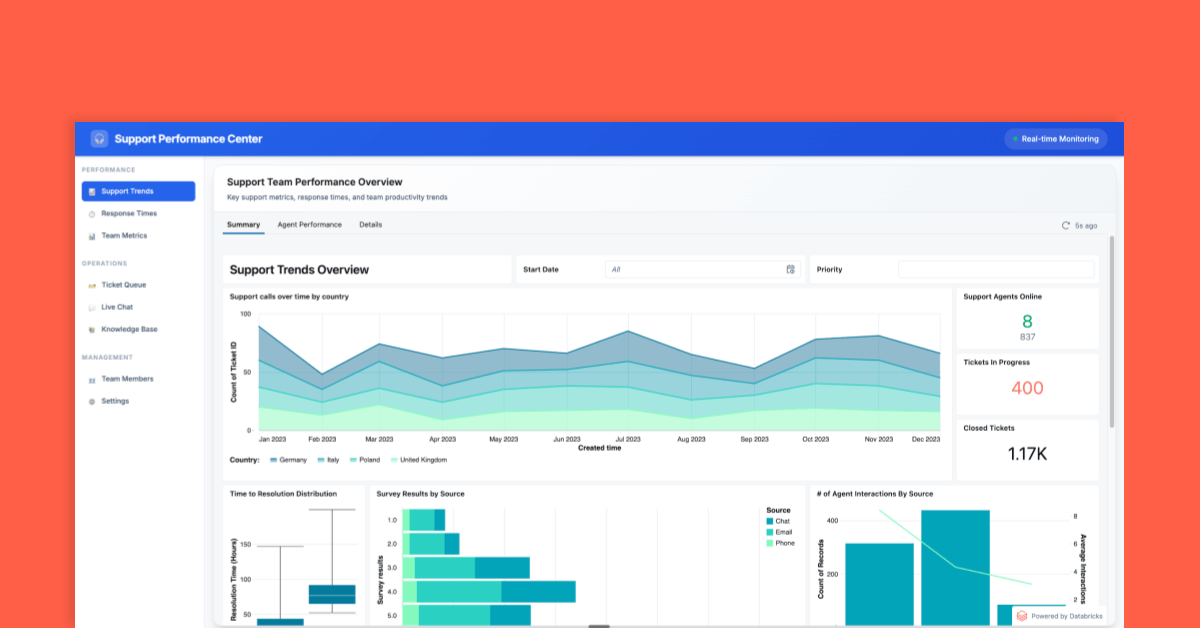
Databricks AI/BI Dashboards is a powerful SaaS solution designed for embedding interactive dashboards into customer-facing applications. It addresses the specific needs of this industry by offering secure, cost-effective, and seamless integration of analytics and business intelligence data into external apps.
Best for Embedded Dashboards for Customer Facing Portals
Expert Take
Databricks AI/BI Dashboards excels in embedding analytics into customer-facing applications with a focus on security, scalability, and integration. Its comprehensive documentation and industry recognition solidify its position as a leading solution in the embedded analytics space.
Pros
- AI-assisted natural language authoring
- Unified governance via Unity Catalog
- Native Databricks platform integration
- Embeddable in third-party applications
Cons
- Visualizations limited to 10,000 rows
- Requires data in Unity Catalog
- Lacks advanced BI visualization features
- Compute-based pricing can be complex
Best for teams that are
- Teams preferring consumption-based pricing over per-user licensing
- Internal or partner apps where iframe embedding is acceptable
Skip if
- SaaS applications requiring native, non-iframe embedding
- Teams needing deep white-labeling beyond basic branding
Best for teams that are
- Teams preferring consumption-based pricing over per-user licensing
- Internal or partner apps where iframe embedding is acceptable
Skip if
- SaaS applications requiring native, non-iframe embedding
- Teams needing deep white-labeling beyond basic branding
Pros
- No per-seat licensing fees
- AI-assisted natural language authoring
- Unified governance via Unity Catalog
- Native Databricks platform integration
- Embeddable in third-party applications
Cons
- Visualizations limited to 10,000 rows
- Limited chart formatting options
- Requires data in Unity Catalog
- Lacks advanced BI visualization features
- Compute-based pricing can be complex
Expert Take
Databricks AI/BI Dashboards excels in embedding analytics into customer-facing applications with a focus on security, scalability, and integration. Its comprehensive documentation and industry recognition solidify its position as a leading solution in the embedded analytics space.



Loading comparison data…