
Requirements Management & Spec Tools
These are the specialized categories within Requirements Management & Spec Tools. Looking for something broader? See all Project Management & Productivity Tools categories.

How big is your team?
What's your budget situation?
What's your team's technical comfort level?
What's the ONE thing this tool must do well?

Siemens Requirement Management software is a powerful tool for managing, linking, and verifying product requirements. This SaaS solution is designed specifically for project managers and enterprise product development teams who need to ensure product compliance and manage project requirements efficiently.
Best for Requirements Management Tools for Enterprise Products
Expert Take
Siemens Requirement Management excels in managing complex product requirements for enterprise-level projects. Its integration with other Siemens software and detailed tracking capabilities make it a standout choice for project managers. While the interface complexity requires training, the software's robust features justify its premium positioning.
Pros
- Round-trip import/export for Word/Excel
- Built-in ISO 26262 & DO-178C templates
- Seamless Teamcenter PLM integration
- Granular traceability for compliance audits
Cons
- User interface feels outdated
- Steep learning curve for new users
- Complex initial configuration
- Advanced features require expensive tiers
Best for teams that are
- Complex, safety-critical software and systems development (Polarion)
- Organizations requiring a unified digital thread across the lifecycle
Skip if
- Small teams or startups due to high implementation costs
- Users seeking a lightweight, standalone requirements tool
Best for teams that are
- Complex, safety-critical software and systems development (Polarion)
- Organizations requiring a unified digital thread across the lifecycle
Skip if
- Small teams or startups due to high implementation costs
- Users seeking a lightweight, standalone requirements tool
Pros
- LiveDocs interface bridges Word and database
- Round-trip import/export for Word/Excel
- Built-in ISO 26262 & DO-178C templates
- Seamless Teamcenter PLM integration
- Granular traceability for compliance audits
Cons
- User interface feels outdated
- Performance lags with large datasets
- Steep learning curve for new users
- Complex initial configuration
- Advanced features require expensive tiers
Expert Take
Siemens Requirement Management excels in managing complex product requirements for enterprise-level projects. Its integration with other Siemens software and detailed tracking capabilities make it a standout choice for project managers. While the interface complexity requires training, the software's robust features justify its premium positioning.

Appian's Requirements Management solution is specifically designed for the public sector to modernize and streamline their requirements, through quick and efficient development of requirement packages and automatic generation of RFIs. Its emphasis on enhancing communication and collaboration aligns perfectly with the needs of a sector that values transparency and teamwork.
Best for Requirements Management Tools for Enterprise Products
Expert Take
Appian Requirements Management is a specialized tool for the public sector, offering unique capabilities like automated RFI generation and quick requirement package development. Its focus on enhancing communication and collaboration makes it a valuable asset for enterprises seeking efficiency and transparency in requirements management.
Pros
- AI-driven requirements writing assistance
- Data Fabric unifies legacy systems
- Reduces Procurement Action Lead Time
- Wizard-driven compliance checklists
Cons
- High licensing & support costs
- Reporting interface can be non-intuitive
- Requires resources to scale effectively
- Pricing is not publicly transparent
Best for teams that are
- Procurement teams managing complex acquisition lifecycles
- Organizations needing to comply with Federal Acquisition Regulations
Skip if
- Product engineering teams developing hardware or software
- Teams needing technical requirements traceability (e.g., code/tests)
Best for teams that are
- Procurement teams managing complex acquisition lifecycles
- Organizations needing to comply with Federal Acquisition Regulations
Skip if
- Product engineering teams developing hardware or software
- Teams needing technical requirements traceability (e.g., code/tests)
Pros
- FedRAMP High & DoD IL5 authorized
- AI-driven requirements writing assistance
- Data Fabric unifies legacy systems
- Reduces Procurement Action Lead Time
- Wizard-driven compliance checklists
Cons
- High licensing & support costs
- Steep learning curve for advanced features
- Reporting interface can be non-intuitive
- Requires resources to scale effectively
- Pricing is not publicly transparent
Expert Take
Appian Requirements Management is a specialized tool for the public sector, offering unique capabilities like automated RFI generation and quick requirement package development. Its focus on enhancing communication and collaboration makes it a valuable asset for enterprises seeking efficiency and transparency in requirements management.

Figma is a robust SaaS solution designed for professionals in design and engineering industries. It provides essential tools to design, prototype, and build products in a collaborative environment that speeds up feedback and iteration cycles. This streamlines the process of product development, making it faster and more efficient.
Best for Product Spec Tools with Design and Engineering Collaboration
Expert Take
Figma is a leading tool in the design and engineering collaboration space, offering robust capabilities for real-time collaboration and prototyping. Its extensive integration ecosystem and user-friendly interface make it a preferred choice for professionals, despite some limitations in offline functionality.
Pros
- Browser-based with no installation required
- Massive community plugin ecosystem
- Industry-standard for UI/UX design
- Enterprise-grade security (SOC 2, ISO)
Cons
- 2GB active memory limit per tab
- No native CMYK print support
- Price increase for professional plans
- Steep learning curve for advanced features
Best for teams that are
- Teams requiring real-time, multiplayer collaboration on visual designs
- Product managers and developers needing quick access to prototypes
Skip if
- Print designers requiring native CMYK support and print output controls
- Users requiring a fully offline workflow without internet access
Best for teams that are
- Teams requiring real-time, multiplayer collaboration on visual designs
- Product managers and developers needing quick access to prototypes
Skip if
- Print designers requiring native CMYK support and print output controls
- Users requiring a fully offline workflow without internet access
Pros
- Real-time multiplayer collaboration
- Browser-based with no installation required
- Massive community plugin ecosystem
- Industry-standard for UI/UX design
- Enterprise-grade security (SOC 2, ISO)
Cons
- 2GB active memory limit per tab
- Limited offline capabilities
- No native CMYK print support
- Price increase for professional plans
- Steep learning curve for advanced features
Expert Take
Figma is a leading tool in the design and engineering collaboration space, offering robust capabilities for real-time collaboration and prototyping. Its extensive integration ecosystem and user-friendly interface make it a preferred choice for professionals, despite some limitations in offline functionality.

Flow is a requirements tool meticulously designed for modern engineering teams. It offers a more streamlined, efficient approach to managing requirements, allowing teams to focus on engineering instead of tedious administrative tasks. It addresses the specific needs of agile teams in the enterprise product development industry by providing a simple, user-friendly interface and robust tracking systems.
Best for Requirements Management Tools for Enterprise Products
Expert Take
Flow is a specialized requirements management tool designed for agile teams in enterprise product development. It excels in usability and product capability, offering a streamlined interface and robust tracking systems. While pricing transparency is limited due to enterprise pricing models, its market credibility is supported by industry-specific features and third-party validations.
Pros
- Modern, intuitive UI (vs legacy tools)
- Full ITAR & GovCloud compliance
- Transparent pricing model
- AI-native requirements analysis
Cons
- Major CAD integrations coming soon
- High per-user cost ($150+)
- Occasional bugs (new software)
- Less ecosystem maturity than DOORS
Best for teams that are
- Teams needing fast, iterative requirements management linked to design
- Organizations moving away from clunky, document-centric legacy tools
Skip if
- Pure software development teams (better served by Jira or Storywise)
- Non-technical business users needing simple project management
Best for teams that are
- Teams needing fast, iterative requirements management linked to design
- Organizations moving away from clunky, document-centric legacy tools
Skip if
- Pure software development teams (better served by Jira or Storywise)
- Non-technical business users needing simple project management
Pros
- Live V&V tracking linked to CAD/Code
- Modern, intuitive UI (vs legacy tools)
- Full ITAR & GovCloud compliance
- Transparent pricing model
- AI-native requirements analysis
Cons
- Major CAD integrations coming soon
- Basic plan limited to 1 project
- High per-user cost ($150+)
- Occasional bugs (new software)
- Less ecosystem maturity than DOORS
Expert Take
Flow is a specialized requirements management tool designed for agile teams in enterprise product development. It excels in usability and product capability, offering a streamlined interface and robust tracking systems. While pricing transparency is limited due to enterprise pricing models, its market credibility is supported by industry-specific features and third-party validations.

Modern Requirements is a powerful requirements management solution designed specifically for complex software development projects. It is seamlessly integrated with Azure DevOps, making it a perfect fit for enterprises that rely on Microsoft's suite of development tools.
Best for Requirements Management Tools for Enterprise Products
Expert Take
Modern Requirements stands out as a leading solution in the requirements management space, particularly for enterprises utilizing Azure DevOps. Its deep integration with Microsoft's tools, combined with robust management capabilities, positions it as a top choice for complex software projects. While it may be less suitable for non-Microsoft ecosystems, its strengths in its niche are well-documented.
Pros
- Free Stakeholder licenses for reviews
- AI-powered requirements elicitation
- FDA & ISO compliance support
- Automated traceability matrices
Cons
- Requires Azure DevOps to function
- Diagramming tool reported as glitchy
- Pricing requires custom quote
- Over-complex for simple projects
Best for teams that are
- Regulated industries (healthcare, banking) needing compliance within ADO
- Teams wanting to transform Azure DevOps into a full ALM solution
Skip if
- Organizations that do not use Azure DevOps as their primary platform
- Teams needing a standalone tool independent of Microsoft's stack
Best for teams that are
- Regulated industries (healthcare, banking) needing compliance within ADO
- Teams wanting to transform Azure DevOps into a full ALM solution
Skip if
- Organizations that do not use Azure DevOps as their primary platform
- Teams needing a standalone tool independent of Microsoft's stack
Pros
- Native Azure DevOps integration
- Free Stakeholder licenses for reviews
- AI-powered requirements elicitation
- FDA & ISO compliance support
- Automated traceability matrices
Cons
- Requires Azure DevOps to function
- Steep learning curve for small teams
- Diagramming tool reported as glitchy
- Pricing requires custom quote
- Over-complex for simple projects
Expert Take
Modern Requirements stands out as a leading solution in the requirements management space, particularly for enterprises utilizing Azure DevOps. Its deep integration with Microsoft's tools, combined with robust management capabilities, positions it as a top choice for complex software projects. While it may be less suitable for non-Microsoft ecosystems, its strengths in its niche are well-documented.

ReqView is a highly effective requirements management tool designed specifically for hardware and software engineers. With robust integration with Git for version control, it supports end-to-end management of requirements, risks, and tests using the V-Model, a key aspect for the product development life cycle in the enterprise products industry.
Best for Requirements Management Tools for Enterprise Products
Expert Take
ReqView excels in providing a comprehensive requirements management solution tailored for hardware and software engineers. Its integration with Git and support for the V-Model are significant strengths, making it a top choice in its category. While it has a learning curve, its capabilities and industry relevance justify its premium positioning.
Pros
- Native Git and SVN version control integration
- Supports ISO 26262 and DO-178C compliance
- Transparent and affordable pricing model
- Fast Excel-like tabular user interface
Cons
- No real-time concurrent editing (requires locking)
- Smaller ecosystem than IBM DOORS or Jama
- Web app limited to specific browsers
- Requires file-based workflow for collaboration
Best for teams that are
- Teams needing offline capabilities or secure file-based storage
- Users wanting a DOORS-like structure at a fraction of the cost
Skip if
- Large enterprises requiring real-time, simultaneous web collaboration
- Organizations needing complex, enterprise-grade PLM integration
Best for teams that are
- Teams needing offline capabilities or secure file-based storage
- Users wanting a DOORS-like structure at a fraction of the cost
Skip if
- Large enterprises requiring real-time, simultaneous web collaboration
- Organizations needing complex, enterprise-grade PLM integration
Pros
- Secure offline-first architecture keeps data local
- Native Git and SVN version control integration
- Supports ISO 26262 and DO-178C compliance
- Transparent and affordable pricing model
- Fast Excel-like tabular user interface
Cons
- No real-time concurrent editing (requires locking)
- Free plan limited to 150 objects
- Smaller ecosystem than IBM DOORS or Jama
- Web app limited to specific browsers
- Requires file-based workflow for collaboration
Expert Take
ReqView excels in providing a comprehensive requirements management solution tailored for hardware and software engineers. Its integration with Git and support for the V-Model are significant strengths, making it a top choice in its category. While it has a learning curve, its capabilities and industry relevance justify its premium positioning.
3DS Collaborative Design & Engineering
Best for Product Spec Tools with Design and Engineering Collaboration
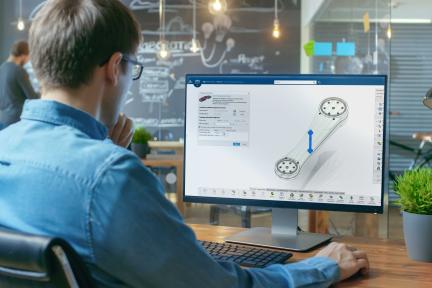
The 3DS Collaborative Design & Engineering for Manufacturing is a cloud-based software for enhancing collaboration across enterprises. Its focus on concurrent engineering and access to product models caters specifically to the manufacturing industry, helping professionals to better understand product specifications, thereby increasing efficiency and reducing errors.
Best for Product Spec Tools with Design and Engineering Collaboration
Expert Take
3DS Collaborative Design & Engineering excels in providing a comprehensive platform for manufacturing collaboration, with strong capabilities in concurrent engineering and product modeling. It demonstrates high usability and value, although it requires training and is dependent on internet connectivity. Its market credibility is supported by its industry-specific focus and cloud-based architecture.
Pros
- Cloud-based Model-Based Definition (MBD) support
- ISO 27001 and 27701 security certified
- Real-time concurrent design collaboration
- No server hardware installation required
Cons
- Steep learning curve and complex UI
- Public cloud is not ITAR compliant
- Complex role-based licensing structure
- Requires constant internet for cloud features
Best for teams that are
- Teams needing deep integration of CAD, simulation, and manufacturing data
- Organizations managing complex multi-disciplinary systems
Skip if
- Small businesses seeking a lightweight, low-cost design tool
- Teams needing only simple 2D drafting capabilities
Best for teams that are
- Teams needing deep integration of CAD, simulation, and manufacturing data
- Organizations managing complex multi-disciplinary systems
Skip if
- Small businesses seeking a lightweight, low-cost design tool
- Teams needing only simple 2D drafting capabilities
Pros
- Seamless integration with SOLIDWORKS and CATIA
- Cloud-based Model-Based Definition (MBD) support
- ISO 27001 and 27701 security certified
- Real-time concurrent design collaboration
- No server hardware installation required
Cons
- Steep learning curve and complex UI
- Cloud latency and performance issues
- Public cloud is not ITAR compliant
- Complex role-based licensing structure
- Requires constant internet for cloud features
Expert Take
3DS Collaborative Design & Engineering excels in providing a comprehensive platform for manufacturing collaboration, with strong capabilities in concurrent engineering and product modeling. It demonstrates high usability and value, although it requires training and is dependent on internet connectivity. Its market credibility is supported by its industry-specific focus and cloud-based architecture.

Codebeamer is a powerful requirement management tool specially designed for large enterprises. It enables users to manage complex software development projects at scale, capturing, tracking, and communicating requirements effectively. With robust compliance, traceability, and collaboration features, it addresses the critical needs of the software development industry.
Best for Requirements Management Tools for Enterprise Products
Expert Take
Codebeamer Requirements Management excels in handling complex, large-scale projects with its comprehensive requirements management capabilities. It is recognized for its robust compliance and traceability features, making it a top choice for enterprise software development. While it requires a learning curve, its scalability and collaborative environment are highly valued.
Pros
- Gapless end-to-end traceability for audits
- Integrated requirements, risk, and test management
- Native Product Line Engineering (PLE) support
- Lower total cost than legacy IBM DOORS
Cons
- Hard limit of 1000 items per review
- User interface perceived as outdated
- Document view limited to 300 items initially
- Complex configuration for custom workflows
Best for teams that are
- Large enterprises requiring end-to-end ALM and regulatory compliance
- Teams needing robust traceability and risk management features
Skip if
- Small teams or simple projects due to high complexity and cost
- Organizations not needing rigorous safety-critical compliance
Best for teams that are
- Large enterprises requiring end-to-end ALM and regulatory compliance
- Teams needing robust traceability and risk management features
Skip if
- Small teams or simple projects due to high complexity and cost
- Organizations not needing rigorous safety-critical compliance
Pros
- Preconfigured templates for ISO 26262 and ASPICE
- Gapless end-to-end traceability for audits
- Integrated requirements, risk, and test management
- Native Product Line Engineering (PLE) support
- Lower total cost than legacy IBM DOORS
Cons
- Hard limit of 1000 items per review
- Steep learning curve for new users
- User interface perceived as outdated
- Document view limited to 300 items initially
- Complex configuration for custom workflows
Expert Take
Codebeamer Requirements Management excels in handling complex, large-scale projects with its comprehensive requirements management capabilities. It is recognized for its robust compliance and traceability features, making it a top choice for enterprise software development. While it requires a learning curve, its scalability and collaborative environment are highly valued.
CoLab's CAD Collaboration Tool
Best for Product Spec Tools with Design and Engineering Collaboration

CoLab's CAD Collaboration tool is a SaaS solution specifically designed for mechanical engineers and product designers. It streamlines the process of sharing, viewing, and commenting on 2D and 3D CAD models, thus accelerating product development and reducing mistakes.
Best for Product Spec Tools with Design and Engineering Collaboration
Expert Take
CoLab's CAD Collaboration Tool excels in providing specialized features for mechanical engineers, enhancing collaboration and reducing errors in product development. It is recognized for its integration capabilities and usability, although it requires internet connectivity and may have a higher price point for small businesses.
Pros
- SOC 2 Type 2 & ISO 27001 certified
- Integrates with Windchill, Teamcenter & 3DX
- AI AutoReview checks for design errors
- Supports 30+ native CAD formats
Cons
- No public pricing available
- Low volume of public user reviews
- Requires internet connection (Cloud-based)
- No free tier for small teams
Best for teams that are
- Enterprises using PLM but struggling with effective design feedback loops
- Complex hardware product teams requiring secure supplier collaboration
Skip if
- Software development teams looking for code review tools
- Teams looking to replace their core PLM system entirely
Best for teams that are
- Enterprises using PLM but struggling with effective design feedback loops
- Complex hardware product teams requiring secure supplier collaboration
Skip if
- Software development teams looking for code review tools
- Teams looking to replace their core PLM system entirely
Pros
- Browser-based 3D viewing (no install)
- SOC 2 Type 2 & ISO 27001 certified
- Integrates with Windchill, Teamcenter & 3DX
- AI AutoReview checks for design errors
- Supports 30+ native CAD formats
Cons
- No public pricing available
- Can be expensive for mid-sized teams
- Low volume of public user reviews
- Requires internet connection (Cloud-based)
- No free tier for small teams
Expert Take
CoLab's CAD Collaboration Tool excels in providing specialized features for mechanical engineers, enhancing collaboration and reducing errors in product development. It is recognized for its integration capabilities and usability, although it requires internet connectivity and may have a higher price point for small businesses.

Perforce ALM is an advanced solution designed for enterprise product managers and developers. It provides robust requirement tracking, centralized management, and detailed impact analysis capabilities, addressing the need for comprehensive traceability and control over product requirements in complex development environments.
Best for Requirements Management Tools for Enterprise Products
Expert Take
Perforce ALM is recognized for its advanced capabilities in managing complex product requirements, offering centralized management and comprehensive traceability. Despite a complex setup, its features are well-suited for enterprise environments, making it a top choice for professionals handling intricate requirement scenarios.
Pros
- Automated end-to-end traceability matrices
- Strong support for medical/automotive compliance
- Suspect item flagging for change management
- Decomposes complex requirements hierarchically
Cons
- Steep learning curve for new users
- Interface described as dated and clunky
- Expensive licensing for large teams
- Configuration can be complex and time-consuming
Best for teams that are
- Teams needing modular ALM to manage requirements, tests, and issues
- Organizations requiring strong traceability and audit trails
Skip if
- Small teams with limited budgets due to high licensing costs
- Teams needing a simple, lightweight project management tool
Best for teams that are
- Teams needing modular ALM to manage requirements, tests, and issues
- Organizations requiring strong traceability and audit trails
Skip if
- Small teams with limited budgets due to high licensing costs
- Teams needing a simple, lightweight project management tool
Pros
- ISO 26262 certified for functional safety
- Automated end-to-end traceability matrices
- Strong support for medical/automotive compliance
- Suspect item flagging for change management
- Decomposes complex requirements hierarchically
Cons
- Steep learning curve for new users
- Web client lacks full desktop parity
- Interface described as dated and clunky
- Expensive licensing for large teams
- Configuration can be complex and time-consuming
Expert Take
Perforce ALM is recognized for its advanced capabilities in managing complex product requirements, offering centralized management and comprehensive traceability. Despite a complex setup, its features are well-suited for enterprise environments, making it a top choice for professionals handling intricate requirement scenarios.


Loading comparison data…