
Product & Web Analytics Platforms
These are the specialized categories within Product & Web Analytics Platforms. Looking for something broader? See all Business Intelligence & Analytics Software categories.

How big is your team?
What's your budget situation?
What's your team's technical comfort level?
What's the ONE thing this tool must do well?
Piwik Pro Ecommerce Analytics is a potent tool specifically designed to cater to the needs of ecommerce businesses. It offers rich insights, intuitive dashboards, custom reports, and heatmaps, all while ensuring easy privacy settings, thereby addressing the unique demands of the ecommerce industry such as conversion optimization and customer behavior analysis.
Best for Web & Product Analytics Platforms for Ecommerce Businesses
Expert Take
Piwik Pro Ecommerce Analytics stands out as a top-tier solution for ecommerce businesses, offering comprehensive insights and privacy-focused analytics. Its robust capabilities, combined with a strong focus on user privacy, make it a trusted choice for businesses aiming to optimize conversion rates and understand customer behavior.
Pros
- 100% data ownership with no data sampling
- GDPR, HIPAA, and SOC 2 Type II compliant
- Generous free plan with 500,000 monthly actions
- User interface similar to Universal Analytics
- Built-in Consent Manager and CDP modules
Cons
- Real-time reporting rated lower than competitors
- Support quality score lower than niche alternatives
- E-commerce integration score lags behind leaders
- Free plan data retention limited to 14 months
Best for teams that are
- Organizations requiring strict GDPR/HIPAA compliance (Gov, Finance)
- Companies seeking a secure, privacy-focused Google Analytics alternative
- Enterprises needing integrated consent management
Skip if
- Teams needing advanced product experimentation like feature flags
- Small hobby sites where enterprise-grade privacy is overkill
- Users wanting a completely free tool without setup limits
Best for teams that are
- Organizations requiring strict GDPR/HIPAA compliance (Gov, Finance)
- Companies seeking a secure, privacy-focused Google Analytics alternative
- Enterprises needing integrated consent management
Skip if
- Teams needing advanced product experimentation like feature flags
- Small hobby sites where enterprise-grade privacy is overkill
- Users wanting a completely free tool without setup limits
Pros
- 100% data ownership with no data sampling
- GDPR, HIPAA, and SOC 2 Type II compliant
- Generous free plan with 500,000 monthly actions
- User interface similar to Universal Analytics
- Built-in Consent Manager and CDP modules
Cons
- Real-time reporting rated lower than competitors
- Support quality score lower than niche alternatives
- E-commerce integration score lags behind leaders
- Free plan data retention limited to 14 months
Expert Take
Piwik Pro Ecommerce Analytics stands out as a top-tier solution for ecommerce businesses, offering comprehensive insights and privacy-focused analytics. Its robust capabilities, combined with a strong focus on user privacy, make it a trusted choice for businesses aiming to optimize conversion rates and understand customer behavior.

PostHog is an all-in-one dev tool for product engineers in consulting firms. It enables engineers to streamline the product development process, from building to measuring and shipping. Its analytics capabilities specifically cater to the unique needs of consulting firms, providing detailed insights to drive product success.
Best for Web & Product Analytics Platforms for Consulting Firms
Expert Take
PostHog excels as a comprehensive tool for consulting firms, offering robust analytics and development capabilities. Its open-source nature and self-hosting options provide flexibility and control, crucial for consulting environments. While it requires technical expertise, its strengths in customization and privacy make it a top choice in its category.
Pros
- Generous free tier (1M events/mo)
- All-in-one analytics & feature flags
- Open-source and self-hostable
- SOC 2 Type II & GDPR compliant
- Direct SQL access via HogQL
Cons
- Steep learning curve for non-tech users
- Unpredictable usage-based pricing
- Performance lags with massive datasets
- Limited in-app engagement features
- Requires engineering resources to manage
Best for teams that are
- Engineers and startups wanting an all-in-one open-source product suite
- Teams requiring self-hosted, privacy-compliant analytics and feature flags
- Technical founders who prefer developer-friendly tools
Skip if
- Non-technical marketing teams who find developer-centric tools too complex
- Users seeking simple, lightweight website traffic statistics
- Enterprises wanting a polished, non-technical UI over functionality
Best for teams that are
- Engineers and startups wanting an all-in-one open-source product suite
- Teams requiring self-hosted, privacy-compliant analytics and feature flags
- Technical founders who prefer developer-friendly tools
Skip if
- Non-technical marketing teams who find developer-centric tools too complex
- Users seeking simple, lightweight website traffic statistics
- Enterprises wanting a polished, non-technical UI over functionality
Pros
- Generous free tier (1M events/mo)
- All-in-one analytics & feature flags
- Open-source and self-hostable
- SOC 2 Type II & GDPR compliant
- Direct SQL access via HogQL
Cons
- Steep learning curve for non-tech users
- Unpredictable usage-based pricing
- Performance lags with massive datasets
- Limited in-app engagement features
- Requires engineering resources to manage
Expert Take
PostHog excels as a comprehensive tool for consulting firms, offering robust analytics and development capabilities. Its open-source nature and self-hosting options provide flexibility and control, crucial for consulting environments. While it requires technical expertise, its strengths in customization and privacy make it a top choice in its category.

Tableau is a robust business intelligence and analytics software specifically designed for retail stores. It allows retailers to visually analyse their data, spot trends, and make data-driven decisions. Its advanced AI/ML capabilities provide predictive insights, while the governance feature ensures data security and compliance. The visual storytelling aspect makes complex data easily understandable, helping retailers to act quickly.
Best for Web & Product Analytics Platforms for Retail Stores
Expert Take
Tableau is a leading data visualization tool for retail analytics, offering robust capabilities in visual storytelling and predictive insights. It is recognized for its user-friendly interface and comprehensive governance features, making it a top choice for retailers seeking data-driven decision-making.
Pros
- Industry-leading visual analytics capabilities
- Massive library of native data connectors
- Deep integration with Salesforce ecosystem
- Robust enterprise security and governance
- Vibrant community and learning resources
Cons
- Steep learning curve for advanced features
- High cost compared to some competitors
- Performance lags with massive datasets
- Complex server setup for on-premise
- Data prep requires separate tool (Prep)
Best for teams that are
- Data analysts requiring highly customizable, pixel-perfect visualizations
- Large enterprises with dedicated data teams to manage complex dashboards
Skip if
- Non-technical users seeking simple, instant answers without training
- Organizations with limited budgets due to high licensing and maintenance costs
Best for teams that are
- Data analysts requiring highly customizable, pixel-perfect visualizations
- Large enterprises with dedicated data teams to manage complex dashboards
Skip if
- Non-technical users seeking simple, instant answers without training
- Organizations with limited budgets due to high licensing and maintenance costs
Pros
- Industry-leading visual analytics capabilities
- Massive library of native data connectors
- Deep integration with Salesforce ecosystem
- Robust enterprise security and governance
- Vibrant community and learning resources
Cons
- Steep learning curve for advanced features
- High cost compared to some competitors
- Performance lags with massive datasets
- Complex server setup for on-premise
- Data prep requires separate tool (Prep)
Expert Take
Tableau is a leading data visualization tool for retail analytics, offering robust capabilities in visual storytelling and predictive insights. It is recognized for its user-friendly interface and comprehensive governance features, making it a top choice for retailers seeking data-driven decision-making.

Umami is explicitly designed for consulting firms that require comprehensive web and product analytics. It provides an easy-to-use interface, real-time data updates, and respects user privacy. The platform's flexibility in collecting and analyzing data makes it particularly suitable for industry professionals dealing with various clients, each with different needs.
Best for Web & Product Analytics Platforms for Consulting Firms
Expert Take
Umami Analytics stands out in the web and product analytics space for consulting firms due to its strong focus on privacy, real-time data capabilities, and affordability. Its design caters specifically to the needs of consulting firms, making it a top choice in its category.
Pros
- Open-source and free to self-host
- No cookies required (GDPR compliant)
- Lightweight 2KB tracking script
- Clean, single-page dashboard interface
- Easy deployment on Vercel/Docker
Cons
- Cloud free tier limits retention (6mo)
- No heatmaps or session recordings
- Limited third-party plugin ecosystem
- Less granular reporting than GA4
- Self-hosting requires maintenance
Best for teams that are
- Developers seeking a privacy-focused, open-source Google Analytics alternative
- Projects requiring GDPR compliance without displaying cookie banners
- Users wanting simple, lightweight web stats without complex setup
Skip if
- Product teams needing deep funnel analysis, cohorts, or session replays
- Enterprises requiring complex marketing attribution or heavy customization
- Non-technical users uncomfortable with self-hosting or server management
Best for teams that are
- Developers seeking a privacy-focused, open-source Google Analytics alternative
- Projects requiring GDPR compliance without displaying cookie banners
- Users wanting simple, lightweight web stats without complex setup
Skip if
- Product teams needing deep funnel analysis, cohorts, or session replays
- Enterprises requiring complex marketing attribution or heavy customization
- Non-technical users uncomfortable with self-hosting or server management
Pros
- Open-source and free to self-host
- No cookies required (GDPR compliant)
- Lightweight 2KB tracking script
- Clean, single-page dashboard interface
- Easy deployment on Vercel/Docker
Cons
- Cloud free tier limits retention (6mo)
- No heatmaps or session recordings
- Limited third-party plugin ecosystem
- Less granular reporting than GA4
- Self-hosting requires maintenance
Expert Take
Umami Analytics stands out in the web and product analytics space for consulting firms due to its strong focus on privacy, real-time data capabilities, and affordability. Its design caters specifically to the needs of consulting firms, making it a top choice in its category.
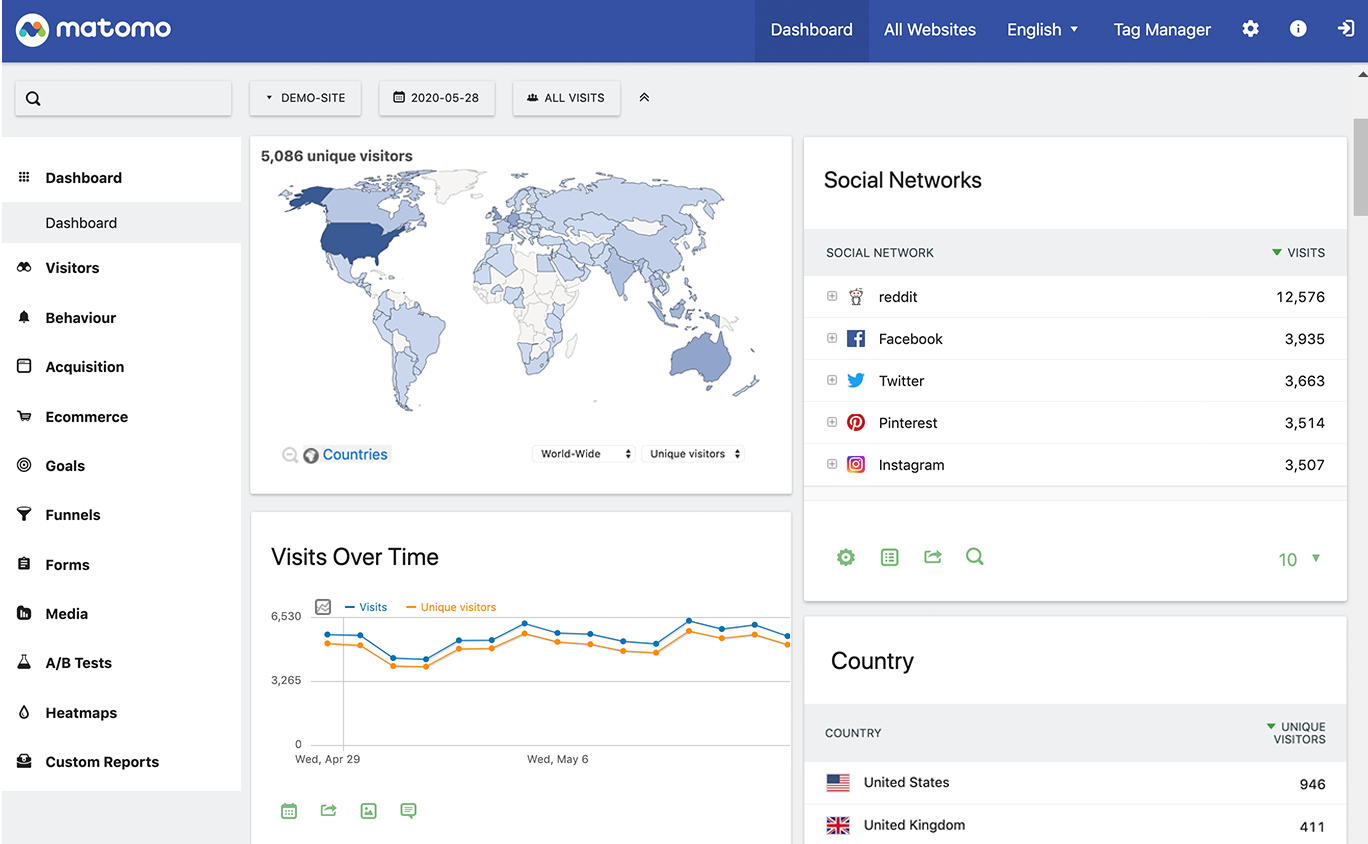
Matomo is a game-changing, privacy-focused alternative to Google Analytics, specifically tailored to meet the needs of ecommerce businesses. It guarantees 100% data ownership and accuracy, eliminating the common data limitations faced by ecommerce industries, and providing ethical, privacy-conscious web and product analytics.
Best for Web & Product Analytics Platforms for Ecommerce Businesses
Expert Take
Matomo excels as a privacy-focused analytics platform, offering 100% data ownership and ecommerce-specific features. While it requires technical knowledge for self-hosting and has limited third-party integrations, its commitment to privacy and data accuracy makes it a top choice for ecommerce businesses.
Pros
- 100% data ownership and GDPR compliance
- CNIL-approved for consent-free tracking
- No data sampling ensures 100% accuracy
- Open-source code transparency and security
- Imports historical Google Analytics data
Cons
- Performance lags on large datasets
- Advanced features cost extra on-premise
- Requires technical maintenance for self-hosting
- Cloud plans have raw data retention limits
- UI less intuitive than modern SaaS rivals
Best for teams that are
- Tech teams requiring 100% data ownership and on-premise hosting
- Privacy-sensitive organizations avoiding third-party cloud storage
- Users wanting a Google Analytics alternative with no data sampling
Skip if
- Non-technical teams unable to manage server maintenance
- Teams needing advanced product feature flagging or experimentation
- Users who prefer a fully managed SaaS without configuration
Best for teams that are
- Tech teams requiring 100% data ownership and on-premise hosting
- Privacy-sensitive organizations avoiding third-party cloud storage
- Users wanting a Google Analytics alternative with no data sampling
Skip if
- Non-technical teams unable to manage server maintenance
- Teams needing advanced product feature flagging or experimentation
- Users who prefer a fully managed SaaS without configuration
Pros
- 100% data ownership and GDPR compliance
- CNIL-approved for consent-free tracking
- No data sampling ensures 100% accuracy
- Open-source code transparency and security
- Imports historical Google Analytics data
Cons
- Performance lags on large datasets
- Advanced features cost extra on-premise
- Requires technical maintenance for self-hosting
- Cloud plans have raw data retention limits
- UI less intuitive than modern SaaS rivals
Expert Take
Matomo excels as a privacy-focused analytics platform, offering 100% data ownership and ecommerce-specific features. While it requires technical knowledge for self-hosting and has limited third-party integrations, its commitment to privacy and data accuracy makes it a top choice for ecommerce businesses.
Snowflake's Data Analytics for Retailers is a SaaS solution specifically designed to assist retail businesses in making data-driven decisions. It enables personalized shopping experiences and helps retailers adapt to changing consumer preferences, thereby meeting customer expectations more effectively. This is achieved through seamless data integration, real-time analytics, and scalable storage capabilities.
Best for Web & Product Analytics Platforms for Retail Stores
Expert Take
Snowflake Data Analytics for Retailers excels in providing a comprehensive data analytics solution tailored for the retail industry. Its strengths lie in real-time analytics, seamless integration, and scalable storage, making it a top choice for retailers seeking to enhance customer experiences and adapt to market changes. Despite its enterprise-level pricing, its robust capabilities justify its premium positioning.
Pros
- Seamless zero-copy data sharing with partners
- Elastic scaling for seasonal retail peaks
- Native support for semi-structured JSON data
- PCI DSS Level 1 compliance for payments
- Strong ecosystem with Blue Yonder & others
Cons
- Unpredictable usage-based pricing model
- Hidden storage costs from Time Travel
- Steep learning curve for cost optimization
- Debugging performance issues can be complex
- Requires manual warehouse sizing management
Best for teams that are
- Retailers with massive datasets requiring scalable storage and processing
- Data engineering teams needing a robust, cloud-native data warehouse
Skip if
- Non-technical users expecting a drag-and-drop visualization tool
- Small businesses with minimal data volume or simple reporting needs
Best for teams that are
- Retailers with massive datasets requiring scalable storage and processing
- Data engineering teams needing a robust, cloud-native data warehouse
Skip if
- Non-technical users expecting a drag-and-drop visualization tool
- Small businesses with minimal data volume or simple reporting needs
Pros
- Seamless zero-copy data sharing with partners
- Elastic scaling for seasonal retail peaks
- Native support for semi-structured JSON data
- PCI DSS Level 1 compliance for payments
- Strong ecosystem with Blue Yonder & others
Cons
- Unpredictable usage-based pricing model
- Hidden storage costs from Time Travel
- Steep learning curve for cost optimization
- Debugging performance issues can be complex
- Requires manual warehouse sizing management
Expert Take
Snowflake Data Analytics for Retailers excels in providing a comprehensive data analytics solution tailored for the retail industry. Its strengths lie in real-time analytics, seamless integration, and scalable storage, making it a top choice for retailers seeking to enhance customer experiences and adapt to market changes. Despite its enterprise-level pricing, its robust capabilities justify its premium positioning.

Mixpanel provides ecommerce businesses with a comprehensive view of customer behaviors. It tracks, analyzes, and presents actionable insights on user behavior, helping businesses drive customer acquisition, growth, and retention - all core needs in the ecommerce industry.
Best for Web & Product Analytics Platforms for Ecommerce Brands
Expert Take
Mixpanel stands out as a top-tier product analytics platform for ecommerce brands due to its comprehensive tracking and analysis capabilities, real-time data insights, and seamless integration with ecommerce tools. Despite a steep learning curve, its robust features and industry recognition affirm its position as a leader in the market.
Pros
- Generous free tier (1M events/month)
- Advanced Metric Trees for strategy mapping
- Integrated Session Replay capabilities
- SOC 2, ISO 27001 & HIPAA compliant
- Powerful group analytics for B2B
Cons
- Steep learning curve for beginners
- Expensive at high event volumes
- Requires strict event taxonomy planning
- Limited built-in marketing attribution
- Complex implementation for advanced features
Best for teams that are
- SaaS and mobile apps focused on user engagement and retention
- Startups needing a robust free tier for event-based tracking
- Product teams needing self-serve, customizable reports
Skip if
- Ecommerce marketers primarily focused on ad attribution and ROAS
- Non-technical teams unable to define and maintain event tracking
- Businesses looking for a simple financial reporting dashboard
Best for teams that are
- SaaS and mobile apps focused on user engagement and retention
- Startups needing a robust free tier for event-based tracking
- Product teams needing self-serve, customizable reports
Skip if
- Ecommerce marketers primarily focused on ad attribution and ROAS
- Non-technical teams unable to define and maintain event tracking
- Businesses looking for a simple financial reporting dashboard
Pros
- Generous free tier (1M events/month)
- Advanced Metric Trees for strategy mapping
- Integrated Session Replay capabilities
- SOC 2, ISO 27001 & HIPAA compliant
- Powerful group analytics for B2B
Cons
- Steep learning curve for beginners
- Expensive at high event volumes
- Requires strict event taxonomy planning
- Limited built-in marketing attribution
- Complex implementation for advanced features
Expert Take
Mixpanel stands out as a top-tier product analytics platform for ecommerce brands due to its comprehensive tracking and analysis capabilities, real-time data insights, and seamless integration with ecommerce tools. Despite a steep learning curve, its robust features and industry recognition affirm its position as a leader in the market.

Amplitude is an advanced analytics platform designed specifically for ecommerce brands. The platform offers deep insights into user behavior, enabling ecommerce businesses to make data-driven decisions and enhance their products. With event tracking features, A/B testing, and real-time data visualization, it addresses the industry's need for comprehensive, actionable analytics.
Best for Web & Product Analytics Platforms for Ecommerce Brands
Expert Take
Amplitude Analytics stands out as a leading analytics platform for ecommerce brands due to its comprehensive features like deep user behavior insights, real-time data visualization, and robust event tracking. The platform is well-regarded for its ability to drive data-driven decisions, supported by strong integration capabilities and industry recognition.
Pros
- Leader in Forrester Wave for Digital Analytics
- Warehouse-native analysis without data duplication
- Over 130 integrations with major tools
- SOC 2 Type 2 and ISO 27001 certified
- Generous free plan for early-stage startups
Cons
- Steep learning curve for non-analysts
- Costs scale sharply with user volume
- HIPAA compliance limited to Enterprise plans
- Complex implementation requires engineering time
- Opaque pricing for Growth and Enterprise tiers
Best for teams that are
- Product teams needing deep user journey and retention analysis
- Enterprises with high data volume and engineering resources
- Companies focusing on product-led growth strategies
Skip if
- Small businesses with low traffic or no technical team
- Marketers seeking simple ad spend attribution dashboards
- Teams wanting a 'done-for-you' setup without implementation
Best for teams that are
- Product teams needing deep user journey and retention analysis
- Enterprises with high data volume and engineering resources
- Companies focusing on product-led growth strategies
Skip if
- Small businesses with low traffic or no technical team
- Marketers seeking simple ad spend attribution dashboards
- Teams wanting a 'done-for-you' setup without implementation
Pros
- Leader in Forrester Wave for Digital Analytics
- Warehouse-native analysis without data duplication
- Over 130 integrations with major tools
- SOC 2 Type 2 and ISO 27001 certified
- Generous free plan for early-stage startups
Cons
- Steep learning curve for non-analysts
- Costs scale sharply with user volume
- HIPAA compliance limited to Enterprise plans
- Complex implementation requires engineering time
- Opaque pricing for Growth and Enterprise tiers
Expert Take
Amplitude Analytics stands out as a leading analytics platform for ecommerce brands due to its comprehensive features like deep user behavior insights, real-time data visualization, and robust event tracking. The platform is well-regarded for its ability to drive data-driven decisions, supported by strong integration capabilities and industry recognition.
Alteryx One is a powerful analytics automation platform specifically designed for marketing agencies. It allows these agencies to unify AI-ready data and automation, thus saving time and making smarter, data-driven decisions without the need for coding.
Best for Web & Product Analytics Platforms for Marketing Agencies
Expert Take
Alteryx One stands out as a leading analytics automation platform for marketing agencies, offering AI-ready data integration and no-code automation. Its market credibility is reinforced by third-party recognitions, and it provides a strong user experience despite a potential learning curve.
Pros
- Unified platform for data prep, analytics, and AI
- Intuitive drag-and-drop interface speeds up ETL
- Trusted by 19 of top 20 global banks
- Magic Reports automates insight generation and storytelling
- Strong governance with SOC 2 and FIPS compliance
Cons
- High cost with forced bundling of AI features
- Workflows not fully compatible between Desktop and Cloud
- 200 MB limit for saving workflows to cloud
- Steep learning curve for advanced platform features
- Opaque enterprise pricing requires sales contact
Best for teams that are
- Business analysts needing to blend data without SQL skills
- Enterprises automating complex data workflows across systems
- Teams needing to prep data for BI tools like Tableau
Skip if
- Technical teams who prefer coding in Python or SQL
- Small teams with simple reporting needs due to high cost
- Organizations looking for a lightweight, cloud-native ETL tool
Best for teams that are
- Business analysts needing to blend data without SQL skills
- Enterprises automating complex data workflows across systems
- Teams needing to prep data for BI tools like Tableau
Skip if
- Technical teams who prefer coding in Python or SQL
- Small teams with simple reporting needs due to high cost
- Organizations looking for a lightweight, cloud-native ETL tool
Pros
- Unified platform for data prep, analytics, and AI
- Intuitive drag-and-drop interface speeds up ETL
- Trusted by 19 of top 20 global banks
- Magic Reports automates insight generation and storytelling
- Strong governance with SOC 2 and FIPS compliance
Cons
- High cost with forced bundling of AI features
- Workflows not fully compatible between Desktop and Cloud
- 200 MB limit for saving workflows to cloud
- Steep learning curve for advanced platform features
- Opaque enterprise pricing requires sales contact
Expert Take
Alteryx One stands out as a leading analytics automation platform for marketing agencies, offering AI-ready data integration and no-code automation. Its market credibility is reinforced by third-party recognitions, and it provides a strong user experience despite a potential learning curve.

Qlik, combined with Talend, offers an end-to-end data integration, data quality, and analytics solution specifically geared towards consulting firms. Not only does it streamline data management and insight generation, but it also addresses the industry's specific needs around client data handling, project analytics, and the fast-paced decision-making environment of consulting.
Best for Web & Product Analytics Platforms for Consulting Firms
Expert Take
Qlik Data Integration & Analytics, enhanced by Talend, offers a comprehensive solution for consulting firms, excelling in data integration and analytics. Its industry-specific features and robust capabilities make it a top choice for firms needing advanced data handling and insights. Despite a steeper learning curve and higher pricing, its value in complex environments is well-documented.
Pros
- Leader in both Analytics and Data Integration
- Unique Associative Engine finds hidden insights
- Real-time Change Data Capture (CDC)
- Extensive security certs (FedRAMP, HITRUST)
- Strong AutoML and AI capabilities
Cons
- Steep learning curve for scripting
- Higher price point than Power BI
- Opaque enterprise pricing requires quotes
- Complex migration from legacy versions
- Mobile app experience can be clunky
Best for teams that are
- Enterprises needing to integrate and explore complex data from multiple sources
- Users valuing an associative engine to uncover hidden data connections
- Organizations requiring strong data governance and integration capabilities
Skip if
- Small teams wanting simple, plug-and-play visualization tools
- Users who prefer linear, query-based analysis over associative exploration
- Non-technical users looking for instant insights without training
Best for teams that are
- Enterprises needing to integrate and explore complex data from multiple sources
- Users valuing an associative engine to uncover hidden data connections
- Organizations requiring strong data governance and integration capabilities
Skip if
- Small teams wanting simple, plug-and-play visualization tools
- Users who prefer linear, query-based analysis over associative exploration
- Non-technical users looking for instant insights without training
Pros
- Leader in both Analytics and Data Integration
- Unique Associative Engine finds hidden insights
- Real-time Change Data Capture (CDC)
- Extensive security certs (FedRAMP, HITRUST)
- Strong AutoML and AI capabilities
Cons
- Steep learning curve for scripting
- Higher price point than Power BI
- Opaque enterprise pricing requires quotes
- Complex migration from legacy versions
- Mobile app experience can be clunky
Expert Take
Qlik Data Integration & Analytics, enhanced by Talend, offers a comprehensive solution for consulting firms, excelling in data integration and analytics. Its industry-specific features and robust capabilities make it a top choice for firms needing advanced data handling and insights. Despite a steeper learning curve and higher pricing, its value in complex environments is well-documented.





Loading comparison data…