
CPQ (Configure, Price, Quote) Software
These are the specialized categories within CPQ (Configure, Price, Quote) Software. Looking for something broader? See all CRM & Sales Software categories.
Expivi CPQ Software
Best for CPQ (Configure Price Quote) Software for Roofing Companies

Expivi CPQ is a roofing industry-specific software solution that streamlines the quotation process. It enables clients to configure products, receive accurate pricing, and get professional quotes instantly, thus improving efficiency and customer satisfaction.
Best for CPQ (Configure Price Quote) Software for Roofing Companies
Expert Take
Our analysis shows Expivi stands out by successfully bridging the gap between visual marketing and manufacturing logic. Unlike standard CPQ tools that rely on text-based rules, Expivi uses immersive 3D and AR to drive the configuration process while simultaneously generating the technical Bill of Materials (BOM) needed for production. Research indicates this 'visual-first' approach significantly reduces order errors and returns for complex products, making it a powerful solution for brands like Ralph Lauren and Crocs that require both aesthetic fidelity and production precision.
Pros
- High-fidelity 3D and AR visualization
- Automated Bill of Materials (BOM) generation
- Seamless SAP, Salesforce, and Magento integrations
- Real-time dynamic pricing engine
- Design-to-Print capabilities for customization
Cons
- High starting cost for enterprise plans
- Slow loading times for complex models
- Pricing transparency is limited
- Setup can be complex and time-consuming
- Occasional integration delays reported
Best for teams that are
- Roofing brands selling direct-to-consumer via e-commerce
- Companies needing immersive 3D/AR visualization for web buyers
- Retailers wanting to let customers visually customize roof colors/styles
Skip if
- Commercial contractors needing complex labor and tender estimation
- Businesses where visual product representation is not a sales driver
- Operations requiring deep back-end manufacturing engineering logic
Best for teams that are
- Roofing brands selling direct-to-consumer via e-commerce
- Companies needing immersive 3D/AR visualization for web buyers
- Retailers wanting to let customers visually customize roof colors/styles
Skip if
- Commercial contractors needing complex labor and tender estimation
- Businesses where visual product representation is not a sales driver
- Operations requiring deep back-end manufacturing engineering logic
Pros
- High-fidelity 3D and AR visualization
- Automated Bill of Materials (BOM) generation
- Seamless SAP, Salesforce, and Magento integrations
- Real-time dynamic pricing engine
- Design-to-Print capabilities for customization
Cons
- High starting cost for enterprise plans
- Slow loading times for complex models
- Pricing transparency is limited
- Setup can be complex and time-consuming
- Occasional integration delays reported
Expert Take
Our analysis shows Expivi stands out by successfully bridging the gap between visual marketing and manufacturing logic. Unlike standard CPQ tools that rely on text-based rules, Expivi uses immersive 3D and AR to drive the configuration process while simultaneously generating the technical Bill of Materials (BOM) needed for production. Research indicates this 'visual-first' approach significantly reduces order errors and returns for complex products, making it a powerful solution for brands like Ralph Lauren and Crocs that require both aesthetic fidelity and production precision.
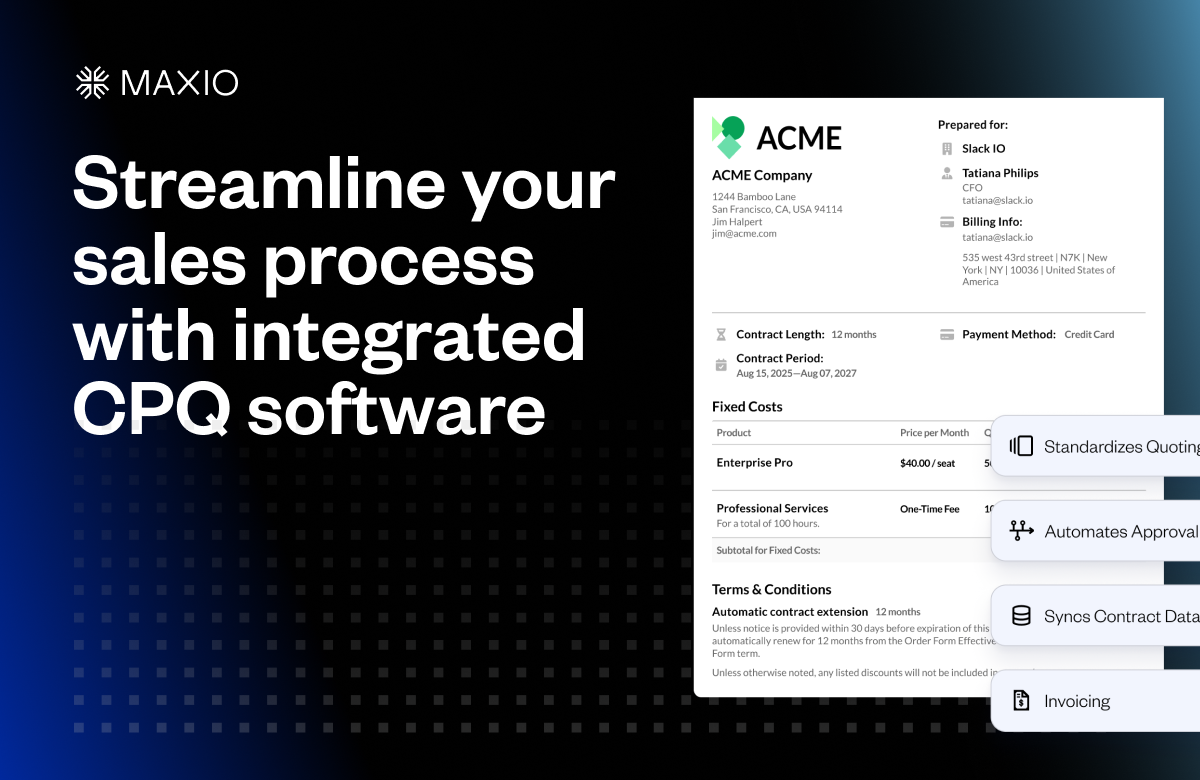
Maxio CPQ is a comprehensive SaaS solution that streamlines the sales process for SaaS Companies. It effectively integrates quoting, approvals, contract execution, CRM syncing, and billing into a cohesive workflow tailored to your specific business needs, ensuring a more efficient and seamless sales cycle.
Best for CPQ (Configure Price Quote) Software for SaaS Companies
Expert Take
Maxio CPQ excels as a comprehensive solution for SaaS companies, integrating critical sales processes into a unified workflow. Its strong market credibility is supported by third-party validations, and it offers a robust set of features tailored to the SaaS industry. While pricing transparency is limited, its value proposition remains strong for its target audience.
Pros
- Unified quote-to-cash workflow automation
- Automated ASC 606 revenue recognition
- Handles complex usage-based pricing models
- Transparent pricing for mid-market plans
- SOC 1, SOC 2, and ISO 27001 certified
Cons
- Reporting features often cited as limited
- Implementation can be technically complex
- Support quality reported as inconsistent
- Custom pricing required for >$100k billings
- Steep learning curve for new users
Best for teams that are
- B2B SaaS companies managing recurring revenue and subscriptions
- Finance teams needing unified quoting, billing, and revenue recognition
- Startups and scale-ups already using Maxio for billing
Skip if
- Manufacturing or hardware companies selling physical goods
- Businesses not using Maxio's billing and financial platform
- Enterprises requiring complex engineering-to-order configurations
Best for teams that are
- B2B SaaS companies managing recurring revenue and subscriptions
- Finance teams needing unified quoting, billing, and revenue recognition
- Startups and scale-ups already using Maxio for billing
Skip if
- Manufacturing or hardware companies selling physical goods
- Businesses not using Maxio's billing and financial platform
- Enterprises requiring complex engineering-to-order configurations
Pros
- Unified quote-to-cash workflow automation
- Automated ASC 606 revenue recognition
- Handles complex usage-based pricing models
- Transparent pricing for mid-market plans
- SOC 1, SOC 2, and ISO 27001 certified
Cons
- Reporting features often cited as limited
- Implementation can be technically complex
- Support quality reported as inconsistent
- Custom pricing required for >$100k billings
- Steep learning curve for new users
Expert Take
Maxio CPQ excels as a comprehensive solution for SaaS companies, integrating critical sales processes into a unified workflow. Its strong market credibility is supported by third-party validations, and it offers a robust set of features tailored to the SaaS industry. While pricing transparency is limited, its value proposition remains strong for its target audience.

DealHub CPQ is a SaaS solution that streamlines the sales process for SaaS companies. It enables salespeople to efficiently configure products, determine prices, and produce quotes, addressing the unique needs of the SaaS industry, including complex pricing models and multi-tiered product configurations.
Best for CPQ (Configure Price Quote) Software for SaaS Companies
Expert Take
DealHub CPQ excels in addressing the specific needs of SaaS companies with its robust capabilities in handling complex pricing models and multi-tiered configurations. Its market credibility is supported by reputable third-party recognition, and it offers a strong user experience, though it requires some training. The product's integration capabilities further enhance its value for SaaS professionals.
Pros
- Unified Quote-to-Revenue platform
- Rapid implementation (avg. 6 weeks)
- No-code configuration for Sales Ops
- Native Salesforce & HubSpot integration
- Digital DealRoom buyer experience
Cons
- Pricing is not publicly available
- Steep learning curve for administrators
- Reporting capabilities can be limited
- Limited customization for bespoke needs
- Smaller ecosystem than Salesforce CPQ
Best for teams that are
- Mid-market to enterprise SaaS companies seeking agile, no-code setup
- HubSpot and Dynamics 365 users needing deep native integration
- Sales teams wanting a unified DealRoom for quotes and contracts
Skip if
- Field sales teams requiring a native mobile app with offline access
- Heavy manufacturing industries with complex engineering constraints
- Very small businesses needing only basic document generation
Best for teams that are
- Mid-market to enterprise SaaS companies seeking agile, no-code setup
- HubSpot and Dynamics 365 users needing deep native integration
- Sales teams wanting a unified DealRoom for quotes and contracts
Skip if
- Field sales teams requiring a native mobile app with offline access
- Heavy manufacturing industries with complex engineering constraints
- Very small businesses needing only basic document generation
Pros
- Unified Quote-to-Revenue platform
- Rapid implementation (avg. 6 weeks)
- No-code configuration for Sales Ops
- Native Salesforce & HubSpot integration
- Digital DealRoom buyer experience
Cons
- Pricing is not publicly available
- Steep learning curve for administrators
- Reporting capabilities can be limited
- Limited customization for bespoke needs
- Smaller ecosystem than Salesforce CPQ
Expert Take
DealHub CPQ excels in addressing the specific needs of SaaS companies with its robust capabilities in handling complex pricing models and multi-tiered configurations. Its market credibility is supported by reputable third-party recognition, and it offers a strong user experience, though it requires some training. The product's integration capabilities further enhance its value for SaaS professionals.
Paradigm Omni CPQ Software
Best for CPQ (Configure Price Quote) Software for Roofing Companies

Paradigm Omni is a specific CPQ solution for the roofing industry, providing a seamless, multi-channel quoting experience for windows and doors. It's designed to streamline the operations of manufacturers and retailers by enabling efficient price configuration and quick, accurate quotes.
Best for CPQ (Configure Price Quote) Software for Roofing Companies
Expert Take
Our analysis shows Paradigm Omni is a dominant force specifically for the window and door industry, validated by its $450M acquisition by Builders FirstSource. Unlike generic CPQ tools, it natively handles the intricate logic of fenestration manufacturing, such as mulling and complex dimensioning. Research indicates it offers a comprehensive ecosystem, linking quoting directly to manufacturing ERPs and advanced 3D visualization tools.
Pros
- Specialized for window/door industry
- Omni-channel sales support
- Advanced 3D visualization features
- Backed by Builders FirstSource
- Integrated ERP ecosystem
Cons
- No public pricing available
- Historical performance/speed issues
- Complex enterprise implementation
- Limited third-party reviews
- Niche focus limits versatility
Best for teams that are
- Building product manufacturers (windows, doors, roofing) and dealers
- Home improvement retailers requiring an omnichannel selling platform
- Companies needing specific logic for construction material dimensions
Skip if
- General SaaS or non-construction industries
- Businesses not involved in the building products supply chain
- Small service-only repair contractors
Best for teams that are
- Building product manufacturers (windows, doors, roofing) and dealers
- Home improvement retailers requiring an omnichannel selling platform
- Companies needing specific logic for construction material dimensions
Skip if
- General SaaS or non-construction industries
- Businesses not involved in the building products supply chain
- Small service-only repair contractors
Pros
- Specialized for window/door industry
- Omni-channel sales support
- Advanced 3D visualization features
- Backed by Builders FirstSource
- Integrated ERP ecosystem
Cons
- No public pricing available
- Historical performance/speed issues
- Complex enterprise implementation
- Limited third-party reviews
- Niche focus limits versatility
Expert Take
Our analysis shows Paradigm Omni is a dominant force specifically for the window and door industry, validated by its $450M acquisition by Builders FirstSource. Unlike generic CPQ tools, it natively handles the intricate logic of fenestration manufacturing, such as mulling and complex dimensioning. Research indicates it offers a comprehensive ecosystem, linking quoting directly to manufacturing ERPs and advanced 3D visualization tools.
Logik.io CPQ Solution
Best for CPQ (Configure Price Quote) Software for Roofing Companies

Logik.io CPQ software is designed specifically with the needs of roofing companies in mind. It streamlines the process of configuring, pricing, and quoting complex products and services, reducing the time and effort required to generate accurate proposals.
Best for CPQ (Configure Price Quote) Software for Roofing Companies
Expert Take
Our analysis shows Logik.io effectively bridges the gap between complex backend logic and modern digital commerce. Research indicates it solves critical performance bottlenecks in legacy systems like Salesforce CPQ by offloading complex calculations to its proprietary 'Commerce Logic Engine.' Based on documented features, its headless architecture allows businesses to maintain a single set of rules for both direct sales and self-service eCommerce, a significant advantage over monolithic competitors.
Pros
- Headless architecture enables omnichannel sales
- High-performance solving engine
- Seamless Salesforce & ServiceNow integration
- Point-and-click admin interface
- Backed by industry pioneers
Cons
- Requires base platform (Salesforce/ServiceNow)
- Visual features trail niche competitors
- No public pricing transparency
- Market presence smaller than Oracle
- Dependency on host ecosystem
Best for teams that are
- High-volume manufacturers with complex attribute dependencies
- Salesforce CPQ users needing a faster, headless configuration engine
- Omnichannel sellers requiring consistent logic across web and sales
Skip if
- Small businesses with simple product catalogs
- Organizations not using Salesforce (though it can work headless)
- Companies needing a standalone CRM/CPQ all-in-one suite
Best for teams that are
- High-volume manufacturers with complex attribute dependencies
- Salesforce CPQ users needing a faster, headless configuration engine
- Omnichannel sellers requiring consistent logic across web and sales
Skip if
- Small businesses with simple product catalogs
- Organizations not using Salesforce (though it can work headless)
- Companies needing a standalone CRM/CPQ all-in-one suite
Pros
- Headless architecture enables omnichannel sales
- High-performance solving engine
- Seamless Salesforce & ServiceNow integration
- Point-and-click admin interface
- Backed by industry pioneers
Cons
- Requires base platform (Salesforce/ServiceNow)
- Visual features trail niche competitors
- No public pricing transparency
- Market presence smaller than Oracle
- Dependency on host ecosystem
Expert Take
Our analysis shows Logik.io effectively bridges the gap between complex backend logic and modern digital commerce. Research indicates it solves critical performance bottlenecks in legacy systems like Salesforce CPQ by offloading complex calculations to its proprietary 'Commerce Logic Engine.' Based on documented features, its headless architecture allows businesses to maintain a single set of rules for both direct sales and self-service eCommerce, a significant advantage over monolithic competitors.
Visual CPQ Software
Best for CPQ (Configure Price Quote) Software for Roofing Companies
Visual CPQ is a specialized CPQ software solution designed to meet the demands of roofing companies. It offers a visual process that simplifies the creation and bundling of products, reducing errors and ensuring accurate quotes. This tool is tailored to address the unique challenges in the roofing industry, such as complex product configurations and specific pricing schemes.
Best for CPQ (Configure Price Quote) Software for Roofing Companies
Expert Take
Our analysis shows Infor CPQ distinguishes itself through its deep engineering integration, automatically generating BOMs and shop floor routings alongside sales quotes. Research indicates its 'Visual Configurator' engine supports 2D, 3D, and AR experiences, bridging the gap between customer engagement and manufacturing precision. Based on documented features, it is particularly effective for complex discrete manufacturers requiring CAD automation.
Pros
- Advanced 2D/3D visualization and AR capabilities
- Automated generation of BOMs and manufacturing routings
- Strong integration with Salesforce and Microsoft Dynamics
- Recognized Leader in 2025 Gartner Magic Quadrant
- Handles complex product hierarchies and logic
Cons
- User interface described as outdated by some
- Occasional performance lag with complex configurations
- Pricing is not publicly available
- Steep learning curve for administrative users
- Implementation can be complex and resource-intensive
Best for teams that are
- Roofing product manufacturers needing 2D/3D visual configuration for dealers
- Companies requiring automated generation of BOMs and shop drawings
- Distributors with complex product hierarchies and dimensional pricing
Skip if
- Small residential roofing contractors needing simple estimation tools
- Service-based businesses that do not manufacture or assemble products
- Companies without a need for visual product validation
Best for teams that are
- Roofing product manufacturers needing 2D/3D visual configuration for dealers
- Companies requiring automated generation of BOMs and shop drawings
- Distributors with complex product hierarchies and dimensional pricing
Skip if
- Small residential roofing contractors needing simple estimation tools
- Service-based businesses that do not manufacture or assemble products
- Companies without a need for visual product validation
Pros
- Advanced 2D/3D visualization and AR capabilities
- Automated generation of BOMs and manufacturing routings
- Strong integration with Salesforce and Microsoft Dynamics
- Recognized Leader in 2025 Gartner Magic Quadrant
- Handles complex product hierarchies and logic
Cons
- User interface described as outdated by some
- Occasional performance lag with complex configurations
- Pricing is not publicly available
- Steep learning curve for administrative users
- Implementation can be complex and resource-intensive
Expert Take
Our analysis shows Infor CPQ distinguishes itself through its deep engineering integration, automatically generating BOMs and shop floor routings alongside sales quotes. Research indicates its 'Visual Configurator' engine supports 2D, 3D, and AR experiences, bridging the gap between customer engagement and manufacturing precision. Based on documented features, it is particularly effective for complex discrete manufacturers requiring CAD automation.
Autodesk CPQ for Roofing
Best for CPQ (Configure Price Quote) Software for Roofing Companies

Autodesk CPQ is specially designed for the roofing industry to simplify the configuration, pricing, and quoting process of complex roofing products. It allows businesses to ensure consistent and accurate quotes, reducing errors and increasing efficiency.
Best for CPQ (Configure Price Quote) Software for Roofing Companies
Expert Take
Our analysis shows that Autodesk's approach to CPQ is unmatched for manufacturers who need engineering precision alongside sales quotes. By leveraging Autodesk Platform Services and Inventor, it automates the generation of production-ready drawings and flat patterns directly from the sales configuration—something standard CPQ tools cannot do. While it requires more initial setup than a simple SaaS app, research indicates it bridges the gap between sales and engineering for complex roofing systems better than almost any alternative.
Pros
- Engineering-grade 3D visualization
- Automated CAD drawing generation
- Seamless BIM/Revit integration
- Strong Salesforce & ERP connectivity
- Scalable cloud-based architecture
Cons
- Requires custom development/coding
- No turnkey 'Roofing CPQ' SKU
- Complex token-based pricing
- Steep learning curve for admins
- Relies on partner ecosystem
Best for teams that are
- Building product manufacturers requiring CAD/BIM integration
- Engineers and architects designing complex roof systems
- Enterprises needing to automate engineering drawings from sales quotes
Skip if
- Residential contractors needing quick field estimates for homeowners
- Sales teams with no need for engineering or CAD automation
- Small businesses looking for a simple price-list based quoting tool
Best for teams that are
- Building product manufacturers requiring CAD/BIM integration
- Engineers and architects designing complex roof systems
- Enterprises needing to automate engineering drawings from sales quotes
Skip if
- Residential contractors needing quick field estimates for homeowners
- Sales teams with no need for engineering or CAD automation
- Small businesses looking for a simple price-list based quoting tool
Pros
- Engineering-grade 3D visualization
- Automated CAD drawing generation
- Seamless BIM/Revit integration
- Strong Salesforce & ERP connectivity
- Scalable cloud-based architecture
Cons
- Requires custom development/coding
- No turnkey 'Roofing CPQ' SKU
- Complex token-based pricing
- Steep learning curve for admins
- Relies on partner ecosystem
Expert Take
Our analysis shows that Autodesk's approach to CPQ is unmatched for manufacturers who need engineering precision alongside sales quotes. By leveraging Autodesk Platform Services and Inventor, it automates the generation of production-ready drawings and flat patterns directly from the sales configuration—something standard CPQ tools cannot do. While it requires more initial setup than a simple SaaS app, research indicates it bridges the gap between sales and engineering for complex roofing systems better than almost any alternative.
Oracle Configure, Price, Quote
Best for CPQ (Configure Price Quote) Software for SaaS Companies

Oracle CPQ is a cloud-based software solution designed to streamline and automate the configuration, pricing, and quoting process for SaaS companies. Its advanced features allow businesses to create accurate and professional quotes, ensuring they provide the right mix of products or services to the clients, thereby enhancing sales productivity and improving profit margins.
Best for CPQ (Configure Price Quote) Software for SaaS Companies
Expert Take
Oracle CPQ is recognized for its comprehensive capabilities in automating the configuration, pricing, and quoting processes, particularly for SaaS companies. Its integration with CRM and ERP systems, along with scalability and strong support, positions it as a leading solution in the CPQ software category.
Pros
- Handles massive complexity and 10,000+ users
- Native Asset-Based Ordering (ABO) capabilities
- Seamless Salesforce and Oracle ERP integration
- Transparent public pricing list available
- AI-driven pricing and deal intelligence
Cons
- Steep learning curve for administrators
- Minimum 3-year contract commitment
- High implementation complexity and cost
- Interface can feel outdated to users
- Requires technical expertise to maintain
Best for teams that are
- Large enterprises with highly complex configuration and pricing rules
- Industrial manufacturers requiring deep ERP and supply chain integration
- Organizations processing high volumes of quotes with intricate logic
Skip if
- Small to mid-sized businesses due to high cost and implementation complexity
- Teams requiring a quick deployment (implementations often take 6-9 months)
- Companies with simple product catalogs and standard pricing models
Best for teams that are
- Large enterprises with highly complex configuration and pricing rules
- Industrial manufacturers requiring deep ERP and supply chain integration
- Organizations processing high volumes of quotes with intricate logic
Skip if
- Small to mid-sized businesses due to high cost and implementation complexity
- Teams requiring a quick deployment (implementations often take 6-9 months)
- Companies with simple product catalogs and standard pricing models
Pros
- Handles massive complexity and 10,000+ users
- Native Asset-Based Ordering (ABO) capabilities
- Seamless Salesforce and Oracle ERP integration
- Transparent public pricing list available
- AI-driven pricing and deal intelligence
Cons
- Steep learning curve for administrators
- Minimum 3-year contract commitment
- High implementation complexity and cost
- Interface can feel outdated to users
- Requires technical expertise to maintain
Expert Take
Oracle CPQ is recognized for its comprehensive capabilities in automating the configuration, pricing, and quoting processes, particularly for SaaS companies. Its integration with CRM and ERP systems, along with scalability and strong support, positions it as a leading solution in the CPQ software category.

Salesforce CPQ is a comprehensive Configure, Price, Quote software specifically tailored for SaaS companies. It simplifies the complex process of creating quotes, pricing them accurately, and routing them for approvals, thereby speeding up the sales cycle and reducing errors.
Best for CPQ (Configure Price Quote) Software for SaaS Companies
Expert Take
Salesforce CPQ is highly regarded for its deep integration with Salesforce CRM, making it a preferred choice for SaaS companies needing robust CPQ capabilities. Its advanced pricing and approval workflows streamline sales processes, though setup complexity and pricing may pose challenges for smaller firms.
Pros
- Native Salesforce integration (no data silos)
- Robust subscription & renewal automation
- Gartner Magic Quadrant Leader
- Massive partner & app ecosystem
- Advanced guided selling logic
Cons
- Legacy package is End-of-Sale
- Steep learning curve for admins
- High implementation & consulting costs
- Performance lags with large quotes
- Mobile app feature limitations
Best for teams that are
- Current Salesforce CRM customers requiring seamless native integration
- Enterprises managing complex subscription or usage-based pricing models
- Sales teams needing to automate complex renewals and amendments
Skip if
- Small businesses with limited budgets or simple quoting needs
- Organizations not using Salesforce Sales Cloud as their primary CRM
- Teams requiring a rapid, low-complexity implementation
Best for teams that are
- Current Salesforce CRM customers requiring seamless native integration
- Enterprises managing complex subscription or usage-based pricing models
- Sales teams needing to automate complex renewals and amendments
Skip if
- Small businesses with limited budgets or simple quoting needs
- Organizations not using Salesforce Sales Cloud as their primary CRM
- Teams requiring a rapid, low-complexity implementation
Pros
- Native Salesforce integration (no data silos)
- Robust subscription & renewal automation
- Gartner Magic Quadrant Leader
- Massive partner & app ecosystem
- Advanced guided selling logic
Cons
- Legacy package is End-of-Sale
- Steep learning curve for admins
- High implementation & consulting costs
- Performance lags with large quotes
- Mobile app feature limitations
Expert Take
Salesforce CPQ is highly regarded for its deep integration with Salesforce CRM, making it a preferred choice for SaaS companies needing robust CPQ capabilities. Its advanced pricing and approval workflows streamline sales processes, though setup complexity and pricing may pose challenges for smaller firms.
NetSuite CPQ Software
Best for CPQ (Configure Price Quote) Software for SaaS Companies

NetSuite CPQ is a robust tool that streamlines the sales process for SaaS companies, enabling them to swiftly configure, price, and quote products and services with accuracy and consistency. It caters specifically to the needs of SaaS firms, reducing sales cycle times, minimizing errors, and enhancing customer satisfaction.
Best for CPQ (Configure Price Quote) Software for SaaS Companies
Expert Take
NetSuite CPQ Software is a top-tier solution for SaaS companies, offering advanced configuration and pricing capabilities integrated with NetSuite ERP. It excels in enhancing sales efficiency and accuracy, though it may require training to fully leverage its features. Its market credibility is supported by its integration with a leading ERP system.
Pros
- Native NetSuite integration (no middleware)
- Dynamic BOM and Routing generation
- 3D product visualization capabilities
- Seamless flow to Work Orders
- Guided selling with ecommerce-like UI
Cons
- Steep learning curve for admins
- UI described as dated/non-intuitive
- Requires JavaScript for advanced logic
- Opaque pricing with renewal hikes
- Complex implementation process
Best for teams that are
- NetSuite ERP users needing a unified quote-to-cash workflow
- Manufacturers requiring automatic generation of BOMs and routing
- Wholesale distributors managing complex inventory and pricing rules
Skip if
- Businesses not currently using or planning to use NetSuite ERP
- Companies seeking a standalone CPQ solution agnostic of backend systems
- Simple service-based businesses that do not need manufacturing logic
Best for teams that are
- NetSuite ERP users needing a unified quote-to-cash workflow
- Manufacturers requiring automatic generation of BOMs and routing
- Wholesale distributors managing complex inventory and pricing rules
Skip if
- Businesses not currently using or planning to use NetSuite ERP
- Companies seeking a standalone CPQ solution agnostic of backend systems
- Simple service-based businesses that do not need manufacturing logic
Pros
- Native NetSuite integration (no middleware)
- Dynamic BOM and Routing generation
- 3D product visualization capabilities
- Seamless flow to Work Orders
- Guided selling with ecommerce-like UI
Cons
- Steep learning curve for admins
- UI described as dated/non-intuitive
- Requires JavaScript for advanced logic
- Opaque pricing with renewal hikes
- Complex implementation process
Expert Take
NetSuite CPQ Software is a top-tier solution for SaaS companies, offering advanced configuration and pricing capabilities integrated with NetSuite ERP. It excels in enhancing sales efficiency and accuracy, though it may require training to fully leverage its features. Its market credibility is supported by its integration with a leading ERP system.