
Cloud Bookkeeping Platforms
These are the specialized categories within Cloud Bookkeeping Platforms. Looking for something broader? See all Accounting & Finance Software categories.
SoftLedger: Multi-Entity Accounting
Best for Cloud Bookkeeping Platforms for Multi-Entity Organizations

SoftLedger is a robust SaaS solution built specifically for multi-entity organizations looking for a reliable cloud bookkeeping platform. Its advanced features facilitate faster closing of books, enhanced accuracy, and real-time financial visibility, addressing the unique needs of finance teams in complex organizational structures.
Best for Cloud Bookkeeping Platforms for Multi-Entity Organizations
Expert Take
SoftLedger excels in providing a comprehensive solution for multi-entity organizations, offering advanced features like real-time financial visibility and automated processes. Its market credibility is supported by third-party validations, and it integrates well within existing ecosystems, making it a top choice for complex financial management.
Pros
- Real-time multi-entity consolidation
- Native cryptocurrency accounting
- Unlimited entities included in base price
- SOC 1 Type 2 & SOC 2 Type 2
- API-first architecture for developers
Cons
- Limited customization vs NetSuite
- No mobile app for crypto tracking
- Occasional bank feed connection glitches
- Fewer native integrations than large ERPs
- Reporting can be complex to configure
Best for teams that are
- Tech-forward SMEs needing real-time multi-entity consolidation via API
- Companies with cryptocurrency assets requiring native crypto accounting
- Organizations needing flexible, programmable financial reporting
Skip if
- Teams requiring a mobile app for on-the-go accounting management
- Non-technical users who rely heavily on phone support
- Users needing a pre-packaged solution without configuration needs
Best for teams that are
- Tech-forward SMEs needing real-time multi-entity consolidation via API
- Companies with cryptocurrency assets requiring native crypto accounting
- Organizations needing flexible, programmable financial reporting
Skip if
- Teams requiring a mobile app for on-the-go accounting management
- Non-technical users who rely heavily on phone support
- Users needing a pre-packaged solution without configuration needs
Pros
- Real-time multi-entity consolidation
- Native cryptocurrency accounting
- Unlimited entities included in base price
- SOC 1 Type 2 & SOC 2 Type 2
- API-first architecture for developers
Cons
- Limited customization vs NetSuite
- No mobile app for crypto tracking
- Occasional bank feed connection glitches
- Fewer native integrations than large ERPs
- Reporting can be complex to configure
Expert Take
SoftLedger excels in providing a comprehensive solution for multi-entity organizations, offering advanced features like real-time financial visibility and automated processes. Its market credibility is supported by third-party validations, and it integrates well within existing ecosystems, making it a top choice for complex financial management.
MoneyMinder Nonprofit Accounting Solution
Best for Cloud Bookkeeping Platforms for Nonprofits and Associations

MoneyMinder has been designed specifically to cater to the accounting needs of nonprofit organizations. It simplifies accounting tasks for volunteers and reduces the overhead of complex bookkeeping tasks. This cloud-based software provides robust nonprofit accounting features making it an optimal choice for PTOs, PTAs, HOAs, Teams, Boosters, and Clubs.
Best for Cloud Bookkeeping Platforms for Nonprofits and Associations
Expert Take
MoneyMinder excels in providing nonprofit-specific accounting features, making it highly suitable for organizations like PTOs and HOAs. Its user-friendly interface and secure cloud-based platform enhance usability and trust. However, limitations in integrations and lack of a mobile app slightly impact its overall score.
Pros
- Designed specifically for volunteer treasurers
- Flat annual pricing for unlimited users
- Integrated IRS 990-N/EZ tax filing
- Includes online store for fundraising
- Extensive library of nonprofit guides
Cons
- Bank integration costs extra ($59/yr)
- Limited report customization options
- Cannot revert saved budget changes
- Single currency support only
- No mobile app for management
Best for teams that are
- Volunteer-run groups like PTAs, HOAs, boosters, and sports teams
- Treasurers with little to no professional accounting experience
- Small organizations needing simple budgeting and banking integration
Skip if
- Large nonprofits with complex payroll, grant management, or ERP needs
- Organizations requiring advanced double-entry accounting features
- Businesses or entities needing inventory management or complex tax forms
Best for teams that are
- Volunteer-run groups like PTAs, HOAs, boosters, and sports teams
- Treasurers with little to no professional accounting experience
- Small organizations needing simple budgeting and banking integration
Skip if
- Large nonprofits with complex payroll, grant management, or ERP needs
- Organizations requiring advanced double-entry accounting features
- Businesses or entities needing inventory management or complex tax forms
Pros
- Designed specifically for volunteer treasurers
- Flat annual pricing for unlimited users
- Integrated IRS 990-N/EZ tax filing
- Includes online store for fundraising
- Extensive library of nonprofit guides
Cons
- Bank integration costs extra ($59/yr)
- Limited report customization options
- Cannot revert saved budget changes
- Single currency support only
- No mobile app for management
Expert Take
MoneyMinder excels in providing nonprofit-specific accounting features, making it highly suitable for organizations like PTOs and HOAs. Its user-friendly interface and secure cloud-based platform enhance usability and trust. However, limitations in integrations and lack of a mobile app slightly impact its overall score.
Docyt AI-Bookkeeping Software
Best for Cloud Bookkeeping Platforms with Built-In Financial Dashboards
Docyt is an AI-driven bookkeeping software solution designed to cater to the needs of multiple businesses. It offers efficient and fast automation of accounting processes, making it a perfect fit for businesses looking to streamline their financial management. Its ability to handle multi-entity accounting sets it apart in the industry, addressing the complex needs of businesses managing multiple entities.
Best for Cloud Bookkeeping Platforms with Built-In Financial Dashboards
Expert Take
Docyt AI-Bookkeeping Software excels in automating complex bookkeeping tasks, particularly for businesses managing multiple entities. Its AI-driven features and built-in dashboards provide significant value, though initial setup and cost considerations may affect smaller businesses. The product is well-regarded for its capabilities and market presence.
Pros
- Automated daily revenue reconciliation
- Integrates with 30+ POS/PMS systems
- Real-time multi-entity financial reporting
- SOC 2 Type II certified security
- AI-powered expense categorization
Cons
- High starting price ($299/mo)
- Reports of software bugs and delays
- Steep learning curve for new users
- Onboarding can be complex
- Support response times vary
Best for teams that are
- Multi-location hospitality businesses like hotels and restaurants
- High-volume businesses needing AI to automate expense categorization and bill pay
- Franchises requiring real-time revenue reconciliation across locations
Skip if
- Freelancers or micro-businesses with low transaction volumes
- Businesses looking for a simple, manual bookkeeping tool without AI complexity
- Users who do not need automated accounts payable or expense management
Best for teams that are
- Multi-location hospitality businesses like hotels and restaurants
- High-volume businesses needing AI to automate expense categorization and bill pay
- Franchises requiring real-time revenue reconciliation across locations
Skip if
- Freelancers or micro-businesses with low transaction volumes
- Businesses looking for a simple, manual bookkeeping tool without AI complexity
- Users who do not need automated accounts payable or expense management
Pros
- Automated daily revenue reconciliation
- Integrates with 30+ POS/PMS systems
- Real-time multi-entity financial reporting
- SOC 2 Type II certified security
- AI-powered expense categorization
Cons
- High starting price ($299/mo)
- Reports of software bugs and delays
- Steep learning curve for new users
- Onboarding can be complex
- Support response times vary
Expert Take
Docyt AI-Bookkeeping Software excels in automating complex bookkeeping tasks, particularly for businesses managing multiple entities. Its AI-driven features and built-in dashboards provide significant value, though initial setup and cost considerations may affect smaller businesses. The product is well-regarded for its capabilities and market presence.
Digits AI-Native Accounting
Best for Cloud Bookkeeping Platforms with Built-In Financial Dashboards
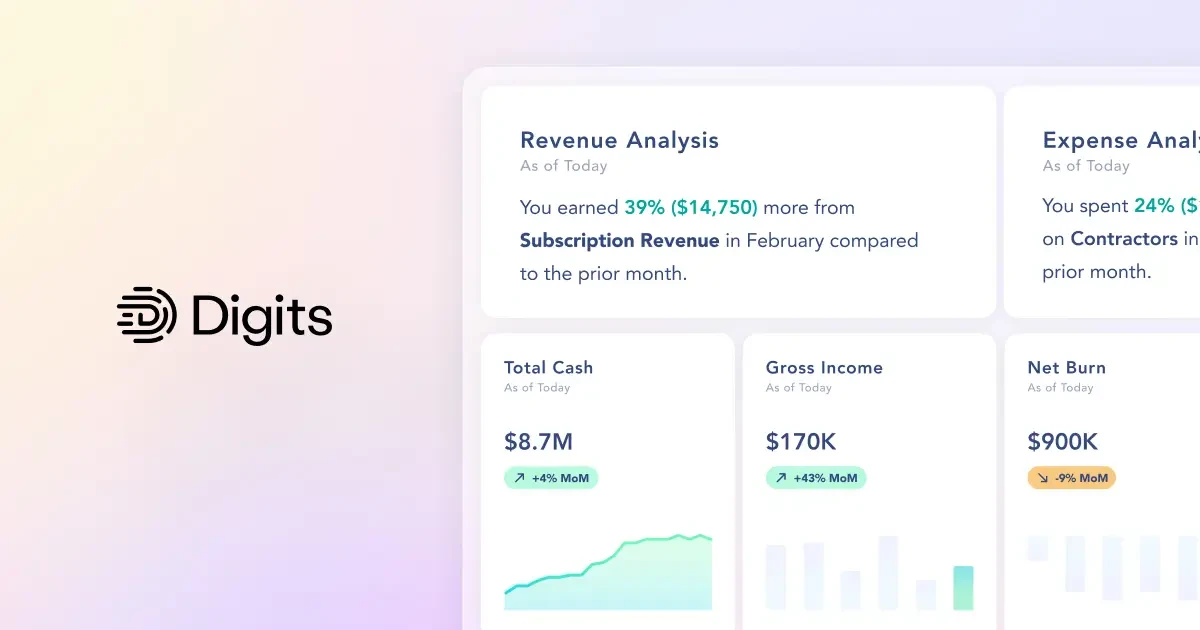
Digits is a robust AI-native accounting software designed specifically for modern finance teams. It builds and updates real-time financial dashboards, prepares statements, and analyzes trends, surfacing deep financial insights. This SaaS solution uniquely addresses the needs of the industry by automating complex bookkeeping tasks, making financial management efficient and seamless.
Best for Cloud Bookkeeping Platforms with Built-In Financial Dashboards
Expert Take
Digits AI-Native Accounting excels in providing AI-powered financial insights and real-time dashboards, making it a top choice for modern finance teams. Its capabilities in automating complex bookkeeping tasks and delivering deep trend analysis position it as a leader in its category. However, limited integration options and a higher price point for advanced features present minor tradeoffs.
Pros
- Autonomous General Ledger automates bookkeeping
- SOC 2 Type II security compliance
- Real-time financial dashboards and insights
- Backed by Benchmark and SoftBank
- Magical, intuitive user experience
Cons
- Limited to U.S. entities and USD
- Starting price higher than basic legacy tools
- Smaller app ecosystem than QuickBooks
- Bank feeds rely on aggregators
- No inventory management features yet
Best for teams that are
- Tech-forward startups seeking AI-driven real-time financial dashboards
- Small businesses wanting automated transaction categorization and visual insights
- Founders who prefer visual burn rate and runway metrics over spreadsheets
Skip if
- Businesses with complex inventory, manufacturing, or job costing requirements
- Companies requiring multi-currency support or non-US bank integrations
- Users needing a traditional, manual double-entry bookkeeping interface
Best for teams that are
- Tech-forward startups seeking AI-driven real-time financial dashboards
- Small businesses wanting automated transaction categorization and visual insights
- Founders who prefer visual burn rate and runway metrics over spreadsheets
Skip if
- Businesses with complex inventory, manufacturing, or job costing requirements
- Companies requiring multi-currency support or non-US bank integrations
- Users needing a traditional, manual double-entry bookkeeping interface
Pros
- Autonomous General Ledger automates bookkeeping
- SOC 2 Type II security compliance
- Real-time financial dashboards and insights
- Backed by Benchmark and SoftBank
- Magical, intuitive user experience
Cons
- Limited to U.S. entities and USD
- Starting price higher than basic legacy tools
- Smaller app ecosystem than QuickBooks
- Bank feeds rely on aggregators
- No inventory management features yet
Expert Take
Digits AI-Native Accounting excels in providing AI-powered financial insights and real-time dashboards, making it a top choice for modern finance teams. Its capabilities in automating complex bookkeeping tasks and delivering deep trend analysis position it as a leader in its category. However, limited integration options and a higher price point for advanced features present minor tradeoffs.

TaxDome is an all-in-one practice management software specifically designed for accounting and bookkeeping firms. It addresses the industry's need for efficient workflow management, with features including tax resolution, CRM, billing, and client portals. Its secure document storage and sharing capabilities also address the industry's stringent data security requirements.
Best for Cloud Bookkeeping Platforms for Agencies and Services Firms
Expert Take
TaxDome excels as a comprehensive practice management software for accounting firms, offering robust workflow management and secure document handling. It is recognized for its extensive feature set and user-friendly interface, making it a top choice for professionals in the industry.
Pros
- All-in-one platform replacing multiple apps
- Unlimited document storage and e-signatures
- SOC 2 Type II security certified
- Robust workflow automation capabilities
- Highly rated mobile app for clients
Cons
- Steep learning curve for setup
- Annual contract commitment required
- Additional fees for KBA and SMS
- Email integration has limitations
- Mixed reviews on support responsiveness
Best for teams that are
- CPA firms, tax professionals, and bookkeepers managing multiple clients
- Practices wanting an all-in-one portal for docs, signatures, and CRM
- Firms looking to automate client intake and workflow management
Skip if
- General small business owners looking for bookkeeping software
- Firms preferring separate, specialized tools over an all-in-one suite
- Solo practitioners who find extensive customization setup daunting
Best for teams that are
- CPA firms, tax professionals, and bookkeepers managing multiple clients
- Practices wanting an all-in-one portal for docs, signatures, and CRM
- Firms looking to automate client intake and workflow management
Skip if
- General small business owners looking for bookkeeping software
- Firms preferring separate, specialized tools over an all-in-one suite
- Solo practitioners who find extensive customization setup daunting
Pros
- All-in-one platform replacing multiple apps
- Unlimited document storage and e-signatures
- SOC 2 Type II security certified
- Robust workflow automation capabilities
- Highly rated mobile app for clients
Cons
- Steep learning curve for setup
- Annual contract commitment required
- Additional fees for KBA and SMS
- Email integration has limitations
- Mixed reviews on support responsiveness
Expert Take
TaxDome excels as a comprehensive practice management software for accounting firms, offering robust workflow management and secure document handling. It is recognized for its extensive feature set and user-friendly interface, making it a top choice for professionals in the industry.
Bill.com Financial Operations Platform
Best for Cloud Bookkeeping Platforms for Agencies and Services Firms

Bill.com is an AI-enhanced financial operations platform that automates bookkeeping tasks, supports client bill pay, and offers spend and expense management services. It's specifically designed for agencies and service firms that need comprehensive, cloud-based financial management tools.
Best for Cloud Bookkeeping Platforms for Agencies and Services Firms
Expert Take
Bill.com excels in automating financial operations for agencies and service firms, providing AI-enhanced services and customizable workflows. Its credibility is supported by industry recognition and robust integrations, though international functionality is limited. Overall, it stands out as a comprehensive solution in its category.
Pros
- Comprehensive AP, AR, and Spend management
- Strong 2-way sync with major ERPs
- SOC 2, PCI, and HIPAA compliant
- Large network of 7.1M+ members
- AI-driven invoice data capture
Cons
- Per-transaction fees add to costs
- Reports of unresponsive customer support
- Complaints of account freezes/held funds
- International wires have high fees
- Sync errors may require support intervention
Best for teams that are
- Businesses with high volumes of accounts payable and receivable
- Finance teams needing strict approval workflows and audit trails
- Companies integrating AP automation with QuickBooks, NetSuite, or Intacct
Skip if
- Businesses looking for a full, standalone general ledger system
- Low-volume users where subscription costs outweigh automation benefits
- Sole proprietors with very simple expense management needs
Best for teams that are
- Businesses with high volumes of accounts payable and receivable
- Finance teams needing strict approval workflows and audit trails
- Companies integrating AP automation with QuickBooks, NetSuite, or Intacct
Skip if
- Businesses looking for a full, standalone general ledger system
- Low-volume users where subscription costs outweigh automation benefits
- Sole proprietors with very simple expense management needs
Pros
- Comprehensive AP, AR, and Spend management
- Strong 2-way sync with major ERPs
- SOC 2, PCI, and HIPAA compliant
- Large network of 7.1M+ members
- AI-driven invoice data capture
Cons
- Per-transaction fees add to costs
- Reports of unresponsive customer support
- Complaints of account freezes/held funds
- International wires have high fees
- Sync errors may require support intervention
Expert Take
Bill.com excels in automating financial operations for agencies and service firms, providing AI-enhanced services and customizable workflows. Its credibility is supported by industry recognition and robust integrations, though international functionality is limited. Overall, it stands out as a comprehensive solution in its category.
TenantCloud: Property Management
Best for Cloud Bookkeeping Platforms for Real Estate Investors and Landlords
TenantCloud is a purpose-built property management software that allows landlords and real estate investors to efficiently collect rent, track late fees, and generate income reports. It addresses the needs of the industry by providing a centralized, cloud-based solution that automates many of the time-consuming property management tasks.
Best for Cloud Bookkeeping Platforms for Real Estate Investors and Landlords
Expert Take
Our analysis shows TenantCloud offers exceptional value for landlords who need to manage unlimited units without per-unit pricing, a rarity in the SaaS property management space. Research indicates the platform stands out with its dedicated portals for service professionals and owners, creating a cohesive ecosystem for property operations. Based on documented features, the integration with Snappt for fraud detection and QuickBooks Online for accounting (on the Pro plan) makes it a powerful tool for growing portfolios that need enterprise-grade capabilities at a competitive price point.
Pros
- Unlimited units on all plans
- QuickBooks Online sync (Pro plan)
- Snappt fraud detection integration
- Separate Owner & Tenant portals
- Mobile apps for all users
Cons
- Strict lease limits (10/30) on lower tiers
- Mandatory applicant fees on Starter plan
- Phone support only on Pro plan
- QuickBooks sync gated to Pro plan
- Limited report customization on Starter
Best for teams that are
- DIY landlords and small property managers on a budget
- Users managing 10-50 units needing rent collection and leasing tools
- Landlords wanting an affordable all-in-one management solution
Skip if
- Large enterprise firms managing hundreds of units
- Users requiring advanced custom financial reporting
- Those needing high-level automation or dedicated account management
Best for teams that are
- DIY landlords and small property managers on a budget
- Users managing 10-50 units needing rent collection and leasing tools
- Landlords wanting an affordable all-in-one management solution
Skip if
- Large enterprise firms managing hundreds of units
- Users requiring advanced custom financial reporting
- Those needing high-level automation or dedicated account management
Pros
- Unlimited units on all plans
- QuickBooks Online sync (Pro plan)
- Snappt fraud detection integration
- Separate Owner & Tenant portals
- Mobile apps for all users
Cons
- Strict lease limits (10/30) on lower tiers
- Mandatory applicant fees on Starter plan
- Phone support only on Pro plan
- QuickBooks sync gated to Pro plan
- Limited report customization on Starter
Expert Take
Our analysis shows TenantCloud offers exceptional value for landlords who need to manage unlimited units without per-unit pricing, a rarity in the SaaS property management space. Research indicates the platform stands out with its dedicated portals for service professionals and owners, creating a cohesive ecosystem for property operations. Based on documented features, the integration with Snappt for fraud detection and QuickBooks Online for accounting (on the Pro plan) makes it a powerful tool for growing portfolios that need enterprise-grade capabilities at a competitive price point.
AccountsIQ Financial Management Software
Best for Cloud Bookkeeping Platforms for Multi-Entity Organizations

AccountsIQ is uniquely designed for multi-entity organizations such as franchises, trusts, or non-profits, offering an advanced cloud-based bookkeeping platform. It provides automation for manual data entry and one-click consolidation of multi-entity accounts, optimizing transparency and control, features that are crucial in this industry.
Best for Cloud Bookkeeping Platforms for Multi-Entity Organizations
Expert Take
AccountsIQ excels in providing advanced features tailored for multi-entity organizations, such as one-click consolidation and automation, which are critical in this niche. The product is well-regarded for its integration capabilities and customizable reporting, though it lacks public pricing information and may require training for optimal use.
Pros
- One-click multi-entity consolidation
- ISO 27001 certified security
- Deep 6-dimension BI coding
- Average support response 27 mins
- Significantly cheaper than NetSuite
Cons
- Single-window interface limitation
- Reports often require customization
- Data overwrite issues reported
- Significant price jump to Growth tier
- No native payroll (requires integration)
Best for teams that are
- Mid-sized groups outgrowing Xero/QuickBooks but avoiding NetSuite's cost
- Multi-entity organizations needing automated consolidation and BI
- Finance teams wanting granular reporting without full ERP complexity
Skip if
- Micro-businesses or freelancers with simple single-entity structures
- Large enterprises requiring a full-suite ERP beyond financial management
- Users looking for a free or very low-cost entry-level solution
Best for teams that are
- Mid-sized groups outgrowing Xero/QuickBooks but avoiding NetSuite's cost
- Multi-entity organizations needing automated consolidation and BI
- Finance teams wanting granular reporting without full ERP complexity
Skip if
- Micro-businesses or freelancers with simple single-entity structures
- Large enterprises requiring a full-suite ERP beyond financial management
- Users looking for a free or very low-cost entry-level solution
Pros
- One-click multi-entity consolidation
- ISO 27001 certified security
- Deep 6-dimension BI coding
- Average support response 27 mins
- Significantly cheaper than NetSuite
Cons
- Single-window interface limitation
- Reports often require customization
- Data overwrite issues reported
- Significant price jump to Growth tier
- No native payroll (requires integration)
Expert Take
AccountsIQ excels in providing advanced features tailored for multi-entity organizations, such as one-click consolidation and automation, which are critical in this niche. The product is well-regarded for its integration capabilities and customizable reporting, though it lacks public pricing information and may require training for optimal use.
REI Hub Rental Accounting
Best for Cloud Bookkeeping Platforms for Real Estate Investors and Landlords

REI Hub fills a niche in the market by being tailored specifically for rental property accounting, catering to the needs of small landlords. Its easy setup and industry-specific functionalities make it an ideal choice for managing the unique financial complexities of real estate investments.
Best for Cloud Bookkeeping Platforms for Real Estate Investors and Landlords
Expert Take
Our analysis shows REI Hub stands out as a dedicated double-entry accounting solution specifically for real estate, bridging the gap between simple spreadsheets and complex generalist tools like QuickBooks. Research indicates it offers specialized features like fixed asset tracking and automatic Schedule E generation that many free competitors lack. Based on documented integrations, it seamlessly pairs with property management platforms like TurboTenant, allowing investors to separate professional-grade bookkeeping from operations.
Pros
- True double-entry accounting system
- Automated Schedule E tax reports
- Fixed asset and depreciation tracking
- Integrates with TurboTenant and RentRedi
- Cheaper than QuickBooks for landlords
Cons
- Mobile app has limited functionality
- No built-in rent collection features
- Monthly subscription (competitors offer free plans)
- Bank feeds may require manual refreshing
- No tenant screening or leasing tools
Best for teams that are
- Real estate investors requiring accurate double-entry accounting
- Owners of mixed portfolios (long-term and short-term rentals)
- TurboTenant users wanting integrated, property-specific bookkeeping
Skip if
- Landlords seeking a free software solution
- Users needing standalone property management features like maintenance
- Those looking for a general business accounting tool
Best for teams that are
- Real estate investors requiring accurate double-entry accounting
- Owners of mixed portfolios (long-term and short-term rentals)
- TurboTenant users wanting integrated, property-specific bookkeeping
Skip if
- Landlords seeking a free software solution
- Users needing standalone property management features like maintenance
- Those looking for a general business accounting tool
Pros
- True double-entry accounting system
- Automated Schedule E tax reports
- Fixed asset and depreciation tracking
- Integrates with TurboTenant and RentRedi
- Cheaper than QuickBooks for landlords
Cons
- Mobile app has limited functionality
- No built-in rent collection features
- Monthly subscription (competitors offer free plans)
- Bank feeds may require manual refreshing
- No tenant screening or leasing tools
Expert Take
Our analysis shows REI Hub stands out as a dedicated double-entry accounting solution specifically for real estate, bridging the gap between simple spreadsheets and complex generalist tools like QuickBooks. Research indicates it offers specialized features like fixed asset tracking and automatic Schedule E generation that many free competitors lack. Based on documented integrations, it seamlessly pairs with property management platforms like TurboTenant, allowing investors to separate professional-grade bookkeeping from operations.
Dext Multi-Entity Bookkeeping
Best for Cloud Bookkeeping Platforms for Multi-Entity Organizations
Dext is a robust cloud-based bookkeeping platform designed specifically for multi-entity businesses and franchises. It offers the ability to capture, categorize, and automate receipts and invoices across various industries, locations, and subsidiaries, addressing the complex accounting needs of these organizations.
Best for Cloud Bookkeeping Platforms for Multi-Entity Organizations
Expert Take
Dext Multi-Entity Bookkeeping excels in providing comprehensive solutions for multi-entity organizations, with strong capabilities in automation and integration. Its market credibility is supported by industry recognition, and it offers a user-friendly experience despite a potential learning curve for non-accountants.
Pros
- 99% OCR accuracy for data extraction
- Unified dashboard for multiple entities
- Integrates with 11,500+ financial institutions
- Award-winning Xero and QuickBooks integration
- Mobile app allows on-the-go receipt capture
Cons
- Bespoke pricing for multi-entity is opaque
- Reports of steep annual price hikes
- No customer support available on weekends
- Cancellation process can be difficult
- Fetch connections may break with 2FA
Best for teams that are
- Franchises needing centralized expense data capture across locations
- Firms wanting to automate receipt collection into a main General Ledger
- Bookkeepers managing high-volume expense data for multiple clients
Skip if
- Businesses seeking a standalone General Ledger (this is a data capture tool)
- Low-volume businesses where manual data entry is cost-effective
- Users needing full financial reporting and forecasting features
Best for teams that are
- Franchises needing centralized expense data capture across locations
- Firms wanting to automate receipt collection into a main General Ledger
- Bookkeepers managing high-volume expense data for multiple clients
Skip if
- Businesses seeking a standalone General Ledger (this is a data capture tool)
- Low-volume businesses where manual data entry is cost-effective
- Users needing full financial reporting and forecasting features
Pros
- 99% OCR accuracy for data extraction
- Unified dashboard for multiple entities
- Integrates with 11,500+ financial institutions
- Award-winning Xero and QuickBooks integration
- Mobile app allows on-the-go receipt capture
Cons
- Bespoke pricing for multi-entity is opaque
- Reports of steep annual price hikes
- No customer support available on weekends
- Cancellation process can be difficult
- Fetch connections may break with 2FA
Expert Take
Dext Multi-Entity Bookkeeping excels in providing comprehensive solutions for multi-entity organizations, with strong capabilities in automation and integration. Its market credibility is supported by industry recognition, and it offers a user-friendly experience despite a potential learning curve for non-accountants.
Explore Categories
- Cloud Bookkeeping Platforms for Agencies and Services Firms
- Cloud Bookkeeping Platforms for Multi-Entity Organizations
- Cloud Bookkeeping Platforms for Nonprofits and Associations
- Cloud Bookkeeping Platforms for Real Estate Investors and Landlords
- Cloud Bookkeeping Platforms with Built-In Financial Dashboards