
Requirements Management & Spec Tools
These are the specialized categories within Requirements Management & Spec Tools. Looking for something broader? See all Project Management & Productivity Tools categories.

How big is your team?
What's your budget situation?
What's your team's technical comfort level?
What's the ONE thing this tool must do well?
CoLab's CAD Collaboration Tool
Best for Product Spec Tools with Design and Engineering Collaboration

CoLab's CAD Collaboration tool is a SaaS solution specifically designed for mechanical engineers and product designers. It streamlines the process of sharing, viewing, and commenting on 2D and 3D CAD models, thus accelerating product development and reducing mistakes.
Best for Product Spec Tools with Design and Engineering Collaboration
Expert Take
CoLab's CAD Collaboration Tool excels in providing specialized features for mechanical engineers, enhancing collaboration and reducing errors in product development. It is recognized for its integration capabilities and usability, although it requires internet connectivity and may have a higher price point for small businesses.
Pros
- Browser-based 3D viewing (no install)
- SOC 2 Type 2 & ISO 27001 certified
- Integrates with Windchill, Teamcenter & 3DX
- AI AutoReview checks for design errors
- Supports 30+ native CAD formats
Cons
- No public pricing available
- Can be expensive for mid-sized teams
- Low volume of public user reviews
- Requires internet connection (Cloud-based)
- No free tier for small teams
Best for teams that are
- Mechanical engineering teams needing streamlined, trackable 3D design reviews
- Enterprises using PLM but struggling with effective design feedback loops
- Complex hardware product teams requiring secure supplier collaboration
Skip if
- Software development teams looking for code review tools
- Small hobbyists or those seeking a free, simple CAD viewer
- Teams looking to replace their core PLM system entirely
Best for teams that are
- Mechanical engineering teams needing streamlined, trackable 3D design reviews
- Enterprises using PLM but struggling with effective design feedback loops
- Complex hardware product teams requiring secure supplier collaboration
Skip if
- Software development teams looking for code review tools
- Small hobbyists or those seeking a free, simple CAD viewer
- Teams looking to replace their core PLM system entirely
Pros
- Browser-based 3D viewing (no install)
- SOC 2 Type 2 & ISO 27001 certified
- Integrates with Windchill, Teamcenter & 3DX
- AI AutoReview checks for design errors
- Supports 30+ native CAD formats
Cons
- No public pricing available
- Can be expensive for mid-sized teams
- Low volume of public user reviews
- Requires internet connection (Cloud-based)
- No free tier for small teams
Expert Take
CoLab's CAD Collaboration Tool excels in providing specialized features for mechanical engineers, enhancing collaboration and reducing errors in product development. It is recognized for its integration capabilities and usability, although it requires internet connectivity and may have a higher price point for small businesses.
3DS Collaborative Design & Engineering
Best for Product Spec Tools with Design and Engineering Collaboration
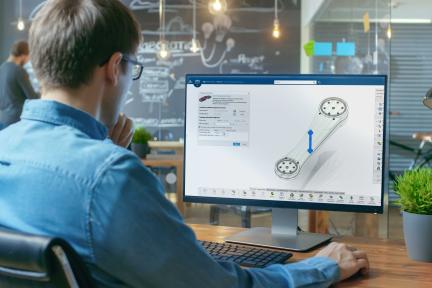
The 3DS Collaborative Design & Engineering for Manufacturing is a cloud-based software for enhancing collaboration across enterprises. Its focus on concurrent engineering and access to product models caters specifically to the manufacturing industry, helping professionals to better understand product specifications, thereby increasing efficiency and reducing errors.
Best for Product Spec Tools with Design and Engineering Collaboration
Expert Take
3DS Collaborative Design & Engineering excels in providing a comprehensive platform for manufacturing collaboration, with strong capabilities in concurrent engineering and product modeling. It demonstrates high usability and value, although it requires training and is dependent on internet connectivity. Its market credibility is supported by its industry-specific focus and cloud-based architecture.
Pros
- Seamless integration with SOLIDWORKS and CATIA
- Cloud-based Model-Based Definition (MBD) support
- ISO 27001 and 27701 security certified
- Real-time concurrent design collaboration
- No server hardware installation required
Cons
- Steep learning curve and complex UI
- Cloud latency and performance issues
- Public cloud is not ITAR compliant
- Complex role-based licensing structure
- Requires constant internet for cloud features
Best for teams that are
- Large enterprises in aerospace/auto requiring end-to-end lifecycle management
- Teams needing deep integration of CAD, simulation, and manufacturing data
- Organizations managing complex multi-disciplinary systems
Skip if
- Small businesses seeking a lightweight, low-cost design tool
- Users with unreliable internet access due to heavy cloud dependency
- Teams needing only simple 2D drafting capabilities
Best for teams that are
- Large enterprises in aerospace/auto requiring end-to-end lifecycle management
- Teams needing deep integration of CAD, simulation, and manufacturing data
- Organizations managing complex multi-disciplinary systems
Skip if
- Small businesses seeking a lightweight, low-cost design tool
- Users with unreliable internet access due to heavy cloud dependency
- Teams needing only simple 2D drafting capabilities
Pros
- Seamless integration with SOLIDWORKS and CATIA
- Cloud-based Model-Based Definition (MBD) support
- ISO 27001 and 27701 security certified
- Real-time concurrent design collaboration
- No server hardware installation required
Cons
- Steep learning curve and complex UI
- Cloud latency and performance issues
- Public cloud is not ITAR compliant
- Complex role-based licensing structure
- Requires constant internet for cloud features
Expert Take
3DS Collaborative Design & Engineering excels in providing a comprehensive platform for manufacturing collaboration, with strong capabilities in concurrent engineering and product modeling. It demonstrates high usability and value, although it requires training and is dependent on internet connectivity. Its market credibility is supported by its industry-specific focus and cloud-based architecture.
Perforce ALM is an advanced solution designed for enterprise product managers and developers. It provides robust requirement tracking, centralized management, and detailed impact analysis capabilities, addressing the need for comprehensive traceability and control over product requirements in complex development environments.
Best for Requirements Management Tools for Enterprise Products
Expert Take
Perforce ALM is recognized for its advanced capabilities in managing complex product requirements, offering centralized management and comprehensive traceability. Despite a complex setup, its features are well-suited for enterprise environments, making it a top choice for professionals handling intricate requirement scenarios.
Pros
- ISO 26262 certified for functional safety
- Automated end-to-end traceability matrices
- Strong support for medical/automotive compliance
- Suspect item flagging for change management
- Decomposes complex requirements hierarchically
Cons
- Steep learning curve for new users
- Web client lacks full desktop parity
- Interface described as dated and clunky
- Expensive licensing for large teams
- Configuration can be complex and time-consuming
Best for teams that are
- Regulated industries like medical devices requiring FDA compliance
- Teams needing modular ALM to manage requirements, tests, and issues
- Organizations requiring strong traceability and audit trails
Skip if
- Small teams with limited budgets due to high licensing costs
- Users wanting a modern, intuitive UI (interface is often seen as dated)
- Teams needing a simple, lightweight project management tool
Best for teams that are
- Regulated industries like medical devices requiring FDA compliance
- Teams needing modular ALM to manage requirements, tests, and issues
- Organizations requiring strong traceability and audit trails
Skip if
- Small teams with limited budgets due to high licensing costs
- Users wanting a modern, intuitive UI (interface is often seen as dated)
- Teams needing a simple, lightweight project management tool
Pros
- ISO 26262 certified for functional safety
- Automated end-to-end traceability matrices
- Strong support for medical/automotive compliance
- Suspect item flagging for change management
- Decomposes complex requirements hierarchically
Cons
- Steep learning curve for new users
- Web client lacks full desktop parity
- Interface described as dated and clunky
- Expensive licensing for large teams
- Configuration can be complex and time-consuming
Expert Take
Perforce ALM is recognized for its advanced capabilities in managing complex product requirements, offering centralized management and comprehensive traceability. Despite a complex setup, its features are well-suited for enterprise environments, making it a top choice for professionals handling intricate requirement scenarios.
Modern Requirements is a powerful requirements management solution designed specifically for complex software development projects. It is seamlessly integrated with Azure DevOps, making it a perfect fit for enterprises that rely on Microsoft's suite of development tools.
Best for Requirements Management Tools for Enterprise Products
Expert Take
Modern Requirements stands out as a leading solution in the requirements management space, particularly for enterprises utilizing Azure DevOps. Its deep integration with Microsoft's tools, combined with robust management capabilities, positions it as a top choice for complex software projects. While it may be less suitable for non-Microsoft ecosystems, its strengths in its niche are well-documented.
Pros
- Native Azure DevOps integration
- Free Stakeholder licenses for reviews
- AI-powered requirements elicitation
- FDA & ISO compliance support
- Automated traceability matrices
Cons
- Requires Azure DevOps to function
- Steep learning curve for small teams
- Diagramming tool reported as glitchy
- Pricing requires custom quote
- Over-complex for simple projects
Best for teams that are
- Development teams already embedded in the Azure DevOps ecosystem
- Regulated industries (healthcare, banking) needing compliance within ADO
- Teams wanting to transform Azure DevOps into a full ALM solution
Skip if
- Organizations that do not use Azure DevOps as their primary platform
- Small, simple projects where advanced compliance features are overkill
- Teams needing a standalone tool independent of Microsoft's stack
Best for teams that are
- Development teams already embedded in the Azure DevOps ecosystem
- Regulated industries (healthcare, banking) needing compliance within ADO
- Teams wanting to transform Azure DevOps into a full ALM solution
Skip if
- Organizations that do not use Azure DevOps as their primary platform
- Small, simple projects where advanced compliance features are overkill
- Teams needing a standalone tool independent of Microsoft's stack
Pros
- Native Azure DevOps integration
- Free Stakeholder licenses for reviews
- AI-powered requirements elicitation
- FDA & ISO compliance support
- Automated traceability matrices
Cons
- Requires Azure DevOps to function
- Steep learning curve for small teams
- Diagramming tool reported as glitchy
- Pricing requires custom quote
- Over-complex for simple projects
Expert Take
Modern Requirements stands out as a leading solution in the requirements management space, particularly for enterprises utilizing Azure DevOps. Its deep integration with Microsoft's tools, combined with robust management capabilities, positions it as a top choice for complex software projects. While it may be less suitable for non-Microsoft ecosystems, its strengths in its niche are well-documented.

Flow is a requirements tool meticulously designed for modern engineering teams. It offers a more streamlined, efficient approach to managing requirements, allowing teams to focus on engineering instead of tedious administrative tasks. It addresses the specific needs of agile teams in the enterprise product development industry by providing a simple, user-friendly interface and robust tracking systems.
Best for Requirements Management Tools for Enterprise Products
Expert Take
Flow is a specialized requirements management tool designed for agile teams in enterprise product development. It excels in usability and product capability, offering a streamlined interface and robust tracking systems. While pricing transparency is limited due to enterprise pricing models, its market credibility is supported by industry-specific features and third-party validations.
Pros
- Live V&V tracking linked to CAD/Code
- Modern, intuitive UI (vs legacy tools)
- Full ITAR & GovCloud compliance
- Transparent pricing model
- AI-native requirements analysis
Cons
- Major CAD integrations coming soon
- Basic plan limited to 1 project
- High per-user cost ($150+)
- Occasional bugs (new software)
- Less ecosystem maturity than DOORS
Best for teams that are
- Agile hardware and systems engineering teams (space, defense, robotics)
- Teams needing fast, iterative requirements management linked to design
- Organizations moving away from clunky, document-centric legacy tools
Skip if
- Pure software development teams (better served by Jira or Storywise)
- Teams preferring rigid, traditional document-based compliance workflows
- Non-technical business users needing simple project management
Best for teams that are
- Agile hardware and systems engineering teams (space, defense, robotics)
- Teams needing fast, iterative requirements management linked to design
- Organizations moving away from clunky, document-centric legacy tools
Skip if
- Pure software development teams (better served by Jira or Storywise)
- Teams preferring rigid, traditional document-based compliance workflows
- Non-technical business users needing simple project management
Pros
- Live V&V tracking linked to CAD/Code
- Modern, intuitive UI (vs legacy tools)
- Full ITAR & GovCloud compliance
- Transparent pricing model
- AI-native requirements analysis
Cons
- Major CAD integrations coming soon
- Basic plan limited to 1 project
- High per-user cost ($150+)
- Occasional bugs (new software)
- Less ecosystem maturity than DOORS
Expert Take
Flow is a specialized requirements management tool designed for agile teams in enterprise product development. It excels in usability and product capability, offering a streamlined interface and robust tracking systems. While pricing transparency is limited due to enterprise pricing models, its market credibility is supported by industry-specific features and third-party validations.

ReqView is a tailored solution for HW/SW engineers, offering robust features to manage requirements, risks, and tests based on the V-Model. Its integration with Git for version control makes it an ideal choice for this industry, providing seamless, efficient versioning and collaboration.
Best for Requirements Tools Integrated with Issue Tracking
Expert Take
ReqView stands out as a specialized tool for HW/SW engineers, offering robust features for managing requirements, risks, and tests. Its integration with Git enhances collaboration and version control, making it a strong choice for engineering teams. While it requires technical proficiency, its alignment with industry standards like the V-Model and flexible pricing options contribute to its premium positioning.
Pros
- Offline-first architecture ensures high security
- Native Git and SVN integration
- Transparent and affordable pricing model
- Supports ISO 26262 and DO-178C
- Fast, lightweight tabular interface
Cons
- No real-time co-authoring (file locking)
- Limited third-party integrations vs ALMs
- Web app has fewer features than desktop
- Reporting customization requires technical skill
- Modeling features less robust than MBSE tools
Best for teams that are
- Regulated industries (medical, automotive) needing strict compliance (ISO 26262)
- Teams preferring offline, file-based storage with Git/SVN integration
- Small to mid-sized engineering teams wanting a cost-effective DOORS alternative
Skip if
- Large teams needing simultaneous real-time cloud collaboration on single docs
- Projects requiring advanced system simulation or dynamic modeling
- Users seeking a purely browser-based tool without local installation
Best for teams that are
- Regulated industries (medical, automotive) needing strict compliance (ISO 26262)
- Teams preferring offline, file-based storage with Git/SVN integration
- Small to mid-sized engineering teams wanting a cost-effective DOORS alternative
Skip if
- Large teams needing simultaneous real-time cloud collaboration on single docs
- Projects requiring advanced system simulation or dynamic modeling
- Users seeking a purely browser-based tool without local installation
Pros
- Offline-first architecture ensures high security
- Native Git and SVN integration
- Transparent and affordable pricing model
- Supports ISO 26262 and DO-178C
- Fast, lightweight tabular interface
Cons
- No real-time co-authoring (file locking)
- Limited third-party integrations vs ALMs
- Web app has fewer features than desktop
- Reporting customization requires technical skill
- Modeling features less robust than MBSE tools
Expert Take
ReqView stands out as a specialized tool for HW/SW engineers, offering robust features for managing requirements, risks, and tests. Its integration with Git enhances collaboration and version control, making it a strong choice for engineering teams. While it requires technical proficiency, its alignment with industry standards like the V-Model and flexible pricing options contribute to its premium positioning.
Enterprise Architect Requirements Tool
Best for Requirements Management Tools for Enterprise Products

Enterprise Architect offers an advanced requirements management solution that addresses complex enterprise-level needs. Its capabilities such as baselining, nesting, traceability, comprehensive reporting, and graphical management enable efficient handling of intricate requirements, making it an indispensable tool for industry professionals dealing with large-scale, multifaceted projects.
Best for Requirements Management Tools for Enterprise Products
Expert Take
Enterprise Architect excels in managing complex requirements for large-scale projects, offering advanced features like baselining and traceability. Its comprehensive capabilities and industry recognition make it a top choice for enterprise-level requirements management.
Pros
- Extremely affordable compared to competitors
- Leader in Gartner Magic Quadrant
- Full traceability from requirements to code
- Supports 80+ industry modeling standards
- ISO 27001 and SOC 2 certified
Cons
- Steep learning curve for new users
- User interface feels dated and complex
- Not ideal for unstructured requirements
- Setup for cloud collaboration can be complex
- Performance lag with large shared models
Best for teams that are
- Systems engineers and architects heavily using UML, SysML, or BPMN
- Large organizations requiring complex enterprise architecture modeling
- Teams needing to integrate requirements directly into visual models
Skip if
- Non-technical business analysts due to a steep learning curve
- Teams needing simple, intuitive requirements management
- Users wanting a modern, web-first collaboration experience
Best for teams that are
- Systems engineers and architects heavily using UML, SysML, or BPMN
- Large organizations requiring complex enterprise architecture modeling
- Teams needing to integrate requirements directly into visual models
Skip if
- Non-technical business analysts due to a steep learning curve
- Teams needing simple, intuitive requirements management
- Users wanting a modern, web-first collaboration experience
Pros
- Extremely affordable compared to competitors
- Leader in Gartner Magic Quadrant
- Full traceability from requirements to code
- Supports 80+ industry modeling standards
- ISO 27001 and SOC 2 certified
Cons
- Steep learning curve for new users
- User interface feels dated and complex
- Not ideal for unstructured requirements
- Setup for cloud collaboration can be complex
- Performance lag with large shared models
Expert Take
Enterprise Architect excels in managing complex requirements for large-scale projects, offering advanced features like baselining and traceability. Its comprehensive capabilities and industry recognition make it a top choice for enterprise-level requirements management.

Appian's Requirements Management solution is specifically designed for the public sector to modernize and streamline their requirements, through quick and efficient development of requirement packages and automatic generation of RFIs. Its emphasis on enhancing communication and collaboration aligns perfectly with the needs of a sector that values transparency and teamwork.
Best for Requirements Management Tools for Enterprise Products
Expert Take
Appian Requirements Management is a specialized tool for the public sector, offering unique capabilities like automated RFI generation and quick requirement package development. Its focus on enhancing communication and collaboration makes it a valuable asset for enterprises seeking efficiency and transparency in requirements management.
Pros
- FedRAMP High & DoD IL5 authorized
- AI-driven requirements writing assistance
- Data Fabric unifies legacy systems
- Reduces Procurement Action Lead Time
- Wizard-driven compliance checklists
Cons
- High licensing & support costs
- Steep learning curve for advanced features
- Reporting interface can be non-intuitive
- Requires resources to scale effectively
- Pricing is not publicly transparent
Best for teams that are
- Government agencies and public sector organizations
- Procurement teams managing complex acquisition lifecycles
- Organizations needing to comply with Federal Acquisition Regulations
Skip if
- Product engineering teams developing hardware or software
- Private sector product development (focused on federal acquisition)
- Teams needing technical requirements traceability (e.g., code/tests)
Best for teams that are
- Government agencies and public sector organizations
- Procurement teams managing complex acquisition lifecycles
- Organizations needing to comply with Federal Acquisition Regulations
Skip if
- Product engineering teams developing hardware or software
- Private sector product development (focused on federal acquisition)
- Teams needing technical requirements traceability (e.g., code/tests)
Pros
- FedRAMP High & DoD IL5 authorized
- AI-driven requirements writing assistance
- Data Fabric unifies legacy systems
- Reduces Procurement Action Lead Time
- Wizard-driven compliance checklists
Cons
- High licensing & support costs
- Steep learning curve for advanced features
- Reporting interface can be non-intuitive
- Requires resources to scale effectively
- Pricing is not publicly transparent
Expert Take
Appian Requirements Management is a specialized tool for the public sector, offering unique capabilities like automated RFI generation and quick requirement package development. Its focus on enhancing communication and collaboration makes it a valuable asset for enterprises seeking efficiency and transparency in requirements management.

Figma is a robust SaaS solution designed for professionals in design and engineering industries. It provides essential tools to design, prototype, and build products in a collaborative environment that speeds up feedback and iteration cycles. This streamlines the process of product development, making it faster and more efficient.
Best for Product Spec Tools with Design and Engineering Collaboration
Expert Take
Figma is a leading tool in the design and engineering collaboration space, offering robust capabilities for real-time collaboration and prototyping. Its extensive integration ecosystem and user-friendly interface make it a preferred choice for professionals, despite some limitations in offline functionality.
Pros
- Real-time multiplayer collaboration
- Browser-based with no installation required
- Massive community plugin ecosystem
- Industry-standard for UI/UX design
- Enterprise-grade security (SOC 2, ISO)
Cons
- 2GB active memory limit per tab
- Limited offline capabilities
- No native CMYK print support
- Price increase for professional plans
- Steep learning curve for advanced features
Best for teams that are
- UI/UX designers building websites, apps, and digital interfaces
- Teams requiring real-time, multiplayer collaboration on visual designs
- Product managers and developers needing quick access to prototypes
Skip if
- Print designers requiring native CMYK support and print output controls
- Mechanical engineers needing 3D parametric modeling for manufacturing
- Users requiring a fully offline workflow without internet access
Best for teams that are
- UI/UX designers building websites, apps, and digital interfaces
- Teams requiring real-time, multiplayer collaboration on visual designs
- Product managers and developers needing quick access to prototypes
Skip if
- Print designers requiring native CMYK support and print output controls
- Mechanical engineers needing 3D parametric modeling for manufacturing
- Users requiring a fully offline workflow without internet access
Pros
- Real-time multiplayer collaboration
- Browser-based with no installation required
- Massive community plugin ecosystem
- Industry-standard for UI/UX design
- Enterprise-grade security (SOC 2, ISO)
Cons
- 2GB active memory limit per tab
- Limited offline capabilities
- No native CMYK print support
- Price increase for professional plans
- Steep learning curve for advanced features
Expert Take
Figma is a leading tool in the design and engineering collaboration space, offering robust capabilities for real-time collaboration and prototyping. Its extensive integration ecosystem and user-friendly interface make it a preferred choice for professionals, despite some limitations in offline functionality.

Siemens Requirement Management software is a powerful tool for managing, linking, and verifying product requirements. This SaaS solution is designed specifically for project managers and enterprise product development teams who need to ensure product compliance and manage project requirements efficiently.
Best for Requirements Management Tools for Enterprise Products
Expert Take
Siemens Requirement Management excels in managing complex product requirements for enterprise-level projects. Its integration with other Siemens software and detailed tracking capabilities make it a standout choice for project managers. While the interface complexity requires training, the software's robust features justify its premium positioning.
Pros
- LiveDocs interface bridges Word and database
- Round-trip import/export for Word/Excel
- Built-in ISO 26262 & DO-178C templates
- Seamless Teamcenter PLM integration
- Granular traceability for compliance audits
Cons
- User interface feels outdated
- Performance lags with large datasets
- Steep learning curve for new users
- Complex initial configuration
- Advanced features require expensive tiers
Best for teams that are
- Large manufacturing enterprises needing deep PLM integration (Teamcenter)
- Complex, safety-critical software and systems development (Polarion)
- Organizations requiring a unified digital thread across the lifecycle
Skip if
- Small teams or startups due to high implementation costs
- Teams not requiring full PLM or ALM ecosystem integration
- Users seeking a lightweight, standalone requirements tool
Best for teams that are
- Large manufacturing enterprises needing deep PLM integration (Teamcenter)
- Complex, safety-critical software and systems development (Polarion)
- Organizations requiring a unified digital thread across the lifecycle
Skip if
- Small teams or startups due to high implementation costs
- Teams not requiring full PLM or ALM ecosystem integration
- Users seeking a lightweight, standalone requirements tool
Pros
- LiveDocs interface bridges Word and database
- Round-trip import/export for Word/Excel
- Built-in ISO 26262 & DO-178C templates
- Seamless Teamcenter PLM integration
- Granular traceability for compliance audits
Cons
- User interface feels outdated
- Performance lags with large datasets
- Steep learning curve for new users
- Complex initial configuration
- Advanced features require expensive tiers
Expert Take
Siemens Requirement Management excels in managing complex product requirements for enterprise-level projects. Its integration with other Siemens software and detailed tracking capabilities make it a standout choice for project managers. While the interface complexity requires training, the software's robust features justify its premium positioning.


Loading comparison data…