Omnichannel Marketing Automation Platforms
These are the specialized categories within Omnichannel Marketing Automation Platforms. Looking for something broader? See all Marketing & Advertising Platforms categories.

What Is Omnichannel Marketing Automation Platforms?
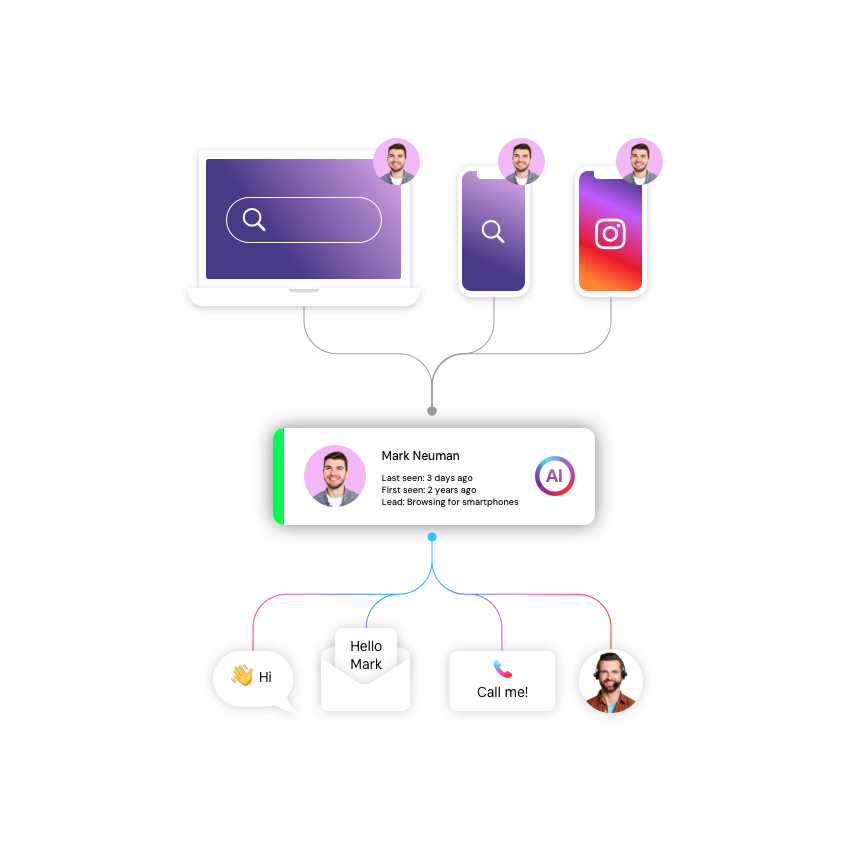
Omnichannel Marketing Automation Platforms are sophisticated software systems designed to orchestrate, execute, and measure customer engagement strategies across all available channels—email, SMS, web, mobile app, social media, and offline touchpoints—from a single, unified interface. Unlike multichannel marketing, which casts a wide net across various platforms that often operate in silos, omnichannel automation relies on a centralized data core to ensure that a customer's interaction in one channel instantly informs the experience in another. If a customer abandons a cart on a mobile app, the platform does not simply send a generic email; it might trigger a push notification if the user is active on their phone or suppress a retargeting ad if the purchase is completed in-store.
This category covers the entire lifecycle of customer engagement, from initial acquisition and lead nurturing to retention, loyalty, and reactivation. It sits squarely between Customer Relationship Management (CRM) systems—which primarily function as the system of record for sales and direct customer interactions—and Enterprise Resource Planning (ERP) systems, which handle back-office inventory and fulfillment. While adjacent to Customer Data Platforms (CDPs), which focus on data unification, Omnichannel Marketing Automation Platforms are distinct in their focus on action and execution. They include both general-purpose platforms suitable for a wide range of B2C and B2B verticals, as well as highly specialized tools purpose-built for regulated industries like healthcare or high-volume sectors like e-commerce.
These platforms matter because they solve the "fragmentation tax" that modern businesses pay when their customer data lives in disconnected tools. For the modern enterprise, they are the central nervous system of the customer experience, translating static data into dynamic, context-aware conversations at scale. Whether used by a boutique retailer or a multinational financial institution, the core promise remains the same: delivering the right message, at the right time, on the right channel, without manual intervention.
History of the Category
The lineage of Omnichannel Marketing Automation can be traced back to the early 1990s, a period characterized by the transition from "spray and pray" mass media to the earliest forms of database marketing. In 1992, Unica was founded, introducing the concept of Enterprise Marketing Management (EMM). At a time when the internet had fewer than 6 million users, Unica (later acquired by IBM) laid the architectural groundwork for managing complex, segment-based campaigns, proving that marketing could be a disciplined, software-driven process rather than just a creative endeavor [1].
The late 1990s and early 2000s marked the "Email Era" and the birth of modern marketing automation. Eloqua, founded in 1999, is widely credited with defining the category for B2B, introducing concepts like "digital body language" and lead scoring. This era was defined by a critical gap: CRM systems like Siebel (and later Salesforce) were excellent at managing sales pipelines but offered little to no functionality for warming up cold leads or nurturing prospects at scale. Marketing automation emerged to fill this void, providing the "top of funnel" engine that fed the CRM database.
The mid-2000s to 2010s saw the rapid shift from on-premise software to the cloud (SaaS), democratizing access to these tools. This period was characterized by massive market consolidation. Large enterprise software players, realizing they missed the shift to the cloud-based marketing front office, aggressively acquired the pioneers: Oracle bought Eloqua, Salesforce bought ExactTarget and Pardot, and Adobe bought Neolane and Marketo. This "platformization" forced a shift in buyer expectations. It was no longer enough to simply send emails; buyers demanded "clouds" that integrated mobile, social, and web interactions.
From 2020 onward, the industry has entered the "Intelligence Era." The focus has shifted from simple rule-based triggers (e.g., "if open email, wait 2 days") to algorithmic orchestration driven by Artificial Intelligence. The rise of CDPs forced marketing automation platforms to evolve from being just execution engines to being intelligence hubs, capable of ingesting vast streams of real-time data to predict the "next best action." Today, the market is bifurcating into massive "all-in-one" suites and nimble, vertical-specific solutions that promise faster time-to-value for industries with complex data needs.
What to Look For
Evaluating Omnichannel Marketing Automation Platforms requires a rigorous inspection of not just what the software claims to do, but how it handles data complexity and workflow orchestration. The market is crowded with vendors who label basic email tools as "omnichannel," so buyers must peel back the layers to find true orchestration capabilities.
Critical Evaluation Criteria:
- Unified Customer Profile (Single Customer View): Can the platform genuinely merge data from disparate sources (POS, e-commerce, CRM, mobile app) into a single, real-time profile? Look for "identity resolution" capabilities—the ability to link an anonymous web visitor to a known email address and a mobile device ID without manual data wrangling.
- Channel Agnosticism vs. Channel Bias: Many platforms started as Email Service Providers (ESPs) and bolted on SMS or push notifications later. These "franken-stacks" often treat non-email channels as second-class citizens. A true omnichannel platform allows you to start a journey on SMS and finish it via email or in-app messaging with equal ease and logic.
- Real-Time Orchestration: "Real-time" is a flexible term in sales demos. Does it mean "within 24 hours" or "within milliseconds"? For use cases like location-based triggers or fraud alerts, the latency must be sub-second. Ask specifically about the data refresh rates for segment membership.
- Scalability of Workflows: Can the visual journey builder handle complex, multi-branch logic without becoming unmanageable? Enterprise-grade tools allow for nested workflows and reusable modules, whereas entry-level tools often become a "spaghetti mess" of connecting lines when complexity scales.
Red Flags and Warning Signs:
- The "All-in-One" Illusion: Be wary of vendors who claim to replace your entire stack (CRM, CMS, CDP, Service). While consolidation is a trend, "jack of all trades" platforms often have shallow capabilities in specific areas. If a vendor says they handle "everything," drill down into the depth of each module.
- Hidden Integration Costs: If a vendor quotes a low license fee but mentions that "custom middleware" or a "implementation partner" is needed to connect to your specific ERP or e-commerce platform, treat this as a major red flag. The Total Cost of Ownership (TCO) often doubles during the integration phase.
- Opaque Deliverability Stats: If a vendor is hesitant to share their average deliverability rates or IP warming protocols, they may have poor infrastructure. In omnichannel marketing, if the message doesn't land in the inbox or on the screen, the automation logic is useless.
Key Questions to Ask Vendors:
- "Can you show me the exact steps required to trigger an SMS based on a specific custom event in our mobile app, and how long that data takes to traverse your system?"
- "How does your pricing model change if our contact volume remains flat but our message frequency doubles?" (This exposes hidden CPM costs).
- "What happens to our historical interaction data if we decide to leave your platform? Is it exportable in a usable format?"
Industry-Specific Use Cases
While the core technology of data ingestion and message triggering is similar across sectors, the application of Omnichannel Marketing Automation varies wildly depending on regulatory requirements, sales cycles, and customer lifetime value models.
Retail & E-commerce
In the high-velocity world of retail, the primary currency is relevance and timing. Retailers use these platforms to bridge the gap between digital browsing and physical store visits. A critical use case is the inventory-aware trigger. Generic platforms might send a "back in stock" email, but a specialized omnichannel tool will check real-time inventory levels at the customer's local store before triggering a "reserve online, pick up in-store" (BOPIS) notification via SMS. This requires deep integration with Point of Sale (POS) and inventory management systems [2]. Evaluation priorities here include the speed of catalog synchronization—if a price changes or a product sells out, marketing messages must update instantly to avoid customer frustration.
Healthcare
For healthcare, the stakes shift from conversion to adherence and privacy. Here, "omnichannel" means coordinating appointment reminders, medication adherence prompts, and post-procedure care instructions across secure channels. The paramount evaluation criterion is HIPAA compliance (or GDPR/regional equivalents). A platform serving this vertical must support "minimum necessary" data exposure—sending a generic SMS reminder ("You have a new secure message") while keeping the sensitive PHI (Protected Health Information) locked behind a secure portal or patient app [3]. Use cases involve complex "cascade" logic: call the patient's landline; if no answer, send a secure email; if unread, trigger a manual task for a nurse to follow up. This reduces no-show rates and improves patient outcomes.
Financial Services
Financial institutions use these platforms to manage long, complex lifecycles like mortgage applications or wealth management onboarding. A unique workflow here is loan application recovery. If a user abandons a mortgage application, the platform must trigger a compliant, audit-trailed follow-up sequence that might involve an email from a loan officer and a secure message in the banking app. Unlike retail, where "abandoned cart" emails are casual, financial communications are heavily regulated. Vendors must offer robust audit trails—recording exactly who was sent what message and when—to satisfy compliance audits [4]. Evaluation priorities include bank-grade security certifications (SOC 2 Type II, ISO 27001) and on-premise hybrid deployment options.
Manufacturing
Manufacturers often face the "channel conflict" dilemma, selling through dealers or distributors rather than directly to consumers. Omnichannel platforms here are used for partner enablement and warranty registration. A typical use case involves a QR code on a physical product (like an HVAC unit or appliance). When the end-user scans it to register the warranty, the platform captures the data, sends a welcome series to the consumer, and simultaneously notifies the local dealer of a new lead for service contracts [5]. This "Through-Channel Marketing Automation" (TCMA) requires features that allow parent companies to control brand assets while giving local partners autonomy to execute campaigns.
Professional Services
For law firms, consultancies, and agencies, the focus is on high-touch relationship management rather than volume. The "product" is expertise, and the "conversion" is trust. These industries use automation for client onboarding and education. Once a contract is signed, the platform might orchestrate a 6-month "welcome" sequence that delivers white papers, schedules check-in calls via calendar integration, and prompts partners to send personal notes on anniversaries. The differentiation lies in the integration with Practice Management Software. A generic tool might track email opens; a specialized tool tracks whether a client has uploaded necessary documents or viewed a billing statement, using those behavioral signals to trigger retention alerts [6].
Subcategory Overview: Omnichannel Automation Tools for Ecommerce
While general-purpose marketing automation platforms can handle basic e-commerce triggers, a dedicated subcategory of Omnichannel Automation Tools for Ecommerce has emerged to address the specific, high-velocity needs of online retailers. What makes this niche genuinely different is its native fluency in SKU-level data. General platforms view a "product" as just a text field in an email; specialized e-commerce tools understand products as dynamic entities with attributes like inventory count, variant size, color, margin, and category velocity.
One workflow that ONLY this specialized tool handles well is the dynamic price-drop alert coupled with inventory scarcity. In a general tool, setting this up requires complex API calls and custom coding. In a dedicated e-commerce automation tool, the platform automatically tracks which users viewed which specific SKUs. When the e-commerce engine (like Shopify or Magento) registers a price reduction for that SKU, the automation platform instantly identifies all users who browsed that item in the last 30 days but didn't buy, filters out those who bought a competing product, checks real-time stock levels to ensure availability, and fires a personalized email or SMS saying, "The item you watched is now 20% off—only 3 left in your size."
The specific pain point driving buyers toward this niche is catalog synchronization latency. Generalist platforms often sync product catalogs once every 24 hours. In fast-fashion or flash-sale environments, this lag is fatal—customers receive promotions for items that are already out of stock, leading to support tickets and brand damage. Specialized tools sync in near real-time, ensuring that marketing promises match inventory reality.
Integration & API Ecosystem
The "original sin" of marketing automation is the data silo. A platform is only as powerful as the data it can access. According to the MuleSoft 2025 Connectivity Benchmark Report, 80% of organizations cite data silos as the primary barrier to achieving their automation goals, with the average enterprise struggling to connect nearly 900 disparate applications [7]. Integration is not just a technical checkbox; it is a business continuity requirement.
Real-World Scenario: Consider a 50-person professional services firm that attempts to connect a mid-market CRM to their billing and project management systems using a generic automation tool with "native" integrations. They assume the "native" connector handles everything. However, the integration is one-way: the CRM pushes closed deals to the billing system, but payment status doesn't flow back. The result? Account managers set up automated renewal emails for clients who are actually 90 days past due on invoices. The automation blindly sends a "We love having you!" email to a client who is currently in collections, causing a customer service disaster. A robust integration strategy would utilize a bi-directional API or a middleware layer to ensure "payment status" fields in the marketing tool are updated in real-time before any communication trigger fires.
Expert Insight: As MuleSoft's SVP notes, "The key to any successful digital strategy is integration... the lack of connected systems continues to hinder innovation." [7].
Security & Compliance
Security in omnichannel marketing is no longer just about preventing hacks; it's about avoiding existential regulatory fines. The regulatory landscape has shifted from "notification" to "enforcement." By January 2025, cumulative GDPR fines reached approximately €5.88 billion, with regulators increasingly targeting non-tech industries like healthcare and finance for data mishandling [8].
Real-World Scenario: A regional bank uses a marketing platform to send loan offers. To personalize the emails, the marketing team uploads a CSV file containing sensitive credit score brackets and income data directly into the platform's custom fields. The platform is secure, but it is not configured for PII (Personally Identifiable Information) retention. A routine audit reveals that this sensitive data is accessible to any junior marketer with a login and is being stored in plain text within the email template history. This violation of data minimization principles could lead to millions in fines. A compliant workflow would use tokenization, where the marketing platform sees only a "Segment ID" (e.g., "Audience A") while the actual sensitive data remains locked in the secure banking core, never entering the marketing cloud.
Expert Insight: Regulators are moving beyond simple consent violations. As noted in recent enforcement reports, "insufficient technical and organisational measures to ensure information security" is becoming a leading cause of massive penalties [9].
Pricing Models & TCO
Pricing in this category is notoriously opaque and complex. The two dominant models are Per-Contact (database size) and Per-Message (volume), often combined with platform fees. Understanding the Total Cost of Ownership (TCO) requires modeling growth scenarios, as "success penalties" are common.
Real-World Scenario: A hypothetical B2C retailer with a 25-person marketing team and a database of 100,000 contacts evaluates two vendors. Vendor A offers a "flat rate" of $2,000/month for unlimited contacts but caps email sends at 500,000/month. Vendor B charges $1,500/month for the platform plus $0.0005 per email. On the surface, Vendor B looks cheaper. However, the retailer plans to send daily newsletters and aggressive flows, totaling 4 million emails/month. Vendor A Calculation: $2,000 base + overage fees for 3.5M emails. If overage is $5/1,000, that's an extra $17,500/month. Vendor B Calculation: $1,500 base + (4,000,000 * $0.0005) = $1,500 + $2,000 = $3,500/month. The "cheaper" base price of Vendor A hides a massive TCO trap for high-volume senders. Buyers must calculate TCO based on projected volume, not just current state.
Expert Insight: Salesforce Marketing Cloud and similar enterprise tools often employ a hybrid model where costs scale with both contact count and "super messages" (interaction units). Heavy SMS or interactive email usage can incur additional costs that are often overlooked during contracting [10].
Implementation & Change Management
The failure rate for major marketing technology implementations is staggering. Research consistently shows that between 50% and 70% of CRM and marketing automation projects fail to meet their original business objectives [11]. The primary culprit is rarely the software itself, but rather the "process debt" organizations try to automate.
Real-World Scenario: A manufacturing company buys a top-tier automation platform to streamline dealer communications. They implement the software in three months, technically "connecting" it to their ERP. However, they fail to train the regional sales managers who actually manage the dealer relationships. The sales managers, feeling threatened by the automation or finding the new dashboards confusing, continue to use their personal Outlook accounts to email dealers. The automation platform runs in a vacuum, sending generic updates that conflict with the sales managers' personal notes. Dealer engagement drops because the messaging is disjointed. The implementation "failed" not because of code, but because of a lack of change management and stakeholder alignment.
Expert Insight: As Nucleus Research highlights, organizations that focus on usability and adoption during implementation see significantly higher ROI. The "human factor" of training and alignment is the single biggest predictor of success vs. failure [12].
Vendor Evaluation Criteria
Evaluating vendors requires looking beyond the "feature bingo" of RFPs. The Nucleus Research Marketing Automation Value Matrix organizes vendors into Leaders, Experts, Facilitators, and Core Providers, emphasizing that the "best" tool depends on organizational maturity, not just feature count [13].
Real-World Scenario: A fast-growing D2C brand evaluates an "Enterprise Leader" (like Salesforce or Adobe) and a "Facilitator" (like Klaviyo or HubSpot). The Enterprise tool ticks every box for AI, customization, and global scale. However, it requires a dedicated technical architect to manage. The D2C brand has a marketing team of generalists. If they choose the Enterprise tool, they will spend 80% of their time managing the tool and 20% on marketing. The "Facilitator" tool, while less powerful on paper, allows their generalists to execute campaigns independently. The "better" vendor is the one that aligns with the team's current operational reality, not just their 5-year aspiration.
Expert Insight: Gartner advises that buyers should prioritize "usability and agility" over "completeness of vision" for mid-market implementations, as complex suites often become shelfware if the internal team lacks the specialized skills to operate them.
Emerging Trends and Contrarian Take
Looking ahead to 2025-2026, the dominant trend is the shift from "Copilot" AI to Agentic AI. While current AI helps marketers write emails or segment lists (copilots), the next generation of AI "Agents" will autonomously plan and execute entire campaigns. These agents will be able to reason, analyze performance, and self-correct—for example, deciding to stop a Facebook ad campaign that isn't converting and reallocating that budget to SMS, all without human intervention [14] [15].
Contrarian Take: The mid-market is significantly overserved and overpaying for marketing automation. Vendors have convinced small marketing teams that they need "Enterprise-grade" features like neural-network-powered send-time optimization or predictive churn modeling. In reality, for 90% of businesses, basic "boring" automation—clean data, reliable transactional emails, and simple segment-based triggers—drives the vast majority of ROI. The complexity of high-end tools often yields negative ROI for mid-sized teams because the overhead of managing the complexity consumes more value than the incremental "AI optimization" generates.
Common Mistakes
Buying for the "Target State" Instead of "Current State": Companies often buy a platform that fits the sophisticated organization they want to be in three years, rather than the one they are today. This leads to paying for expensive features (like advanced AI modeling) that sit unused for years because the foundational data isn't ready.
Dirty Data Migration: Migrating to a new platform is often treated as a "lift and shift" of old data. Importing 10 years of unengaged, low-quality contacts into a new IP address is a recipe for instant deliverability failure. A new platform should be an opportunity to purge data, not preserve it.
Ignoring the "Unsubscribe" Experience: Most teams obsess over the "subscribe" flow but neglect the exit. Making it hard to unsubscribe or failing to offer "down-subscribe" options (e.g., "email me less" vs. "unsubscribe all") drives users to hit the "Spam" button, which damages domain reputation far more than a simple unsubscribe.
Questions to Ask in a Demo
- "Can you open the 'Settings' menu and show me how to set up a custom integration right now, without using a slide deck?" (This tests ease of use vs. reliance on developers).
- "Show me the error log. When a workflow fails or an API call times out, how will my team know, and what does the troubleshooting interface look like?"
- "How do you handle 'identity collision'—if a husband and wife share an email address but use different mobile devices, does your system treat them as one person or two?"
- "What is the exact latency between a customer purchase and that data being available for segmentation triggers? Is it real-time or batch?"
- "Can I speak to a customer who migrated away from [Competitor X] to you, and specifically ask them what became harder to do after the switch?"
Before Signing the Contract
Final Decision Checklist:
- Data Audit: Have we confirmed that our data is clean enough to actually use the features we are buying?
- Skill Gap Analysis: Do we have an internal "super user" who can manage this admin panel, or do we need to hire a consultant?
- Exit Strategy: Does the contract specify the format and cost of data extraction if we leave?
Common Negotiation Points:
- Sandboxes: Always negotiate for a free, permanent "sandbox" environment to test workflows before they go live. Vendors often charge extra for this; push to have it included.
- Support SLAs: Don't settle for "standard" support. Negotiate specific response times for critical outages, especially during your peak trading periods (e.g., Black Friday for retail).
- Overage Buffers: Ask for a "forgiveness buffer" on contact or send limits (e.g., "no overage fees unless we exceed limits by >10% for two consecutive months") to account for seasonal spikes.
Deal-Breakers:
- Lack of a documented API or "rate limits" that are too low for your peak volume.
- Refusal to sign a Business Associate Agreement (BAA) if you are in healthcare.
- Proprietary data formats that make leaving the platform technically difficult.
Closing
Selecting an Omnichannel Marketing Automation Platform is a foundational decision that shapes your customer experience for years. It requires balancing the allure of "AI magic" with the gritty reality of data integration and workflow management. If you need a sounding board to validate your shortlist or want an unbiased second opinion on a contract offer, I'm here to help.
Reach out at: albert@whatarethebest.com
What Is Omnichannel Marketing Automation Platforms?
Omnichannel Marketing Automation Platforms are sophisticated software systems designed to orchestrate, execute, and measure customer engagement strategies across all available channels—email, SMS, web, mobile app, social media, and offline touchpoints—from a single, unified interface. Unlike multichannel marketing, which casts a wide net across various platforms that often operate in silos, omnichannel automation relies on a centralized data core to ensure that a customer's interaction in one channel instantly informs the experience in another. If a customer abandons a cart on a mobile app, the platform does not simply send a generic email; it might trigger a push notification if the user is active on their phone or suppress a retargeting ad if the purchase is completed in-store.
This category covers the entire lifecycle of customer engagement, from initial acquisition and lead nurturing to retention, loyalty, and reactivation. It sits squarely between Customer Relationship Management (CRM) systems—which primarily function as the system of record for sales and direct customer interactions—and Enterprise Resource Planning (ERP) systems, which handle back-office inventory and fulfillment. While adjacent to Customer Data Platforms (CDPs), which focus on data unification, Omnichannel Marketing Automation Platforms are distinct in their focus on action and execution. They include both general-purpose platforms suitable for a wide range of B2C and B2B verticals, as well as highly specialized tools purpose-built for regulated industries like healthcare or high-volume sectors like e-commerce.
These platforms matter because they solve the "fragmentation tax" that modern businesses pay when their customer data lives in disconnected tools. For the modern enterprise, they are the central nervous system of the customer experience, translating static data into dynamic, context-aware conversations at scale. Whether used by a boutique retailer or a multinational financial institution, the core promise remains the same: delivering the right message, at the right time, on the right channel, without manual intervention.
History of the Category
The lineage of Omnichannel Marketing Automation can be traced back to the early 1990s, a period characterized by the transition from "spray and pray" mass media to the earliest forms of database marketing. In 1992, Unica was founded, introducing the concept of Enterprise Marketing Management (EMM). At a time when the internet had fewer than 6 million users, Unica (later acquired by IBM) laid the architectural groundwork for managing complex, segment-based campaigns, proving that marketing could be a disciplined, software-driven process rather than just a creative endeavor [1].
The late 1990s and early 2000s marked the "Email Era" and the birth of modern marketing automation. Eloqua, founded in 1999, is widely credited with defining the category for B2B, introducing concepts like "digital body language" and lead scoring. This era was defined by a critical gap: CRM systems like Siebel (and later Salesforce) were excellent at managing sales pipelines but offered little to no functionality for warming up cold leads or nurturing prospects at scale. Marketing automation emerged to fill this void, providing the "top of funnel" engine that fed the CRM database.
The mid-2000s to 2010s saw the rapid shift from on-premise software to the cloud (SaaS), democratizing access to these tools. This period was characterized by massive market consolidation. Large enterprise software players, realizing they missed the shift to the cloud-based marketing front office, aggressively acquired the pioneers: Oracle bought Eloqua, Salesforce bought ExactTarget and Pardot, and Adobe bought Neolane and Marketo. This "platformization" forced a shift in buyer expectations. It was no longer enough to simply send emails; buyers demanded "clouds" that integrated mobile, social, and web interactions.
From 2020 onward, the industry has entered the "Intelligence Era." The focus has shifted from simple rule-based triggers (e.g., "if open email, wait 2 days") to algorithmic orchestration driven by Artificial Intelligence. The rise of CDPs forced marketing automation platforms to evolve from being just execution engines to being intelligence hubs, capable of ingesting vast streams of real-time data to predict the "next best action." Today, the market is bifurcating into massive "all-in-one" suites and nimble, vertical-specific solutions that promise faster time-to-value for industries with complex data needs.
What to Look For
Evaluating Omnichannel Marketing Automation Platforms requires a rigorous inspection of not just what the software claims to do, but how it handles data complexity and workflow orchestration. The market is crowded with vendors who label basic email tools as "omnichannel," so buyers must peel back the layers to find true orchestration capabilities.
Critical Evaluation Criteria:
- Unified Customer Profile (Single Customer View): Can the platform genuinely merge data from disparate sources (POS, e-commerce, CRM, mobile app) into a single, real-time profile? Look for "identity resolution" capabilities—the ability to link an anonymous web visitor to a known email address and a mobile device ID without manual data wrangling.
- Channel Agnosticism vs. Channel Bias: Many platforms started as Email Service Providers (ESPs) and bolted on SMS or push notifications later. These "franken-stacks" often treat non-email channels as second-class citizens. A true omnichannel platform allows you to start a journey on SMS and finish it via email or in-app messaging with equal ease and logic.
- Real-Time Orchestration: "Real-time" is a flexible term in sales demos. Does it mean "within 24 hours" or "within milliseconds"? For use cases like location-based triggers or fraud alerts, the latency must be sub-second. Ask specifically about the data refresh rates for segment membership.
- Scalability of Workflows: Can the visual journey builder handle complex, multi-branch logic without becoming unmanageable? Enterprise-grade tools allow for nested workflows and reusable modules, whereas entry-level tools often become a "spaghetti mess" of connecting lines when complexity scales.
Red Flags and Warning Signs:
- The "All-in-One" Illusion: Be wary of vendors who claim to replace your entire stack (CRM, CMS, CDP, Service). While consolidation is a trend, "jack of all trades" platforms often have shallow capabilities in specific areas. If a vendor says they handle "everything," drill down into the depth of each module.
- Hidden Integration Costs: If a vendor quotes a low license fee but mentions that "custom middleware" or a "implementation partner" is needed to connect to your specific ERP or e-commerce platform, treat this as a major red flag. The Total Cost of Ownership (TCO) often doubles during the integration phase.
- Opaque Deliverability Stats: If a vendor is hesitant to share their average deliverability rates or IP warming protocols, they may have poor infrastructure. In omnichannel marketing, if the message doesn't land in the inbox or on the screen, the automation logic is useless.
Key Questions to Ask Vendors:
- "Can you show me the exact steps required to trigger an SMS based on a specific custom event in our mobile app, and how long that data takes to traverse your system?"
- "How does your pricing model change if our contact volume remains flat but our message frequency doubles?" (This exposes hidden CPM costs).
- "What happens to our historical interaction data if we decide to leave your platform? Is it exportable in a usable format?"
Industry-Specific Use Cases
While the core technology of data ingestion and message triggering is similar across sectors, the application of Omnichannel Marketing Automation varies wildly depending on regulatory requirements, sales cycles, and customer lifetime value models.
Retail & E-commerce
In the high-velocity world of retail, the primary currency is relevance and timing. Retailers use these platforms to bridge the gap between digital browsing and physical store visits. A critical use case is the inventory-aware trigger. Generic platforms might send a "back in stock" email, but a specialized omnichannel tool will check real-time inventory levels at the customer's local store before triggering a "reserve online, pick up in-store" (BOPIS) notification via SMS. This requires deep integration with Point of Sale (POS) and inventory management systems [2]. Evaluation priorities here include the speed of catalog synchronization—if a price changes or a product sells out, marketing messages must update instantly to avoid customer frustration.
Healthcare
For healthcare, the stakes shift from conversion to adherence and privacy. Here, "omnichannel" means coordinating appointment reminders, medication adherence prompts, and post-procedure care instructions across secure channels. The paramount evaluation criterion is HIPAA compliance (or GDPR/regional equivalents). A platform serving this vertical must support "minimum necessary" data exposure—sending a generic SMS reminder ("You have a new secure message") while keeping the sensitive PHI (Protected Health Information) locked behind a secure portal or patient app [3]. Use cases involve complex "cascade" logic: call the patient's landline; if no answer, send a secure email; if unread, trigger a manual task for a nurse to follow up. This reduces no-show rates and improves patient outcomes.
Financial Services
Financial institutions use these platforms to manage long, complex lifecycles like mortgage applications or wealth management onboarding. A unique workflow here is loan application recovery. If a user abandons a mortgage application, the platform must trigger a compliant, audit-trailed follow-up sequence that might involve an email from a loan officer and a secure message in the banking app. Unlike retail, where "abandoned cart" emails are casual, financial communications are heavily regulated. Vendors must offer robust audit trails—recording exactly who was sent what message and when—to satisfy compliance audits [4]. Evaluation priorities include bank-grade security certifications (SOC 2 Type II, ISO 27001) and on-premise hybrid deployment options.
Manufacturing
Manufacturers often face the "channel conflict" dilemma, selling through dealers or distributors rather than directly to consumers. Omnichannel platforms here are used for partner enablement and warranty registration. A typical use case involves a QR code on a physical product (like an HVAC unit or appliance). When the end-user scans it to register the warranty, the platform captures the data, sends a welcome series to the consumer, and simultaneously notifies the local dealer of a new lead for service contracts [5]. This "Through-Channel Marketing Automation" (TCMA) requires features that allow parent companies to control brand assets while giving local partners autonomy to execute campaigns.
Professional Services
For law firms, consultancies, and agencies, the focus is on high-touch relationship management rather than volume. The "product" is expertise, and the "conversion" is trust. These industries use automation for client onboarding and education. Once a contract is signed, the platform might orchestrate a 6-month "welcome" sequence that delivers white papers, schedules check-in calls via calendar integration, and prompts partners to send personal notes on anniversaries. The differentiation lies in the integration with Practice Management Software. A generic tool might track email opens; a specialized tool tracks whether a client has uploaded necessary documents or viewed a billing statement, using those behavioral signals to trigger retention alerts [6].
Subcategory Overview: Omnichannel Automation Tools for Ecommerce
While general-purpose marketing automation platforms can handle basic e-commerce triggers, a dedicated subcategory of Omnichannel Automation Tools for Ecommerce has emerged to address the specific, high-velocity needs of online retailers. What makes this niche genuinely different is its native fluency in SKU-level data. General platforms view a "product" as just a text field in an email; specialized e-commerce tools understand products as dynamic entities with attributes like inventory count, variant size, color, margin, and category velocity.
One workflow that ONLY this specialized tool handles well is the dynamic price-drop alert coupled with inventory scarcity. In a general tool, setting this up requires complex API calls and custom coding. In a dedicated e-commerce automation tool, the platform automatically tracks which users viewed which specific SKUs. When the e-commerce engine (like Shopify or Magento) registers a price reduction for that SKU, the automation platform instantly identifies all users who browsed that item in the last 30 days but didn't buy, filters out those who bought a competing product, checks real-time stock levels to ensure availability, and fires a personalized email or SMS saying, "The item you watched is now 20% off—only 3 left in your size."
The specific pain point driving buyers toward this niche is catalog synchronization latency. Generalist platforms often sync product catalogs once every 24 hours. In fast-fashion or flash-sale environments, this lag is fatal—customers receive promotions for items that are already out of stock, leading to support tickets and brand damage. Specialized tools sync in near real-time, ensuring that marketing promises match inventory reality.
Integration & API Ecosystem
The "original sin" of marketing automation is the data silo. A platform is only as powerful as the data it can access. According to the MuleSoft 2025 Connectivity Benchmark Report, 80% of organizations cite data silos as the primary barrier to achieving their automation goals, with the average enterprise struggling to connect nearly 900 disparate applications [7]. Integration is not just a technical checkbox; it is a business continuity requirement.
Real-World Scenario: Consider a 50-person professional services firm that attempts to connect a mid-market CRM to their billing and project management systems using a generic automation tool with "native" integrations. They assume the "native" connector handles everything. However, the integration is one-way: the CRM pushes closed deals to the billing system, but payment status doesn't flow back. The result? Account managers set up automated renewal emails for clients who are actually 90 days past due on invoices. The automation blindly sends a "We love having you!" email to a client who is currently in collections, causing a customer service disaster. A robust integration strategy would utilize a bi-directional API or a middleware layer to ensure "payment status" fields in the marketing tool are updated in real-time before any communication trigger fires.
Expert Insight: As MuleSoft's SVP notes, "The key to any successful digital strategy is integration... the lack of connected systems continues to hinder innovation." [7].
Security & Compliance
Security in omnichannel marketing is no longer just about preventing hacks; it's about avoiding existential regulatory fines. The regulatory landscape has shifted from "notification" to "enforcement." By January 2025, cumulative GDPR fines reached approximately €5.88 billion, with regulators increasingly targeting non-tech industries like healthcare and finance for data mishandling [8].
Real-World Scenario: A regional bank uses a marketing platform to send loan offers. To personalize the emails, the marketing team uploads a CSV file containing sensitive credit score brackets and income data directly into the platform's custom fields. The platform is secure, but it is not configured for PII (Personally Identifiable Information) retention. A routine audit reveals that this sensitive data is accessible to any junior marketer with a login and is being stored in plain text within the email template history. This violation of data minimization principles could lead to millions in fines. A compliant workflow would use tokenization, where the marketing platform sees only a "Segment ID" (e.g., "Audience A") while the actual sensitive data remains locked in the secure banking core, never entering the marketing cloud.
Expert Insight: Regulators are moving beyond simple consent violations. As noted in recent enforcement reports, "insufficient technical and organisational measures to ensure information security" is becoming a leading cause of massive penalties [9].
Pricing Models & TCO
Pricing in this category is notoriously opaque and complex. The two dominant models are Per-Contact (database size) and Per-Message (volume), often combined with platform fees. Understanding the Total Cost of Ownership (TCO) requires modeling growth scenarios, as "success penalties" are common.
Real-World Scenario: A hypothetical B2C retailer with a 25-person marketing team and a database of 100,000 contacts evaluates two vendors. Vendor A offers a "flat rate" of $2,000/month for unlimited contacts but caps email sends at 500,000/month. Vendor B charges $1,500/month for the platform plus $0.0005 per email. On the surface, Vendor B looks cheaper. However, the retailer plans to send daily newsletters and aggressive flows, totaling 4 million emails/month. Vendor A Calculation: $2,000 base + overage fees for 3.5M emails. If overage is $5/1,000, that's an extra $17,500/month. Vendor B Calculation: $1,500 base + (4,000,000 * $0.0005) = $1,500 + $2,000 = $3,500/month. The "cheaper" base price of Vendor A hides a massive TCO trap for high-volume senders. Buyers must calculate TCO based on projected volume, not just current state.
Expert Insight: Salesforce Marketing Cloud and similar enterprise tools often employ a hybrid model where costs scale with both contact count and "super messages" (interaction units). Heavy SMS or interactive email usage can incur additional costs that are often overlooked during contracting [10].
Implementation & Change Management
The failure rate for major marketing technology implementations is staggering. Research consistently shows that between 50% and 70% of CRM and marketing automation projects fail to meet their original business objectives [11]. The primary culprit is rarely the software itself, but rather the "process debt" organizations try to automate.
Real-World Scenario: A manufacturing company buys a top-tier automation platform to streamline dealer communications. They implement the software in three months, technically "connecting" it to their ERP. However, they fail to train the regional sales managers who actually manage the dealer relationships. The sales managers, feeling threatened by the automation or finding the new dashboards confusing, continue to use their personal Outlook accounts to email dealers. The automation platform runs in a vacuum, sending generic updates that conflict with the sales managers' personal notes. Dealer engagement drops because the messaging is disjointed. The implementation "failed" not because of code, but because of a lack of change management and stakeholder alignment.
Expert Insight: As Nucleus Research highlights, organizations that focus on usability and adoption during implementation see significantly higher ROI. The "human factor" of training and alignment is the single biggest predictor of success vs. failure [12].
Vendor Evaluation Criteria
Evaluating vendors requires looking beyond the "feature bingo" of RFPs. The Nucleus Research Marketing Automation Value Matrix organizes vendors into Leaders, Experts, Facilitators, and Core Providers, emphasizing that the "best" tool depends on organizational maturity, not just feature count [13].
Real-World Scenario: A fast-growing D2C brand evaluates an "Enterprise Leader" (like Salesforce or Adobe) and a "Facilitator" (like Klaviyo or HubSpot). The Enterprise tool ticks every box for AI, customization, and global scale. However, it requires a dedicated technical architect to manage. The D2C brand has a marketing team of generalists. If they choose the Enterprise tool, they will spend 80% of their time managing the tool and 20% on marketing. The "Facilitator" tool, while less powerful on paper, allows their generalists to execute campaigns independently. The "better" vendor is the one that aligns with the team's current operational reality, not just their 5-year aspiration.
Expert Insight: Gartner advises that buyers should prioritize "usability and agility" over "completeness of vision" for mid-market implementations, as complex suites often become shelfware if the internal team lacks the specialized skills to operate them.
Emerging Trends and Contrarian Take
Looking ahead to 2025-2026, the dominant trend is the shift from "Copilot" AI to Agentic AI. While current AI helps marketers write emails or segment lists (copilots), the next generation of AI "Agents" will autonomously plan and execute entire campaigns. These agents will be able to reason, analyze performance, and self-correct—for example, deciding to stop a Facebook ad campaign that isn't converting and reallocating that budget to SMS, all without human intervention [14] [15].
Contrarian Take: The mid-market is significantly overserved and overpaying for marketing automation. Vendors have convinced small marketing teams that they need "Enterprise-grade" features like neural-network-powered send-time optimization or predictive churn modeling. In reality, for 90% of businesses, basic "boring" automation—clean data, reliable transactional emails, and simple segment-based triggers—drives the vast majority of ROI. The complexity of high-end tools often yields negative ROI for mid-sized teams because the overhead of managing the complexity consumes more value than the incremental "AI optimization" generates.
Common Mistakes
Buying for the "Target State" Instead of "Current State": Companies often buy a platform that fits the sophisticated organization they want to be in three years, rather than the one they are today. This leads to paying for expensive features (like advanced AI modeling) that sit unused for years because the foundational data isn't ready.
Dirty Data Migration: Migrating to a new platform is often treated as a "lift and shift" of old data. Importing 10 years of unengaged, low-quality contacts into a new IP address is a recipe for instant deliverability failure. A new platform should be an opportunity to purge data, not preserve it.
Ignoring the "Unsubscribe" Experience: Most teams obsess over the "subscribe" flow but neglect the exit. Making it hard to unsubscribe or failing to offer "down-subscribe" options (e.g., "email me less" vs. "unsubscribe all") drives users to hit the "Spam" button, which damages domain reputation far more than a simple unsubscribe.
Questions to Ask in a Demo
- "Can you open the 'Settings' menu and show me how to set up a custom integration right now, without using a slide deck?" (This tests ease of use vs. reliance on developers).
- "Show me the error log. When a workflow fails or an API call times out, how will my team know, and what does the troubleshooting interface look like?"
- "How do you handle 'identity collision'—if a husband and wife share an email address but use different mobile devices, does your system treat them as one person or two?"
- "What is the exact latency between a customer purchase and that data being available for segmentation triggers? Is it real-time or batch?"
- "Can I speak to a customer who migrated away from [Competitor X] to you, and specifically ask them what became harder to do after the switch?"
Before Signing the Contract
Final Decision Checklist:
- Data Audit: Have we confirmed that our data is clean enough to actually use the features we are buying?
- Skill Gap Analysis: Do we have an internal "super user" who can manage this admin panel, or do we need to hire a consultant?
- Exit Strategy: Does the contract specify the format and cost of data extraction if we leave?
Common Negotiation Points:
- Sandboxes: Always negotiate for a free, permanent "sandbox" environment to test workflows before they go live. Vendors often charge extra for this; push to have it included.
- Support SLAs: Don't settle for "standard" support. Negotiate specific response times for critical outages, especially during your peak trading periods (e.g., Black Friday for retail).
- Overage Buffers: Ask for a "forgiveness buffer" on contact or send limits (e.g., "no overage fees unless we exceed limits by >10% for two consecutive months") to account for seasonal spikes.
Deal-Breakers:
- Lack of a documented API or "rate limits" that are too low for your peak volume.
- Refusal to sign a Business Associate Agreement (BAA) if you are in healthcare.
- Proprietary data formats that make leaving the platform technically difficult.
Closing
Selecting an Omnichannel Marketing Automation Platform is a foundational decision that shapes your customer experience for years. It requires balancing the allure of "AI magic" with the gritty reality of data integration and workflow management. If you need a sounding board to validate your shortlist or want an unbiased second opinion on a contract offer, I'm here to help.
Reach out at: albert@whatarethebest.com