
Social Media Content Creation Tools
These are the specialized categories within Social Media Content Creation Tools. Looking for something broader? See all Design, Creative & Media Production Software categories.

How big is your team?
What's your budget situation?
What's your team's technical comfort level?
What's the ONE thing this tool must do well?

Captions is an AI-powered creative studio that caters specifically to the needs of social media professionals. It allows users to create studio-grade videos with minimal effort, thus addressing the industry's need for efficient, high-quality content creation. The software's AI capabilities simplify the process of captioning and copywriting, making it ideal for social media content creation.
Best for Caption and Copywriting Tools for Social Media
Expert Take
Captions AI Creative Studio excels in providing AI-driven tools for efficient social media content creation, with strong usability and value propositions. Its market credibility is supported by its innovative approach, though customization limitations are noted. Overall, it is a premium tool for social media professionals.
Pros
- AI Lipdub visually syncs lips to translations
- AI Eye Contact corrects gaze automatically
- Supports captions in over 100 languages
- Backed by top investors like Sequoia
- Entry-level Pro plan is affordable ($9.99/mo)
Cons
- Desktop version reported as buggy/slow
- Generative features limited by monthly credits
- Export errors and audio sync issues reported
- Free plan includes watermarks and limitations
- Android version lags behind iOS features
Best for teams that are
- Video creators focusing on TikTok, Reels, and Shorts
- Influencers needing AI dubbing and eye contact correction
Skip if
- Copywriters looking for text-only blog or article generation
- Users needing static graphic design or image editing tools
Best for teams that are
- Video creators focusing on TikTok, Reels, and Shorts
- Influencers needing AI dubbing and eye contact correction
Skip if
- Copywriters looking for text-only blog or article generation
- Users needing static graphic design or image editing tools
Pros
- AI Lipdub visually syncs lips to translations
- AI Eye Contact corrects gaze automatically
- Supports captions in over 100 languages
- Backed by top investors like Sequoia
- Entry-level Pro plan is affordable ($9.99/mo)
Cons
- Desktop version reported as buggy/slow
- Generative features limited by monthly credits
- Export errors and audio sync issues reported
- Free plan includes watermarks and limitations
- Android version lags behind iOS features
Expert Take
Captions AI Creative Studio excels in providing AI-driven tools for efficient social media content creation, with strong usability and value propositions. Its market credibility is supported by its innovative approach, though customization limitations are noted. Overall, it is a premium tool for social media professionals.

Memingo is a SaaS solution designed specifically for the creation and distribution of memes. It addresses the needs of social media content creators, marketers, and influencers by streamlining the meme generation process, thus saving time and increasing productivity.
Best for Social Media Meme & Trend Creation Tools
Expert Take
Memingo excels in providing a user-friendly platform for meme creation with a vast template library and multimedia support. Its real-time sharing capabilities enhance productivity for content creators. However, the lack of public pricing for premium plans limits transparency.
Pros
- Exports memes without watermarks
- Privacy-first local storage
- AI-generated smart captions
- Over 2,000 trending templates
- No account registration required
Cons
- Contains in-app advertisements
- AI humor can be inconsistent
- Mobile-only focus limits desktop use
- Lacks advanced layer editing
- Smaller user base than competitors
Best for teams that are
- Mobile-first users on iOS or Android wanting to create memes on the go
- Privacy-conscious users who prefer local storage over cloud uploads
- Casual creators wanting instant AI-generated captions for their photos
Skip if
- Desktop-only users who prefer a web browser workflow over a mobile app
- Teams needing shared workspaces or cloud-based collaboration features
- Designers needing advanced layering or complex photo editing capabilities
Best for teams that are
- Mobile-first users on iOS or Android wanting to create memes on the go
- Privacy-conscious users who prefer local storage over cloud uploads
- Casual creators wanting instant AI-generated captions for their photos
Skip if
- Desktop-only users who prefer a web browser workflow over a mobile app
- Teams needing shared workspaces or cloud-based collaboration features
- Designers needing advanced layering or complex photo editing capabilities
Pros
- Exports memes without watermarks
- Privacy-first local storage
- AI-generated smart captions
- Over 2,000 trending templates
- No account registration required
Cons
- Contains in-app advertisements
- AI humor can be inconsistent
- Mobile-only focus limits desktop use
- Lacks advanced layer editing
- Smaller user base than competitors
Expert Take
Memingo excels in providing a user-friendly platform for meme creation with a vast template library and multimedia support. Its real-time sharing capabilities enhance productivity for content creators. However, the lack of public pricing for premium plans limits transparency.
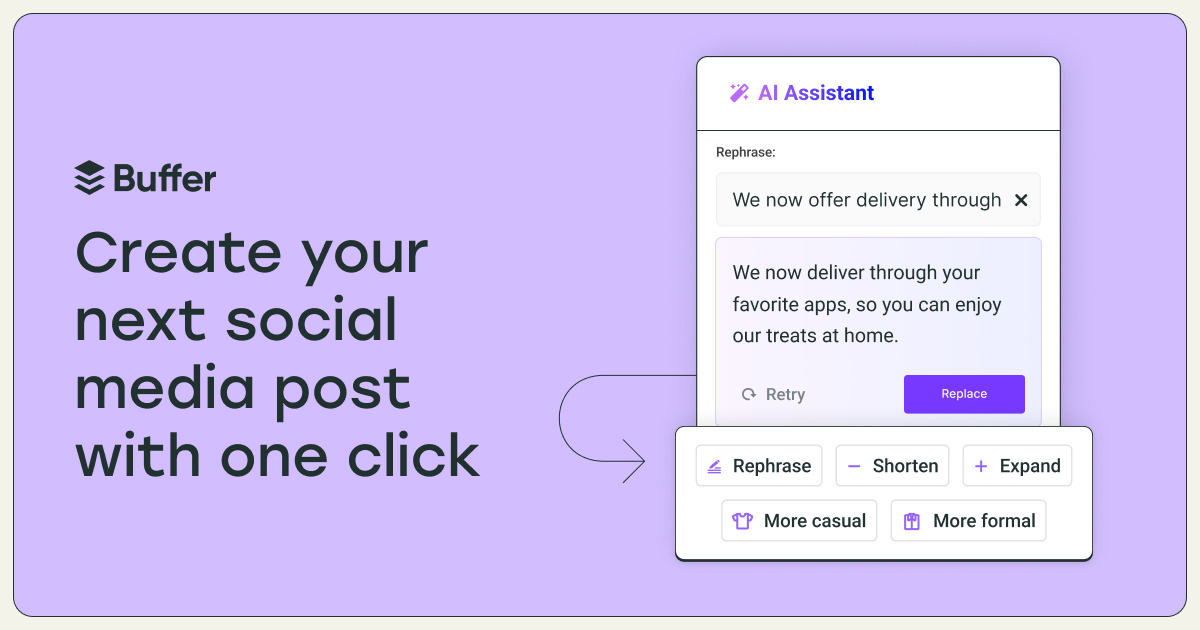
Buffer's AI Social Media Post Generator is a powerful tool specifically designed to meet the needs of social media professionals. It eliminates the need for time-consuming brainstorming by using AI to generate fresh, engaging social media posts, tailored to the user's unique audience and brand voice.
Best for AI Social Media Content Generators
Expert Take
Buffer AI Social Media Post Generator excels in providing AI-driven content creation tailored to brand voice, making it a valuable tool for social media professionals. Its integration capabilities and analytics further enhance its usability, though the free plan's limitations and lack of in-app image creation are notable tradeoffs.
Pros
- Unlimited AI credits on paid plans
- Supports Bluesky, Mastodon & Threads
- Seamless Canva integration in composer
- Free plan includes AI Assistant
- Clean, intuitive user interface
Cons
- Per-channel pricing gets expensive
- AI may hallucinate facts
- No auto-publish for complex IG Stories
- Lacks advanced social listening tools
- Free plan limited to 10 posts
Best for teams that are
- Solo creators and small teams prioritizing a simple scheduling interface.
- Social managers wanting AI to quickly adapt post tone per platform.
- Budget-conscious brands looking for cross-posting with basic analytics.
Skip if
- Large enterprise teams needing highly advanced social listening capabilities.
- Brands requiring built-in video editors and complex graphic design suites.
- Users seeking to automate complete marketing funnels beyond social media.
Best for teams that are
- Solo creators and small teams prioritizing a simple scheduling interface.
- Social managers wanting AI to quickly adapt post tone per platform.
- Budget-conscious brands looking for cross-posting with basic analytics.
Skip if
- Large enterprise teams needing highly advanced social listening capabilities.
- Brands requiring built-in video editors and complex graphic design suites.
- Users seeking to automate complete marketing funnels beyond social media.
Pros
- Unlimited AI credits on paid plans
- Supports Bluesky, Mastodon & Threads
- Seamless Canva integration in composer
- Free plan includes AI Assistant
- Clean, intuitive user interface
Cons
- Per-channel pricing gets expensive
- AI may hallucinate facts
- No auto-publish for complex IG Stories
- Lacks advanced social listening tools
- Free plan limited to 10 posts
Expert Take
Buffer AI Social Media Post Generator excels in providing AI-driven content creation tailored to brand voice, making it a valuable tool for social media professionals. Its integration capabilities and analytics further enhance its usability, though the free plan's limitations and lack of in-app image creation are notable tradeoffs.
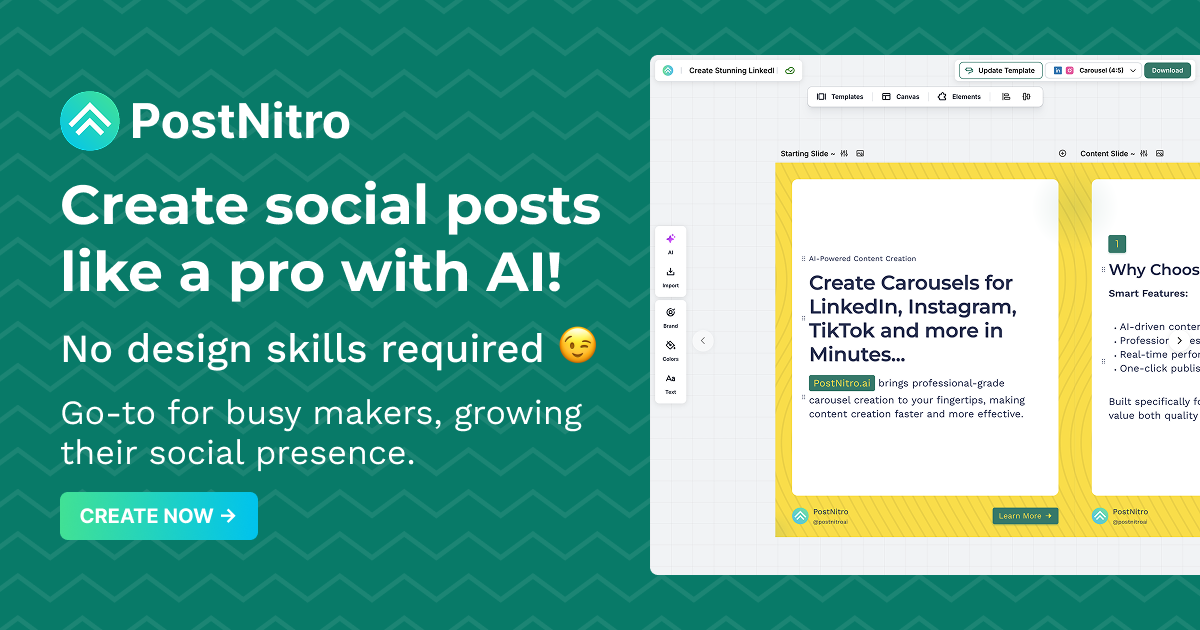
PostNitro is a powerful AI-driven carousel builder tailored for social media professionals. Its intuitive features and design capabilities streamline the creation of engaging carousels for Instagram, LinkedIn, and more. It addresses the industry's needs for visually captivating content to drive social engagement and reach.
Best for Social Media Story & Carousel Builders
Expert Take
PostNitro stands out as a leading tool in the social media content creation space, particularly for its AI-driven capabilities and user-friendly interface. Its focus on creating engaging carousels for platforms like Instagram and LinkedIn meets the industry's demand for high-quality visual content. While the free plan has limitations, the premium offerings provide significant value for professionals.
Pros
- Access to GPT-4o and Claude Sonnet
- Unlimited downloads on Creator plan
- Automated brand kit application
- Integrates with Publer and Zapier
- Supports 13+ languages
Cons
- No native auto-posting feature
- Free plan limited to 5 downloads
- Limited to carousel formats only
- No built-in analytics dashboard
- Watermarks on free exports
Best for teams that are
- Marketing agencies managing multiple client brands and workspaces.
- Content creators needing built-in multi-platform scheduling.
- Marketers wanting to repurpose articles into carousel posts.
Skip if
- Casual users seeking a completely free tool with unlimited downloads.
- Creators who need graphic design features beyond carousel formats.
Best for teams that are
- Marketing agencies managing multiple client brands and workspaces.
- Content creators needing built-in multi-platform scheduling.
- Marketers wanting to repurpose articles into carousel posts.
Skip if
- Casual users seeking a completely free tool with unlimited downloads.
- Creators who need graphic design features beyond carousel formats.
Pros
- Access to GPT-4o and Claude Sonnet
- Unlimited downloads on Creator plan
- Automated brand kit application
- Integrates with Publer and Zapier
- Supports 13+ languages
Cons
- No native auto-posting feature
- Free plan limited to 5 downloads
- Limited to carousel formats only
- No built-in analytics dashboard
- Watermarks on free exports
Expert Take
PostNitro stands out as a leading tool in the social media content creation space, particularly for its AI-driven capabilities and user-friendly interface. Its focus on creating engaging carousels for platforms like Instagram and LinkedIn meets the industry's demand for high-quality visual content. While the free plan has limitations, the premium offerings provide significant value for professionals.
Free Meme Generator by Viggle.ai is a cutting-edge tool designed specifically for social media professionals and digital marketers who need to create engaging, viral content. Leveraging AI technology, this tool offers a vast library of meme templates and automates the meme creation process, thus saving time and enhancing creativity.
Best for Social Media Meme & Trend Creation Tools
Expert Take
Free Meme Generator by Viggle.ai excels in providing a user-friendly, AI-driven platform for creating engaging social media content. Its extensive template library and free access make it a valuable tool for social media professionals. While it is limited to meme creation, it effectively meets its niche purpose.
Pros
- Proprietary JST-1 physics-aware AI model
- Backed by a16z with $19M funding
- Massive library of 1,000+ motion templates
- Huge community with 4M+ Discord members
- Free tier available for casual testing
Cons
- Free videos have mandatory watermarks
- Privacy concerns regarding asset deletion
- Slow processing in free 'relaxed' mode
- Discord workflow may confuse non-gamers
- Copyright liability shifts entirely to user
Best for teams that are
- Video content creators for TikTok/Reels wanting to animate static characters
- Users looking to replace characters in existing viral videos using motion transfer
- Discord community members comfortable with command-based generation tools
Skip if
- Users looking to create traditional static image macro memes (top/bottom text)
- Professionals requiring high-resolution 4K video output for broadcast
- Those uncomfortable using Discord or beta-stage software interfaces
Best for teams that are
- Video content creators for TikTok/Reels wanting to animate static characters
- Users looking to replace characters in existing viral videos using motion transfer
- Discord community members comfortable with command-based generation tools
Skip if
- Users looking to create traditional static image macro memes (top/bottom text)
- Professionals requiring high-resolution 4K video output for broadcast
- Those uncomfortable using Discord or beta-stage software interfaces
Pros
- Proprietary JST-1 physics-aware AI model
- Backed by a16z with $19M funding
- Massive library of 1,000+ motion templates
- Huge community with 4M+ Discord members
- Free tier available for casual testing
Cons
- Free videos have mandatory watermarks
- Privacy concerns regarding asset deletion
- Slow processing in free 'relaxed' mode
- Discord workflow may confuse non-gamers
- Copyright liability shifts entirely to user
Expert Take
Free Meme Generator by Viggle.ai excels in providing a user-friendly, AI-driven platform for creating engaging social media content. Its extensive template library and free access make it a valuable tool for social media professionals. While it is limited to meme creation, it effectively meets its niche purpose.

ViralContent offers a comprehensive library of 800 fully editable templates, specifically designed to help industry professionals create engaging and informative social media content. It addresses the industry's need for ready-to-use, high-quality content that can drive engagement and increase brand visibility on various social media platforms.
Best for Template Libraries for Social Media Content
Expert Take
ViralContent Social Media Templates excel in providing a wide range of fully editable templates tailored for social media platforms, enhancing content creation efficiency. While the lack of a subscription model and limited support are noted, the product's depth and usability in template variety and customization justify its premium positioning.
Pros
- One-time payment with lifetime access
- Fully editable in free Canva version
- Includes Resell Rights (PLR) options
- Highly specialized niche bundles available
- Free future updates included
Cons
- Repetitive designs reported in bundles
- Some template colors may be unchangeable
- Posts described as 'too wordy' by users
- Domain owner identity is hidden
- Moderate trust score on safety scanners
Best for teams that are
- Small business owners in health, finance, and home services.
- Coaches, mentors, and personal development professionals.
- Digital marketers and content creators using Canva.
Skip if
- Users who do not have access to or use the Canva platform.
- Those seeking highly customizable quote templates.
- Professionals needing non-Canva software compatibility.
Best for teams that are
- Small business owners in health, finance, and home services.
- Coaches, mentors, and personal development professionals.
- Digital marketers and content creators using Canva.
Skip if
- Users who do not have access to or use the Canva platform.
- Those seeking highly customizable quote templates.
- Professionals needing non-Canva software compatibility.
Pros
- One-time payment with lifetime access
- Fully editable in free Canva version
- Includes Resell Rights (PLR) options
- Highly specialized niche bundles available
- Free future updates included
Cons
- Repetitive designs reported in bundles
- Some template colors may be unchangeable
- Posts described as 'too wordy' by users
- Domain owner identity is hidden
- Moderate trust score on safety scanners
Expert Take
ViralContent Social Media Templates excel in providing a wide range of fully editable templates tailored for social media platforms, enhancing content creation efficiency. While the lack of a subscription model and limited support are noted, the product's depth and usability in template variety and customization justify its premium positioning.

Virbo empowers content creators with AI-driven video editing, offering high-quality avatars and seamless cross-platform functionality. Ideal for global marketers, it supports over 400 voices in 90+ languages, making it easy to localize content without expensive actors.
Best for Social Media Video Editing Tools
Expert Take
Wondershare Virbo democratizes professional video production by combining high-quality AI avatars with an incredibly fast, user-friendly interface. We love its robust cross-platform functionality, allowing creators to generate videos seamlessly on both desktop and mobile devices. Furthermore, its massive library of over 400 voices across 90+ languages makes it a powerhouse for global marketing, enabling effortless content localization without the need for expensive actors.
Pros
- Fast and intuitive drag-and-drop video creation
- Extensive multilingual and voice support
- Available natively on mobile and desktop
- Helpful URL-to-video marketing automation tool
Cons
- Expensive credit-based pricing model
- Customer support is slow and unresponsive
- Free plan prohibits usable video exports
- Minor stiffness in some avatar animations
Best for teams that are
- Businesses creating multilingual marketing and training videos.
- Content creators wanting AI avatars instead of filming themselves.
- Marketers needing fast, text-to-video promotional content.
Skip if
- Traditional video editors needing frame-perfect timeline control.
- Creators with tight budgets due to high subscription costs.
- Users wanting highly customized, unique animations or tweaking.
Best for teams that are
- Businesses creating multilingual marketing and training videos.
- Content creators wanting AI avatars instead of filming themselves.
- Marketers needing fast, text-to-video promotional content.
Skip if
- Traditional video editors needing frame-perfect timeline control.
- Creators with tight budgets due to high subscription costs.
- Users wanting highly customized, unique animations or tweaking.
Pros
- Fast and intuitive drag-and-drop video creation
- Extensive multilingual and voice support
- Available natively on mobile and desktop
- Helpful URL-to-video marketing automation tool
Cons
- Expensive credit-based pricing model
- Customer support is slow and unresponsive
- Free plan prohibits usable video exports
- Minor stiffness in some avatar animations
Expert Take
Wondershare Virbo democratizes professional video production by combining high-quality AI avatars with an incredibly fast, user-friendly interface. We love its robust cross-platform functionality, allowing creators to generate videos seamlessly on both desktop and mobile devices. Furthermore, its massive library of over 400 voices across 90+ languages makes it a powerhouse for global marketing, enabling effortless content localization without the need for expensive actors.

Renderforest offers social media managers an AI-powered branding ecosystem that includes a vast 2D and 3D mockup library. It enables users to create logos, apply them to mockups, and integrate them into websites seamlessly, ensuring enterprise-grade security.
Best for Content Creation Tools for Social Media Managers
Expert Take
Renderforest transcends the traditional mockup generator by embedding it within a comprehensive, AI-powered branding ecosystem. We love how a user can generate a logo, instantly apply it to an iPhone or apparel mockup, and embed that image directly into a custom-built website—all from a single browser tab. Its robust security certifications (SOC 2, ISO 27001) also ensure enterprise-grade safety for your brand assets.
Pros
- Massive 2D and 3D mockup library
- All-in-one video, logo, and web suite
- Pay-per-product or subscription flexibility
- Enterprise-grade security certifications
Cons
- Prominent watermarks on the free tier
- Pricing structure can be confusing
- Customer support can be slow
Best for teams that are
- Freelancers and agencies needing fast, realistic product mockups.
- Creators looking to visualize branding on apparel or devices easily.
Skip if
- Professional 3D artists requiring custom, ground-up rendering.
- Users who only need a standalone mockup tool without other features.
Best for teams that are
- Freelancers and agencies needing fast, realistic product mockups.
- Creators looking to visualize branding on apparel or devices easily.
Skip if
- Professional 3D artists requiring custom, ground-up rendering.
- Users who only need a standalone mockup tool without other features.
Pros
- Massive 2D and 3D mockup library
- All-in-one video, logo, and web suite
- Pay-per-product or subscription flexibility
- Enterprise-grade security certifications
Cons
- Prominent watermarks on the free tier
- Pricing structure can be confusing
- Customer support can be slow
Expert Take
Renderforest transcends the traditional mockup generator by embedding it within a comprehensive, AI-powered branding ecosystem. We love how a user can generate a logo, instantly apply it to an iPhone or apparel mockup, and embed that image directly into a custom-built website—all from a single browser tab. Its robust security certifications (SOC 2, ISO 27001) also ensure enterprise-grade safety for your brand assets.

CrowdRiff Social Media Templates is a creative tool specifically designed for social media professionals, offering a vast library of ready-to-use Canva video templates. It addresses the industry's need for quick, efficient, and visually appealing content creation, making it an ideal solution for busy social media managers.
Best for Template Libraries for Social Media Content
Expert Take
CrowdRiff Social Media Templates excels in providing a comprehensive library of Canva-integrated templates, which significantly enhances the efficiency of social media content creation. Its integration with Canva and ease of use make it a valuable tool for social media professionals, despite some limitations in customization and direct posting features.
Pros
- Free plug-and-play Canva video templates
- Designed specifically for vertical short-form video
- Seamless integration with CrowdRiff DAM via Canva app
- Backed by industry-leading travel marketing expertise
- Simplifies creation of Reels and TikTok content
Cons
- Limited library size (approx. 12+ templates)
- Requires business email for access
- Relies on external platform (Canva)
- Generic designs require customization to stand out
- Acts primarily as lead generation for paid tools
Best for teams that are
- Travel marketers, airlines, and hospitality brands.
- Destination Marketing Organizations driving tourism.
- Agencies managing travel user-generated content.
Skip if
- Individuals using personal email addresses for sign-up.
- Businesses operating outside the travel or hospitality sector.
- Creators needing templates for non-video platforms.
Best for teams that are
- Travel marketers, airlines, and hospitality brands.
- Destination Marketing Organizations driving tourism.
- Agencies managing travel user-generated content.
Skip if
- Individuals using personal email addresses for sign-up.
- Businesses operating outside the travel or hospitality sector.
- Creators needing templates for non-video platforms.
Pros
- Free plug-and-play Canva video templates
- Designed specifically for vertical short-form video
- Seamless integration with CrowdRiff DAM via Canva app
- Backed by industry-leading travel marketing expertise
- Simplifies creation of Reels and TikTok content
Cons
- Limited library size (approx. 12+ templates)
- Requires business email for access
- Relies on external platform (Canva)
- Generic designs require customization to stand out
- Acts primarily as lead generation for paid tools
Expert Take
CrowdRiff Social Media Templates excels in providing a comprehensive library of Canva-integrated templates, which significantly enhances the efficiency of social media content creation. Its integration with Canva and ease of use make it a valuable tool for social media professionals, despite some limitations in customization and direct posting features.

Wondershare Filmora offers intuitive video editing with AI tools like text-based editing and lip-sync translation, ideal for content creators and marketers needing fast, efficient solutions.
Best for Social Media Video Editing Tools
Expert Take
Wondershare Filmora bridges the gap between basic movie makers and complex professional suites. Its standout attribute is the deep integration of practical AI tools—such as text-based editing, automatic lip-sync translation, and smart short clips—that drastically cut down editing time. Partnering with Intel for NPU hardware acceleration ensures the software runs blazing fast, making it a highly capable and accessible choice for content creators, marketers, and casual editors.
Pros
- Highly intuitive drag-and-drop interface
- Blazing-fast rendering and hardware optimization
- Extensive suite of AI-powered editing tools
- Affordable entry-level subscription pricing
Cons
- Controversial changes to lifetime license terms
- Lacks advanced 360-degree VR capabilities
- Generative AI features require additional credits
Best for teams that are
- YouTube creators and vloggers needing an intuitive, efficient editor.
- Small business marketing teams looking for affordable AI tools.
- Beginners wanting a balance of ease-of-use and advanced effects.
Skip if
- High-end professionals requiring advanced cinematic color grading.
- Film editors needing complex multicam and professional audio mixing.
- Users looking for a completely free tool, due to heavy watermarks.
Best for teams that are
- YouTube creators and vloggers needing an intuitive, efficient editor.
- Small business marketing teams looking for affordable AI tools.
- Beginners wanting a balance of ease-of-use and advanced effects.
Skip if
- High-end professionals requiring advanced cinematic color grading.
- Film editors needing complex multicam and professional audio mixing.
- Users looking for a completely free tool, due to heavy watermarks.
Pros
- Highly intuitive drag-and-drop interface
- Blazing-fast rendering and hardware optimization
- Extensive suite of AI-powered editing tools
- Affordable entry-level subscription pricing
Cons
- Controversial changes to lifetime license terms
- Lacks advanced 360-degree VR capabilities
- Generative AI features require additional credits
Expert Take
Wondershare Filmora bridges the gap between basic movie makers and complex professional suites. Its standout attribute is the deep integration of practical AI tools—such as text-based editing, automatic lip-sync translation, and smart short clips—that drastically cut down editing time. Partnering with Intel for NPU hardware acceleration ensures the software runs blazing fast, making it a highly capable and accessible choice for content creators, marketers, and casual editors.
Explore Categories







Loading comparison data…