
Revenue Intelligence & Forecasting Platforms
These are the specialized categories within Revenue Intelligence & Forecasting Platforms. Looking for something broader? See all CRM & Sales Software categories.
Anaplan Scenario Planning
Best for Forecasting Platforms with Scenario and What If Modeling

Anaplan's AI-driven solution is a game-changer for industry professionals seeking to optimize decision-making and scenario planning. Its strategic, financial, and operational alignment capabilities make it a must-have tool for businesses needing to navigate complex forecasting and revenue intelligence scenarios.
Best for Forecasting Platforms with Scenario and What If Modeling
Expert Take
Anaplan Scenario Planning excels in providing AI-driven scenario planning and real-time analytics, making it a leader in the forecasting platforms category. Its integration capabilities and cross-functional collaboration features further enhance its value for enterprises. While pricing may be a consideration, its comprehensive features justify its premium positioning.
Pros
- Patented Hyperblock™ engine for real-time calculation
- Polaris™ engine handles sparse data at scale
- Enterprise-grade security with BYOK option
- Unlimited 'what-if' scenario modeling capabilities
- ISO 27001 and SOC 2 Type II certified
Cons
- Steep learning curve for new users
- High implementation costs ($50k-$250k range)
- Performance lags on very large datasets
- No public pricing transparency
- Requires specialized skills to build models
Best for teams that are
- Large enterprises with complex, cross-departmental planning needs.
- Teams requiring granular supply chain and sales forecasting models.
- Organizations needing to connect finance, sales, and operations data.
Skip if
- Small businesses or startups with limited budgets and simple needs.
- Teams without dedicated resources to manage complex model building.
- Users seeking an out-of-the-box solution with zero learning curve.
Best for teams that are
- Large enterprises with complex, cross-departmental planning needs.
- Teams requiring granular supply chain and sales forecasting models.
- Organizations needing to connect finance, sales, and operations data.
Skip if
- Small businesses or startups with limited budgets and simple needs.
- Teams without dedicated resources to manage complex model building.
- Users seeking an out-of-the-box solution with zero learning curve.
Pros
- Patented Hyperblock™ engine for real-time calculation
- Polaris™ engine handles sparse data at scale
- Enterprise-grade security with BYOK option
- Unlimited 'what-if' scenario modeling capabilities
- ISO 27001 and SOC 2 Type II certified
Cons
- Steep learning curve for new users
- High implementation costs ($50k-$250k range)
- Performance lags on very large datasets
- No public pricing transparency
- Requires specialized skills to build models
Expert Take
Anaplan Scenario Planning excels in providing AI-driven scenario planning and real-time analytics, making it a leader in the forecasting platforms category. Its integration capabilities and cross-functional collaboration features further enhance its value for enterprises. While pricing may be a consideration, its comprehensive features justify its premium positioning.
Revenue.io AI Sales Engagement
Best for Revenue Intelligence Tools with Conversation and Activity Data

Chosen for its state-of-the-art AI and real-time guidance, Revenue.io is designed specifically with sales professionals in mind. It offers comprehensive sales engagement and conversation intelligence tools, enabling users to enhance their sales forecasting and revenue intelligence capabilities. Its AI technology is adept at analyzing conversation and activity data, providing critical insights to drive sales growth.
Best for Revenue Intelligence Tools with Conversation and Activity Data
Expert Take
Revenue.io AI Sales Engagement is recognized for its advanced AI capabilities and comprehensive sales engagement tools. It excels in providing real-time guidance and conversation intelligence, making it a top choice for sales professionals seeking to enhance revenue intelligence. Despite some complexity for beginners, its robust features justify its premium positioning.
Pros
- 100% Salesforce native architecture (no sync delays)
- Real-time in-call AI coaching (Moments™)
- Automated activity logging reduces admin work
- Enterprise-grade security and compliance (SOC 2, HIPAA)
- High-quality 'white glove' implementation support
Cons
- Requires Salesforce CRM (cannot run standalone)
- Mobile app functionality is limited
- Pricing is opaque and perceived as high
- Limited integrations outside Salesforce ecosystem
- Steeper learning curve for advanced analytics
Best for teams that are
- Sales teams deeply embedded in the Salesforce ecosystem requiring native integration
- Organizations needing real-time conversation guidance and an integrated dialer
Skip if
- Companies that do not use Salesforce as their primary CRM
- Small businesses with simple telephony needs that don't require complex AI guidance
Best for teams that are
- Sales teams deeply embedded in the Salesforce ecosystem requiring native integration
- Organizations needing real-time conversation guidance and an integrated dialer
Skip if
- Companies that do not use Salesforce as their primary CRM
- Small businesses with simple telephony needs that don't require complex AI guidance
Pros
- 100% Salesforce native architecture (no sync delays)
- Real-time in-call AI coaching (Moments™)
- Automated activity logging reduces admin work
- Enterprise-grade security and compliance (SOC 2, HIPAA)
- High-quality 'white glove' implementation support
Cons
- Requires Salesforce CRM (cannot run standalone)
- Mobile app functionality is limited
- Pricing is opaque and perceived as high
- Limited integrations outside Salesforce ecosystem
- Steeper learning curve for advanced analytics
Expert Take
Revenue.io AI Sales Engagement is recognized for its advanced AI capabilities and comprehensive sales engagement tools. It excels in providing real-time guidance and conversation intelligence, making it a top choice for sales professionals seeking to enhance revenue intelligence. Despite some complexity for beginners, its robust features justify its premium positioning.
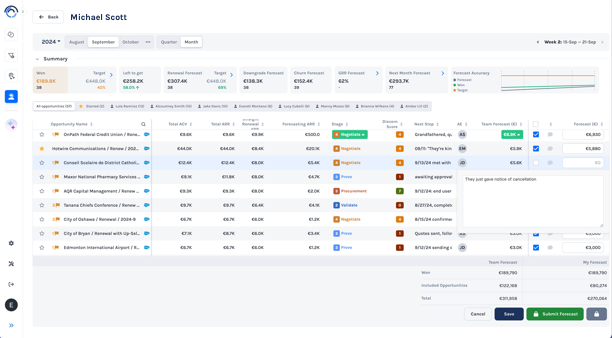
Discern's Sales Forecasting software is an AI-driven solution specifically designed for the sales industry. It provides accurate forecasting scores by AE and team, automates sales reports for accurate forecasting and offers a bi-directional CRM sync for easy CRM field clean up. These features address the industry's need for reliable sales forecasting and streamlined CRM management.
Best for Forecasting Tools Integrated with CRM and BI
Expert Take
Discern Sales Forecasting is a premium AI-driven tool designed to enhance sales forecasting accuracy and CRM management. Its integration capabilities, automation features, and industry-specific focus make it a top choice for sales teams seeking data-driven insights. While pricing transparency is limited, the product's capabilities justify its positioning as a best-of-the-best solution.
Pros
- Dual forecasting model (AI + Human)
- Rapid 1-3 day implementation
- Transparent $500/rep pricing
- Unlimited leadership viewer licenses
- Bi-directional CRM sync
Cons
- Steep learning curve for some
- Low market review volume
- Salesforce setup not fully self-serve
- Data accuracy issues reported
- Fewer integrations than leaders
Best for teams that are
- B2B SaaS companies tracking ARR, MRR, and retention metrics
- Revenue leaders needing automated investor reporting and board decks
- Finance teams wanting to unify data from CRM, accounting, and spreadsheets
Skip if
- Non-subscription businesses (e.g., manufacturing) not tracking ARR/MRR
- Small teams without complex data fragmentation or investor reporting needs
- Companies looking for a standalone CRM rather than an analytics layer
Best for teams that are
- B2B SaaS companies tracking ARR, MRR, and retention metrics
- Revenue leaders needing automated investor reporting and board decks
- Finance teams wanting to unify data from CRM, accounting, and spreadsheets
Skip if
- Non-subscription businesses (e.g., manufacturing) not tracking ARR/MRR
- Small teams without complex data fragmentation or investor reporting needs
- Companies looking for a standalone CRM rather than an analytics layer
Pros
- Dual forecasting model (AI + Human)
- Rapid 1-3 day implementation
- Transparent $500/rep pricing
- Unlimited leadership viewer licenses
- Bi-directional CRM sync
Cons
- Steep learning curve for some
- Low market review volume
- Salesforce setup not fully self-serve
- Data accuracy issues reported
- Fewer integrations than leaders
Expert Take
Discern Sales Forecasting is a premium AI-driven tool designed to enhance sales forecasting accuracy and CRM management. Its integration capabilities, automation features, and industry-specific focus make it a top choice for sales teams seeking data-driven insights. While pricing transparency is limited, the product's capabilities justify its positioning as a best-of-the-best solution.

White Cup CRM + BI is a robust SaaS solution designed for distributors seeking to streamline their forecasting and business intelligence processes. It delivers real-time alerts through dashboards, in-app notifications, automated tasks or emails, providing instant insights to help distributors make informed decisions.
Best for Forecasting Tools Integrated with CRM and BI
Expert Take
White Cup CRM + BI excels as a forecasting tool integrated with CRM and BI, offering real-time insights and user-friendly dashboards. Its flexibility and automation capabilities make it a strong choice for distributors, despite requiring some technical setup.
Pros
- Real-time alerts
- User-friendly dashboards
- Automated tasks & workflows
- Email notifications
Cons
- Requires technical knowledge for setup
- May take time to fully integrate with existing systems
Best for teams that are
- Wholesale distributors needing deep ERP integration (Epicor, Infor)
- Teams requiring combined CRM and Business Intelligence for inventory sales
- Companies wanting to uncover upsell opportunities based on order history
Skip if
- SaaS, real estate, or service-based companies without physical inventory
- Businesses not using compatible ERP systems for data syncing
- Small teams looking for a generic, lightweight CRM solution
Best for teams that are
- Wholesale distributors needing deep ERP integration (Epicor, Infor)
- Teams requiring combined CRM and Business Intelligence for inventory sales
- Companies wanting to uncover upsell opportunities based on order history
Skip if
- SaaS, real estate, or service-based companies without physical inventory
- Businesses not using compatible ERP systems for data syncing
- Small teams looking for a generic, lightweight CRM solution
Pros
- Real-time alerts
- User-friendly dashboards
- Automated tasks & workflows
- Email notifications
Cons
- Requires technical knowledge for setup
- May take time to fully integrate with existing systems
Expert Take
White Cup CRM + BI excels as a forecasting tool integrated with CRM and BI, offering real-time insights and user-friendly dashboards. Its flexibility and automation capabilities make it a strong choice for distributors, despite requiring some technical setup.
Jedox Scenario Planning Software
Best for Forecasting Platforms with Scenario and What If Modeling

Jedox's Scenario Planning Software is designed specifically for financial forecasting and scenario modeling. The software provides a single source of truth (SSOT) to create and evaluate various 'what-if' scenarios, eliminating manual intervention. This is particularly valuable in the sales forecasting and revenue intelligence sector, where predicting and planning for different sales outcomes is crucial.
Best for Forecasting Platforms with Scenario and What If Modeling
Expert Take
Jedox Scenario Planning Software excels in providing advanced financial forecasting and scenario modeling capabilities. It is recognized for its ability to create a single source of truth, which is crucial for effective decision-making in sales forecasting. The software's integration capabilities and intuitive interface further enhance its usability, making it a top choice in its category.
Pros
- Excel-like interface eases adoption
- AI-assisted predictive forecasting
- Unlimited scenario modeling capabilities
- Strong SAP and Salesforce integrations
- ISO 27001 & SOC 2 certified
Cons
- Steep learning curve for beginners
- Complex initial setup process
- Performance lags with massive datasets
- Extra costs for premium connectors
- UI elements can feel outdated
Best for teams that are
- Finance teams wanting a flexible platform with strong Excel integration.
- Organizations requiring hybrid or on-premise deployment options.
- Users who want to convert Excel models into an enterprise solution.
Skip if
- Teams wanting to completely eliminate Excel from their workflows.
- Small businesses unable to support enterprise-grade configuration.
- Users seeking a rigid, pre-built application with no customization.
Best for teams that are
- Finance teams wanting a flexible platform with strong Excel integration.
- Organizations requiring hybrid or on-premise deployment options.
- Users who want to convert Excel models into an enterprise solution.
Skip if
- Teams wanting to completely eliminate Excel from their workflows.
- Small businesses unable to support enterprise-grade configuration.
- Users seeking a rigid, pre-built application with no customization.
Pros
- Excel-like interface eases adoption
- AI-assisted predictive forecasting
- Unlimited scenario modeling capabilities
- Strong SAP and Salesforce integrations
- ISO 27001 & SOC 2 certified
Cons
- Steep learning curve for beginners
- Complex initial setup process
- Performance lags with massive datasets
- Extra costs for premium connectors
- UI elements can feel outdated
Expert Take
Jedox Scenario Planning Software excels in providing advanced financial forecasting and scenario modeling capabilities. It is recognized for its ability to create a single source of truth, which is crucial for effective decision-making in sales forecasting. The software's integration capabilities and intuitive interface further enhance its usability, making it a top choice in its category.
Gong - Revenue AI OS
Best for Revenue Intelligence Tools with Conversation and Activity Data

Gong is a game-changing SaaS solution for revenue teams. It harnesses the power of artificial intelligence to provide a 360-degree view of all customer interactions, helping to optimize sales processes, improve forecasting accuracy, and boost revenue. It's specifically designed to meet the unique needs of sales and revenue teams, delivering unparalleled insights into customer behaviors, market trends, and sales performance.
Best for Revenue Intelligence Tools with Conversation and Activity Data
Expert Take
Gong stands out as a leading solution in the revenue intelligence space due to its AI-driven insights and comprehensive data capture capabilities. It is recognized for its ability to enhance sales forecasting and provide deep customer understanding. Despite some initial setup requirements, it remains a top choice for enterprise revenue teams.
Pros
- AI-driven insights
- Extensive data capture
- Deep customer understanding
- Improved sales forecasting
- Customizable reports
Cons
- May require technical understanding
- Some initial setup required
- Pricing may be prohibitive for smaller businesses
Best for teams that are
- Mid-market to enterprise teams focused on deep conversation analytics and coaching
- Organizations willing to invest in a premium, comprehensive revenue intelligence platform
Skip if
- Small teams constrained by high platform fees and minimum seat requirements
- Teams seeking simple call recording without advanced AI analytics features
Best for teams that are
- Mid-market to enterprise teams focused on deep conversation analytics and coaching
- Organizations willing to invest in a premium, comprehensive revenue intelligence platform
Skip if
- Small teams constrained by high platform fees and minimum seat requirements
- Teams seeking simple call recording without advanced AI analytics features
Pros
- AI-driven insights
- Extensive data capture
- Deep customer understanding
- Improved sales forecasting
- Customizable reports
Cons
- May require technical understanding
- Some initial setup required
- Pricing may be prohibitive for smaller businesses
Expert Take
Gong stands out as a leading solution in the revenue intelligence space due to its AI-driven insights and comprehensive data capture capabilities. It is recognized for its ability to enhance sales forecasting and provide deep customer understanding. Despite some initial setup requirements, it remains a top choice for enterprise revenue teams.
SugarCRM Enhanced Forecasting
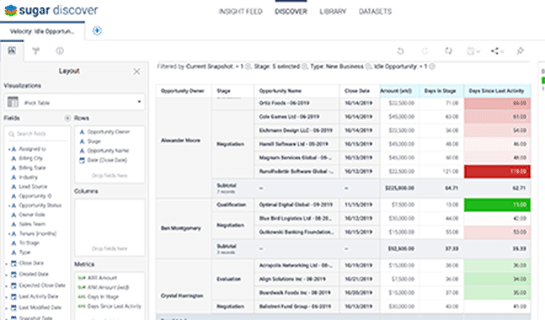
SugarCRM Enhanced Forecasting is a cloud-based customer analytics tool that integrates smoothly with SugarCRM. This tool is unique to the market as it dynamically updates, offering real-time insights for sales professionals. It addresses industry needs by providing detailed forecasts to improve decision-making in sales and revenue operations.
Best for Forecasting Tools Integrated with CRM and BI
Expert Take
SugarCRM Enhanced Forecasting stands out for its real-time integration with SugarCRM, providing dynamic updates and detailed forecasts that enhance decision-making in sales operations. Its enterprise-level capabilities and seamless CRM integration position it as a top-tier solution in the sales forecasting category.
Pros
- Time-aware snapshots track history
- Out-of-the-box funnel velocity charts
- Predictive analytics via Sugar Discover
- Visualizes pipeline changes week-over-week
- Deep cohort analysis capabilities
Cons
- Expensive $135/user/mo tier required
- 15-user minimum requirement
- Restricted to specific cloud regions
- Steep learning curve for new users
- UI feels outdated compared to competitors
Best for teams that are
- Mid-market sales teams with complex cycles in manufacturing or services
- Sugar Sell Premier users needing native "time-aware" historical analytics
- Organizations wanting predictive insights without buying separate BI tools
Skip if
- Small businesses or startups with limited budgets or simple processes
- Users on lower Sugar tiers (Essentials/Advanced) unwilling to upgrade
- Teams that do not require historical pipeline snapshotting
Best for teams that are
- Mid-market sales teams with complex cycles in manufacturing or services
- Sugar Sell Premier users needing native "time-aware" historical analytics
- Organizations wanting predictive insights without buying separate BI tools
Skip if
- Small businesses or startups with limited budgets or simple processes
- Users on lower Sugar tiers (Essentials/Advanced) unwilling to upgrade
- Teams that do not require historical pipeline snapshotting
Pros
- Time-aware snapshots track history
- Out-of-the-box funnel velocity charts
- Predictive analytics via Sugar Discover
- Visualizes pipeline changes week-over-week
- Deep cohort analysis capabilities
Cons
- Expensive $135/user/mo tier required
- 15-user minimum requirement
- Restricted to specific cloud regions
- Steep learning curve for new users
- UI feels outdated compared to competitors
Expert Take
SugarCRM Enhanced Forecasting stands out for its real-time integration with SugarCRM, providing dynamic updates and detailed forecasts that enhance decision-making in sales operations. Its enterprise-level capabilities and seamless CRM integration position it as a top-tier solution in the sales forecasting category.
Cube Scenario Analysis
Best for Forecasting Platforms with Scenario and What If Modeling
Cube's Scenario & What-If Analysis is a powerful tool specifically designed for sales forecasters and revenue intelligence specialists. It allows users to model, build, compare, and analyze diverse financial scenarios, providing deep insights into potential impacts of business decisions. This answers the industry's needs for predictive and prescriptive analytics.
Best for Forecasting Platforms with Scenario and What If Modeling
Expert Take
Cube Scenario Analysis is a specialized tool for sales forecasting and revenue intelligence, offering advanced scenario modeling capabilities. It is recognized for its depth in financial analysis and intuitive interface, making it a valuable asset for professionals in sales enablement and revenue operations. The product's premium positioning is justified by its robust feature set and adaptability.
Pros
- Native Excel and Google Sheets integration
- Unlimited what-if scenario modeling
- Fast implementation time (typically weeks)
- SOC 2 Type 2 security compliance
- Highly rated customer support
Cons
- Limited custom dimensions for complex models
- Performance lag with large datasets
- Opaque quote-based pricing model
- Drill-down capabilities can be restricted
- Web interface workflows can feel clunky
Best for teams that are
- Mid-market finance teams who want to keep working within Excel.
- Companies needing quick implementation without abandoning spreadsheets.
- FP&A teams using Google Sheets or Excel as their primary interface.
Skip if
- Large enterprises requiring complex, non-financial operational modeling.
- Teams looking to move completely away from spreadsheet interfaces.
- Organizations needing heavy-duty supply chain or workforce planning.
Best for teams that are
- Mid-market finance teams who want to keep working within Excel.
- Companies needing quick implementation without abandoning spreadsheets.
- FP&A teams using Google Sheets or Excel as their primary interface.
Skip if
- Large enterprises requiring complex, non-financial operational modeling.
- Teams looking to move completely away from spreadsheet interfaces.
- Organizations needing heavy-duty supply chain or workforce planning.
Pros
- Native Excel and Google Sheets integration
- Unlimited what-if scenario modeling
- Fast implementation time (typically weeks)
- SOC 2 Type 2 security compliance
- Highly rated customer support
Cons
- Limited custom dimensions for complex models
- Performance lag with large datasets
- Opaque quote-based pricing model
- Drill-down capabilities can be restricted
- Web interface workflows can feel clunky
Expert Take
Cube Scenario Analysis is a specialized tool for sales forecasting and revenue intelligence, offering advanced scenario modeling capabilities. It is recognized for its depth in financial analysis and intuitive interface, making it a valuable asset for professionals in sales enablement and revenue operations. The product's premium positioning is justified by its robust feature set and adaptability.

HubSpot's forecasting tool is specifically designed for sales-driven businesses. It offers powerful analytics, integrates with CRM and BI systems, and provides team performance metrics, addressing the industry's need for accurate sales forecasts and data-driven insights.
Best for Forecasting Tools Integrated with CRM and BI
Expert Take
HubSpot Forecasting excels in providing integrated sales forecasting solutions with CRM and BI systems, offering robust analytics and team performance metrics. Its user-friendly interface and reliable support further enhance its appeal, making it a top choice for sales-driven businesses.
Pros
- Native Breeze AI predictive forecasting
- Highly intuitive user interface
- Customizable forecast categories
- Seamless Salesforce integration
- Verified ROI on deal close rates
Cons
- No forecasting in Starter plan
- Lacks native MAPE/accuracy metrics
- Complex overlay splits are difficult
- Enterprise tier is expensive
- Reporting less deep than Salesforce
Best for teams that are
- Sales Hub Pro/Enterprise users wanting native, integrated forecasting
- Scaling teams prioritizing ease of use and pipeline visibility
- Managers needing simple quota tracking and rep-submitted forecasts
Skip if
- Complex sales orgs needing overlay splits or advanced matrix modeling
- Users on the "Starter" tier or free plan where this feature is gated
- Teams requiring deep predictive analytics without third-party add-ons
Best for teams that are
- Sales Hub Pro/Enterprise users wanting native, integrated forecasting
- Scaling teams prioritizing ease of use and pipeline visibility
- Managers needing simple quota tracking and rep-submitted forecasts
Skip if
- Complex sales orgs needing overlay splits or advanced matrix modeling
- Users on the "Starter" tier or free plan where this feature is gated
- Teams requiring deep predictive analytics without third-party add-ons
Pros
- Native Breeze AI predictive forecasting
- Highly intuitive user interface
- Customizable forecast categories
- Seamless Salesforce integration
- Verified ROI on deal close rates
Cons
- No forecasting in Starter plan
- Lacks native MAPE/accuracy metrics
- Complex overlay splits are difficult
- Enterprise tier is expensive
- Reporting less deep than Salesforce
Expert Take
HubSpot Forecasting excels in providing integrated sales forecasting solutions with CRM and BI systems, offering robust analytics and team performance metrics. Its user-friendly interface and reliable support further enhance its appeal, making it a top choice for sales-driven businesses.
Prophix Scenario Planning
Best for Forecasting Platforms with Scenario and What If Modeling

Prophix Scenario Planning is a financial modelling software tailored for forecasting and revenue intelligence. The software's real-time scenario planning, dynamic multi-scenario modelling, and AI-powered 'what-if' analysis functionalities address the industry's demand for accurate, adaptable, and actionable financial forecasts.
Best for Forecasting Platforms with Scenario and What If Modeling
Expert Take
Prophix Scenario Planning excels in providing advanced financial modeling capabilities with real-time scenario planning and AI-powered 'what-if' analysis. It is recognized for its adaptability and data-driven insights, making it a top choice for businesses needing precise forecasting tools.
Pros
- AI-powered 'what-if' scenario agents
- HITRUST and SOC 2 certified security
- Connects to 120+ ERP/CRM systems
- Highly rated Customer Success Program
- User-friendly Excel-like interface
Cons
- Slow performance with large datasets
- Steep learning curve for admins
- Opaque pricing with renewal hikes
- Complex report building process
- Lengthy implementation for complex needs
Best for teams that are
- Mid-market to large companies automating complex financial consolidations.
- Finance teams in manufacturing or healthcare needing detailed planning.
- Organizations wanting to move away from manual spreadsheet errors.
Skip if
- Early-stage startups or small businesses with simple budgeting needs.
- Users seeking a purely spreadsheet-native tool without implementation.
- Teams needing a lightweight, instant-setup solution.
Best for teams that are
- Mid-market to large companies automating complex financial consolidations.
- Finance teams in manufacturing or healthcare needing detailed planning.
- Organizations wanting to move away from manual spreadsheet errors.
Skip if
- Early-stage startups or small businesses with simple budgeting needs.
- Users seeking a purely spreadsheet-native tool without implementation.
- Teams needing a lightweight, instant-setup solution.
Pros
- AI-powered 'what-if' scenario agents
- HITRUST and SOC 2 certified security
- Connects to 120+ ERP/CRM systems
- Highly rated Customer Success Program
- User-friendly Excel-like interface
Cons
- Slow performance with large datasets
- Steep learning curve for admins
- Opaque pricing with renewal hikes
- Complex report building process
- Lengthy implementation for complex needs
Expert Take
Prophix Scenario Planning excels in providing advanced financial modeling capabilities with real-time scenario planning and AI-powered 'what-if' analysis. It is recognized for its adaptability and data-driven insights, making it a top choice for businesses needing precise forecasting tools.