
Portfolio & Program Management Software
These are the specialized categories within Portfolio & Program Management Software. Looking for something broader? See all Project Management & Productivity Tools categories.
OnePlan Strategic PPM Software
Best for Portfolio & Program Management Software for SaaS Companies
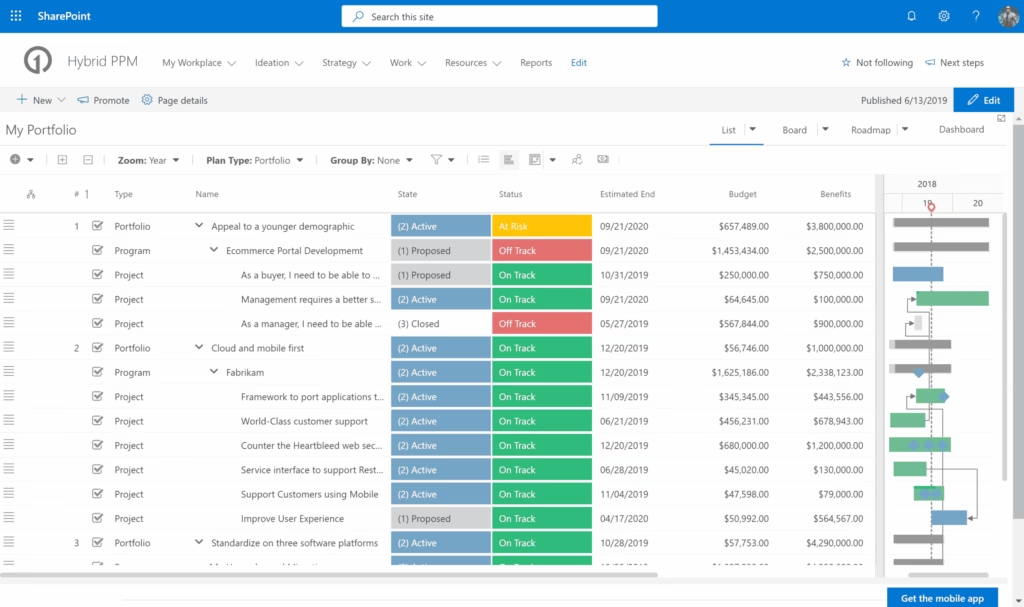
OnePlan is specifically designed for SaaS companies to streamline project portfolio management, provide valuable insights, and enable data-driven decisions. This software's unique focus on PMO professionals in the SaaS industry ensures that it caters to the specific needs and challenges of this sector, including resource management, financial planning, and agile project methodologies.
Best for Portfolio & Program Management Software for SaaS Companies
Expert Take
OnePlan Strategic PPM Software excels in providing tailored solutions for SaaS companies, with strong capabilities in resource management and strategic decision-making. Its integration capabilities and advanced analytics are well-documented, making it a top choice for PMO professionals in the SaaS industry.
Pros
- Unified view of Microsoft Project, Azure DevOps, and Jira data
- Award-winning Microsoft Partner integration
- Built-in AI assistant (Sofia GPT) for strategic insights
- Transparent pricing for Basic and Professional tiers
- Strong resource capacity planning and financial modeling
Cons
- Steep learning curve for advanced configuration
- Baseline tracking features reported as limited by users
- Performance lags with very large portfolios
- Custom reporting can be complex to set up
- Enterprise features require custom pricing
Best for teams that are
- Enterprises needing to align strategy across disparate execution tools like Jira and Azure DevOps
- Organizations seeking a 'single pane of glass' for hybrid agile and waterfall portfolios
- Leaders requiring advanced strategic portfolio modeling and what-if analysis
Skip if
- Small businesses without complex portfolio governance or strategic alignment needs
- Teams looking for a simple standalone project management tool without integrations
- Organizations that do not need to aggregate data from multiple execution systems
Best for teams that are
- Enterprises needing to align strategy across disparate execution tools like Jira and Azure DevOps
- Organizations seeking a 'single pane of glass' for hybrid agile and waterfall portfolios
- Leaders requiring advanced strategic portfolio modeling and what-if analysis
Skip if
- Small businesses without complex portfolio governance or strategic alignment needs
- Teams looking for a simple standalone project management tool without integrations
- Organizations that do not need to aggregate data from multiple execution systems
Pros
- Unified view of Microsoft Project, Azure DevOps, and Jira data
- Award-winning Microsoft Partner integration
- Built-in AI assistant (Sofia GPT) for strategic insights
- Transparent pricing for Basic and Professional tiers
- Strong resource capacity planning and financial modeling
Cons
- Steep learning curve for advanced configuration
- Baseline tracking features reported as limited by users
- Performance lags with very large portfolios
- Custom reporting can be complex to set up
- Enterprise features require custom pricing
Expert Take
OnePlan Strategic PPM Software excels in providing tailored solutions for SaaS companies, with strong capabilities in resource management and strategic decision-making. Its integration capabilities and advanced analytics are well-documented, making it a top choice for PMO professionals in the SaaS industry.
Planview SPM & DPD Solutions
Best for Portfolio & Program Management Software for SaaS Companies

Planview is an industry-leading SaaS solution designed specifically for SaaS companies looking to streamline their strategic portfolio management and digital product development. It leverages advanced AI capabilities to provide comprehensive project management, strategic planning, and resource allocation, making it a powerful tool for SaaS companies aiming to optimize their product pipeline and maximize productivity.
Best for Portfolio & Program Management Software for SaaS Companies
Expert Take
Planview SPM & DPD Solutions is a premium tool for SaaS companies, offering advanced AI-driven project management and strategic planning capabilities. Its focus on resource optimization and strategic alignment makes it a standout choice for enterprises. While its complexity and pricing may not suit smaller teams, its comprehensive features justify its high ranking.
Pros
- Leader in Gartner MQ & Forrester Wave
- Connects strategy to delivery via OKRs
- Robust integrations via Planview Hub
- Supports hybrid Agile and Waterfall work
- Advanced Flow Metrics & AI insights
Cons
- Steep learning curve for new users
- Interface can feel dated and clunky
- Complex and time-consuming implementation
- High cost for enterprise features
- Opaque pricing for main modules
Best for teams that are
- Large global enterprises with complex, high-maturity portfolios and governance needs
- Organizations requiring deep strategic planning, value stream management, and scalability
- Executives needing comprehensive visibility across strategy, funding, and delivery
Skip if
- Small to mid-sized businesses (SMBs) with limited budgets and simpler workflows
- Teams wanting a lightweight tool with a short learning curve
- Organizations that do not require heavy-duty financial governance or compliance features
Best for teams that are
- Large global enterprises with complex, high-maturity portfolios and governance needs
- Organizations requiring deep strategic planning, value stream management, and scalability
- Executives needing comprehensive visibility across strategy, funding, and delivery
Skip if
- Small to mid-sized businesses (SMBs) with limited budgets and simpler workflows
- Teams wanting a lightweight tool with a short learning curve
- Organizations that do not require heavy-duty financial governance or compliance features
Pros
- Leader in Gartner MQ & Forrester Wave
- Connects strategy to delivery via OKRs
- Robust integrations via Planview Hub
- Supports hybrid Agile and Waterfall work
- Advanced Flow Metrics & AI insights
Cons
- Steep learning curve for new users
- Interface can feel dated and clunky
- Complex and time-consuming implementation
- High cost for enterprise features
- Opaque pricing for main modules
Expert Take
Planview SPM & DPD Solutions is a premium tool for SaaS companies, offering advanced AI-driven project management and strategic planning capabilities. Its focus on resource optimization and strategic alignment makes it a standout choice for enterprises. While its complexity and pricing may not suit smaller teams, its comprehensive features justify its high ranking.
Procore Construction Management
Best for Portfolio & Program Management Software for Contractors
Procore is an all-in-one construction management software designed specifically for contractors. It addresses the industry needs by offering tools for project management, resource coordination, and comprehensive cost control to ensure projects are completed safely, on time, and within budget.
Best for Portfolio & Program Management Software for Contractors
Expert Take
Procore excels in providing comprehensive construction management solutions tailored for contractors. Its robust feature set, industry-specific capabilities, and strong market credibility make it a standout choice in its category. The product's integration capabilities and commitment to industry standards further enhance its value proposition.
Pros
- Unlimited user licenses for all stakeholders
- Massive ecosystem with 500+ integrations
- Robust mobile app with offline caching
- Comprehensive all-in-one project lifecycle management
- Publicly traded market leader with high trust
Cons
- Expensive ACV-based pricing model
- Steep learning curve for new users
- Complex admin and permissions setup
- No transparent public pricing list
- Notification fatigue from frequent alerts
Best for teams that are
- General and specialty contractors managing complex construction projects
- Large firms requiring a comprehensive field-to-office platform
- Teams needing unlimited user licenses for collaboration
Skip if
- Small businesses with low construction volume due to high cost
- Teams needing only simple task scheduling without financial tools
- Companies wanting a perpetual license rather than subscription
Best for teams that are
- General and specialty contractors managing complex construction projects
- Large firms requiring a comprehensive field-to-office platform
- Teams needing unlimited user licenses for collaboration
Skip if
- Small businesses with low construction volume due to high cost
- Teams needing only simple task scheduling without financial tools
- Companies wanting a perpetual license rather than subscription
Pros
- Unlimited user licenses for all stakeholders
- Massive ecosystem with 500+ integrations
- Robust mobile app with offline caching
- Comprehensive all-in-one project lifecycle management
- Publicly traded market leader with high trust
Cons
- Expensive ACV-based pricing model
- Steep learning curve for new users
- Complex admin and permissions setup
- No transparent public pricing list
- Notification fatigue from frequent alerts
Expert Take
Procore excels in providing comprehensive construction management solutions tailored for contractors. Its robust feature set, industry-specific capabilities, and strong market credibility make it a standout choice in its category. The product's integration capabilities and commitment to industry standards further enhance its value proposition.
Chronograph Portfolio Monitoring
Best for Portfolio & Program Management Software for Private Equity Firms

Chronograph is a portfolio monitoring solution specifically designed to support the needs of private equity investors. It offers cloud-based analytics, data management, and collaborative tools, enabling firms to manage their investments more effectively and make data-driven decisions. It addresses the industry's need for reliable, accurate, and real-time data.
Best for Portfolio & Program Management Software for Private Equity Firms
Expert Take
Chronograph Portfolio Monitoring excels in providing specialized features for private equity firms, offering real-time analytics and collaborative tools. Its focus on cloud-based data management enhances decision-making capabilities. Despite the lack of public pricing, its tailored approach for private equity ensures its position as a best-of-the-best solution.
Pros
- Automated PDF/Excel data extraction
- Native Snowflake data warehousing (Snowbank)
- AI-powered natural language querying (Claude)
- Backed by Carlyle and Nasdaq
- SOC 2 and ISO 27001 certified
Cons
- Requires portfolio company adoption
- Smaller market share than iLevel
- No public pricing available
- Enterprise-focused (overkill for small funds)
Best for teams that are
- LPs and GPs needing automated data extraction from high volumes of PDF/Excel reports
- Firms prioritizing high-fidelity data auditability and next-generation analytics
- Investors wanting to minimize the manual data entry burden on their portfolio companies
Skip if
- Small firms with very simple reporting needs where Excel suffices
- Firms looking for a full ERP or General Ledger system alongside monitoring
Best for teams that are
- LPs and GPs needing automated data extraction from high volumes of PDF/Excel reports
- Firms prioritizing high-fidelity data auditability and next-generation analytics
- Investors wanting to minimize the manual data entry burden on their portfolio companies
Skip if
- Small firms with very simple reporting needs where Excel suffices
- Firms looking for a full ERP or General Ledger system alongside monitoring
Pros
- Automated PDF/Excel data extraction
- Native Snowflake data warehousing (Snowbank)
- AI-powered natural language querying (Claude)
- Backed by Carlyle and Nasdaq
- SOC 2 and ISO 27001 certified
Cons
- Requires portfolio company adoption
- Smaller market share than iLevel
- No public pricing available
- Enterprise-focused (overkill for small funds)
Expert Take
Chronograph Portfolio Monitoring excels in providing specialized features for private equity firms, offering real-time analytics and collaborative tools. Its focus on cloud-based data management enhances decision-making capabilities. Despite the lack of public pricing, its tailored approach for private equity ensures its position as a best-of-the-best solution.
Allvue's Portfolio Monitoring Software
Best for Portfolio & Program Management Software for Private Equity Firms
Allvue's Portfolio Monitoring Software is a SaaS solution specifically designed for private equity and venture capital firms. It automates reporting and tracking of their portfolio investments, facilitates seamless data integration, and provides valuable insights for smarter investment decisions.
Best for Portfolio & Program Management Software for Private Equity Firms
Expert Take
Allvue's Portfolio Monitoring Software excels in providing industry-specific features for private equity and venture capital firms. It automates complex reporting and tracking tasks, integrates data seamlessly, and delivers actionable insights. The software is recognized for its depth and usability, though its pricing transparency is limited.
Pros
- Built on Microsoft Dynamics 365
- SOC 1 & SOC 2 Certified
- Automated data collection & KPIs
- Supports PE, Debt, & CLOs
- Scalable enterprise architecture
Cons
- High annual cost (>$100k)
- Complex implementation process
- Can be resource-heavy
- Opaque pricing model
- Overkill for small funds
Best for teams that are
- Private debt and CLO managers requiring specialized credit investment capabilities
- Mid-to-large firms seeking a unified platform for accounting and portfolio monitoring
- Organizations already invested in the Microsoft ecosystem (built on Dynamics 365)
Skip if
- Small firms or micro-VCs with limited budgets due to high cost and complexity
- Teams wanting a lightweight, standalone monitoring tool without a full back-office suite
- Users seeking a non-Microsoft based infrastructure
Best for teams that are
- Private debt and CLO managers requiring specialized credit investment capabilities
- Mid-to-large firms seeking a unified platform for accounting and portfolio monitoring
- Organizations already invested in the Microsoft ecosystem (built on Dynamics 365)
Skip if
- Small firms or micro-VCs with limited budgets due to high cost and complexity
- Teams wanting a lightweight, standalone monitoring tool without a full back-office suite
- Users seeking a non-Microsoft based infrastructure
Pros
- Built on Microsoft Dynamics 365
- SOC 1 & SOC 2 Certified
- Automated data collection & KPIs
- Supports PE, Debt, & CLOs
- Scalable enterprise architecture
Cons
- High annual cost (>$100k)
- Complex implementation process
- Can be resource-heavy
- Opaque pricing model
- Overkill for small funds
Expert Take
Allvue's Portfolio Monitoring Software excels in providing industry-specific features for private equity and venture capital firms. It automates complex reporting and tracking tasks, integrates data seamlessly, and delivers actionable insights. The software is recognized for its depth and usability, though its pricing transparency is limited.
Kahua Construction Project Management
Best for Portfolio & Program Management Software for Contractors

Kahua offers a robust and flexible project management solution tailored to the unique needs of the construction industry. It streamlines communication between project teams, integrates with existing business processes, and emphasizes asset-centric management, providing a 360-degree view of all project assets.
Best for Portfolio & Program Management Software for Contractors
Expert Take
Kahua excels in providing a tailored project management solution for the construction industry, with strong integration capabilities and asset-centric management. While pricing transparency is limited, its industry-specific features and flexibility justify its premium positioning.
Pros
- FedRAMP and DoD IL-2 security authorizations
- Low-code kBuilder platform for deep customization
- Asset-centric data architecture improves handover
- Flexible pricing model (not revenue-based)
- Strong adoption in government and healthcare
Cons
- Interface can be sluggish and slow
- Mobile app reports of crashes/instability
- Steep learning curve for administrators
- Onboarding can be complex and messy
- Smaller integration ecosystem than Procore
Best for teams that are
- Capital project owners and government agencies like the GSA
- Large programs requiring highly customizable workflows and hierarchy
- Organizations needing strict data security and ownership controls
Skip if
- Small contractors looking for a pre-configured, plug-and-play solution
- Teams with limited budget or time for implementation and customization
- Users who prefer a rigid, standardized interface over flexibility
Best for teams that are
- Capital project owners and government agencies like the GSA
- Large programs requiring highly customizable workflows and hierarchy
- Organizations needing strict data security and ownership controls
Skip if
- Small contractors looking for a pre-configured, plug-and-play solution
- Teams with limited budget or time for implementation and customization
- Users who prefer a rigid, standardized interface over flexibility
Pros
- FedRAMP and DoD IL-2 security authorizations
- Low-code kBuilder platform for deep customization
- Asset-centric data architecture improves handover
- Flexible pricing model (not revenue-based)
- Strong adoption in government and healthcare
Cons
- Interface can be sluggish and slow
- Mobile app reports of crashes/instability
- Steep learning curve for administrators
- Onboarding can be complex and messy
- Smaller integration ecosystem than Procore
Expert Take
Kahua excels in providing a tailored project management solution for the construction industry, with strong integration capabilities and asset-centric management. While pricing transparency is limited, its industry-specific features and flexibility justify its premium positioning.
Dynamo Private Equity Software
Best for Portfolio & Program Management Software for Private Equity Firms

Dynamo is a specialized SaaS solution designed to streamline private equity investment management. It offers capabilities to enhance investor relations, track outreach efforts, and monitor existing investments, addressing the complex needs of the private equity industry.
Best for Portfolio & Program Management Software for Private Equity Firms
Expert Take
Dynamo Private Equity Software is a specialized solution tailored for the private equity industry, offering comprehensive CRM and investment management capabilities. Its strong security measures and reporting capabilities make it a reliable choice for managing sensitive investment data. While pricing transparency is limited, its industry-specific features and integrations justify its premium positioning.
Pros
- End-to-end platform consolidating CRM, deal flow, and accounting
- Backed by Blackstone and Francisco Partners
- SOC 1 and SOC 2 Type II certified
- AI-powered data automation for document processing
- Strong integration with Microsoft Excel and Outlook
Cons
- Steep learning curve for new users
- Pricing is quote-based and can be high at scale
- Accounting module may lack depth for complex waterfalls
- Implementation can be complex and time-consuming
- Mobile app interface described as clunky by some users
Best for teams that are
- Firms prioritizing a strong CRM integrated with deal flow and portfolio monitoring
- GPs and LPs seeking a configurable, modular cloud platform that scales
- Teams wanting an end-to-end solution that is generally more affordable than eFront
Skip if
- Users needing native, out-of-the-box integrations with non-traditional third-party apps
- Firms looking for a purely plug-and-play tool without configuration or setup time
Best for teams that are
- Firms prioritizing a strong CRM integrated with deal flow and portfolio monitoring
- GPs and LPs seeking a configurable, modular cloud platform that scales
- Teams wanting an end-to-end solution that is generally more affordable than eFront
Skip if
- Users needing native, out-of-the-box integrations with non-traditional third-party apps
- Firms looking for a purely plug-and-play tool without configuration or setup time
Pros
- End-to-end platform consolidating CRM, deal flow, and accounting
- Backed by Blackstone and Francisco Partners
- SOC 1 and SOC 2 Type II certified
- AI-powered data automation for document processing
- Strong integration with Microsoft Excel and Outlook
Cons
- Steep learning curve for new users
- Pricing is quote-based and can be high at scale
- Accounting module may lack depth for complex waterfalls
- Implementation can be complex and time-consuming
- Mobile app interface described as clunky by some users
Expert Take
Dynamo Private Equity Software is a specialized solution tailored for the private equity industry, offering comprehensive CRM and investment management capabilities. Its strong security measures and reporting capabilities make it a reliable choice for managing sensitive investment data. While pricing transparency is limited, its industry-specific features and integrations justify its premium positioning.
Prism PPM is a dedicated project portfolio management software designed to serve SaaS companies. Unlike simple task management tools, this SaaS solution offers comprehensive project management features that streamline planning, tracking, and execution of multiple projects. It is designed to address the unique needs of SaaS companies, such as managing complex projects, ensuring effective resource allocation, and achieving strategic alignment.
Best for Portfolio & Program Management Software for SaaS Companies
Expert Take
Prism PPM stands out as a specialized project portfolio management solution tailored for SaaS companies. It offers comprehensive features that address the complexities of managing multiple projects, strategic alignment, and resource allocation. While pricing transparency is limited, the product's capabilities and market credibility justify its position as a premium offering.
Pros
- Transparent pricing starting at $20/user
- Gartner Magic Quadrant Visionary status
- Built-in 'What-If' scenario planning
- Strong resource management capabilities
- High customer satisfaction (4.9/5 ratings)
Cons
- Jira sync disables 'What-If' analysis
- Single currency support only
- Documentation described as spotty
- Dashboard personalization limitations
- Interface described as less modern
Best for teams that are
- Mid-market PMOs in industries like manufacturing, insurance, and government
- Teams needing easy-to-adopt resource management and capacity planning tools
- Organizations moving from spreadsheets to a structured PPM solution without high complexity
Skip if
- Small teams looking for a free or very low-cost task management tool
- Large enterprises requiring highly complex custom coding or heavy API development
- Users who need a tool primarily for creative collaboration rather than resource data
Best for teams that are
- Mid-market PMOs in industries like manufacturing, insurance, and government
- Teams needing easy-to-adopt resource management and capacity planning tools
- Organizations moving from spreadsheets to a structured PPM solution without high complexity
Skip if
- Small teams looking for a free or very low-cost task management tool
- Large enterprises requiring highly complex custom coding or heavy API development
- Users who need a tool primarily for creative collaboration rather than resource data
Pros
- Transparent pricing starting at $20/user
- Gartner Magic Quadrant Visionary status
- Built-in 'What-If' scenario planning
- Strong resource management capabilities
- High customer satisfaction (4.9/5 ratings)
Cons
- Jira sync disables 'What-If' analysis
- Single currency support only
- Documentation described as spotty
- Dashboard personalization limitations
- Interface described as less modern
Expert Take
Prism PPM stands out as a specialized project portfolio management solution tailored for SaaS companies. It offers comprehensive features that address the complexities of managing multiple projects, strategic alignment, and resource allocation. While pricing transparency is limited, the product's capabilities and market credibility justify its position as a premium offering.

OpenProject is a leading open-source project management software designed to fit the needs of SaaS companies. It offers hybrid project management, task management, team collaboration tools, and Gantt charts, aligning with the dynamic nature of SaaS businesses. It provides a unified platform for cross-functional teams to collaborate and manage various aspects of their projects.
Best for Portfolio & Program Management Software for SaaS Companies
Expert Take
OpenProject excels as a versatile project management tool for SaaS companies, offering a blend of agile, classic, and hybrid methodologies. Its open-source nature allows for customization, and it supports team collaboration across time zones. While it may be complex for beginners, its comprehensive features make it a top choice in its category.
Pros
- Free Community Edition with unlimited users
- Hybrid Agile and Waterfall management
- Full data sovereignty and GDPR compliance
- Flexible hosting: Cloud or On-Premises
- Open source code for full customization
Cons
- No native mobile apps (iOS/Android)
- SSO locked behind Enterprise plan
- Advanced automation requires paid upgrade
- Steep learning curve for self-hosting
- Interface less modern than competitors
Best for teams that are
- Technical teams and developers who prefer open-source software
- Privacy-conscious organizations (e.g., Gov, EU) requiring on-premise data control
- Teams needing a cost-effective solution with classic and agile project management features
Skip if
- Non-technical marketing or creative teams wanting a 'pretty' SaaS tool with zero setup
- Users who rely heavily on extensive third-party SaaS integrations out of the box
- Teams needing advanced financial portfolio modeling or strategic strategy mapping
Best for teams that are
- Technical teams and developers who prefer open-source software
- Privacy-conscious organizations (e.g., Gov, EU) requiring on-premise data control
- Teams needing a cost-effective solution with classic and agile project management features
Skip if
- Non-technical marketing or creative teams wanting a 'pretty' SaaS tool with zero setup
- Users who rely heavily on extensive third-party SaaS integrations out of the box
- Teams needing advanced financial portfolio modeling or strategic strategy mapping
Pros
- Free Community Edition with unlimited users
- Hybrid Agile and Waterfall management
- Full data sovereignty and GDPR compliance
- Flexible hosting: Cloud or On-Premises
- Open source code for full customization
Cons
- No native mobile apps (iOS/Android)
- SSO locked behind Enterprise plan
- Advanced automation requires paid upgrade
- Steep learning curve for self-hosting
- Interface less modern than competitors
Expert Take
OpenProject excels as a versatile project management tool for SaaS companies, offering a blend of agile, classic, and hybrid methodologies. Its open-source nature allows for customization, and it supports team collaboration across time zones. While it may be complex for beginners, its comprehensive features make it a top choice in its category.
Planview PPM Tools
Best for Portfolio & Program Management Software for Contractors

Planview PPM Tools is a highly effective software solution specifically tailored for contractors, enabling them to optimize project portfolios and balance capacity against demand. It seamlessly links plans to resources, ensuring efficient project execution and resource utilization.
Best for Portfolio & Program Management Software for Contractors
Expert Take
Planview PPM Tools excels in providing comprehensive project portfolio management capabilities tailored for contractors. It offers strong integration options and real-time insights, which are crucial for effective decision-making. While it requires training, its robust support and resource management features position it as a top choice in its category.
Pros
- Leader in 2025 Gartner Magic Quadrant
- Used by 59 of Fortune 100
- ISO 27001 and SOC 2 Certified
- Strong hybrid Agile/Waterfall support
- 60+ pre-built enterprise integrations
Cons
- Steep learning curve for new users
- No public pricing transparency
- High cost barrier for small teams
- Complex initial configuration required
- Interface can feel dated
Best for teams that are
- Large enterprise PMOs managing complex portfolios and resource capacity
- Organizations mixing Agile, Waterfall, and hybrid project methodologies
- Executives needing visibility into strategy alignment and value streams
Skip if
- Construction field crews needing site-specific tools like daily logs
- Small businesses wanting a lightweight, low-cost project tracker
- Teams focused solely on simple task execution without portfolio needs
Best for teams that are
- Large enterprise PMOs managing complex portfolios and resource capacity
- Organizations mixing Agile, Waterfall, and hybrid project methodologies
- Executives needing visibility into strategy alignment and value streams
Skip if
- Construction field crews needing site-specific tools like daily logs
- Small businesses wanting a lightweight, low-cost project tracker
- Teams focused solely on simple task execution without portfolio needs
Pros
- Leader in 2025 Gartner Magic Quadrant
- Used by 59 of Fortune 100
- ISO 27001 and SOC 2 Certified
- Strong hybrid Agile/Waterfall support
- 60+ pre-built enterprise integrations
Cons
- Steep learning curve for new users
- No public pricing transparency
- High cost barrier for small teams
- Complex initial configuration required
- Interface can feel dated
Expert Take
Planview PPM Tools excels in providing comprehensive project portfolio management capabilities tailored for contractors. It offers strong integration options and real-time insights, which are crucial for effective decision-making. While it requires training, its robust support and resource management features position it as a top choice in its category.