
Collaboration & Work Management Platforms
These are the specialized categories within Collaboration & Work Management Platforms. Looking for something broader? See all Project Management & Productivity Tools categories.
AccuLynx Roofing CRM
Best for Collaboration & Work Management Platforms for Roofing Companies
AccuLynx is a robust CRM solution purpose-built for roofing businesses. It seamlessly integrates every aspect of a roofing business from field operations to office management, enabling real-time communication and collaboration across teams. Its industry-specific features streamline workflow, improve productivity, and boost profitability, making it an indispensable tool for roofing professionals.
Best for Collaboration & Work Management Platforms for Roofing Companies
Expert Take
AccuLynx Roofing CRM excels as a specialized tool for roofing businesses, offering comprehensive features tailored to industry needs. Its strong integration capabilities and real-time collaboration tools enhance productivity and workflow efficiency. While pricing transparency is limited, the platform's robust capabilities justify its premium positioning.
Pros
- Direct material ordering (ABC/SRS)
- Integrated aerial measurements (EagleView)
- Comprehensive production management
- Strong industry reputation
- Dedicated mobile field app
Cons
- High monthly cost per user
- Extra fees for add-on features
- No public pricing transparency
- Closed API limits customization
- Steep learning curve for some
Best for teams that are
- Mid-to-large roofing companies requiring an all-in-one business management suite
- Contractors needing direct material ordering integrations with ABC Supply and SRS
- Teams that value dedicated customer success resources and US-based support
Skip if
- Small startups or budget-conscious firms due to higher costs and add-on fees
- Businesses requiring open API access or deep customization outside preset workflows
- Companies looking for a simple, lightweight tool just for estimates
Best for teams that are
- Mid-to-large roofing companies requiring an all-in-one business management suite
- Contractors needing direct material ordering integrations with ABC Supply and SRS
- Teams that value dedicated customer success resources and US-based support
Skip if
- Small startups or budget-conscious firms due to higher costs and add-on fees
- Businesses requiring open API access or deep customization outside preset workflows
- Companies looking for a simple, lightweight tool just for estimates
Pros
- Direct material ordering (ABC/SRS)
- Integrated aerial measurements (EagleView)
- Comprehensive production management
- Strong industry reputation
- Dedicated mobile field app
Cons
- High monthly cost per user
- Extra fees for add-on features
- No public pricing transparency
- Closed API limits customization
- Steep learning curve for some
Expert Take
AccuLynx Roofing CRM excels as a specialized tool for roofing businesses, offering comprehensive features tailored to industry needs. Its strong integration capabilities and real-time collaboration tools enhance productivity and workflow efficiency. While pricing transparency is limited, the platform's robust capabilities justify its premium positioning.
Intapp DealCloud
Best for Collaboration & Work Management Platforms for Private Equity Firms

Intapp DealCloud is a dedicated private equity software solution specifically designed to cater to the unique needs of private equity firms. It offers tools for analytics, relationship management, and deal and pipeline management, enabling firms to streamline their operations, make informed decisions, and maintain strong relationships with clients and stakeholders.
Best for Collaboration & Work Management Platforms for Private Equity Firms
Expert Take
Intapp DealCloud is a specialized solution for private equity firms, offering comprehensive tools for analytics, relationship management, and deal management. It is recognized for its industry-specific capabilities and strong market credibility, making it a top choice for private equity professionals seeking tailored solutions.
Pros
- Purpose-built for private capital markets
- Deep Microsoft 365 & Outlook integration
- Extensive security certifications (ISO/SOC/CSA)
- Native integrations with PitchBook & Preqin
- AI-powered relationship intelligence & scoring
Cons
- High minimum cost (~$85k/year)
- Complex implementation process
- Steep learning curve for new users
- Not suitable for small teams
- Opaque pricing structure
Best for teams that are
- Enterprise-grade PE and Investment Banks with complex workflows
- Firms needing a highly configurable single source of truth
- Teams requiring deep relationship intelligence and customization
Skip if
- Small firms needing a quick, out-of-the-box implementation
- Organizations with limited budget for setup and consultants
- Teams wanting a simple, low-maintenance CRM
Best for teams that are
- Enterprise-grade PE and Investment Banks with complex workflows
- Firms needing a highly configurable single source of truth
- Teams requiring deep relationship intelligence and customization
Skip if
- Small firms needing a quick, out-of-the-box implementation
- Organizations with limited budget for setup and consultants
- Teams wanting a simple, low-maintenance CRM
Pros
- Purpose-built for private capital markets
- Deep Microsoft 365 & Outlook integration
- Extensive security certifications (ISO/SOC/CSA)
- Native integrations with PitchBook & Preqin
- AI-powered relationship intelligence & scoring
Cons
- High minimum cost (~$85k/year)
- Complex implementation process
- Steep learning curve for new users
- Not suitable for small teams
- Opaque pricing structure
Expert Take
Intapp DealCloud is a specialized solution for private equity firms, offering comprehensive tools for analytics, relationship management, and deal management. It is recognized for its industry-specific capabilities and strong market credibility, making it a top choice for private equity professionals seeking tailored solutions.
STACK Construction Software
Best for Collaboration & Work Management Platforms for Contractors

STACK's cloud-based construction software is designed to streamline construction project management. It addresses the industry's needs by providing real-time collaboration, enhancing accuracy in estimation and bid decisions, and easing project closeout processes. This is vital for contractors seeking to optimize their workflows and increase overall efficiency.
Best for Collaboration & Work Management Platforms for Contractors
Expert Take
STACK Construction Software excels as a cloud-based platform tailored for the construction industry, offering robust project management and estimation tools. Its real-time collaboration features and flexible pricing plans make it a top choice for contractors. Despite some limitations in the free plan, its overall capabilities justify its premium positioning.
Pros
- 100% cloud-based with Mac/PC compatibility
- SOC 2 Type II security compliant
- Seamless Procore and QuickBooks integrations
- Intuitive interface with low learning curve
- Free version available for trial
Cons
- High starting cost ($2,999/user/year)
- Reports of price hikes at renewal
- Performance lags on large projects
- Limited editing tools vs desktop software
- Estimating requires internet connection
Best for teams that are
- Subcontractors and GCs focused primarily on cloud-based takeoff and estimating
- Suppliers and distributors needing to measure digital plans for bids
- Teams wanting to streamline the preconstruction and bidding process
Skip if
- Field teams needing comprehensive jobsite management tools like daily logs
- Businesses looking for a full ERP with accounting and invoicing built-in
- Users requiring offline access for heavy field work
Best for teams that are
- Subcontractors and GCs focused primarily on cloud-based takeoff and estimating
- Suppliers and distributors needing to measure digital plans for bids
- Teams wanting to streamline the preconstruction and bidding process
Skip if
- Field teams needing comprehensive jobsite management tools like daily logs
- Businesses looking for a full ERP with accounting and invoicing built-in
- Users requiring offline access for heavy field work
Pros
- 100% cloud-based with Mac/PC compatibility
- SOC 2 Type II security compliant
- Seamless Procore and QuickBooks integrations
- Intuitive interface with low learning curve
- Free version available for trial
Cons
- High starting cost ($2,999/user/year)
- Reports of price hikes at renewal
- Performance lags on large projects
- Limited editing tools vs desktop software
- Estimating requires internet connection
Expert Take
STACK Construction Software excels as a cloud-based platform tailored for the construction industry, offering robust project management and estimation tools. Its real-time collaboration features and flexible pricing plans make it a top choice for contractors. Despite some limitations in the free plan, its overall capabilities justify its premium positioning.
Roofr Roofing Software
Best for Collaboration & Work Management Platforms for Roofing Companies

Roofr is a comprehensive software solution specifically designed for roofing companies. It manages customer relationships, provides instant estimates, measurements, proposals, and even facilitates payments and material ordering, streamlining the entire roofing process and addressing the unique needs of this industry.
Best for Collaboration & Work Management Platforms for Roofing Companies
Expert Take
Roofr excels as a specialized solution for roofing companies, offering comprehensive tools that streamline operations from estimates to payments. Its industry-specific features and integration capabilities make it a strong contender in its niche, despite being relatively new and lacking a mobile app.
Pros
- Instant Estimator tool captures leads 24/7
- Free Pay-As-You-Go plan available
- Proposals generated in under 5 minutes
- Affordable aerial reports ($10-$19)
- Real-time ABC Supply material pricing
Cons
- No native mobile app (browser only)
- Measurement accuracy issues with tree cover
- Limited advanced reporting and analytics
- Per-report costs add up for high volume
- Less suitable for complex commercial projects
Best for teams that are
- Sales-focused roofing teams needing instant estimates and professional proposals
- Contractors seeking affordable, pay-as-you-go aerial roof measurement reports
- Small to mid-size residential roofers prioritizing speed and ease of use
Skip if
- Large operations requiring complex project management or full-cycle CRM depth
- Teams needing robust offline capabilities or a native mobile app for field production
- Commercial contractors needing advanced heavy construction financial tools
Best for teams that are
- Sales-focused roofing teams needing instant estimates and professional proposals
- Contractors seeking affordable, pay-as-you-go aerial roof measurement reports
- Small to mid-size residential roofers prioritizing speed and ease of use
Skip if
- Large operations requiring complex project management or full-cycle CRM depth
- Teams needing robust offline capabilities or a native mobile app for field production
- Commercial contractors needing advanced heavy construction financial tools
Pros
- Instant Estimator tool captures leads 24/7
- Free Pay-As-You-Go plan available
- Proposals generated in under 5 minutes
- Affordable aerial reports ($10-$19)
- Real-time ABC Supply material pricing
Cons
- No native mobile app (browser only)
- Measurement accuracy issues with tree cover
- Limited advanced reporting and analytics
- Per-report costs add up for high volume
- Less suitable for complex commercial projects
Expert Take
Roofr excels as a specialized solution for roofing companies, offering comprehensive tools that streamline operations from estimates to payments. Its industry-specific features and integration capabilities make it a strong contender in its niche, despite being relatively new and lacking a mobile app.
Allvue Systems
Best for Collaboration & Work Management Platforms for Private Equity Firms

Allvue Systems is a comprehensive SaaS solution specifically designed for Alternative Investment management. Leveraging AI, it unifies data, automates workflows and provides actionable insights for private equity firms, credit asset managers and other financial institutions. It is tailored to address the complex analytical and operational needs of the industry.
Best for Collaboration & Work Management Platforms for Private Equity Firms
Expert Take
Allvue Systems excels in providing a specialized SaaS solution for private equity firms and financial institutions, leveraging AI to unify data and automate workflows. The platform's tailored features and industry-specific capabilities position it as a leader in its niche, despite some limitations in pricing transparency.
Pros
- Comprehensive private capital asset coverage
- Built on Microsoft Dynamics stack
- SOC 1 & SOC 2 certified
- Integrated ABOR and IBOR capabilities
- Tracks over $8.5T in assets
Cons
- Steep learning curve for new users
- High cost of ownership
- Complex implementation process
- Opaque pricing model
- System can be resource-heavy
Best for teams that are
- Mid-to-large private capital firms needing end-to-end management
- Managers requiring integrated fund accounting and monitoring
- Private credit and CLO managers needing complex data handling
Skip if
- Small funds or startups with limited software budgets
- Teams seeking a lightweight, standalone CRM solution
- Firms wanting a quick, low-complexity implementation
Best for teams that are
- Mid-to-large private capital firms needing end-to-end management
- Managers requiring integrated fund accounting and monitoring
- Private credit and CLO managers needing complex data handling
Skip if
- Small funds or startups with limited software budgets
- Teams seeking a lightweight, standalone CRM solution
- Firms wanting a quick, low-complexity implementation
Pros
- Comprehensive private capital asset coverage
- Built on Microsoft Dynamics stack
- SOC 1 & SOC 2 certified
- Integrated ABOR and IBOR capabilities
- Tracks over $8.5T in assets
Cons
- Steep learning curve for new users
- High cost of ownership
- Complex implementation process
- Opaque pricing model
- System can be resource-heavy
Expert Take
Allvue Systems excels in providing a specialized SaaS solution for private equity firms and financial institutions, leveraging AI to unify data and automate workflows. The platform's tailored features and industry-specific capabilities position it as a leader in its niche, despite some limitations in pricing transparency.
Dataforma Field Management
Best for Collaboration & Work Management Platforms for Plumbers

Dataforma Field Management is a comprehensive SaaS solution specifically tailored for the plumbing industry. It streamlines operations by managing vehicles, overseeing projects online, and enhancing customer service - all critical aspects of running a successful plumbing business.
Best for Collaboration & Work Management Platforms for Plumbers
Expert Take
Dataforma Field Management excels as a specialized SaaS solution for the plumbing industry, offering comprehensive project management and vehicle tracking capabilities. Its industry-specific focus and centralized management features make it a valuable tool for plumbing businesses, despite the lack of public pricing information.
Pros
- Specialized for commercial roofing/trades
- Robust 24/7 customer support
- Real-time GPS and labor tracking
- Client portal for project transparency
- Centralized building history & warranties
Cons
- Steep learning curve for new users
- Higher per-user cost for small teams
- Mobile app UI readability issues
- Potential for data duplication
- Complex initial setup process
Best for teams that are
- Commercial and industrial plumbing contractors
- Businesses managing large building assets and histories
- Teams needing robust project management for contracts
Skip if
- Residential service-only businesses
- Small teams wanting a simple, quick-setup app
- Companies focused on short-term repair jobs
Best for teams that are
- Commercial and industrial plumbing contractors
- Businesses managing large building assets and histories
- Teams needing robust project management for contracts
Skip if
- Residential service-only businesses
- Small teams wanting a simple, quick-setup app
- Companies focused on short-term repair jobs
Pros
- Specialized for commercial roofing/trades
- Robust 24/7 customer support
- Real-time GPS and labor tracking
- Client portal for project transparency
- Centralized building history & warranties
Cons
- Steep learning curve for new users
- Higher per-user cost for small teams
- Mobile app UI readability issues
- Potential for data duplication
- Complex initial setup process
Expert Take
Dataforma Field Management excels as a specialized SaaS solution for the plumbing industry, offering comprehensive project management and vehicle tracking capabilities. Its industry-specific focus and centralized management features make it a valuable tool for plumbing businesses, despite the lack of public pricing information.
Housecall Pro Plumbing Software
Best for Collaboration & Work Management Platforms for Plumbers

Housecall Pro Plumbing Software is a comprehensive digital tool specifically designed for plumbers. It streamlines administrative tasks, optimizes project management and enhances team coordination. This SaaS solution addresses the industry's need for efficiency, allowing more jobs to be handled and minimizing downtime.
Best for Collaboration & Work Management Platforms for Plumbers
Expert Take
Housecall Pro Plumbing Software excels in providing industry-specific solutions for plumbers, with strong capabilities in project management and team coordination. It is recognized for its usability and comprehensive feature set, though it requires an internet connection and may be complex for non-tech users. The product's market credibility is supported by third-party validations and industry-specific integrations.
Pros
- Intuitive mobile app for field techs
- Transparent pricing tiers published online
- Seamless QuickBooks Online integration
- Built-in flat rate price book features
- Automated 'On my way' customer notifications
Cons
- Native inventory management is limited
- Add-on costs can accumulate quickly
- Cancellation process reported as difficult
- Lacks advanced construction project features
- Support relies heavily on AI/Chat
Best for teams that are
- Residential service businesses scaling operations
- Teams needing built-in marketing and booking tools
- Companies wanting an easy-to-use mobile interface
Skip if
- Commercial construction or heavy project management
- Businesses needing complex multi-warehouse inventory
- Subcontractors in new construction sectors
Best for teams that are
- Residential service businesses scaling operations
- Teams needing built-in marketing and booking tools
- Companies wanting an easy-to-use mobile interface
Skip if
- Commercial construction or heavy project management
- Businesses needing complex multi-warehouse inventory
- Subcontractors in new construction sectors
Pros
- Intuitive mobile app for field techs
- Transparent pricing tiers published online
- Seamless QuickBooks Online integration
- Built-in flat rate price book features
- Automated 'On my way' customer notifications
Cons
- Native inventory management is limited
- Add-on costs can accumulate quickly
- Cancellation process reported as difficult
- Lacks advanced construction project features
- Support relies heavily on AI/Chat
Expert Take
Housecall Pro Plumbing Software excels in providing industry-specific solutions for plumbers, with strong capabilities in project management and team coordination. It is recognized for its usability and comprehensive feature set, though it requires an internet connection and may be complex for non-tech users. The product's market credibility is supported by third-party validations and industry-specific integrations.
RIB Construction Collaboration
Best for Collaboration & Work Management Platforms for Contractors

RIB Construction Collaboration Software is a highly specialized tool designed to address the complex needs of the construction industry. It facilitates efficient collaboration and comprehensive document management, ensuring streamlined project progression from initiation to completion.
Best for Collaboration & Work Management Platforms for Contractors
Expert Take
RIB Construction Collaboration Software excels in providing industry-specific solutions for the construction sector, with strong capabilities in document management and collaboration. Its market credibility is supported by third-party recognitions, and it offers a comprehensive user experience tailored to construction needs.
Pros
- Integrated 2D/3D BIM viewer
- Complete non-editable audit trails
- Direct Revit integration plugin
- Backed by Schneider Electric
- Centralized tender and contract management
Cons
- Slow loading times reported
- No free version available
- Opaque, quote-based pricing
- Complex modular structure
- Steep learning curve for some
Best for teams that are
- Large enterprise construction firms and infrastructure projects
- Owners and GCs requiring enterprise-grade security and document control
- Quality managers needing detailed defect tracking and compliance workflows
Skip if
- Small residential contractors wanting a simple, quick-setup tool
- Teams with poor internet connectivity due to heavy web-based architecture
- Users prioritizing a modern, lightweight mobile interface over complex data
Best for teams that are
- Large enterprise construction firms and infrastructure projects
- Owners and GCs requiring enterprise-grade security and document control
- Quality managers needing detailed defect tracking and compliance workflows
Skip if
- Small residential contractors wanting a simple, quick-setup tool
- Teams with poor internet connectivity due to heavy web-based architecture
- Users prioritizing a modern, lightweight mobile interface over complex data
Pros
- Integrated 2D/3D BIM viewer
- Complete non-editable audit trails
- Direct Revit integration plugin
- Backed by Schneider Electric
- Centralized tender and contract management
Cons
- Slow loading times reported
- No free version available
- Opaque, quote-based pricing
- Complex modular structure
- Steep learning curve for some
Expert Take
RIB Construction Collaboration Software excels in providing industry-specific solutions for the construction sector, with strong capabilities in document management and collaboration. Its market credibility is supported by third-party recognitions, and it offers a comprehensive user experience tailored to construction needs.
STACK Plumbing Management Software
Best for Collaboration & Work Management Platforms for Plumbers
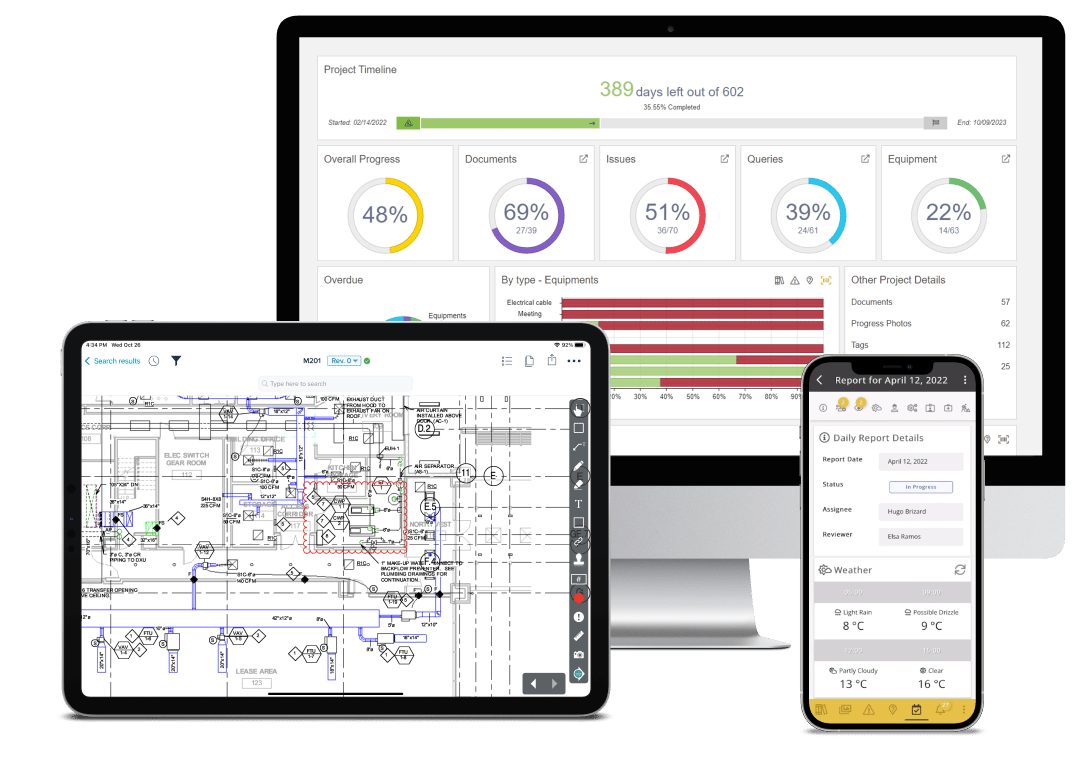
STACK's Plumbing Management Software is tailored to boost the efficiency and productivity of plumbing operations. It's a cloud-based solution that offers collaborative planning, tracking, and project management tools, making it ideal for organizing plumbing projects and facilitating informed decision-making.
Best for Collaboration & Work Management Platforms for Plumbers
Expert Take
STACK Plumbing Management Software excels in providing industry-specific tools for plumbing operations, offering robust project management and collaboration features. While the pricing may be on the higher side, the software's capabilities and cloud-based nature justify its premium positioning. It is recognized for its tailored approach to plumbing project management.
Pros
- Cloud-based access on any device
- Automated fixture counting (Autocount)
- Real-time material pricing via 1build
- Pre-built Division 22 plumbing assemblies
- Seamless Procore and QuickBooks integrations
Cons
- High annual subscription cost per user
- No native labor crew rate tables
- Performance lags on very large projects
- Requires constant internet connection
- Limited editing tools for plans
Best for teams that are
- Commercial contractors needing digital takeoff tools
- Teams managing complex construction projects
- Estimators requiring precise material and labor calcs
Skip if
- Residential service plumbers needing dispatch tools
- Small repair businesses focused on quick invoicing
- Teams needing field service CRM features
Best for teams that are
- Commercial contractors needing digital takeoff tools
- Teams managing complex construction projects
- Estimators requiring precise material and labor calcs
Skip if
- Residential service plumbers needing dispatch tools
- Small repair businesses focused on quick invoicing
- Teams needing field service CRM features
Pros
- Cloud-based access on any device
- Automated fixture counting (Autocount)
- Real-time material pricing via 1build
- Pre-built Division 22 plumbing assemblies
- Seamless Procore and QuickBooks integrations
Cons
- High annual subscription cost per user
- No native labor crew rate tables
- Performance lags on very large projects
- Requires constant internet connection
- Limited editing tools for plans
Expert Take
STACK Plumbing Management Software excels in providing industry-specific tools for plumbing operations, offering robust project management and collaboration features. While the pricing may be on the higher side, the software's capabilities and cloud-based nature justify its premium positioning. It is recognized for its tailored approach to plumbing project management.
OpsCheck Private Equity Operations
Best for Collaboration & Work Management Platforms for Private Equity Firms
OpsCheck is a SaaS system specifically designed for private equity firms aiming to enhance control and oversight. It offers a flexible workflow management system that is tailored to the unique needs and challenges of the private equity industry, enabling firms to streamline their portfolio operations effectively.
Best for Collaboration & Work Management Platforms for Private Equity Firms
Expert Take
OpsCheck is a specialized SaaS solution tailored for private equity firms, offering industry-specific features and flexible workflow management. Its focus on enhanced control and oversight, along with scalability and collaboration tools, positions it as a premium choice for firms in this niche. However, the lack of upfront pricing and potential onboarding complexity are noted tradeoffs.
Pros
- Founder has Tiger Management pedigree
- Centralized operational oversight dashboard
- Robust audit trails for compliance
- Generous 60-day free trial
- Specific focus on financial services
Cons
- Pricing not publicly available
- Low volume of third-party reviews
- No native mobile app (web-only)
- Niche focus limits general utility
- Requires quote for pricing
Best for teams that are
- COOs and Operations teams in PE and Hedge Funds
- Firms needing centralized oversight of compliance tasks
- Teams replacing manual spreadsheets for operational checklists
Skip if
- Deal teams seeking pipeline management or CRM features
- Firms looking for portfolio performance valuation tools
- Users needing a virtual data room for external sharing
Best for teams that are
- COOs and Operations teams in PE and Hedge Funds
- Firms needing centralized oversight of compliance tasks
- Teams replacing manual spreadsheets for operational checklists
Skip if
- Deal teams seeking pipeline management or CRM features
- Firms looking for portfolio performance valuation tools
- Users needing a virtual data room for external sharing
Pros
- Founder has Tiger Management pedigree
- Centralized operational oversight dashboard
- Robust audit trails for compliance
- Generous 60-day free trial
- Specific focus on financial services
Cons
- Pricing not publicly available
- Low volume of third-party reviews
- No native mobile app (web-only)
- Niche focus limits general utility
- Requires quote for pricing
Expert Take
OpsCheck is a specialized SaaS solution tailored for private equity firms, offering industry-specific features and flexible workflow management. Its focus on enhanced control and oversight, along with scalability and collaboration tools, positions it as a premium choice for firms in this niche. However, the lack of upfront pricing and potential onboarding complexity are noted tradeoffs.



Loading comparison data…