
Secure File Transfer Tools
These are the specialized categories within Secure File Transfer Tools. Looking for something broader? See all Cloud Storage, Backup & File Management categories.

Egnyte is a robust file sharing solution designed for contractors, offering secure enterprise file sharing, threat prevention, and a unified platform for data control. It addresses the industry's need for secure file transfer and collaboration, data security, and compliance.
Best for Secure File Transfer Tools for Contractors
Expert Take
Egnyte Enterprise File Sharing is a top-tier solution for contractors needing secure file transfer and collaboration. It excels in security, compliance, and usability, making it a reliable choice for handling sensitive data. Its strong market credibility and integration capabilities further solidify its position as a leading product in its category.
Pros
- Hybrid cloud and on-premise syncing
- Advanced CMMC and HIPAA compliance tools
- Excellent large file (CAD/BIM) handling
- Granular permission and access controls
- Mapped drive experience for desktop users
Cons
- Expensive compared to standard cloud storage
- Mac OS sync stability issues reported
- Mobile preview limits for restricted files
- Steep learning curve for admin features
- Opaque Enterprise tier pricing
Best for teams that are
- Construction and engineering firms needing fast access to large files on job sites
- Companies requiring hybrid cloud infrastructure to sync local servers with the cloud
- Regulated industries needing built-in compliance and ransomware detection
Skip if
- Individuals or tiny teams needing cheap, simple cloud storage
- Users who do not need hybrid infrastructure or advanced data governance
- Organizations fully committed to a pure cloud ecosystem without local caching needs
Best for teams that are
- Construction and engineering firms needing fast access to large files on job sites
- Companies requiring hybrid cloud infrastructure to sync local servers with the cloud
- Regulated industries needing built-in compliance and ransomware detection
Skip if
- Individuals or tiny teams needing cheap, simple cloud storage
- Users who do not need hybrid infrastructure or advanced data governance
- Organizations fully committed to a pure cloud ecosystem without local caching needs
Pros
- Hybrid cloud and on-premise syncing
- Advanced CMMC and HIPAA compliance tools
- Excellent large file (CAD/BIM) handling
- Granular permission and access controls
- Mapped drive experience for desktop users
Cons
- Expensive compared to standard cloud storage
- Mac OS sync stability issues reported
- Mobile preview limits for restricted files
- Steep learning curve for admin features
- Opaque Enterprise tier pricing
Expert Take
Egnyte Enterprise File Sharing is a top-tier solution for contractors needing secure file transfer and collaboration. It excels in security, compliance, and usability, making it a reliable choice for handling sensitive data. Its strong market credibility and integration capabilities further solidify its position as a leading product in its category.
MASV Large File Transfer Service

MASV is specifically designed to address the needs of marketing agencies that often need to transfer large files securely and quickly. With its cloud and hybrid workflow compatibility, MASV ensures seamless collaboration among team members, regardless of file size or location, making it an ideal tool for remote teams.
Best for Secure File Transfer Tools for Marketing Agencies
Expert Take
MASV is a premium solution for marketing agencies needing secure, large file transfers. Its pay-as-you-go model, robust security, and unlimited user access make it highly suitable for remote teams. While its per-GB pricing may be costly, the service's capabilities justify its positioning as a best-of-the-best product.
Pros
- Unlimited file and package sizes
- No plugins or software installation required
- TPN Gold Shield security certification
- Pay-as-you-go with no subscription fees
- Multiconnect bonds multiple internet connections
Cons
- Expensive for high-volume multi-recipient transfers
- Per-download billing multiplies costs
- Storage fees apply after 5-7 days
- Store-and-forward adds step vs point-to-point
- Requires internet upload speed (no shipping drives)
Best for teams that are
- Video professionals sending massive raw footage (4K/8K+)
- Users preferring a pay-as-you-go model without subscriptions
- Agencies needing to ingest huge files from clients via portals
Skip if
- Teams needing document storage or real-time collaboration
- Users sending frequent small files where per-GB pricing adds up
- Organizations looking for a fixed-cost monthly subscription
Best for teams that are
- Video professionals sending massive raw footage (4K/8K+)
- Users preferring a pay-as-you-go model without subscriptions
- Agencies needing to ingest huge files from clients via portals
Skip if
- Teams needing document storage or real-time collaboration
- Users sending frequent small files where per-GB pricing adds up
- Organizations looking for a fixed-cost monthly subscription
Pros
- Unlimited file and package sizes
- No plugins or software installation required
- TPN Gold Shield security certification
- Pay-as-you-go with no subscription fees
- Multiconnect bonds multiple internet connections
Cons
- Expensive for high-volume multi-recipient transfers
- Per-download billing multiplies costs
- Storage fees apply after 5-7 days
- Store-and-forward adds step vs point-to-point
- Requires internet upload speed (no shipping drives)
Expert Take
MASV is a premium solution for marketing agencies needing secure, large file transfers. Its pay-as-you-go model, robust security, and unlimited user access make it highly suitable for remote teams. While its per-GB pricing may be costly, the service's capabilities justify its positioning as a best-of-the-best product.
FileCloud offers a unique blend of secure file sharing, compliance, and collaboration tools, specifically tailored for the insurance industry. This solution aids in seamless remote access and sharing of files, ensuring that data is secure and compliant with industry regulations, thereby facilitating effective collaboration among teams and with clients.
Best for Secure File Transfer Tools for Insurance Agents
Expert Take
FileCloud for Insurance is tailored for the insurance industry, offering secure file sharing and compliance features that are critical for this sector. Its capabilities in remote access and collaboration make it a strong choice for insurance professionals. While setup complexity and training needs are noted, its specialized features and compliance focus justify its premium positioning.
Pros
- Unlimited file versioning included
- FIPS 140-2 & HIPAA compliant
- Hybrid & on-premise deployment options
- Unlimited external users (Essentials tier)
- Granular data residency controls
Cons
- Minimum 10-20 user purchase required
- Sync client performance issues reported
- Mobile app slower than desktop
- Fewer native integrations than Box
- Advanced tier pricing requires quote
Best for teams that are
- Firms requiring strict data residency control (on-premise) and HIPAA compliance
- Organizations needing secure remote access to network files without a VPN
- IT managers wanting granular control over user permissions and device management
Skip if
- Very small teams wanting a zero-maintenance, purely cloud-based tool
- Non-technical admins who find self-hosting setup too complex
- Users who prefer a simple SaaS interface over deep customization
Best for teams that are
- Firms requiring strict data residency control (on-premise) and HIPAA compliance
- Organizations needing secure remote access to network files without a VPN
- IT managers wanting granular control over user permissions and device management
Skip if
- Very small teams wanting a zero-maintenance, purely cloud-based tool
- Non-technical admins who find self-hosting setup too complex
- Users who prefer a simple SaaS interface over deep customization
Pros
- Unlimited file versioning included
- FIPS 140-2 & HIPAA compliant
- Hybrid & on-premise deployment options
- Unlimited external users (Essentials tier)
- Granular data residency controls
Cons
- Minimum 10-20 user purchase required
- Sync client performance issues reported
- Mobile app slower than desktop
- Fewer native integrations than Box
- Advanced tier pricing requires quote
Expert Take
FileCloud for Insurance is tailored for the insurance industry, offering secure file sharing and compliance features that are critical for this sector. Its capabilities in remote access and collaboration make it a strong choice for insurance professionals. While setup complexity and training needs are noted, its specialized features and compliance focus justify its premium positioning.
FileCloud is specifically designed for businesses in the contracting sector, offering secure file transfer that prevents unauthorized access to sensitive project data. It ensures the safeguarding of proprietary information both in transit and at rest, which is critical in an industry where data security is paramount.
Best for Secure File Transfer Tools for Contractors
Expert Take
FileCloud Secure Transfer excels in providing secure file transfer solutions tailored for contractors, with strong encryption and advanced sharing controls. While the user interface could be more intuitive, its security features and multi-platform support make it a top choice in its category.
Pros
- Unlimited file size transfers
- Hybrid and on-premises deployment
- FIPS 140-2 & ITAR compliance
- Zero Trust File Sharing
- Granular DRM access controls
Cons
- Mobile app lacks desktop features
- Minimum user count requirements
- Complex setup for non-tech users
- Higher entry cost for small teams
- Occasional sync issues reported
Best for teams that are
- Enterprises requiring on-premise or hybrid hosting for strict data sovereignty
- Organizations needing unlimited external user accounts without per-seat licensing costs
- Teams needing advanced customization and white-label branding options
Skip if
- Small teams wanting a simple, purely cloud-based "set and forget" tool
- Users with no technical expertise for server deployment or maintenance
- Organizations that do not need self-hosting capabilities
Best for teams that are
- Enterprises requiring on-premise or hybrid hosting for strict data sovereignty
- Organizations needing unlimited external user accounts without per-seat licensing costs
- Teams needing advanced customization and white-label branding options
Skip if
- Small teams wanting a simple, purely cloud-based "set and forget" tool
- Users with no technical expertise for server deployment or maintenance
- Organizations that do not need self-hosting capabilities
Pros
- Unlimited file size transfers
- Hybrid and on-premises deployment
- FIPS 140-2 & ITAR compliance
- Zero Trust File Sharing
- Granular DRM access controls
Cons
- Mobile app lacks desktop features
- Minimum user count requirements
- Complex setup for non-tech users
- Higher entry cost for small teams
- Occasional sync issues reported
Expert Take
FileCloud Secure Transfer excels in providing secure file transfer solutions tailored for contractors, with strong encryption and advanced sharing controls. While the user interface could be more intuitive, its security features and multi-platform support make it a top choice in its category.
Globalscape Secure File Sharing
Best for Secure File Transfer Tools for Ecommerce Businesses

Globalscape's Secure File Sharing offers a robust tool for ecommerce businesses that need to securely share large files, regardless of platform. It caters specifically to the industry's needs for secure digital asset exchange, ensuring data protection while maintaining ease of use.
Best for Secure File Transfer Tools for Ecommerce Businesses
Expert Take
Globalscape Secure File Sharing is tailored for ecommerce businesses requiring secure and efficient file transfers. It excels in product capability and security, supported by industry recognition and certifications. Its usability and integration capabilities further enhance its standing as a premium solution.
Pros
- No-code Advanced Workflow Engine
- Native PCI, HIPAA, GDPR modules
- DMZ Gateway prevents data exposure
- Supports SFTP, FTPS, AS2, HTTPS
- Active-Active High Availability support
Cons
- Pricing is high and opaque
- Reporting database performance issues
- HA upgrades require downtime
- Steep learning curve for advanced features
- Large file transfer limitations
Best for teams that are
- Windows-centric enterprises requiring complex automation and event rules
- Organizations with high-volume batch transfer needs and strict compliance
- IT teams needing granular control over file transfer workflows
Skip if
- Environments running exclusively on Linux or non-Windows servers
- Small businesses with limited IT budgets or simple sharing needs
- Users wanting a cloud-native, SaaS-first solution without infrastructure
Best for teams that are
- Windows-centric enterprises requiring complex automation and event rules
- Organizations with high-volume batch transfer needs and strict compliance
- IT teams needing granular control over file transfer workflows
Skip if
- Environments running exclusively on Linux or non-Windows servers
- Small businesses with limited IT budgets or simple sharing needs
- Users wanting a cloud-native, SaaS-first solution without infrastructure
Pros
- No-code Advanced Workflow Engine
- Native PCI, HIPAA, GDPR modules
- DMZ Gateway prevents data exposure
- Supports SFTP, FTPS, AS2, HTTPS
- Active-Active High Availability support
Cons
- Pricing is high and opaque
- Reporting database performance issues
- HA upgrades require downtime
- Steep learning curve for advanced features
- Large file transfer limitations
Expert Take
Globalscape Secure File Sharing is tailored for ecommerce businesses requiring secure and efficient file transfers. It excels in product capability and security, supported by industry recognition and certifications. Its usability and integration capabilities further enhance its standing as a premium solution.
Smash Large File Transfer

Smash's Large File Transfer service is an ideal solution for marketing agencies looking to send large files swiftly and securely. Its ability to allow the transfer of large files up to 5 times faster than other services makes it particularly advantageous for agencies dealing with high-resolution media files, advertising assets, and large-scale project data.
Best for Secure File Transfer Tools for Marketing Agencies
Expert Take
Smash Large File Transfer excels in providing a fast and secure solution for marketing agencies needing to manage large files. Its unique features like unlimited file size and file preview enhance usability, while its competitive pricing and security measures make it a strong contender in the secure file transfer market.
Pros
- Unlimited file size on free tier
- No account registration required
- Password protection included for free
- Customizable download page branding
- Robust API and Node.js SDK
Cons
- No resume for interrupted uploads
- Queue/throttling for free files >2GB
- Pro plan limited to 250GB/transfer
- Requires stable internet connection
- Files expire after 7-30 days
Best for teams that are
- Creatives on a budget needing to send files of unlimited size
- Users wanting highly customizable, artistic download pages
- Freelancers wanting a free tool with no account required
Skip if
- Enterprises requiring advanced security audits and compliance
- Mission-critical transfers requiring guaranteed high speeds
- Users needing permanent file storage and organization
Best for teams that are
- Creatives on a budget needing to send files of unlimited size
- Users wanting highly customizable, artistic download pages
- Freelancers wanting a free tool with no account required
Skip if
- Enterprises requiring advanced security audits and compliance
- Mission-critical transfers requiring guaranteed high speeds
- Users needing permanent file storage and organization
Pros
- Unlimited file size on free tier
- No account registration required
- Password protection included for free
- Customizable download page branding
- Robust API and Node.js SDK
Cons
- No resume for interrupted uploads
- Queue/throttling for free files >2GB
- Pro plan limited to 250GB/transfer
- Requires stable internet connection
- Files expire after 7-30 days
Expert Take
Smash Large File Transfer excels in providing a fast and secure solution for marketing agencies needing to manage large files. Its unique features like unlimited file size and file preview enhance usability, while its competitive pricing and security measures make it a strong contender in the secure file transfer market.
Diplomat MFT Secure Transfer
Diplomat MFT is a perfect solution for Insurance Agents who need to handle sensitive data securely. Its powerful encryption and automation features eliminate the risks associated with manual transfers, ensuring data safety and compliance. Furthermore, its audit-ready design assures that industry-specific regulatory requirements are met, easing the burden of data management for agents.
Best for Secure File Transfer Tools for Insurance Agents
Expert Take
Diplomat MFT Secure Transfer excels in providing secure and compliant file transfer solutions tailored for insurance agents. Its strong encryption, automation capabilities, and audit-ready design make it a top choice for handling sensitive data. Despite requiring technical skills for setup, it remains a premium product in its category.
Pros
- 20+ years breach-free record
- Transparent public pricing tiers
- Built-in PGP encryption automation
- Exceptional customer support ratings
- No-code workflow orchestration
Cons
- SFTP Server requires Enterprise Edition
- Interface lacks modern web polish
- Large price jump to Enterprise
- Manual key management in older versions
- Steep learning curve for some
Best for teams that are
- Operations needing affordable, automated PGP/SFTP transfers without scripting
- Teams focusing on scheduled backend data transfers rather than user sharing
- Organizations needing 340B compliance or specific healthcare data automation
Skip if
- Users needing a modern, slick web interface for ad-hoc client sharing
- Teams requiring extensive mobile app support or real-time collaboration
- Those needing 24/7 support on lower-tier plans
Best for teams that are
- Operations needing affordable, automated PGP/SFTP transfers without scripting
- Teams focusing on scheduled backend data transfers rather than user sharing
- Organizations needing 340B compliance or specific healthcare data automation
Skip if
- Users needing a modern, slick web interface for ad-hoc client sharing
- Teams requiring extensive mobile app support or real-time collaboration
- Those needing 24/7 support on lower-tier plans
Pros
- 20+ years breach-free record
- Transparent public pricing tiers
- Built-in PGP encryption automation
- Exceptional customer support ratings
- No-code workflow orchestration
Cons
- SFTP Server requires Enterprise Edition
- Interface lacks modern web polish
- Large price jump to Enterprise
- Manual key management in older versions
- Steep learning curve for some
Expert Take
Diplomat MFT Secure Transfer excels in providing secure and compliant file transfer solutions tailored for insurance agents. Its strong encryption, automation capabilities, and audit-ready design make it a top choice for handling sensitive data. Despite requiring technical skills for setup, it remains a premium product in its category.
Couchdrop Secure File Transfer
Best for Secure File Transfer Tools for Ecommerce Businesses

Couchdrop provides a secure, seamless way for Ecommerce businesses to transfer files without the need for temporary storage. It meets this industry's need for safe, speedy, and easy-to-use file transfer solutions, which are crucial in managing large volumes of transaction data and sensitive customer information.
Best for Secure File Transfer Tools for Ecommerce Businesses
Expert Take
Couchdrop Secure File Transfer excels in providing a secure and efficient solution for ecommerce businesses needing to transfer sensitive data. Its integration capabilities with major cloud storage providers and support for multiple file transfer protocols enhance its usability and versatility. While pricing transparency is limited, the product's security features and market credibility make it a top choice in its category.
Pros
- Bring Your Own Storage architecture
- Zero infrastructure management (SaaS)
- Visual automation builder included
- HIPAA-ready infrastructure option
- Transparent month-to-month pricing
Cons
- No native file versioning
- Static IPs cost extra
- Automation features maturing
- Mobile app support rated lower
- Large price jump between tiers
Best for teams that are
- Cloud-native businesses wanting to 'bring your own storage' (S3, SharePoint)
- Organizations needing a simple, zero-infrastructure SFTP/FTP gateway
- Teams wanting to automate transfers between cloud storage platforms
Skip if
- Legacy on-premise environments without cloud storage connectivity
- Users requiring built-in storage rather than connecting their own
- Enterprises needing complex mainframe integrations
Best for teams that are
- Cloud-native businesses wanting to 'bring your own storage' (S3, SharePoint)
- Organizations needing a simple, zero-infrastructure SFTP/FTP gateway
- Teams wanting to automate transfers between cloud storage platforms
Skip if
- Legacy on-premise environments without cloud storage connectivity
- Users requiring built-in storage rather than connecting their own
- Enterprises needing complex mainframe integrations
Pros
- Bring Your Own Storage architecture
- Zero infrastructure management (SaaS)
- Visual automation builder included
- HIPAA-ready infrastructure option
- Transparent month-to-month pricing
Cons
- No native file versioning
- Static IPs cost extra
- Automation features maturing
- Mobile app support rated lower
- Large price jump between tiers
Expert Take
Couchdrop Secure File Transfer excels in providing a secure and efficient solution for ecommerce businesses needing to transfer sensitive data. Its integration capabilities with major cloud storage providers and support for multiple file transfer protocols enhance its usability and versatility. While pricing transparency is limited, the product's security features and market credibility make it a top choice in its category.
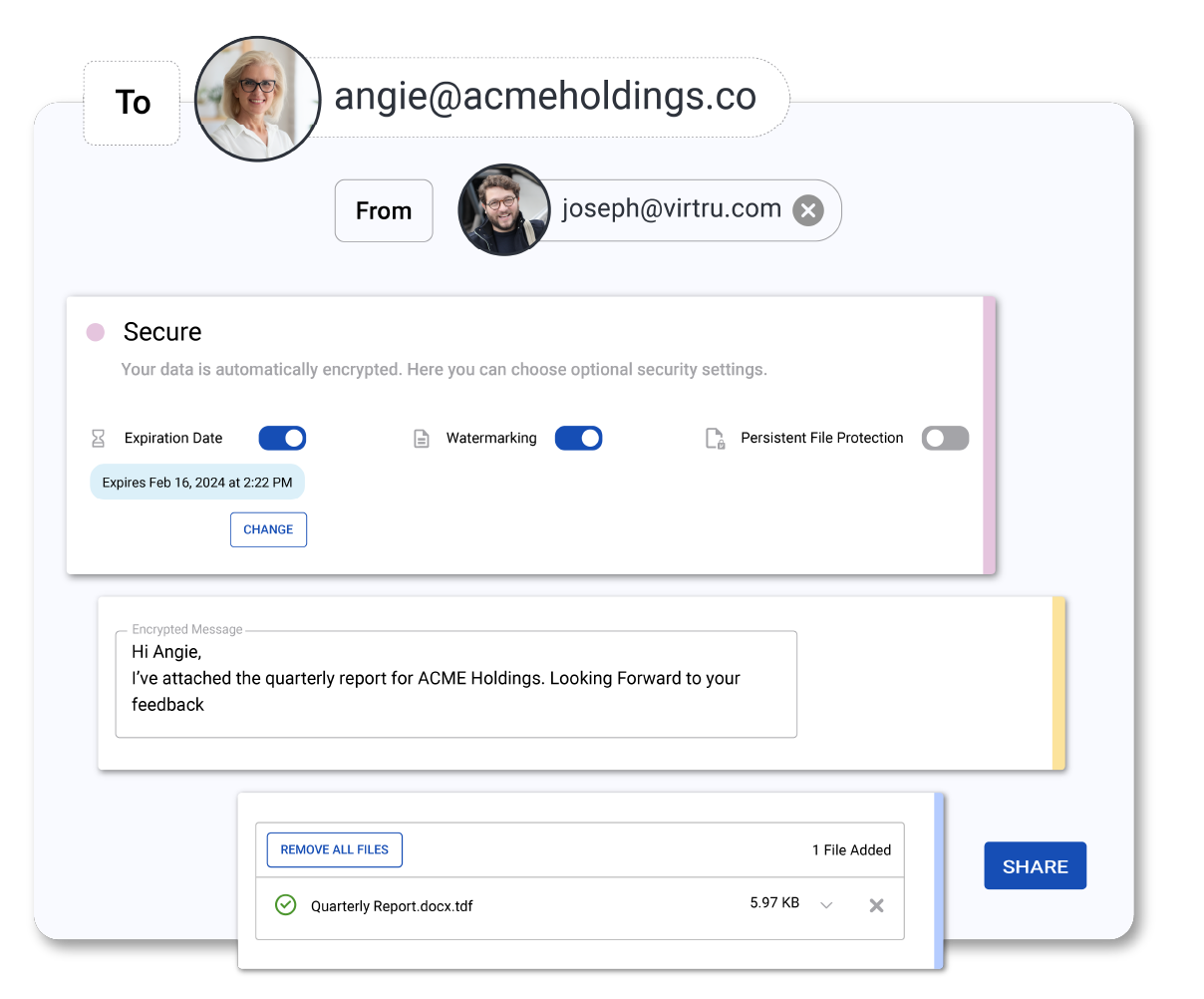
Virtru Secure Share is a game-changer for contractors who need to share sensitive project files securely. It provides robust encryption and adjustable access control, ensuring only authorized personnel can access project data. The tool offers complete data visibility, crucial for managing project timelines and mitigating risk.
Best for Secure File Transfer Tools for Contractors
Expert Take
Virtru Secure Share excels in providing secure file transfer solutions tailored for contractors. Its strong encryption and access control features ensure data security, while its cloud-native design enhances usability and collaboration. The product's market credibility is supported by third-party validations, making it a top choice in its category.
Pros
- Shares files up to 15GB
- FedRAMP Moderate and HIPAA compliant
- Revoke access after sending
- No recipient account required
- Transparent pricing tiers
Cons
- User interface described as clunky
- Occasional recipient login loops
- Chrome-centric browser extensions
- Mobile experience limitations
- Upload delays with large files
Best for teams that are
- HR and Healthcare teams handling PII/PHI via email needing HIPAA compliance
- Contractors needing to securely request sensitive data from clients via links
- Organizations needing to revoke access to files even after they are shared
Skip if
- Teams needing a full document management system (DMS) or storage repository
- Users needing to transfer files larger than 15GB
- Businesses looking for complex folder structures or team collaboration spaces
Best for teams that are
- HR and Healthcare teams handling PII/PHI via email needing HIPAA compliance
- Contractors needing to securely request sensitive data from clients via links
- Organizations needing to revoke access to files even after they are shared
Skip if
- Teams needing a full document management system (DMS) or storage repository
- Users needing to transfer files larger than 15GB
- Businesses looking for complex folder structures or team collaboration spaces
Pros
- Shares files up to 15GB
- FedRAMP Moderate and HIPAA compliant
- Revoke access after sending
- No recipient account required
- Transparent pricing tiers
Cons
- User interface described as clunky
- Occasional recipient login loops
- Chrome-centric browser extensions
- Mobile experience limitations
- Upload delays with large files
Expert Take
Virtru Secure Share excels in providing secure file transfer solutions tailored for contractors. Its strong encryption and access control features ensure data security, while its cloud-native design enhances usability and collaboration. The product's market credibility is supported by third-party validations, making it a top choice in its category.
MOVEit Managed File Transfer
Best for Secure File Transfer Tools for Digital Marketing Agencies

MOVEit is the ideal file transfer solution for digital marketing agencies dealing with sensitive data. It offers advanced workflow automation capabilities, ensuring secure, controlled data transfers while eliminating the need for manual operations. Its robust security measures address the critical needs of data protection and compliance which are paramount in the digital marketing industry.
Best for Secure File Transfer Tools for Digital Marketing Agencies
Expert Take
MOVEit Managed File Transfer excels in providing secure and automated file transfer solutions tailored for digital marketing agencies. Its robust security features and compliance capabilities make it a trusted choice in the industry. Despite a complex setup process, its comprehensive capabilities justify its premium positioning.
Pros
- FIPS 140-2 validated AES-256 encryption
- HIPAA, PCI-DSS, GDPR, SOC 2 compliance
- No-code workflow automation module
- Native AWS S3 & Azure Blob integration
- G2 Leader for 22 consecutive quarters
Cons
- History of critical zero-day exploits
- Opaque pricing requires sales contact
- Separate license for Automation module
- Interface described as dated by some
- Complex setup for high-availability clusters
Best for teams that are
- Large enterprises in finance/healthcare with strict compliance needs (PCI/HIPAA)
- IT departments needing to automate complex, secure file transfer workflows
- Organizations requiring centralized visibility and tamper-evident logging
Skip if
- Creative agencies looking for a simple, visual user interface
- Small businesses with limited IT budget and technical expertise
- Users needing ad-hoc file sharing without complex configuration
Best for teams that are
- Large enterprises in finance/healthcare with strict compliance needs (PCI/HIPAA)
- IT departments needing to automate complex, secure file transfer workflows
- Organizations requiring centralized visibility and tamper-evident logging
Skip if
- Creative agencies looking for a simple, visual user interface
- Small businesses with limited IT budget and technical expertise
- Users needing ad-hoc file sharing without complex configuration
Pros
- FIPS 140-2 validated AES-256 encryption
- HIPAA, PCI-DSS, GDPR, SOC 2 compliance
- No-code workflow automation module
- Native AWS S3 & Azure Blob integration
- G2 Leader for 22 consecutive quarters
Cons
- History of critical zero-day exploits
- Opaque pricing requires sales contact
- Separate license for Automation module
- Interface described as dated by some
- Complex setup for high-availability clusters
Expert Take
MOVEit Managed File Transfer excels in providing secure and automated file transfer solutions tailored for digital marketing agencies. Its robust security features and compliance capabilities make it a trusted choice in the industry. Despite a complex setup process, its comprehensive capabilities justify its premium positioning.



Loading comparison data…