
Project Management Software
These are the specialized categories within Project Management Software. Looking for something broader? See all Project Management & Productivity Tools categories.
Jobber Roofing Contractor Software
Jobber Roofing Contractor Software is a comprehensive project management solution tailored for roofing companies. It provides industry-specific tools to streamline operations such as creating proposals, scheduling staff, tracking jobs, managing invoicing, and processing payments, thus addressing the unique needs of roofing professionals.
Best for Project Management Software for Roofing Companies
Expert Take
Jobber Roofing Contractor Software excels in providing industry-specific project management tools tailored for roofing companies. Its comprehensive features, such as job tracking and integrated invoicing, make it a valuable asset for professionals in the field. Despite some limitations in customization and offline access, its overall capabilities and market credibility position it as a top choice in its category.
Pros
- Seamless EagleView integration for measurements
- Client Hub for self-service payments
- Intuitive mobile app for field crews
- Real-time job costing & profit tracking
- Strong CompanyCam photo integration
Cons
- Expensive per-user pricing for teams
- Cancellation process can be difficult
- Lacks advanced roofing estimation tools
- QuickBooks sync can be unreliable
- Reporting features are somewhat basic
Best for teams that are
- Small to mid-sized roofing businesses focused on repairs
- Contractors needing simple scheduling, quoting, and invoicing
- Teams wanting an easy-to-use app for field communication
Skip if
- Large enterprises managing complex insurance claims
- Companies needing advanced construction project management
- Teams requiring detailed job costing for large projects
Best for teams that are
- Small to mid-sized roofing businesses focused on repairs
- Contractors needing simple scheduling, quoting, and invoicing
- Teams wanting an easy-to-use app for field communication
Skip if
- Large enterprises managing complex insurance claims
- Companies needing advanced construction project management
- Teams requiring detailed job costing for large projects
Pros
- Seamless EagleView integration for measurements
- Client Hub for self-service payments
- Intuitive mobile app for field crews
- Real-time job costing & profit tracking
- Strong CompanyCam photo integration
Cons
- Expensive per-user pricing for teams
- Cancellation process can be difficult
- Lacks advanced roofing estimation tools
- QuickBooks sync can be unreliable
- Reporting features are somewhat basic
Expert Take
Jobber Roofing Contractor Software excels in providing industry-specific project management tools tailored for roofing companies. Its comprehensive features, such as job tracking and integrated invoicing, make it a valuable asset for professionals in the field. Despite some limitations in customization and offline access, its overall capabilities and market credibility position it as a top choice in its category.
Linear – Project Management

Linear is a project management software for SaaS companies that focuses on end-to-end project management. It consolidates milestones, tasks, specs, and other documentation in one place, providing a streamlined overview of projects. It offers seamless integrations with popular development tools and prioritizes workflow efficiency, making it particularly suited to the high-paced development cycles of SaaS companies.
Best for Project Management Software for SaaS Companies
Expert Take
Linear excels in providing a streamlined project management experience tailored for SaaS companies. Its integration capabilities and focus on workflow efficiency make it a strong choice for high-paced environments. While it offers a clean UI and real-time collaboration, the basic plan's limited features and potential cost for large teams are notable trade-offs.
Pros
- Blazing fast local-first architecture
- Keyboard-centric efficient workflow
- Deep GitHub & GitLab integration
- Generous free plan for startups
- Minimalist, distraction-free interface
Cons
- Limited advanced reporting features
- Steep curve for non-developers
- Rigid, opinionated workflows
- No native time tracking
- Fewer enterprise-grade customizations
Best for teams that are
- High-velocity software engineering and product teams
- Power users who prefer keyboard shortcuts and speed
- Startups wanting a streamlined, opinionated workflow
Skip if
- Non-technical departments like Sales, Marketing, or HR
- Teams requiring Waterfall planning or Gantt charts
- Large enterprises needing complex, heavy customization
Best for teams that are
- High-velocity software engineering and product teams
- Power users who prefer keyboard shortcuts and speed
- Startups wanting a streamlined, opinionated workflow
Skip if
- Non-technical departments like Sales, Marketing, or HR
- Teams requiring Waterfall planning or Gantt charts
- Large enterprises needing complex, heavy customization
Pros
- Blazing fast local-first architecture
- Keyboard-centric efficient workflow
- Deep GitHub & GitLab integration
- Generous free plan for startups
- Minimalist, distraction-free interface
Cons
- Limited advanced reporting features
- Steep curve for non-developers
- Rigid, opinionated workflows
- No native time tracking
- Fewer enterprise-grade customizations
Expert Take
Linear excels in providing a streamlined project management experience tailored for SaaS companies. Its integration capabilities and focus on workflow efficiency make it a strong choice for high-paced environments. While it offers a clean UI and real-time collaboration, the basic plan's limited features and potential cost for large teams are notable trade-offs.
Roofr: Comprehensive Roofing Software

Roofr is a highly specialized software solution for roofing companies, addressing their unique needs by providing powerful CRM, instant estimates, measurements, proposals, and material ordering functionalities. Its robust features help streamline project management, enhance productivity, and ultimately improve profitability in the roofing business.
Best for Project Management Software for Roofing Companies
Expert Take
Roofr excels as a specialized project management tool for roofing companies, offering tailored functionalities like CRM, instant estimates, and material ordering. Its industry-specific features and usability make it a top choice for roofing professionals, despite some integration limitations.
Pros
- Free Pay-As-You-Go plan available
- Instant Estimator automates lead qualification
- Fast measurement reports ($13-$19)
- Direct material ordering (ABC/SRS)
- Highly rated user interface
Cons
- No native mobile app (browser only)
- Instant Estimator requires Elite plan
- QuickBooks integration is in Beta
- Reporting less robust than AccuLynx
- Offline access is limited
Best for teams that are
- Sales-driven roofers needing fast, affordable satellite measurements
- Contractors wanting to generate instant proposals and estimates
- Teams looking for a user-friendly, sales-focused platform
Skip if
- Companies needing complex project management or full ERP features
- Users requiring robust offline mobile functionality
- Large enterprises needing deep accounting integrations
Best for teams that are
- Sales-driven roofers needing fast, affordable satellite measurements
- Contractors wanting to generate instant proposals and estimates
- Teams looking for a user-friendly, sales-focused platform
Skip if
- Companies needing complex project management or full ERP features
- Users requiring robust offline mobile functionality
- Large enterprises needing deep accounting integrations
Pros
- Free Pay-As-You-Go plan available
- Instant Estimator automates lead qualification
- Fast measurement reports ($13-$19)
- Direct material ordering (ABC/SRS)
- Highly rated user interface
Cons
- No native mobile app (browser only)
- Instant Estimator requires Elite plan
- QuickBooks integration is in Beta
- Reporting less robust than AccuLynx
- Offline access is limited
Expert Take
Roofr excels as a specialized project management tool for roofing companies, offering tailored functionalities like CRM, instant estimates, and material ordering. Its industry-specific features and usability make it a top choice for roofing professionals, despite some integration limitations.
Procore Construction Management
Procore is an all-in-one construction management software specifically designed for contractors. It helps them manage their projects efficiently, ensuring quality, safety, and adherence to budget and schedule. It also facilitates seamless collaboration and communication among the project team members and stakeholders.
Best for Project Management Software for Contractors
Expert Take
Procore Construction Management excels as a comprehensive solution tailored for the construction industry, offering robust project management capabilities and extensive integration options. Its market credibility is reinforced by industry recognition, though its pricing transparency could be improved. Overall, it stands out as a premium choice for contractors.
Pros
- Unlimited users model encourages collaboration
- Comprehensive all-in-one construction platform
- Over 500 integrations in App Marketplace
- SOC 2 Type 2 and ISO 27001 certified
- 90% customer support satisfaction rate
Cons
- Expensive for small to mid-sized firms
- No public pricing (custom quotes only)
- Steep learning curve for new users
- Mobile app has some functional limitations
- Implementation can take weeks to months
Best for teams that are
- Large general contractors and owners
- Complex commercial and enterprise-level projects
- Teams needing unlimited user access and robust field tools
Skip if
- Small residential builders or remodelers
- Budget-conscious firms due to high cost barriers
- Simple projects requiring minimal feature sets
Best for teams that are
- Large general contractors and owners
- Complex commercial and enterprise-level projects
- Teams needing unlimited user access and robust field tools
Skip if
- Small residential builders or remodelers
- Budget-conscious firms due to high cost barriers
- Simple projects requiring minimal feature sets
Pros
- Unlimited users model encourages collaboration
- Comprehensive all-in-one construction platform
- Over 500 integrations in App Marketplace
- SOC 2 Type 2 and ISO 27001 certified
- 90% customer support satisfaction rate
Cons
- Expensive for small to mid-sized firms
- No public pricing (custom quotes only)
- Steep learning curve for new users
- Mobile app has some functional limitations
- Implementation can take weeks to months
Expert Take
Procore Construction Management excels as a comprehensive solution tailored for the construction industry, offering robust project management capabilities and extensive integration options. Its market credibility is reinforced by industry recognition, though its pricing transparency could be improved. Overall, it stands out as a premium choice for contractors.

ServiceTitan Plumbing Software is an all-in-one platform specifically designed for plumbing businesses. It offers a range of features from dispatching and scheduling to estimating and project management, all aimed at improving efficiency, tracking costs, and increasing profitability for plumbing professionals.
Best for Project Management Software for Plumbers
Expert Take
ServiceTitan Plumbing Software excels in providing industry-specific solutions for plumbing businesses, offering comprehensive tools for scheduling, dispatching, and cost tracking. Its strong market credibility and user experience make it a top choice for plumbing professionals seeking efficiency and profitability.
Pros
- Comprehensive all-in-one plumbing management
- Robust offline mobile app capabilities
- Deep accounting integrations (QuickBooks/Sage)
- Advanced inventory and job costing
- Industry-leading reporting and analytics
Cons
- Expensive per-technician pricing
- High upfront implementation fees
- Steep learning curve for new users
- Lengthy onboarding process (months)
- Long-term contract commitments
Best for teams that are
- Large plumbing enterprises with complex workflows and 15+ technicians
- Companies managing both service/repair and construction divisions in one platform
- Businesses requiring advanced reporting, inventory, and custom pricebook features
Skip if
- Small plumbing shops or solo operators with limited budgets
- Businesses wanting a simple, quick-to-deploy solution without a steep learning curve
- Companies with fewer than 5-10 users where the high cost is not justifiable
Best for teams that are
- Large plumbing enterprises with complex workflows and 15+ technicians
- Companies managing both service/repair and construction divisions in one platform
- Businesses requiring advanced reporting, inventory, and custom pricebook features
Skip if
- Small plumbing shops or solo operators with limited budgets
- Businesses wanting a simple, quick-to-deploy solution without a steep learning curve
- Companies with fewer than 5-10 users where the high cost is not justifiable
Pros
- Comprehensive all-in-one plumbing management
- Robust offline mobile app capabilities
- Deep accounting integrations (QuickBooks/Sage)
- Advanced inventory and job costing
- Industry-leading reporting and analytics
Cons
- Expensive per-technician pricing
- High upfront implementation fees
- Steep learning curve for new users
- Lengthy onboarding process (months)
- Long-term contract commitments
Expert Take
ServiceTitan Plumbing Software excels in providing industry-specific solutions for plumbing businesses, offering comprehensive tools for scheduling, dispatching, and cost tracking. Its strong market credibility and user experience make it a top choice for plumbing professionals seeking efficiency and profitability.
Monograph Project Management Software
Monograph is a comprehensive firm management tool tailored for architects and engineers. This SaaS solution adeptly manages tasks, tracks time, and invoices clients, allowing for streamlined operations and efficient project management. It addresses the industry-specific needs by integrating project planning, time tracking, and financial management in one platform.
Best for Project Management Software for SaaS Companies
Expert Take
Monograph excels in providing industry-specific project management solutions for architects and engineers, with strong capabilities in time tracking and financial management. While it offers a modern interface and robust reporting, its limited integrations and higher price point are notable tradeoffs. Overall, it remains a top choice for its target audience.
Pros
- MoneyGantt visualizes budgets vs. schedules
- Intuitive design-centric user interface
- Built specifically for A&E workflows
- Real-time profitability and revenue forecasting
- Seamless QuickBooks Online integration
Cons
- Reporting tools lack deep customization
- Limited integrations (no native Xero)
- Higher price point than generic tools
- Interface density requires scrolling
- Mobile app features historically limited
Best for teams that are
- Architecture, landscape, and engineering design firms
- Firms needing to track architectural phases and budgets
- Design professionals managing billable hours and expenses
Skip if
- General marketing agencies or software development teams
- Businesses that do not track billable hours or phases
- Freelancers needing a generic task management tool
Best for teams that are
- Architecture, landscape, and engineering design firms
- Firms needing to track architectural phases and budgets
- Design professionals managing billable hours and expenses
Skip if
- General marketing agencies or software development teams
- Businesses that do not track billable hours or phases
- Freelancers needing a generic task management tool
Pros
- MoneyGantt visualizes budgets vs. schedules
- Intuitive design-centric user interface
- Built specifically for A&E workflows
- Real-time profitability and revenue forecasting
- Seamless QuickBooks Online integration
Cons
- Reporting tools lack deep customization
- Limited integrations (no native Xero)
- Higher price point than generic tools
- Interface density requires scrolling
- Mobile app features historically limited
Expert Take
Monograph excels in providing industry-specific project management solutions for architects and engineers, with strong capabilities in time tracking and financial management. While it offers a modern interface and robust reporting, its limited integrations and higher price point are notable tradeoffs. Overall, it remains a top choice for its target audience.
Allvue's Private Equity Software
Best for Project Management Software for Private Equity Firms

Allvue's Private Equity Accounting Software is an industry-specific solution designed to streamline fund accounting, portfolio monitoring, and fundraising for private equity firms. The software is built to cater to the unique needs of private equity professionals, providing robust features for managing complex financial data, tracking portfolio performance, and facilitating investor communication.
Best for Project Management Software for Private Equity Firms
Expert Take
Allvue's Private Equity Software is recognized for its specialized capabilities in fund accounting and portfolio management tailored for private equity firms. Its comprehensive feature set, including advanced financial data management and investor communication tools, positions it as a leading solution in its category.
Pros
- Built on Microsoft Dynamics 365
- Tracks over $8.5 trillion in assets
- SOC 1 & SOC 2 Type II certified
- Integrated General Ledger capabilities
- End-to-end fund lifecycle coverage
Cons
- High estimated contract threshold ($420k)
- Described as 'heavy' for small teams
- Complex implementation process
- Opaque quote-based pricing
- Requires significant setup effort
Best for teams that are
- Managers of complex asset classes like private credit and CLOs.
- Firms heavily invested in the Microsoft ecosystem (Excel/Outlook).
- PE firms needing deep back-office accounting capabilities.
Skip if
- Small firms or startups with limited budgets due to high cost.
- Teams looking for a lightweight, front-office-only CRM tool.
- Organizations wanting a simple, out-of-the-box solution.
Best for teams that are
- Managers of complex asset classes like private credit and CLOs.
- Firms heavily invested in the Microsoft ecosystem (Excel/Outlook).
- PE firms needing deep back-office accounting capabilities.
Skip if
- Small firms or startups with limited budgets due to high cost.
- Teams looking for a lightweight, front-office-only CRM tool.
- Organizations wanting a simple, out-of-the-box solution.
Pros
- Built on Microsoft Dynamics 365
- Tracks over $8.5 trillion in assets
- SOC 1 & SOC 2 Type II certified
- Integrated General Ledger capabilities
- End-to-end fund lifecycle coverage
Cons
- High estimated contract threshold ($420k)
- Described as 'heavy' for small teams
- Complex implementation process
- Opaque quote-based pricing
- Requires significant setup effort
Expert Take
Allvue's Private Equity Software is recognized for its specialized capabilities in fund accounting and portfolio management tailored for private equity firms. Its comprehensive feature set, including advanced financial data management and investor communication tools, positions it as a leading solution in its category.
Dynamo Private Equity Software
Best for Project Management Software for Private Equity Firms

Dynamo's Private Equity Software is tailored to private equity firms, offering a robust CRM and investment management solution. It streamlines outreach, investor relations tracking, and monitoring of existing investments, fulfilling the unique needs of the industry.
Best for Project Management Software for Private Equity Firms
Expert Take
Dynamo Private Equity Software excels in providing tailored solutions for private equity firms, with strong capabilities in CRM and investment management. Its market credibility is supported by industry-specific features and third-party recognitions. While pricing transparency is limited, the product's depth and usability justify its premium positioning.
Pros
- End-to-end platform from deal to accounting
- Backed by Blackstone and Francisco Partners
- Strong AI-driven data automation features
- Deep integrations with Preqin and PitchBook
- Highly responsive customer support team
Cons
- Steep learning curve for new users
- Interface described as clunky by some
- No public pricing transparency
- Mobile app has limited editing features
- Implementation can be complex
Best for teams that are
- Medium to large investment firms prioritizing CRM and deal flow.
- General Partners needing a configurable, end-to-end platform.
- Limited Partners requiring portfolio monitoring and research tools.
Skip if
- Small firms finding the enterprise pricing not cost-effective.
- Teams wanting a simple tool without time for configuration.
- Users seeking a standalone accounting ledger without CRM features.
Best for teams that are
- Medium to large investment firms prioritizing CRM and deal flow.
- General Partners needing a configurable, end-to-end platform.
- Limited Partners requiring portfolio monitoring and research tools.
Skip if
- Small firms finding the enterprise pricing not cost-effective.
- Teams wanting a simple tool without time for configuration.
- Users seeking a standalone accounting ledger without CRM features.
Pros
- End-to-end platform from deal to accounting
- Backed by Blackstone and Francisco Partners
- Strong AI-driven data automation features
- Deep integrations with Preqin and PitchBook
- Highly responsive customer support team
Cons
- Steep learning curve for new users
- Interface described as clunky by some
- No public pricing transparency
- Mobile app has limited editing features
- Implementation can be complex
Expert Take
Dynamo Private Equity Software excels in providing tailored solutions for private equity firms, with strong capabilities in CRM and investment management. Its market credibility is supported by industry-specific features and third-party recognitions. While pricing transparency is limited, the product's depth and usability justify its premium positioning.
Fieldwire is a real-time jobsite management software designed for contractors. It allows professionals to effectively track tasks, update drawings and reduce costly rework, making it a reliable tool for project delivery. Fieldwire addresses the industry needs by offering a platform to manage, communicate and document work efficiently.
Best for Project Management Software for Contractors
Expert Take
Fieldwire by Hilti excels in providing real-time jobsite management tailored for contractors, with strong capabilities in task tracking and drawing management. Despite some integration limitations, its robust functionality and industry-specific design make it a top choice in construction project management software.
Pros
- Robust offline mobile functionality
- Transparent per-user pricing model
- Unlimited sheets and projects included
- Backed by Hilti's market stability
- SOC 2 and ISO 27001 certified
Cons
- Lacks native financial/budgeting tools
- No task dependencies for scheduling
- Syncing large projects can be slow
- Fewer integrations than Procore
- Reporting customization is limited
Best for teams that are
- Field teams, foremen, and superintendents
- Projects requiring strong plan viewing and task management
- Mobile-heavy workflows for onsite coordination
Skip if
- Teams needing comprehensive financial or budget tools
- Office-based staff requiring deep administrative features
- Companies looking for a full ERP replacement
Best for teams that are
- Field teams, foremen, and superintendents
- Projects requiring strong plan viewing and task management
- Mobile-heavy workflows for onsite coordination
Skip if
- Teams needing comprehensive financial or budget tools
- Office-based staff requiring deep administrative features
- Companies looking for a full ERP replacement
Pros
- Robust offline mobile functionality
- Transparent per-user pricing model
- Unlimited sheets and projects included
- Backed by Hilti's market stability
- SOC 2 and ISO 27001 certified
Cons
- Lacks native financial/budgeting tools
- No task dependencies for scheduling
- Syncing large projects can be slow
- Fewer integrations than Procore
- Reporting customization is limited
Expert Take
Fieldwire by Hilti excels in providing real-time jobsite management tailored for contractors, with strong capabilities in task tracking and drawing management. Despite some integration limitations, its robust functionality and industry-specific design make it a top choice in construction project management software.
STACK Plumbing Contractor Software
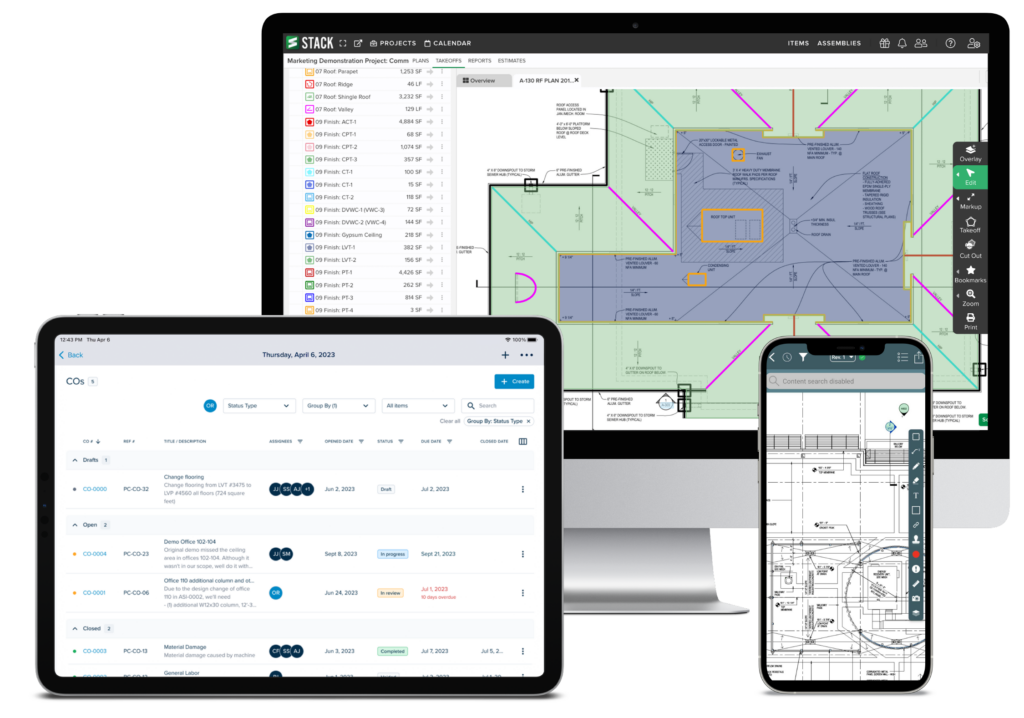
Specifically designed for plumbing contractors, STACK offers a cloud-based comprehensive solution that covers all phases of plumbing projects. It streamlines the workflow, from executing initial estimates to managing complex projects, aligning perfectly with the unique needs of the plumbing industry.
Best for Project Management Software for Plumbers
Expert Take
STACK Plumbing Contractor Software is tailored for the plumbing industry, offering comprehensive project management and estimating tools. Its cloud-based nature enhances accessibility, though the lack of a mobile app and the need for training are tradeoffs. Despite these, its industry-specific capabilities and 24/7 support make it a top choice for plumbing contractors.
Pros
- AI-powered automated symbol counting
- Cloud-based access from any device
- Free version available for basic use
- Strong QuickBooks & Procore integrations
- Excellent customer support ratings
Cons
- High starting cost for paid plans
- Mobile app navigation issues
- Limited editing tools reported
- Steep learning curve for some users
- Slow sheet transitions occasionally
Best for teams that are
- Plumbing contractors focusing on new construction bids and digital takeoffs
- Estimators needing to quickly calculate material counts from digital blueprints
- Teams needing cloud-based collaboration for pre-construction proposals
Skip if
- Service plumbers needing dispatching, routing, or CRM for daily repair jobs
- Businesses looking for a field service management tool for technicians
- Companies that do not perform takeoffs from blueprints or plans
Best for teams that are
- Plumbing contractors focusing on new construction bids and digital takeoffs
- Estimators needing to quickly calculate material counts from digital blueprints
- Teams needing cloud-based collaboration for pre-construction proposals
Skip if
- Service plumbers needing dispatching, routing, or CRM for daily repair jobs
- Businesses looking for a field service management tool for technicians
- Companies that do not perform takeoffs from blueprints or plans
Pros
- AI-powered automated symbol counting
- Cloud-based access from any device
- Free version available for basic use
- Strong QuickBooks & Procore integrations
- Excellent customer support ratings
Cons
- High starting cost for paid plans
- Mobile app navigation issues
- Limited editing tools reported
- Steep learning curve for some users
- Slow sheet transitions occasionally
Expert Take
STACK Plumbing Contractor Software is tailored for the plumbing industry, offering comprehensive project management and estimating tools. Its cloud-based nature enhances accessibility, though the lack of a mobile app and the need for training are tradeoffs. Despite these, its industry-specific capabilities and 24/7 support make it a top choice for plumbing contractors.
Explore Categories





Loading comparison data…