
Enterprise Content Management (ECM) Platforms
These are the specialized categories within Enterprise Content Management (ECM) Platforms. Looking for something broader? See all Cloud Storage, Backup & File Management categories.

How big is your team?
What's your budget situation?
What's your team's technical comfort level?
What's the ONE thing this tool must do well?

KORTO.io for Real Estate is a centralized ECM solution tailored for real estate industry professionals. It allows agents to manage property listings, contracts, and client communications on a secure platform while automating workflows to reduce administrative time and expedite deal closures.
Best for Enterprise Content Management Systems for Real Estate Agents
Expert Take
KORTO.io for Real Estate is a specialized ECM solution that excels in providing industry-specific features for real estate professionals. Its secure platform and automated workflows enhance efficiency and data management, making it a top choice in its category. However, the lack of transparent pricing and potential training needs are minor considerations.
Pros
- Transparent volume-based pricing model
- Blockchain-backed immutable audit trails
- AI auto-tagging replaces folder structures
- Plug-and-play Microsoft 365 integration
- Compliant with eIDAS and ESIGN
Cons
- Low volume of public user reviews
- No built-in CRM or lead management
- Support channels limited to email/phone
- Niche focus on documents over transactions
Best for teams that are
- Agencies requiring blockchain-backed audit trails for strict compliance
- Firms preferring a pay-per-document pricing model over user subscriptions
- Developers needing version control for architectural plans and permits
Skip if
- Small teams with high document volume preferring flat monthly fees
- Users needing built-in transaction management features beyond ECM
- Organizations looking for a traditional user-based subscription model
Best for teams that are
- Agencies requiring blockchain-backed audit trails for strict compliance
- Firms preferring a pay-per-document pricing model over user subscriptions
- Developers needing version control for architectural plans and permits
Skip if
- Small teams with high document volume preferring flat monthly fees
- Users needing built-in transaction management features beyond ECM
- Organizations looking for a traditional user-based subscription model
Pros
- Transparent volume-based pricing model
- Blockchain-backed immutable audit trails
- AI auto-tagging replaces folder structures
- Plug-and-play Microsoft 365 integration
- Compliant with eIDAS and ESIGN
Cons
- Low volume of public user reviews
- No built-in CRM or lead management
- Support channels limited to email/phone
- Niche focus on documents over transactions
Expert Take
KORTO.io for Real Estate is a specialized ECM solution that excels in providing industry-specific features for real estate professionals. Its secure platform and automated workflows enhance efficiency and data management, making it a top choice in its category. However, the lack of transparent pricing and potential training needs are minor considerations.

CMiC's Enterprise Content Management (ECM) is a specialized SaaS solution designed for the construction industry, simplifying document access across various file types and storage locations. It offers a unified platform to streamline information management, foster collaboration, and improve project efficiency, addressing the unique needs and complexities of construction projects.
Best for Enterprise Content Management Systems for Contractors
Expert Take
CMiC ECM for Construction excels in providing a specialized solution for the construction industry, offering robust document management capabilities tailored to the sector's needs. Its market credibility is supported by industry-specific features and integration capabilities, although it requires training for optimal use. Overall, it stands out as a premium product in its category.
Pros
- Single Database Platform unifies data
- Native OCR for drawing management
- Seamless DocuSign & Bluebeam integration
- Used by 25% of Top 400
- Deep financial and ERP integration
Cons
- Steep learning curve for new users
- Interface described as outdated/clunky
- High implementation and training costs
- Occasional system slowness reported
- Overwhelming for small contractors
Best for teams that are
- Mid-to-large general contractors needing a unified ERP and ECM platform
- Firms requiring deep integration between financials and project documents
- Organizations with dedicated IT resources to manage complex implementation
Skip if
- Small contractors with limited budgets due to high cost
- Teams seeking a simple, quick-to-deploy tool with a low learning curve
- Firms looking for a standalone document solution without ERP features
Best for teams that are
- Mid-to-large general contractors needing a unified ERP and ECM platform
- Firms requiring deep integration between financials and project documents
- Organizations with dedicated IT resources to manage complex implementation
Skip if
- Small contractors with limited budgets due to high cost
- Teams seeking a simple, quick-to-deploy tool with a low learning curve
- Firms looking for a standalone document solution without ERP features
Pros
- Single Database Platform unifies data
- Native OCR for drawing management
- Seamless DocuSign & Bluebeam integration
- Used by 25% of Top 400
- Deep financial and ERP integration
Cons
- Steep learning curve for new users
- Interface described as outdated/clunky
- High implementation and training costs
- Occasional system slowness reported
- Overwhelming for small contractors
Expert Take
CMiC ECM for Construction excels in providing a specialized solution for the construction industry, offering robust document management capabilities tailored to the sector's needs. Its market credibility is supported by industry-specific features and integration capabilities, although it requires training for optimal use. Overall, it stands out as a premium product in its category.

OpenText Enterprise Content Management (ECM) software is designed specifically for marketing agencies. It organizes all your company's knowledge and makes it readily accessible within workflows, enabling informed decisions and efficient content management. Its capabilities like digital asset management, records management, and content analytics make it a comprehensive solution for managing all types of content.
Best for Enterprise Content Management Systems for Marketing Agencies
Expert Take
OpenText ECM Software excels as a comprehensive solution for marketing agencies, offering advanced content analytics, robust digital asset management, and seamless integration capabilities. Its industry recognition and scalability further establish it as a top-tier choice for enterprise content management.
Pros
- Deep certified integration with SAP & Salesforce
- FedRAMP Fully Authorized for government use
- Advanced GenAI 'Aviator' capabilities
- Enterprise-grade records management & compliance
- Scalable for massive data volumes
Cons
- High licensing and maintenance costs
- Steep learning curve for administrators
- Complex initial configuration & deployment
- Support response times can be slow
- Legacy interface elements still persist
Best for teams that are
- Large global enterprises with complex compliance needs
- Organizations needing deep integration with SAP or Salesforce
- Highly regulated industries requiring strict governance
Skip if
- Small to mid-sized agencies with limited IT budgets
- Teams seeking a lightweight, rapidly deployable solution
- Creative teams wanting a simple, modern user interface
Best for teams that are
- Large global enterprises with complex compliance needs
- Organizations needing deep integration with SAP or Salesforce
- Highly regulated industries requiring strict governance
Skip if
- Small to mid-sized agencies with limited IT budgets
- Teams seeking a lightweight, rapidly deployable solution
- Creative teams wanting a simple, modern user interface
Pros
- Deep certified integration with SAP & Salesforce
- FedRAMP Fully Authorized for government use
- Advanced GenAI 'Aviator' capabilities
- Enterprise-grade records management & compliance
- Scalable for massive data volumes
Cons
- High licensing and maintenance costs
- Steep learning curve for administrators
- Complex initial configuration & deployment
- Support response times can be slow
- Legacy interface elements still persist
Expert Take
OpenText ECM Software excels as a comprehensive solution for marketing agencies, offering advanced content analytics, robust digital asset management, and seamless integration capabilities. Its industry recognition and scalability further establish it as a top-tier choice for enterprise content management.
ImageRight Insurance Document Management
Best for Enterprise Content Management Systems for Insurance Agents
ImageRight is a SaaS solution designed specifically for the insurance industry, providing intelligent workflows, process automation, and data insights for claims. It addresses the need for efficient content management, data analysis, and seamless process automation within insurance agencies.
Best for Enterprise Content Management Systems for Insurance Agents
Expert Take
ImageRight excels in providing industry-specific solutions for insurance document management with intelligent workflows and automation. It is well-regarded for its capability to enhance efficiency and productivity in insurance operations. While it lacks public pricing transparency, its specialized features and third-party validations affirm its position as a leading solution in its category.
Pros
- Specialized for insurance claims/underwriting
- SOC 2 Type II compliant
- Integration with Guidewire ClaimCenter
- Automated document retention management
- 500+ RESTful APIs available
Cons
- Web client lacks desktop parity
- Support responsiveness has declined
- Reporting tool costs extra
- Opaque quote-based pricing
- Complex workflow maintenance
Best for teams that are
- Insurance Carriers and Managing General Agents (MGAs)
- High-volume underwriting and claims departments needing specialized workflows
- Vertafore ecosystem users wanting seamless integration
Skip if
- Small independent agencies (often overkill compared to agency management systems)
- Non-insurance businesses (highly specialized for insurance workflows)
- Organizations seeking a generic, low-cost document repository
Best for teams that are
- Insurance Carriers and Managing General Agents (MGAs)
- High-volume underwriting and claims departments needing specialized workflows
- Vertafore ecosystem users wanting seamless integration
Skip if
- Small independent agencies (often overkill compared to agency management systems)
- Non-insurance businesses (highly specialized for insurance workflows)
- Organizations seeking a generic, low-cost document repository
Pros
- Specialized for insurance claims/underwriting
- SOC 2 Type II compliant
- Integration with Guidewire ClaimCenter
- Automated document retention management
- 500+ RESTful APIs available
Cons
- Web client lacks desktop parity
- Support responsiveness has declined
- Reporting tool costs extra
- Opaque quote-based pricing
- Complex workflow maintenance
Expert Take
ImageRight excels in providing industry-specific solutions for insurance document management with intelligent workflows and automation. It is well-regarded for its capability to enhance efficiency and productivity in insurance operations. While it lacks public pricing transparency, its specialized features and third-party validations affirm its position as a leading solution in its category.

Contentful is a high-performing Enterprise Content Management System designed specifically for marketing agencies. It allows streamlined content creation, management, and distribution across various platforms, ensuring consistent, on-brand experiences. Due to its API-first architecture, it integrates seamlessly with other marketing tools, enhancing workflow efficiency.
Best for Enterprise Content Management Systems for Marketing Agencies
Expert Take
Contentful excels as an Enterprise Content Management System for marketing agencies due to its API-first architecture, which facilitates seamless integration with other tools. Its scalability and robust content management capabilities make it a top choice for agencies looking to maintain brand consistency across platforms.
Pros
- API-first architecture with robust SDKs
- Used by ~30% of Fortune 500
- ISO 27001 and SOC 2 certified
- Global CDN for fast content delivery
- AI-powered content generation tools
Cons
- Steep learning curve for non-developers
- High costs for enterprise scaling
- Strict API rate limits on lower tiers
- Requires setup for visual previews
- Complex relational content modeling
Best for teams that are
- Enterprises delivering content across websites, apps, and IoT
- Technical teams building custom digital experiences via API
- Agencies managing omnichannel marketing content
Skip if
- Internal document management for contracts or invoices
- Non-technical users wanting a visual drag-and-drop page builder
- Teams needing a traditional monolithic CMS setup
Best for teams that are
- Enterprises delivering content across websites, apps, and IoT
- Technical teams building custom digital experiences via API
- Agencies managing omnichannel marketing content
Skip if
- Internal document management for contracts or invoices
- Non-technical users wanting a visual drag-and-drop page builder
- Teams needing a traditional monolithic CMS setup
Pros
- API-first architecture with robust SDKs
- Used by ~30% of Fortune 500
- ISO 27001 and SOC 2 certified
- Global CDN for fast content delivery
- AI-powered content generation tools
Cons
- Steep learning curve for non-developers
- High costs for enterprise scaling
- Strict API rate limits on lower tiers
- Requires setup for visual previews
- Complex relational content modeling
Expert Take
Contentful excels as an Enterprise Content Management System for marketing agencies due to its API-first architecture, which facilitates seamless integration with other tools. Its scalability and robust content management capabilities make it a top choice for agencies looking to maintain brand consistency across platforms.
Box Enterprise Content Management
Best for Enterprise Content Management Systems for Marketing Agencies

Box is a powerful AI-powered enterprise content management solution designed to cater to the needs of marketing agencies. It offers a single, secure platform to manage, share, and collaborate on content, enhancing productivity and reducing operational costs.
Best for Enterprise Content Management Systems for Marketing Agencies
Expert Take
Box Enterprise Content Management excels in providing a secure, scalable platform tailored for marketing agencies. Its AI-powered capabilities, robust security, and collaboration tools make it a top choice in its category. Despite some complexity for beginners, its comprehensive features justify its premium positioning.
Pros
- FedRAMP High Authorization for top-tier security
- Leader in Gartner MQ and Forrester Wave
- Over 1,500 integrations including Salesforce & Microsoft
- Native e-signature and workflow automation tools
- Intuitive interface requiring minimal user training
Cons
- Higher cost compared to bundled competitors
- Strict file upload limits on lower plans
- Occasional syncing delays and performance issues
- Mobile app performance can be sluggish
- Advanced features locked behind custom pricing
Best for teams that are
- Marketing teams collaborating frequently with external clients
- Agencies needing secure cloud storage with light DAM features
- Remote workforces requiring easy access from any device
Skip if
- Complex, high-volume transactional processing workflows
- Organizations requiring complex metadata-driven records management
- Teams needing a strictly on-premise storage solution
Best for teams that are
- Marketing teams collaborating frequently with external clients
- Agencies needing secure cloud storage with light DAM features
- Remote workforces requiring easy access from any device
Skip if
- Complex, high-volume transactional processing workflows
- Organizations requiring complex metadata-driven records management
- Teams needing a strictly on-premise storage solution
Pros
- FedRAMP High Authorization for top-tier security
- Leader in Gartner MQ and Forrester Wave
- Over 1,500 integrations including Salesforce & Microsoft
- Native e-signature and workflow automation tools
- Intuitive interface requiring minimal user training
Cons
- Higher cost compared to bundled competitors
- Strict file upload limits on lower plans
- Occasional syncing delays and performance issues
- Mobile app performance can be sluggish
- Advanced features locked behind custom pricing
Expert Take
Box Enterprise Content Management excels in providing a secure, scalable platform tailored for marketing agencies. Its AI-powered capabilities, robust security, and collaboration tools make it a top choice in its category. Despite some complexity for beginners, its comprehensive features justify its premium positioning.
Kohezion Enterprise Property Management
Best for Enterprise Content Management Systems for Property Managers
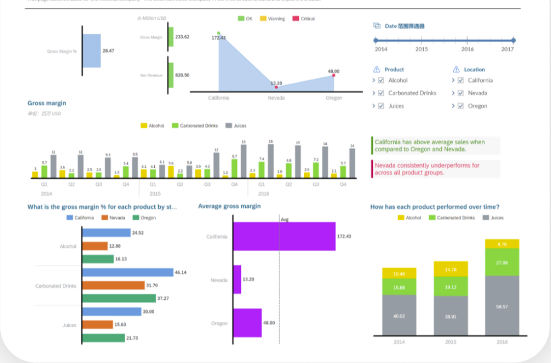
Kohezion's Enterprise Property Management Software is specially designed to streamline and optimize real estate asset management. With its robust and flexible features, it caters to the unique needs of property managers, offering a comprehensive solution for managing properties, tenants, and maintenance tasks.
Best for Enterprise Content Management Systems for Property Managers
Expert Take
Kohezion Enterprise Property Management excels in providing a comprehensive and flexible solution for property managers, with strong customization capabilities and cloud-based access. While it may require initial setup time, its robust features and integration capabilities make it a top choice in its category.
Pros
- Highly customizable no-code platform
- HIPAA compliant security features
- Excellent customer support responsiveness
- Centralized document and data management
- Scalable enterprise architecture
Cons
- Occasional software stability issues
- Steeper learning curve for complex apps
- Fewer pre-built templates than competitors
- Higher starting price for small teams
- Limited native third-party integrations
Best for teams that are
- SMBs and startups needing affordable, customizable database tools
- Non-technical teams wanting to build custom workflows without coding
- Property managers tracking rent, leases, and maintenance on a budget
Skip if
- Large enterprises requiring complex, pre-built ERP integrations
- Users who want a rigid, fully pre-configured system out of the box
- Organizations needing advanced, heavy-duty compliance features
Best for teams that are
- SMBs and startups needing affordable, customizable database tools
- Non-technical teams wanting to build custom workflows without coding
- Property managers tracking rent, leases, and maintenance on a budget
Skip if
- Large enterprises requiring complex, pre-built ERP integrations
- Users who want a rigid, fully pre-configured system out of the box
- Organizations needing advanced, heavy-duty compliance features
Pros
- Highly customizable no-code platform
- HIPAA compliant security features
- Excellent customer support responsiveness
- Centralized document and data management
- Scalable enterprise architecture
Cons
- Occasional software stability issues
- Steeper learning curve for complex apps
- Fewer pre-built templates than competitors
- Higher starting price for small teams
- Limited native third-party integrations
Expert Take
Kohezion Enterprise Property Management excels in providing a comprehensive and flexible solution for property managers, with strong customization capabilities and cloud-based access. While it may require initial setup time, its robust features and integration capabilities make it a top choice in its category.
GRM Real Estate Document Management
Best for Enterprise Content Management Systems for Real Estate Agents

GRM’s information management solution is specifically designed for real estate professionals. It provides an Enterprise Content Management (ECM) system that streamlines the management of crucial documents, automates workflows, and integrates all aspects of document management, catering to the industry's need for organized, accessible, and secure document handling.
Best for Enterprise Content Management Systems for Real Estate Agents
Expert Take
GRM Real Estate Document Management excels in providing industry-specific solutions for real estate professionals, with strong capabilities in document management and workflow automation. Its integration capabilities and security measures further enhance its value, although pricing transparency is limited due to a contact-based model.
Pros
- Offline mobile data collection via FieldForms
- SOC 2 Type II certified security
- Forrester Wave Strong Performer recognition
- Hybrid physical and digital document management
- End-to-end data encryption
Cons
- Fluctuating fuel surcharges for physical services
- Pricing is not publicly available
- Steep learning curve for non-technical users
- Occasional system performance/freezing issues
- Complex permission setup process
Best for teams that are
- Property managers requiring offline mobile forms for site inspections
- Firms with legacy physical records needing secure offsite storage and scanning
- Enterprises managing diverse portfolios like commercial, residential, and HOAs
Skip if
- Small agencies seeking a purely digital, lightweight cloud storage solution
- Solo agents who do not manage physical building assets or maintenance
- Users wanting a plug-and-play tool without implementation requirements
Best for teams that are
- Property managers requiring offline mobile forms for site inspections
- Firms with legacy physical records needing secure offsite storage and scanning
- Enterprises managing diverse portfolios like commercial, residential, and HOAs
Skip if
- Small agencies seeking a purely digital, lightweight cloud storage solution
- Solo agents who do not manage physical building assets or maintenance
- Users wanting a plug-and-play tool without implementation requirements
Pros
- Offline mobile data collection via FieldForms
- SOC 2 Type II certified security
- Forrester Wave Strong Performer recognition
- Hybrid physical and digital document management
- End-to-end data encryption
Cons
- Fluctuating fuel surcharges for physical services
- Pricing is not publicly available
- Steep learning curve for non-technical users
- Occasional system performance/freezing issues
- Complex permission setup process
Expert Take
GRM Real Estate Document Management excels in providing industry-specific solutions for real estate professionals, with strong capabilities in document management and workflow automation. Its integration capabilities and security measures further enhance its value, although pricing transparency is limited due to a contact-based model.
M-Files ECM is a versatile solution tailored to meet the demands of marketing agencies. It offers robust content management capabilities, including easy storage, retrieval, and management of a wide array of content types. Its advanced search features and intelligent metadata management streamline workflows, making it an ideal tool for busy marketing professionals.
Best for Enterprise Content Management Systems for Marketing Agencies
Expert Take
M-Files ECM is a premium enterprise content management solution tailored for marketing agencies, offering advanced features like intelligent metadata management and compliance tools. Its integration capabilities and workflow streamlining make it a top choice in its category, despite some learning curve and customization limitations.
Pros
- Metadata-driven organization eliminates folder chaos
- Strong native integration with Microsoft 365
- ISO 27001 and SOC 2 certified security
- AI-powered automation via M-Files Aino
- Offline access capabilities for remote work
Cons
- Steep learning curve for metadata concepts
- Mobile app has limited functionality vs desktop
- Pricing is not transparent (custom quotes)
- Performance lags with large data volumes
- Complex initial setup and configuration
Best for teams that are
- Agencies needing metadata-driven organization without folders
- Teams requiring deep integration with Microsoft 365
- Firms with strict compliance and versioning requirements
Skip if
- Small teams preferring simple, traditional folder structures
- Users unwilling to adapt to a tag-based filing system
- Organizations needing a purely free or low-cost storage solution
Best for teams that are
- Agencies needing metadata-driven organization without folders
- Teams requiring deep integration with Microsoft 365
- Firms with strict compliance and versioning requirements
Skip if
- Small teams preferring simple, traditional folder structures
- Users unwilling to adapt to a tag-based filing system
- Organizations needing a purely free or low-cost storage solution
Pros
- Metadata-driven organization eliminates folder chaos
- Strong native integration with Microsoft 365
- ISO 27001 and SOC 2 certified security
- AI-powered automation via M-Files Aino
- Offline access capabilities for remote work
Cons
- Steep learning curve for metadata concepts
- Mobile app has limited functionality vs desktop
- Pricing is not transparent (custom quotes)
- Performance lags with large data volumes
- Complex initial setup and configuration
Expert Take
M-Files ECM is a premium enterprise content management solution tailored for marketing agencies, offering advanced features like intelligent metadata management and compliance tools. Its integration capabilities and workflow streamlining make it a top choice in its category, despite some learning curve and customization limitations.

Ricoh's Enterprise Content Management (ECM) solution is specifically designed for contractors who need a centralized system for managing and organizing their content. With managed cloud SaaS, it creates efficiencies in workflow, making it easier to access and distribute necessary information and documents within the construction industry.
Best for Enterprise Content Management Systems for Contractors
Expert Take
Ricoh ECM Cloud Solutions offers a tailored content management system for contractors, emphasizing centralized document management and workflow efficiency. While it excels in industry-specific capabilities, its market credibility is supported by external recognitions and partnerships. Usability may require some training, and pricing transparency is limited due to enterprise-level customization.
Pros
- HITRUST certified security
- Strong workflow automation
- Hybrid cloud/on-premise options
- Seamless ERP/CRM integrations
- Intelligent indexing capabilities
Cons
- Export size limits (10GB)
- Viewer file size limit (2GB)
- Steep admin learning curve
- Complex enterprise pricing
- Customization can be limited
Best for teams that are
- Organizations looking to digitize heavy paper-based workflows and archives
- Companies needing automated Accounts Payable and business process services
- Firms seeking a managed service approach to digital transformation
Skip if
- Firms seeking a dedicated construction project management platform
- Small teams needing a simple, DIY cloud storage solution
- Users requiring deep integration with specialized construction design tools
Best for teams that are
- Organizations looking to digitize heavy paper-based workflows and archives
- Companies needing automated Accounts Payable and business process services
- Firms seeking a managed service approach to digital transformation
Skip if
- Firms seeking a dedicated construction project management platform
- Small teams needing a simple, DIY cloud storage solution
- Users requiring deep integration with specialized construction design tools
Pros
- HITRUST certified security
- Strong workflow automation
- Hybrid cloud/on-premise options
- Seamless ERP/CRM integrations
- Intelligent indexing capabilities
Cons
- Export size limits (10GB)
- Viewer file size limit (2GB)
- Steep admin learning curve
- Complex enterprise pricing
- Customization can be limited
Expert Take
Ricoh ECM Cloud Solutions offers a tailored content management system for contractors, emphasizing centralized document management and workflow efficiency. While it excels in industry-specific capabilities, its market credibility is supported by external recognitions and partnerships. Usability may require some training, and pricing transparency is limited due to enterprise-level customization.
Explore Categories



Loading comparison data…